

Forum Replies Created
-
AuthorPosts
-
Hi,
True that the flag is a PNG but it doesn’t have a transparent background, please check in a image editor.
When I check in my image editor the background is white & gray boxes:
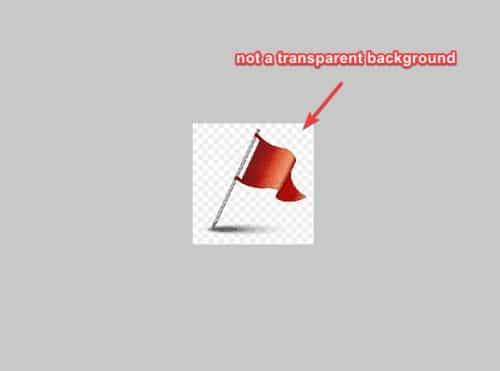
this is a PNG that does have a transparent background:

Perhaps you have a version of this on your computer that dose have a transparent background, but the on on your website is not, try downgrading it and checking
To hide the numbers try this CSS in your Enfold Theme Options ▸ General Styling ▸ Quick CSS field:#top .av-hotspot-image-container .av-image-hotspot .av-image-hotspot_inner { color: transparent; }After applying the css, please clear your browser cache and check.
Best regards,
MikeHi,
Glad we were able to help, if you have any further questions please create a new thread and we will gladly try to help you. Thank you for using Enfold.Best regards,
MikeHi,
I added this code to your WPCode plugin as a javascript snippt and enabled the header on the three pages and now the burger menu is replaced with the back button you had created at the bottom of those pages, please clear your browser cache and check.window.addEventListener('DOMContentLoaded', function() { (function($){ var button = $('<div class="avia-button-wrap avia-button-right back-button"><a href="https://www.stilecatalini.it/#barche" class="avia-button avia-icon_select-yes-left-icon avia-size-large avia-position-center av-button-notext avia-color-light avia-font-color-white"><span class="avia_button_icon avia_button_icon_left" aria-hidden="true" data-av_icon="" data-av_iconfont="entypo-fontello"></span><span class="avia_iconbox_title"></span><span class="avia_button_background avia-button avia-color-theme-color"></span></a></div>'); if ($("body").hasClass("page-id-738") || $("body").hasClass("page-id-5837") || $("body").hasClass("page-id-5667") == true) { $('.main_menu').prepend(button); $('.avia-menu.av-main-nav-wrap').css({'display':'none'}); $('.main_menu').css({'display':'flex','align-items':'center'}); } else {} })(jQuery); });I tested on mobile & desktop and it works.
Best regards,
MikeHi,
Ok I disabled it for you, it is in your WPcode plugin should you change your mind in the future.
The only other idea that I would have is to change the header to show on those pages and then use the same button script to replace the burger button on those page, so you have the same header but instead of a mobile menu button you will have the white box button with the “X” like at the bottom of those pages.Best regards,
MikeHi,
Thanks for the login, I found that you had a different reset plugin installed, so I installed the one I linked to above and ran it, it reset the site so there were no pages, posts, or files in the media library, but the medical demo showed on the frontend.
So I activated your LiteSpeed Cache plugin and cleared your server LiteSpeed Cache with it and now it is all set. I recommend not using caching plugins until you are done with your site as you may have trouble seeing your edits if the server is showing a cached version.
Please clear your browser cache and check.
This is what your homepage looks like now:

If you see something else try clearing your browser cache again, Please note that testing with iPads & iPhones can be hard to clear the cache, often you need to also clear the history to fully purge the cache, following these steps for Safari and note Step 4 where you will Clear the History.Best regards,
MikeJune 12, 2023 at 11:19 am in reply to: Custom Template ignoring get_header / get_footer – Mod Help Required #1410325Hi,
Glad to hear that you have this sorted out, it’s cool that you are doing this in a plugin but I think it’s above my skill set. If you have any further questions please create a new thread and we will gladly try to help you. Thank you for using Enfold.Best regards,
MikeHi,
Glad we were able to help, if you have any further questions please create a new thread and we will gladly try to help you. Thank you for using Enfold.Best regards,
MikeJune 12, 2023 at 11:14 am in reply to: logo background at Start page different than on other pager #1410323Hi,
Glad we were able to help, if you have any further questions please create a new thread and we will gladly try to help you. Thank you for using Enfold.Best regards,
MikeJune 12, 2023 at 11:13 am in reply to: cannot make color settings in menu for mobile version #1410322Hi,
Glad we were able to help, if you have any further questions please create a new thread and we will gladly try to help you. Thank you for using Enfold.Best regards,
MikeJune 12, 2023 at 11:13 am in reply to: Color section problem – Background image showing completely in mobile and deskto #1410321Hi,
Glad we were able to help, if you have any further questions please create a new thread and we will gladly try to help you. Thank you for using Enfold.Best regards,
MikeHi,
Yes I checked and all is working, if you have any further questions please create a new thread and we will try to help you. This thread is too long and cover multiple topics. Thank you for understanding.Best regards,
MikeHi,
Glad we were able to help, if you have any further questions please create a new thread and we will gladly try to help you. Thank you for using Enfold.Best regards,
MikeJune 12, 2023 at 12:51 am in reply to: “Couldn’t Add the Font Because The Server Didn’t Respond” Error #1410296Hi,
Glad we were able to help, if you have any further questions please create a new thread and we will gladly try to help you. Thank you for using Enfold.Best regards,
MikeHi,
Thanks for the feedback, try adding this css also:@media only screen and (min-width: 768px) { #header.header_color .header_bg { background-position-y: -18px; } }After applying the css, please clear your browser cache and check.
Best regards,
MikeHi,
I don’t see a issue with the image, but you can adjust the css 140px to suit your needs.
The only other idea I have is to just make the topbar content hidden and leave the space white. If you want to do this remove the css that I gave you above show it shows again.Best regards,
MikeHi,
Try adding this css:@media only screen and (min-width: 768px) { .html_header_top.html_header_topbar_active.html_header_sticky.html_bottom_nav_header #top #main { padding-top: 140px; } }Best regards,
MikeHey CharlieTh,
Try this CSS in your Enfold Theme Options ▸ General Styling ▸ Quick CSS field:.av-hamburger strong { display: block!important; position: absolute; font-size: 20px; transform: translate(21%, -11%); color: #fff; }The expected results:

Best regards,
MikeHey mithun_samanta,
Is this the WP Reset that you are using?
Typically when I use it, it removes everything.
Please include an admin login in the Private Content area so we can be of more assistance.Best regards,
MikeHi,
To hide the topbar on devices smaller than 767px, try this CSS in your Enfold Theme Options ▸ General Styling ▸ Quick CSS field:@media only screen and (max-width: 767px) { #header_meta { display: none; } }After applying the css, please clear your browser cache and check.
Best regards,
MikeHi,
Glad Guenni007 could help, thank you Guenni007, if you have any further questions please create a new thread and we will gladly try to help you. Thank you for using Enfold.Best regards,
MikeHi,
Typically when this occurs it is due to a plugin, try disabling your plugins. If that resolves the issue, reactivate each one individually until you find the cause.Best regards,
MikeHi,
The strange vertical line after the mobile number is in the background image, see the direct link to the image below.Best regards,
MikeHey yayo85,
Try adding a Blog Element to your page with the Blog Style: Single Author, big preview Pic (no author picture is displayed, feature image is big):

and add thw custom class row-posts:

Then add this CSS in your Enfold Theme Options ▸ General Styling ▸ Quick CSS field:#top .row-posts.template-blog article.single-big .blog-meta, #top .row-posts.template-blog article.single-small .big-preview{ width: 300px; height: 300px; line-height: 300px; } #top .row-posts.template-blog article.single-big { display: flex; align-items: center; flex-direction: row; } #top .row-posts.template-blog article.single-big:nth-child(even) { flex-direction: row-reverse; }This is the expected results:

Best regards,
MikeJune 11, 2023 at 8:18 pm in reply to: Mobile view even at 50 % reduction on the smartphone. #1410277Hi,
I don’t think that you will find this an easy task, 989px is in the theme 409 times in 83 files, you would also need to change the 767px which is 774 times in 140 files.
Try using VS Code and open your theme folder with in on your desktop you can then search all of the files at the same time.Best regards,
MikeHey Stefan,
Thanks for your patience but you login page also requires another login account so we can not check the backend.
We don’t have a way to customize the breadcrumb structure, but I beleve that you can use the Yoast plugin to do this, it also uses a shortcode.Best regards,
MikeHi,
Thanks for your patience, the video element uses the default WordPress mediaelement which removes the volume control for mobile devices, we can not change this WordPress core file inside the theme, see: Volume Button is not showing on the mobile screen Their reason is that mobile devices have volume controls so on screen controls are not needed,
If you host your video on YouTube or Vimeo the video element will use their players and show the volume control.
Another option would be to use a different video player plugin.Best regards,
MikeHi,
Glad to hear that you have this sorted out, if you have any further questions please create a new thread and we will gladly try to help you. Thank you for using Enfold.Best regards,
Mike -
AuthorPosts
