

Forum Replies Created
-
AuthorPosts
-
Hi,
Glad to hear this helped, I used the Chrome Dev Tools and the inspector to see the ID of the slider:

Unless there is anything else we can assist with on this issue, shall we close this then?Best regards,
MikeHey Carl,
Please use the option Enfold Theme Options ▸ Header ▸ Header behavior ▸ Sticky Header to make the header sticky.
To show the footer always visible at the bottom of the screen Try this CSS in your Enfold Theme Options ▸ General Styling ▸ Quick CSS field:#footer { position: fixed; bottom: 0; width: 100%; }After applying the css, please clear your browser cache and check.
Please note that using the contact form is not appropriate for support questions, please log in to the support forum and open a new thread if you need further assistance.
If you are unable to login to the support forum because you don’t have a activate support contract, please try going to your Theme Forest account and renew your support and then log in to the support forum and open a new thread.Best regards,
MikeHey Henrik Primdal,
Thank you for your patience and the link to your site, I see that you are using an older version 4.8.6.4, we are now up to v5.6.6
I see that your product pages are manually created with the Advanced Layout Builder, so you can use the ALB template option in the builder to reuse the layout for each product that you create:

adjusting the content for each new product.
If you are going to import more products and want them to automatically be added as ALB product using the same elements, we don’t have an option for that, you could try our partner CodeableBest regards,
MikeSeptember 9, 2023 at 11:41 pm in reply to: How do I change this current style of product images #1418609Hi,
Thank you for your patience, on my demo site the text is below the products like this:
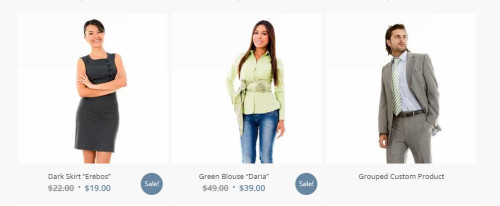
please link to your page so we can examine.Best regards,
MikeHi,
Glad Guenni007 could help, thank you Guenni007, if you have any further questions please create a new thread and we will gladly try to help you. Thank you for using Enfold.Best regards,
MikeHi,
On this page: https://alphafamilycounseling.net/slider-revolution-test-page/
the ID for Yigit css doesn’t exist #rev_slider_3_1 you said that it worked fine until you made some changes, perhaps the changes changed the ID to #rev_slider_9_1 so try this css:@media only screen and (max-width: 480px) { #rev_slider_9_1 a.rs-layer { max-width: none !important; } }After applying the css, please clear your browser cache and check.
Please note that testing with iPads & iPhones can be hard to clear the cache, often you need to also clear the history to fully purge the cache, following these steps for Safari and note Step 4 where you will Clear the History.Best regards,
MikeHey Jeannette,
Thank you for your patience, but unfortunately if you use the filter ‘avf_post_css_create_file’ the css will be inline.
Have you tried the option Enfold Theme Options ▸ Performance ▸ CSS file merging and compression ▸ Use minified theme CSS files without merging this doesn’t merge or add the css inline.Best regards,
MikeHi,
Glad we were able to help, if you have any further questions please create a new thread and we will gladly try to help you. Thank you for using Enfold.Best regards,
MikeHey rmatus,
Try this CSS in your Enfold Theme Options ▸ General Styling ▸ Quick CSS field:.avia-content-slider-inner .slide-entry { pointer-events: none; }After applying the css, please clear your browser cache and check.
Best regards,
MikeSeptember 9, 2023 at 11:03 pm in reply to: Problem Uploading Flaticon Set from Media Library.. #1418602September 9, 2023 at 11:00 pm in reply to: The video control on mobile phones cannot be deactivated #1418601Hey Martin,
When I check the height of the video seems to be the same as the video, you can remove the controls with this css:@media only screen and (max-width: 500px) { #top.page-id-3912 #av-layout-grid-1 .mejs-controls { display: none; } }Or you can use the LayerSlider it will play videos on mobile, just set your canvas size to something like 425px wide so it will be the size of your mobile device.
Best regards,
MikeHi,
I added it and it is not clickable because it is under the cookie bar.Best regards,
MikeHi,
No I don’t think so, I see that you are using WPML, try asking them if there is a why that their plugin does that, it might be an option in the plugin but I don’t know.Best regards,
MikeHi,
Unfortunately I can not do these things based on if the cookie bar has been clicked or not, it would require a lot of custom coding that is out of the scope for support here.
Please consider to hire a freelance developer for the task.Best regards,
MikeHi,
Thank you for your patience, but unfortunately I don’t see a way to display the content like this with the filter, I recommend using a plugin with a shortcode that you can add to your current page to display it.
Perhaps try the plugin Display Posts it offers a lot of parmeters for creating a list of posts without any extra style so you can easily style it yourself, I tested the shortcode in a code block to show a specific category with the title and full content:
[display-posts category="order" include_content="true" category_label="Category: " category_display="true"]
and it display in full width:

You can add more features like images and the date and then style it with css to make it look as you want, it doesn’t have the filter though.Best regards,
MikeHi,
I thought that you asked for the arrow to scroll up to be under the cookie banner so it can’t be clicked, this is what the css does.Best regards,
MikeHi,
Your cookie bar message is only in English and it doesn’t look like WPML translates it, so the link in it to the privacy policy page was always the English link.
So I created two new classes lang-en & lang-it and add the text twice so one will always be hidden. You can adjust the test in one for your other language.<p class="lang-en" style="text-align: left;">This site stores cookies on your device in order to build a profile of your interests and show you relevant ads on other sites. By continuing to browse this site, you agree to the use and storage of cookies in accordance with our <a href="https://www.stilecatalini.it/en/privacy-policy-en/" style="color:#FFFFFF; text-decoration:underline;">Privacy Policy.</a> You can completely disable some or all cookies at any time through your advanced browser settings. For more information on disabling cookies, see <a href="https://cookies.insites.com/disable-cookies/" style="color:#FFFFFF; text-decoration:underline;">here.</a></p> <p class="lang-it" style="text-align: left;">This site stores cookies on your device in order to build a profile of your interests and show you relevant ads on other sites. By continuing to browse this site, you agree to the use and storage of cookies in accordance with our <a href="https://www.stilecatalini.it/it/privacy-policy-it/" style="color:#FFFFFF; text-decoration:underline;">Privacy Policy.</a> You can completely disable some or all cookies at any time through your advanced browser settings. For more information on disabling cookies, see <a href="https://cookies.insites.com/disable-cookies/" style="color:#FFFFFF; text-decoration:underline;">here.</a></p>and then I added this css:
html[lang="it-IT"] #top .avia-cookie-consent .lang-en {
	display: none;
}
html[lang="en-GB"] #top .avia-cookie-consent .lang-it {
  	display: none;
}
now the correct link is shown depending on the language.
Best regards,
MikeHi,
We have giving you a solution to this in another thread, plase don’t open multiple threads for the same topic. Thank you for your patience and understanding and using Enfold.Best regards,
MikeHey Stilecatalini,
Unfortunately we don’t have a way to do that, please consider to hire a freelance developer for the task.Best regards,
MikeHi,
I understand that it doesn’t work as you wanted, that is why we said we don’t have a way to make it exactly like you wanted.Best regards,
MikeHi,
I did, we don’t have a way to make it exactly like the link you provided, but you can use the page preloading in Enfold theme options > Page Preloading as Yigit said and it will be sort of like it.Best regards,
MikeHi,
Thanks for the feedback, this css will put it under:#top .avia-cookie-consent { z-index: 9999; }add it to your Enfold Theme Options ▸ General Styling ▸ Quick CSS field and then clear your browser cache.
Best regards,
MikeHey Stilecatalini,
I have replied to these posts, please review them.Best regards,
MikeHi,
Please try Yigit’s suggestion, please note that he said: We cannot help you fine-tune this. If you need further assistance, please consider to hire a freelance developer for the task.Best regards,
MikeHi,
Unfortunately as Yigit pointed out this is not possible.
If you’d like such feature in Enfold, please feel free to request it at https://github.com/KriesiMedia/Enfold-Feature-Requests.Best regards,
MikeHi,
Please try Yigit’s suggestion, unfortunately we don’t have a way to make it exactly like the link you provided.Best regards,
Mike -
AuthorPosts
