

Forum Replies Created
-
AuthorPosts
-
Hey sharynt3,
Try this CSS in your Enfold Theme Options ▸ General Styling ▸ Quick CSS field:#top .avia-team-member { text-align: center; }After applying the css, please clear your browser cache and check.
Best regards,
MikeHi,
Glad we were able to help, if you have any further questions please create a new thread and we will gladly try to help you. Thank you for using Enfold.Best regards,
MikeHi,
First you should update your sites, both are built with Enfold v4.1.2 with WordPress v6.1.4
v4.1.2 in not compatible with WordPress v6+ nor PHP v8+ so you need to update to v5.6.9
Envato (Theme Forest) changed how the updates were delivered a while back so your version will not be able to update automatically, please follow these steps to manually update:
To update your version of Enfold you will need to download the latest installable WP version from your Theme Forest account and upload it to your WordPress ▸ Appearance ▸ Themes ▸ Add Themes ▸ Add New

after you choose the zip file and click install, you will see a This theme is already installed message because you are updating, you can continue

then you will see the Theme updated successfully message.

Best regards,
MikeHi,
Glad that this helped, I don’t know of anything that has changed in the theme, and I have not seen any other questions about this.
Unless there is anything else we can assist with on this issue, shall we close this thread then?Best regards,
MikeHi,
Try the other solution on the same page:add_filter('wp_headers', 'wpse167128_nocache'); function wpse167128_nocache($headers) { unset($headers['Cache-Control']); return $headers; }or include an admin login so we can try.
Best regards,
MikeHi,
Thank you, I hope you find enjoyment in your new business venture, Thank you for using Enfold.Best regards,
MikeHi,
In my research I find that this is added by WordPress, and to remove it try adding this code to the end of your child theme functions.php file in Appearance ▸ Editor:function varnish_safe_http_headers() { header( 'X-UA-Compatible: IE=edge,chrome=1' ); session_cache_limiter(''); header("Cache-Control: public, s-maxage=120"); if( !session_id() ) { session_start(); } } add_action( 'send_headers', 'varnish_safe_http_headers' );Best regards,
MikeHi,
Try this CSS in your Enfold Theme Options ▸ General Styling ▸ Quick CSS field:#top.home .slideshow_align_caption { text-align: center; }After applying the css, please clear your browser cache and check.
Best regards,
MikeDecember 9, 2023 at 8:07 pm in reply to: PHP 8.0 isn't working with Enfold 4.2.5 will it work with Enfold 5.0? #1427643Hey Andrew Frahm,
Thanks for your question v4.2.5 in not compatible with WordPress v6+ or PHP v8+
You will need to update, we are now up to v5.6.9 and works with PHP v8+
Envato (Theme Forest) changed how the updates were delivered a while back so your version will not be able to update automatically, please follow these steps to manually update:
To update your version of Enfold you will need to download the latest installable WP version from your Theme Forest account and upload it to your WordPress ▸ Appearance ▸ Themes ▸ Add Themes ▸ Add New
after you choose the zip file and click install, you will see a This theme is already installed message because you are updating, you can continue
then you will see the Theme updated successfully message.
Best regards,
MikeHi,
Thanks for the feedback, I see that this is from your 301 Redirects plugin and it is showing you a list of images that lead to 404 errors, unfortunately it doesn’t tell you which page they are on.
I had checked all of the pages that were linked in your main menu and found that one missing image on your page /wedding-photography-packages/
but in your backend I see that you have 77 posts and 395 pages, I will not be able to check every one of your pages, you will need to do this.
I recommend checking your webhost error log for the 404 errors and hopefully it will give you the page urls, then you can fix the errors on the pages.
If you are not sure how to do this try asking your webhost support, they will be able to create a report for you.
Once you know the pages you will need to correct them by choosing a new image in the elements.Best regards,
MikeDecember 9, 2023 at 7:43 pm in reply to: Burger Menu JS click action is deferred by WP-Rocket #1427639Hi,
Ok, its solved, please ensure to clear your mobile browser cache, please note that testing with iPads & iPhones can be hard to clear the cache, often you need to also clear the history to fully purge the cache, following these steps for Safari and note Step 4 where you will Clear the History.Best regards,
MikeHi,
Hopefully you have found the solution, would you like us to keep this thread open until the next update, or shall we close this thread and you will open a new thread is you have further trouble?Best regards,
MikeHey Enfoldfanatic,
The two files that you mention are both export functions that only fire when the settings are being exported, the first one is when the LayerSlider export zip file is being created and the second one is for when the Enfold theme settings are being exported, in both cases you would not want the export to use cached files and neither of these run in normal site operations, so I don’t see how this could be an issue.
Please feel free to remove these lines with the no-cache but be aware the export features may not work correctly.
Also note that neither of these files can be added to a child theme so you will need to edit these files with each update.
If you feel that this really needs to be changed in the theme the Dev Team has opened a new Github Feature Request for users to place requests and follow them as the Dev Team reviews them.Best regards,
MikeDecember 9, 2023 at 3:07 pm in reply to: Headline isn’t shown correctly if cookies aren’t accepted #1427631Hi,
This sounds like when you are testing you are trying to emulate different screen sizes by resizing the browser widow without reloading the page. Often javascript needs to be reloaded for the screen size calculation to work correctly. PHP can’t determine the users screensize so javascript is used and it doesn’t work on the fly like CSS.
Typically this doesn’t cause any errors in a real life situation because real devices don’t change from smaller than 390px to a desktop size suddenly, so the correct way to test is to reload the page when you change the size dramatically and you know the element is using javascript like the LayerSlider.
Developers will sometimes add a javascript Event Listener for the resize event, but typically this is viewed as unnecessary and adds overhead to the page.
So I recommend reloading the page when you test, but if you really want to change this you could add this script to the end of your child theme functions.php file in Appearance ▸ Editor:function custom_reload_script() { ?> <script> var resizeId; window.addEventListener('resize', function() { clearTimeout(resizeId); resizeId = setTimeout(doneResizing, 500); }); function doneResizing(){ location.reload(); } </script> <?php } add_action( 'wp_footer', 'custom_reload_script', 99 );Please ensure to copy the code from the forum and not an email notification so the symbols are not converted.
Best regards,
MikeHi,
Glad that this helps. We don’t have a built-in option to blur the image, but you can add a custom class blur-background to the color section advanced tab for Custom CSS Class:

Then add this CSS in your Enfold Theme Options ▸ General Styling ▸ Quick CSS field:#top .avia-section.blur-background .av-parallax .av-parallax-inner { filter: blur(6px); }
feel free to adjust the number to suit.Best regards,
MikeHi,
I assume that your are referring to the Elegant Portfolio Demo

For this demo the main menu links have the background color and font color set with two Enfold Theme Options ▸ Advanced Styling ▸ Menu Links options, not the Apply only to mouse hover state & Apply only to active state check boxes in the screenshot:
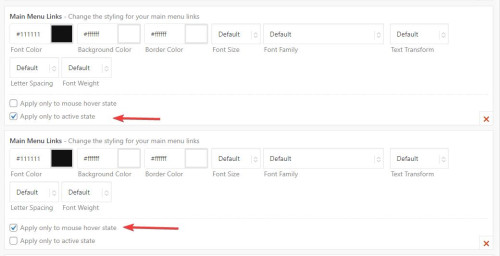
Then for the standard menu link color of white is set in a third Enfold Theme Options ▸ Advanced Styling ▸ Menu Links option with no check boxes checked:

There is no setting to have all of the menu items the same width, the width is set with a css min-width rule, for your site it looks like the largest menu item is “showrooms” at 98px so you could add this css to your Enfold Theme Options ▸ General Styling ▸ Quick CSS field#header .av-main-nav > li > a { min-width: 98px; }in the future if you add larger menu items you can adjust this rule.
Please ensure to copy the code from the forum and not an email notification so the symbols are not converted.Best regards,
MikeHey andre_h_,
Thanks for the links to your example pages, I believe that you are referring to the parallax effect, where there is a fixed image and the rest of the page scrolls over it, like in this example that I created:

To create this I added a color section at the top of the page and set the height to 50% of the screen, and then added a background image with the Background Attachment set to Parallax

Then I added a special heading to the color section and under it with a masonry gallery at the bottom of the page, is this what you are trying to do?Best regards,
MikeHi,
The only DocCheck plugin that I could find has beed closed on the WordPress library: doccheck-login

is this the one that you are referring to?
I assume that the plugin is tring to modify the headers to add it’s own login cookie and the plugin should call ob_start() at the top of the script to buffer the output.
Try contacting the plugin author to see if they are working on a solution for this, we are limited to the support that we can provide for third party plugins.Best regards,
MikeHey Angelo,
Thank you for the link to your site, try this CSS in your Enfold Theme Options ▸ General Styling ▸ Quick CSS field:@media only screen and (max-width: 767px) { #top .avia-button .avia_button_icon, #top .avia-button .avia_iconbox_title { vertical-align: middle; } }After applying the css, please clear your browser cache and check.
Best regards,
MikeHi,
I see that you are using Enfold v4.0.5 with WordPress v6.4.2
This is a very old version of Enfold that is not compatible with WordPress v6+
Unfortunately a while back Envato (Theme Forest) changed how updates are done and the old API will no longer work. So you will need get the latest version from your Envato account and manually update, then after you update you can create a Envato Token in your Theme Forest account so that future updates can be done easily, but your current version will not work with the Envato Token.
To update your version of Enfold you will need to download the latest installable WP version from your Theme Forest account and upload it to your WordPress ▸ Appearance ▸ Themes ▸ Add Themes ▸ Add New
after you choose the zip file and click install, you will see a This theme is already installed message because you are updating, you can continue
then you will see the Theme updated successfully message.
Best regards,
MikeHey Ian Stone,
Thank you for your question, this is possible, you can change the name of the page that is used for the blog and then when the menu is created the page will use your new name for the page. Even if you import one of our demos you can still change the name of the page and the menu item for it.
Here is a link to the purchase page for the theme.Best regards,
MikeHi,
Glad we were able to help, if you have any further questions please create a new thread and we will gladly try to help you. Thank you for using Enfold.Best regards,
MikeHey Munford,
Thank you for the link to your site, try this CSS in your Enfold Theme Options ▸ General Styling ▸ Quick CSS field:#main #socket .copyright { float: none; text-align: center; width: 100%; display: inline-block; }After applying the css, please clear your browser cache and check.
Best regards,
MikeHey Highlander-2013,
Typically this error occurs when a Token is used on a older theme that can not use the token. If you are trying to update a older site then please do so manually this time and then the token will work properly for future updates.
To update your version of Enfold you will need to download the latest installable WP version from your Theme Forest account and upload it to your WordPress ▸ Appearance ▸ Themes ▸ Add Themes ▸ Add New
after you choose the zip file and click install, you will see a This theme is already installed message because you are updating, you can continue
then you will see the Theme updated successfully message.
Best regards,
MikeHey ERLAN CLAUDIO DOS SANTOS LYRIO,
Please vist our Envato product page.Best regards,
MikeHey woogie07,
Thank you for the link to your site, to change the background color of the top menu try this CSS in your Enfold Theme Options ▸ General Styling ▸ Quick CSS field:#top .header_color .header_bg { background-color: #706f6f; }then to change the color of the menu links go to Enfold Theme Options ▸ Advanced Styling ▸ Menu Links
Then clear your browser cache and check.Best regards,
MikeDecember 8, 2023 at 4:57 pm in reply to: My Client’s website will break if I update basic things #1427583Hi,
Glad to hear that you have this sorted out, unless there is anything else we can help with on this issue, shall we close this thread then?Best regards,
MikeDecember 8, 2023 at 4:54 pm in reply to: Burger Menu JS click action is deferred by WP-Rocket #1427582Hi,
Thanks for the login, when I test your page above with the Dev Tools inspector for mobile device (425px) and am not logged in I see the delay when clicking the burger menu, but when I am logged in for the same page there is no delay when clicking the burger menu, even when I clear my browser cache with a hard reload.
I also tested on my real Android device and had the same results.
Do you also experience this also? Please try.Best regards,
Mike -
AuthorPosts
