

Forum Replies Created
-
AuthorPosts
-
the example page above is an archiv page of personal – and yes the breadcrumb is h1 – but all the other blog title headings are h2.

That is why i ask if your page is similar to that – it makes me wonder. on the single posts – the titles are h1 but then breadcrumb tag is “strong”.
is there a link to your site that you can make public – as participant as you are – i do not see private content field here on board.The functions.php is located directly in the root directory of the theme. However, if you are working without a child theme, there are a few things to consider for the parent theme. That’s why I recommend always working with a child theme: changed settings / customizations will not be lost with the next update.
A page like that: https://kriesi.at/themes/enfold-2017/category/personal/
there all post do have h2 headings – and only the breadcrumb category is h1.
or – instead of replacing it afterwards – use the filter avf_customize_heading_settings to influence the generation of those headings:
function my_customized_headings_for_masonry_titles( array $args, $context, array $extra_args = array() ) { if( $context == 'avia_masonry' ){ $args['heading'] = 'h6'; } return $args; } add_filter( 'avf_customize_heading_settings', 'my_customized_headings_for_masonry_titles', 10, 3 );have you tried that already:
It’s good that one can always check the corresponding pages to see if it worked. ;)
First – Mikes post is still right – but the need for the callback function is not necessary anymore – because there is now a filter for reaching the fixed background on lightbox opened.
add_filter( 'avf_default_lightbox_no_scroll', '__return_true' );
next: the code for that inline popup is correct but you had to know that the class open-popup-link had to be the trigger for the magnificPopup function.
On button Element the custom class goes to the button wrapper – not the anchor itself. – so the selector had to reflect that ( the class is parent of the anchor)function inline_popup_every_avia_ID_you_like() { ?> <script type="text/javascript"> (function($){ $(window).on('load', function () { $('.open-popup-link').find('a').addClass('no-scroll'); $('.open-popup-link a').magnificPopup({ removalDelay: 500, type:'inline', midClick: true, }); $(document).on('click', '.popup-modal-dismiss', function (e) { $.magnificPopup.close(); }); }); })(jQuery); </script> <?php } add_action('wp_footer', 'inline_popup_every_avia_ID_you_like', 999);summary:
- the trigger is a link which is child of the custom-class: open-popup-link
- if you got a lot of these trigger links you can give that custom-class to the color-section etc. this indicates that all links inside goes to lightbox.
- if you want to link to another lightbox from that modal window – just place a button inside again with class: open-popup-link
- there is a second class – thats for a link inside the popup that could close the lightbox: popup-modal-dismiss
nice to have for links in the lightbox that goes to an anchor link (f.e. one-pager sites). - the triggered link should have now a manual link to an anchor with unique ID
- give to this element that goes to the lightbox the class mfp-hide (to make it invisible) and maybe the class white-popup (for prestyled styling of the lightbox by magnificPopup) and the ID of the button link
on docu – you can find a possibility not to use for those images a different source :
see https://kriesi.at/documentation/enfold/magazine/ and search for: image_size
maybe we can use the avf_magazine_defaults filter to change that. … ;)
put this to your child-theme functions.php:function avia_magazine_thumbnail($atts, $magazine){ $atts['image_size']['small'] = 'square'; return $atts; } add_filter('avf_magazine_settings', 'avia_magazine_thumbnail', 10, 2);unterhalb des Logo Eingabefeldes gibt es einen Schiebregler für die Transparenz Optionen: “Transparency Logo Options”
den aktiviere bitte mal. Dann kannst du nun ein Logo für die Seiten mit Transparenz hinterlegen, sowie die Farben des Menüs festsetzen.Achte bitte darauf, dass die beiden Logos die gleichen Abmessungen haben und auch sonst deckungsgleich sind. Dann ist der Übergang fließender.
if you got a link on your private Content field – i could not see this as participant.
So maybe a mod should adjust it for you.btw: if you got the hamburger icon from the beginning the media query aren’t needed!
you can put inside the same media query to have then complete:
@media only screen and (max-width:989px) {
  .responsive #top .av-burger-menu-main  {
    top: -5px
  }
  #top .av-burger-menu-main .av-hamburger-box strong {
    display: block !important;
    position: absolute;
    top: -10px;
    left: 50%;
    transform: translateX(-50%);
    color: var(--enfold-header_burger_color);
  }
  #top #header.av_header_transparency .av-burger-menu-main .av-hamburger-box strong {
    color: var(--enfold-header_replacement_menu_color);
  }
}
colors if burger menu is active – f.e.:
#top .header_color .av-hamburger--spin.is-active .av-hamburger-inner, #top .header_color .av-hamburger--spin.is-active .av-hamburger-inner::before, #top .header_color .av-hamburger--spin.is-active .av-hamburger-inner::after{ background-color: #FFF; } #top .av-burger-menu-main .av-hamburger--spin.is-active .av-hamburger-box strong { color: #FFF ; }well i would not use the hidden : .avia_hidden_link_text nor pseudo-containers because there is allready an existing “caption”
use the hidden strong container inside av-hamburger-box !
synchronize the media query with the hamburger “break point”
f.e:@media only screen and (max-width:989px) { #top .av-burger-menu-main .av-hamburger-box strong { display: block !important; position: absolute; top: -10px; left: 50%; transform: translateX(-50%); color: #000; /*** edit this to your needs ****/ } }you have to adjust the color for this and think of transparency option too.
for example you can use the variable color definitions:
@media only screen and (max-width:989px) { #top .av-burger-menu-main .av-hamburger-box strong { display: block !important; position: absolute; top: -10px; left: 50%; transform: translateX(-50%); color: var(--enfold-header_burger_color); } #top #header.av_header_transparency .av-burger-menu-main .av-hamburger-box strong { color: var(--enfold-header_replacement_menu_color); } }can you try this:
#top #header .avia_mega_div { max-height: calc(100vh - 20px); overflow-y: auto !important; }you can try that in quick css:
But maybe that is only nice for wide screens – if there is not enough space it will be not advisable@media only screen and (min-width:1300px) { #top .avia-content-slider { overflow: visible !important; } #top .avia-content-slider .avia-slideshow-arrows a.prev-slide { left: -70px; } #top .avia-content-slider .avia-slideshow-arrows a.next-slide { right: -70px; } #top .avia-content-slider .avia-slideshow-arrows a.prev-slide:before{ text-indent: 15px; } #top .avia-content-slider .avia-slideshow-arrows a.next-slide:before { text-indent: -15px; } }Select an alternative value for 1300px for your installation
That exactly is the meaning of background-images. The content height determins the height of the section.
by the way – it now makes me wonder that the original inline rule set by Enfold is with height and not min-height:
.av-minimum-height-90:not(.av-slideshow-section) .container {
  height: 90vh;
}
so my code above reflects that.
Try first now to set only a min-height to 50vhBut as mentioned : the content height will be the determinating factor on that.
December 28, 2023 at 8:02 am in reply to: Include customer recommendations on two different pages with same data #1428938on each Enfold Advanced Layout Builder (ALB) Element – you have the chance to save that element as template:
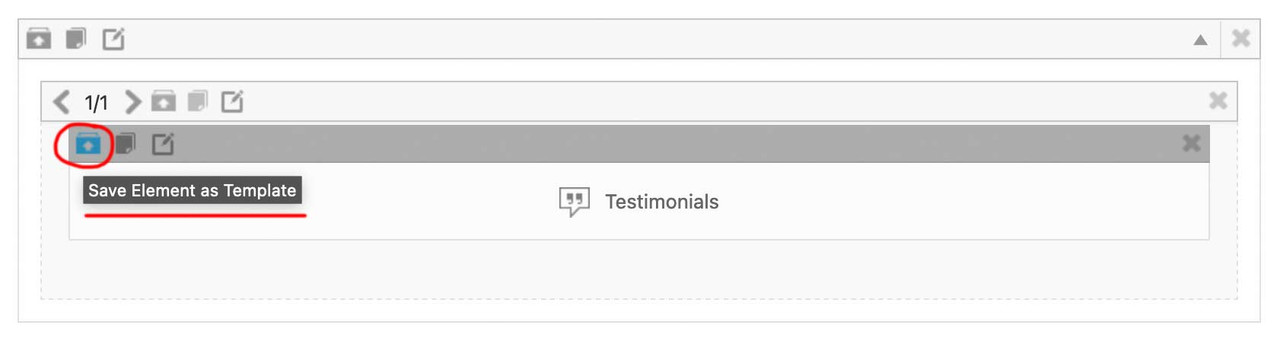
you now can insert this ( completely styled and filled with content ) ALB Element to different pages/posts – on top right of the layout builder window there is a drop-down:
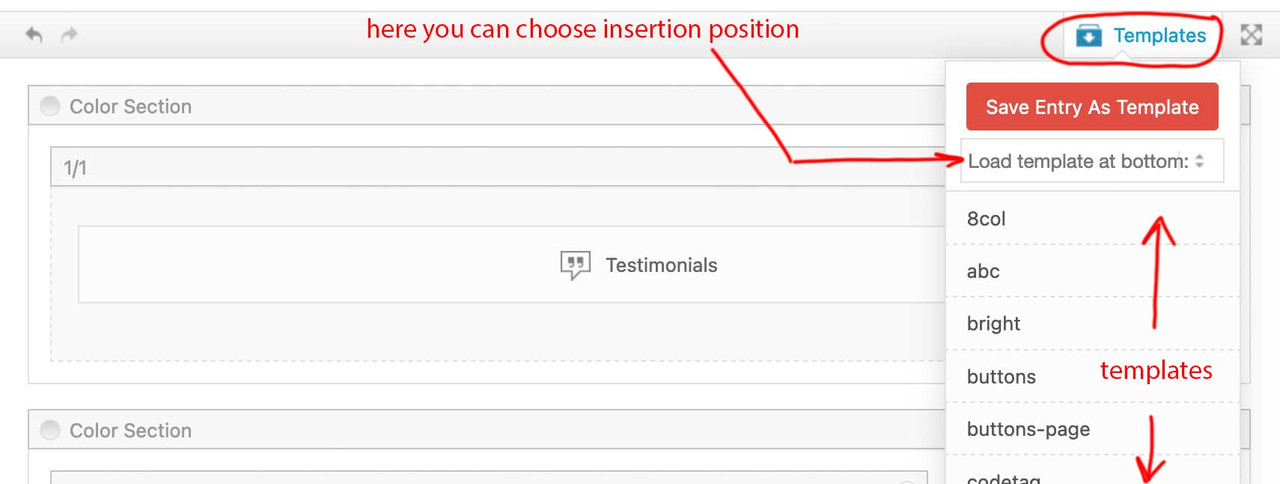
after Insertion ( top or bottom ) you now can drag that element to the wanted position.
___________
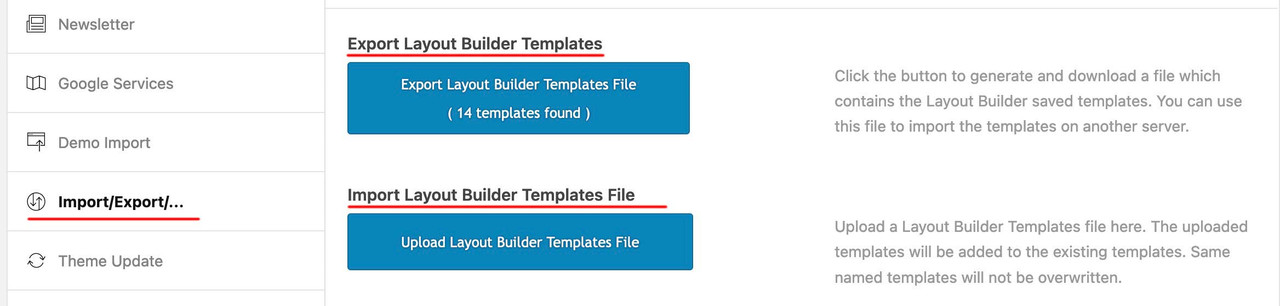
by the way: these templates could even be transformed to different installations ( but you had to think of transfering the content used inside these elements by yourself ) :
give a custom class to your color-section – f.e. : fifty
then put your rules inside a media-query: ( if you like to have it on a different screen-width than 767px – change that f.e. to 989px )
@media only screen and (max-width:767px) {
  .responsive #top .avia-section.fifty {
    height: 50vh;
  }
}
PS: if you really like to have that only for mobile devices – and not for small screen sizes ? you can change that selector ( and use the enfold default class for mobile devices: avia_mobile ):.responsive.avia_mobile #top .avia-section.fifty { height: 50vh; }first tell me if my suggestion from above is correct.
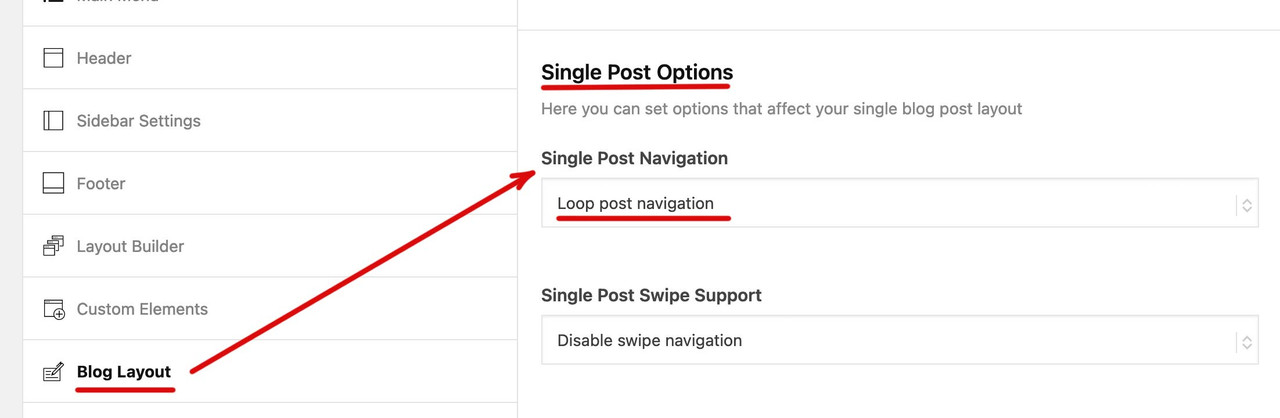
it belongs to the post-navigation left/right arrows? If you have opened a single post – there are left and right arrows to navigate to the other posts.
And now you only want to reach other posts inside the same category ?And you put that filter to the child-theme functions.php ?
try : maybe the is_fullwidth setting is only missing
function enfold_customization_postnav($settings){
  $settings['is_fullwidth'] = false;
  $settings['skip_output'] = false;
  $settings['same_category'] = true;
  return $settings;
}
add_filter('avf_post_nav_settings','enfold_customization_postnav', 10, 1);
here is the github part showing the long version with comments on that filter:
https://github.com/KriesiMedia/enfold-library/commit/969ff37a8219fee349bb94fcfdbd28fd02d22713but if I then open one of the two portfolio entries I can scroll to the other entry
you belong to the post navigation arrows left and right. If those entries should stay only in the same category …
can you try this in your child-theme functions.php:add_filter('avf_post_nav_settings','enfold_customization_postnav', 10, 1); function enfold_customization_postnav($settings){ $settings['skip_output'] = false; $settings['same_category'] = true; return $settings; } add_filter('avf_post_nav_settings','enfold_customization_postnav', 10, 1);if it does not work . we can try a different way …
for combo widget i had to look into the code now …
… guess – as mike said no child-theme working solution. – you had to place the widget from the plugin itself.Well – there is a free version too – but i can not say if this is the plugin you use.
For a customer – long time ago – i edited the postslider.php to insert the counter into meta info of a post.
But I would have to think my way back into it first; the version of postslider.php I still have saved here is from 2020
maybe loop-index.php should also be edited.i think only a code like this :
number_format_i18n(pvc_get_post_views( $the_id ))had to be inserted to the $meta.
F.e. open loop-index.php and find around line 431:
$meta_seperator = apply_filters( 'avf_post_metadata_seperator', '<span class="text-sep">/</span>', 'loop-index' );place just under that line:
$meta_postviews  = "<span class='post-views' title='Calls for: ".get_the_title( $the_id )."'><span class='post-views-icon dashicons dashicons-businessperson'></span>".number_format_i18n(pvc_get_post_views( $the_id ))."</span>";
$meta_info['postviews'] = $meta_postviews;
upload that edited loop-index.php to a child-theme folder : includes
see how it looks like ( after a short css )
https://weber.tips/clock/The most common mistake made when preparing SVG files for fontello upload is not to make the paths compound.
on fontello – uploading those svg files – there are no error warnings? Did you see those uploaded icons in the preview on fontello?

i would follow Mike – and try the plugin. But here is the way i mentioned.
this to your child theme functions.php:function wp_tinymce_more_buttons( $buttons ) { if ( ! in_array( "fontsizeselect", $buttons ) ) { $buttons[] = 'fontsizeselect'; } if ( ! in_array( "backcolor", $buttons ) ) { $buttons[] = 'backcolor'; } if ( ! in_array( "alignjustify", $buttons ) ) { $buttons[] = 'alignjustify'; } if ( ! in_array( "underline", $buttons ) ) { $buttons[] = 'underline'; } return $buttons; } add_filter( 'mce_buttons_2', 'wp_tinymce_more_buttons', 99999 ); // if you choose here mce_buttons_3 - then it will be in another buttons-row function add_font_size_to_tinymce( $initArray ){ $initArray['fontsize_formats'] = "9px 10px 12px 13px 14px 16px 18px 21px 24px 28px 32px 36px"; return $initArray; } add_filter( 'tiny_mce_before_init', 'add_font_size_to_tinymce' );one hook that might help is : tiny_mce_before_init
what do you like to have added?
try this in your child-theme functions.php:
function ava_exclude_current_post($query) {
  if (is_singular('post') || is_singular('portfolio') ) {
    $exclude = avia_get_the_ID();
    $query->set( 'post__not_in', array($exclude) );
  }
}
add_action('pre_get_posts', 'ava_exclude_current_post');
you can use as if clause instead:
if(is_single()){ …oh wow – did not see that you are only asking for the logo hide/show !
so forget about my solution – which is meant for hide/show complete header – sorryand if you like to have the benefit of those classes added on scroll – without having a shrink see:
https://kriesi.at/support/topic/how-to-set-a-very-small-shrink-factor/#post-1416772
Your setting only makes sense – if the header stays fixed on responsive case. So on the css above it is set to fixed
the 116px is the standard setting of header hight on setting: large– if you got this “Reading Progress Bar” active it might be a decision to show it on scroll or not – that makes only a difference in translate-y amount.
see: https://enfold.webers-webdesign.de/
now there must be a setting for burger active …
best would be to show the header always ( because burger-menu and hamburger icon are part of the header ).responsive.av-burger-overlay-active #header { position: fixed !important; }PS: you see on the css above that the media queries rules are the same (in this case) – but it might be different on your settings – f.e. to have a smaller header hight on screens less than 768px.
oh wow – did not see that you are only asking for the logo hide/show !
so forget about my solution – which is meant for hide/show complete header – sorry_________ so this is not for your problem ____________
yes, this is a possibility – but has the disadvantage that this class (header-scrolled) is only removed if you are in the top position on the page. This means that the header only appears again then. If you scroll-direction is up at the bottom (or middle) of a page, nothing happens.
It would therefore be better to have a class that is removed as soon as a certain distance is scrolled back – and thus restores the header visibility.This is a function adding a class (hide-header) depending on scroll distance.
function hide_header(){
?>
<script>
(function($){

  'use strict';
  var c,
  currentScrollTop = 0,
  header = $('#header');

   $(window).on('scroll', function () {
      var a = $(window).scrollTop();
      var b = header.height();
      currentScrollTop = a;

      if (c < currentScrollTop && a > b  ) {
        header.addClass("hide-header");
      } else if (c > currentScrollTop && !(a <= b)) {
        header.removeClass("hide-header");
      }
      c = currentScrollTop;
  });
})(jQuery);
</script>
<?php
}
add_action('wp_footer', 'hide_header');
The css you need on that must reflect your header height you set on Enfold options. And the options – f.e. if you have a top-menu or phone-info field above the header. And if it scrolls away.
The trick now is to shift the header in y-direction above the viewport.
And because we do not want to do that if the burger menu is opend – we exclaim it bei not selector ( :not(.av-burger-overlay-active) )
The media query settings are individual – and you have to adjust it to your needs – if you got pages with transparency headers – maybe there had to be different padding-top settings of #main.css – first settings:
.responsive:not(.av-burger-overlay-active) #header { top: 0px; -webkit-transition: transform 0.5s ease-in; transition: transform 0.5s ease-in; } .responsive:not(.av-burger-overlay-active) #header.hide-header { -webkit-transition: transform 0.5s ease-in; transition: transform 0.5s ease-in; } .responsive:not(.av-burger-overlay-active) #main { top: 0px; -webkit-transition: padding-top 0.5s ease-in; transition: padding-top 0.5s ease-in; } .responsive.av-burger-overlay-active #header { position: fixed !important; } @media only screen and (min-width: 990px) { .responsive:not(.av-burger-overlay-active) #header.hide-header { transform: translateY(-116px); } } @media only screen and (min-width: 768px) and (max-width: 989px) { .responsive:not(.av-burger-overlay-active) #header { position: fixed !important; top: 0; } .responsive:not(.av-burger-overlay-active) #header.hide-header { transform: translateY(-90px); } .responsive #top #main { padding-top: 90px !important; } } @media only screen and (max-width: 767px) { .responsive:not(.av-burger-overlay-active) #header { position: fixed !important; top: 0; } .responsive:not(.av-burger-overlay-active) #header.hide-header { transform: translateY(-80px); } .responsive #top #main { padding-top: 80px !important; } }PS: du solltest sehr zeitnah für Impressum und Datenschutzseite sorgen. Impressumspflicht und DSGVO ist da schon recht streng.
Oder zumindest die Comming Soon Seite so einrichten, das man die anderen Seiten nicht erreichen kann.December 19, 2023 at 8:07 am in reply to: Copy page only from one Enfold Website to another Enfold website #1428471After activating the Debug Mode the shortcodes shown under the layout insertion field.:
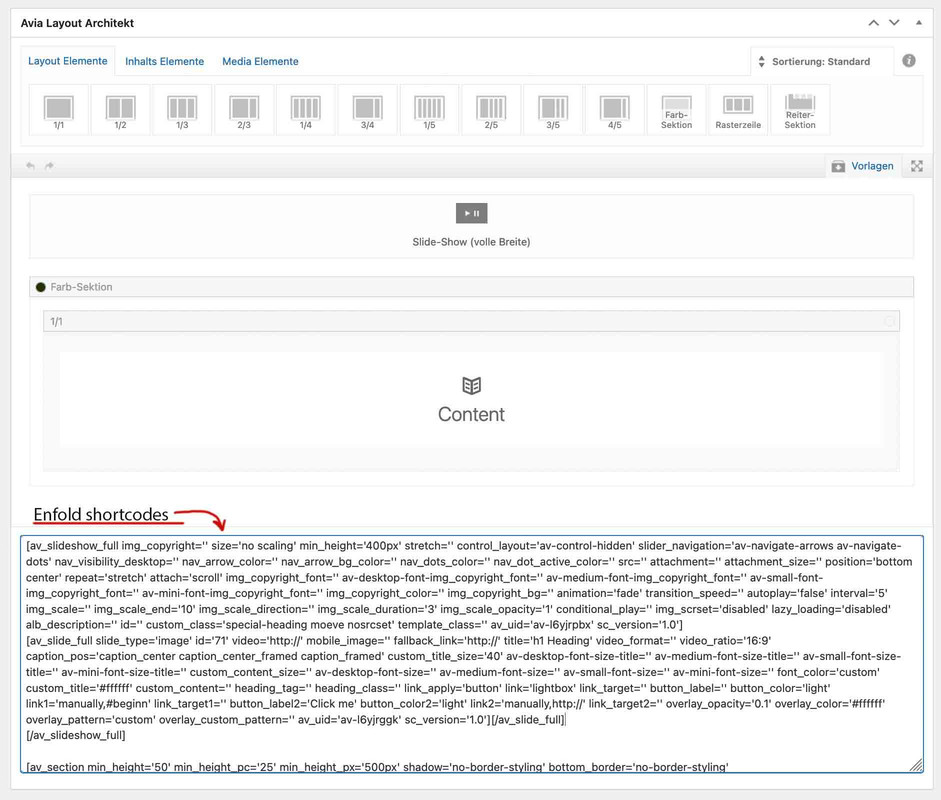
copy all shortcodes from there and input these to the same field in a new created page on the other installation.
And save now.
After that you had to fix the content – as the links, e.g. from images, still point to the first domain. -
AuthorPosts
