

Forum Replies Created
-
AuthorPosts
-
no Nikko – that would be not enough. Because i think he likes to transform all headings to (f.e. a h3 standard heading – with that small line besides) to modern style (without that line). ( And styling is not implemented in headings advanced styling options)
If it is only that line that disturbed him – that was easy to get rid of
you can set all headings as Nikko said on that advanced styling to font-weight : normal (300) or you put this to quick css
.av-special-heading-tag  { font-weight: 300}
.special-heading-border { display: none}
maybe an !important on font-weight is necessary
-
This reply was modified 8 years ago by
Guenni007.
yes that is the line above from shortcodes.js and its calculation. it adds that css if window height is smaller than the sum of the other heights
see post there – i answered on that thread
you can see result here – dont know why on your site the hover effect is like it is:
https://webers-testseite.de/weber/
-
This reply was modified 8 years ago by
do this in quick css:
and have a look:#av-burger-menu-ul li.burger-social { float: left; } #av-burger-menu-ul li.burger-social a { padding: 10px !important; border-bottom: none !important; } #av-burger-menu-ul li.social_icon_1 { padding-left: 40px }but i think this looks better if you do not prependTo but apendTo
here:…
$(socialString).each(function() { $(this).appendTo('#av-burger-menu-ul'); });you are kidding – no : this is only an advice to take the nice and costless polylang.
(meanwhile the lifetime licenses on wpml is no longer available – i have an old contract)
here on board there are a lot of satisfied Polylang userssame shit different name: with mediaquery (play with the values and determine the 480px if it is small enough etc.
@media only screen and (max-width: 480px) { .av-hamburger-inner, .av-hamburger-inner::before, .av-hamburger-inner::after { width: 30px; height: 2px; } .av-hamburger-inner::before { top: -8px; } .av-hamburger-inner::after { bottom: -8px; } }have a look if this fits your whishes:
.av-hamburger-inner, .av-hamburger-inner::before, .av-hamburger-inner::after {
    width: 40px;
    height: 5px;
}

.av-hamburger-inner::before {
    top: -12px;
}
.av-hamburger-inner::after {
    bottom: -12px;
}
the hight is what you asked for , width is clear – and top and bottom values determines the distance
i have a lifetime license from WPML – but polylang seem to do a good job for / in enfold too
by the way – on Enfold Options – Header – Header behavior – please checkmark that “Let logo and menu position adapt to browser window”
And have a look if this isn’t better for your big wide menu!On Main Menu – what do you have on : “Menu Items for mobile” ?
one after the other
1)
#menu-item-668 a .avia-menu-text {
    box-shadow: 2px 2px 5px #333;
}
…
and afterwards ( you don’t want to have both footer and socket links) goto enfold options – footer and deselect social icons there
now put in the widget:
<ul class="noLightbox social_bookmarks icon_count_4"><li class="social_bookmarks_facebook av-social-link-facebook social_icon_1"><a target="_blank" href="https://www.facebook.com/UNITE4HUMANITY" aria-hidden="true" data-av_icon="" data-av_iconfont="entypo-fontello" title="Facebook"><span class="avia_hidden_link_text">Facebook</span></a></li><li class="social_bookmarks_instagram av-social-link-instagram social_icon_2"><a target="_blank" href="https://www.instagram.com/unite4humanity_/" aria-hidden="true" data-av_icon="" data-av_iconfont="entypo-fontello" title="Instagram"><span class="avia_hidden_link_text">Instagram</span></a></li><li class="social_bookmarks_twitter av-social-link-twitter social_icon_3"><a target="_blank" href="https://twitter.com/Unite4Humanity_" aria-hidden="true" data-av_icon="" data-av_iconfont="entypo-fontello" title="Twitter"><span class="avia_hidden_link_text">Twitter</span></a></li><li class="social_bookmarks_youtube av-social-link-youtube social_icon_4"><a target="_blank" href="https://www.youtube.com/channel/UC3HWLg_brLlmepvvdGKm4SA" aria-hidden="true" data-av_icon="" data-av_iconfont="entypo-fontello" title="Youtube"><span class="avia_hidden_link_text">Youtube</span></a></li></ul>But i believe that this couldn’t work –
you have to have the social media activated on Enfold Options dialog – without these links could not work.yes because you haven’t used the code tag here on board i have transfered your wrong quotation marks.
<ul class="noLightbox social_bookmarks icon_count_5"> <li class="social_bookmarks_mail av-social-link-mail social_icon_1"> (Email address hidden if logged out) ?subject=Inquiry from WGM Website"><span class="avia_hidden_link_text">Mail</span></li> <li class="social_bookmarks_facebook av-social-link-facebook social_icon_2"><span class="avia_hidden_link_text">Facebook</span></li> <li class="social_bookmarks_instagram av-social-link-instagram social_icon_3"><span class="avia_hidden_link_text">Instagram</span></li> <li class="social_bookmarks_twitter av-social-link-twitter social_icon_4"><span class="avia_hidden_link_text">Twitter</span></li> <li class="social_bookmarks_youtube av-social-link-youtube social_icon_5"><span class="avia_hidden_link_text">YouTube</span></li> </ul>if it works – don’t know why if you haven’t set the social things on Enfold options – try:
just a moment i did have your wrong quotatin marks
<ul class="noLightbox social_bookmarks icon_count_5">
<li class="social_bookmarks_mail av-social-link-mail social_icon_1"> (Email address hidden if logged out) ?subject=Inquiry from WGM Website"><span class="avia_hidden_link_text">Mail</span></li>
<li class="social_bookmarks_facebook av-social-link-facebook social_icon_2"><span class="avia_hidden_link_text">Facebook</span></li>
<li class="social_bookmarks_instagram av-social-link-instagram social_icon_3"><span class="avia_hidden_link_text">Instagram</span></li>
<li class="social_bookmarks_twitter av-social-link-twitter social_icon_4"><span class="avia_hidden_link_text">Twitter</span></li>
<li class="social_bookmarks_youtube av-social-link-youtube social_icon_5"><span class="avia_hidden_link_text">YouTube</span></li>
</ul>
now you can copy paste
-
This reply was modified 8 years ago by
your code has no closing tags at all.
a ul opens but not closing
a li the same try this :<ul class=”noLightbox social_bookmarks icon_count_3″> <li class=”social_bookmarks_mail av-social-link-mail social_icon_1″> (Email address hidden if logged out) ?subject=Inquiry from WGM Website”><span class=”avia_hidden_link_text”>Mail</span></li> <li class=”social_bookmarks_linkedin av-social-link-linkedin social_icon_2″><span class=”avia_hidden_link_text”>Linkedin</span></li> <li class=”social_bookmarks_youtube av-social-link-youtube social_icon_3″><span class=”avia_hidden_link_text”>YouTube</span></li> </ul>April 15, 2018 at 12:31 pm in reply to: Changing style of unordered list without changing the menu style #942179just be more specific :
.avia_textblock li {
    list-style-type: none;
    position: relative;
    padding-left: 10px !important;
    margin-left: 5px !important;
}

.avia_textblock li:before {
    content: "\25BA \0020";
    font-size: 12px;
    position: absolute;
    top: 1px;
    left: -10px;
}
margin-left is for the indent – if you like to have no line to the Text above – give it a bit more px’s
What did you do on touchscreens ?
how did you place the social icons there – by text widget
for a while i wrote a sozial-bookmarks widget for that – but it only places the bookmarks set on Enfold Options dialog –
you can see it on my testing page in the footer on the right column: https://webers-testseite.de
So if you don’t like to show a different set than on top this would only work if you define all and get rid of some in the footer via display:none.can you try this in quick css :
#footer .social_bookmarks {
    position: relative;
    left: -8px;
    top: -15px;
}

#footer .social_bookmarks a::before {
    font-size: 20px;
    color: #fff !important;
}
maybe it is better to define the link color in your enfold options – general styling – footer : highlight color
first of all allthough i’m german too – i have to write here english ( and sorry it is not the best – I do not have language practice any more for years)
so if there is something not clear : ask for german explanation.First use a child-theme ! Because it has many advantages – and adjustments do not get lost on parent update !
1) Split both of your logos – try to give them similar dimensions.
2) it is for some reasons better to set the enfold options logo to display none ( espacially if you have that second logo floating on the right side)
3) insert this to your functions.php of your child theme:function add_logos($logo) { $logo .= '<span class="logo first-logo"><a href="/">' ; $logo .= '<img src="/wp-content/uploads/logo1.jpg"/>'; $logo .= '</a></span>'; $logo .= '<span class="logo second-logo"><a href="a-different-link" target="_blank">' ; $logo .= '<img src="/wp-content/uploads/logo2.jpg"/>'; $logo .= '</a></span>'; return $logo; } add_filter('avf_logo_final_output', 'add_logos');3a) you see you can give each logo his own link ( if you don’t like the target blank on second logo erase it)
4) now the things come to quick css ( depends on dimensions and header settings we will see later):.logo, .logo a { display: inline-block} .logo:first-child img {display: none} .logo.first-logo { z-index: 3 } .logo.second-logo { z-index: 2 } .logo.second-logo { width: 100% } .logo.second-logo a { float: right !important } .logo.first-logo a, .logo.second-logo a { display: inline-flex } .main_menu:not(:first-of-type) { display: none !important }and for the responsive case:
@media only screen and (max-width: 768px) {
.responsive #top .logo:first-child {display: none}
.responsive #top .logo.first-logo {display: inline !important}
.logo.second-logo a {float: left !important}
.responsive #top #wrap_all .container {max-width: 95%; width: 95%}
}
5) we will see when this is done
see here: https://webers-testseite.de/cynthia/mille-deco/
-
This reply was modified 8 years ago by
you can insert it via functions.php of child-theme: (guess it is italian)
add_action('wp_head', 'insert_hreflang_info');
function insert_hreflang_info() {
?>
  <link rel="alternate" href="https://www.borgomummialla.com/" hreflang="it">
<?php
}
but i guess that the x-default is ok – it tells the bots that this is the default language
and if an international visitor ( someone else than italian or english) comes to your site it is redirected to the root directory
on my opinion this is the perfect setting !the error is not the setting of the hreflang but that it is redirected to the /it/ page !
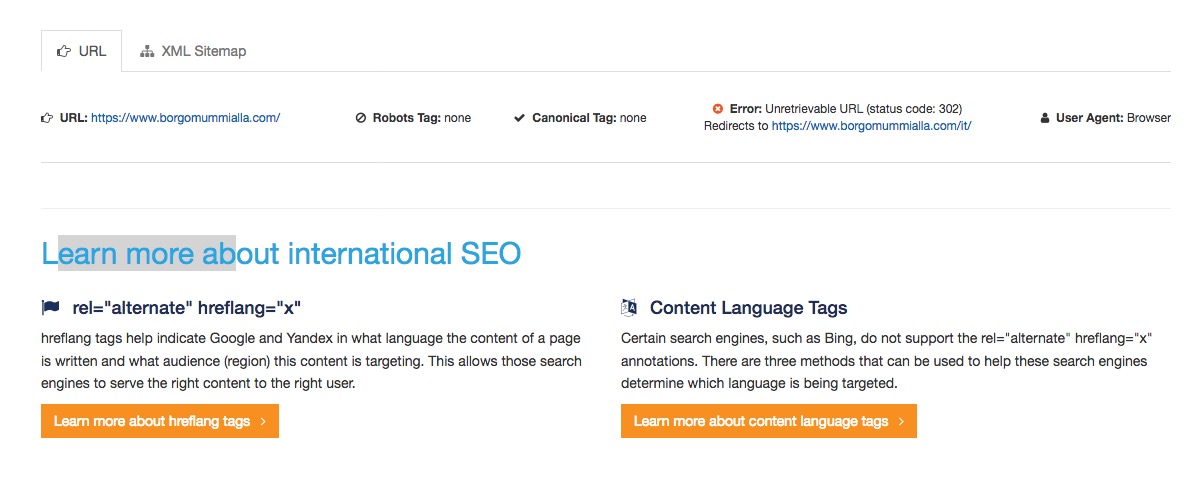
so your have here to decide what is your x-default :
maybe you test this better ( and i think for international visitors the english is better):add_action('wp_head', 'insert_hreflang_info'); function insert_hreflang_info() { ?> <link rel="alternate" href="https://www.borgomummialla.com/en/" hreflang="x-default"> <?php }it all based on the direct parent container of the iframe – if it is like on your test page: avia-iframe-wrap
than replace the above lines with:var $allVideos = $(".avia-iframe-wrap iframe[src*='www.youtube.com']"), // Hier das Element hinein welches fluidieren soll $fluidEl = $(".avia-iframe-wrap");It is probably also a good idea to include these two things only on the pages that it concerns.
if you don’t know how to – ask pleaseso here a bit optimised:
all comes to functions.php of your child theme:
here a debounce function – easy to use ( if you have a resize function – only replace resize with smartresize)
here is a timing of 250ms preselectedfunction add_debounce_function(){ ?> <script> (function($,sr){ var debounce = function (func, threshold, execAsap) { var timeout; return function debounced () { var obj = this, args = arguments; function delayed () { if (!execAsap) func.apply(obj, args); timeout = null; }; if (timeout) clearTimeout(timeout); else if (execAsap) func.apply(obj, args); timeout = setTimeout(delayed, threshold || 250); }; } jQuery.fn[sr] = function(fn){ return fn ? this.bind('resize', debounce(fn)) : this.trigger(sr); }; })(jQuery,'smartresize'); </script> <?php } add_action('wp_footer', 'add_debounce_function');and the code now ( give to the parent container of iframe the class spezialyoutube )
function custom_video_embed_script(){ ?> <script> (function( $ ) { "use strict"; $(function() { var $allVideos = $(".spezialyoutube iframe[src*='www.youtube.com']"), $fluidEl = $(".spezialyoutube"); $allVideos.each(function() { $(this) .data('aspectRatio', this.height / this.width) .removeAttr('height') .removeAttr('width'); }); $(window).smartresize(function () { var newWidth = $fluidEl.width(); $allVideos.each(function() { var $el = $(this); $el .width(newWidth) .height(newWidth * $el.data('aspectRatio')); }); }).resize(); }); }(jQuery)); </script> <?php } add_action('wp_footer', 'custom_video_embed_script');The thing with those codes of youtube is that often there are width and heights information about the video – but that causes this behavior.
if it works it will be better if we debounce this resize function.
it is always a good advice to do
throttling on scroll events and
debouncing on resize eventssee here the result on left with resize function – on the right normal behavior : https://webers-testseite.de/weber/youtube-windows/
If you resize the browser window – you will see that debouncing is working . (every 250ms the function resizes the window of the given element)
another clou of that code is – that aspect ratio is part of the calculation !
i think there will be only a jquery solution – and that is sad it has to be a function that will check the screen width:
Source: https://css-tricks.com/fluid-width-youtube-videos/this to functions.php of your child theme:
the thing is we had to find the parent container of the youtube videos in your installation ( i suposed it could be wpb_wrapper)this is the only line to be adjusted:
$fluidEl = $(".wpb_wrapper");function custom_youtube_script(){ ?> <script> (function( $ ) { "use strict"; $(function() { var $allVideos = $("iframe[src^='https://www.youtube.com']"), // The element that is fluid width $fluidEl = $(".wpb_wrapper"); $allVideos.each(function() { $(this) .data('aspectRatio', this.height / this.width) .removeAttr('height') .removeAttr('width'); }); $(window).resize(function() { var newWidth = $fluidEl.width(); $allVideos.each(function() { var $el = $(this); $el .width(newWidth) .height(newWidth * $el.data('aspectRatio')); }); }).resize(); }); }(jQuery)); </script> <?php } add_action('wp_footer', 'custom_youtube_script');can you try this in quick css:
.wpb_video_widget.vc_video-aspect-ratio-169 .wpb_video_wrapper {
    display: inline-flex;
}
maybe an !important is necessary
Edit: this works only in firefox ( on simulation with webdevelper ) but test it please live – maybe it will work than on those browsers
Well on your starting page i see this in your head section :
click to enlarge:

and where is your Navigation on that ?
and what should happen with the second logo on the right in responsive case ?the point is that the surrounding parent content container gets a padding-top/padding-bottom of 50px
in your case this would be the css rule :
.page-id-19 #after_layer_slider_1 .content {padding: 0!important}
but if you don’t like to look always what is the name of that given container (after-section1 etc. ) you can do this :
assign the hr element a custom-class called : nopadding and this comes
into functions.php of your child-theme:function padding_to_parent_of_hr_nopadding(){ ?> <script> (function($){ $('div.hr.nopadding').closest('.content').css({"padding": "0", "min-height": "0px" }); })(jQuery); </script> <?php } add_action('wp_footer', 'padding_to_parent_of_hr_nopadding');from now on every hr which has the class nopadding will transfer to its nearest parent content those values
-
This reply was modified 8 years ago by
-
AuthorPosts
