

Forum Replies Created
-
AuthorPosts
-
Multiline Menus See here: https://kriesi.at/documentation/enfold/menu/#multiline-menu
by the way – if you like to have the menu floats right:
set that rule to
justify-content: flex-end;by the way : for custom color schemes i would take this to child-theme functions.php:
https://kriesi.at/support/topic/change-color-palette/#post-1016286
hi Yigit : in register-admin-options.php is still the wrong Sequence
this is the right order:
//required for the general styling color schemes
include('register-backend-styles.php');

//required for the advanced styling wizard
include('register-backend-advanced-styles.php');

// Allow to include a user defined file to add or alter backend styles
$custom_path = apply_filters( 'avf_register_custom_backend_styles', '' );
if( ! empty( $custom_path ) && file_exists( $custom_path ) ){
	include_once $custom_path;
}
the new filter is on new Enfold 4.4.1 again over :
//required for the general styling color schemes
include('register-backend-styles.php');

//required for the advanced styling wizard
include('register-backend-advanced-styles.php');
And with this sequence it will not work !
Check it out for yourself – i told it again – but it is always forgotten till nowand ps: you can do a gradient background like this:
#intro {
background: rgb(102,154,194);
background: -moz-linear-gradient(45deg,  rgb(100,60,150) 0%, rgb(102,154,194) 50%, rgb(160,200,220) 100%);
background: -webkit-linear-gradient(45deg,  rgb(100,60,150) 0%,rgb(102,154,194) 50%,rgb(160,200,220) 100%);
background: linear-gradient(45deg,  rgb(100,60,150) 0%,rgb(102,154,194) 50%,rgb(160,200,220) 100%);
filter: progid:DXImageTransform.Microsoft.gradient( startColorstr='#643c96', endColorstr='#a0c8dc',GradientType=1 );
}
this definition creates a gradient that is not stepped.
see here: http://www.colorzilla.com/gradient-editor/-
This reply was modified 7 years, 5 months ago by
Guenni007.
you can make your own predefined color-scheme by adding some code to your child-theme functions.php:
All manual – but you got your own style and can transform this to other installations if you likeadd_filter('avf_skin_options', 'my_custom_added_style_function'); function my_custom_added_style_function($styles = "") { $default_primary = "#2d5c88"; $default_highlight = "#3d71a1"; $default_background = "#041424"; $special_border = "#0A2138"; $styles["Custom Style"] = array( "style"=>"background-color:$default_primary;", "default_font" => "Open Sans:400,600", "google_webfont" => "Open Sans:400,600", "color_scheme" =>"Custom Style", // header "colorset-header_color-bg" =>"#ffffff", "colorset-header_color-bg2" =>"#f8f8f8", "colorset-header_color-primary" =>"$default_primary", "colorset-header_color-secondary" =>"#444444", "colorset-header_color-color" =>"#333333", "colorset-header_color-border" =>"#e1e1e1", "colorset-header_color-img" =>"", "colorset-header_color-customimage" =>"", "colorset-header_color-pos" => "top center", "colorset-header_color-repeat" => "repeat", "colorset-header_color-attach" => "scroll", 'colorset-header_color-heading' => '#000000', 'colorset-header_color-meta' => '#808080', // main "colorset-main_color-bg" =>"#ffffff", "colorset-main_color-bg2" =>"#fcfcfc", "colorset-main_color-primary" =>"$default_primary", "colorset-main_color-secondary" =>"$default_highlight", "colorset-main_color-color" =>"#666666", "colorset-main_color-border" =>"#e1e1e1", "colorset-main_color-img" =>"", "colorset-main_color-customimage" =>"", "colorset-main_color-pos" => "top center", "colorset-main_color-repeat" => "repeat", "colorset-main_color-attach" => "scroll", 'colorset-main_color-heading' => '#222222', 'colorset-main_color-meta' => '#919191', // alternate "colorset-alternate_color-bg" =>"#fcfcfc", "colorset-alternate_color-bg2" =>"#ffffff", "colorset-alternate_color-primary" =>"$default_primary", "colorset-alternate_color-secondary" =>"$default_highlight", "colorset-alternate_color-color" =>"#666666", "colorset-alternate_color-border" =>"#e1e1e1", "colorset-alternate_color-img" => "", "colorset-alternate_color-customimage" =>"", "colorset-alternate_color-pos" => "top center", "colorset-alternate_color-repeat" => "repeat", "colorset-alternate_color-attach" => "scroll", 'colorset-alternate_color-heading' => '#222222', 'colorset-alternate_color-meta' => '#8f8f8f', // Footer "colorset-footer_color-bg" =>"#222222", "colorset-footer_color-bg2" =>"#333333", "colorset-footer_color-primary" =>"#ffffff", "colorset-footer_color-secondary" =>"#aaaaaa", "colorset-footer_color-color" =>"#dddddd", "colorset-footer_color-border" =>"#444444", "colorset-footer_color-img" => "", "colorset-footer_color-customimage" =>"", "colorset-footer_color-pos" => "top center", "colorset-footer_color-repeat" => "repeat", "colorset-footer_color-attach" => "scroll", 'colorset-footer_color-heading' => '#919191', 'colorset-footer_color-meta' => '#919191', // Socket "colorset-socket_color-bg" =>"#333333", "colorset-socket_color-bg2" =>"#555555", "colorset-socket_color-primary" =>"#ffffff", "colorset-socket_color-secondary" =>"#aaaaaa", "colorset-socket_color-color" =>"#eeeeee", "colorset-socket_color-border" =>"#444444", "colorset-socket_color-img" =>"", "colorset-socket_color-customimage" =>"", "colorset-socket_color-pos" => "top center", "colorset-socket_color-repeat" => "repeat", "colorset-socket_color-attach" => "scroll", 'colorset-socket_color-heading' => '#ffffff', 'colorset-socket_color-meta' => '#999999', //body bg "color-body_style" =>"stretched", "color-body_color" =>"#333333", //bg "color-body_fontcolor" =>"#ffffff", //font "color-body_attach" =>"scroll", "color-body_repeat" =>"repeat", "color-body_pos" =>"top center", "color-body_img" => "", "color-body_customimage" =>"", ); return $styles; }what do you mean by color-palette ?
Do you like to have a different color-picker color-palette ( those colors under the picker field)
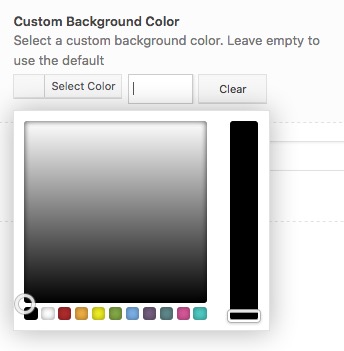
or do you mean a custom style on enfold – general styling – predefined color scheme ?
what headings – normal h3 headings or those in the widgets should get h6
as i said :you can add to this function more lines like :
replaceElementTag(‘h3.widgettitle’, ‘<div></div>’);
in front the selector – on the end the new surrounding tag! separate each line by a semicolon.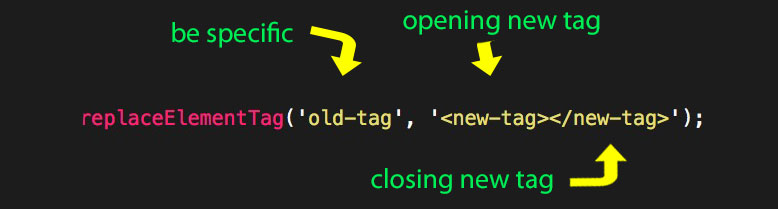
the code above that line is only to transform all classes and attribute existing to the old-tag get transformed to the new one.so to replace h3 with h6:
replaceElementTag('h3', '<h6></h6>');
replace widget h3 with h6:
replaceElementTag('h3.widgettitle', '<h6></h6>');
etc. ppyou have to look in the source code of your page to be more specific with the selector when you only want to replace some tags.
September 29, 2018 at 4:30 pm in reply to: Can I get rid of Black Bars on YouTube Video and Personalize Contact Form? #1016074Well Enfold does it realy good with their video alb element.
If there are no bars in the film there will be very small in the embedded one of enfold.If you like to insert your films via iframe there might be methods to calculate the correct aspect ratio – with the additional advantage to insert all good youtube parameters which set the advertisements to a minimum ( video on pause and on the end) etc.
see here a A/B comparison left with recalculation and right the enfold one.
https://webers-testseite.de/weber/youtube-test/PS on the right side there is that borlabs cookie plugin working to double opt-in on youtube videos.
if you don’t want to show widgets on some pages / posts you can install that older but good plugin : restrict widget
there you got the decision when you like to show the widget or when not.
It is not so complex like widget logic – but in the most cases this seems to be enough controlyou can add to this function more lines like :
replaceElementTag('h3.widgettitle', '<div></div>');
in front the selector – on the end the new surrounding tag! separate each line by a semicolon.you can do this to your child-theme functions.php:
function replace_tags_with_tags(){
?>
<script>
  (function($) {
      function replaceElementTag(targetSelector, newTagString) {
        $(targetSelector).each(function(){
          var newElem = $(newTagString, {html: $(this).html()});
          $.each(this.attributes, function() {
            newElem.attr(this.name, this.value);
          });
          $(this).replaceWith(newElem);
        });
      }

      replaceElementTag('h3.widgettitle', '<div></div>');

  }(jQuery));
</script>
<?php
}
add_action('wp_footer', 'replace_tags_with_tags');
if you like to have p tags then replace div with p
PS : the color set by enfold via the h-tag is lost : but you can give to the div.widgettitle a color and font-size settings etc.September 29, 2018 at 8:03 am in reply to: Best settings of Enfold to get maximum google pagespeed score? #1015985Caution: Real satire
And now I really believed that I would write my website for the visitors of the page. Now I have to realize that I only did it for Google. I had actually assumed that not overloaded texts with interesting contents and appealing and informative graphics would entice the reader to read on. Of course, you have to give him information quickly.
Some people should consider whether they really need all functions of a plugin or whether they want to evaluate a statistics tool at all. I have some customers who install e.g. Google Analytics and don’t perform any analyses themselves. Only Google receives important information about your page and about the visitors of your page. Do I really have to help a company worth billions to collect data about my potential customers?
YSlow is always worse because it wants to know if CDN systems are installed. Your website loads quite quickly with a little more than 2sec (average is 6.8sec).
Yes, it is not unimportant to have a fast loading page. I don’t want to be the servant of performance values whose algorithms are set by companies that don’t have your well-being in mind but their own.can you try to make it dependent on screen width:
.avia-slideshow,
.avia-slideshow-inner ,
.avia-slideshow li {
    overflow: visible;
}

.avia-slideshow {
    margin-bottom: 80px !important;
}

.avia-slideshow-inner .avia-caption {
    position: absolute;
    top: 100%;
    left: 50%;
    transform: translateX(-50%);
    width: 100%;
}

.avia-slideshow-inner .avia-caption-title {
    color: #000 !important;
    text-align: center;
    font-size: 2.5vw
}
see here on bottom: https://webers-testseite.de/horizontal-gallery/
the avia-slideshow margin-bottom: 80px. has to be big enough to show even the caption content – if there was something
-
This reply was modified 7 years, 5 months ago by
no he must have changed the images or upload them again. Now all images are shown on my desktop – that is something what did not work before.
Maybe a positive feedback would be polite ;)September 28, 2018 at 5:02 pm in reply to: Adding caption to each slide in horizontal gallery #1015802give me please a link to your site – but i’m participant as you so i can not see private area!
September 28, 2018 at 5:01 pm in reply to: Adding caption to each slide in horizontal gallery #1015799well you are talking about Caption – the Caption on horizontal Gallery is this field under the image:
(see the empty field on the left – and what happend then to the frontend.
click to enlarge:
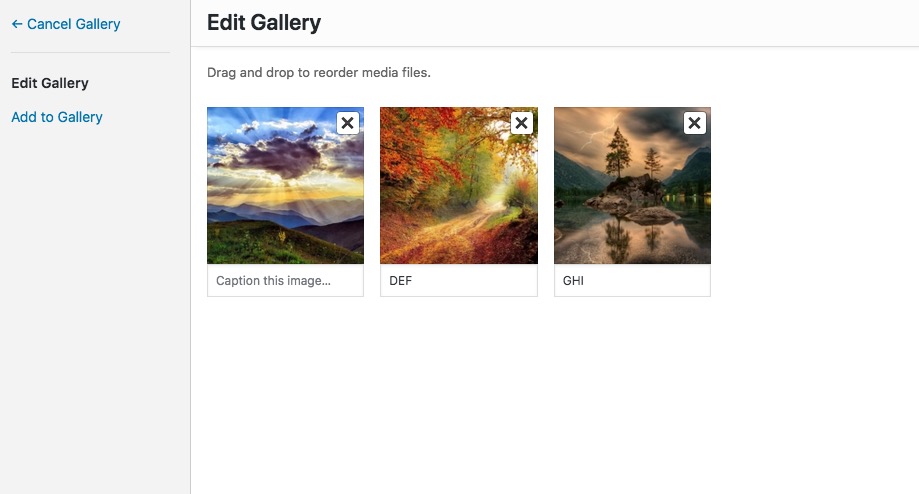
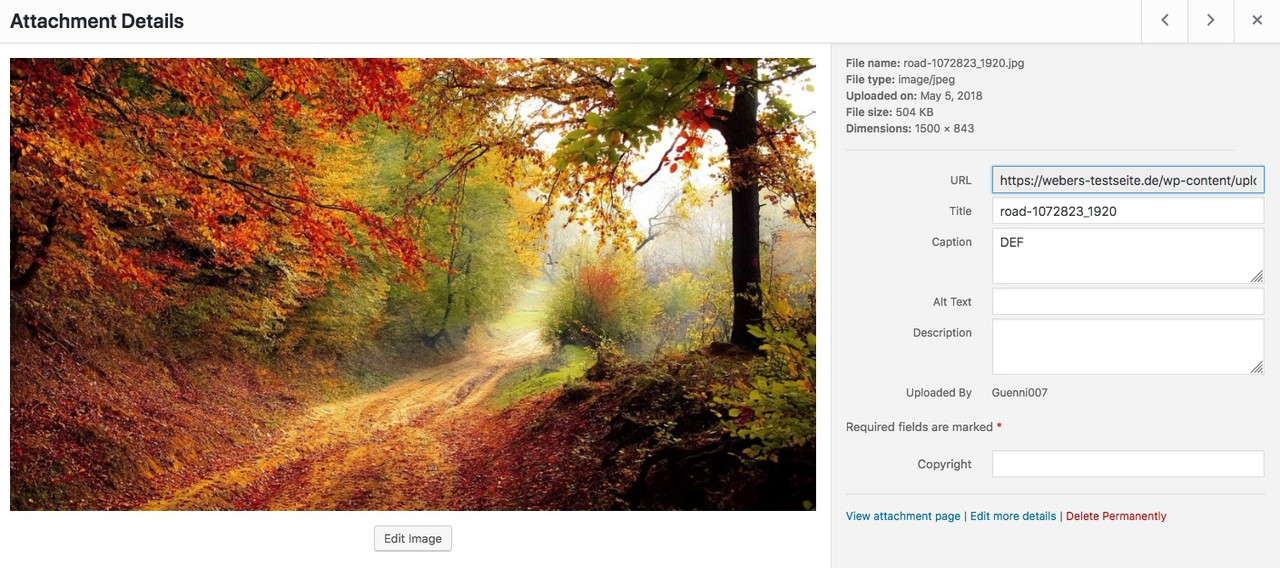
or on media library you can see where the caption is.
If yo like to have a different field – better tell me:
 September 28, 2018 at 3:16 pm in reply to: Adding caption to each slide in horizontal gallery #1015761
by the way – for screens under 768px:
@media only screen and (max-width: 767px){
	.text-under-image {
	    position: absolute !important;
	    background-color: #fff;
	    bottom: 0;
	    left: 50%;
	    transform: translateX(-50%);
	    padding: 0 30px;
	    margin: 0 !important;
	    text-shadow: 1px 1px 2px #aaa;
	    border-radius: 8px 8px 0 0;
	}
}
see example page: https://webers-testseite.de/horizontal-gallery/#next
Yes i see now – but I think that makes sense. To have a field that you can leave blank, because this way the 1st option is always included in the e-mail as a selection.
September 28, 2018 at 1:34 pm in reply to: Adding caption to each slide in horizontal gallery #1015735if you do not like to have this on all horizontal galleries :
give a custom class to the horizontal gallery like: subline-galleryfunction horizontal_gallery_subline(){ ?> <script> (function($){ $(window).load(function() { $('.subline-gallery').css("overflow", "visible" ); $('.subline-gallery .av-horizontal-gallery-link').each(function(){ var linkTitle = $(this).attr('title'); $(this).before('<p class="text-under-image">' + linkTitle + '</p>'); $('.text-under-image').css({ "text-align": "center", "margin": "0.2em 0", }); }); }); })(jQuery); </script> <?php } add_action('wp_footer', 'horizontal_gallery_subline');it is much more easy to give you an advice if there was a life link to the concerning page.
September 28, 2018 at 12:52 pm in reply to: Adding caption to each slide in horizontal gallery #1015728you can try this in your child-theme functions.php:
function horizontal_gallery_subline(){
?>
<script>
(function($){
    $(window).load(function() {
	   $('.av-horizontal-gallery-link').each(function(){
            var linkTitle = $(this).attr('title');
            $(this).closest('.av-horizontal-gallery').css("overflow", "visible" )
            $(this).before('<p class="text-under-image">' + linkTitle + '</p>');
            $('.text-under-image').css({
            	"text-align": "center",
            	"margin": "0.2em 0",
            });
        });
    });
})(jQuery);
</script>
<?php
}
add_action('wp_footer', 'horizontal_gallery_subline');
see here: https://webers-testseite.de/horizontal-gallery/
btw: this will work with active image style enlarge too
September 28, 2018 at 11:09 am in reply to: Close popop/modal using back button without changing url #1015697on my desctop ismaels code works : https://webers-testseite.de/fullbackground/
can you try if it is on mobile working too?
lies mal hier – vielleicht hilft das weiter: https://kriesi.at/support/topic/remove-archive-from-category-page-title/
für meine Begriffe ist hier der Plural richtig.
Aber ich glaube auch, dass dies eher von WordPress selber gesteuert wird – als vom Thema.
Sorry da musst du wohl auf einen der Coder hier warten.can you show me the place where Archiv is shown – i can not see either on en nor on de
even in source code no “archiv” found
or do you mean the body class? – it’s a cruel idea to translate the class namesedit: or is it in the head section the title tags ( and opengraph title tags ) ?
what do you expect is different on SEO point of view if there is “Allgemein Archiv” instead of “Allgemein Archive” ?-
This reply was modified 7 years, 6 months ago by
no private content for me – i’m participant as you.
isn’t it on english : archives ? pl.
what is the plural of Archiv in german ? ;)and on singular:
english: archive
german: Archiv
_______
show me a link – maybe you are right .but be carefull with German lang files there is a “Du” and a formal “Sie” translation.
So first have a look what kind of salutation you have choosed in wordpress settings.
You then have to edit the formal or normal po filesGuess you choosed the “Sie” formal addressing – because this is not translated in de_DE_formal.po:
Choose the archive sidebar position here. This setting will be applied to all archive pagesbut i think Ismael that should be implemented as default if this field is a required one.
by the way : i can see your icons on my end here
and on one of the fixed background-images there is a 300x200px image (very blurry on this)First is : what do you prefer for your domain : the www or the non www version?
try to fix this too.I think it will be best to use a search and replace plugin for your database here.
I use for this: https://wordpress.org/plugins/search-and-replace/
actually quite easy to use.
But it’s better to backup the database first. This tool already offers that.
so on that
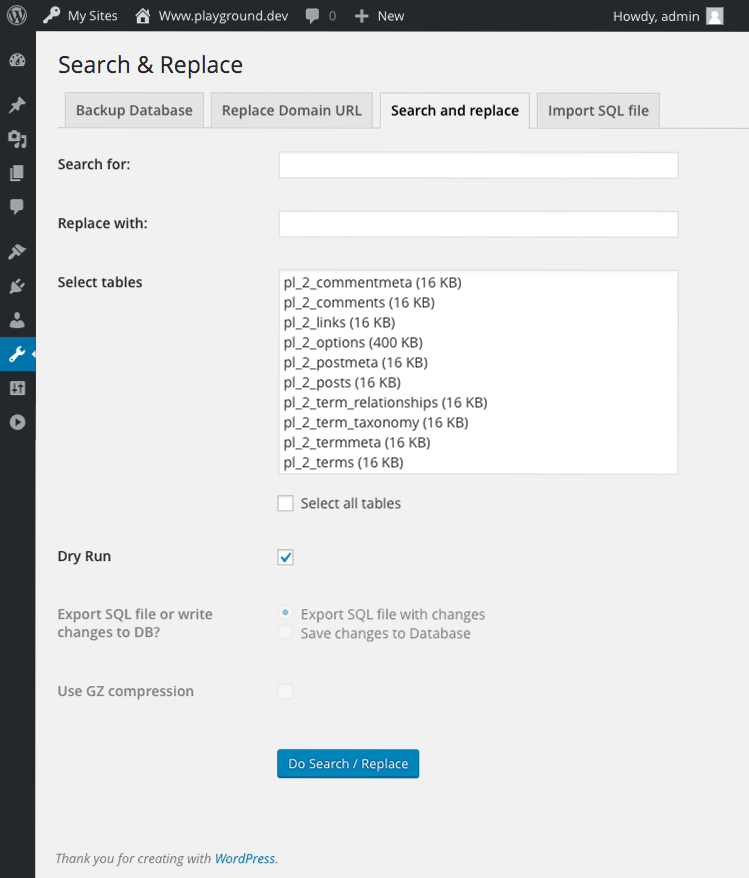
( that is the reason why i ask for www or not !!!) normaly i would search and replace for a part of thr urlsearch for: headstudios.com
replace with : zoebooth.comthe more specific the better – so if you prefer www then:
search for: http://www.headstudios.com
replace with : http://www.zoebooth.comto look for the whole domain with .au is protected (therefor the tool got “replace Domain url” – but this you allready done.
you can do a dry run or do it directly in all tables and write to database -
This reply was modified 7 years, 5 months ago by
-
AuthorPosts
