Forum Replies Created
-
AuthorPosts
-
may i see your site please – think of – i’m participant as you are and can not see private area
maybe a search on google could help you : look for wordpress and nested shortcodes f.e.: https://slewis.org/nested-wordpress-shortcodes/
it all is about setting filterpriority – and be carefull on dooing that too early – maybe a mod could give you a hint on what priority ( 10 or 20 …) it is best to implement.
this comes to child-theme functions.php:define('filter_priority', 10); add_filter('the_content', 'do_shortcode', filter_priority); add_filter('widget_text', 'do_shortcode', filter_priority);– A nice idea ! indeed – and in combination with f.e. restrict widget plugin you can define for different pages in a quick manner different footers.
______________________
Off-Topic: by the way i showed a way to have a second footer widget row in the footer – or to have a widget row in socket here:
https://kriesi.at/support/topic/second-widget-line-in-footer/all you need is a custom child-theme footer.php and one entry in child-theme functions.php:
here for footer: https://kriesi.at/support/topic/second-widget-line-in-footer/#post-1156806
here for Socket: https://kriesi.at/support/topic/second-widget-line-in-footer/#post-1156800it will end in an extra setting in enfold options dialog f.e.:
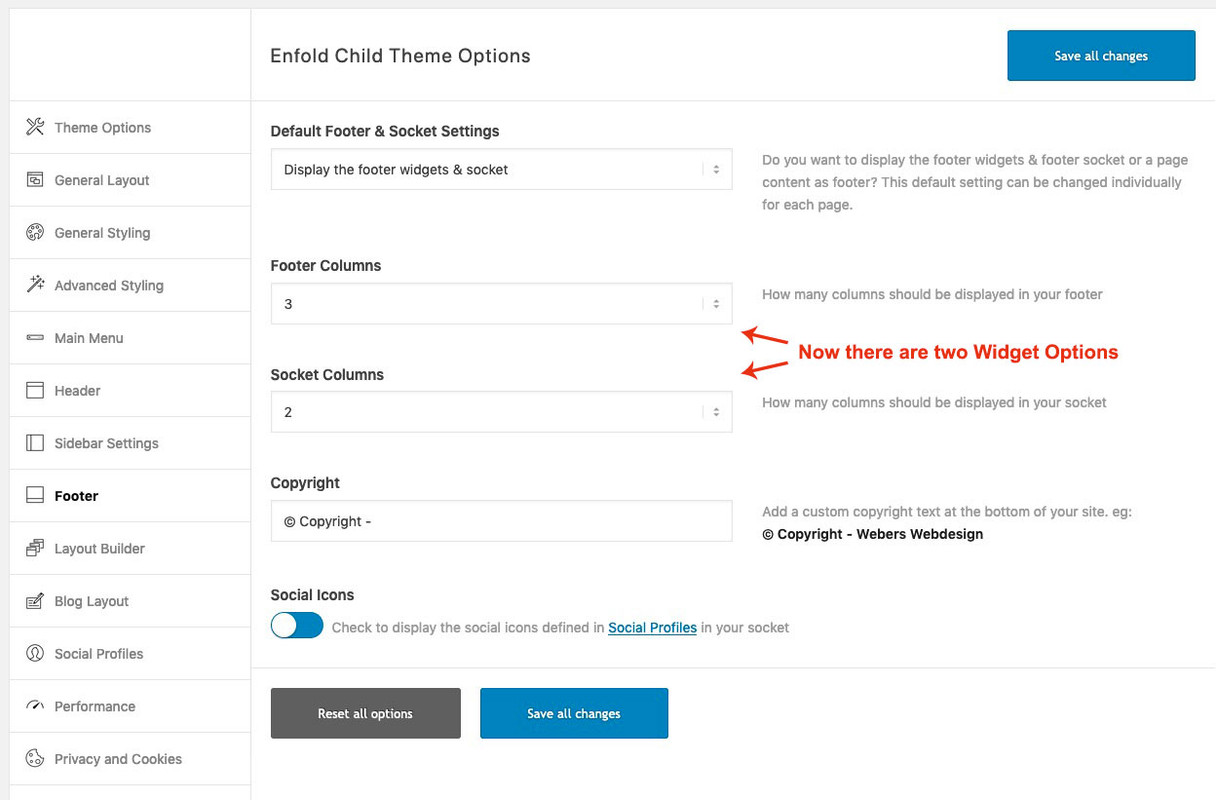
This is meant to be a suggestion: https://webers-testseite.de/sticky-sidebar/
The sidebar is fixed as long as the content container can scroll. If the sidebar has more content than the screen height – it is recommended to scroll at the end.
you have to transfer this to sidebar left and to your page-id.
Here you can see another page with same idea: https://webers-testseite.de/sticky-elements/
or here: https://webers-testseite.de/layout-mimic/. – see whats happening on the end of the page. ;)December 11, 2019 at 11:39 pm in reply to: Galerie: Nicht verbundene Bilder erkennen und löschen #1165017there are some plugins – and most of them make a backup of marked for delete images.
f.e.: https://wordpress.org/plugins/media-cleaner/Make yourself a backup of media library and test yourself
PS : a lot of tools to redirect – and even Yoast SEO did it this way.
But i try to find a solution to completely hamper creation of those attachment pages – but didn’t found one.Well this is a wordpress feature –
if you go to your media library and open one image to edit – there is an attachment page.
If you are using Yoast SEO there is an Option to do this : redirect image attachment page to something.if you not using it – and you don’t like to use a plugin – you can redirect all image attachment pages f.e. to your homepage via child-theme functions.php:
function image_redirect_attachment_page() { if ( is_attachment() ) { global $post; if ( $post && $post->post_parent ) { wp_redirect( esc_url( get_permalink( $post->post_parent ) ), 301 ); exit; } else { wp_redirect( esc_url( home_url( '/' ) ), 301 ); exit; } } } add_action( 'template_redirect', 'image_redirect_attachment_page' );Many thanks – I like people with good behaviour. ;)
Anyway – under my nick there is my contact information, if you know where the layout goes, then I’m happy to help.
But with your code above, which you used, I don’t think a special help is necessary. Sometimes you just can’t get to the simplest things, like the Order option of a Flex layout.
Otherwise my example pages are mostly without merging, so that you get quite far with the developer tools to pick out the css instructions.December 10, 2019 at 10:19 am in reply to: What's the best way to build a "catalog" page (a page showing all my products)? #1164355yes – for book collections there is a lot to do, and this is also a good idea to have a special custom post format on this, because there could be special keywords (like ISBN numbers etc.) .
Most of the time these plugins create only custom post type ( often shorted to CPT – if you see that) , as we have seen from the portfolios.That could be advantageous in your case.
What I see on the old example page, however, would work without problems only with Enfold elements.
You just have to look through the function of a blog page a bit more.
Don’t worry – every question is a good one; stupid are people who have no questions.Enfold presents some Options on showing a blog page ( i prefer to style it with ALB Element ) but you can set any page to show the blog ( if you have only one ) by setting it on Enfold Options – Theme Options = “And where do you want to display the Blog?” here you have the choice to set a page as Blog Page.
Under Enfold Options – Blog Layout – you have different settings on that page. ( you need the grid layout ) etc. pp.December 10, 2019 at 10:13 am in reply to: What's the best way to build a "catalog" page (a page showing all my products)? #1164353look to your other topic.
You have your single Books in Posts – so use first Blog Element to show these Posts in a Grid view.More and more I come to the conclusion that you may not have discovered the Enfold typical editor yet.
With your 18 topics, that might be the case.
First of all I recommend you to disable the Block Editor (Gutenberg). I find this only confusing in connection with Enfold.
This can be done under Dashboard – Enfold (or Enfold Child) – Theme Options = Select Your EditorThen you have a button below the Title input field of each Editor Page ( Pages / Posts/ Portfolio) : Advanced Layout Editor. If you press this button, then these Advanced Layout Builder Elements ( ALB Elements) will appear above the layout window (sometimes this is not quite clear in the theme because Avia Layout Builder is also used as a name).
This is indeed the great strength of this theme. An intuitive layout design via drag and drop; sometimes with a little too many settings, but most of them are quite useful and have grown over time.
December 10, 2019 at 9:58 am in reply to: 4 columns, images over text blocks: please help me align them nicely #1164348Now for those pages that are a collection of existing posts/portfolios there are exactly the blog representations.
Because I see that you have probably created the individual book pages all as posts. So you have the possibility to drag the element “Blog Posts” from the tab “Content Elements” to e.g. a color section. If you want to have a sidebar there, just drag it into a 1/1 container.

Then you can choose the grid display in the element “Blog Posts”.

Whenever you then add a new post in the category, the new entry will automatically appear on the overview page.or maybe this is something for you: https://kriesi.at/documentation/enfold/example-of-widget-left-logo-center-widget-right-menu-below/#toggle-id-2
It is working with widgets in that area.But you already know that you probably chose the option : “Header is invisible and appears once the users scrolls down”?
And what do you mean by “When I comment out the script in the quick css-field, than the desktop-display is OK again.”
Quick CSS Input is not at all a place for a script.you see the code i used to insert the additional containers.
It is easy to have there additional attributes on the spans ( title, alt etc.) – the code could be language specific because you can build if clauses on that case.
If you need different links on these left and right sentences – maybe it is better then to have siblings of the span.logo container instead.
i do not know how your prefered header looks like. So describe a bit more. On your example image above it seems to be that your logo is on top and navigation below.on a customer page i did it just with one svg file – and on smaller screens i shift the groups the way i want.
It is a bit more work before – but you have a lot of advantages on that. Fill options etc. pp
OR: with your setting of logo on top nav below: https://webers-testseite.de/cynthia/logo-top-two-subs/you can set for wide screens on flex layout the logo container to 100% width and set justify-content to space-around.
See here: https://webers-testseite.de/cynthia/logo-two-subs/
i have on that logo ( img , span1, span2 )
on wider screens i handle logo a as display flex and set the order this way that span1 is before img.
on mobile i go back to display block and can now position the spans absolute and float options.by the way i did not think on that function – i just added both spans with:
( so i have these as siblings to logo img )function add_logo_elements() { ?> <script> (function($){ $('.logo a').append('<span class="on-left">My Company</span><span class="on-right">My Slogan</span>'); })(jQuery); </script> <?php } add_action('wp_footer', 'add_logo_elements');What would be your idea how the mobile version should look like?
have you looked to the date of that question ( and solution) ?
Ok – try this in child-theme functions.php:
function my_avf_post_nav_entries( array $entries, array $settings, array $queried_entries ){
  $next = $entries['next'];
  $entries['next'] = $entries['prev'];
  $entries['prev'] = $next;
  return $entries;
}
add_filter( 'avf_post_nav_entries', 'my_avf_post_nav_entries', 10, 3 );
__________
Off-Topicto have the same category this would be nice to have:
function my_avf_post_nav_settings( array $settings ){
  if( true === $settings['is_hierarchical'] ){
    $settings['skip_output'] = true;
    return $settings;
  }
  if( ! in_array( $settings['type'], array( 'post', 'portfolio' ) ) ){
    $settings['skip_output'] = false;
    return $settings;
  }
  $settings['same_category'] = true;
  $settings['is_fullwidth'] = false;
  $settings['skip_output'] = false;
  return $settings;
}
add_filter( 'avf_post_nav_settings', 'my_avf_post_nav_settings', 10, 1 );
December 9, 2019 at 1:40 pm in reply to: Flex column animation at the end of a page not triggering #1164031you can use the implemented waypoint script but have your own settings with child-theme functions.php.
for some enfold animations it is only necessary to have fired it once the point of triggering is passed. But sometimes it is nice to include if scroll-direction is important:
f.e. if you like to move a container from off-screen to the center – and on scrolling up it will go off-screen againfor that i use to toggle a class to which i can give the animation rules. The element to observe gets a custom class ( f.e. inview )
function scroll_up_down_change() {
?>
<script>
    (function($) {
	var element_to_animate = $('.inview');
	element_to_animate1.waypoint(function(direction) {
		if (direction === 'down') {
			$(this.element).addClass('animate-now');
		}
	 },{offset: '90%'}
	);
	element_to_animate1.waypoint(function(direction) {
		if (direction === 'up') {
			$(this.element).toggleClass('animate-now');
		}
	 },{offset: '90%'}
	);
})(jQuery);
</script>
<?php
}
add_action('wp_footer', 'scroll_up_down_change', 9999);
then you can play with offset too.
By the way i believe the 100% offset is if it comes on the bottom into view – so maybe the 90% will do the trick on the change aboveSee here the last button on that page uses 90% : https://webers-testseite.de/buttons/
and an enfold animation – but you can have your own keyframes aswell – just define it for the toggled class.
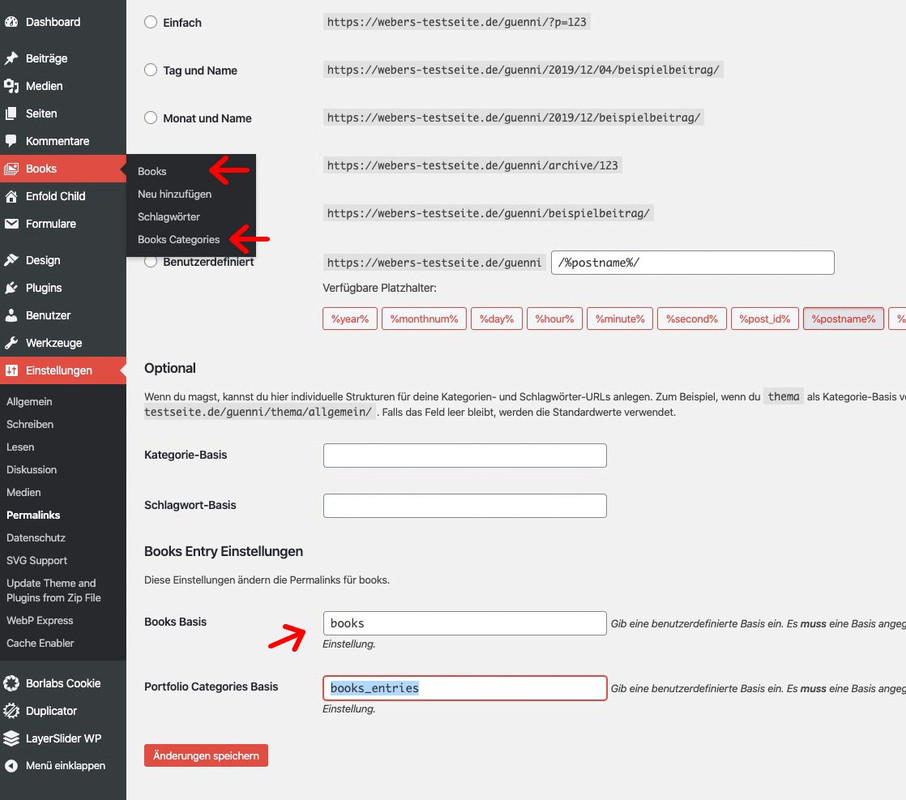
Or: See here how it can be used to change header_bg background-color on color-section dependencies.: https://kriesi.at/support/topic/menu-bar-with-dynamically-changing-colors-referencing-the-background/#post-1161520December 9, 2019 at 10:30 am in reply to: Can I rename "Portfolio Items" to something my content team will relate to? #1163988hm ? i did not do that Ismael and see image above: Link and my Categories Label is that way. The only thing left as portfolio is the permalink settings. ( same Image – over that red button “Änderungen speichern” )
on former times that was a hard stuff to realize. – Because the list-style-image had a bad browser support but it seem that time has changed a bit:
https://caniuse.com/#search=list-style-imageif you like to have that sonar effect too: just replace the first part : overflow:hidden to overflow:visible see testpage:
.av_font_icon.av-icon-style-border.move .av-icon-char {
    position: relative;
    display: inline-block;
    overflow: visible;
    background-color: #fff;
	-webkit-transition: background .5s,color .5s,-webkit-box-shadow .5s;
	transition: background .5s,color .5s,-webkit-box-shadow .5s;
	transition: background .5s,color .5s,box-shadow .5s;
	transition: background .5s,color .5s,box-shadow .5s,-webkit-box-shadow .5s;
	border-radius: 50%;
	-webkit-box-shadow: 0 0 0 2px #bbb;
	box-shadow: 0 0 0 2px #bbb;
        height: 80px;
}
and see here – the height must set to the icon dimension for that
because Enfold uses as icons an icon-set and did some dimensions on that by line-height of the entypo fontello font. we must reconstruct a bit on that. On your example page there are svg as icons!
If you choose the big icon alb and animation only have icons with links.
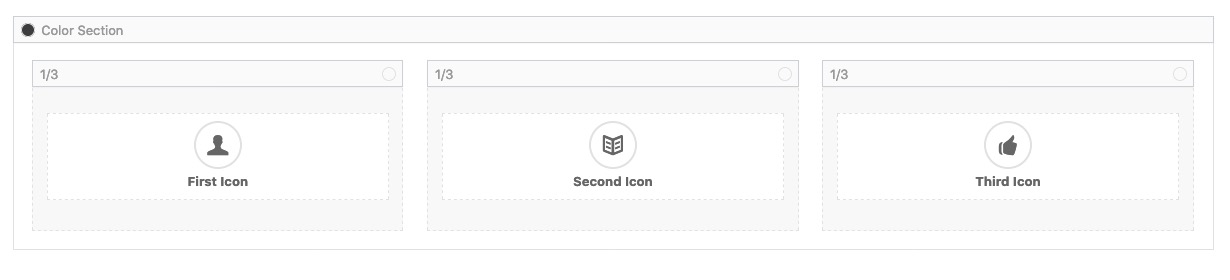
you must look to that setup : i have choosen 80px icon-height ! this had to be synchronized with one css setting of that effect.
I gave to the icon alb elment a custom-class of: movehere is the result: https://webers-testseite.de/icon-in-motion/
what i now try to achieve is that the radar effect of enfold is included to that effect.
here is the interims code:
.av_font_icon.av-icon-style-border.move .av-icon-char { position: relative; display: inline-block; overflow: hidden; background-color: #fff; -webkit-transition: background .5s,color .5s,-webkit-box-shadow .5s; transition: background .5s,color .5s,-webkit-box-shadow .5s; transition: background .5s,color .5s,box-shadow .5s; transition: background .5s,color .5s,box-shadow .5s,-webkit-box-shadow .5s; border-radius: 50%; -webkit-box-shadow: 0 0 0 2px #bbb; box-shadow: 0 0 0 2px #bbb; height: 80px; } .av_font_icon.av-icon-style-border.move .av-icon-char:hover { background-color: #6b6b6b; -webkit-box-shadow: 0 0 0 6px rgba(0,0,0,.1); box-shadow: 0 0 0 6px rgba(0,0,0,.1); } .av_font_icon.av-icon-style-border.move .av-icon-char:before { position: absolute; left: 50%; top: 50%; -webkit-transform: translate(-50%,-50%); transform: translate(-50%,-50%); } .av_font_icon.av-icon-style-border.move .av-icon-char:hover:before { animation: toRightFromLeft .5s forwards; color: #fff } /*** animation for that ****/ @-webkit-keyframes toRightFromLeft { 49% { -webkit-transform:translateX(100%) translateY(-50%); transform:translateX(100%) translateY(-50%) } 50% { opacity:0; -webkit-transform:translateX(-100%) translateY(-50%); transform:translateX(-100%) translateY(-50%) } 51% { opacity:1 } } @keyframes toRightFromLeft { 49% { -webkit-transform:translateX(100%) translateY(-50%); transform:translateX(100%) translateY(-50%) } 50% { opacity:0; -webkit-transform:translateX(-100%) translateY(-50%); transform:translateX(-100%) translateY(-50%) } 51% { opacity:1 } }first a few words: in a development phase in which you want to get help it would be nice to release the context menu button of the mouse on a website. Then it would be good if also optimization tools and merging were switched off; only then it is possible to localize the rules exactly which disturb.
Then you can also say exactly where rules and the also still important useless too much were set. That was also the case here. So now to the first attempt:Get rid of some rules in your code :
f.e.: ( as i said i can not give advice because of merging tools )@media only screen and (min-device-width :375px) and (max-device-width :736px) and (orientation :portrait){ .responsive .logo img { height:130px!important; max-height:130px; width:300px; max-width:300px } }There must be similar rules that are for screenwidth less than 990px – they were set sometimes to important – thats why they disturb the real interaction.
my rules here are set to important – the only way to get them work because other logo rules ( container and image) are present too here:
maybe you can do it without important when the set of competing rules has been removed.@media only screen and (min-width: 768px) and (max-width: 989px) { .responsive .logo { position: absolute !important; width: 100% !important; } .responsive .logo img { max-width: inherit !important; max-height: 250px !important; } } @media only screen and (max-width: 767px) { .responsive .logo { position: relative !important; width: 100% !important; } .responsive .logo img { max-width: inherit !important; max-height: 250px !important; margin-top: 50px !important; } }btw: Is the placement of the shopping cart there wanted?
In the responsive case, when the screen width becomes small, I have placed it next to the other symbols at the top.See Film: https://webers-testseite.de/celtic.mp4
PS : make the film fullscreen then you can see on top the screenwidth in pxquite confused up there in your css.
What would I do now in a hurry.I would make myself a top 1/1 container ( no color-section) with your logo ( image ALB Element) in it, and link that image to the homepage.
I would only display this container in the responsive case, while I would set the entire logo (span.logo) container to Display: none.
Then only a small correction regarding #main padding would be necessary. Done.
So that you don’t have to set this container on all pages, I would set it with jQuery as first-child of #main on all pages.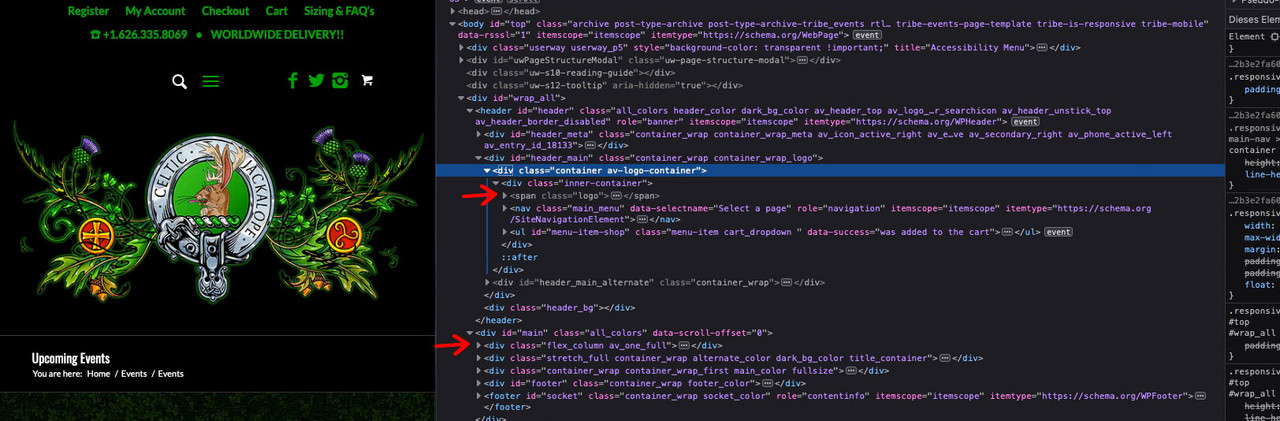
See here a quick test page : https://webers-testseite.de/cynthia/special-header/
you can insert this image on each site by filter
add_action('ava_after_main_container', function() { echo do_shortcode("[av_one_full …]…[/av_one_full]"); });Anyway the fact is that there are empty p-tags:
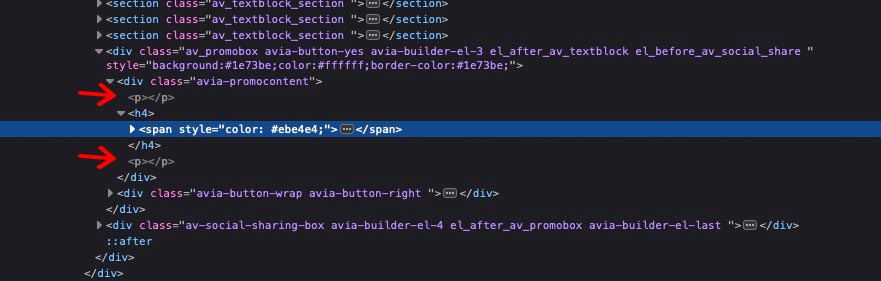
and that is because of the rule above the reason for different behavior.See here your first link markup:
 December 7, 2019 at 2:31 pm in reply to: desktop 3 columns > tablet 2 columns > mobile 1 column #1163572
Bitte – gern geschehen.
Das kann man natürlich auch auf andere Elemente von Enfold übertragen. Iconboxes etc. pp
Immer wenn gleiche Elemente auftauchen, die in einem gemeinsamen Elternelement stecken.
Gilt zB auch für Listenpunkte – oder Hauptmenu Navigations Punkte.
Bis dannEdit: That was a little too much urge to communicate here in this answer – therefore : away with it.
The above is enough for your solution.i guess your site with promo box on the second case is built inside a text-block ? or similar to it.
The wpautop filter adds some empty p-tags ( <p></p> ) here :
and because of rule that influences headings as sibling of p-tag :p + h1, p + h2, p + h3, p + h4, p + h5, p + h6 { margin-top: 1.5em; }there will be that outlook.
you can redefine the rule for promo-box – or deactivate wpautop filter in WordPress. (Or remove with one child-theme functions.php snippet all empty p-tags at all:
function remove_empty_p_tags(){
?>
<script type="text/javascript">
(function($) {
    $('p:empty').remove();
})(jQuery);
</script>
<?php
}
add_action('wp_footer', 'remove_empty_p_tags');
the margin on bottom of the whole promo-box is the same in both cases – but top margin is set here to another value – look into developer tools to see difference
December 7, 2019 at 9:00 am in reply to: desktop 3 columns > tablet 2 columns > mobile 1 column #1163547and here you see next advantage – the columns “width” 1/3 has no influence – what do you think would happen if i declare this for large screens?
@media only screen and (min-width:1800px) {
  .three-two-one .entry-content-wrapper .flex_column {
    flex: 0 1 15%;
  }
}
December 7, 2019 at 12:21 am in reply to: desktop 3 columns > tablet 2 columns > mobile 1 column #1163497on my test page i took a different screen-width range.
/****  your tablet definitions - play with the values as you like  ***/
@media only screen and (min-width: 600px) and (max-width: 989px) {
  .three-two-one .entry-content-wrapper .flex_column {
    flex: 0 1 47%;
  }
}

/*** this is not necessary because on that screen-width the Enfold default is 100%  ***/
@media only screen and (max-width: 599px) {
  .three-two-one .entry-content-wrapper .flex_column {
    flex: 0 1 100%;
  }
}
you decide what looks best for your page
All new browser can do that – but if you like to have a better browser coverage – see here: https://kriesi.at/support/topic/browser-specific-css/ -
AuthorPosts