

Forum Replies Created
-
AuthorPosts
-
March 13, 2021 at 6:42 pm in reply to: Special Character Plugin Not Found – 500 Internal Error #1288043
i see your logo on your page – does it break your layout ??? – no – so ?
it might – conditional case
As i said above – this is not a selfdestructing information – try it – if it works – good – if not change it.March 13, 2021 at 1:09 pm in reply to: Special Character Plugin Not Found – 500 Internal Error #1287946yes: this is not a warning that you have activated the self-destruction button : it might break !
Warning: Characters <,>,[,] might break ALB backend or frontend. Read more if you want to use them. You can use valid HTML markup.
And you see in detail what characters could indicate that. – those which are correlated with code ( tags etc. )
March 12, 2021 at 11:19 pm in reply to: Special Character Plugin Not Found – 500 Internal Error #1287892i do not really know what you might think this plugin does. If it is only to insert a html entity that could not be seen – it is not neccessary.
you can insert   ; without that space ( between p and semicolon ) – and you will have a invisible heading there – where you can insert your logo either as pseudo-container background like here: https://webers-testseite.de/tesla/
you see that i did it a bit different – you can make this heading invisible by font color : transparent ( i let it at opacity 0.1)
or set the text-indent to a big value ( -2000px). the advantage would be a SEO one – because there is a heading f.e. Tesla Logo then.
i gave a custom class to the slider: tesla.tesla .slide-1 .avia-caption-title { color: rgba(255,255,255,0.1); } .tesla .slide-1 .avia-caption-title::before { content: ""; width: 100px; height: 100px; position: absolute; left: -60px; top: -60px; background-image: url(/wp-content/uploads/TESLA-logo.png); background-repeat: no-repeat; background-size: contain; }or – you replace the content directly with the image:
.tesla .slide-1 .avia-caption-title {
    content: url(/wp-content/uploads/TESLA-logo.png);
}
if this will work on all browsers – i don’t know
This above is only for slide-1 – if this should be for all slides – let that class out from the css codeThere must be a conflict that may have nothing to do with Enfold. Forcing a jpg or a pdf download is more complex, but a zip is actually always made available for download automatically.
Your page above is inaccessible.everything you need is flex modell and instructions vor you are here: https://webers-testseite.de/8col-flex/#av_section_3
blue background ( layout was 10x 1/5columns – that is the reason for that custom-class 10-columns ) but i erased 3 so there are in one color-section these 7x 1/5 columns and nothing else
that flex modell works it is important that no other elements can be part of the styling. !!!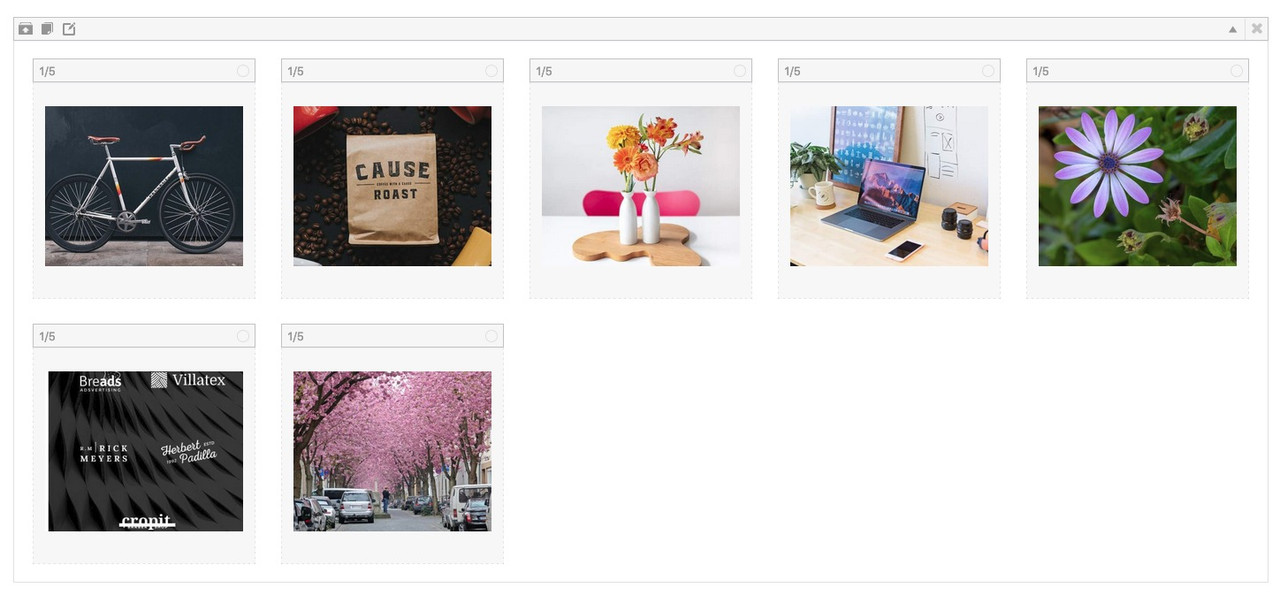
btw – very good instructions : https://css-tricks.com/snippets/css/a-guide-to-flexbox/
when you are in editor mode and have your Advanced Layout Builder open – click that sign besides templates:
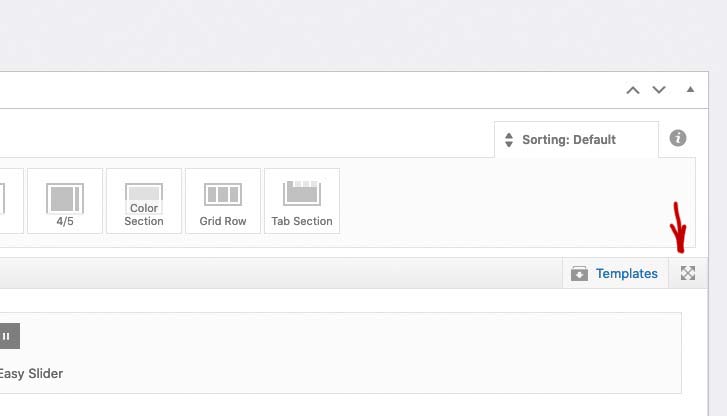
here you are. After editing you have on top right these three buttons Preview, Update and Close.
if it is this way – that your customer like to change on the alb the background-image of color-section/slider etc. This could not be done by css only.
These images (svgs) had to be injected as additional elements as inline-svgs via child-theme functions.php
hint:
$(‘.avia-section.divider.top1’).prepend(‘<svg class=”top” ……… preserveAspectRatio=”none”></svg>’);
$(‘.avia-section.divider.bottom1’).append(‘<svg class=”bottom” ……… preserveAspectRatio=”none”></svg>’);the divider class indicates that there will be dividers – and it is for preparing the color-section ( display : relative not static )
and if i give then in addition a custom-class: top1 to the color-section it will prepend that svg to it and if the custom class is bottom1 it will append.
in this way:<div class="avia-section … <svg ( inline for the top ) </svg> <div class="container">… </div> <svg ( inline for the bottom ) </svg> </div>look to that link: https://kriesi.at/support/topic/diagonal-border-angle/#post-1138144
the rest is css positioningsee doku of Enfold: https://kriesi.at/documentation/enfold/svg-dividers/
and look with developer tools to it:
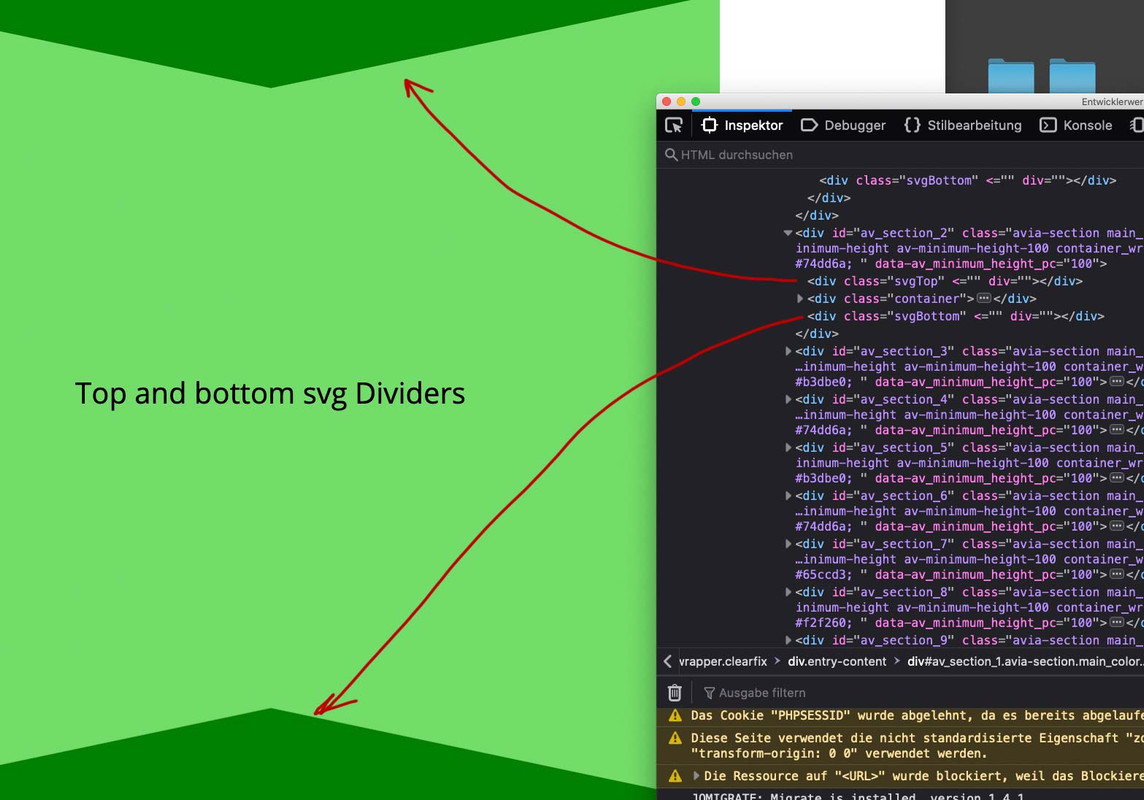
One thing is to mention – the svgs had to be well prepared to insert them in this way.
yes – but this additional information would not have been bad to know at the beginning.
So best would be to use the normal Enfold Background-Image Insertion by the ALB Element itself – and then bring some dividers on top f.e. by custom class.
This will be best – by handling svgs inserted by a custom class of the color-section to the right place in the dom
This might be the best place for it: https://kriesi.at/support/topic/curved-section-dividers/#post-1212353
If you do it the right way – even animated svgs could be inserted: see the bottom of that page: https://webers-testseite.de/pureinstall/fullwidth-slider/A littel help is here: https://kriesi.at/support/topic/diagonal-border-angle/#post-1138048
but this will be more a tutorial here then a little help.
Get familiar with svg and and … sorry to much to say here .and if your … dourleur-chronique image is again with transparency – you can define a background-color on the end:
example code with my page-id.page-id-30559 .three-bg-images { background-image: url('https://webers-testseite.de/wp-content/uploads/double-wabe-bot.png'), url('https://webers-testseite.de/wp-content/uploads/bandeau_1920.jpg') , url('https://webers-testseite.de/wp-content/uploads/clinique-transparent.png'), linear-gradient(45deg, #1e5799 0%,#7db9e8 100%); background-repeat: no-repeat; background-position: left bottom,left top,center center, left top; background-size: contain,100% 20px,cover, 100vw 100%; }As you can see on my test page and in the instructions if you got 2 images in one container as background – you can have 2 instructions each for:
background-position, background-size, background-repeat etc. pp. every background value can be twice same separated by commata.i do not see on your page that custom class: blog-divider – so it is hard to give advice.
on my test-page from above i put in my page your images – and here is the code for that page:
https://webers-testseite.de/multiple-background-images/#av_section_4.page-id-30559 .three-bg-images { background-image: url("/wp-content/uploads/double-wabe-bot.png" ), url("/wp-content/uploads/bandeau_1920.jpg" ) , url("/wp-content/uploads/clinique-synapse-comprendre-la-douleur-chronique.jpg" ) ; background-repeat: no-repeat; background-position: left bottom, left top, center center; background-size: contain , 100% 20px , cover; }These are layered atop one another with the first background you provide on top and the last background listed in the back. Only the last background can include a background color.
if you got for all the same value ( like above – background-repeat – you can write down shorten : background-repeat: no-repeat)
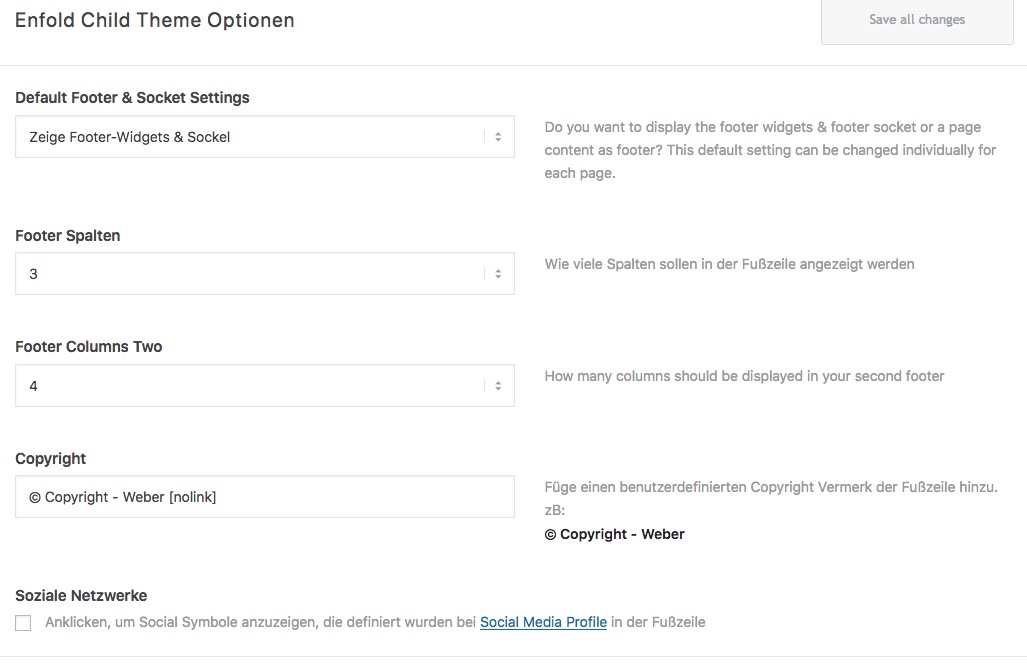
so the bug still exists. ( on your site ) becaue i do see on both languages the copyright input field
March 10, 2021 at 11:02 am in reply to: Footer: insert a row below the "footer – columns1, 2 and 3" #1287039by the way – more complex – something for techies ;)
a second footer row – with admin options to style – either in the footer a second footer row – or in the socket one! ;)https://kriesi.at/support/topic/second-widget-line-in-footer/
 March 10, 2021 at 10:44 am in reply to: Footer: insert a row below the "footer – columns1, 2 and 3" #1287034
or you use Rikards nice hook to insert a shortcode
just style f.e. on a testpage without any surrounding containers a partner logo alb element. With all styling and links you need –
aktivate the debug mode (link) and use the shortcode to insert that partner alb at that place by:
if you want it on all pages just get rid of the if clause. ( don’t forget the closing bracket then to remove too)add_action('avia_after_footer_columns', function() { if ( is_page(31169) ) { echo do_shortcode("place-the-shortcode-here"); } });my test was with : https://pastebin.com/n1pMA0S1
see here: https://webers-testseite.de/partner-logos/
with it you can even have animation (slide, fade) etc.for text you can use a min max combination for font-size :
f.e.:
font-size: min(max(28px,2.4vw),42px) !important;see here: https://css-tricks.com/how-do-you-do-max-font-size-in-css/
and
https://css-tricks.com/snippets/css/fluid-typography/the boxed layout / stretched layout ? i have a look if it is possible …
that seem to be solved by css only
f.e: for home
#top.boxed.home { width: 100% !important; max-width: 100% !important; }layout framed to stretched is harder to get
maybe this is a good start but there had to be other adjustment to do i guess:because the postid-xy or the page-id-xy goes to html as class: html_entry_id_xy
.html_entry_id_395 .av-frame { display:none !important } html.html_av-framed-box.html_entry_id_395 { padding: 0; } .html_header_top.html_header_sticky.html_av-framed-box.html_entry_id_395 #header_main, .html_header_top.html_header_sticky.html_av-framed-box.html_entry_id_395 #header_meta { margin: 0; } html.html_entry_id_395 .avia-post-nav.avia-post-next { right: 0 !important; } html.html_entry_id_395 .avia-post-nav.avia-post-prev { left: 0 !important }you can add a lot of additional settings above
$header['header_shrinking']   =  'header_shrinking';
$header['header_class'] .= " av_header_shrinking";
or
$header['header_transparency'] = 'header_transparency';
$header['header_class'] .= " av_header_transparency";
but some of the settings are mutually exclusive. So I don’t know if a header on the left with a transparent header makes sense.
the other layout change could be done via filter: avf_header_setting_filter
f.e.:add_filter('avf_header_setting_filter','av_change_header_style'); function av_change_header_style($header){ if(is_page('2089')){ $header['header_position'] = "header_left header_sidebar"; //think of the classes to set - and the first class in that list has to have that one space before ! $header['header_class'] .= " av_header_left av_header_sidebar"; } return $header; }A custom color scheme you can have by this in your child-theme functions.php and the filter: avf_skin_options
( you find the existing color-schemes in folder: enfold – includes – admin : register-backend-styles.php
but that would not help you to have on page1 that color-scheme and on a different page the other.function my_custom_added_style_function($styles = "") { $default_primary = "#2d5c88"; $default_highlight = "#3d71a1"; $default_background = "#041424"; $special_border = "#0A2138"; //put your own Name for the style $styles["Guennis Style"] = array( "style"=>"background-color:$default_primary;", "default_font" => "Open Sans:400,600", "google_webfont" => "Open Sans:400,600", "color_scheme" =>"Guennis Style", // header "colorset-header_color-bg" =>"#ffffff", "colorset-header_color-bg2" =>"#f8f8f8", "colorset-header_color-primary" =>"$default_primary", "colorset-header_color-secondary" =>"#444444", "colorset-header_color-color" =>"#333333", "colorset-header_color-border" =>"#e1e1e1", "colorset-header_color-img" =>"", "colorset-header_color-customimage" =>"", "colorset-header_color-pos" => "top center", "colorset-header_color-repeat" => "repeat", "colorset-header_color-attach" => "scroll", 'colorset-header_color-heading' => '#000000', 'colorset-header_color-meta' => '#808080', // main "colorset-main_color-bg" =>"#ffffff", "colorset-main_color-bg2" =>"#fcfcfc", "colorset-main_color-primary" =>"$default_primary", "colorset-main_color-secondary" =>"$default_highlight", "colorset-main_color-color" =>"#666666", "colorset-main_color-border" =>"#e1e1e1", "colorset-main_color-img" =>"", "colorset-main_color-customimage" =>"", "colorset-main_color-pos" => "top center", "colorset-main_color-repeat" => "repeat", "colorset-main_color-attach" => "scroll", 'colorset-main_color-heading' => '#222222', 'colorset-main_color-meta' => '#919191', // alternate "colorset-alternate_color-bg" =>"#fcfcfc", "colorset-alternate_color-bg2" =>"#ffffff", "colorset-alternate_color-primary" =>"$default_primary", "colorset-alternate_color-secondary" =>"$default_highlight", "colorset-alternate_color-color" =>"#666666", "colorset-alternate_color-border" =>"#e1e1e1", "colorset-alternate_color-img" => "", "colorset-alternate_color-customimage" =>"", "colorset-alternate_color-pos" => "top center", "colorset-alternate_color-repeat" => "repeat", "colorset-alternate_color-attach" => "scroll", 'colorset-alternate_color-heading' => '#222222', 'colorset-alternate_color-meta' => '#8f8f8f', // Footer "colorset-footer_color-bg" =>"#222222", "colorset-footer_color-bg2" =>"#333333", "colorset-footer_color-primary" =>"#ffffff", "colorset-footer_color-secondary" =>"#aaaaaa", "colorset-footer_color-color" =>"#dddddd", "colorset-footer_color-border" =>"#444444", "colorset-footer_color-img" => "", "colorset-footer_color-customimage" =>"", "colorset-footer_color-pos" => "top center", "colorset-footer_color-repeat" => "repeat", "colorset-footer_color-attach" => "scroll", 'colorset-footer_color-heading' => '#919191', 'colorset-footer_color-meta' => '#919191', // Socket "colorset-socket_color-bg" =>"#333333", "colorset-socket_color-bg2" =>"#555555", "colorset-socket_color-primary" =>"#ffffff", "colorset-socket_color-secondary" =>"#aaaaaa", "colorset-socket_color-color" =>"#eeeeee", "colorset-socket_color-border" =>"#444444", "colorset-socket_color-img" =>"", "colorset-socket_color-customimage" =>"", "colorset-socket_color-pos" => "top center", "colorset-socket_color-repeat" => "repeat", "colorset-socket_color-attach" => "scroll", 'colorset-socket_color-heading' => '#ffffff', 'colorset-socket_color-meta' => '#999999', //body bg "color-body_style" =>"stretched", "color-body_color" =>"#333333", //bg "color-body_fontcolor" =>"#ffffff", //font "color-body_attach" =>"scroll", "color-body_repeat" =>"repeat", "color-body_pos" =>"top center", "color-body_img" => "", "color-body_customimage" =>"", ); return $styles; } add_filter('avf_skin_options', 'my_custom_added_style_function');Maybe it is no social media :lol: – media : yes – social : ?
in enfold – social profiles – “Your social profiles” you can enter a link but this will be no “share” link.
So it is not part of those : enfold – blog layout – “Share links at the bottom of your blog post”
It will be listed in those features of enfold where the social icons are shown. ( Header or Footer)what – if you do not use the sidebar on that page – and style it this way:
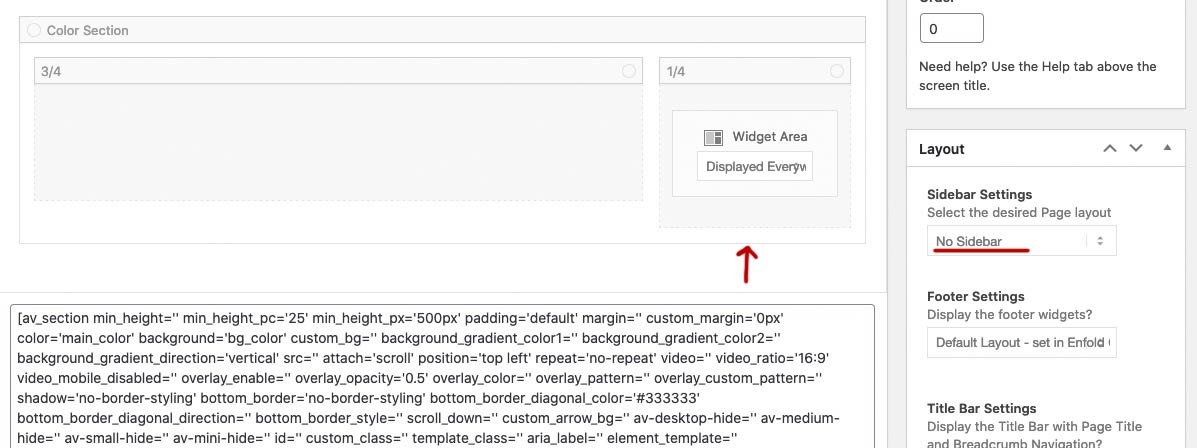
This will look like a sidebar – but is part of the color-section
So another color-section under it will not influence the behavior abovesee here a fullwidth element under the color-section: https://webers-testseite.de/mimic/
By the way Rikard – that little Plugin “Update Themes and Plugins from zip file” was in former times the instrument of choice if I wanted to execute smaller updates – otherwise I have always executed the updates over ftp.
Since I also initially had the 4.8 on it I thought that I will now install the 4.8.1 in this way. In the meantime, this plugin is included in the new WP (5.6.x) versions, which is why you no longer need this plugin with the newer WordPress versions.
So WordPress notices even when uploading a theme zip files, whether it is an existing theme and you can then decide for the update procedure.Why is it fixed on safari and on other browsers not – there it scrolls.
Safari is one browser that can not handle good the css with background-attachment : fixed.
there are workarounds here on board – to set the background-attachment : scroll and place a pseudo-container with the inherited image as background and place the pseudo-container on position : fixedEdit – may i ask you why you had to work with the slider? and not with a 100% color-section. this Element is not so performance intensive.
have a look at: https://webers-testseite.de/jaime/ – with safari/*********** Safari Fix for background-attachment: fixed **************/ /********* give a custom-class to the color-section: bg-fixed ***********/ /***** Set the image to background-attachment : scroll and : **********/ .avia-section.bg-fixed { -webkit-clip-path: inset(0 0 0 0); clip-path: inset(0 0 0 0); background-size: 0 !important; overflow: hidden; position: relative; } .avia-section.bg-fixed:before { background-image: inherit !important; background-repeat: inherit !important; background-size: cover; background-position: inherit; content: ""; position: fixed; width: 100%; height: 100%; top: 0; left: 0; z-index: -1 !important; pointer-events: none; will-change: transform; /*** if you got more than 3 images like this - comment this out ***/ }well if you got no child-theme the place to insert this is just before ( around line 831):
require_once( 'functions-enfold.php');in functions.php there is a comment for that place:
/*
 *  register custom functions that are not related to the framework but necessary for the theme to run
 */
put it in here
my advice is definitly to have a child-theme for enfold – all those nice snippets here from board are very easy to handle then – and are not lost on theme-update: https://kriesi.at/documentation/enfold/child-theme/
maybe 6 columns break to one column is a bad responsive behavior – so go and flex the layout for it f.e.:
in quick css:#footer .container { display: flex; flex-flow: row wrap; justify-content: space-between; } #footer .flex_column { width: unset !important; flex: 0 1 14%; margin-left: 0; } @media only screen and (max-width:1249px) { #footer .flex_column { width: unset !important; flex: 0 1 30%; } } @media only screen and (max-width:989px) { #footer .flex_column { width: unset !important; flex: 0 1 50%; } } @media only screen and (max-width:767px) { #footer .flex_column { width: unset !important; flex: 0 1 100%; } }if you are working with a child-theme add this to your child-theme functions.php:
it will work without any other changings – because in footer.php there is allready a case 6: ;)function my_avf_option_page_data_change_elements( array $avia_elements = array() ){ /*** Example: Customize "Footer Columns Count" array*/ $slug = "footer"; $id = 'footer_columns'; $index = -1; /** Find index of element to change*/ foreach( $avia_elements as $key => $element ){ if( isset( $element['id'] ) && ( $element['id'] == $id ) && isset( $element['slug'] ) && ( $element['slug'] == $slug ) ){ $index = $key; break; } } /** * If key not found, return unmodified array*/ if( $index < 0 ){ return $avia_elements;} /*** Make your customizations*/ $avia_elements[ $index ]['subtype'] = array( __('1', 'avia_framework') =>'1', __('2', 'avia_framework') =>'2', __('3', 'avia_framework') =>'3', __('4', 'avia_framework') =>'4', __('5', 'avia_framework') =>'5', __('6', 'avia_framework') =>'6' ); return $avia_elements; } add_filter( 'avf_option_page_data_init', 'my_avf_option_page_data_change_elements', 10, 1 );what enfold version have you installed.
what WordPress Version is it.
since Wp 5.6 there is jQuery 3.5.1 – but newest Enfold (since 4.8) this should be no problem anymoreyes and did you try that ( above the post was for a specific postid )
You had to change it to your selectorhave a look if this works – then we can go and make it more specific to your needs:
function remove_title_attr(){ ?> <script> (function($) { $(window).on('load', function(){ $('#wrap_all a').removeAttr('title'); $('#wrap_all img').removeAttr('title'); }); })(jQuery); </script> <?php } add_action('wp_footer', 'remove_title_attr');ok – you mean this enfold feature ( yellow underlined in the image) not the tooltip ( red-underlined)

the tooltip over links and images are not influenced by enfold – these are fundamental Settings of browsers to show a tooltip if a title tag is present.
You can remove the title attribute – but is it advisable to do so from an SEO point of view?
Put this to your child-theme functions.php:function remove_title_attr(){ if(is_single(29041)) { ?> <script> (function($) { $(window).on('load', function(){ $('#wrap_all a').removeAttr('title'); $('#wrap_all img').removeAttr('title'); }); })(jQuery); </script> <?php } } add_action('wp_footer', 'remove_title_attr');March 8, 2021 at 1:46 pm in reply to: 1 lightbox for all images of a page (simple slider + images in text/content) #1286440hey mike you can find here account info: https://kriesi.at/support/topic/customized-lightbox-markup/#post-1286046
I had understood him/her to mean that different ALB elements should form a gallery with images in a common lightbox. Also the images that were inserted in a text box, for example.
-
AuthorPosts
