

Forum Replies Created
-
AuthorPosts
-
and you want only to change the background of the footerpage on one specific pages ?
because – why don’t you change the background on the footerpage itself ?next: on my installation the footerpage is in place – and the sidebars aren’t touched in this way – even with curtain effect footer.
see: https://webers-web.info/portfolio/portfolio-post/maybe it is specific to woocommerce. Did you use a custom generated page for the shop page?
the links must reflect the path to your anchors ( so use individual link ) – if you got an anchor on page: imprint – you can use relative path /imprint/#anchor or the absolute path to it. One disadvantage is here – the smooth scroll does not work then.
i use on many installation the nice plugin : page scroll to ID
it has that option to first oben the different page on top – then scroll to the anchor.February 3, 2022 at 2:32 pm in reply to: SVG Divider in the bottom of Woocommerce shop-page? #1338700on your page list – there is a “shop” page – this was setup by WooCommerce ( like Cart and Checkout Page )
These from woocommerce generated pages couldn’t be edited by advanced layout editor. Thats all.
If you create your own page like the mentioned sample page of enfold you can use the advanced layout editor, but have to layout that page yourself.
On the advanced layout editor there will be an extra tab besides the media elements : “Plugin Additions” containing some extra elements concerning to WooCommerce.

is it on a heading or inside block-text?
even in the heading alb you can use span tags like:Juniper <span class="alternate-font">and</span> Sage
there will be a warning – but you can ignore that – the rest is quick cssFebruary 3, 2022 at 2:01 pm in reply to: SVG Divider in the bottom of Woocommerce shop-page? #1338690But you can create that page with or without that. Read the first list point on that link
February 3, 2022 at 12:06 pm in reply to: SVG Divider in the bottom of Woocommerce shop-page? #1338670i guess your option 2 was the way to go.
If you see that startpage of the demo: https://kriesi.at/themes/enfold-shop/
That is a enfold styled shop landing page. And to that it is easy to insert that svg divider you like.for some headings i prefer the method of fluid font-size – but i use the clamp values –
like:font-size: clamp(1.5rem, 2.5vw, 4rem);font-size: clamp(min, mid, max);min: The minimum value is the smallest value. This is the lower bound in the range of allowed values. If the preferred value is less than this value, the minimum value will be used.
mid: The preferred value is the expression whose value will be used as long as the result is between the minimum and maximum values.
max: The maximum value is the largest (most positive) expression value to which the value of the property will be assigned if the preferred value is greater than this upper bound.
See: https://webers-testseite.de/heading-with-fluid-font-size/
and :#top .av-special-heading.fluid-font .av-special-heading-tag {font-size: clamp(25px, 7vw, 150px) !important;}For the copyright text you only have to add a little shortcode after your inserted content: [nolink]
For your footer:
You want to preserve the space for column 1 and 3 empty – and have the column in the center filled with content ?
Or do you like to have only 1 Column for the whole width?hm – I can not confirm this -.
Click on the image to enlarge – left side shows the Enfold Options setting, which sets h1 headings to 40px by default – right side shows the DOM with the styles, the set alb properties are applied with 36px.

PS : even the advanced Styling options for h1 will be overwritten by the alb setted styles.February 1, 2022 at 6:04 pm in reply to: Spelling mistake on Line 2077 of helper-privacy.php #1338295Yes, but if you replace that, please don’t forget to replace it in all language files as well, otherwise we will have an untranslated phrase. ;)
btw. there are a lot of specialized Plugins (even free ones ) for that purpose. I use for a friend that one: youtube embed plus.
You can show by shortcodes different channels with different options etc.
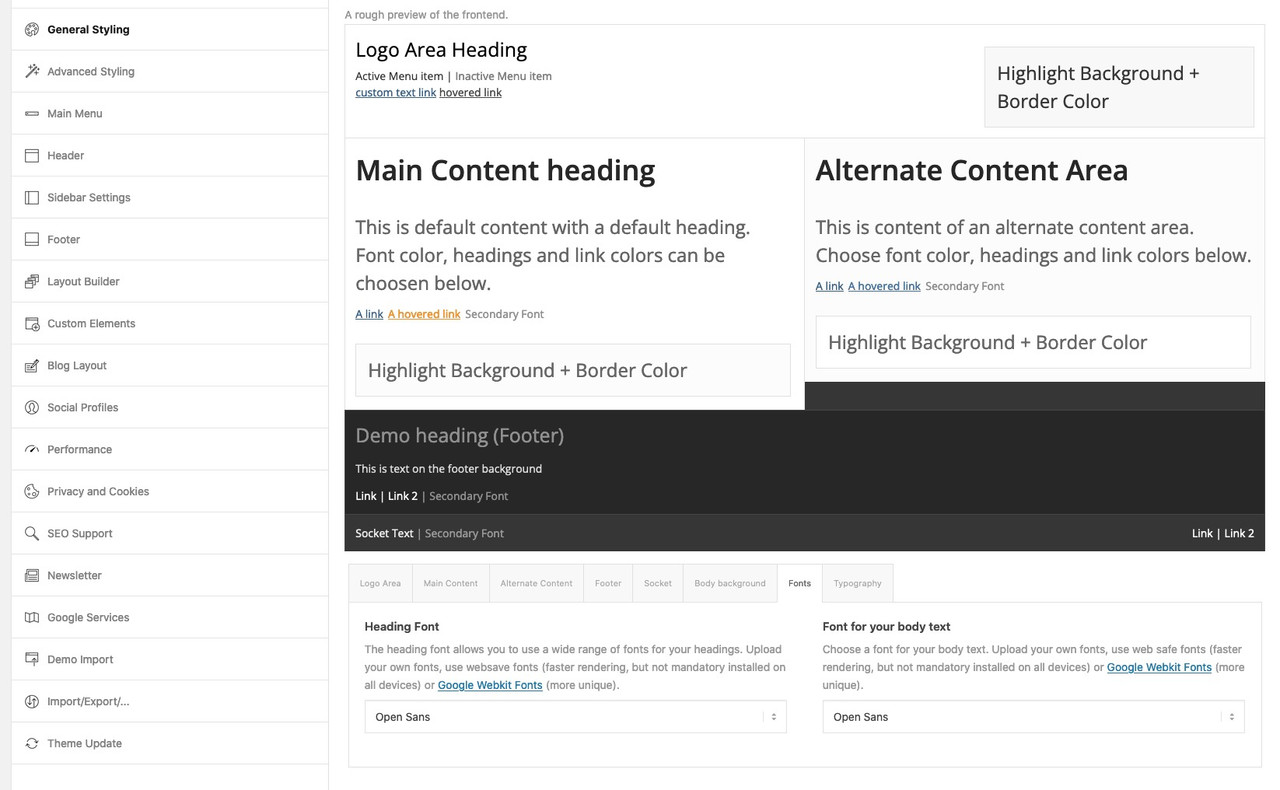
See: https://kurzundschluss.com/@sitesme: you see my image above – on Enfold Options Page.
These links work with the enfold integrated Google Fonts. But it will show the preview with a longer delay – because all fonts had to be loaded on that preview page.And as Ismael mentioned you can see the preview on top. – thats why this section has the topic: A rough preview of the frontend
btw. to better evaluate the font – you can increase the font-size by adding this to your child-theme functions.php:function admin_head_mod() { echo '<style type="text/css"> #avia_options_page .live_bg_wrap .main_h3 { font-size: 36px !important; } #avia_options_page .content_p, #avia_options_page .bg2 { font-size: 24px; } </style>'; } add_action('admin_head', 'admin_head_mod');__________________________
see font-size relation if you enter that snippet above:
Well – it depends.
Some listings will use f.e. the postslider.php for generating the posts shown.
On postslider.php we got this switch what to do in case the $expert is not empty ( Well, that’s a real Freudian slip – sorry ). ( arround line 980 formulated as a ternary operator )$output .= ! empty( $excerpt ) ? "<div class='slide-entry-excerpt entry-content' {$markup}>{$excerpt}</div>" : '';ternary operators are constructed like this:
Output = Condition ? (true) output1 : (false) output2that means if excerpt is empty – the output will be: ” (empty) and no markup will be added !
what if you change that to:$output .= ! empty( $excerpt ) ? "<div class='slide-entry-excerpt entry-content' {$markup}>{$excerpt}</div>" : "<div class='slide-entry-default-excerpt'>Here comes a default excerpt</div>";________ now we can have a child-theme postslider.php with that. : see how to on docu
see here a result of a blog page with ( a styled ) Grid-View: https://webers-testseite.de/blog/
In the code, I have only highlighted the text “Standard excerpt” in bold._______
on masonry with showing the excerpt it is a bit different – so better would be to link to the page where you like to have that.-
This reply was modified 4 years, 1 month ago by
Guenni007.
can you post the script here!
i’m participant as you are – so no private content for me to see.pay attention on the writing of noLightbox – it works casesensitive – if you use nolightbox it will not do the job
January 30, 2022 at 10:28 am in reply to: a single specific character; different rendering in headings and text #1337902maybe you only deactivate the ampersand filter – try in your child-theme functions.php:
add_filter('avia_ampersand','__return_false');or you can set the class inserted by that filter to be not special:
.special_amp { font-family: inherit; font-style: inherit; font-size: inherit; line-height: inherit; font-weight: inherit; }and maybe change Nikko’s code a little bit to:
#avia-menu .menu-item-has-children > a:before { content: '\e875'; display: block; position: absolute; top: 0; right: 0; font-family: 'entypo-fontello'; } #avia-menu .menu-item-has-children:hover > a:before { content: '\e873'; }try:
function posts_iframe_popup() {
?>
<script type="text/javascript">
(function($) {
	if (top === self) {
		// no frame
	} else { //frame
		$('#header, #footer, #socket').remove();
		$('#main').attr('style', 'padding-top: 0px !important');
	};

	$(window).on('load', function(){
	  $('.open-in-lightbox a.av-masonry-entry').magnificPopup({
	    type:'iframe',
	    disableOn: 768,
	    mainClass: 'spezial-masonries',
	  });

	  $('.open-in-lightbox a.slide-image, .open-in-lightbox .slide-entry-title > a').magnificPopup({
	    type:'iframe',
	    disableOn: 768,
	    mainClass: 'spezial-blogposts',
	  });
	});
})(jQuery);
</script>
<?php }
add_action('wp_footer', 'posts_iframe_popup');
play with the 768 value to get what you like to have f.e.:
if you take 769
you have that case where an ipad mini (1024×768) will open on portrait the new page without lightbox – if you tilt it to landscape – it will open the lightbox.
However, it will not undergo any change after the link is opened.should it be prevented for real mobile devices or for small screen sizes?
If it is for small screen sizes is only to avoid ? it must respond to resize?the first only hides it (sets it to display: none), but it remains in the DOM – the second removes these containers. Nevertheless, the adjustment of the css (especially the padding-top) must still be done.
did you check the docu link?
i noted a different snippet on including a CPT to Advanced Layout Builder –
i can not test it here – i haven’t installed “The Events Calendar”try :
add_filter('avf_builder_boxes','enable_boxes_on_tribeevents');
function enable_boxes_on_tribeevents($boxes) {
$boxes[] = array( 'title' =>__('Avia Layout Builder','avia_framework' ), 'id'=>'avia_builder', 'page'=>array('tribe_events'), 'context'=>'normal', 'expandable'=>true );
$boxes[] = array( 'title' =>__('Layout','avia_framework' ), 'id'=>'layout', 'page'=>array('tribe_events'), 'context'=>'side', 'priority'=>'low');
    return $boxes;
}
________
Edit: it seem to be an older (deprecated) snippet – see docu on that:
https://kriesi.at/documentation/enfold/intro-to-layout-builder/#alb-for-any-post-type
i guess “YOUR CUSTOM POST NAME” is a bit confusing and i suppose that it is for tribe events: tribe_eventsyes you are right – it is a little bit a strange translation of header layout – sounds like it is only belonging to titles.
Intestazione is ok for header – but that header layout is in “Layout Titolo” and on the right side you see “Dimensione Titolo”______
sì hai ragione – è un po’ una strana traduzione del layout di intestazione – sembra che appartenga solo ai titoli.
“Intestazione” è ok per l’intestazione – ma quel layout di intestazione è in “Layout Titolo” e sul lato destro si vede “Dimensione Titolo”Not for that –
maybe you change from.hide() to .remove()
that is somehow a matter of tasteif you like to have no sidebar on the iframe replace that part above that checks if frame or not with:
	if (top === self) {
		// no frame
	} else { //frame
		$('#header, #footer, #socket, .sidebar').hide();
		$('#main').attr('style', 'padding-top: 0px !important');
		$('.container .av-content-small').css('width', '100%');
		$('.content').css('border-right', 'none');
	};
and if you like to have the link of the concerning categorie aswell open in a lightbox – extend the selectors to:
$('.open-in-lightbox a.slide-image, .open-in-lightbox .blog-categories > a, .open-in-lightbox .slide-entry-title > a').magnificPopup({try:
function posts_iframe_popup() {
?>
<script type="text/javascript">
(function($) {
	if (top === self) {
		// no frame
	} else { //frame
		$('#header, #footer, #socket').hide();
		$('#main').attr('style', 'padding-top: 0px !important');
	};

	$(window).on('load', function(){
	  $('.open-in-lightbox a.av-masonry-entry').magnificPopup({
	    type:'iframe',
	    mainClass: 'spezial-masonries',
	  });

	  $('.open-in-lightbox a.slide-image, .open-in-lightbox .slide-entry-title > a').magnificPopup({
	    type:'iframe',
	    mainClass: 'spezial-blogposts',
	  });
	});
})(jQuery);
</script>
<?php }
add_action('wp_footer', 'posts_iframe_popup');
see testpage: https://webers-testseite.de/lightboxes/
January 27, 2022 at 7:11 pm in reply to: H1 – H6 do not show font changes and Body font size – Enfold 4.8.9 and WP 5.9 #1337570Did you see the additonal tab on enfold – general styling – typography
there is a comment that the first option is for body
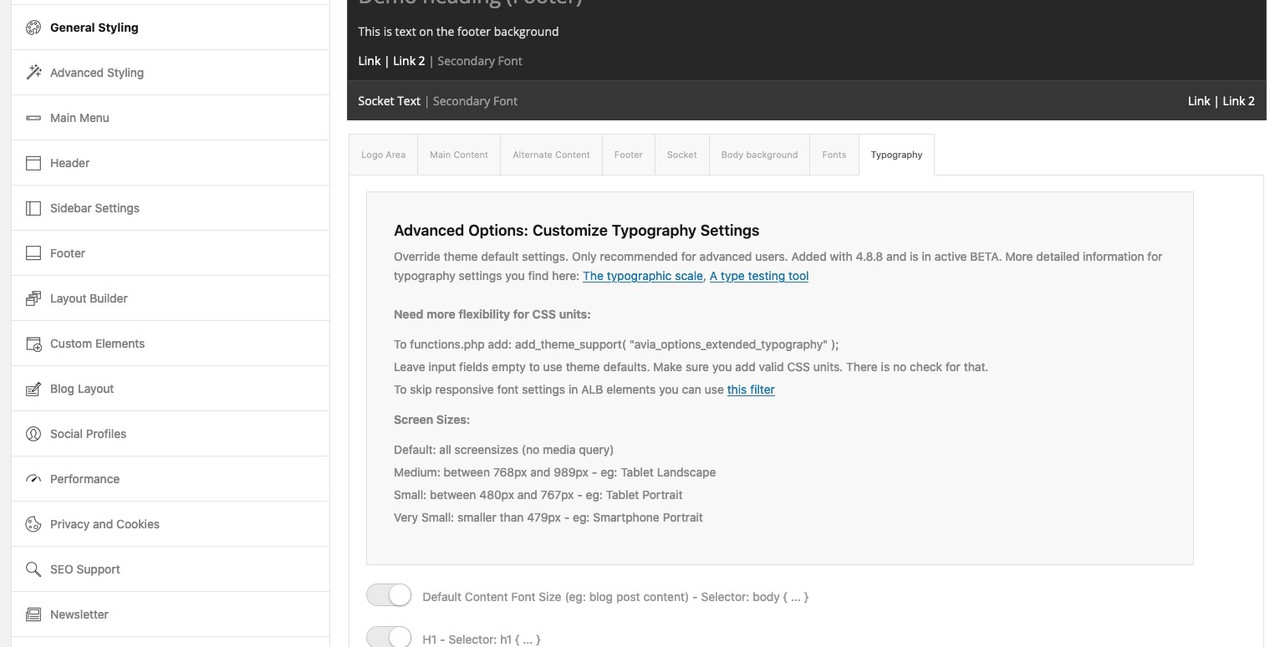
you can leave the other screen options on default and change only the first option – then it will be the same as before setting the body font
i gave to the alb element itself a custom-class ( in my case ) : open-in-lightbox
then i put this to child-theme functions.php:
function posts_iframe_popup() {
?>
<script type="text/javascript">
(function($) {
$(window).on('load', function(){
  $('.open-in-lightbox a.av-masonry-entry').magnificPopup({
    type:'iframe',
    mainClass: 'spezial-masonries',
  });

  $('.open-in-lightbox a.slide-image, .open-in-lightbox .slide-entry-title > a').magnificPopup({
    type:'iframe',
    mainClass: 'spezial-blogposts',
  });

});
})(jQuery);
</script>
<?php }
add_action('wp_footer', 'posts_iframe_popup');
the mainClass is only to have a way to select f.e. the iframe-scaler specifically for that usage – you will have that class on mfp-wrap container.
to have the links from both ( the image and the slide title – we have in that rule two selectors).PS : on that blog-posts the first link “iframe-lightbox” leads to an iframe which can open a new iframe on top :lol:
you can see here on top of that page a masonry with portfolio links.
If you click to open it – it will open that portfolio in a lightbox ( but the complete page )
https://webers-testseite.de/lightboxes/
Is it the way you like to have it? -
This reply was modified 4 years, 1 month ago by
-
AuthorPosts
