

Forum Replies Created
-
AuthorPosts
-
Thank you – you’re welcome
did you load your jQuery in the footer?
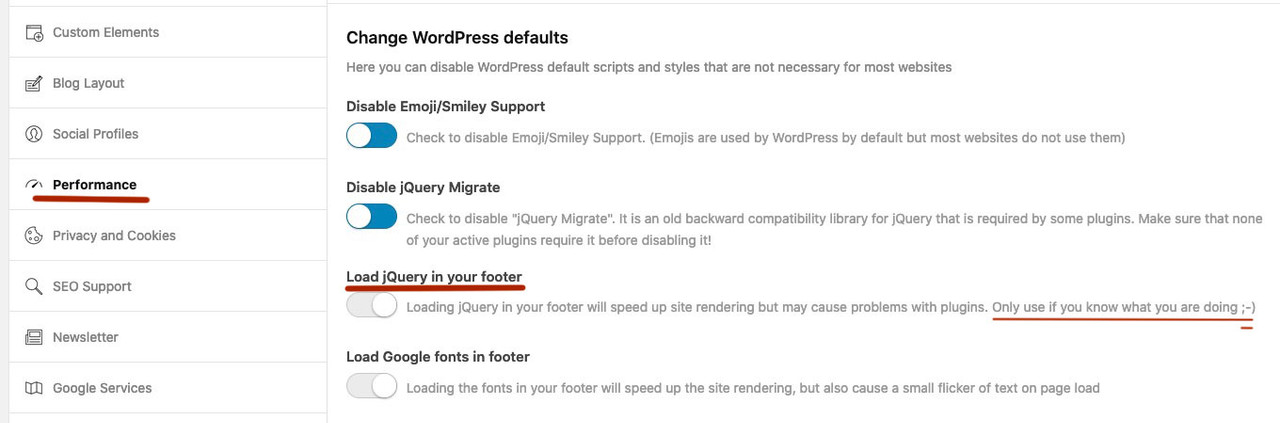
if so these snippets added to your child-theme functions.php had to be loaded afterwards.
( just add a low ( higher value) priority )
so try with 999 on priority as Ismael does with his snippet :function open_masonry_entries_in_new_tab(){ ?> <script> (function($) { MutationObserver = window.MutationObserver || window.WebKitMutationObserver; var observer = new MutationObserver(function() { $("a.av-masonry-entry").attr("target", "_blank"); }); observer.observe(document, { subtree: true, childList: true }); })(jQuery); </script> <?php } add_action('wp_footer', 'open_masonry_entries_in_new_tab', 999);PS:
$priority (int) (Optional) Used to specify the order in which the functions associated with a particular action are executed. Lower numbers correspond with earlier execution, and functions with the same priority are executed in the order in which they were added to the action. Default value: 10
transfering your codepen link to enfold buttons:
1) give a custom-class to your button: flip-button
2) this to the Label Input Field:<span class="back">Click!</span><span class="front">Read More</span>
( you can change the content to what you like to have as label for the button )
3) this to child-theme functions.php:function set_data_attribute_for_flip_buttons(){ ?> <script type="text/javascript"> (function($) { $(document).ready(function(){ $('.avia-button-wrap.flip-button').each( function() { $(this).find('.avia-button').addClass('btn-flip'); var frontLabel = $(this).find('.front').html(); var backLabel = $(this).find('.back').html(); $(this).find('.avia-button').attr('data-front', frontLabel).attr('data-back', backLabel); $(this).find('.label').css('display', 'none'); }); }); })(jQuery); </script> <?php } add_action('wp_footer', 'set_data_attribute_for_flip_buttons');4) this to quick css:
body div .avia-button.btn-flip { padding: 0px; margin: 0px; opacity: 1; outline: 0; color: #fff; line-height: 40px !important; position: relative; text-align: center; letter-spacing: 1px; display: inline-block; text-decoration: none; font-family: "Open Sans"; text-transform: uppercase; } body div .avia-button.btn-flip:hover:after { opacity: 1; transform: translateY(0) rotateX(0); } body div .avia-button.btn-flip:hover:before { opacity: 0; transform: translateY(50%) rotateX(90deg); } body div .avia-button.btn-flip:after { top: 0; left: 0; opacity: 0; width: 100%; color: #323237; display: block; transition: 0.5s; position: absolute; background: #adadaf; content: attr(data-back); transform: translateY(-50%) rotateX(90deg); } body div .avia-button.btn-flip:before { top: 0; left: 0; opacity: 1; color: #adadaf; display: block; padding: 0 ; line-height: 40px; transition: 0.5s; position: relative; background: #323237; content: attr(data-front); transform: translateY(0) rotateX(0); }see here the first row: https://consulting.webers-testseite.de/buttons/
to have different colors than blue there is a custom-class for it: red, green, etc.
to have that effect there is a custom class: btn-12
And: The button color is set to light-transparentto have two different button lables i put in the Button Label Field:
<span>Click!</span><span>Read More</span>/****** Button 12 ***********/ #top .btn-12 .avia-button { position: relative; border:none; box-shadow: none !important; } #top .btn-12 .avia-button .avia_iconbox_title { display: block; position: absolute; height: 60px; width: 250px; -webkit-perspective: 650px; perspective: 650px; } #top .btn-12 .avia-button .avia_iconbox_title span { background: rgb(0,172,238); background: linear-gradient(0deg, rgba(0,172,238,1) 0%, rgba(2,126,251,1) 100%); display: block; position: absolute; width: 250px; height: 60px; box-shadow:inset 2px 2px 2px 0px rgba(255,255,255,.5), 7px 7px 20px 0px rgba(0,0,0,.1), 4px 4px 5px 0px rgba(0,0,0,.1); border-radius: 5px; margin:0; text-align: center; -webkit-box-sizing: border-box; -moz-box-sizing: border-box; box-sizing: border-box; -webkit-transition: all .3s; transition: all .3s; } #top .btn-12.red .avia-button .avia_iconbox_title span { background: rgb(156, 39, 176); background:-moz-linear-gradient(180deg, rgba(244, 67, 54, 1) 0%, rgba(156, 39, 176, 1) 100%); background:-webkit-linear-gradient(180deg, rgba(244, 67, 54, 1) 0%, rgba(156, 39, 176, 1) 100%); background:linear-gradient(180deg, rgba(244, 67, 54, 1) 0%, rgba(156, 39, 176, 1) 100%); } #top .btn-12.green .avia-button .avia_iconbox_title span { background: #00CF30; background: -webkit-linear-gradient(to bottom, #00CF30 0%, #009C24 100%); background: -moz-linear-gradient(to bottom, #00CF30 0%, #009C24 100%); background: linear-gradient(to bottom, #00CF30 0%, #009C24 100%); } #top .btn-12 .avia-button .avia_iconbox_title span:nth-child(1) { -webkit-transform: rotateX(90deg); -moz-transform: rotateX(90deg); transform: rotateX(90deg); -webkit-transform-origin: 50% 50% -30px; -moz-transform-origin: 50% 50% -30px; transform-origin: 50% 50% -30px; } #top .btn-12 .avia-button .avia_iconbox_title span:nth-child(2) { -webkit-transform: rotateX(0deg); -moz-transform: rotateX(0deg); transform: rotateX(0deg); -webkit-transform-origin: 50% 50% -30px; -moz-transform-origin: 50% 50% -30px; transform-origin: 50% 50% -30px; } #top .btn-12 .avia-button:hover .avia_iconbox_title span:nth-child(1) { box-shadow:inset 2px 2px 2px 0px rgba(255,255,255,.5), 7px 7px 20px 0px rgba(0,0,0,.1), 4px 4px 5px 0px rgba(0,0,0,.1); -webkit-transform: rotateX(0deg); -moz-transform: rotateX(0deg); transform: rotateX(0deg); } #top .btn-12 .avia-button:hover .avia_iconbox_title span:nth-child(2) { box-shadow:inset 2px 2px 2px 0px rgba(255,255,255,.5), 7px 7px 20px 0px rgba(0,0,0,.1), 4px 4px 5px 0px rgba(0,0,0,.1); color: transparent; -webkit-transform: rotateX(-90deg); -moz-transform: rotateX(-90deg); transform: rotateX(-90deg); }you do not have that checkbox “duplicate”?
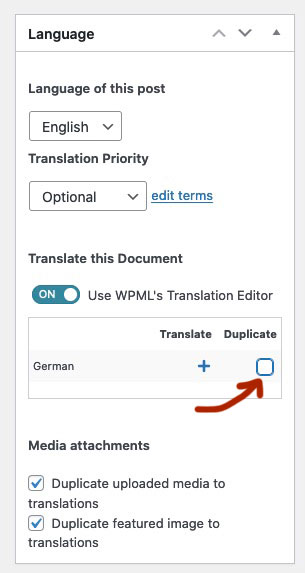
i mark that checkbox and then press “Duplicate”
And for example – you are loading jQuery in both installations on the same place? Or do you load on the one in the header section and the other in footer?
sometimes you don’t think about tiny differences, but they can have a big impact. – What about the php versions of the two installations? Also identical?can you try this instead in your child-theme functions.php:
( on former times i used on that the$('body').on('DOMNodeInserted', function(){– but that is now deprecated. )function open_masonry_entries_in_new_tab(){ ?> <script> (function($) { MutationObserver = window.MutationObserver || window.WebKitMutationObserver; var observer = new MutationObserver(function() { $("a.av-masonry-entry").attr("target", "_blank"); }); observer.observe(document, { subtree: true, childList: true }); })(jQuery); </script> <?php } add_action('wp_footer', 'open_masonry_entries_in_new_tab');See in action: https://webers-testseite.de/masonry/
Allthough the MutationObserver is less performance intense than the DOMNodeInserted Function – it might be a good idea to only activate it for the specific pages it is needed.snippet is here for your child-theme functions.php:
Boardsoft will change the special characters needed for that snippet.
Did you check for the console log file f.e.
A-Frame:warn Put the A-Frame <script> tag in the <head> of the HTML *before* the scene to ensure everything for A-Frame is properly registered before they are used from HTML.
I would test that on deactivating all Plugins. (Espacially Autoptimize) – refreshing all cache – and look if that helps. After that reactivating one by one.
Hast du Ihn unter Enfold Child – Layout Builder abgestellt oder gar deinstalliert?
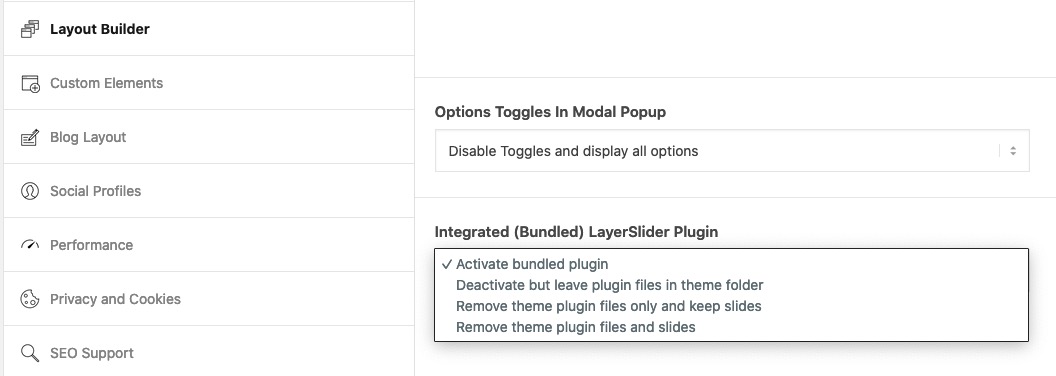
wenn du die zweite Postiion gewählt hast, versuch Ihn mal wieder zu aktivieren und die Einstellung dann zu setzen und danach kannst du ihn wieder deaktivieren. Nicht das der da trotzdem zwischen funkt.Layerslider Tab im Dashboard anklicken – (beim ersten öffnen läuft etwas animiertes ab. Dann rechts das Zahnrad clicken – dort dann “Google Fonts”
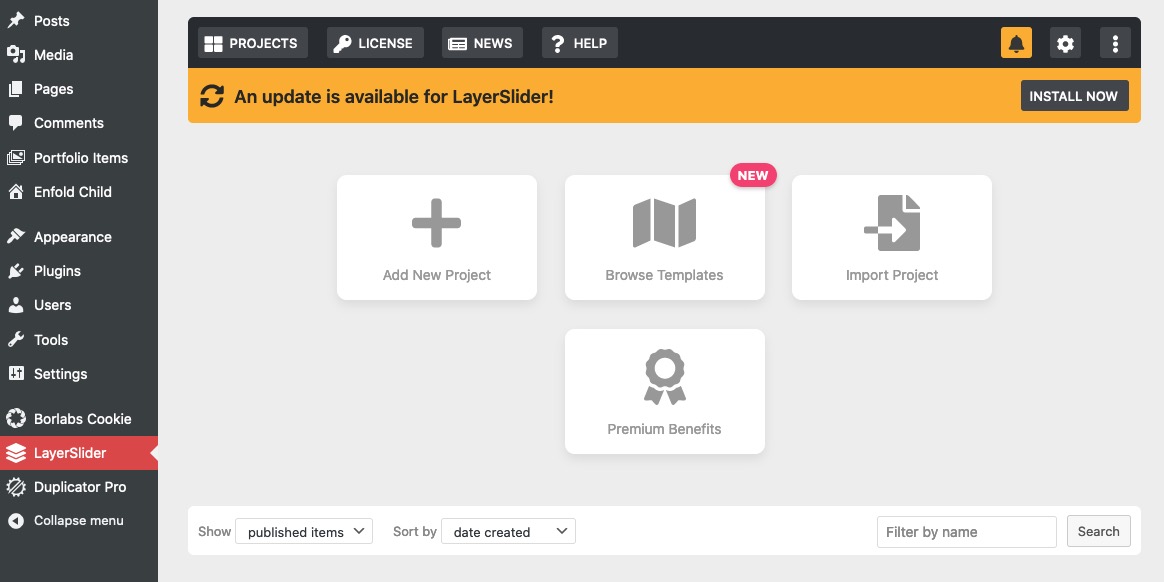
PS: war übrigens nur auf einer meiner Seiten aktiviert – weiss nicht ob ich das mal selbst machte, oder ob es die Default Einstellung ist. Wenn es so ist sollten die Mods es so einstellen, dass es nicht so ist.
-
This reply was modified 3 years, 11 months ago by
Guenni007.
siehe Nachtrag : zum Layerslider
Bist du sicher, dass Google Analytics keine Schrften nachlädt? Denn Google Maps war es immer die Roboto die mitgeladen wurde.
PS:
Ich bin übrigens auch in die Falle getappt. Layerslider bringt seinen eigenen Font-Loader mit. Geh dort in die Einstellungen und deaktiviere das Laden von Google Fonts.you can try:
/*** for fullwidth sliders ***/
.avia_transform .av_slideshow_full .active-slide .avia-caption-title,
.avia_transform .av_slideshow_full .active-slide .avia-slideshow-button {
    -webkit-animation: unset !important;
    animation: unset !important;
    opacity: 1 !important;
    transition: none !important;
    visibility: visible !important;
}
if there is a custom-class on that alb – it will be as you can see above on av_slideshow_full
nein solche Snippets kommen in die child-theme functions.php.
zunächst um deinen Bedenken Rechnung zu tragen: solltest du deine Startseite als Maintenance Mode Seite definieren ( über Theme Options Tab).
Wer nämlich deine Seite über z.B die Google Suche direkt findet ist trotzdem auf deiner Seite. – und hier begrüßt ihn als erstes : Google Analytics – welches unbedingt ein Opt In benötigt.Ich lade meine Schriften alle local. Heißt: ich lade mir die Google Fonts herunter und binde diese im Theme local ein.
Um Copyright Problemen diesbezüglich zu umgehen kann man sich bei Google einloggen, und dort den Nutzungsbedingungen der Google Fonts zustimmen. Ist schon ne Weile her, dass ich dies tat; daher musst du mal Googlen wo das war. Ist nur einmal nötig – danach kann man alle Google Fonts auch nutzen in dem man sie downloaded und einbindet.Um die Einbindung via Enfold zu unterdrücken nutze ich immer noch das alte Snippet:
*removed the deprecated snippet*
aber es geht wohl auch so :function my_output_google_webfonts_script( $activate ){ return false; } add_filter( 'avf_output_google_webfonts_script', 'my_output_google_webfonts_script', 10, 1 );ich habe mir ein kleines Plugin dafür geschrieben, aber man kann auch ganz einfach mit den Angaben die Google selbst anbietet bzw. der Google Webfont Helper: Link für Raleway bietet die Fonts dann local einbinden.
-
This reply was modified 3 years, 3 months ago by
Yigit.
because you only have one slide in that slider –
1) the simple way would be to setup under the alb itself on advanced tab the slider-animation – Slideshow Transition to fade. Because the animation of the caption is correlated to the slide animation –
then there will be no animation: caption-left – it is then changed to : caption-top________
If there were multiple slides – and you like to preserve the slide animation on the slides – you can set a different animation for it:
/*** for fullwidth sliders - That is your case***/
.avia_transform .av_slideshow_full .active-slide .avia-caption-title,
.avia_transform .av_slideshow_full .active-slide .avia-slideshow-button {
 -webkit-animation: avia-fadein 1.5s 1 ease-out !important;
 animation: avia-fadein 1.5s 1 ease-out !important;
}

/*** for fullscreen sliders ***/
.avia_transform .av_fullscreen .active-slide .avia-caption-title,
.avia_transform .av_fullscreen .active-slide .avia-slideshow-button {
 -webkit-animation: avia-fadein 1.5s 1 ease-out !important;
 animation: avia-fadein 1.5s 1 ease-out !important;
}
if you only want to change it for a specific slider – then a custom-class would be the way to go:
( f.e. caption-fader ):/*** for fullwidth sliders - That is your case***/ .avia_transform .av_slideshow_full.caption-fader .active-slide .avia-caption-title, .avia_transform .av_slideshow_full.caption-fader .active-slide .avia-slideshow-button { -webkit-animation: avia-fadein 1.5s 1 ease-out !important; animation: avia-fadein 1.5s 1 ease-out !important; } /*** for fullscreen sliders ***/ .avia_transform .av_fullscreen.caption-fader .active-slide .avia-caption-title, .avia_transform .av_fullscreen.caption-fader .active-slide .avia-slideshow-button { -webkit-animation: avia-fadein 1.5s 1 ease-out !important; animation: avia-fadein 1.5s 1 ease-out !important; }______________________________________________________________________________
here is the alternative solution with that custom class.
the caption-top animation is with a little movement of the captions:/*** for fullwidth sliders ***/ .avia_transform .av_slideshow_full.caption-fader .active-slide .avia-caption-title, .avia_transform .av_slideshow_full.caption-fader .active-slide .avia-slideshow-button { -webkit-animation: caption-top 0.5s 1 ease-out !important; animation: caption-top 0.5s 1 ease-out !important; } /*** for fullscreen sliders ***/ .avia_transform .av_fullscreen.caption-fader .active-slide .avia-caption-title, .avia_transform .av_fullscreen.caption-fader .active-slide .avia-slideshow-button { -webkit-animation: caption-top 0.5s 1 ease-out !important; animation: caption-top 0.5s 1 ease-out !important; }-
This reply was modified 3 years, 11 months ago by
ok – now i see the pages . There are elements in it.
to have a color-section with background-image responsive you had to determine the height in that aspect-ratio of the bg image.
for your page (free-session) i would insert the 1500px x 430px image format – and set the background-image to cover.Then for your page: free-session
#top.page-id-9607 #av_section_1 {
  height: 28.66vw; /***  100x(430px:1500px)  ***/
  min-height: 350px;
  background-size: cover !important; /*** but you can do that on alb settings ***/
}
The min-height rule is to have enough height on small screens to fully surround the content
Same on your home page – let the image be full and set background-size to cover
#top.page-id-143 #av_section_3 { height: 26.04vw; /*** 100x(500px:1920px) ***/ min-height: 500px; background-size: cover !important; /*** but you can do that on alb settings ***/ }for your starting topic :
why don’t you use a full-width slider with one slide – without captions.
Big advantage – it is responsive by default.You had to know a fundamental thing on WPML: Nearly all of the Enfold Settings are saved separatly by each language.
Quck Css, Color Settings, Advanced Settings etc. pp.
You see an additional Tab on top of the enfold settings:
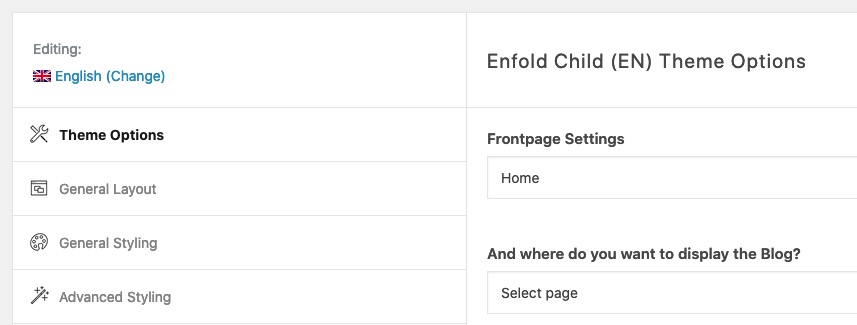
My advice is: Layout and Style your first default language. After doing that – you can then transfrer your enfold settings to the other languages.
Just export the enfold theme settings file from your default language – change the lang on that tab – and import that theme settings file.
Many claim that this is too complicated, I find it a nice feature. You can choose your own colour schemes and fonts etc. for each language.are these dot realy not seen or are there shown on a place where you do not expect them?
you can test this in quick css to get better dot navigation colours.#top .avia-slideshow-dots a { background-color: #f00707 !important; } #top .main_color .avia-slideshow-dots a.active, #top .main_color .avia-slideshow-dots a:hover { background-color: #f00707 !important; }on my testpage they are on top right of the slider.
yes – different classes on the same element are noted without space.
.av-submenu-container.topsubmenu
if you have.av-submenu-container .topsubmenuthe av-submenu-container has a child with class: topsubmenu. What is not the fact.
The order is then also important, with parent – child relationships anyway – and here at the same element in particular.if you like to have a whole background-image you do not need the code above – just:
.avia-button-wrap.custom-class {
  display:inline-block;
  background-image: url(/wp-content/uploads/Your-Image.jpg);
  background-size: cover;
}
April 12, 2022 at 12:46 pm in reply to: Need to add Houz under social media profiles section #1348097i would do that with an image of houzz and a small snippet in child-theme functions.php:
function avia_add_houzz_social_icon($icons) {
    $icons['Houzz'] = 'houzz';
    return $icons;
}
add_filter('avf_social_icons_options','avia_add_houzz_social_icon', 10, 1);
you find this new entry than on “social profiles” at the end of the list.
for inserting now the new icon just place this to quick css:#top #wrap_all .av-social-link-houzz a:before{ content: ""; width: 20px; height: 20px; display: inline-block; vertical-align: top; background: url(/wp-content/uploads/path-to-houzz.svg) no-repeat center center; background-size: contain; } #top #wrap_all .av-social-link-houzz:hover a { /*** optional ***/ }now the values depends on where you will show your social media icons
April 12, 2022 at 12:28 pm in reply to: Remove default 'you are here' text from breadcrumbs #1348094this to quick css:
.trail-before { display: none !important; }the custom class – if you set it directly to the alb element (submenu) itself goes to the submenu container.
so it is the same place – therefore it has to be placed without space in the rule – and because it is after the av-submenu-container class :@media only screen and (min-width: 1024px) { #top .av-submenu-container.topsubmenu { display: none !important; } }April 12, 2022 at 11:33 am in reply to: change (italian word) "Da" in "Di" and move the meta info after post title #1348084ok that is line: 1393ff:
the first line is for the title of the anchor – the second line is for your shown text.and you see that here it is a translatable insertion:
$author_link = '<a href="' . $author_link . '" title="' . __( 'by', 'avia_framework' ) . ' ' . $author_name . '" rel="author">' . $author_name . '</a>';
$author_output  =	'<span class="av-magazine-author minor-meta">' . __( 'by', 'avia_framework' ) . ' ';
this indicates the translatable text :
__( 'TRANSLATABLE', 'avia_framework' )so you had to search for that “by” in the lang files
_______________btw: dear mods – maybe a translatable categorie pre word would be nice too!
$cats_html .= '<span class="av-magazine-text-sep text-sep-cats">'. __( "In", "avia_framework" ) .'</span>';PPS: it is the difference on english : by and from ;)
April 12, 2022 at 11:12 am in reply to: change (italian word) "Da" in "Di" and move the meta info after post title #1348080no i’m participant as you are.
But i guess you are belonging to magazine.php line 1441 and the category for that post.$cats_html .= '<span class="av-magazine-text-sep text-sep-cats">In</span>';but i do not see that this is in translated in any lang file – so it makes me wonder that you have there a “Da”
April 12, 2022 at 10:51 am in reply to: change (italian word) "Da" in "Di" and move the meta info after post title #1348072can you give us a link to that page?
choose for that button alb element the option to have an icon. place it where you like – even to see only on hovering.
then replace that icon by an image via quick css.
To better select the specific button – give a custom class to the button alb itself – f.e.: imagebutton.avia-button-wrap.imagebutton { overflow: hidden; } .imagebutton .avia_button_icon { height: 0px; overflow:visible; display: inline-block; vertical-align: top !important; } .imagebutton .avia_button_icon::before { content: ""; background-image: url(/wp-content/uploads/IMAGE.svg); /*** path to your image file ***/ background-repeat: no-repeat; background-size: contain; width: 50px; height: 50px; position: relative; display: inline-block; top: -11px; left: -5px; }See here – buttons on the right – green or blue one: https://webers-testseite.de/buttons/
-
This reply was modified 3 years, 11 months ago by
-
AuthorPosts
