

Forum Replies Created
-
AuthorPosts
-
by the way – if it is a common Side Bar – the name you had to enter is exactly what you see on your widgets:
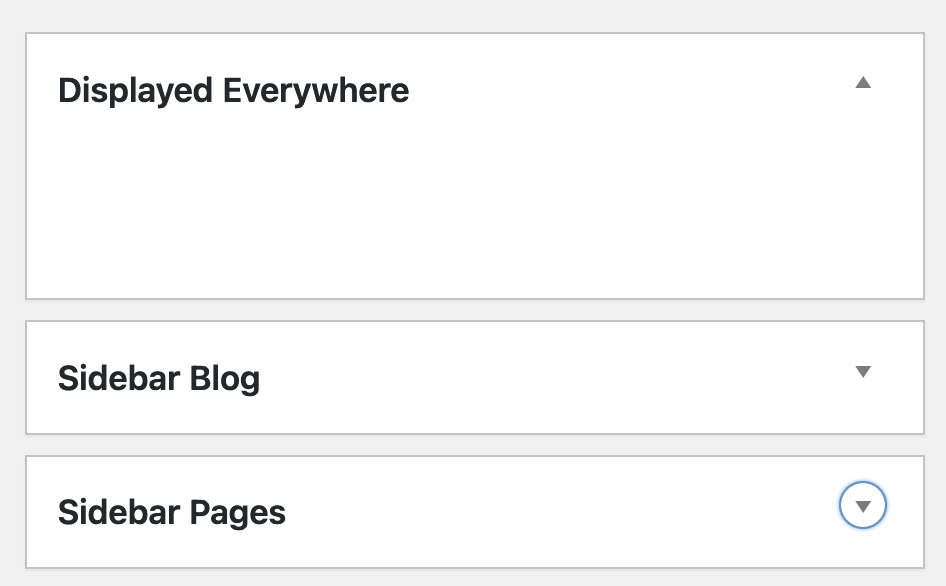
so it is “Sidebar Pages” for pages widgets
but isn’t it the default behavior that search results page got a sidebar?
you can manage the position by that snippet:
(if you like a sidebar left … you know what to change?)function avia_change_layout_for_searchresults($layout, $post_id) { if( is_search() ) { $layout['current'] = $layout['sidebar_right']; $layout['current']['main'] = 'sidebar_right'; } return $layout; } add_filter('avia_layout_filter', 'avia_change_layout_for_searchresults', 10, 2);if you like to show a custom sidebar on that page you can do it via:
add_filter("avf_custom_sidebar", function($custom_sidebar) { if( is_search() ) { $custom_sidebar = "Your Custom Sidebar Name"; } return $custom_sidebar; }, 10, 1);f.e.: if you open a page on mobile device e.g. iphone there will be two classes on html tag:
avia_mobile avia-safariGreat plugin – thanks for the hint – essentially it will probably act on the basis of gettext
always the same question: do you really mean mobile devices – or small screens?
Can I see the page it’s about?The reason why I ask the question is that Enfold sets certain classes to html tag that on the one hand differ between mobile or desktop device, and then even take into account the browser that is accessing. So you could create your own rules e.g. for Safari.
However, I don’t think using fonts in logos for the body font – (paragraph texts) on the website is a good decision anyway. This font in particular should be seen as a standalone and stand out well. For the headings it could be a similar font – but for some fonts that would be no good idea.
Think about Coca Cola would use their own font for the body text of their website…?
Only where “Nomen est Omen” applies, such as the Times Magazine, is the body type adapted to this.Besides this advice regarding typography; if you have the licensing rights to the font, and there are no web fonts (woff, woff2 etc) included in the package, you could upload it to Fontsquirrel and have the web fonts generated.
After that you can embed those fonts in different way to your theme.
If you then also want to include these fonts in the Enfold theme – i.e. the selection of this font via Enfold Options dialog – there would be a solution for this as well.
PS: what font is the brand font? – maybe we can find a good font-combination on that.
May 18, 2022 at 11:43 am in reply to: Re-sized thumbnails / images are not correctly created by Enfold #1352171did you see any info on image-sizes if you activate the concerning Option? :
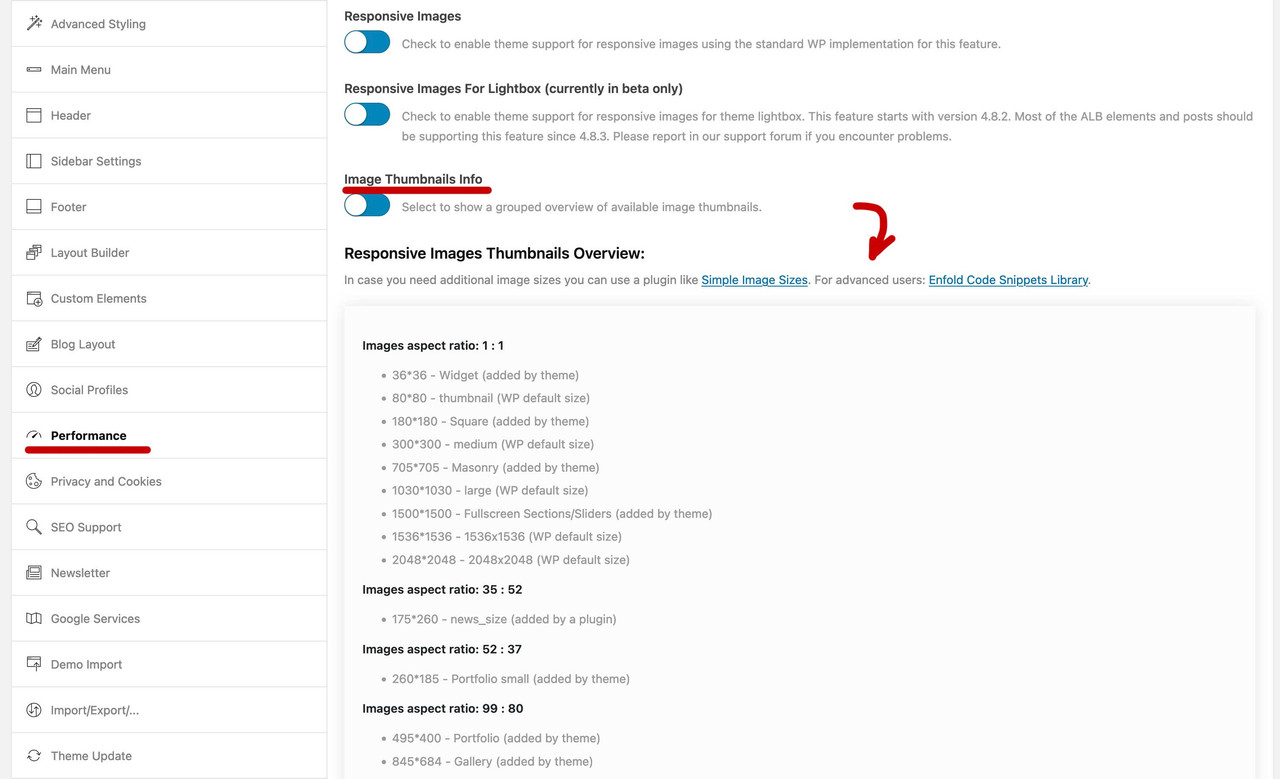
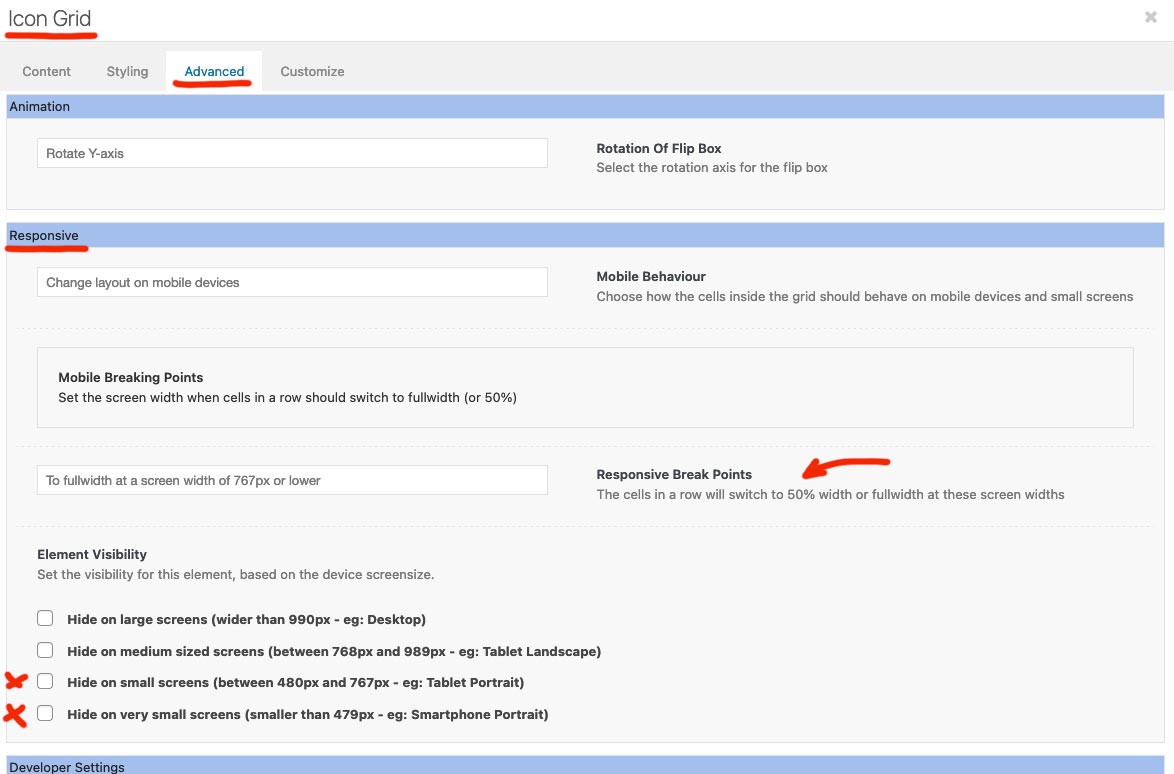
But i would start earlier the way Nikko did – f.e. on 767px
and maybe you decide to have on very small screens a different way to show those icons :
@media only screen and (max-width:767px) {
    #top .main-column {
        padding: 0 !important;
    }
}

@media only screen and (max-width:479px) {
  .iconbox.enlarge-icons {
    display: flex;
  }

  .iconbox.iconbox_left_content.enlarge-icons {
    flex-flow: wrap row
  }

  .iconbox.iconbox_right_content.enlarge-icons {
    flex-flow: wrap row-reverse
  }

  .enlarge-icons .iconbox_icon {
    margin-right: 50px !important;
    margin-left: 0 !important;
    margin-top: 20px !important;
  }
}
May 17, 2022 at 12:40 pm in reply to: flex masonry gallery with landscape image over two columns #1352060But isn’t it the case if you choose:
“Perfect Automatic Masonry: Display a grid where most images get the same size, only very wide images get twice the width and very high images get twice the height. To qualify for “very wide” or “very high” the image must have an aspect ratio of 16:9 or higher”You had to think of the aspect ratio, and the image size to show : no scaling – thats all
I think the problem is not that Ismael’s snippet does not work. I have tested Ismael’s snippet – and it works here on my test installation.
But the problem occurs when you have multiple “product categories” for a product.
See e.g. the shop demo there are “men” and “women” products – but they both have : “casual” as another category.
( here again ismaels snippet)function avf_post_nav_settings_mod($settings){ if($settings['type'] == 'product'){ $settings['taxonomy'] = "product_cat"; $settings['same_category'] = true; } return $settings; } add_filter( 'avf_post_nav_settings', 'avf_post_nav_settings_mod', 10, 2);If now a men’s product is called, which is also sorted with casual, then it can be that also women’s products are displayed.
I removed all product categories from men products. By that you only have men product post navigation.Don’t know if this is totaly different to ismaels snippet – but can you try:
function enfold_customization_postnav($settings){
  if('product' == $settings['type'] )  {
    $settings['same_category'] = true;
    $settings['is_fullwidth'] = false;
    $settings['skip_output'] = false;
  }
  return $settings;
}
add_filter('avf_post_nav_settings','enfold_customization_postnav', 10, 1);
And think of caching and merging etc. to refresh.
May 15, 2022 at 2:17 am in reply to: Insert Enfold templates above content | Feature request #1351828I do not understand the contradiction in this. I still work with Enfold and the Adavanced Layout Builder. Only I put the event lists into the ALB elements using the shortcodes given by the plugin. I like to use the Events Manager Plugin.
f.e.: for all future events the list shortcode is:[events_list scope="future" order="asc"]
you can put that shortcode to enfold columns, icon-boxes etc. ppMay 14, 2022 at 12:04 pm in reply to: Insert Enfold templates above content | Feature request #1351761But isn’t that exactly what an event plugin could do? It’s not for nothing that such plugins are specialized exactly in this way. The realization of arranging past events in such a way that the less recent events are moved down is just a matter of setting how you want it.
i didn’t test text widget – but html widget does.
Learning through teaching. I learned that as a student who liked to tutor math. So it’s not completely selfless what I’m doing here.
;)btw. if i click on the “nega” button – i expect as a visitor that the “google crap” is not loaded.
But see what is on your page:

i’m participant as you are – so if there are links in private content i do not see them.
if it is an image Gallery – what are your settings for it? especially on the advance tab : link settings?
do you open them in a lightbox? etc. pp.
because you only have the possibility to set the content for that lightbox bottom bar on this.if you mean that tooltip like showing above the thumnails – it would be better to have a link to see whats happening.
have you set on your quick css some rules about : avia-tooltip or inner_tooltip
“Do i need” ? …
no – that is the code reference to that filter function. see here : https://developer.wordpress.org/reference/functions/add_filter/
The filter hooks are set by the developers in meaningful places, so that you can redefine default settings. This string name is set. the next callback is arbitrary but must match the callback function name. (Dashes are not allowed, but underscores are.)
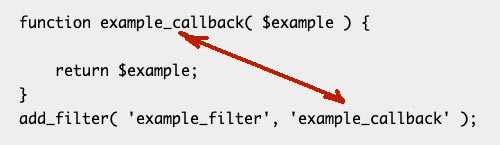
it is of course better to have a descriptive name here, so that you know directly what is happening there.
The rest about priority you can read on the link to code reference yourself.i do not know how your snippet plugin works – the functions.php had to start with that opening <?php but does not have a closing.
child-theme functions.php the same.the given snippet by ismael is all you need. So if you set your default setting of font-display to swap – it makes sense to have for entypo-fontello a different loading.
Well you say it i name it: use the ALB Element : Widget Area
You can create on widgets a new widget area – f.e.: form1
place inside that new widget area your form and place it with that above mentioned ALB : Widget Area to all of your 20 pages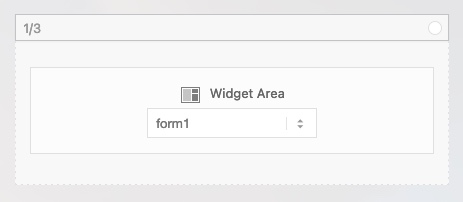
Next: how to put a form in a widget area?
How would you do it on a normal situation – do you have a shortcode for it?Is it an enfold generated form? – then you can copy that enfold – shortcodes and place a html widget in that new widget-area – copy&paste that enfold shortcodes of that form to it.

you know how to get the enfold shortcodes?
First, there is an option on Gallery ALB element to use lazy loading of images – does that help with your goal of loading less file data on the page load?
;)
i do not know if your selector is right for your installation – but maybe you add some IDs to the selector to get more weight on them; next the color goes to the text itself : avia-menu-text
#top #wrap_all .header_color .main_menu ul:first-child > li > a:active .avia-menu-text {
  color: #b3ae40 !important;
}
Edit: if you click on them – yes then the focus is on them too – but the pseudo class is active for that.
focus is too – if you have for example a navigation style for disabled people – and the will navigate with e tab or space key. A Return Key then will be the click state – and that is active ;)your rule on that is a bit confused.
Maybe you only had to swap the rule for background-position on:#top select, #top .avia_ajax_form .select, #top .entry-content-wrapper select { -webkit-appearance: none; border-radius: 0; background-image: url(data:image/png;base64,iVBORw0KGgoAAAANSUhEUgAAAB4AAAANCAYAAAC+ct6XAAAAGXRFWHRTb2Z0d2FyZQBBZG9iZSBJbWFnZVJlYWR5ccllPAAAAyJpVFh0WE1MOmNvbS5hZG9iZS54bXAAAAAAADw/eHBhY2tldCBiZWdpbj0i77u/IiBpZD0iVzVNME1wQ2VoaUh6cmVTek5UY3prYzlkIj8+IDx4OnhtcG1ldGEgeG1sbnM6eD0iYWRvYmU6bnM6bWV0YS8iIHg6eG1wdGs9IkFkb2JlIFhNUCBDb3JlIDUuMC1jMDYwIDYxLjEzNDc3NywgMjAxMC8wMi8xMi0xNzozMjowMCAgICAgICAgIj4gPHJkZjpSREYgeG1sbnM6cmRmPSJodHRwOi8vd3d3LnczLm9yZy8xOTk5LzAyLzIyLXJkZi1zeW50YXgtbnMjIj4gPHJkZjpEZXNjcmlwdGlvbiByZGY6YWJvdXQ9IiIgeG1sbnM6eG1wPSJodHRwOi8vbnMuYWRvYmUuY29tL3hhcC8xLjAvIiB4bWxuczp4bXBNTT0iaHR0cDovL25zLmFkb2JlLmNvbS94YXAvMS4wL21tLyIgeG1sbnM6c3RSZWY9Imh0dHA6Ly9ucy5hZG9iZS5jb20veGFwLzEuMC9zVHlwZS9SZXNvdXJjZVJlZiMiIHhtcDpDcmVhdG9yVG9vbD0iQWRvYmUgUGhvdG9zaG9wIENTNSBNYWNpbnRvc2giIHhtcE1NOkluc3RhbmNlSUQ9InhtcC5paWQ6RjBBRUQ1QTQ1QzkxMTFFMDlDNDdEQzgyNUE1RjI4MTEiIHhtcE1NOkRvY3VtZW50SUQ9InhtcC5kaWQ6RjBBRUQ1QTU1QzkxMTFFMDlDNDdEQzgyNUE1RjI4MTEiPiA8eG1wTU06RGVyaXZlZEZyb20gc3RSZWY6aW5zdGFuY2VJRD0ieG1wLmlpZDpGMEFFRDVBMjVDOTExMUUwOUM0N0RDODI1QTVGMjgxMSIgc3RSZWY6ZG9jdW1lbnRJRD0ieG1wLmRpZDpGMEFFRDVBMzVDOTExMUUwOUM0N0RDODI1QTVGMjgxMSIvPiA8L3JkZjpEZXNjcmlwdGlvbj4gPC9yZGY6UkRGPiA8L3g6eG1wbWV0YT4gPD94cGFja2V0IGVuZD0iciI/Pk5mU4QAAACUSURBVHjaYmRgYJD6////MwY6AyaGAQIspCieM2cOjKkIxCFA3A0TSElJoZ3FUCANxAeAWA6IOYG4iR5BjWwpCDQCcSnNgxoIVJCDFwnwA/FHWlp8EIpHSKoGgiggLkITewrEcbQO6mVAbAbE+VD+a3IsJTc7FQAxDxD7AbEzEF+jR1DDywtoCr9DbhwzDlRZDRBgACYqHJO9bkklAAAAAElFTkSuQmCC); background-position: 100% 50%; background-repeat: no-repeat; border-radius: 2px; }or try in the code above
background-position: -7px 50%;you will have then the image left sideyou got now: 50% 100%
can you try this snippet in your child-theme functions.php:
function my_avf_masonry_loop_entry_content($loop_excerpt, $entry) {
  $loop_excerpt = $entry->post_excerpt;
  return $loop_excerpt;
}
add_filter('avf_masonry_loop_entry_content', 'my_avf_masonry_loop_entry_content', 10, 2);
the original line in the enfold code is:
$loop_excerpt = strip_tags( $entry->post_excerpt );the strip_tags is the reason for that loss.
May 8, 2022 at 10:28 pm in reply to: Column Link won't work if a manual link is entered and it contains page anchor #1350972i do often use that nice plugin: page scroll to id
mainly because of that function to scroll smoothly to an id by opening first the top of a page – and then scroll to that id with a custom delay.
This behavior i like most. Next advantage – you can insert an id to be the offset where the scroll position is stopped – with a shrinking header this might be helpful – i put in that setting input field #header.see f.e.: https://webers-testseite.de/abcdef-2/ and click the column link
First, there is an option on Gallery ALB element to use lazy loading of images – does that help with your goal of loading less file data on the page load?
Next – i do not know that lightbox plugin you use for it.
Maybe you can implement a button – or an event if you click outside the lightbox – that it will go back to in browser history
something like :$('.goback').on('click', function(e){ e.preventDefault(); window.history.go(-2); });Or simply place each gallery in its own column – open the gallery alb element and choose the option on “styling” tab “Big image only – other images can be accessed via lightbox” on “Gallery Style”!
For the big preview image you can choose whatever you like.
(click to enlarge the image:)
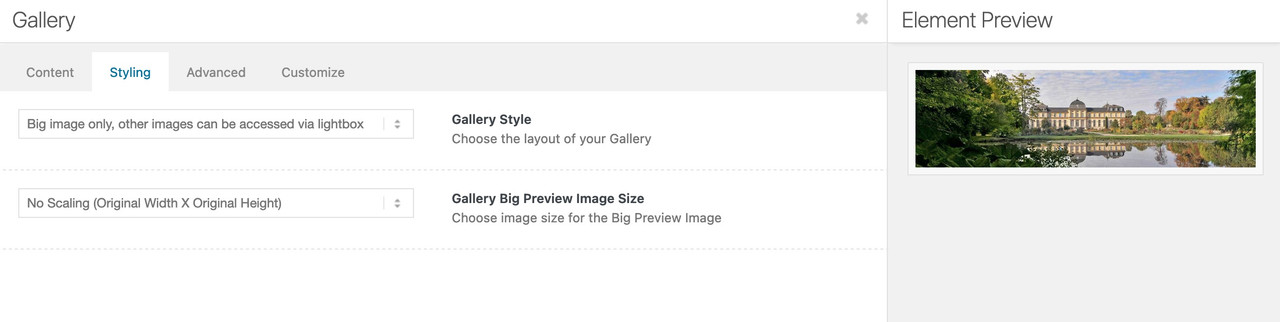
As long as the galleries are in different containers – they will build there own Group ; a sparation by putting them inside each in a different Column will be enough.
So put for each room a gallery inside a column.
-
This reply was modified 3 years, 10 months ago by
Guenni007.
And besides your css rule you can set this in the alb element itself on advanced tab:
(click to enlarge:)
The most efficient way to help is to be able to inspect the real website. If you don’t want to make the link public, you can place it in the Private Content area. But then you have to wait for the help of the mods.
i could not imagine a situation when this is happening.
is there an example where i can see the issue.by the way it can be found in : enfold/js/avia-popup/jquery.magnific-popup.js
but if you had to change it in the minified version – look for: tNotFound ( the first place):
tNotFound: 'Content not found'It’s great that it worked out after all. However, I will now remove my example page.
-
This reply was modified 3 years, 10 months ago by
-
AuthorPosts
