

-
AuthorPosts
-
October 21, 2019 at 11:12 am #1149803
I now have hundreds of dead links on my website because you have added this to all our reviews:
https://tinyurl.com/y62z6aqyPlease remove this ASAP because this is very bad for our rankings on Google.
Thank you.
October 21, 2019 at 2:44 pm #1149879Hey servifarmacomp,
The screenshot does not really show anything. Can you please explain in more detail what the issue is?
Best regards,
VictoriaOctober 22, 2019 at 9:49 am #1150091I sent you a link to my website, not a screenshot.
If you scroll down you will see numerous https://
You simply cannot miss them. They’re below every review on the site…
October 23, 2019 at 12:35 pm #1150487I would love some help!!!
October 24, 2019 at 11:51 pm #1151035Hi,
Thanks for the explanation, I see that you are using the testimonial element, please check that the “Website Link” field is empty:
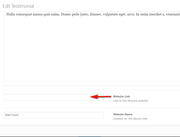
in my tests when this is empty no link should show:
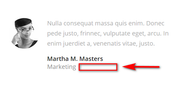
Best regards,
MikeOctober 25, 2019 at 9:42 am #1151124Hi Mike,
Yes they always were empty but with your latest update ENFOLD has already standardly put https:// in the fields. So now I have hundreds of testimonials with this.
Please fix this, I don’t want to have to do this manually because this will take hours of my employees time.
Thank you.
October 25, 2019 at 10:02 am #1151128Hi,
Please edit: \enfold\config-templatebuilder\avia-shortcodes\testimonials\testimonials.php
on line 216 look for:"std" => "http://",and change to"std" => "",
Then clear your browser cache and any cache plugin, and check.Best regards,
MikeOctober 25, 2019 at 10:05 am #1151130Will ask my webmaster.
But with future updates will this be over written?
October 25, 2019 at 10:16 am #1151133Hi,
Yes, you should use a child theme Get our pre-built one here then follow this documentation to add your custom Advanced Layout Builder element.Best regards,
Mike -
AuthorPosts


- You must be logged in to reply to this topic.