Hey schweg33,
Please try the following in Quick CSS under Enfold->General Styling:
.responsive.html_mobile_menu_tablet #top #header .av-main-nav > li > a:before {
  color: #fff;
}
Best regards,
Rikard
Hi,
Great, I’m glad that Ismael could help you out. Please let us know if you should need any further help on the topic, or if we can close it.
Best regards,
Rikard
Hello everyone
On the page link below
I have displayed the magnifying glass on mobile but it has a different color than on the desktop
can I specify this color in white via CSS?
Thanks in advance
kind regards
Franz
Adding &muted=1 to the parameters at the end of the vimeo URL seems to have been the trick to get it to autoplay in Chrome incognito! Thank you Ismael :)
Dear Enfold team.
Since I asked a question on this topic before,
I have a file that is about 80-90% complete in Japanese translation.
It is a bit old as of 2021 and I am not sure if you need it,
Would it be better to send it to you?
Best regards,
Megmi
-
This topic was modified 1 year, 2 months ago by
 Megmi.
Hi we are experiencing an issue with Enfold on one of our sites where the memory limit is getting exausted when trying to view any ALB image element on our site.
It times out and when I check the log files I get the following:
If we have redis enabled:
AH01071: Got error ‘; PHP message: PHP Fatal error: Allowed memory size of 536870912 bytes exhausted (tried to allocate 1310720 bytes) in /var/www/vhosts/domainname.com/httpdocs/wp-content/object-cache.php on line 2534’, referer: https://domainname.com/wp-admin/post.php?post=14&action=edit
If we have redis disabled:
AH01071: Got error ‘PHP message: PHP Fatal error: Allowed memory size of 536870912 bytes exhausted (tried to allocate 5242880 bytes) in /var/www/vhosts/domainname.com/httpdocs/wp-includes/class-wp-object-cache.php on line 239’, referer: https://domainname.com/wp-admin/post.php?post=14&action=edit
This is accompanied by a console error:
Failed to load resource: server responded with a status of 500 ()
wp-admin/admin-ajax.php
wp-admin/load-scripts.php
I am assuming these two errors are because the process has stopped – And the cause is something to do with the issues above.
We therefore cannot change the images on this site.
I have raised this issue before but we couldnt find a cause.
The allowed memory size is much larger than the limit suggested here. So not sure where the memory limit at 536870912 bytes is being pulled from.
I think this is an issue with PHP compatibility and the avia builder. The problem seems to be worse in anything above php 8.0. We are now running PHP 8.2 on this site and the problem occurs with consistency.
Please can you let me know what you need from us to investigate? I can provide login credentials if required.
-
This topic was modified 1 year, 2 months ago by
 thinkjarvis.
-
This topic was modified 1 year, 2 months ago by thinkjarvis. Reason: redacted url for security
Hi,
Thanks for the update, and for sharing your code. Please let us know if you should need any further help on the topic, or if we can close it.
Best regards,
Rikard
Hi,
Thanks for the update, it was likely a caching problem then. Please let us know if you should need any further help on the topic, or if we can close it.
Best regards,
Rikard
Hey bergente,
We can’t say for sure if your site will crash or not, but we would suggest that you update the theme first of all. The update to 6.0.8 has to be done manually from the version you are running, please refer to my replies in this thread: https://kriesi.at/support/topic/enfold-4-5-theme-update-update-failed-download-failed-a-valid-url-was-not-pro/#post-1021541
You can either update manually via FTP: https://kriesi.at/documentation/enfold/how-to-install-enfold-theme/#theme-update, or upload the theme as if it was new under Appearance->Themes->Add New Theme.
If that doesn’t work then please try to delete the whole theme folder, then replace it with the new version. Make sure that you have backups of the site before starting updating.
Also please read this after you have updated: https://kriesi.at/documentation/enfold/
Best regards,
Rikard
Hey tczubkowski_priv,
Thank you for the inquiry.
There is no option for this by default. One solution is to duplicate the current logo slider element, set it to display 4 columns, and then toggle the visibility of both elements in the Advanced > Responsive > Element Visibility settings. Configure it so that one slider is visible only on desktop and the other on smaller screens. Please refer to the screenshot below:
View post on imgur.com
Best regards,
Ismael
Please have a look at
The Burger menu icon on the top right does display on mobile resolutions, but clicking/tapping it does not make slide open.
On Chrome (both desktop and iPhone), it works fine.
What’s wrong?
Thanks a lot!
Uwe
-
This topic was modified 1 year, 2 months ago by
 UweS. Reason: typo
Hey togetherconcept,
Try this solution:
note that you may need to adjust for the special charters “quotes” in the code.
Or perhaps this one:
but note that the grid layout with the “read more” is only for some theme layouts so we would need to see your site with admin access to investigate feather.
Best regards,
Mike
Hey Diana,
Try this CSS in your Enfold Theme Options ▸ General Styling ▸ Quick CSS field:
#top .avia-timeline-container .av-milestone .av-milestone-indicator,
#top .avia-timeline-container .av-milestone .av-milestone-article-footer {
    background-color: rgba(148, 159, 175, 0.77);
}
Please ensure to copy the code from the forum and not an email notification so the symbols are not converted.
After applying the css, please clear your browser cache and check.
Best regards,
Mike
Hi,
Try this instead:
#top #wrap_all #main .template-page h1.markdown a,
#top #wrap_all #main .template-page h2.markdown a,
#top #wrap_all #main .template-page h3.markdown a,
#top #wrap_all #main .template-page p.markdown ~ h3 a{
	 text-decoration: none !important;
}
#top #main .template-page .avia_textblock :not(h1,h2,h3) a:not(.avia-button) {
    text-decoration: underline !important;
}
Please ensure to copy the code from the forum and not an email notification so the symbols are not converted.
After applying the css, please clear your browser cache and check.
Best regards,
Mike
Hi,
Thanks for the update. Please let us know if you should need any further help on the topic, or if we can close it.
Best regards,
Rikard
Hi, I recently added this element through woocommerce:
View post on imgur.com
Is it at all possible to remove the “never expires” part, I tried with CSS, but it also removes the FREEPREORDER and BONJIFREE parts.
I tried display: none that entire section, and then bring back the top text using: div.font-mono.uppercase …. but there seems to be no reverse to display none, so I can’t bring it back.
Please help, and thank you
Dear Support Team
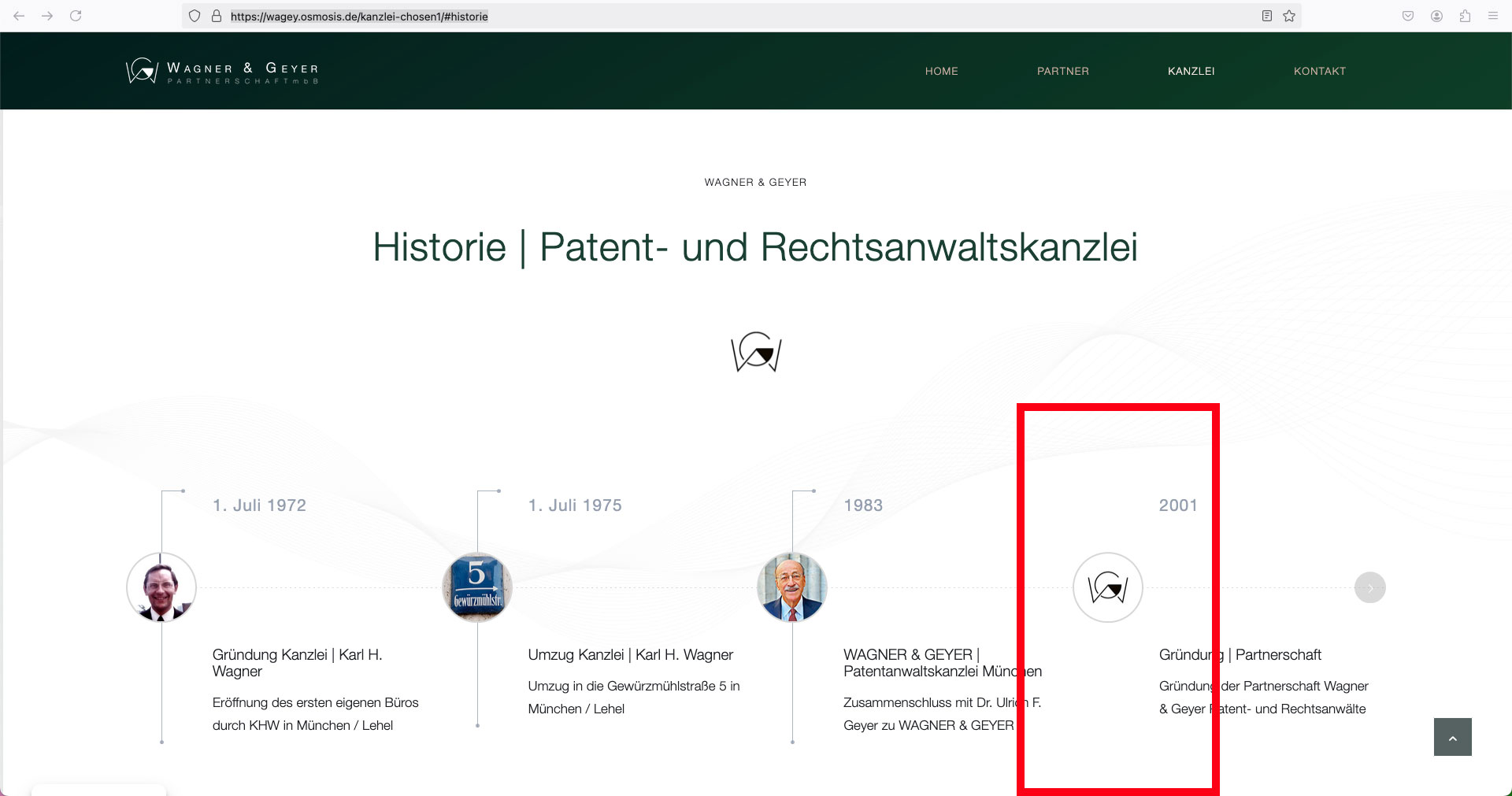
On the website https://wagey.osmosis.de/kanzlei-chosen1/#historie I have a timeline element where the vertical lines to the top (to the date) and bottom (to the text) are missing at the 4th milestone point for some reason – ???
Here is another screenshot of the marked milestone point without lines: https://osmosis.de/support/timeline.jpg
I have already deleted the point several times, recreated it, duplicated another point, always the same result, either milestone point #3 or #4 is missing the vertical lines.
Could you please help me? How can I display these lines?
Best regards, Diana
How can I set (CSS) a different value for the Column count parameter depending on the browser resolution? For example, I would like to set 5 for desktop mode (5 logos in one row), and 4 (two logos in two rows) for tablets and mobile devices. Currently, when I select 5 columns, I have 5 logos in one row for desktop (ok), but on tablets and mobile devices, I see 5 logos stacked one under the other, which looks unattractive. Thank you. Tom
Hey José Augusto,
Try going to the “screen options” at the top of the menu page and select “Link Target”, then after you add your custom link, open it and change your Link Target for it.
Best regards,
Mike
We have a background video using Vimeo. It works great in all browsers except Chrome. In Chrome, it seems about 70% of the time the Vimeo video loads frozen and doesn’t autoplay. But if you refresh the browser, it will start playing. I think I’ve narrowed it down to this error in the console when it does freeze: “Unchecked runtime.lastError: The message port closed before a response was received.”
Also not sure if this is related, but only in Chrome do I also see the Vimeo tools loading over the video.
Any thoughts?? 🤔
Hi,
Thank you for following up.
We added this css code to adjust the padding on mobile view:
@media only screen and (max-width: 767px) {
  /* Add your Mobile Styles here */
  .html_header_top.html_header_sticky #top #wrap_all #main {
    padding-top: 0 !important;
  }
}
Please make sure to purge the cache before checking the page.
Best regards,
Ismael
Hi,
Thank you for the update.
The shift or the spaces around the cells are due to the padding settings. Did you set the left or right padding to 20%?
.responsive #top #wrap_all .flex_cell.av-kyn9tdd8-374b8bd1892b4b8013281e9880b054a8 {
    padding: 4% 20% 4% 4% !important;
}
You have to edit the Grid Row cells and adjust the Styling > Padding for the mobile view, as shown in the screenshot below.
View post on imgur.com
Best regards,
Ismael
Hi,
Thank you for the update.
We have selected a larger version of the product image in the Product Grid’s Styling > Image Size settings.
To underline all links in the site, please add this css code:
#top #main a {
    text-decoration: underline !important;
}
Best regards,
Ismael
on default – the padding-top for transparency header setting is set to zero ( padding-top: 0 ) – check if you have a different setting on your page.
Maybe your header is transparent – but there is no content under that area ;)
Yes, you are right – that even if you select the last option (responsive) for that color-section in “Section Minimum Height” and set it to, say, 56% (for a 16:9 video) – this setting will have no effect on small screens.
The reason for this is that if it is forced, there is a high probability that the content of the colour section will grow beyond the then quite small height.
( 900 / 16 = 56.25)
.responsive #top .avia-section[data-section-video-ratio="16:9"] {
  height: 56.25vw !important;
}
see here what is the problem: https://webers-testseite.de/videobackground/
Hello,
I have found two posts on this topic, but they are very old:
How to enable the Enfold “Theme Options” for editors?
Enabling the Enfold “Theme Options” for editors also reveals “Settings” menu
The solution “You can copy the whole avia_adminpages class to your child functions.php” doesn’t work for me.
What exactly do I have to write in the functions.php, to change
Line 219: and line 233:
'manage_options', // capability`
in:
'edit_theme_options', // capability`
Best regards,
Neverlands
And sorry, off topic, but what is the code to underline all text links on the website. But not the buttons. thanks
Thank you! On desktop it looks great! on tablet/mobile now the header is really tall. How would that be amended?
Which shortcode do I need to apply the link titles to? I am confused
Are you referring to the PHP code?
my page shortcode does have link titles (see below)
[av_section min_height='' min_height_pc='25' min_height_px='500px' padding='small' custom_margin='0px' custom_margin_sync='true' svg_div_top='' svg_div_top_color='#333333' svg_div_top_width='100' svg_div_top_height='50' svg_div_top_max_height='none' svg_div_top_opacity='' svg_div_bottom='' svg_div_bottom_color='#333333' svg_div_bottom_width='100' svg_div_bottom_height='50' svg_div_bottom_max_height='none' svg_div_bottom_opacity='' color='main_color' background='bg_color' custom_bg='#000000' background_gradient_direction='vertical' background_gradient_color1='#000000' background_gradient_color2='#ffffff' background_gradient_color3='' src='' attachment='' attachment_size='' attach='scroll' position='top left' repeat='no-repeat' video='' video_ratio='16:9' overlay_opacity='0.5' overlay_color='' overlay_pattern='' overlay_custom_pattern='' shadow='no-border-styling' bottom_border='no-border-styling' bottom_border_diagonal_color='#333333' bottom_border_diagonal_direction='' bottom_border_style='' custom_arrow_bg='' id='' custom_class='' template_class='' aria_label='' av_element_hidden_in_editor='0' av_uid='av-gw04d9' sc_version='1.0']
[av_hr class='invisible' icon_select='yes' icon='ue808' font='entypo-fontello' position='center' shadow='no-shadow' height='-25' custom_border='av-border-thin' custom_width='50px' custom_margin_top='30px' custom_margin_bottom='30px' custom_border_color='' custom_icon_color='' id='' custom_class='' template_class='' av_uid='av-fvcgnh' sc_version='1.0' admin_preview_bg='']
[av_heading heading='CHECK OUT OUR OTHER BOWL 360 FRANCHISE ' tag='h3' style='blockquote modern-quote modern-centered' subheading_active='' show_icon='' icon='ue800' font='entypo-fontello' size='26' av-desktop-font-size-title='' av-medium-font-size-title='' av-small-font-size-title='' av-mini-font-size-title='' subheading_size='20' av-desktop-font-size='' av-medium-font-size='' av-small-font-size='' av-mini-font-size='' icon_size='' av-desktop-font-size-1='' av-medium-font-size-1='' av-small-font-size-1='' av-mini-font-size-1='' color='custom-color-heading' custom_font='#ffffff' subheading_color='' seperator_color='' icon_color='' margin='' margin_sync='true' av-desktop-margin='' av-desktop-margin_sync='true' av-medium-margin='' av-medium-margin_sync='true' av-small-margin='' av-small-margin_sync='true' av-mini-margin='' av-mini-margin_sync='true' headline_padding='' headline_padding_sync='true' av-desktop-headline_padding='' av-desktop-headline_padding_sync='true' av-medium-headline_padding='' av-medium-headline_padding_sync='true' av-small-headline_padding='' av-small-headline_padding_sync='true' av-mini-headline_padding='' av-mini-headline_padding_sync='true' padding='10' av-desktop-padding='' av-medium-padding='' av-small-padding='' av-mini-padding='' icon_padding='10' av-desktop-icon_padding='' av-medium-icon_padding='' av-small-icon_padding='' av-mini-icon_padding='' link='manually,http://' link_dynamic='' link_target='' title_attr='' id='' custom_class='' template_class='' av_uid='av-esbpnx' sc_version='1.0' admin_preview_bg='']
Birthdays. Holidays. Parties for the kids. Parties for the office. Parties for you and your friends. When you’re ready to celebrate, then it’s time to BE BOWLED. Bring your party to the lanes and get ready for one unforgettable event.
[/av_heading]
[av_hr class='invisible' icon_select='yes' icon='ue808' font='entypo-fontello' position='center' shadow='no-shadow' height='-50' custom_border='av-border-thin' custom_width='50px' custom_margin_top='30px' custom_margin_bottom='30px' custom_border_color='' custom_icon_color='' id='' custom_class='' template_class='' av_uid='av-cpo64d' sc_version='1.0' admin_preview_bg='']
[av_partner heading='' type='grid' columns='8' navigation='arrows' control_layout='av-control-default' nav_visibility_desktop='' nav_arrow_color='' nav_arrow_bg_color='' nav_dots_color='' nav_dot_active_color='' size='no scaling' img_size_behave='' border='' img_border='solid' img_border_width='1' img_border_width_sync='true' img_border_color='#cccccc' border_radius='12' border_radius_sync='true' box_shadow='' box_shadow_style='0px,0px,0px,0px' box_shadow_color='' padding='10px' padding_sync='true' animation='slide' transition_speed='' autoplay='false' interval='5' heading_tag='' heading_class='' img_scrset='' lazy_loading='disabled' el_id='' custom_class='' template_class='' av_uid='av-bil12l' sc_version='1.0']
[av_partner_logo id='2178' id_dynamic='' hover='Bowl 360 Ozone Park' link='manually,https://bowl360.nyc/' link_dynamic='' link_target='_blank' linktitle='Bowl 360 Ozone Park' av_uid='av-9cabb1' sc_version='1.0']
[av_partner_logo id='2180' id_dynamic='' hover='' link='manually,https://bowl360astoria.nyc/' link_dynamic='' link_target='' linktitle='Bowl 360 Astoria' av_uid='av-6z8btp' sc_version='1.0']
[av_partner_logo id='2181' id_dynamic='' hover='' link='manually,https://bowl360brooklyn.nyc/' link_dynamic='' link_target='' linktitle='Bowl360 Brooklyn' av_uid='av-6jvk4t' sc_version='1.0']
[av_partner_logo id='2183' id_dynamic='' hover='' link='manually,http://bowl360newhydepark.com/' link_dynamic='' link_target='' linktitle='Bowl 360 New Hyde Park' av_uid='av-44jhel' sc_version='1.0']
[av_partner_logo id='2184' id_dynamic='' hover='' link='manually,https://bowl360strikecityspringhill.com/' link_dynamic='' link_target='' linktitle='Bowl 360 Strike City Spring Hill' av_uid='av-101zh' sc_version='1.0']
[av_partner_logo id='2220' id_dynamic='' hover='' link='manually,https://island360restaurant.com/' link_dynamic='' link_target='' linktitle='Island 360 Restaurant' av_uid='av-101zh-2' sc_version='1.0']
[av_partner_logo id='2222' id_dynamic='' hover='' link='manually,https://paddles360.com/' link_dynamic='' link_target='' linktitle='Paddles 360' av_uid='av-101zh-1' sc_version='1.0']
[av_partner_logo id='2260' id_dynamic='' hover='' link='manually,https://uptownbarandgrill360.com/' link_dynamic='' link_target='' linktitle='Uptown Bar and Grill' av_uid='av-101zh-1-1' sc_version='1.0']
[/av_partner]
[/av_section]