Thanks for your time.
I’ve tried, but those settings are only available for layouts with a main menu placed at the top.
As anticipated at the beginning, for all other pages we’d like the sidebar menu on the left.
Hi,
Thank you for the update.
You can replace the previous modification with this css rule to apply the changes to every section across the site.
@media only screen and (max-width: 767px) {
     #top #wrap_all .avia-fold-unfold-section  {
	display: none;
     }
}
Let us know the result.
Best regards,
Ismael
Hey Maggie,
Thank you for the inquiry.
There are transparent spaces above and below the actual logo image (see private field). Try to remove the current logo from the Media > Library, edit the image to remove the transparent gaps using any photo editing tool, then upload it again.
Remove the green part:
View post on imgur.com
You can also try this css code:
.logo img, .logo svg {
    min-height: 150px;
    margin-top: -24px;
}

.logo, .logo a {
    overflow: visible;
}
Best regards,
Ismael
I don’t recall having added that folder and 2 files in enfold-child. But when I hide the folder, the warning notice goes away at the top of the page.
However, I’m seeing a warning notice below the footer (that I had not seen before) (see screenshot):
Notice: ob_end_flush(): Failed to send buffer of zlib output compression (0) in /home/dotorgw1/public_html/wp-includes/functions.php on line 5471
Notice: ob_end_flush(): Failed to send buffer of zlib output compression (0) in /home/dotorgw1/public_html/wp-content/plugins/really-simple-ssl/class-mixed-content-fixer.php on line 107
In the footer area, colummn 1, I had an icon list there which was generated using the “insert theme shortcodes” tool within the toolbar options. The iconlist still views, but above it is an error message. (See private for screenshot view).
Hey Kati17,
I see that you are running an old version of the theme, could you try to update to the latest version (7.1.1) to see if that helps please? The update to 7.1.1 has to be done manually from the version you are running, please refer to my replies in this thread: https://kriesi.at/support/topic/enfold-4-5-theme-update-update-failed-download-failed-a-valid-url-was-not-pro/#post-1021541
You can either update manually via FTP: https://kriesi.at/documentation/enfold/how-to-install-enfold-theme/#theme-update, or upload the theme as if it was new under Appearance->Themes->Add New Theme.
If that doesn’t work then please try to delete the whole theme folder, then replace it with the new version. Make sure that you have backups of the site before starting updating.
Also please read this after you have updated: https://kriesi.at/documentation/enfold/theme-registration/
Best regards,
Rikard
For the site’s homepage, we’d like the “burger” icon on the left and the logo on the right, preferably in the center (https://img.savvyify.com/image/01-Homepage.y9tpL).
For all other pages, we’d like the sidebar menu on the left (https://img.savvyify.com/image/02-All-pages.yy86x).
As you can see from the images, we can obviously do this in the theme settings, but one excludes the other.
So, either only at the top or only on the left.
Is there a way to achieve the result we want?
And when using the “burger” icon, is it possible to open the menu on the left instead of the right (https://img.savvyify.com/image/01-Homepage-b.yy905)?
but you are loading some fonts – how do you load them. I see f.e. a roboto-slab – this is not inside the default drop-down for available fonts.
Try to upload those fonts – by using the font-manager.
i can see this console warning : downloadable font: glyf: empty gid 164 used as component in glyph 165 (font-family: “Roboto Slab” style:normal weight:100..900 stretch:100 src index:0) source: https://fonts.gstatic.com/s/robotoslab/v35/BngMUXZYTXPIvIBgJJSb6ufN5qWr4xCC.woff2
_____
a similar Problem?
btw. : have a look at: https://kriesi.at/support/topic/deprecation-warnings-clogging-up-my-error_log-file/
and maybe then it would be nice to get rid of that small border too:
.avia_transform .av-extra-border-element.border-extra-diagonal.border-extra-diagonal-inverse .av-extra-border-inner {
  background-color: #FFF;
}

#top .container_wrap {
  border-top-style: none;
}
Hi,
Try this CSS instead in your Enfold Theme Options ▸ General Styling ▸ Quick CSS field:
.avia_desktop #top .av-hover-overlay-active .av-masonry-image-container {
    opacity: 1;
}
Please ensure to copy the code from the forum and not an email notification so the symbols are not converted.
After applying the css, please clear your browser cache and check.
Best regards,
Mike
Hi guys,
When adding special characters, I get a warning that it may break the internal structure. I found this post from 2018 and this solution from Guenter: https://kriesi.at/documentation/enfold/intro-to-layout-builder/#using-special-characters.
Guenter’s solution does work, however it makes the code almost unreadable, especially for my client, the end user. They’ll never be able to make changes themselves. So my question is: Is there a more workable solution, especially since this issue has been known for a long time?
Regards,
Steven
Hey laptophobo,
Which PHP version are you using?
Best regards,
Rikard
Hi folks,
When I turn Debug on I get the following error message (on top of home page, which is at: dotorgwebworks.org):
Deprecated: Function av_icon is deprecated since version 7.0! Use Use avia_font_manager::get_frontend_icon() instead instead. in /home/dotorgw1/public_html/wp-includes/functions.php on line 6121
I see that the issue is within the “functions.php” file, the one in wp-includes. Since I’ve never tampered with this file before, I’m seeking your advice.
Perhaps this error message is telling me that one or more of my icons (e.g.: Fontello) is problematic?
Any help you can offer would be appreciated. Thanks.
only one thing : the one ruleset inside the media query (see Link ) : the hyphens: auto had to be set to !important
hyphens: auto !important;
Hi,
We’re unable to reproduce the issue, but the css modification should prevent the lightbox containers from wobbling while swiping. You can also try this css:
#top .mfp-wrap {
    overflow: hidden;
    touch-action: none;
}
Let us know the result.
Best regards,
Ismael
Hey dburton77,
Thank you for the update.
We may need to access the site to properly check the issue. We didn’t find any site information in the previous thread.
— https://kriesi.at/support/topic/google-analytics-loaded-in-footer/
You can remove the code to relocate the tracking script to the footer, which is the default placement.
Best regards,
Ismael
Hi, I am working on this site: https://www.mygpc.org/staging/4150/
How do I make the top hero image taller in the Fullwidth Easy Slider?
Thanks!
Justine
Hey Katy Maurer,
It should likely not change anythings, but I would advise that you update on a staging site first to check the results there first. If that is not a possibility for you, then make sure that you keep backups of your current site in case you should have to restore it. Once you are ready to update then the update to 7.1.1 has to be done manually from the version you are running, please refer to my replies in this thread: https://kriesi.at/support/topic/enfold-4-5-theme-update-update-failed-download-failed-a-valid-url-was-not-pro/#post-1021541
You can either update manually via FTP: https://kriesi.at/documentation/enfold/how-to-install-enfold-theme/#theme-update, or upload the theme as if it was new under Appearance->Themes->Add New Theme.
If that doesn’t work then please try to delete the whole theme folder, then replace it with the new version. Make sure that you have backups of the site before starting updating.
Also please read this after you have updated: https://kriesi.at/documentation/enfold/theme-registration/
Best regards,
Rikard
Hi everyone,
I need your help and I’m a bit lost. I’m trying to track form submissions from the Enfold contact form using Google Tag Manager.
I’ve already added the following code to the functions.php file, as recommended in this thread: https://kriesi.at/support/topic/contact-form-tracking-with-gtm/
add_filter(‘avf_contact_form_submit_button_attr’,’avia_add_submit_attributes_to_cf’, 10, 3);
function avia_add_submit_attributes_to_cf($att, $formID, $form_params){
$att = “onsubmit =\” dataLayer.push({‘event’: ‘form-submission’}); \””;
return $att;
}
Everything in GTM seems to be set up correctly, but for some reason, the event isn’t firing. Does anyone have an idea what I might be missing?
Best regards,
Chris
Hey Gianluca,
Go to Apperance->Menus, then click Screen Options in the top right hand corner. Select to show Description in that menu.
Best regards,
Rikard
Hi,
Thank you for the screenshot. We initially thought the first section contained a static image. To adjust the size of the video, try to add this css code.
#top .avia-video .mejs-container, #top .avia-video .mejs-container video {
    object-fit: cover;
}
View post on imgur.com
Best regards,
Ismael
Hi,
Try to include this css code to disable the external link overlay.
#top .image-overlay.overlay-type-extern {
    display: none !important;
}
Let us know the result.
Best regards,
Ismael
and in addition – some magic of “container-type” property and font-size adjust via cqi
to have more legible font sizes!
@media only screen and (max-width: 989px){
  #top .gridded-flipbox .avia-icongrid-flipback  .avia-icongrid-inner {
    padding: 20px !important;
  }

  #top .gridded-flipbox .avia-icongrid-flipback {
    container-type: inline-size;
  }

  #top .gridded-flipbox .avia-icongrid-flipback p {
    hyphens: auto;
    font-size: 9cqi;
    line-height: 1.5em
  }
}
Hi,
Thanks for the update. Please let us know if you should need any further help on the topic, or if we can close it.
Best regards,
Rikard
so first try this in addition to my code from example page:
#top .gridded-flipbox .avia-icongrid-wrapper,
#top .gridded-flipbox .article-icon-entry {
  width: 100%;
  height: 100%;
  min-height: unset !important;
}

@media only screen and (min-width: 990px){
  #top .gridded-flipbox .avia-icongrid-flipback  .avia-icongrid-inner {
    padding: 10px !important;
  }
  #top .gridded-flipbox .avia-icongrid-flipback p {
    hyphens: auto
  }
}
i found your site – and i see that you have set the min-height option – remove that
See on the element on Styling – Grid Styling – “Minimum Height – For Flipbox Only”
Unfortunately, few of my fellow participants have the courage to publicly post links to their websites here. Otherwise, it would surely have been resolved by now.
you only had to adjust that one rule:
#top .gridded-flipbox .avia-icongrid-wrapper, #top .gridded-flipbox .article-icon-entry {
  width: 100%;
  height: 100%;
  min-height: unset !important;
}
and maybe you set the gap a bit smaller than 30px
Hi,
The addition of the class first_form when the empty line is present is expected since the third form field (phone) is technically the first field in the new row. The empty line counts as a field, at least in how it’s rendered in the document, so the layout works as follows: first row – 1/2 field (email) + empty line; second row – 1/2 field (phone). This can be avoided by removing the empty line and using it only before or after full-width elements.
If you need to force the phone field to stay in the second row even when there’s an empty line in between, try adding this css code:
#top .avia_ajax_form p#element_avia_2_1, #top .avia_ajax_form p#element_avia_4_1 {
    clear: none !important;
    float: left;
    margin-left: 0;
}

#top .avia_ajax_form p#element_avia_4_1 {
    margin-left: 1%;
}
Best regards,
Ismael
hey,
i made an annotated screenshot – hopefully it will appear below & help explain what i mean better.
looks like the “Empty Line” Element, when set to “Print Email Only” is adding a “first_form” class to any field that doesn’t already have it. and that class seems to be the reason that it breaks a row on the front-end.
so seems to me that the “Email Only” “Empty Line” needs to stay email only and not add that class to fields on the front-end.
hope that helps. i don’t mean to beat a dead horse, so you can close this topic if you want. doesn’t seem to me that there’s anything else to be done until/unless ya’ll change that (to me, bug) issue so when an element is set for email only, it doesn’t change anything on the front-end.

because i do not see any cover on your page- do you solve it?
#top .wp-playlist-current-item img {
  display: none;
}
___________
or do you mean : how to show them?
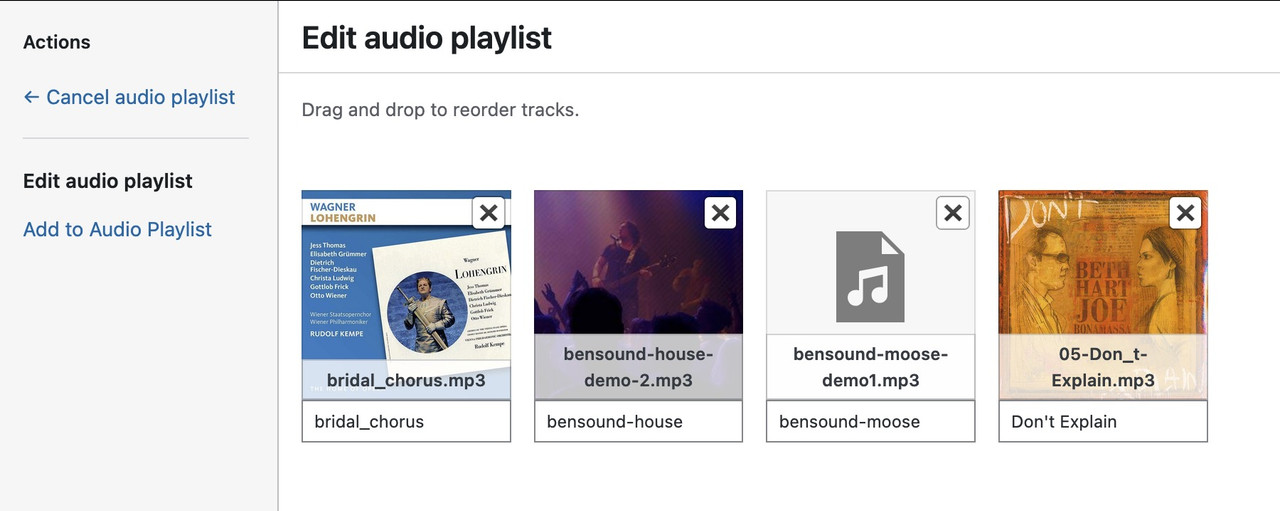
if you like to have cover:
on element (audio player) – player tab: do not enter a cover image ( only if you like to have for all items in the playlist the same cover)
on “Media Icon/Album Cover”
now your audio files must have an embedded cover. – you can see if the file got an embedded cover on media-library popup – when you choose your files:
i embed a cover to your file and uploaded it to my text page – :
Hi,
Thank you for the update.
Looks like you’ve already detached the title from the image as suggested — it does look better now. Have you tried adding the css we recommended earlier? It will force the image to display fully but the layout might look slightly off if the flipback content is taller than the image.
#top .avia-icon-grid-container .avia-icongrid-flipbox .avia-icongrid-wrapper .avia-icongrid-front.bg-img:before {
    background-size: contain;
}
Best regards,
Ismael



