Hey peanuttario,
Please try adding this code to the Quick CSS section under Enfold > General Styling or to your child theme’s style.css file:
#top .content .flex_column .widget_nav_menu ul:first-child>.current-menu-item, #top .content .flex_column .widget_nav_menu ul:first-child>.current_page_item {
    background-color: transparent;
}
Please make sure that > sign is not converted to – http://i.imgur.com/IDXRZQ3.png in Quick CSS field.
Best regards,
Yigit
Hi,
Please try adding !important rule as following
.gform_wrapper .gform_footer {
    margin-top: 0 !important;
    padding-top: 0 !important;
}
If that too does not work, please create a temporary admin login and post it here privately so we can look into it
Best regards,
Yigit
Thanks Jordan,
That sounds like it’s way out of my knowledge/ability!
Just one thing, is there a way to move that text down, so it’s more aligned to the button on the left.
Thanks again for your, always helpful, replies,
Regards
Jon
EDIT – Don’t worry, I fixed it by adding some padding!
.phone-info span{
padding-top: 45px;
}
Sure, please notice my site on top vs. a site built with a previous version of your theme:
http://2.1m.yt/pG4D_kw.jpg
Hi creativeyes,
1 and 2, no they don’t. When you create a post with Advanced Layout Builder, it is rendered using different templates and it acts like a page. You need to add everything you want to show via Advanced Layout Builder or by customizing templates and writing code.
These are threads on category layout:
https://kriesi.at/support/topic/category-page-and-layout-builder/
https://kriesi.at/support/topic/changing-the-layout-for-post-categories/
3 I agree the breadcrumbs are really weird, need to investigate a bit more. Is this a new post or a duplicate?
Best regards,
Victoria
I’m probably just looking in the wrong area to post a feature request. On the support forum main page for Enfold, near the top I see the attached. Note the lock icon and inside that topic, it says at the bottom “The topic ‘Enfold Feature Requests’ is closed to new replies.”
Perhaps you can just post a link to where new feature requests can be submitted?
Thanks
Hi,
Please try adding this code to the Quick CSS section under Enfold > General Styling or to your child theme’s style.css file:
.gform_wrapper .gform_footer {
    margin-top: 0;
    padding-top: 0;
}
Best regards,
Yigit
Again: if you want to get rid of the search results in Google, then refer to this link: https://kriesi.at/support/topic/gwt-problems-indexing-enfold-soft-404-with-search-activated-s
Most people want their search results appearing in Google, but if you don’t, then simply follow the link.
I’m going to close this thread now.
Best regards,
Andy
Hi,
Please start a separate thread for this issue. It is only to ensure that we keep topics organized to one problem per topic.
Best regards,
Jordan Shannon
Hi,
I added the following to quick css:
.content .entry-content-wrapper {
    padding-right: 0px!important;
}

.inner_sidebar {
    margin-left: 0px!important;
}

.sidebar {
position:absolute;
right:0;
top:0;
bottom:0;
max-width:calc(25% - 50px);
background:#ffffff!important;
}

.sidebar .widget:first-child {
    padding-top: 50px!important;
}
Please test and let me know if it is what you needed or close.
Best regards,
Jordan Shannon
Hi,
The site is back up. Now again sir, please follow this solution https://kriesi.at/support/topic/enfold-theme-woocommerce-product-images-not-showing-as-of-4-4-17/page/3/#post-773385
This works and is simple to implement, but the steps involved go beyond what can be offer here in the support forum. If you are not comfortable, we do offer freelance services
Please sir follow the linked solution.
Best regards,
Jordan Shannon
Hi,
I have an usual request, which I hope that you’ll be able to help me with.
I am building a new site using Enfold and Superfly (menu plugin). In order to get it to work I have to disable the enfold menu.
I would, however, like to have some text at the top right of every page. This would appear on top of everything, there will be videos and images heading each page, so it would act very much like a header menu, but a single line of text, which wouldn’t be a link.
Is there some CSS you’d be able to suggest to make this happen.
Thanks in advance.
EDIT: I think I am hacking a way to do it, but I don’t know how advisable it is.
#top .av_header_transparency #header_main { display:none !important; }
#top .av_header_transparency #header_meta { border-bottom: 0px; }
.phone-info { font-weight: 100 !important; text-transform: uppercase; }
-
This topic was modified 8 years, 10 months ago by
 jonrouse. Reason: Trying to fix problem
Hi John,
If you test the anchors, or watch the gif the anchors do not sit. They shoot back up to the top of the screen
That’s exactly what I’d like to avoid
Hello,
On the website http://www.DansPremiumCigars.com I find that when I create a fullwidth easy slider, the images appear well on desktop. The main image is correctly sized, the color overlay is working correctly and the .png appears center and correct. That said, when I look at the site from mobile, the overlay (.png file inserted as ‘pattern’) is no longer centered and only parts of it appear.
What can I do to fix this or is there a different setup I should be following? I’ve used the Advanced Layerslider a time or two but find it to be a lot to handle and a bit beyond my skills visually speaking.
Thanks in advance!
-Neil
Hi,
Sorry was referring to height and my mistake I misunderstood it. Try adding this css code in Quick CSS:
.html_top_nav_header #main .av-logo-container {
    height: 500px;
}

#main .container.av-logo-container {
    max-width: 100%;
}
Just adjust the height as you see fit. Hope this helps :)
Best regards,
Nikko
 emiliano
Guest
I’m going to buy your theme, I need an ecommerce, clean, fast and elegant. What do you suggest me? what does kind plugin use to manage ecommerce? Is it fully compatible with woocommerce and wpml multilanguage?
May I download a demo in orger to change just what I need?
Last question, I would like to know if my clients can use a personal area by registering or logging, please see those two example:
http://www.nixon.com/it/it/home/
http://www.nike.com/it/it_it/
You can see two banner located on top of main manu, where you can chose lang and register o login.
Is it possible with your theme?
Thank you,
Emiliano
Hi Frank,
Here is the code you can put in Enfold > General Styling > Quick Css, if it does not work, put into themes/enfold/css/custom.css
#top .variations_form {
    border: none;
    background-color: transparent;
}
Don’t forget to flush the cache or disable cache until you get the issue resolved.
If you need further assistance please let us know.
Best regards,
Victoria
HI!
I adjusted the font size and weight for Enfold (theme settings). Worked.
The second page http://pentacode.co/funktionen also still works. It’s just that somehow the main page didn’t save correctly. I also get this error message from the layer slider WP plugin:
It seems there is a server issue that prevented Layer Slider from saving your work. Please check Layer Slider -> System Status for potential errors, try to temporarily disable the theme/plugins to rule out compatibility issues or contact your hosting provider to resolve server configuration problems. Your http server thrown the following error: NOT FOUND
Can I make another page with the code from previous wp auto saves?
This is the beginning part of the code..
[ av_layerslider id=’5′]
[ av_section min_height=” min_height_px=’500px’ padding=’huge’ shadow=’no-border-styling’ bottom_border=’no-border-styling’ bottom_border_diagonal_color=’#333333′ bottom_border_diagonal_direction=” bottom_border_style=” id=” color=’main_color’ custom_bg=” src=’http://pentacode.co/wp-content/uploads/2017/04/Card3.jpg’ attachment=’3847′ attachment_size=’full’ attach=’parallax’ position=’top center’ repeat=’no-repeat’ video=” video_ratio=’16:9′ overlay_opacity=’0.5′ overlay_color=’#754c24′ overlay_pattern=” overlay_custom_pattern=” av_element_hidden_in_editor=’0′]
[ av_hr class=’invisible’ height=’100′ shadow=’no-shadow’ position=’center’ custom_border=’av-border-thin’ custom_width=’50px’ custom_border_color=” custom_margin_top=’30px’ custom_margin_bottom=’30px’ icon_select=’yes’ custom_icon_color=” icon=’ue808′ font=’entypo-fontello’ admin_preview_bg=”]
[ av_one_fifth first min_height=” vertical_alignment=” space=” custom_margin=” margin=’0px’ padding=’0px’ border=” border_color=” radius=’0px’ background_color=” src=” background_position=’top left’ background_repeat=’no-repeat’ animation=” mobile_display=”]
Hi,
Glad we could help. Please let us know if you should need any further help on the topic or if we can close it.
Best regards,
Rikard
Hi Ralf,
I am pretty sure, you’re aware that those are two most common ways to change something in WordPress. If you don’t want to use either, you can edit theme framework files and you must know that those changes will be lost with the next them update. So I ask the question again, how do you expect to get this fixed?
Here are some threads that might give you an idea:
https://kriesi.at/support/topic/edit-autoresponder-message/
https://kriesi.at/support/topic/can-i-change-the-contact-forms-autoresponse-reply-to-email/
https://kriesi.at/support/topic/change-text-auto-response-contactform/#post-392414
Best regards,
Victoria
Hi Victoria,
i want display in line in center bottom, fonts style should not all caps.
i tryed some how i have achieved, but still i need all words should not caps bold
/*Change slideshow align caption*/
.slideshow_align_caption {
top: 220px;
}
/*Change font family*/
h2.avia-caption-title{
font-family: “Martel”!important;
}
-
This reply was modified 8 years, 10 months ago by
 srinagasai.
Hi,
Glad we could help :-)
Please let us know if you should need any further help on the topic or if we can close it.
Best regards,
Rikard
try this too combining Yigits rule:
html {
    -webkit-font-smoothing: antialiased;
}
or as Basilis changing:
* {
    -webkit-font-smoothing: antialiased;
}
see thread here : https://kriesi.at/support/topic/different-font-weight-in-menu-navigation/?bbp_reply_to=717694&_wpnonce=9354f7d078#new-post
and look to the warning:
Use Wisely
For these last two hacks, each character re-rendered will require extra resources so it’s best NOT to use these to render large swaths of copy. Use these on headers and global elements where you will have the most impact, but for the main copy use ‘serif’ or ‘sans-serif’ and let the browser decide.
so perhaps you will only do for navigation or important headlines
-
This reply was modified 8 years, 10 months ago by
 Guenni007.
Hi,
Great, glad we could help :-)
Please let us know if you should need any further help on the topic or if we can close it.
Best regards,
Rikard
Hi,
i created a content-slider
and i editet the template, to create deep links to the slider:
https://kriesi.at/support/topic/deeplink-into-content-slider/
(worked perfectly well)
Now i have the problem, i want to use Hotspots to navigate the deep links. You can see what i meen on my website (private)
Hi Ismael,
Please remove that modification so that we can test the filter properly.
Sorry I know, but there is no more modification?!
“whtat is that? You find *your* solution at reply #785574!” = https://kriesi.at/support/topic/breadcrum-shows-all-categories-off-an-portfolio-item/#post-785574
Hope you can help, best regrads
Mike
Hi,
Yes! :) This is essentially the same page, it’s just paginated.
To verify, you can view the source of the page (right click, “View Source”, depending on your browser), and you can see the unique class in the body tag. For your blog overview page, the body tag looks like this:
<body id="top" class="page-template-default page page-id-259 stretched caveat open_sans cookies-not-accepted" itemscope="itemscope" itemtype="https://schema.org/WebPage">
You will notice that all subpages of your blog overview has the same assigned class, page-id-259.
In case you need to apply the CSS to other pages, you can just get their class! :D
I hope that’s clear and helpful. Please do let us know if you need further assistance.
Best regards,
Sarah
sorry for my little off topic but your question reminds me to a film sequence of Peter Seller as Inspector Clouseau – the lightswitch question.
Just a bit of humor now: https://www.youtube.com/watch?v=eu8erlaxLAg
so now to something completely different:
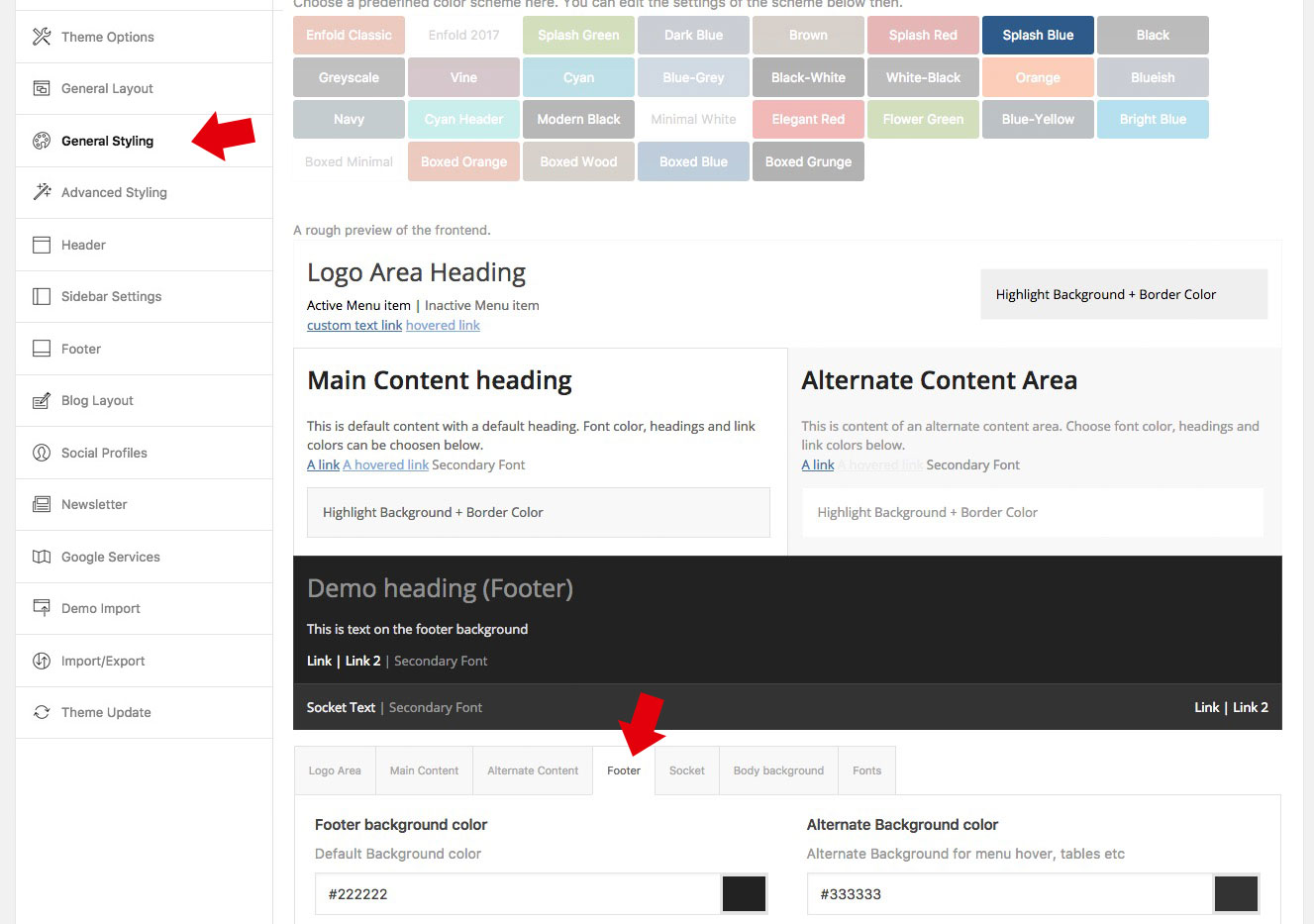
on dashboard – general styling – footer (tab) – be careful the footer is that segment with the widgets in it. The bottom of your site is the “socket” – as you can see in the image above those tabs
Hey christian,
Here is a great article on the topic https://www.elegantthemes.com/blog/tips-tricks/how-to-stop-search-engines-from-indexing-specific-posts-and-pages-in-wordpress
If you need further assistance please let us know.
Best regards,
Victoria
Hi,
Please review your response here:
// https://kriesi.at/support/topic/breadcrum-shows-all-categories-off-an-portfolio-item/#post-786953
The categories are not displaying in the breadcrumb so the modification or solution that you mentioned is still in effect. Please remove that modification so that we can test the filter properly.
And please note that we can’t locate the reply based on the reply number “#784464” or “#785574”. You need to include the actual post url plus the number. Example:
// https://kriesi.at/support/topic/breadcrum-shows-all-categories-off-an-portfolio-item/#post-786953
Best regards,
Ismael



