Hi,
Since we couldn’t locate the “Liver Studies” section on the page, we assumed you were trying to modify the heading element within the embedded script. Please include this css code.
#top #wrap_all .all_colors h2.osArea {
    background: #2a303b;
    color: #ffffff;
}
Best regards,
Ismael
Hi,
Sorry, but I don’t use any CDNs, so I can’t make any recommends, I think that Guenni007 is pointing out that the domain cloudflareinsights.com is on a AD tracking list, perhaps from some of their users, I’m not sure. As for fixing the CORS issue with them you will need to ask them and your webhost, as I pointed out above. Or you could try not using the CDN at all and see if this helps. Once you stop using them and clear your server cache, it might take a day or so for the files to stop being serve by them.
Best regards,
Mike
Hi Ismael,
the site was working fine until I updated it to version 5.6.8. Since then, the settings sidebar of the portfolio items page has disappeared. Normally that sidebar is found on the right hand side of the page, and it can be toggled on or off by pressing the relevant button at the top right of the page. I took a screenshot for you.
I circled in red the settings sidebar toggle button, when it’s black it as in the screenshot the settings column should be displayed on the right side of the screen. Instead, it’s not being displayed and pressing the toggle button makes no effect. Furthermore, if I switch the editor from advanced to basic the page settings column magically re-appears.
I was able to reproduce the same issue across a variety of browsers including Chrome and Firefox for mac osx 13.4 (Ventura)
Many thanks for your help.
Regards,
Patrizio
Please try the following in Quick CSS under Enfold->General Styling for the overlay on tablets
Thank you, but it doesn’t help…:( I will send you the login datas:)
@Guenni007 once set a very pretty border, which unfortunately also transferred to what you see when clicking on portfolio entries. (https://kriesi.at/support/topic/mouse-hower-effect/#post-1421611 and https://kriesi.at/support/topic/mouse-hower-effect/#post-1421686). Is it possible to prevent this?
Perhaps, you know a solution for helping:)? I will send Guenni007 a PM!
Hi Matthias,
Great, I’m glad that you got things working, and sorry for the problem. Please let us know if you should need any further help on the topic, or if we can close it.
Best regards,
Rikard
Hi,
Great, I’m glad that we could help you out. Please let us know if you should need any further help on the topic, or if we can close it.
Best regards,
Rikard
on some customer pages i got (top-level) menu-items that shows f.e. blog-post of a given category.
is it possible to dynamically hide those menu-items if there is no post inside. The page shows in this case that message of no_criteria_matched : “Sorry, no posts matched your criteria”
It would be nice if the corresponding Menu-Items are then removed ( or hidden ) dynamically.
Hello together
I have on this page link below:
facebook and instagram enabled
additionally created a store
can i define via css that all three icons, order facebook instagram and shopping cart are displayed in the header right next to (Früher und Heute).
and the top white line (where now facebook and instagram) is not shown
thanks in advance
kind reagards Franz
Sorry, now I’ll ask again about the mouse hover…
At umwelt-magazin.eu at “Themenbereiche” the portfolio pictures are displayed slightly whitish. This should also remain so on the computer. But not on tablets. Is it possible that this is changed:)?
@Mike should have the access data for our website.
@Guenni007 once set a very pretty border, which unfortunately also transferred to what you see when clicking on portfolio entries. (https://kriesi.at/support/topic/mouse-hower-effect/#post-1421611 and https://kriesi.at/support/topic/mouse-hower-effect/#post-1421686). Is it possible to prevent this?
Hi,
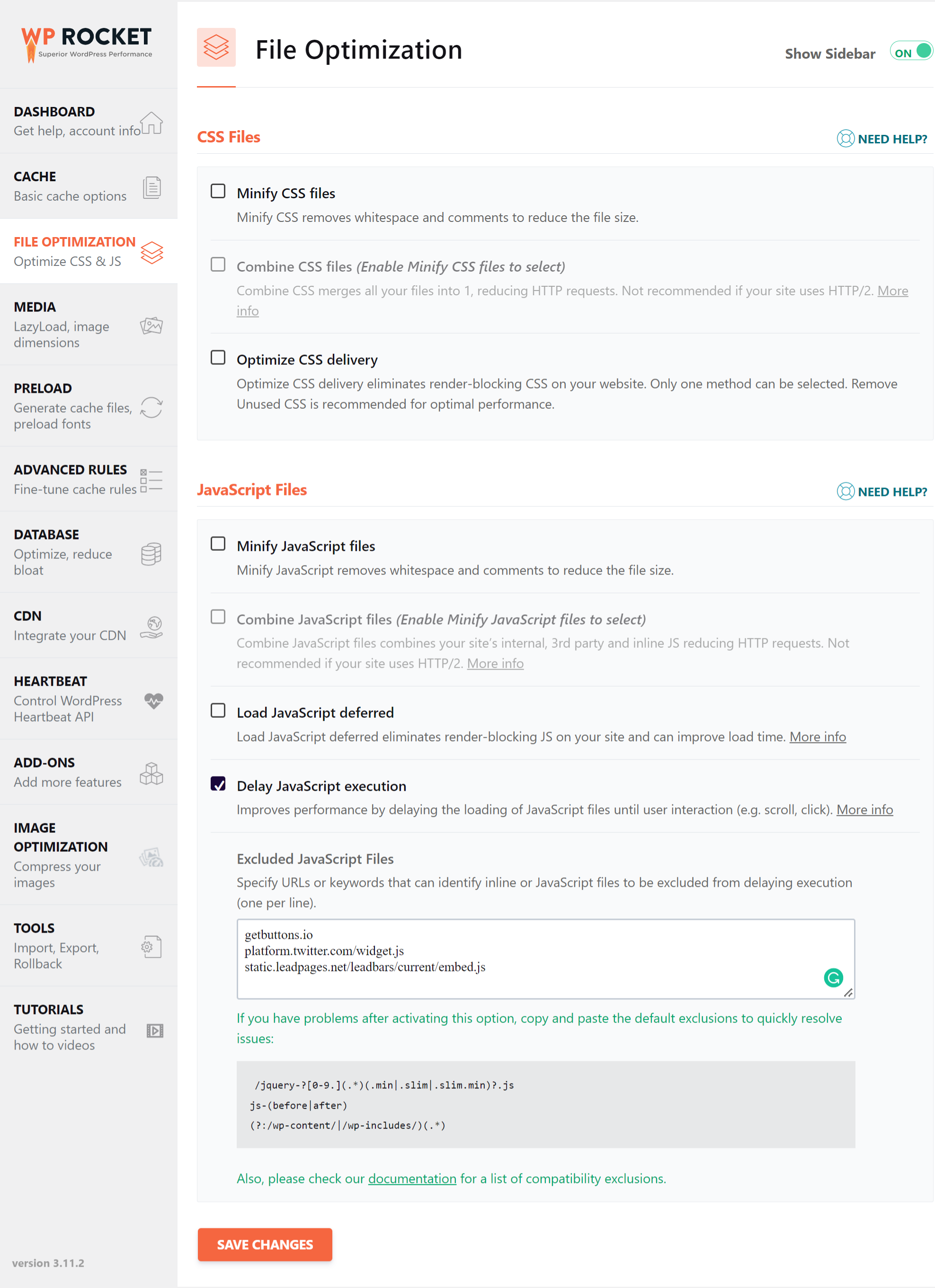
We deactivated all options shown in the screenshot below.
// https://wp-rocket.me/wp-content/uploads/2022/05/wprocket-1-css-js.png
If you want to learn more about file compression, please check the following article.
// https://wp-rocket.me/blog/wp-rocket-and-autoptimize
Best regards,
Ismael
Hi,
If you have any additional questions at this time we kindly ask that you open them up in a separate thread. The longer threads get in the forum, they become more difficult to support as they tend to drift off topic and they also make it troublesome for users trying to search for solutions. Keeping threads relevant to their original inquiry ensures that we can keep better track of what has been resolved and that users can more effectively find answers to similar issues they might be experiencing.
Thanks!
Best regards,
Ismael
Hi,
The only thing I’m missing now is the blackening of the search icon hover state.
The initial color of the search icon is black and turns white on hover. Would you mind providing a screenshot of the search icon? If you’d like to change the hover style of the search icon, try this code.
#top #menu-item-search:hover>a {
    background: transparent;
    color: inherit;
}
I’m pleased that the white baby seal (not exactly a genius) could be of help! ;D
Best regards,
Ismael
All good, please close this topic. Thanks again.
 Patrizio Saliani
Guest
Dear Kriesi,
since I updated the Enfold theme the portfolio setting column in the advanced layout editor doesn’t work anymore. Pressing the settings toggle button found at the top right of the portfolio page doesn’t do anything. I appreciate that the support linked to my licence has expired however this is an issue introduced by your theme update so I’d like to ask your support anyway. I also appreciate this is your pre-sale email however I can’t raise a ticket in the forum as I get a message saying that my support licence has expired.
Please help.
Regards,
Patrizio
Hi,
Thank you for your patience, on your /dachdecker/ page I changed the element to Accordion mode and added this css:
.togglecontainer .single_toggle {
    float: none;
}
and tested on desktop and mobile Android and the issue seems to be solved now.
Please note that if you are testing with an iPhone it can be hard to clear the cache, often you need to also clear the history to fully purge the cache, following these steps for Safari and note Step 4 where you will Clear the History.
Please check.
Best regards,
Mike
i’m so sorry – i tested it on my own toggles – and there it worked like a charm –
try this instead ( or in addition)
#top .single_toggle {
    clear:both;
}
but loosing the focus away to top is still on your page a problem – because if you open a toggle – you like to read it – and not to move to the top!
Hi,
I am attempting to create a layer slider for a site. I don’t want the layer slider to show on any mobile devices, only desktops. I set the hide “hide on mobile” toggle to on and I set the “hide under” to 1026. The background of the slider still shows on larger mobile breakpoints. Any idea how to set it up so that under 1026px the slider is completely hidden?
Thank You for the help.
~ JP
I did not see on your page why the toggles looses their focus – on click all moves to the top. – this is not standard behavior!
Can you try to deactivte the total cache – refresh all cachings and merging of enfold.
Hi planttilesseo,
This has been fixed in Enfold 5.6.7, please try updating to that. If you need further help on the topic, then please open a new thread and include WordPress admin login details in private, so that we can have a closer look at your site.
Best regards,
Rikard
Hey ftt123,
Thank you for the inquiry.
This feature is not available yet, but it will be included in the next patch. If you require it immediately, please follow the instructions in the following thread.
// https://kriesi.at/support/topic/new-icon-twitter-to-x/#post-1422330
Best regards,
Ismael
Hi,
Thank you for following up.
Please remove the previous css code, then add the following modification instead.
#top .av_toggle_section {
    clear:both
}
If the issue persists, try to set the Content > Behavior settings to Multiple toggles open allowed.
Best regards,
Ismael
if you download the font from google there is the variable font inside too. The static fonts are in an extra folder. Did you upload the whole zip to enfold?
In this static folder there are condensed styles too!
_______
But one piece of advice from me is: don’t install too many fonts. The performance of the website will suffer.
As I mentioned in another topic, you should think carefully about whether you should include italic font styles at all. Especially with sans-serif fonts, the slanting of the font on the browser side is often almost identical to the italic font style.
If you can do without the support of older browsers, then the variable font might be the better alternative anyway. There, all font styles would be included, and the memory usage is much lower. ( 1,1Mb versus 4,8MB ) .
Next offer modern font style types as woff2. The Google download do offer only ttf. You can upload it with the zip too – but the woff2 will be loaded.
Try this zip ( with only light, regular and bold style (woff2 and ttf) ) – this would be a good way for the most of the websites:
https://webers-webdesign.de/Open-Sans.zip
Delete your uploaded font and use it instead.
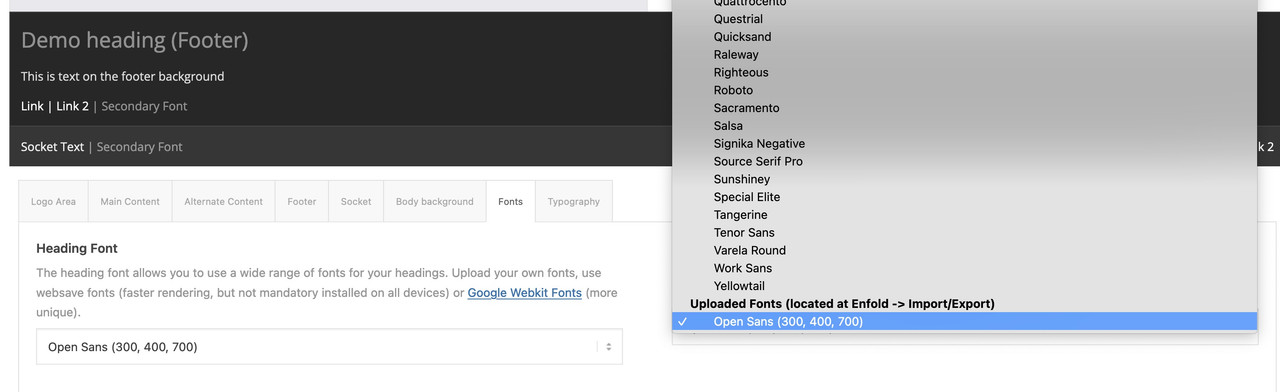
think of to use them – these uploaded fonts are at the end of the dropdown list on font setting options
Hi,
Great, I’m glad that Mike could help you out. Please let us know if you should need any further help on the topic, or if we can close it.
Best regards,
Rikard
Hi,
Great, I’m glad that we could help. Please let us know if you should need any further help on the topic, or if we can close it.
Best regards,
Rikard
can you try
#top .av_toggle_section {
    clear:both
}
thats indeed a chrome thing only!
Hi,
Thank you for the screenshots.
The header height has increased significantly because of the previous modification, so you need to push the main container down a bit. Please consider adding this css code.
.html_header_top.html_header_topbar_active.html_header_sticky.html_large #top #main {
    padding-top: 350px;
}
Best regards,
Ismael
Hi,
We might have found the issue. Please look for this css rule:
#top #wrap_all .header_color.av_header_transparency, #top #wrap_all .header_color.av_header_transparency .phone-info.with_nav span, #top #header.header_color.av_header_transparency .av-main-nav > li > a .avia-menu-text, #top #header.header_color.av_header_transparency .av-main-nav > li > a .avia-menu-subtext {
    color: #000000;
}
Replace it with:
#top #wrap_all .header_color.av_header_transparency.av_header_glassy, #top #wrap_all .header_color.av_header_transparency.av_header_glassy .phone-info.with_nav span, #top #header.header_color.av_header_transparency.av_header_glassy .av-main-nav > li > a .avia-menu-text, #top #header.header_color.av_header_transparency.av_header_glassy  .av-main-nav > li > a .avia-menu-subtext {
    color: #000000;
}
Best regards,
Ismael
Hey Timothy,
Your error points to this line: $enqueued->registered[ $remove ]->src = ''; in /config-templatebuilder/avia-template-builder/php/class-asset-manager.php
This was also reported by a user that was using the plugin: Asset CleanUp: Page Speed Booster are you using this plugin?
I recommend disabling all of your plugins, besides your Memberpress and see if this helps, if so enable your plugins one at a time to isolate the conflict.
Or you can try the solution in this thread, it seemed to help in 2021, perhaps it will also help you.
Best regards,
Mike
Thanks Ismael
When you look at the CSS on the inspect tool, you will notice I am referring to the main header.
This URL shows how it looks when it is in place – https://snipboard.io/itQrCw.jpg
This URL shows the design elements that are hidden under the main header navigation – https://snipboard.io/GWgfdQ.jpg
The October event title was hidden behind the menu. I am trying to have it so the menu doesn’t overlay the top of the page content.
Do those images clarify?
Hi whdsolutions,
Can you try the solution posted on this thread: https://kriesi.at/support/topic/portfolio-items-wont-open-in-a-new-window-from-the-masonry-grid/
Hope it helps.
Best regards,
Nikko