
-
AuthorSearch Results
-
October 4, 2024 at 5:55 pm #1468445
Hey Peter,
Thanks for your patience, I didn’t see this thread. To show the arrows try this CSS in your Enfold Theme Options ▸ General Styling ▸ Quick CSS field:#top .avia-fullscreen-slider .avia-slideshow-controls a, #top .avia-fullscreen-slider .av-control-minimal .avia-slideshow-controls a { opacity: 1; }For your other question try this css and adjust to suit if it is not exact:
#top .avia-slideshow-dots a {
	margin: 0 14%;
}
Best regards,
MikeOctober 4, 2024 at 5:22 pm #1468441In reply to: Can you have a fullwidth menu bar with boxed layout
This is just a boxed layout with fixed header.
The header could be stretched to full width ( fixed positioned elements are on default out of the box ):.html_header_top.html_header_sticky #header { position: fixed; width: 100% !important; max-width: 100% !important; left: 0; background-color: #FFF !important; }October 4, 2024 at 11:57 am #1468425In reply to: change caption mouse over color
Hi,
Please try the following in Quick CSS under Enfold->General Styling:
#top .av-caption-style-overlay .av-masonry-item-with-image .av-inner-masonry-content * {
  color: white !important;
}
Best regards,
RikardOctober 4, 2024 at 11:51 am #1468421Aman
GuestHello,
As we gear up for the highly anticipated Halloween Sale 2024, we are offering companies like yours an exciting opportunity to feature your exclusive deals on ThemeHunk.
This is the perfect chance to showcase your products and services to our extensive customer base. Our sale event draws in thousands of visitors, making it a prime time to increase your visibility and drive more sales.
Why Submit Your Deals?
– Reach a wider audience during peak shopping season
– Boost your brand visibility alongside our top WordPress & Hosting products
– Be part of our exclusive promotional campaigns targeting bloggers, eCommerce businesses, and web developersHow to Submit:
Fill out the form with your deal details to secure your spot in our promotion: 🔗 Submit Your Deals Here
We look forward to collaborating with you for a successful holiday season!
Best Regards
Aman—
Company Behind WordPress Products
ThemeHunk | Zita | BlogWings
Join Us
Linkedin | Twitter | YouTubeOctober 4, 2024 at 9:49 am #1468410In reply to: Can’t import demo
Hi,
I see that other users have had the same problem as you with OVH hosting, maybe this thread will help you out? https://kriesi.at/support/topic/demo-installation-fails-2/
Best regards,
RikardOctober 4, 2024 at 5:16 am #1468403Topic: Add featured image thumbnail to search results
in forum Enfoldmahdyputraa
ParticipantHi,
When I tried to follow the instructions on the following link: https://kriesi.at/support/topic/add-featured-image-to-search-results/, I was confused about where to find the loop-search.php file to place the code. I hope the Enfold team can help clarify this.
Thank you.
October 4, 2024 at 4:48 am #1468398In reply to: Enfold back end not working in safari on Sequoia
Hi,
Thank you for the suggestion. This seems to be a general WordPress issue occurring in the latest versions of macOS and Safari. Please check the link below.
// https://wordpress.org/support/topic/safari-18-0-breaking-classic-editor/
Best regards,
IsmaelOctober 4, 2024 at 3:40 am #1468390In reply to: Make menu span the menu area
Hi,
Please start a new thread for any additional questions. Long threads can go off-topic and are harder to support and search. Keeping each thread focused helps everyone find answers more easily.
Best regards,
IsmaelOctober 3, 2024 at 8:43 pm #1468387And that is exactly what the NY Page shows – the top video fades out the video in the middle of the page fades in.
See the top video solution on : https://webers-testseite.de/snowfall4/October 3, 2024 at 5:15 pm #1468372Hi,
I don’t think that you can have the fade-in on the top video because the scroll requires a scroll for it to work, this is why it is blank on the page load, until you scroll.
Note that on Guenni007’s example the video is midway so you can scroll: https://webers-testseite.de/snowfall-video-3/
On the NY Times site the top video fades-out on scroll so it shows on the page load.Best regards,
MikeOctober 3, 2024 at 2:49 pm #1468366In reply to: Intra wepage links not working
You may also wish to look at this webpage (Private Content) if you have any doubt about how we set up internal links. Scroll down from the image at the top and click on “Alphabetical List & Links To Each Artist”
October 3, 2024 at 1:16 pm #1468360In reply to: error strong tag
well on your page (nicolealbaek.dk) there is set that h1 always is bold (strong)
@media only screen and (min-width: 780px) {
  #top #wrap_all .all_colors h1 {
    color: #2d2d2d;
    font-size: 32px;
    font-family: 'oswald',Helvetica,Arial,sans-serif;
    font-weight: bold;
  }
}
That is the reason why there is no difference between the heading and the dot!
next: the color of the strong tag could be different to red – depends on your color settings.it seem that you have different settings on the other domain (equusbalance.dk)
you set on the other domain a color of: #c49570
try on nicolealbaek.dk if you like to have on all strong tags inside a h1 tag:#top .all_colors h1 strong { color: #F00 !important; }by the way – This is only an advisory note (warning in red) and can be neglected if everything is done correctly.
October 3, 2024 at 12:44 pm #1468358In reply to: error strong tag
Rikard already said it : in your example – there is the closing strong tag correct with an /
The slash indicates that the tag is closed – on top you only have opening strong tags !Podcast: Afhængige Parforhold<strong>.</strong>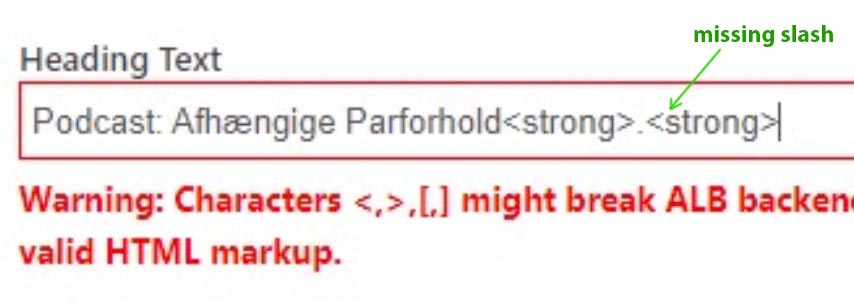
PS: only a few tag seems not to have a closing tag – but if you look nearer f.e. to an img tag the opening tag ends with
/>
hr and br tags need no closing tag ( although old fashioned guys like me write:<br />)October 3, 2024 at 11:39 am #1468352Topic: Strange menu activity on scroll
in forum Enfoldwhdsolutions
ParticipantAs you can see on https://2024-liptonrogers-com.stackstaging.com/contact/
When scrolling the menu items (page tabs) move up – how to stop this?
How do we remove the white line when scroling?
See our envisaged idea > https://ibb.co/JzbX8dg
October 3, 2024 at 10:31 am #1468338In reply to: Parallax column effect reverse
For moderator this is a solution for this scenario.
“Column starts outside the viewport and it places at it’s position depending on scrolling the page”File avia-snippet-parallax.js line 467 mod
case ‘left_right’:
scrollPos = Math.ceil( this.elProperty.distanceRight * scrolled_pc_toTop * this.speed );
transform.x = scrollPos;
var leftmargin = this.winWidth -this.elProperty.distanceRight +this.elProperty.width;
if (scrollPos<leftmargin) {
matrix = this._getTranslateMatrix( this.elProperty.translateObj, { x: -leftmargin +scrollPos } );
} else {
matrix = this._getTranslateMatrix( this.elProperty.translateObj, { x: 0 } );
}October 3, 2024 at 4:48 am #1468325In reply to: Make menu span the menu area
Hi,
Thank you for the update.
Doing these changes has messed-up the mobile menu and the line is still showing on mobile
Try to move the css code inside a css media query. Please replace the previous code with this:
@media only screen and (min-width: 768px) {

  /* Add your Desktop Styles here */
  #top #avia-menu:after {
    content: "";
    width: 90%;
    height: 2px;
    display: block;
    position: absolute;
    background: white;
    top: 140px;
  }

  #top #avia-menu {
    margin-top: -19px;
  }
}
If you have any additional questions at this time we kindly ask that you open them up in a separate thread. The longer threads get in the forum, they become more difficult to support as they tend to drift off topic and they also make it troublesome for users trying to search for solutions. Keeping threads relevant to their original inquiry ensures that we can keep better track of what has been resolved and that users can more effectively find answers to similar issues they might be experiencing.
Thanks!
Best regards,
IsmaelOctober 2, 2024 at 5:11 pm #1468299In reply to: Parallax column effect reverse
My try is:
Position relative -50vw (Ok it starts outside de viewport)
Parallax left_to_right 50% (It moves from left to right but it don’t stop at the right position, it continues to move to right)
I’m wrong?A great improvement for ENFOLD will be a setting that can set the parallax movement from START VALUE to the END VALUE when the values are relative to the CSS X/Y translate. Value 0 is the position defined in the Avia Builder.
Example scrolling page down:
PARALLAX X
0 -> 100px move a div from its own position 100px to right, then stops (reverse when scroll up)
0 -> -100px move a div from its own position 100px to left, then stops (reverse when scroll up)
-100px -> 0 move a div from 100px on the left to right to its own position then stops (reverse when scroll up)
100px -> 0 move a div from 100px on the right to left to its own position then stops (reverse when scroll up)October 2, 2024 at 2:06 pm #1468280In reply to: Bug: No option for background video to loop
i tested it with a selfhosted video (mp4) : WP 6.6.2 and Enfold 6.0.4
looked at firefox (developer), Chrome and Safari
https://webers-testseite.de/selfhosted-video/
on top: fullwidth easy slider.
below – easy-slider
( did you check on styling tab of the slide popup the loop check-mark?)October 2, 2024 at 1:29 pm #1468278In reply to: Enfold back end not working in safari on Sequoia
and if you want to bring the containers below the title to the same top position:
function admin_head_mod() {
echo '<style type="text/css">
  .avia-advanced-editor-enabled #post-body-content { float: none; }
  .avia-advanced-editor-enabled #normal-sortables .postbox#avia_builder:first-child { margin-top: 0; }
</style>';
}
add_action('admin_head', 'admin_head_mod');
dear dev : it concerns to class avia-advanced-editor-enabled
why the other browser can manage that – i do not know – i look now inside avia-builder.css – maybe there is something missing.because I don’t use the Gutenberg stuff – someone else will have to check if it needs fixing there too.
October 2, 2024 at 9:23 am #1468252In reply to: How to remove blank above sticky menu header ?
This reply has been marked as private.October 2, 2024 at 9:13 am #1468251In reply to: Customize single.php whit new name
Ok, thanks… now you can close the topic ;)
October 2, 2024 at 5:24 am #1468246In reply to: Headline size issues
Hey bemodesign,
Thank you for the inquiry.
Did you add this css code?
#top #wrap_all .av-inherit-size .av-special-heading-tag {
    font-size: 1em;
}
Please try to temporarily disable the Enfold > Performance > File Compression settings to make sure that the changes to the theme options take effect. Let us know the result.
Best regards,
IsmaelOctober 2, 2024 at 4:43 am #1468239In reply to: 4 Spalten nebeneinander in mobiler Ansicht
Hi,
Thank you for the update.
Please try to add this css code inside the css media query for smaller screens (max-width 767px):
#top .flex_column_table.av-4btnt-bc0f998b93a28d7e425a3498b18d0188.sc-av_one_fourth.av-equal-height-column-flextable {
    display: flex !important;
    flex-direction: row;
}

#top .flex_column_table.av-equal-height-column-flextable.av-4btnt-bc0f998b93a28d7e425a3498b18d0188 .av-flex-placeholder {
    display: none;
}
As @Guenni007 pointed out above, please make sure to check for any invalid css code.
Best regards,
IsmaelOctober 2, 2024 at 4:27 am #1468237In reply to: full width slider caption doesn’t fit on mobile
Hi,
Thank you for the update.
We adjusted the css code a bit. Please try it again:
@media only screen and (max-width: 767px) {
  #top #wrap_all .avia-slideshow .av-slideshow-caption.av-m1g8o6g7-f7efce2774fcf0ca4bccdacd45c3be64__0 .avia-caption-title {
    font-size: 22px !important;
  }
}
Regarding the text color, please edit the slide, then configure the settings in the Styling > Colors panel.
Best regards,
IsmaelOctober 2, 2024 at 4:24 am #1468236In reply to: Make menu span the menu area
Hi,
Thank you for the update.
Please try to include this css code to create a border below the menu items:
#top #avia-menu:after {
    content: "";
    width: 90%;
    height: 2px;
    display: block;
    position: absolute;
    background: white;
    top: 140px;
}

#top #avia-menu {
    margin-top: -19px;
}
Best regards,
IsmaelOctober 1, 2024 at 8:04 pm #1468210Hi,
4: to add the “homepage” menu item please add manually your menu
3: to add the logo to your burger menu, create another menu item and add an image as in this thread
2: to add the text “menu” below the burger icon, the text is all ready there but it is hidden, you can try this css:#top .av-hamburger ~ .avia_hidden_link_text { display: block; top: 25px; position: absolute; }or make a new burger icon with the text in the image following this thread changing the icon code with a image link.
1: you could use css to change the menu link color, but note that all sub menu item under the parent will also change, each sub menu item doesn’t have it’s own class in the burger menu.Best regards,
MikeOctober 1, 2024 at 6:59 pm #1468202In reply to: Problem with bought theme – 2020
Hey Antonio,
The update to 6.0.4 has to be done manually from the version you are running, please refer to my replies in this thread: https://kriesi.at/support/topic/enfold-4-5-theme-update-update-failed-download-failed-a-valid-url-was-not-pro/#post-1021541
You can either update manually via FTP: https://kriesi.at/documentation/enfold/how-to-install-enfold-theme/#theme-update, or upload the theme as if it was new under Appearance->Themes->Add New Theme.
If that doesn’t work then please try to delete the whole theme folder, then replace it with the new version. Make sure that you have backups of the site before starting updating.
Also please read this after you have updated: https://kriesi.at/documentation/enfold/theme-registration/Best regards,
RikardOctober 1, 2024 at 5:31 pm #1468196In reply to: toggle id’s in accordian
Hi,
I could reproduce it now – I will add a fix to react correctly when the address bar hash changes.
But I think this will not solve the problem from the initial topic.
I will let you know here, when I have the fix.Best regards,
GünterOctober 1, 2024 at 12:08 pm #1468164In reply to: Layerslider image to stretch full width
I added but nothing happened
function top_divider_moves_outwards(){
?>
<script type="text/javascript">
window.addEventListener("DOMContentLoaded", function () {
(function($) {
  $('#top .avia-section.outwards').each( function() {
    var bgColor = $(this).css('background-color');
	  if($(this).children().hasClass('avia-svg-negative')){
		  $(this).find('.avia-divider-svg.avia-divider-svg-top').css({
			  "transform-origin" : "top center",
			  "-webkit-transform" : "translateY(-100%)",
			  "transform" : "translateY(-100%)",
			  "z-index" : "100",
		  });
	  }
	  else{
		  $(this).find('.avia-divider-svg.avia-divider-svg-top').css({
			  "transform-origin" : "top center",
			  "-webkit-transform" : "rotate(180deg)",
			  "transform" : "rotate(180deg)",
			  "z-index" : "100",
		  });
	  }
    $(this).not(".preserve-color").find(".avia-divider-svg-top > svg").css('fill', bgColor);
  });
})(jQuery);
});
</script>
<?php
}
add_action('wp_footer', 'top_divider_moves_outwards');
October 1, 2024 at 9:43 am #1468153In reply to: Make menu span the menu area
Hey whdsolutions,
Please try the following in Quick CSS under Enfold->General Styling:
.html_header_top.html_main_nav_header #top .av_menu_left .main_menu, .html_header_top.html_main_nav_header #top .av_menu_left .main_menu .av-main-nav-wrap {
  width: 100%;
}

#top #header .av-main-nav > li {
  width: 25%;
}
Best regards,
Rikard -
AuthorSearch Results
-
Search Results
-
Hello,
As we gear up for the highly anticipated Halloween Sale 2024, we are offering companies like yours an exciting opportunity to feature your exclusive deals on ThemeHunk.
This is the perfect chance to showcase your products and services to our extensive customer base. Our sale event draws in thousands of visitors, making it a prime time to increase your visibility and drive more sales.
Why Submit Your Deals?
– Reach a wider audience during peak shopping season
– Boost your brand visibility alongside our top WordPress & Hosting products
– Be part of our exclusive promotional campaigns targeting bloggers, eCommerce businesses, and web developersHow to Submit:
Fill out the form with your deal details to secure your spot in our promotion: 🔗 Submit Your Deals Here
We look forward to collaborating with you for a successful holiday season!
Best Regards
Aman—
Company Behind WordPress Products
ThemeHunk | Zita | BlogWings
Join Us
Linkedin | Twitter | YouTubeHi,
When I tried to follow the instructions on the following link: https://kriesi.at/support/topic/add-featured-image-to-search-results/, I was confused about where to find the loop-search.php file to place the code. I hope the Enfold team can help clarify this.
Thank you.
As you can see on https://2024-liptonrogers-com.stackstaging.com/contact/
When scrolling the menu items (page tabs) move up – how to stop this?
How do we remove the white line when scroling?
See our envisaged idea > https://ibb.co/JzbX8dg


