
-
AuthorSearch Results
-
July 8, 2018 at 7:15 pm #982775
In reply to: Enfold Footer Widget Issues
I can see the social media icons but how do I get the mailchimp to show up?
Do I have to download the mailchimp plugin? I cannot expand the widget dropdown
July 8, 2018 at 11:59 am #982675AdrianSmithUK
ParticipantHello,
I read the documentation for including a widget area in the menu bar.https://kriesi.at/documentation/enfold/header/
Unfortunately, this doesn’t mention how to modify the menu when the bar is below the logo.
How would I replace the social icons with a widget area?
Kind Regards,
Adrian SmithJuly 8, 2018 at 2:36 am #982623Topic: Enfold Footer Widget Issues
in forum Enfoldnavindesigns
ParticipantHi,
I am having some issues with my footer widgets on my site.
1- The Enfold Mailchimp Newsletter Sign Up is not allowing me to dropdown on the footer widget column 1
2- I am trying the following shortcode in footer widget column 2 and it is only showing one icon on the front end.
—————————————————————————————————————————————————————-
<ul class=”noLightbox social_bookmarks icon_count_6″>
<li class=”social_bookmarks_facebook av-social-link-facebook social_icon_1″><span class=”avia_hidden_link_text”>Facebook</span>
<li class=”social_bookmarks_twitter av-social-link-twitter social_icon_2″><span class=”avia_hidden_link_text”>Twitter</span>
<li class=”social_bookmarks_instagram av-social-link-instagram social_icon_3″><span class=”avia_hidden_link_text”>Instagram</span>—————————————————————————————————————————————————————-
Please help. My dev site is http://77.104.128.85/~triden11
July 7, 2018 at 2:44 pm #982481In reply to: Logo Pic responsive
Hi,
Thank you for sharing the example site to show what you are trying to achieve.
In the example site, the image behind the logo is absolute positioned and in the WordPress site, the image behind the logo is set using CSS background property which is why it does not work the way you expect.
Enfold is fully responsive and works right out of the box as you may have already seen it in our demos. If you like to make the theme work in a different way which it is not designed for then you need to add the necessary code.
I personally like the header style which you are trying to achieve using Enfold. I was able to achieve a similar header style on my local system with a slightly different approach.
Please perform the below steps:
1. Remove all modification/codes added to achieve this header style.
2. Remove the header background image from Enfold > General Styling > Logo area.
3. Create a header widget area.
4. Add the header background as a widget image from WordPress > Appearance > Widget > Header > Image Widget
5. Copy and paste the below CSS to your child theme styles.css file./************************************ Full width widget as background ************************************* CSS Settings: » Initiate Flexbox » Topbar » Header » Logo » Menu » Widget » Social icons » Search » Cart icon ***********************************/ /*-------------------------------- » Initiate Flexbox --------------------------------*/ /* Header */ .responsive #top #header, /* Top bar */ .responsive #top #header #header_meta, /* Search icon */ .responsive #top #header #menu-item-search a, /* Cart icon */ .responsive #top #header a.cart_dropdown_link, /* Social icon */ .responsive #top #header #header_main nav .social_bookmarks, /* Logo */ .responsive #top #header #header_main .inner-container .logo, /* Main menu, cart and social icons */ .responsive #top #header #header_main .inner-container .main_menu, /* Widgets */ .responsive #top #header #header_main .inner-container .widget, /* Header inner container */ #top #header #header_main .container.av-logo-container .inner-container { display: flex; position: relative; } /*-------------------------------- » Topbar --------------------------------*/ /* Top bar */ .responsive #top #header #header_meta { flex-basis: 100%; } /*-------------------------------- » Header --------------------------------*/ /* Height */ #top #header #header_main .container.av-logo-container { height: inherit; /* Auto height: Header takes the height of the contents */ padding: 0; } /* Header inner container */ #top #header #header_main .container.av-logo-container .inner-container { height: inherit; position: relative !important; flex-wrap: wrap; } /* Wrappers --------------------------------*/ /* Header content and Topbar */ .responsive #top #header { flex-wrap: wrap; } /* Header contents: Logo, Menu, Social Icons and Widgets. */ .responsive #top #header #header_main { flex-basis: 100%; } /* Transparent header --------------------------------*/ .responsive.html_header_transparency #top #wrap_all #header { position: absolute; } /* Main content: -----------------------*/ .responsive #top #main { padding-top: 0px; /* Gap between the content and header */ } /* Fixed header --------------------------------*/ /* Fixed header */ .html_header_sticky.html_header_transparency #top #wrap_all #header, .html_header_sticky #top #wrap_all #header { position: fixed; } /* Fixed header and page content gap. Padding value should be same as the fixed header height. */ .html_header_sticky:not(.html_header_transparency) #top #wrap_all #main { /*padding-top: 145px !important; */ } @media only screen and (max-width: 767px) { .html_header_sticky #top #wrap_all #main { /*padding-top: 145px !important; */ }} /*-------------------------------- » Logo --------------------------------*/ /* Logo */ .responsive #top #header #header_main .inner-container .logo { order: 2; flex-basis: 100%; width: auto; min-width: 80px; /* Minimum width of the logo in small screens */ z-index: 1; justify-content: center; align-self: center; /* Logo Overflow */ /*transform: translateY(50%);*/ } /* Logo image size */ /*.responsive #top #header .logo,*/ .responsive #top #header .logo a, .responsive #top #header .logo img { /* Logo Width and alignment */ width: auto; max-width: auto; /* Logo width: (auto | 100% | px ); Set auto to display the uploaded image size. Select full size in media library */ height: auto; /* Height specification is not required. It is proportional to the max width of the logo */ align-items: center; align-self: center; } /* center transparency logo */ .responsive #top #header .logo span img { position: absolute; top: 50%; transform: translateY(-50%); } /*-------------------------------- » Menu --------------------------------*/ /* Menu outer container: Menu with siblings cart and social icons */ .responsive #top #header #header_main .inner-container .main_menu { order: 3; flex-basis: 100%; /* Use calc to minus the width of the logo */ align-items: flex-end; align-self: center; justify-content: center; margin-top: -100px; } /* Navigation */ #header .av-main-nav { display: flex; flex-wrap: nowrap; } /* Activate burger menu */ @media only screen and (max-width: 1000px) { #top #header .av-main-nav>li.menu-item { display: none!important; } #top #header .av-burger-menu-main { cursor: pointer; display: block!important; } } @media only screen and (max-width: 767px) { /* Mobile menu position fix */ .responsive #top .av-logo-container .avia-menu { display: flex!important; align-items: center; }} /* Mega menu fix */ #header li .avia_mega_div, #header li:hover .avia_mega_div { right: auto!important; left: auto!important; max-width: 50vw; } /*-------------------------------- » Widget --------------------------------*/ /* Widgets */ .responsive #top #header #header_main .inner-container .widget { order: 1; flex-basis: auto; padding: unset; clear: none!important; align-self: center; align-items: center; z-index: 1; } .responsive #top #header #header_main .inner-container .widget > div { display: flex; align-items: center; width: 100%; line-height: 14px; padding:0 10px; } /*-------------------------------- » Social icons --------------------------------*/ /* Flex support and position fix */ .responsive #top #header #header_main nav .social_bookmarks { display: flex; top: auto; margin-top: 0; align-items: center; } /* Inherit height for flex alignment */ #top .av-logo-container .social_bookmarks li { height: inherit; } /*-------------------------------- » Search --------------------------------*/ /* Your styles here */ /*-------------------------------- » Cart --------------------------------*/ @media only screen and (max-width: 767px) { .responsive #top #menu-item-shop.cart_dropdown { display: flex; align-items: center; } .cart_dropdown .dropdown_widget .avia-arrow { display: none; }} /*-------------------------------- Position fix ----------------------------------*/ .responsive #top #header #header_main .inner-container .logo { margin-top: -75%; z-index: 9; } .responsive #top #header #header_main .inner-container .main_menu { margin-top: -10%; } .responsive #top #header #header_main .inner-container .widget { z-index: 1; }If you have any issue please post the WP login credentials with the user role as admin in private content area so we can take a closer look at the issue.
Best regards,
Vinay-
This reply was modified 7 years, 9 months ago by
Vinay.
July 7, 2018 at 12:28 pm #982425In reply to: Logo Left – menu left
Hi,
To center the logo and menu please remove the previous code and add the below CSS:
NOTE: The code works for both text and Icon menu. To activate the Icon menu go to Enfold > Main Menu > General > Menu Items for Desktop
CSS:
/************************************

Centered menu widget and logo

*************************************


CSS Settings:

» Initiate Flexbox
» Topbar
» Header
» Logo
» Menu
» Widget
» Social icons
» Search
» Cart icon

***********************************/


/*--------------------------------

» Initiate Flexbox

--------------------------------*/


/* Header */
.responsive #top #header,
/* Top bar */
.responsive #top #header #header_meta,
/* Search icon */
.responsive #top #header #menu-item-search a,
/* Cart icon */
.responsive #top #header a.cart_dropdown_link,
/* Social icon */
.responsive #top #header #header_main nav .social_bookmarks,
/* Logo */
.responsive #top #header #header_main .inner-container .logo,
/* Main menu, cart and social icons */
.responsive #top #header #header_main .inner-container .main_menu,
/* Widgets */
.responsive #top #header #header_main .inner-container .widget:nth-child(3),
/* Header inner container */
#top #header #header_main .container.av-logo-container .inner-container {
    display: flex;
    position: relative;
}


/*--------------------------------

» Topbar

--------------------------------*/


/* Top bar */

.responsive #top #header #header_meta {
    flex-basis: 100%;
}


/*--------------------------------

» Header

--------------------------------*/

/* Height */

#top #header #header_main .container.av-logo-container {
    height: inherit;   /* Auto height: Header takes the height of the contents */
}


/* Header inner container */

#top #header #header_main .container.av-logo-container .inner-container {
  height: inherit;
  position: relative !important;
  flex-wrap: wrap;
  justify-content: center;
}


/* Wrappers
--------------------------------*/

/* Header content and Topbar */

.responsive #top #header {
    flex-wrap: wrap;
}

/* Header contents: Logo, Menu, Social Icons and Widgets. */

.responsive #top #header #header_main {
    flex-basis: 100%;
}

/* Transparent header
--------------------------------*/

.responsive.html_header_transparency #top #wrap_all #header {
    position: absolute;
}


/* Main content:
-----------------------*/

.responsive #top #main {
    padding-top: 0px; /* Gap between the content and header */
}


/* Fixed header
--------------------------------*/

/* Fixed header */

.html_header_sticky.html_header_transparency #top #wrap_all #header,
.html_header_sticky #top #wrap_all #header {
    position: fixed;
}


/* Fixed header and page content gap.
   Padding value should be same as the fixed header height. */

.html_header_sticky:not(.html_header_transparency) #top #wrap_all #main {
    /*padding-top: 145px !important; */
}

@media only screen and (max-width: 767px) {
.html_header_sticky #top #wrap_all #main {
    /*padding-top: 145px !important; */
}}


/*--------------------------------

» Logo

--------------------------------*/


/* Logo */

.responsive #top #header #header_main .inner-container .logo {
   order: 1;
   flex-basis: auto;
   /*width: auto;*/
   min-width: 80px; /* Minimum width of the logo in small screens */
   z-index: 1;
}

/* Logo image size */
.responsive #top #header .logo,
.responsive #top #header .logo a,
.responsive #top #header .logo img { /* Logo Width and alignment */
    width: auto;
    max-width:200px;  /* Logo width: (auto | 100% | px );  Set auto to display the uploaded image size. Select full size in media library */
    height: auto; /* Height specification is not required. It is proportional to the max width of the logo */
    align-items: center;
    align-self: center;
}

/* center transparency logo */
 .responsive #top #header .logo span img {
    position: absolute;
    top: 50%;
    transform: translateY(-50%);
}


/*--------------------------------

» Menu

--------------------------------*/


/* Menu outer container: Menu with siblings cart and social icons */

.responsive #top #header #header_main .inner-container .main_menu {
    order: 1;
    flex-basis: auto;   /* Use calc to minus the width of the logo */
    align-items: center;
    align-self: center;
}

/* Navigation */

#header .av-main-nav {
    display: flex;
    flex-wrap: nowrap;
}

/*  Activate burger menu  */

@media only screen and (max-width: 1000px) {
    #top #header .av-main-nav>li.menu-item {
        display: none!important;
    }
    #top #header .av-burger-menu-main {
        cursor: pointer;
        display: block!important;
    }
}

@media only screen and (max-width: 767px) {

/* Mobile menu position fix */
.responsive #top .av-logo-container .avia-menu {
    display: flex!important;
    align-items: center;
}}

/* Mega menu fix */
#header li .avia_mega_div,
#header li:hover .avia_mega_div {
    right: auto!important;
    left: auto!important;
    max-width: 50vw;
}

/*--------------------------------

» Widget

--------------------------------*/


/* Widgets */

.responsive #top #header #header_main .inner-container .widget {
    order: 2;
    flex-basis: auto;
    padding: unset;
    clear: none!important;

    align-self: center;
    align-items: center;
    z-index: 1;
    max-width: 200px;
}

.responsive #top #header #header_main .inner-container .widget > div {
    display: flex;
    align-items: center;

    width: 100%;
    line-height: 14px;
    padding:0 10px;
}


/*--------------------------------

» Social icons

--------------------------------*/


/* Flex support and position fix */
.responsive #top #header #header_main nav .social_bookmarks {
    display: flex;
     top: auto;
     margin-top: 0;
     align-items: center;
}
/* Inherit height for flex alignment */
#top .av-logo-container .social_bookmarks li {
    height: inherit;
}


/*--------------------------------

» Search

--------------------------------*/


/* Your styles here */


/*--------------------------------

» Cart

--------------------------------*/


@media only screen and (max-width: 767px) {
.responsive #top #menu-item-shop.cart_dropdown {
    display: flex;
    align-items: center;
}
.cart_dropdown .dropdown_widget .avia-arrow {
    display: none;
}}
Best regards,
VinayJuly 7, 2018 at 10:30 am #982366In reply to: Adding the Shop Banner to Site Pages
Hi,
To display a shop banner image elsewhere on selected pages of the site please create a header widget area and add the below CSS.
The below code will display the banner on all pages by default.
To display widget on selected pages, first hide the widget on all pages with the below code:
.widget {
   display:none;
}
Then use the page ID of the page on which you want to display before .widget in the “Initiate Flexbox” section of the below code:
/************************************

Full-width banner below logo and menu

*************************************


CSS Settings:

» Initiate Flexbox
» Topbar
» Header
» Logo
» Menu
» Widget
» Social icons
» Search
» Cart icon

***********************************/


/*--------------------------------

» Initiate Flexbox

--------------------------------*/


/* Header */
.responsive #top #header,
/* Top bar */
.responsive #top #header #header_meta,
/* Search icon */
.responsive #top #header #menu-item-search a,
/* Cart icon */
.responsive #top #header a.cart_dropdown_link,
/* Social icon */
.responsive #top #header #header_main nav .social_bookmarks,
/* Logo */
.responsive #top #header #header_main .inner-container .logo,
/* Main menu, cart and social icons */
.responsive #top #header #header_main .inner-container .main_menu,
/* Widgets */
.responsive #top #header #header_main .inner-container .widget,
/* Header inner container */
#top #header #header_main .container.av-logo-container .inner-container {
    display: flex;
    position: relative;
}


/*--------------------------------

» Topbar

--------------------------------*/


/* Top bar */

.responsive #top #header #header_meta {
    flex-basis: 100%;
}


/*--------------------------------

» Header

--------------------------------*/

/* Height */

#top #header #header_main .container.av-logo-container {
    height: inherit;   /* Auto height: Header takes the height of the contents */
}


/* Header inner container */

#top #header #header_main .container.av-logo-container .inner-container {
  height: inherit;
  position: relative !important;
  flex-wrap: wrap;
  justify-content: space-between;
}


/* Wrappers
--------------------------------*/

/* Header content and Topbar */

.responsive #top #header {
    flex-wrap: wrap;
}

/* Header contents: Logo, Menu, Social Icons and Widgets. */

.responsive #top #header #header_main {
    flex-basis: 100%;
}

/* Transparent header
--------------------------------*/

.responsive.html_header_transparency #top #wrap_all #header {
    position: absolute;
}


/* Main content:
-----------------------*/

.responsive #top #main {
    padding-top: 0px; /* Gap between the content and header */
}


/* Fixed header
--------------------------------*/

/* Fixed header */

.html_header_sticky.html_header_transparency #top #wrap_all #header,
.html_header_sticky #top #wrap_all #header {
    position: fixed;
}


/* Fixed header and page content gap.
   Padding value should be same as the fixed header height. */

.html_header_sticky:not(.html_header_transparency) #top #wrap_all #main {
    /*padding-top: 145px !important; */
}

@media only screen and (max-width: 767px) {
.html_header_sticky #top #wrap_all #main {
    /*padding-top: 145px !important; */
}}


/*--------------------------------

» Logo

--------------------------------*/


/* Logo */

.responsive #top #header #header_main .inner-container .logo {
   order: 2;
    flex-basis: auto;

    /*width: auto;*/
    min-width: 80px; /* Minimum width of the logo in small screens */
    z-index: 1;
}

/* Logo image size */
.responsive #top #header .logo,
.responsive #top #header .logo a,
.responsive #top #header .logo img { /* Logo Width and alignment */
    width: auto;
    max-width:250px;  /* Logo width: (auto | 100% | px );  Set auto to display the uploaded image size. Select full size in media library */
    height: auto; /* Height specification is not required. It is proportional to the max width of the logo */
    align-items: center;
    align-self: center;
    justify-content: center;
}

/* center transparency logo */
 .responsive #top #header .logo span img {
    position: absolute;
    top: 50%;
    transform: translateY(-50%);
}


/*--------------------------------

» Menu

--------------------------------*/


/* Menu outer container: Menu with siblings cart and social icons */

.responsive #top #header #header_main .inner-container .main_menu {
    order: 3;
    flex-basis: auto;   /* Use calc to minus the width of the logo */
    align-items: center;
    align-self: center;
}

/* Navigation */

#header .av-main-nav {
    display: flex;
    flex-wrap: nowrap;
}

/*  Activate burger menu  */

@media only screen and (max-width: 1000px) {
    #top #header .av-main-nav>li.menu-item {
        display: none!important;
    }
    #top #header .av-burger-menu-main {
        cursor: pointer;
        display: block!important;
    }
}

@media only screen and (max-width: 767px) {

/* Mobile menu position fix */
.responsive #top .av-logo-container .avia-menu {
    display: flex!important;
    align-items: center;
}}


/*--------------------------------

» Widget

--------------------------------*/


/* Widgets */

.responsive #top #header #header_main .inner-container .widget {
    order: 4;
    flex-basis: 100%;
    padding: unset;
    clear: none!important;

    align-self: center;
    align-items: center;
    z-index: 1;

}

.responsive #top #header #header_main .inner-container .widget > div {
    display: flex;
    align-items: center;

    width: 100%;
    line-height: 14px;
    padding:0 10px;
}


/*--------------------------------

» Social icons

--------------------------------*/


/* Flex support and position fix */
.responsive #top #header #header_main nav .social_bookmarks {
    display: flex;
     top: auto;
     margin-top: 0;
     align-items: center;
}
/* Inherit height for flex alignment */
#top .av-logo-container .social_bookmarks li {
    height: inherit;
}


/*--------------------------------

» Search

--------------------------------*/


/* Your styles here */


/*--------------------------------

» Cart

--------------------------------*/


@media only screen and (max-width: 767px) {
.responsive #top #menu-item-shop.cart_dropdown {
    display: flex;
    align-items: center;
}
.cart_dropdown .dropdown_widget .avia-arrow {
    display: none;
}}
Best regards,
VinayJuly 4, 2018 at 5:07 pm #981294This reply has been marked as private.July 3, 2018 at 2:00 am #980344Hi,
I corrected the code in your functions.php, so you can add the “thumbs-up” next to your social icons at:
Enfold Theme Options > Social Profiles > Your social profiles
But I thought that we could add a link to the icon to create the “Like” feature, but as I search I don’t see that the “Like” can be a url, it seems that it must be a script.
So, I added the script for you and placed it next to the other social icons, unfortunately it must be the blue FB button. I hope this is ok.

This is how I added it:
I added the FB script to a custom html widget in your “header” widget area:<div class="fb-like" data-href="http://www.facebook.com/your-fb-page" data-layout="button" data-action="like" data-size="small" data-show-faces="false" data-share="false"></div>then I moved it next to your social icons with this function in your functions.php:
function custom_script(){
  ?>
  <script>
jQuery(window).load(function(){
  jQuery( "#custom_html-4" ).appendTo( ".social_bookmarks" );
  });
  </script>
  <?php
  }
  add_action('wp_footer', 'custom_script');
and made some minor adjustments with this css in your Quick CSS:
#custom_html-4.widget {
    width: 50px !important;
    padding: 15px 0 !important;
    display: inline-block !important;
}
Best regards,
MikeJune 27, 2018 at 1:49 am #978211In reply to: 2 logos in the header (1 left, 1 right)
Hi,
I tried to troubleshoot this issue but the login credentials you provided do not work for me.
I have customized the code for you please remove the previous code and try the below CSS
1. How to I get the 2 logos to align with the container for the page
By default, the logo and widget should automatically align to the width of the page container unless some change has been made. Please check the theme options Header > Header Behavior > Let logo and menu position adapt to browser window is checked? You can also define a custom header width (Please check the header section of the docs for code snippets).2. What kind of CSS should I use to make the logo in the widget area adjust in size to become responsive
After the code is added the logo and the widgets show up in the original image size provided there is enough space available. If there isn’t much space available the images are auto re-sized proportionately to fit in the available space. To increase or decrease the width of the images a “flex-basis” value can be specified.3. On tablet portrait and mobile portrait mode in the customise view the logo is moving to the right and forcing the widget down
This issue is fixed in the below code :)/*-------------------------------- Widget area on the right ---------------------------------- CSS Settings . Flexbox support . Settings . Header . Logo . Menu . Cart Icon . Social Icons . Header Widget --------------------------------/* /*-------------------------------- Enable Flexbox Support to the header elements. --------------------------------*/ /* Header */ .responsive #top #header, /* Top bar */ .responsive #top #header #header_meta, /* Search icon */ .responsive #top #header #menu-item-search a, /* Shopping cart */ .responsive #top #header a.cart_dropdown_link, /* Social icons */ .responsive #top #header #header_main nav .social_bookmarks, /* Logo */ .responsive #top #header #header_main .inner-container .logo, /* Main menu area including the main menu (with search and burger icons), cart and social icons */ .responsive #top #header #header_main .inner-container .main_menu, /* Widgets */ .responsive #top #header #header_main .inner-container .widget, /* Header inner container */ #top #header #header_main .container.av-logo-container .inner-container { position: relative; display: flex; flex-wrap: nowrap; } /*-------------------------------- Settings: flexbox order, width, height and alignment for header and header elements ----------------------------------*/ /* Top bar */ .responsive #top #header #header_meta { order: 0; flex-grow: 0; flex-basis: 100%; } /* Header */ .responsive #top #header #header_main { order: 0; flex-grow: 0; flex-basis: 100%; } /* Header inner container */ #top #header #header_main .container.av-logo-container .inner-container { order: 0; flex-grow: 0; flex-basis: auto; flex-direction: row; /* Vertical alignment */ align-content: center; /* Horizontal alignment */ justify-content: space-between; height: inherit; } /* Logo */ .responsive #top #header #header_main .inner-container .logo { order: 1; flex-grow: 0; flex-basis: auto; } /* Main area: Menu with siblings cart and social icons */ .responsive #top #header #header_main .inner-container .main_menu { order: 2; flex-grow: 0; flex-basis: auto; align-items: center; align-self: center; justify-content: flex-end; } /* Menu: Menu items with search and burger icon */ .responsive #top .av-main-nav #avia-menu { order: 0; align-items: center; align-self: center; flex-grow: 0; flex-basis: auto; } /* Search icon */ .responsive #top #header #menu-item-search a { order: 0; flex-grow: 0; flex-basis: auto; } /* Shopping cart */ .responsive #top #header a.cart_dropdown_link { order: 0; flex-grow: 0; flex-basis: auto; } /* Social icons */ .responsive #top #header #header_main nav .social_bookmarks { order: 0; flex-grow: 0; flex-basis: auto; } /* Widgets */ .responsive #top #header #header_main .inner-container .widget { order: 3; flex-grow: 0; flex-basis: auto; align-items: center; align-self: center; justify-content: center; margin-left: auto; } /*-------------------------------- Header --------------------------------*/ /* Header */ .responsive #top #header #header_main { padding: 30px 0; } /* Main Header */ .responsive #top #header #header_main, .responsive #top #header #header_main .container.av-logo-container { height: inherit; /*background: aquamarine;*/ } /* Header container height */ .responsive #top #header #header_main .container.av-logo-container .inner-container { position: relative !important; } /*-------------------------------- Logo --------------------------------*/ /* Logo image size */ .responsive #top #header .logo, .responsive #top #header .logo a, .responsive #top #header .logo img { /* Logo Width and alignment */ width: 100px; max-width: auto; align-items: center; align-self: center; height: auto; justify-content: center; } /*-------------------------------- Menu --------------------------------*/ /* Main area: Menu with siblings cart and social icons */ .responsive #top #header #header_main .inner-container .main_menu { /*flex-wrap: nowrap;*/ } /* Meun: Menu items with search and burger icon */ .responsive #top .av-main-nav #avia-menu { } /* Menu style */ #top #header #avia-menu a .avia-menu-text { color: #222; font-size: 18px; } /* Menu hover color */ #top #header #avia-menu .menu-item:hover>a>.avia-menu-text { color: #20f; } /* Activate burger menu */ @media only screen and (max-width: 1280px) { #top #header .av-main-nav>li.menu-item { display: none!important; } #top #header .av-burger-menu-main { cursor: pointer; display: block!important; } } /*-------------------------------- Cart Icon ----------------------------------*/ /*-------------------------------- Header Social Icons ----------------------------------*/ /* Main menu social icon alignment fix */ /* Flex support and position fix */ .responsive #top #header #header_main nav .social_bookmarks { display: flex; top: auto; margin-top: 0; align-items: center; } /* Inherit height for flex alignment */ #top .av-logo-container .social_bookmarks li { height: inherit; } /*-------------------------------- Header Widget --------------------------------*/ /* Reset default theme styles */ .responsive #top #header #header_main .inner-container .widget { padding: unset; clear: none!important; margin-left: 10px; } /* Widget Text */ .responsive #top #header #header_main .inner-container .widget p { font-size: 11px; line-height: 14px; text-transform: uppercase; letter-spacing: .35em; color: #222; padding:0 10px; }Best regards,
VinayJune 22, 2018 at 10:44 pm #976502In reply to: How can I delete old posts here? :)
Dear Yigit,
i want to delete all my posts – because my customers can found it with google. But I´ve no hurry.
Can you delete them for me, please? Or tell me how I can do this?Thanks a lot! :)
Jennyhttps://kriesi.at/support/topic/img-after-the-topic/
https://kriesi.at/support/topic/fullscreenslider-isnt-fullscreen/
https://kriesi.at/support/topic/replace-the-navigation/
https://kriesi.at/support/topic/wrong-e-mail-adress-in-the-contactform/
https://kriesi.at/support/topic/problem-with-the-navigation-on-smaller-screen/
https://kriesi.at/support/topic/topic-area-that-looks-like-the-kriesi-at-example-how-can-i-build/
https://kriesi.at/support/topic/change-the-language-of-the-timer/
https://kriesi.at/support/topic/delete-calenderlink-hide-sidbar/
https://kriesi.at/support/topic/incarnation-twitter-widget-doesnt-work/
https://kriesi.at/support/topic/kalenderwidget-404-error/
https://kriesi.at/support/topic/problem-with-the-event-cathegory/
https://kriesi.at/support/topic/contactform-included/
https://kriesi.at/support/topic/how-can-i-change-the-speed-of-fade-of-the-fade-slider/
https://kriesi.at/support/topic/how-to-delete-the-picture-link/
https://kriesi.at/support/topic/how-can-i-change-the-high-of-the-slider/
https://kriesi.at/support/topic/problem-with-the-quote-on-mobile-version/
https://kriesi.at/support/topic/theme-update-error-after-wp-update-4-0/https://kriesi.at/support/topic/postslider/
https://kriesi.at/support/topic/scrollende-sich-verschiebende-hintergrund-bilder-parallax/
https://kriesi.at/support/topic/menu-overlaps-in-the-logo-area/
https://kriesi.at/support/topic/color-problem/https://kriesi.at/support/topic/hohe-in-wird-seit-kurzem-ignoriert/
https://kriesi.at/support/topic/preloader-is-blurred/
https://kriesi.at/support/topic/change-the-color-of-the-bullet-points/https://kriesi.at/support/topic/style-link-color-in-the-list-element/
https://kriesi.at/support/topic/socket-element-is-out-of-place-in-the-ipad-version/
https://kriesi.at/support/topic/how-can-i-make-a-subline-in-the-menu/
https://kriesi.at/support/topic/please-help-me-to-change-the-slider-textelement/
June 22, 2018 at 9:13 pm #976465In reply to: Enfold Social Profiles in Widget
Hey Andrew,
Please refer to the following:
Best regards,
Jordan ShannonJune 22, 2018 at 4:52 pm #976409Topic: Enfold Social Profiles in Widget
in forum Enfoldabmich
ParticipantI would like to add the social icons from my social profiles that are in the header or socket to a footer widget. Thank you!
June 22, 2018 at 12:09 pm #976283In reply to: Need code to add social icons to Footer (not socket)
if you like to obtain that very elegant – this is a custom widget i wrote for that case – code comes to function.php of your child-theme:
The generated widget is called (as you see in the code). Enfold-Child-Social-Bookmarks/*** custom social bookmarks widget ****/ function social_bookmarks_register_widget() { register_widget( 'add_social_bookmarks' ); } add_action( 'widgets_init', 'social_bookmarks_register_widget' ); class add_social_bookmarks extends WP_Widget { public function __construct() { $widget_ops = array( 'classname' => 'socialbookmarks-widget', 'description' => __('A widget that displays the social bookmarks', 'avia_framework') ); parent::__construct( 'add_social_bookmarks', THEMENAME.' Social Bookmarks', $widget_ops ); } public function widget( $args, $instance ) { $title = apply_filters( 'widget_title', $instance['title'] ); echo $args['before_widget']; //if title is present if ( ! empty( $title ) ) echo $args['before_title'] . $title . $args['after_title']; //output echo $before_widget; $social_args = array('outside'=>'ul', 'inside'=>'li', 'append' => ''); echo avia_social_media_icons($social_args, false); echo $after_widget; } public function form( $instance ) { if ( isset( $instance[ 'title' ] ) ) $title = $instance[ 'title' ]; else $title = __( 'Social Bookmarks', 'avia_framework' ); ?> <p> <label for="<?php echo $this->get_field_id( 'title' ); ?>"><?php _e( 'Title:' ); ?></label> <input class="widefat" id="<?php echo $this->get_field_id( 'title' ); ?>" name="<?php echo $this->get_field_name( 'title' ); ?>" type="text" value="<?php echo esc_attr( $title ); ?>" /> </p> <?php } public function update( $new_instance, $old_instance ) { $instance = array(); $instance['title'] = ( ! empty( $new_instance['title'] ) ) ? strip_tags( $new_instance['title'] ) : ''; return $instance; } }to have the same look as other widgets – this comes to child-theme quick css:
#top .socialbookmarks-widget .social_bookmarks {
    float: left;
    margin: 15px 0 0 ;
    position: relative;
}

#top .socialbookmarks-widget .social_bookmarks li {
    float: left;
    clear: right !important;
}
you then only have to pull that widget to your footer widget-area you like – title in your case is then: Connect with us
June 22, 2018 at 11:38 am #976262Topic: Need code to add social icons to Footer (not socket)
in forum EnfoldAdam_Pemberton
ParticipantHello,
I would like to include our social icons (Facebook, Twitter, LinkedIn, basically everything that we configure in the Social Profiles area of the Enfold theme settings) in a footer widget column with a title such as “Connect with us”.
Note: I don’t wnat them in the socket, which is the only way the theme settings will display them.
I like the square icons that are displayed via the widget “RSS Link and Twitter Feed”.
The website URL is https://divcorporate.wpengine.com
When we launch the site, the URL will be http://diversifiedus.com (I can modify the domain in the code when the time comes to launch).Can you provide the HTML to place in the Widget area, and any necessary Quick CSS code?
Thanks,
AdamJune 16, 2018 at 3:20 am #973501In reply to: How to set a diferent header just for 1 page
Hi Rikard,
There is a way to reuse the same social icons beside the burger menu from the main header in the Layout Builder?
Like invoking it on a Code Block element or something like that. Maybe a widget. I don’t know hahahahThanks in advance.
June 13, 2018 at 3:13 pm #972309Topic: Widget Area on the Right
in forum Enfolddinmix
ParticipantI have tried the solution here but I just couldnt achieve what I wanted.https://kriesi.at/documentation/enfold/header/#header-widget-position
I’m using the the theme with the menu below the header. I just want a widget area on the right to display a secondary menu. The area where the social icon appear. Something like this: https://ibb.co/nC5QSy
Can I create a new header in chid theme and modify the code to achieve the layout?
Left Logo | Right Secondary Menu
Bottom: Main Menu.Best Regards
Din-
This topic was modified 7 years, 10 months ago by
dinmix.
June 13, 2018 at 5:39 am #972044In reply to: Centre Align Widget Area
Hey,
The link is in the private content. You will see the “Keep up with the Experience” piece at the bottom of the home page above the footer. The social icons (done through a widget area) is what i would like to centre.
Some of our media does not work our on preview link.
June 13, 2018 at 12:01 am #971962Topic: Centre Align Widget Area
in forum EnfoldVerhoevenGroup
ParticipantHi there,
2 Questions…Q1. On the home page I have a colour section with two 1/3 columns.
In the right column I have a Widget Area where I have used ‘Enfold Advertising Area’ – here I have inputted my own social icons.Currently the Widget area is aligned ‘left’. (see screenshot below). Is it possible to align this to ‘centre’
Q2. On my secondary menu (located in the top bar) the drop down menu items have a dotted white line between each item.
How do i change this dotted line colour or how do i remove this dotted line?Thank you
-
This topic was modified 7 years, 10 months ago by
VerhoevenGroup.
June 12, 2018 at 7:34 pm #971785In reply to: menu below , logo right
Hi kasem-online,
Social icons are in a different container and so they stay there is the meta header area.
To have them there, you can add a widget area to the header and assign a widget there with social icons.
If you need further assistance please let us know.
Best regards,
VictoriaJune 7, 2018 at 7:12 pm #969749Topic: Social icons disappeared (apart from facebook)
in forum Enfoldindpro
ParticipantAnyone who knows why only Facebook displayed in the footee segment (not the socket, just above at widget area 2)
I think I removed some Quick CSS that fixed this, but I cant figure out which.
The page is http://www.bio-works.com
June 7, 2018 at 6:30 pm #969729Ok so if I am following along then I would add an image to each of the six columns instead of using the advertising area widget? Then for the logo below the ads I’d create 3 columns to center the logo as an image? What will that do with the social media icons and copyright in the footer? Will the socket remain using a page based footer?
May 22, 2018 at 9:23 pm #960520In reply to: Social icons into a widget
Hey sutiboz,
There is no direct code. One way to go about doing this is to use your browser to inspect the social icon element and then past that code into the widget area. You may still have to do some minor styling after that point, but this method should get you what you need.
Best regards,
Jordan ShannonMay 22, 2018 at 7:22 pm #960483Topic: Social icons into a widget
in forum Enfoldsutiboz
ParticipantHi, please can you give me the code to have the same social icons in the header (same size and effect) into a widget?
Please find the website into private content
thanks a lot,
FabioMay 20, 2018 at 11:53 pm #959542In reply to: move social icons to bottom of left sidebar layout
Hi,
I understand, often it helps to see the classes and structure to determine how best to change something, and other times it’s not exactly the same on my localhost and the live site.
Here’s a good example, I set up a localhost demo with the sidebar header, such as your screenshot, added the widget area in the sidebar header:add_action( 'ava_after_main_menu', 'enfold_customization_header_widget_area' ); function enfold_customization_header_widget_area() { dynamic_sidebar( 'header' ); }so I could add the search bar and a text widget to match your site.
Then I turn to the frontpage ready to figure out the changes needed to move the social icons down below the widget area, but I find there is no need to:
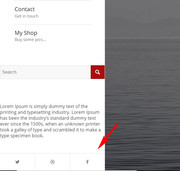
So, I wonder what I did different from you, and why my social icons are at the bottom and yours are not?Best regards,
MikeMay 20, 2018 at 6:35 pm #959480Topic: move social icons to bottom of left sidebar layout
in forum Enfoldsky19er
ParticipantI’d like to move the social icons down below the widget area available in the Left Sidebar layout (please see this screen grab: https://www.evernote.com/shard/s320/sh/9c060211-09b4-4399-af26-182691848ad7/105bb754544db2c2837fa3a3cad63a19). Can you point me to how I might handle this?
Thanks and let me know if you have any questions.
May 4, 2018 at 7:26 am #951399In reply to: A few small questions about Enfold settings
Hi,
There is no option for a custom message but you can create a page with a “thank you” note or something and a link to the home page instead. The screenshot is not accessible.
You can use the theme’s icon element to create a social icon container in the sidebar area. Add the icon shortcode in a text widget.
Best regards,
IsmaelMay 3, 2018 at 3:46 am #950419Topic: Widget area
in forum EnfoldLara
ParticipantHi team,
I’m trying to replicate my footer into a colour section throughout my website, so I can have an easy slider as one of my footer colums. I’ve placed all widgets into columns in a colour section.
I’m wondering if I can get the fonts to be the same as they are in the footer and if I could get my social icons to be spaced too.
Lara
April 25, 2018 at 12:31 pm #946539In reply to: Spacing, Backgrounds, Buttons and more!
Hi,
For the footer social icons, we also needed to add this to quick css:.widget .social_bookmarks li { clear: none !important; }I did so, please check.
For the menu background, perhaps try clearing your browser cache, as it seems full length to me. Please see screenshot in Private Content area.
For footer spacing on desktops, I added this to reduce the space, note the 3% margin-left, the standard is 6%, you can adjust this more if you wish.@media only screen and (min-width: 787px) { #footer .flex_column.av_one_third.el_after_av_one_third { margin-left: 3%!important; } #footer .container { width: 80%!important; display: flex!important; justify-content: center!important; } }For the mobile footer widgets, when they are stacked, you have a extra empty widget that is adding margin and space. With this code it is hidden, along with other element’s margin:
@media only screen and (max-width: 765px) {
#footer #custom_html-5 {
display: none !important;
}
#footer #media_image-2,#footer .container .flex_column:nth-child(2),#footer .container .flex_column:nth-child(1) {
margin: 0px !important;
}
}
Please check.
Best regards,
MikeApril 24, 2018 at 4:45 am #945659In reply to: Spacing, Backgrounds, Buttons and more!
Hi,
Try this css to hide the captions:.avia-tooltip.avia-tt {display: none !important;}For transparent spacing in your gallery, I change the code to:
#top div .avia-gallery img {
    border-style: none!important;
    border-width: 0px!important;
    background-color: transparent;
}
Please check.
For your footer width, please try this code that changes the width from 100% to 80%, making the items closer:#footer .container {width: 80%!important; }For the background of the menu, please try:
.html_av-overlay-side #top .av-burger-overlay-scroll {
background:url(//static.campbellhillsguestranch.com/themes/CampBell17/images/layout/leatherBG.jpg) no-repeat right top !important;
}
To add the social icons to the footer, please try adding this code to a HTML widget in your footer:
<ul class="noLightbox social_bookmarks icon_count_5"><li class="social_bookmarks_youtube av-social-link-youtube social_icon_1"><a target="_blank" href="https://www.youtube.com/channel/UCsaXEoWO2zFOaD5h3QjRCGg" aria-hidden="true" data-av_icon="" data-av_iconfont="entypo-fontello" title="Youtube"><span class="avia_hidden_link_text">Youtube</span></a></li><li class="social_bookmarks_facebook av-social-link-facebook social_icon_2"><a target="_blank" href="https://www.facebook.com/campbellhillsguestranchkamloops/" aria-hidden="true" data-av_icon="" data-av_iconfont="entypo-fontello" title="Facebook"><span class="avia_hidden_link_text">Facebook</span></a></li><li class="social_bookmarks_instagram av-social-link-instagram social_icon_3"><a target="_blank" href="https://www.instagram.com/campbell_hills_guest_ranch/" aria-hidden="true" data-av_icon="" data-av_iconfont="entypo-fontello" title="Instagram"><span class="avia_hidden_link_text">Instagram</span></a></li><li class="social_bookmarks_gplus av-social-link-gplus social_icon_4"><a target="_blank" href="https://plus.google.com/+Campbellhillsguestranch" aria-hidden="true" data-av_icon="" data-av_iconfont="entypo-fontello" title="Gplus"><span class="avia_hidden_link_text">Gplus</span></a></li><li class="social_bookmarks_mail av-social-link-mail social_icon_5"><a href="mailto: (Email address hidden if logged out) " aria-hidden="true" data-av_icon="" data-av_iconfont="entypo-fontello" title="Mail"><span class="avia_hidden_link_text">Mail</span></a></li></ul>Best regards,
MikeApril 23, 2018 at 7:46 pm #945509In reply to: Spacing, Backgrounds, Buttons and more!
Hi Mike,
Thanks for that. I see the borders are gone.
I do still want captions, I just don’t want them popping up in the speech bubble above the image when you roll over. Are there other options? Also, I want a transparent space between images, just not white. I tried to add a space into the custom css you added but it put in white padding.
Footer – Remove white line between footer background image and body.MOBILE
Header logo – The logo is defining the header size is see. Can we add more space above and below so it doesn’t overlap the rope? Or should I upload an image with the space already?
Footer spacing – The 3 footer widget areas are too far spaced. Ho can I bring it in tighter?
Footer Social icons – I would ultimately like these in the footer, not the socket. They’re too small in the socket and way too far down on mobile.
Menu – The main parts of the menu are white with the sub menu items having the custom background. How do I make it so they all have the custom background? -
This reply was modified 7 years, 9 months ago by
-
AuthorSearch Results
-
Search Results
-
Hello,
I read the documentation for including a widget area in the menu bar.https://kriesi.at/documentation/enfold/header/
Unfortunately, this doesn’t mention how to modify the menu when the bar is below the logo.
How would I replace the social icons with a widget area?
Kind Regards,
Adrian SmithTopic: Enfold Footer Widget Issues
Hi,
I am having some issues with my footer widgets on my site.
1- The Enfold Mailchimp Newsletter Sign Up is not allowing me to dropdown on the footer widget column 1
2- I am trying the following shortcode in footer widget column 2 and it is only showing one icon on the front end.
—————————————————————————————————————————————————————-
<ul class=”noLightbox social_bookmarks icon_count_6″>
<li class=”social_bookmarks_facebook av-social-link-facebook social_icon_1″><span class=”avia_hidden_link_text”>Facebook</span>
<li class=”social_bookmarks_twitter av-social-link-twitter social_icon_2″><span class=”avia_hidden_link_text”>Twitter</span>
<li class=”social_bookmarks_instagram av-social-link-instagram social_icon_3″><span class=”avia_hidden_link_text”>Instagram</span>—————————————————————————————————————————————————————-
Please help. My dev site is http://77.104.128.85/~triden11
I would like to add the social icons from my social profiles that are in the header or socket to a footer widget. Thank you!
Hello,
I would like to include our social icons (Facebook, Twitter, LinkedIn, basically everything that we configure in the Social Profiles area of the Enfold theme settings) in a footer widget column with a title such as “Connect with us”.
Note: I don’t wnat them in the socket, which is the only way the theme settings will display them.
I like the square icons that are displayed via the widget “RSS Link and Twitter Feed”.
The website URL is https://divcorporate.wpengine.com
When we launch the site, the URL will be http://diversifiedus.com (I can modify the domain in the code when the time comes to launch).Can you provide the HTML to place in the Widget area, and any necessary Quick CSS code?
Thanks,
AdamTopic: Widget Area on the Right
I have tried the solution here but I just couldnt achieve what I wanted.https://kriesi.at/documentation/enfold/header/#header-widget-position
I’m using the the theme with the menu below the header. I just want a widget area on the right to display a secondary menu. The area where the social icon appear. Something like this: https://ibb.co/nC5QSy
Can I create a new header in chid theme and modify the code to achieve the layout?
Left Logo | Right Secondary Menu
Bottom: Main Menu.Best Regards
DinTopic: Centre Align Widget Area
Hi there,
2 Questions…Q1. On the home page I have a colour section with two 1/3 columns.
In the right column I have a Widget Area where I have used ‘Enfold Advertising Area’ – here I have inputted my own social icons.Currently the Widget area is aligned ‘left’. (see screenshot below). Is it possible to align this to ‘centre’
Q2. On my secondary menu (located in the top bar) the drop down menu items have a dotted white line between each item.
How do i change this dotted line colour or how do i remove this dotted line?Thank you
Anyone who knows why only Facebook displayed in the footee segment (not the socket, just above at widget area 2)
I think I removed some Quick CSS that fixed this, but I cant figure out which.
The page is http://www.bio-works.com
Topic: Social icons into a widget
Hi, please can you give me the code to have the same social icons in the header (same size and effect) into a widget?
Please find the website into private content
thanks a lot,
FabioI’d like to move the social icons down below the widget area available in the Left Sidebar layout (please see this screen grab: https://www.evernote.com/shard/s320/sh/9c060211-09b4-4399-af26-182691848ad7/105bb754544db2c2837fa3a3cad63a19). Can you point me to how I might handle this?
Thanks and let me know if you have any questions.
Topic: Widget area
Hi team,
I’m trying to replicate my footer into a colour section throughout my website, so I can have an easy slider as one of my footer colums. I’ve placed all widgets into columns in a colour section.
I’m wondering if I can get the fonts to be the same as they are in the footer and if I could get my social icons to be spaced too.
Lara


