Viewing 30 results - 2,881 through 2,910 (of 16,898 total)
  • Author
    Search Results
  • e-motiondesign
    Participant

    Hello, my client noticed today that the following is displayed on their website:
    Warning: Creating default object from empty value in /homepages/11/d141567160/htdocs/clickandbuilds/YourMentalHealing/wp-content/themes/enfold/config-templatebuilder/avia-shortcodes/slideshow_layerslider/slideshow_layerslider.php on line 28

    Warning: Cannot modify header information – headers already sent by (output started at /homepages/11/d141567160/htdocs/clickandbuilds/YourMentalHealing/wp-content/themes/enfold/config-templatebuilder/avia-shortcodes/slideshow_layerslider/slideshow_layerslider.php:28) in /homepages/11/d141567160/htdocs/clickandbuilds/YourMentalHealing/wp-content/themes/enfold/includes/helper-privacy.php on line 264

    Warning: Cannot modify header information – headers already sent by (output started at /homepages/11/d141567160/htdocs/clickandbuilds/YourMentalHealing/wp-content/themes/enfold/config-templatebuilder/avia-shortcodes/slideshow_layerslider/slideshow_layerslider.php:28) in /homepages/11/d141567160/htdocs/clickandbuilds/YourMentalHealing/wp-content/themes/enfold/includes/helper-privacy.php on line 284`

    No child theme has been created for this page. What can I do?
    I can no longer log into the site. Can someone help me please?
    sorry, I use a translation program 🙈
    Thanks a lot

    #1316579
    zunflaz
    Participant

    Hello,

    I’ve got problems with Enfold Themes.
    Initially I was trying to change the homepage of my website with Avia Template Builder but it didn’t worked (was always loading).
    I updated my wordpress version to 5.8, my website works, my wp-admin backend page works, but I can’t get into the Avia Template Builder.
    It’s full of warning and errors:

    This is the list of errors:

    Warning: Illegal string offset ‘shortcodehandler’ in /web/htdocs/www.lauraluzzipodologo.it/home/wp-content/themes/enfold/config-templatebuilder/avia-template-builder/php/shortcode-template.class.php on line 480

    Warning: Illegal string offset ‘modal_title’ in /web/htdocs/www.lauraluzzipodologo.it/home/wp-content/themes/enfold/config-templatebuilder/avia-template-builder/php/shortcode-template.class.php on line 481

    Warning: Illegal string offset ‘modal_ajax_hook’ in /web/htdocs/www.lauraluzzipodologo.it/home/wp-content/themes/enfold/config-templatebuilder/avia-template-builder/php/shortcode-template.class.php on line 482

    Warning: Illegal string offset ‘dragdrop-level’ in /web/htdocs/www.lauraluzzipodologo.it/home/wp-content/themes/enfold/config-templatebuilder/avia-template-builder/php/shortcode-template.class.php on line 483

    Warning: Illegal string offset ‘allowed-shortcodes’ in /web/htdocs/www.lauraluzzipodologo.it/home/wp-content/themes/enfold/config-templatebuilder/avia-template-builder/php/shortcode-template.class.php on line 484

    Warning: Invalid argument supplied for foreach() in /web/htdocs/www.lauraluzzipodologo.it/home/wp-content/themes/enfold/config-templatebuilder/avia-template-builder/php/generic-helper.class.php on line 320

    Warning: Illegal string offset ‘shortcodehandler’ in /web/htdocs/www.lauraluzzipodologo.it/home/wp-content/themes/enfold/config-templatebuilder/avia-template-builder/php/shortcode-template.class.php on line 480

    Warning: Illegal string offset ‘modal_title’ in /web/htdocs/www.lauraluzzipodologo.it/home/wp-content/themes/enfold/config-templatebuilder/avia-template-builder/php/shortcode-template.class.php on line 481

    Warning: Illegal string offset ‘modal_ajax_hook’ in /web/htdocs/www.lauraluzzipodologo.it/home/wp-content/themes/enfold/config-templatebuilder/avia-template-builder/php/shortcode-template.class.php on line 482

    Warning: Illegal string offset ‘dragdrop-level’ in /web/htdocs/www.lauraluzzipodologo.it/home/wp-content/themes/enfold/config-templatebuilder/avia-template-builder/php/shortcode-template.class.php on line 483

    Warning: Illegal string offset ‘allowed-shortcodes’ in /web/htdocs/www.lauraluzzipodologo.it/home/wp-content/themes/enfold/config-templatebuilder/avia-template-builder/php/shortcode-template.class.php on line 484

    Warning: Illegal string offset ‘modal_on_load’ in /web/htdocs/www.lauraluzzipodologo.it/home/wp-content/themes/enfold/config-templatebuilder/avia-template-builder/php/shortcode-template.class.php on line 495

    Warning: Invalid argument supplied for foreach() in /web/htdocs/www.lauraluzzipodologo.it/home/wp-content/themes/enfold/config-templatebuilder/avia-template-builder/php/generic-helper.class.php on line 320

    Warning: Illegal string offset ‘shortcodehandler’ in /web/htdocs/www.lauraluzzipodologo.it/home/wp-content/themes/enfold/config-templatebuilder/avia-template-builder/php/shortcode-template.class.php on line 480

    Warning: Illegal string offset ‘modal_title’ in /web/htdocs/www.lauraluzzipodologo.it/home/wp-content/themes/enfold/config-templatebuilder/avia-template-builder/php/shortcode-template.class.php on line 481

    Warning: Illegal string offset ‘modal_ajax_hook’ in /web/htdocs/www.lauraluzzipodologo.it/home/wp-content/themes/enfold/config-templatebuilder/avia-template-builder/php/shortcode-template.class.php on line 482

    Warning: Illegal string offset ‘dragdrop-level’ in /web/htdocs/www.lauraluzzipodologo.it/home/wp-content/themes/enfold/config-templatebuilder/avia-template-builder/php/shortcode-template.class.php on line 483

    Warning: Illegal string offset ‘allowed-shortcodes’ in /web/htdocs/www.lauraluzzipodologo.it/home/wp-content/themes/enfold/config-templatebuilder/avia-template-builder/php/shortcode-template.class.php on line 484

    Warning: Illegal string offset ‘modal_on_load’ in /web/htdocs/www.lauraluzzipodologo.it/home/wp-content/themes/enfold/config-templatebuilder/avia-template-builder/php/shortcode-template.class.php on line 495

    Warning: Invalid argument supplied for foreach() in /web/htdocs/www.lauraluzzipodologo.it/home/wp-content/themes/enfold/config-templatebuilder/avia-template-builder/php/generic-helper.class.php on line 320

    Warning: Illegal string offset ‘shortcodehandler’ in /web/htdocs/www.lauraluzzipodologo.it/home/wp-content/themes/enfold/config-templatebuilder/avia-template-builder/php/shortcode-template.class.php on line 480

    Warning: Illegal string offset ‘modal_title’ in /web/htdocs/www.lauraluzzipodologo.it/home/wp-content/themes/enfold/config-templatebuilder/avia-template-builder/php/shortcode-template.class.php on line 481

    Warning: Illegal string offset ‘modal_ajax_hook’ in /web/htdocs/www.lauraluzzipodologo.it/home/wp-content/themes/enfold/config-templatebuilder/avia-template-builder/php/shortcode-template.class.php on line 482

    Warning: Illegal string offset ‘dragdrop-level’ in /web/htdocs/www.lauraluzzipodologo.it/home/wp-content/themes/enfold/config-templatebuilder/avia-template-builder/php/shortcode-template.class.php on line 483

    Warning: Illegal string offset ‘allowed-shortcodes’ in /web/htdocs/www.lauraluzzipodologo.it/home/wp-content/themes/enfold/config-templatebuilder/avia-template-builder/php/shortcode-template.class.php on line 484

    Warning: Illegal string offset ‘allowed-shortcodes’ in /web/htdocs/www.lauraluzzipodologo.it/home/wp-content/themes/enfold/config-templatebuilder/avia-template-builder/php/shortcode-template.class.php on line 488

    Warning: Illegal string offset ‘allowed-shortcodes’ in /web/htdocs/www.lauraluzzipodologo.it/home/wp-content/themes/enfold/config-templatebuilder/avia-template-builder/php/shortcode-template.class.php on line 489

    Fatal error: Uncaught Error: Cannot use string offset as an array in /web/htdocs/www.lauraluzzipodologo.it/home/wp-content/themes/enfold/config-templatebuilder/avia-template-builder/php/shortcode-template.class.php:489 Stack trace: #0 /web/htdocs/www.lauraluzzipodologo.it/home/wp-content/themes/enfold/config-templatebuilder/avia-template-builder/php/shortcode-template.class.php(443): aviaShortcodeTemplate->create_sortable_editor_element() #1 /web/htdocs/www.lauraluzzipodologo.it/home/wp-content/themes/enfold/config-templatebuilder/avia-template-builder/php/template-builder.class.php(397): aviaShortcodeTemplate->prepare_editor_element() #2 /web/htdocs/www.lauraluzzipodologo.it/home/wp-includes/class-wp-hook.php(303): AviaBuilder->js_template_editor_elements() #3 /web/htdocs/www.lauraluzzipodologo.it/home/wp-includes/class-wp-hook.php(327): WP_Hook->apply_filters() #4 /web/htdocs/www.lauraluzzipodologo.it/home/wp-includes/plugin.php(470): WP_Hook->do_action() #5 /web/htdocs/www.lauraluzzipodologo.it/home/wp-includes/media-t in /web/htdocs/www.lauraluzzipodologo.it/home/wp-content/themes/enfold/config-templatebuilder/avia-template-builder/php/shortcode-template.class.php on line 489
    There has been a critical error on this website. Please check your site admin email inbox for instructions.

    Learn more about troubleshooting WordPress.

    #1316455
    jamesedwardcouncill
    Participant

    I just updated enfold to version 4.8.6.1. (PHP version 7.4.22). After the update, all my full-width color sections are not full width anymore. Please advise.

    #1316412

    Hi,

    @honighut
    & @BeeCee
    the dev team has released this temp fix for theme settings import, please give this a try, via FTP save your current function-set-avia-ajax.php as a fallback and replace it with this one:
    https://www.dropbox.com/sh/8fsahv7a6y7er1z/AAC7zyDWptD4HGL2r_p_5Y1Za?dl=0
    you will find it at:
    \wp-content\themes\enfold\framework\php\function-set-avia-ajax.php
    you may need to clear any server caching first, then you may also need to use the WP Reset plugin on your new site that you are importing to if you had a previous failure during the process.

    Best regards,
    Mike

    #1316401
    Bernd
    Participant

    Liebes Kriesi-Team,

    seit 2 Tagen habe ich den willkürlichen Fehler, das Farbsektionen, Schriftfarben und Hintergründe im Frontend plötzlich nicht mehr angezeigt werden.
    Geschehen tut das ganze in einem Blog-Beitrag, den ich neu eröffnet habe.

    – Alle anderen Seite der Website funktionieren, solange ich nichts ändere.
    – Im Backend wird alles korrekt ausgespielt, auch die Vorschau sieht richtig aus
    – Im Frontend hingegen funktionieren die Trennlinien nicht und ziehen sich über die ganze Seite, Hintergründe werden nicht geladen, Farben falsch
    ausgespielt, Icons funktionieren nicht.
    Der Fehler kommt in jedem Browser, Cashe ist ebenfalls leer.
    Cache-Plugins werden nicht verwendet.

    So wie es aktuell aussieht, können wir den Beitrag nicht veröffentlichen :-(
    Aktuelle Versionen:
    Enfold: 4.8.6.1
    WordPress: 5.8
    PHP: 7.4.22

    ————————————————–

    Dear Kriesi Team,

    since 2 days I have the random error that color sections, font colors and backgrounds are suddenly not displayed in the frontend.
    The whole thing is happening in a blog post that I have newly opened.

    – All other pages of the website work as long as I don’t change anything.
    – In the backend everything is played out correctly, even the preview looks right
    – In the frontend, however, the separators don’t work and stretch across the whole page, backgrounds don’t load, colors play out incorrectly, icons don’t work.
    colors, icons do not work.
    The error occurs in every browser, Cashe is also empty.
    Cache plugins are not used.

    As it looks currently, we can not publish the post :-(
    Current versions:
    Enfold: 4.8.6.1
    WordPress: 5.8
    PHP: 7.4.22

    Translated with http://www.DeepL.com/Translator (free version)

    #1316378

    In reply to: Advanced Layout Editor

    Hi,

    Thank you for the inquiry.

    The button displays back when we disable the mtn_setup_theme function in the child theme’s functions.php file. The function limits the ALE to the mtn-faq post type. You may need to use the avf_alb_supported_post_types filter instead.

    Examples:

    // https://kriesi.at/support/topic/custom-post-type-not-displaying-correctly/#post-1299723
    // https://kriesi.at/support/topic/pods-enfold-advanced-layout-editor/#post-1281976

    Best regards,
    Ismael

    #1316354

    Hi,

    Thanks for the login details. First off, could you try updating the theme to the latest version (4.8.6.1) to see if that helps please? https://kriesi.at/documentation/enfold/how-to-install-enfold-theme/#theme-update. If not, then please share the key you are trying to use in private. Also please consider updating your PHP version to 7.4 or higher.

    Best regards,
    Rikard

    sagar kumar sahu
    Guest

    Hi Team,
    we have got a project from our client 2 months back and it’s based on ENFOLD theme and it really going well but a few days back I am getting an error “there is a critical issue in your site”, while click on customize button so we are now stuck in development, also we got an error mail from WordPress so please look into it and help us, we also don’t know about Genuity of the theme because we sign the product in the midway of development, we are also ready to pay for resolution please find out below error and contact if any (Email address hidden if logged out) , +917008035073

    Error Mail:
    Howdy!

    Since WordPress 5.2 there is a built-in feature that detects when a plugin or theme causes a fatal error on your site and notifies you with this automated email.

    In this case, WordPress caught an error with your theme, Enfold.

    First, visit your website (https://www.happymovermsct.com/) and check for any visible issues. Next, visit the page where the error was caught (https://www.happymovermsct.com/wp-admin/customize.php?url=https%3A%2F%2Fwww.happymovermsct.com%2F) and check for any visible issues.

    Please contact your host for assistance with investigating this issue further.(already contacted to host partner and they said theme issue )

    If your site appears broken and you can’t access your dashboard normally, WordPress now has a special “recovery mode”. This lets you safely log in to your dashboard and investigate further.

    https://www.happymovermsct.com/wp-login.php?action=enter_recovery_mode&rm_token=2j5RKG2vmwacHi5LZ2EoPE&rm_key=CR4tVkl970GMnMDNA8sjNg

    To keep your site safe, this link will expire in 1 day. Don’t worry about that, though: a new link will be emailed to you if the error occurs again after it expires.

    When seeking help with this issue, you may be asked for some of the following information:
    WordPress version 5.8
    Current theme: Enfold (version 4.6.3.1)
    Current plugin: (version )
    PHP version 7.4.22

    Error Details
    =============
    An error of type E_ERROR was caused in line 619 of the file /home/webclexc/happymovermsct.com/wp-content/themes/enfold/config-gutenberg/class-avia-gutenberg.php. Error message: Uncaught TypeError: Argument 2 passed to Avia_Gutenberg::handler_display_post_states() must be an instance of WP_Post, null given, called in /home/webclexc/happymovermsct.com/wp-includes/class-wp-hook.php on line 303 and defined in /home/webclexc/happymovermsct.com/wp-content/themes/enfold/config-gutenberg/class-avia-gutenberg.php:619
    Stack trace:
    #0 /home/webclexc/happymovermsct.com/wp-includes/class-wp-hook.php(303): Avia_Gutenberg->handler_display_post_states(Array, NULL)
    #1 /home/webclexc/happymovermsct.com/wp-includes/plugin.php(189): WP_Hook->apply_filters(Array, Array)
    #2 /home/webclexc/happymovermsct.com/wp-admin/includes/template.php(2239): apply_filters(‘display_post_st…’, Array, NULL)
    #3 /home/webclexc/happymovermsct.com/wp-includes/nav-menu.php(831): get_post_states(NULL)
    #4 [internal function]: wp_setup_nav_menu_item(Object(WP_Post))
    #5 /home/webclexc/happymovermsct.com/wp-includes/nav-menu.php(755): array_map(‘wp_setup_nav_me…’, Array)
    #6 /home/webclexc/happymovermsct.com/wp-content/plugins/

    #1316315

    In reply to: Problem with 4.8.6.1

    Strange.
    No, I do not have a standalone version.
    Running WP 5.8 with PHP 7.4 and Enfold 4.8.6.1 (child theme).
    Adding the LayerSlider with Avia Layout Builder.

    Sounds pretty standard to me.

    #1316302

    In reply to: Center Upsell

    Hi,

    Would you like to display 7 products in 2 column layout? If so, you would need to change the code in functions.php file to following one

    /**
     * Change number of upsells output
     */
    add_filter( 'woocommerce_upsell_display_args', 'wc_change_number_related_products', 20 );
    
    function wc_change_number_related_products( $args ) {
     
     $args['posts_per_page'] = 7;
     $args['columns'] = 2; //change number of upsells here
     return $args;
    }

    If that too does not help, can you post a screenshot and show the changes you would like to make so we can make sure that we are on the same page? :)

    Best regards,
    Yigit

    #1316267

    ok – thanks:
    see here: https://webers-testseite.de/hover-images/

    the trouble with it is – as mentioned above – that in image.css there is a rule set to !important.
    We must avoid that – here is the possibility to have a child-theme image.css. But i hope that developer will prove that standard enfold behavior will work without !important setting – and remove it on next update.

    Basic: Put in the custom css field of your image : hoverstyle2

    First:
    Snippet to have child-theme alb element replacement:
    (for child-theme functions.php ):

    function avia_include_shortcode_template($paths){
      $template_url = get_stylesheet_directory();
          array_unshift($paths, $template_url.'/shortcodes/');
      return $paths;
    }
    add_filter('avia_load_shortcodes', 'avia_include_shortcode_template', 15, 1);

    Second:
    download from pastebin these two files ( the child-theme image alb files ):
    https://pastebin.com/ndewwkx7 or download
    https://pastebin.com/WJTbAxJJ or download

    Third:
    Upload these two files to a child-theme folder named: “shortcodes”

    Fourth
    To preserve the alb setting for overlay color and opacity we store this overlay opacity in a variable and transfer that to a container of our choice:

    
    function style_a_hover_state(){
    ?>
    <script type="text/javascript">
    (function($) {
      $(document).ready(function(){ 
            $('.avia-image-container.hoverstyle2').each( function() {
            var initialOpacity = $(this).find('.av-caption-image-overlay-bg').css('opacity');
    			$(this).find('.avia_image').hover(function() {
    			  $(this).find('.av-caption-image-overlay-bg').css('opacity', initialOpacity );
    			}); 
            });  
      }); 
    })(jQuery);
    </script>
    <?php
    }
    add_action('wp_footer', 'style_a_hover_state');

    Last:
    put this to your child-theme quick css:

    .hoverstyle2 .image-overlay {
      display: none !important;
    }
    
    .hoverstyle2 .avia-image-overlay-wrap .av-image-caption-overlay {
      pointer-events: none;
    }
    
    .hoverstyle2 .avia-image-overlay-wrap .av-image-caption-overlay {
      opacity: 0;
      transform: translateY(100%);
      transition: 0.5s transform cubic-bezier(.77,0,.18,1);
    }
    
    .avia-image-container:not(.av-hover-grow).hoverstyle2 .avia-image-overlay-wrap .av-image-caption-overlay {
      opacity: 1;
      transition: 0.5s all cubic-bezier(.77,0,.18,1);
    }
    
    .hoverstyle2 .avia-image-overlay-wrap a:hover.avia_image .av-image-caption-overlay {
      opacity: 1;
      transform: translateY(0);
      transition: 0.5s transform cubic-bezier(.77,0,.18,1) 0.3s , 0.5s opacity ease 0.5s;
      overflow: visible;
    }
    
    .hoverstyle2 .av-caption-image-overlay-bg {
      width: calc(100% - 50px);
      height: calc(100% - 50px);
      top: 50%;
      left: 50%;
      transform: translate(-50%, -50%);
    }
    
    .av-hover-grow.hoverstyle2 .av-caption-image-overlay-bg {
      width: calc(90% - 50px);
      height: calc(90% - 50px);
    }
    
    .av-hover-grow:not(.av-hide-overflow).hoverstyle2 .av-caption-image-overlay-bg {
        width: calc(110% - 50px);
        height: calc(110% - 50px);
    }
    
    .av-image-caption-overlay-center p {
        padding: 5px;
    }
    
    .av-hover-grow.hoverstyle2 .avia-image-overlay-wrap:hover a.avia_image::before, 
    .av-hover-grow.hoverstyle2 .avia-image-overlay-wrap:hover a.avia_image::after {
      transform: scale(0.9);
    }
    
    .av-hover-grow:not(.av-hide-overflow).hoverstyle2 .avia-image-overlay-wrap:hover a.avia_image::before, 
    .av-hover-grow:not(.av-hide-overflow).hoverstyle2 .avia-image-overlay-wrap:hover a.avia_image::after {
      transform: scale(1.1);
    }

    PPS: these little frames growing on hover are hoverstyle1:

    .hoverstyle1 .image-overlay {
      display: none !important;
    }
    
    .hoverstyle1 a.avia_image:before, 
    .hoverstyle1 a.avia_image:after {
      content: '';
      position: absolute;
      top: 10px;
      right: 10px;
      bottom: 10px;
      left: 10px;
      -webkit-transition: all 0.5s ease;
      -ms-transition: all 0.5s ease;
      transition: all 0.5s ease;
      pointer-events: none;
      background: transparent;
      width: auto;
      height: auto;
      z-index: 10;
    }
    
    .hoverstyle1 a.avia_image:before {
      border-top: 2px solid #fff;
      border-bottom: 2px solid #fff;
      -webkit-transform: scaleX(0);
      -ms-transform: scaleX(0);
      transform: scaleX(0);
    }
    
    .hoverstyle1 a.avia_image:after {
      border-left: 2px solid #fff;
      border-right: 2px solid #fff;
      -webkit-transform: scaleY(0);
      -ms-transform: scaleY(0);
      transform: scaleY(0);
    }
    
    .hoverstyle1 .avia-image-overlay-wrap:hover a.avia_image:before, 
    .hoverstyle1 .avia-image-overlay-wrap:hover a.avia_image:after {
      -webkit-transform: scale(1);
      -ms-transform: scale(1);
      transform: scale(1);
    }

    Result page: https://webers-testseite.de/hover-images/
    so – if you like both hoverstyles on the image – put in the custom css field: hoverstyle1 hoverstyle2

    bryandep
    Participant

    Hi,

    I’ve been doing all possible fixes on a problem on our installation. When I edit theme options and click save, it gives me the error “Saving didnt work!
    Please reload the page and try again”

    Also, the AVIA page builder doesn’t load on pages. Website is currently on 7.3. Installed the latest version of Enfold. Increase the PHP memory limit in wp config and turned off all plugins.

    #1316119
    IMaclean1995
    Participant

    Hi there,

    I am receiving errors on my website and unsure how to fix them. I have updated to the latest Enfold theme and tried amending PHP settings / tried previous versions and this does not fix the issue.

    The error I get is:

    Fatal error: Uncaught Error: Call to undefined method avia_masonry::get_element_styles() in /home/customer/www/slapharma.com/public_html/wp-content/themes/enfold/config-templatebuilder/avia-shortcodes/masonry_entries/masonry_entries.php:673 Stack trace: #0 /home/customer/www/slapharma.com/public_html/wp-content/themes/enfold/config-templatebuilder/avia-template-builder/php/class-shortcode-template.php(335): avia_sc_masonry_entries->get_element_styles(Array) #1 /home/customer/www/slapharma.com/public_html/wp-content/themes/enfold/config-templatebuilder/avia-template-builder/php/class-post-css-management.php(920): aviaShortcodeTemplate->create_header_styles(Array, false) #2 /home/customer/www/slapharma.com/public_html/wp-content/themes/enfold/config-templatebuilder/avia-template-builder/php/class-post-css-management.php(955): aviaPostCssManagement->css_rules_from_shortcodes(Array) #3 /home/customer/www/slapharma.com/public_html/wp-content/themes/enfold/config-templatebuilder/avia-template-builder/php/class-post-css-manageme in /home/customer/www/slapharma.com/public_html/wp-content/themes/enfold/config-templatebuilder/avia-shortcodes/masonry_entries/masonry_entries.php on line 673

    #1316082

    Hey mterrianrode,

    Thank you for using Enfold.

    Actually Enfold should be able to deal with 7.0 or higher – this message is not php related.

    Can you try to increase your memory limit – see https://docs.woocommerce.com/document/increasing-the-wordpress-memory-limit/

    Best regards,
    Günter

    #1315996
    This reply has been marked as private.
    mterrianrode
    Participant

    Hi there, we have a peculiar problem. We have a web hosting company who refuses to update PHP to version 7.4 until later this fall (yes, awful) But we’d still like to continue to use Enfold’s newer version(s), because most older versions are throwing errors. The latest Enfold is also throwing an error too: An error of type E_ERROR was caused in line 287 of the file /pub/web/(directorynameredactedforprivacy)/wp-content/themes/enfold/config-templatebuilder/avia-shortcodes/post_metadata/post_metadata.php. Error message: Out of memory (allocated 60817408) (tried to allocate 20480 bytes)

    Is there any version of Enfold that we could temporarily dial back to (via FTP) that would work well with PHP 7.2 until these people update PHP? They have all their clients on version 7.2.31 currently

    Thanks for any creative suggestions to get around this….

    Hi Nikko,
    Today I uploaded our logo, but the front website showed :
    Fatal error: Uncaught TypeError: aviaShortcodeTemplate::unique_css_element_id(): Argument #1 ($atts) must be of type array, string given, called in /home/xggba53wvavb/public_html/wp-content/themes/enfold/config-templatebuilder/avia-template-builder/php/class-shortcode-template.php on line 359 and defined in /home/xggba53wvavb/public_html/wp-content/themes/enfold/config-templatebuilder/avia-template-builder/php/class-shortcode-template.php:445 Stack trace: #0 /home/xggba53wvavb/public_html/wp-content/themes/enfold/config-templatebuilder/avia-template-builder/php/class-shortcode-template.php(359): aviaShortcodeTemplate->unique_css_element_id() #1 /home/xggba53wvavb/public_html/wp-content/themes/enfold/config-templatebuilder/avia-template-builder/php/class-shortcode-template.php(374): aviaShortcodeTemplate->element_styles_defaults() #2 /home/xggba53wvavb/public_html/wp-content/themes/enfold/config-templatebuilder/avia-shortcodes/columns/columns.php(994): aviaShortcodeTemplate->get_element_styles() #3 /home/xggba53wvavb/public_html/wp-content/themes/enfold/config-templatebuilder/avia-template-builder/php/class-shortcode-template.php(335): avia_sc_columns->get_element_styles() #4 /home/xggba53wvavb/public_html/wp-content/themes/enfold/config-templatebuilder/avia-template-builder/php/class-post-css-management.php(895): aviaShortcodeTemplate->create_header_styles() #5 /home/xggba53wvavb/public_html/wp-content/themes/enfold/config-templatebuilder/avia-template-builder/php/class-post-css-management.php(831): aviaPostCssManagement->css_rules_from_shortcodes() #6 /home/xggba53wvavb/public_html/wp-content/themes/enfold/config-templatebuilder/avia-template-builder/php/class-post-css-management.php(793): aviaPostCssManagement->get_css_rules_from_content() #7 /home/xggba53wvavb/public_html/wp-content/themes/enfold/config-templatebuilder/avia-template-builder/php/class-post-css-management.php(210): aviaPostCssManagement->get_css_rules_from_post() #8 /home/xggba53wvavb/public_html/wp-content/themes/enfold/config-templatebuilder/avia-template-builder/php/class-post-css-management.php(168): aviaPostCssManagement->check_create_file() #9 /home/xggba53wvavb/public_html/wp-includes/class-wp-hook.php(303): aviaPostCssManagement->handler_enqueue_post_styles() #10 /home/xggba53wvavb/public_html/wp-includes/class-wp-hook.php(327): WP_Hook->apply_filters() #11 /home/xggba53wvavb/public_html/wp-includes/plugin.php(470): WP_Hook->do_action() #12 /home/xggba53wvavb/public_html/wp-includes/script-loader.php(2083): do_action() #13 /home/xggba53wvavb/public_html/wp-includes/class-wp-hook.php(303): wp_enqueue_scripts() #14 /home/xggba53wvavb/public_html/wp-includes/class-wp-hook.php(327): WP_Hook->apply_filters() #15 /home/xggba53wvavb/public_html/wp-includes/plugin.php(470): WP_Hook->do_action() #16 /home/xggba53wvavb/public_html/wp-includes/general-template.php(3015): do_action() #17 /home/xggba53wvavb/public_html/wp-content/themes/enfold/header.php(100): wp_head() #18 /home/xggba53wvavb/public_html/wp-includes/template.php(770): require_once(‘/home/xggba53wv…’) #19 /home/xggba53wvavb/public_html/wp-includes/template.php(716): load_template() #20 /home/xggba53wvavb/public_html/wp-includes/general-template.php(48): locate_template() #21 /home/xggba53wvavb/public_html/wp-content/themes/enfold/template-builder.php(15): get_header() #22 /home/xggba53wvavb/public_html/wp-includes/template-loader.php(106): include(‘/home/xggba53wv…’) #23 /home/xggba53wvavb/public_html/wp-blog-header.php(19): require_once(‘/home/xggba53wv…’) #24 /home/xggba53wvavb/public_html/index.php(17): require(‘/home/xggba53wv…’) #25 {main} thrown in /home/xggba53wvavb/public_html/wp-content/themes/enfold/config-templatebuilder/avia-template-builder/php/class-shortcode-template.php on line 445

    What’s the problem ??

    Thanks
    Alan

    #1315149

    Hey armyranger882002,
    Thank you for your patience, the errors above are for WordPress core files, in my research this seems to be caused by the mysqli PHP extension is not enabled
    I recommend asking your webhost for assistance, I have seen many issues with PHP v8 and would recommend sticking with v7.4 for now.

    Best regards,
    Mike

    #1315127
    tecnoprof
    Participant

    Hi,
    i receive this error with some portfolio items (not all).. I supposed was a problem of WPML but it doesn’t…

    Fatal error: Uncaught TypeError: Argument 1 passed to aviaShortcodeTemplate::unique_css_element_id() must be of the type array, string given, called in /nas/content/live/pematest/wp-content/themes/enfold/config-templatebuilder/avia-template-builder/php/class-shortcode-template.php on line 359 and defined in /nas/content/live/pematest/wp-content/themes/enfold/config-templatebuilder/avia-template-builder/php/class-shortcode-template.php:445 Stack trace: #0 /nas/content/live/pematest/wp-content/themes/enfold/config-templatebuilder/avia-template-builder/php/class-shortcode-template.php(359): aviaShortcodeTemplate->unique_css_element_id(”, ‘av_one_third’) #1 /nas/content/live/pematest/wp-content/themes/enfold/config-templatebuilder/avia-template-builder/php/class-shortcode-template.php(374): aviaShortcodeTemplate->element_styles_defaults(Array) #2 /nas/content/live/pematest/wp-content/themes/enfold/config-templatebuilder/avia-shortcodes/columns/columns.php(994): aviaShortcodeTemplate->get_element_styles(Array) #3 /nas/content in /nas/content/live/pematest/wp-content/themes/enfold/config-templatebuilder/avia-template-builder/php/class-shortcode-template.php on line 445

    #1315125
    cosmstudio
    Participant

    On top of the web site there’s an error message:

    Notice: is_feed was called incorrectly. Conditional query tags do not work before the query is run. Before then, they always return false. Please see Debugging in WordPress for more information. (This message was added in version 3.1.0.) in /var/www/wp-includes/functions.php on line 5535

    Please let me know how I can solve this problem, thanks!

    Enfold Version: 4.7.6.3
    PHP Version 7.3.12
    Plugins: Jetpack, Ninja Forms, Polylang, Regenerate Thumbnails, SRS Simple Hits Counter & Yoast Duplicate Post

    • This topic was modified 4 years, 8 months ago by cosmstudio.

    Hi,

    Thanks for that. Please try this in your functions.php file:

    function avia_move_search_icon(){
    ?>
    <script>
    	jQuery(document).ready(function($) {
    		var search = $('#header_main li#menu-item-search').detach();
    		$('#header_main ul.social_bookmarks icon_count_7').append(search);
    	});
    </script>
    <?php
    add_action('wp_footer', 'avia_move_search_icon');

    Best regards,
    Rikard

    #1315058

    Hey jeremysecondary,
    Thank you for your patience and for the login, the main issue with your site was this code in your Quick CSS field:

    /**
     * Changes the redirect URL for the Return To Shop button in the cart.
     *
     * @return string
     */
    function wc_empty_cart_redirect_url() {
    	return 'https://www.goddessgarden.com/store/';
    }
    add_filter( 'woocommerce_return_to_shop_redirect', 'wc_empty_cart_redirect_url' );

    which was breaking your css, I removed it, if you want to use this add it to the end of your child theme functions.php file in Appearance > Editor
    I was not able to add it for you as this feature is hidden probably by your security plugin.
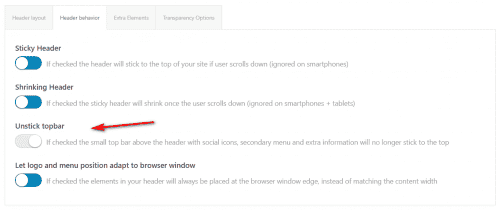
    To make your topbar sticky I disabled the “Unstick topbar” option
    2021-08-07_007.png
    Please clear your browser cache and check.

    Best regards,
    Mike

    #1314925
    armyranger882002
    Participant

    Fatal error: Uncaught Error: Call to undefined function mysql_connect() in /home/shrineki/public_html/wp-includes/wp-db.php:1688 Stack trace: #0 /home/shrineki/public_html/wp-includes/wp-db.php(632): wpdb->db_connect() #1 /home/shrineki/public_html/wp-includes/load.php(558): wpdb->__construct(‘shrineki_shrine’, ‘v0295PI!S)’, ‘shrineki_shrine’, ‘localhost’) #2 /home/shrineki/public_html/wp-settings.php(124): require_wp_db() #3 /home/shrineki/public_html/wp-config.php(98): require_once(‘/home/shrineki/…’) #4 /home/shrineki/public_html/wp-load.php(50): require_once(‘/home/shrineki/…’) #5 /home/shrineki/public_html/wp-blog-header.php(13): require_once(‘/home/shrineki/…’) #6 /home/shrineki/public_html/index.php(17): require(‘/home/shrineki/…’) #7 {main} thrown in /home/shrineki/public_html/wp-includes/wp-db.php on line 1688

    I have to roll back to php 7.4

    #1314855

    In reply to: 4.85 Update Support

    This reply has been marked as private.
    #1314794

    Hi,

    The functions.php file contains the old code. You have to use this one.

    // https://kriesi.at/support/topic/unique-title-and-description-on-pagination-pages/#post-1308722

    We already added it in the functions.php file. We also removed the SEO title value again. Please note that the SEO title field will override the title that we set, so you should leave it as is.

    Best regards,
    Ismael

    SteveMcDowall
    Participant

    I have a site in chaos and would appreciate some help please. It started with all pages just showing the preloader but the pages would never load. So I restored a backup and that crashed the site totally with this error:

    Fatal error: Uncaught Error: Call to undefined method Avia_Popup_Templates::get_border_styles_options() in /home/customer/www/roadtodakar.com.au/public_html/wp-content/themes/enfold/config-templatebuilder/avia-shortcodes/columns/columns.php:561 Stack trace: #0 /home/customer/www/roadtodakar.com.au/public_html/wp-content/themes/enfold/config-templatebuilder/avia-template-builder/php/shortcode-template.class.php(1191): avia_sc_columns->register_dynamic_templates() #1 /home/customer/www/roadtodakar.com.au/public_html/wp-content/themes/enfold/config-templatebuilder/avia-template-builder/php/shortcode-template.class.php(116): aviaShortcodeTemplate->extra_config() #2 /home/customer/www/roadtodakar.com.au/public_html/wp-content/themes/enfold/config-templatebuilder/avia-shortcodes/columns/columns.php(89): aviaShortcodeTemplate->__construct(Object(AviaBuilder)) #3 /home/customer/www/roadtodakar.com.au/public_html/wp-content/themes/enfold/config-templatebuilder/avia-template-builder/php/template-builder.class.php(1765): avia_sc_col in /home/customer/www/roadtodakar.com.au/public_html/wp-content/themes/enfold/config-templatebuilder/avia-shortcodes/columns/columns.php on line 561

    I managed to get the site back online by uploading the theme files again but that destroyed all the site formatting and many of the widgets I had on the pages.

    Does anyone have a solution in mind or a suggestion on what I can try to resolve this issue. Many thanks.

    #1314783

    Hi,

    Is there a way to solve it with a function to put in functions.php that says something like: if the category name is CATX rename it with CATY?

    That is not possible, unfortunately, You will have to add the modifications in the shortcode file directly, or you have to use Javascript. If you chose to use a Javascript solution, you might find this helpful.

    // https://kriesi.at/support/topic/menu-position-on-header/#post-1312127
    // https://kriesi.at/support/topic/4-8-2-onwards-woocommerce-main-shop-image-is-being-lazy-loaded/#post-1313773

    Best regards,
    Ismael

    for the Lifesupport website:

    I have done some digging through debug and get the following error:
    Fatal error: Allowed memory size of 67108864 bytes exhausted (tried to allocate 32768 bytes) in /home/lifesupportuk/public_html/wp-admin/includes/theme.php on line 739

    Line 739 of code shows:
    ‘hasPackage’ => isset( $updates[ $slug ] ) && ! empty( $updates[ $slug ][‘package’] ),

    Not sure what’s happening here as this has only happened since 4.8.6. nothing else on the site has changed other than the enfold update

    Hope you can help

    • This reply was modified 4 years, 8 months ago by computereze.
    #1314756

    Hey sealmaster,

    Thanks for that. How can we access the backend of the lessons?

    I see that you are running an old PHP version on the server, please consider updating to 7.4 or higher.

    Best regards,
    Rikard

    Hello! Sorry for the delay. I’ve hacked things a bit but one item remains – when mobile, the logo reverts back to the non transparent version. Here’s all of my code (functions.php and css), to help others as well:

    functions.php

    //--------------------------------
    
    // hack to use trans logo
    
    //--------------------------------
    
    function custom_script() { ?>
        <script>
    (function ($) { 
      $(window).load(function() {    
            $("#top.page-id-932 #header").addClass('av_header_transparency');
            $('#top.page-id-932 .logo').append('<span class="subtext"><img src="https://oneoakaustin.com/wp-content/uploads/2021/07/One-Oak-Bouldin-Creek-logo-transparent.svg" class="alternate" alt="Corporate logo" title=""></span>');
      });
    })(jQuery);
    </script>
        <?php
    }
    add_action('wp_footer', 'custom_script');

    and my css:

    /**************************************************
    
    logo swap hack in functions.php addition
    
    - home option page - 932
    
    #header_main bg needs to be transparent
    
    **************************************************/
    
    #top.page-id-932 #header.av_header_transparency,
    #top.page-id-932 .av_header_transparency #header_main {
        /* background: rgba(0, 0, 0, 0.5)!important; */
    }
    
    /* force main bg on scrolling */
    
    #top.page-id-932 .header_color .header_bg {
    	/* background: #4a4747!important;  dk mushroom */
    }
    
    /* force pancake lines closed  */
        
    #top.page-id-932 .header_color .av-hamburger-inner,
    #top.page-id-932 .header_color .av-hamburger-inner::before,
    #top.page-id-932 .header_color .av-hamburger-inner::after {
            background-color: #c6b193 !important; /* taupe */
        }
    
    /* force widget custom reg button */
    
    #top.page-id-932 #header.header_color #header_main .widget a.buW2 {
        border: 1px solid #f2efee !important; /* off white */
        color: #f2efee !important; /* off white */
        background: #4a4747!important; /*  dk mushroom */
        margin-right: 50px !important;
        margin-top: 43px !important;
        width: 300px !important;
    }
    
    /* force pages to have a different bg after scrolling  */
    
    .page-id-932 #header_main {
    	background: #4a4747!important; /*  dk mushroom */
    }
    
    /* custom main menu for alternate - before and after scrolling */
    
    #top .page-id-932 .av-main-nav>li.current-menu-item>a>.avia-menu-text,
    #top .page-id-932 .av-main-nav>li.current-page-ancestor>a>.avia-menu-text {
      color: red!important;
    }
    
    #top .page-id-932 .av-main-nav li a:hover .avia-menu-text,
    #top .page-id-932 .av-main-nav li.current-menu-item > a > .avia-menu-text {
        color: blue !important;
    }
    
    #top .page-id-932 .av-main-nav>li.current-menu-item>a>.avia-menu-text,
    #top .page-id-932 .av-main-nav>li.current-page-ancestor>a>.avia-menu-text {
      color: blue !important;
    }
    
    /* smallest portrait phones *************************************************/
    
    @media only screen and (max-width: 767px) {
        
    	/* start max 767 */
        
        
     #top.page-id-932 .responsive .logo img,
        .responsive.html_mobile_menu_tablet #top.page-id-932 .av_header_transparency.av_alternate_logo_active .logo a > img {
        height: 50px !important;
        width: auto!important;
        max-width: 100%;
        display: block;
        margin: 0px !important;
        /* max-height: 120px!important; */
            
            
    }


        /* end max 767 */
    }
Viewing 30 results - 2,881 through 2,910 (of 16,898 total)