I have noticed a problem with the Fullwidth Easy Slider that seems to have have started with the latest wordpress update. When you try to add or change an image in the Fullwidth Easy Slider, the image info and options is blank (this is normally displayed on the right) so you can add any text or select the size.
I have tried disabling all plugins, re-installing wordpress and even uploading an older version of Enfold (using the child theme) as well as trying different PHP versions (all are currently running 7.4). This issue is the same on all clients sites who use Enfold.
It is also the same with the Easy Slider & Fullscreen Slider but not with image and the different galleries as the info on the right is displayed. when you try to add an image.
Any ideas?
-
This topic was modified 4 years, 7 months ago by
 boxnumberone. Reason: Adding more info
Hey Brugmedia,
Thank you for the inquiry.
1.) Try to add this css code to apply a border to the block table element.
.wp-block-table {
    margin: 0 0 1em;
    overflow-x: auto;
    border-color: black !important;
    border: 1px solid black;
}
2.) To move the comment form above the comments, you will have to modify the themes > enfold > comments.php file and move line 156-207 above line 77. Or just replace the content of the file with the following code.
// https://pastebin.com/jkcXe97P
Best regards,
Ismael
Hi There,
I have an issue with updating our theme. I get the following error code:
Downloading update from https://marketplace.envato.com/short-dl?hash=fb7b3637-a92d-474a-bb61-91b75dac70f5…
Unpacking the update…
Could not copy file. enfold/framework/php/legacy/class-tgm-plugin-activation.php
Could you please let me know how we can fix this?
current Parent Theme (Enfold) Version Number is 4.8.6.1 – a new version 4.8.6.2 is available.
PHP version: 7.2.24
Wow, thank you Guenni007. !!!!!
So i insert this code in the child-theme functions.php . ok, but at which position and can I add a comment so that I know again in a year what the code is good for :) Can you do that with * / or with which code?
And then i add this code: [print_button] to a code container from ALB. will an icon be displayed with which I can “print” and can I define this ivon and its size? many many thanks!
I just set up another dummy site and just installed
wordpress, 5.8.1
php 7.4,
enfold 4.8.6
orbisious child theme creator (created child theme)
Classic editor (1.6.2)
Imported the Gym demo
And still have the same problem with the Avia Layout Builder just spinning round and not opening the welcome page from editing?
The problem is just with the home page, I can open and edit other pages. Classes, Prices etc..
If I change the ABOUT page to be the home page, I can open and edit that page, the problem seems to be opening the “Welcome” page in the downloaded demo. Cannot edit it, but can see it when I come out of the backend.???
I hope this helps.
Regards, Steve
Hi!
Both sliders are actually using the same set of images. We just displayed the 4th image in the first slider and the first one in the other because they are the closest, and so that we can show the difference. Did you modify line 789 of the av-helper-slideshow.php file?
if(false == strpos($this->config['class'], "nosrcset")) {
							$img_tag = Av_Responsive_Images()->make_image_responsive( $img_tag, $slide->ID, $this->config['lazy_loading'] );
						}
Regards,
Ismael
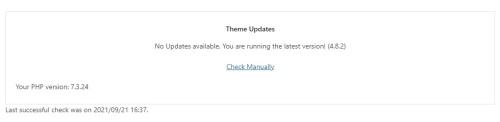
WP version: 5.8.1
Enfold version: 4.8.2
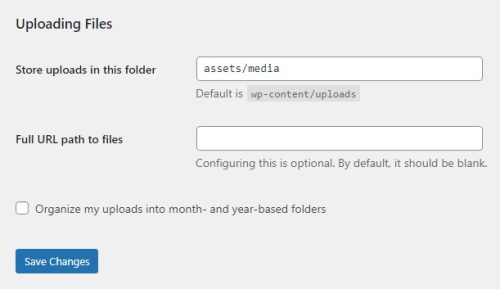
It’s interesting… I remember having that issue one time when I wasn’t able to find the option to change the Uploads folder in WP’s UI; and I remember bringing it back by setting the upload_path field to 1 in the wp_options table in the WP DB. In any case, I can see this setting in the UI in all my new WP instances. I always use Installatron to install WP, maybe this setting is preset in there by default.
I will try your suggestion and use the UPLOADS constant in wp-config.php on a clean WP install and let you know how it goes.

-
This reply was modified 4 years, 7 months ago by
 Enfoldio.
Hello Ismael,
Thank you for the CSS, it has worked as intended.
In relation to updating the theme – like mentioned before – what do you recommend we do?
We have updated the Enfold theme manually using FTP – but we received the below error.
“An error of type E_PARSE was caused in line 277 of the file /home/nicholsonbrown/public_html/wp-content/themes/enfold/config-layerslider/LayerSlider/assets/wp/notices.php. Error message: syntax error, unexpected end of file”
To temporarily resolve this issue, we changed the file name notices.php to notices.old.
I look forward to hearing from you.
Kind regards,
Natasha.
Hey mickra76,
Thank you for the inquiry.
Did you modify the slideshow_layerslider.php file in the child theme? Make sure to use the latest version of the file from Enfold v4.8.6.2. If the issue persists, please post the login details in the private field so that we could check the dashboard.
Best regards,
Ismael
Aviva layout builder stuck in loop – not allowing to edit page content of welcome page of imported GYM demo
I had all latest versions php 7.4, wp 5.8.2 & enfold 4-8-6-2, didn’t work.
So I went back to wp 5.8 and Enfold 4.8.5, still didn’t work.
Deactivated all plugins, that didn’t work
Aviva builder will open other pages, just not the home page, I like the layout of the demo home page and don’t really want to have to build it from scratch.
Hope you can help. Maybe others are having the same issues.
I emptied browser cache and used Chrome then Firefox, same problem.
Thanks
Hello,
after two changes made to the site while saving an error appeared on the part of wordpress and immediately after the email that I am attaching below arrived.
The problem is related to the theme and we have also heard the hosting but on their part there is no error. What can depend on the theme Enfold?
Thanks
EMAIL FROM WORDPRESS:
Ciao!
WordPress, a partire dalla versione 5.2, ha una funzionalità integrata che rileva quando un plugin o un tema provoca un errore irreversibile sul tuo sito e ti avvisa con questa email automatica.
In questo caso, WordPress ha incontrato un errore con il tuo tema, Enfold.
Per prima cosa, vai al tuo sito web (https://www.grattoni1892.it/) e controlla se ci sono problemi visibili. Successivamente, vai nella pagina in cui è stato rilevato l’errore (https://www.grattoni1892.it/wp-admin/post.php?post=26&action=edit&lang=it) e verifica se c’è qualche problema visibile.
Contatta il tuo host per richiedere assistenza per una investigazione più approfondita di questo problema.
Se il tuo sito appare danneggiato e non puoi accedere normalmente alla tua bacheca, WordPress ora ha una speciale “modalità di ripristino”. Ciò ti consente di accedere in modo sicuro alla tua bacheca per controllare cosa non va.
https://www.grattoni1892.it/wp-login.php?action=enter_recovery_mode&rm_token=zdYyQ2BbkAaowyfdCujN8h&rm_key=95CPcvgDd1wKnLtBO0GlWm
Per mantenere il tuo sito sicuro, questo link scadrà tra 1 giorno. Non preoccuparti di questo: ti verrà inviato un nuovo link se l’errore si ripresenta dopo la scadenza.
Se cerchi aiuto per questo problema, ti potrebbero essere chieste alcune delle seguenti informazioni:
Versione di WordPress 5.7.3
Tema corrente: Enfold (versione 4.8.1)
Plugin corrente: (versione )
Versione PHP 7.4.16
Dettagli dell’errore
====================
Un errore di E_ERROR è stato causato nella linea 3710 del file /var/www/clients/client52/web69/web/wp-content/themes/enfold/config-templatebuilder/avia-template-builder/php/element-templates.class.php. Messaggio di errore: Uncaught TypeError: Argument 1 passed to aviaElementTemplates::set_locked_attributes() must be of the type array, string given, called in /var/www/clients/client52/web69/web/wp-content/themes/enfold/config-templatebuilder/avia-shortcodes/timeline/timeline.php on line 1234 and defined in /var/www/clients/client52/web69/web/wp-content/themes/enfold/config-templatebuilder/avia-template-builder/php/element-templates.class.php:3710
Stack trace:
#0 /var/www/clients/client52/web69/web/wp-content/themes/enfold/config-templatebuilder/avia-shortcodes/timeline/timeline.php(1234): aviaElementTemplates->set_locked_attributes()
#1 /var/www/clients/client52/web69/web/wp-includes/shortcodes.php(343): avia_sc_timeline->av_timeline_item()
#2 [internal function]: do_shortcode_tag()
#3 /var/www/clients/client52/web69/web/wp-includes/shortcodes.php(218): preg_replace_callback()
#4 /var/www/clients/client52/web69/web/wp-content/themes/enfold/config-templatebuilder/avia-template-builder/php/shortcode-helper.class.php(503): do_short
Hi,
Try to modify the enfold\framework\php\class-style-generator.php file and look for this code around line 767.
document.getElementsByTagName('head')[0].appendChild(f);
Replace it with:
document.getElementsByTagName('head')[0].prepend(f);
This should prepend the font files at the very top of the head tag, loading them first. Let us know if that helps.
Best regards,
Ismael
Hi,
That could also work. We have to modify the config-templatebuilder\avia-shortcodes\slideshow_fullsize\slideshow_fullsize.php file, around line 1073, add this code below to pass the class names to the avia_slideshow object.
$slider->set_extra_class( $meta["el_class"] );
In the config-templatebuilder\avia-shortcodes\av-helper-slideshow.php, around line 789, we could check if the class name “nosrcset” exists or not.
	if(false == strpos($this->config['class'], "nosrcset")) {
							$img_tag = Av_Responsive_Images()->make_image_responsive( $img_tag, $slide->ID, $this->config['lazy_loading'] );
						}
The srcset attribute should not be added whenever the “nosrcset” is used as a custom css class name for a Fullwidth Slider element.
Best regards,
Ismael
Hi,
@tiffanytnttobo: You have to add the code in the functions.php file.
@Guenni007: In the filter above, we are actually appending or pushing the new font in the end of the array, which is why the new font is located at the bottom of the list. We might be able to adjust the order of the fonts by re-sorting the $fonts array.
Best regards,
Ismael
Hi Matti,
Thanks for the update. We appreciate you efforts with the screenshots, but they don’t tell us much about what you are actually doing on the site when the problems occurs, could you please try to explain that a bit further in words? If you are uncomfortable with English, then please write in your native language, then we’ll translate your message. You could also record a screencast as I suggested earlier.
About the index file in your screenshot; that could well be the problem, but I’m not sure exactly which index.php file WordPress is referring to. There’s one in each folder from the root, up to wp-content and themes. If you could share FTP login details with us in private, then we can check the file permission status on those files.
Best regards,
Rikard
-
This reply was modified 4 years, 7 months ago by
 Rikard.
Re: WordPress/Enfold Site: https://kulturverein-berg.de/
Hallo und guten Tag,
folgende Nachricht kam von wordpress:
Hallo!
Seit WordPress 5.2 gibt es eine eingebaute Funktion, die erkennt, wenn ein Plugin oder ein Theme einen fatalen Fehler auf deiner Website verursacht, und dich deswegen mit dieser automatisierten E-Mail benachrichtigt.
In diesem Fall hat WordPress einen Fehler in deinem Theme „Enfold“ abgefangen.
Besuche zunächst deine Website (https://kulturverein-berg.de/) und überprüfe sie auf sichtbare Probleme. Besuche als nächstes die Seite, auf der der Fehler aufgetreten ist (https://kulturverein-berg.de/wp-admin/customize.php?return=%2Fwp-admin%2Fpost.php%3Fpost%3D3075%26action%3Dedit%26classic-editor%3D1) und prüfe, ob es sichtbare Probleme gibt.
Bitte kontaktiere dein Hosting-Unternehmen, um Unterstützung bei der weiteren Untersuchung dieses Problems zu erhalten.
Wenn deine Website fehlerhaft zu sein scheint und du nicht mehr wie gewohnt auf dein Dashboard zugreifen kannst, hat WordPress jetzt einen speziellen „Wiederherstellungsmodus“. Auf diese Weise kannst du dich sicher in deinem Dashboard anmelden und weitere Untersuchungen durchführen.
https://kulturverein-berg.de/wp-login.php?action=enter_recovery_mode&rm_token=Vv4vBZwfpw7Wd1DZhcnNqG&rm_key=Egj1Fpg9SCvXQWqaSsnWJb
Um deine Website zu schützen, läuft dieser Link in 1 Tag ab. Aber keine Sorge: Ein neuer Link wird dir per E-Mail zugeschickt, wenn der Fehler nach Ablauf der Frist erneut auftritt.
Wenn du Hilfe bei diesem Problem suchst, wirst du möglicherweise nach einigen der folgenden Informationen gefragt:
WordPress-Version 5.8.1
Aktuelles Theme: Enfold Child (Version 1.0) Aktuelles Plugin: (Version ) PHP-Version 7.4.22
Fehler-Details
==============
Ein Fehler vom Typ E_ERROR wurde in der Zeile 517 der Datei /mnt/web010/c3/53/56960853/htdocs/WordPress_SecureMode_08/wp-content/themes/enfold/config-gutenberg/class-avia-gutenberg.php verursacht. Fehlermeldung: Uncaught Error: Call to undefined function gutenberg_can_edit_post_type() in /mnt/web010/c3/53/56960853/htdocs/WordPress_SecureMode_08/wp-content/themes/enfold/config-gutenberg/class-avia-gutenberg.php:517
Stack trace:
#0 /mnt/web010/c3/53/56960853/htdocs/WordPress_SecureMode_08/wp-content/themes/enfold/config-gutenberg/class-avia-gutenberg.php(377): Avia_Gutenberg->can_use_block_editor()
#1 /mnt/web010/c3/53/56960853/htdocs/WordPress_SecureMode_08/wp-content/themes/enfold/config-gutenberg/class-avia-gutenberg.php(412): Avia_Gutenberg->init_force_classic_post_types()
#2 /mnt/web010/c3/53/56960853/htdocs/WordPress_SecureMode_08/wp-content/themes/enfold/config-gutenberg/class-avia-gutenberg.php(487): Avia_Gutenberg->get_force_classic_post_types()
#3 /mnt/web010/c3/53/56960853/htdocs/WordPress_SecureMode_08/wp-content/themes/enfold/config-gutenberg/class-avia-gutenberg.php(615): Avia_Gutenberg->force_classic_editor()
#4 /mnt/web010/c3/53/56960853/htdocs/WordPress_SecureMode_08/wp-includes/class-wp-hook.php(303):
———-
The system seems to work, but I cannot access “Enfold-Customize”.
Possibly, the problem is related to me erasing a theme (WordPress 2017 or so) via FTP Filezilla whilst I was working as the admin.
Could you please, have alook at it – and hopefully advise? Thank you very much!
Best regards from Bavaria!
Re: WordPress/Enfold Site: https://kulturverein-berg.de/
Hallo und guten Tag,
folgende Nachricht kam von wordpress:
Hallo!
Seit WordPress 5.2 gibt es eine eingebaute Funktion, die erkennt, wenn ein Plugin oder ein Theme einen fatalen Fehler auf deiner Website verursacht, und dich deswegen mit dieser automatisierten E-Mail benachrichtigt.
In diesem Fall hat WordPress einen Fehler in deinem Theme „Enfold“ abgefangen.
Besuche zunächst deine Website (https://kulturverein-berg.de/) und überprüfe sie auf sichtbare Probleme. Besuche als nächstes die Seite, auf der der Fehler aufgetreten ist (https://kulturverein-berg.de/wp-admin/customize.php?return=%2Fwp-admin%2Fpost.php%3Fpost%3D3075%26action%3Dedit%26classic-editor%3D1) und prüfe, ob es sichtbare Probleme gibt.
Bitte kontaktiere dein Hosting-Unternehmen, um Unterstützung bei der weiteren Untersuchung dieses Problems zu erhalten.
Wenn deine Website fehlerhaft zu sein scheint und du nicht mehr wie gewohnt auf dein Dashboard zugreifen kannst, hat WordPress jetzt einen speziellen „Wiederherstellungsmodus“. Auf diese Weise kannst du dich sicher in deinem Dashboard anmelden und weitere Untersuchungen durchführen.
https://kulturverein-berg.de/wp-login.php?action=enter_recovery_mode&rm_token=Vv4vBZwfpw7Wd1DZhcnNqG&rm_key=Egj1Fpg9SCvXQWqaSsnWJb
Um deine Website zu schützen, läuft dieser Link in 1 Tag ab. Aber keine Sorge: Ein neuer Link wird dir per E-Mail zugeschickt, wenn der Fehler nach Ablauf der Frist erneut auftritt.
Wenn du Hilfe bei diesem Problem suchst, wirst du möglicherweise nach einigen der folgenden Informationen gefragt:
WordPress-Version 5.8.1
Aktuelles Theme: Enfold Child (Version 1.0) Aktuelles Plugin: (Version ) PHP-Version 7.4.22
Fehler-Details
==============
Ein Fehler vom Typ E_ERROR wurde in der Zeile 517 der Datei /mnt/web010/c3/53/56960853/htdocs/WordPress_SecureMode_08/wp-content/themes/enfold/config-gutenberg/class-avia-gutenberg.php verursacht. Fehlermeldung: Uncaught Error: Call to undefined function gutenberg_can_edit_post_type() in /mnt/web010/c3/53/56960853/htdocs/WordPress_SecureMode_08/wp-content/themes/enfold/config-gutenberg/class-avia-gutenberg.php:517
Stack trace:
#0 /mnt/web010/c3/53/56960853/htdocs/WordPress_SecureMode_08/wp-content/themes/enfold/config-gutenberg/class-avia-gutenberg.php(377): Avia_Gutenberg->can_use_block_editor()
#1 /mnt/web010/c3/53/56960853/htdocs/WordPress_SecureMode_08/wp-content/themes/enfold/config-gutenberg/class-avia-gutenberg.php(412): Avia_Gutenberg->init_force_classic_post_types()
#2 /mnt/web010/c3/53/56960853/htdocs/WordPress_SecureMode_08/wp-content/themes/enfold/config-gutenberg/class-avia-gutenberg.php(487): Avia_Gutenberg->get_force_classic_post_types()
#3 /mnt/web010/c3/53/56960853/htdocs/WordPress_SecureMode_08/wp-content/themes/enfold/config-gutenberg/class-avia-gutenberg.php(615): Avia_Gutenberg->force_classic_editor()
#4 /mnt/web010/c3/53/56960853/htdocs/WordPress_SecureMode_08/wp-includes/class-wp-hook.php(303):
———-
The system seems to work, but I cannot access “Enfold-Customize”.
Possibly, the problem is related to me erasing a theme (WordPress 2017 or so) via FTP Filezilla whilst I was working as the admin.
Could you please, have alook at it – and hopefully advise? Thank you very much!
Best regards from Bavaria!
This reply has been marked as private.
Hi,
This is not going to be included in the next patch. We are just trying to provide a possible solution. You could also remove the make_image_responsive function from the enfold/config-templatebuilder/avia-shortcodes/av-helper-slideshow.php line 787.
$img_tag = "<img src='{$img[0]}' width='{$img[1]}' height='{$img[2]}' title='{$linktitle}' alt='{$linkalt}' {$markup_url} {$img_style} />";
						$img_tag = Av_Responsive_Images()->make_image_responsive( $img_tag, $slide->ID, $this->config['lazy_loading'] );
Maybe add a new element option or toggle in the enfold/config-templatebuilder/avia-template-builder/php/class-popup-templates.php where you can disable/enable srcset attribute or responsive images for the slider. Something like:
/**
		 * Responsive Images Option
		 *
		 * @since 4.8.6.2
		 * @param array $element
		 * @return array
		 */
		protected function responsive_image_toggle( array $element )
		{
			$desc  = __( 'Enable responsive images or add srcset attribute to slider images.', 'avia_framework' ) . ' ';

			$id = isset( $element['id'] ) && ! empty( $element['id'] ) ? $element['id'] : 'responsive_srcset';
			$std = isset( $element['std'] ) && in_array( $element['std'] , array( 'disabled', 'enabled' ) ) ? $element['std'] : 'enabled';
			$required = isset( $element['required'] ) && is_array( $element['required'] ) ? $element['required'] : array();
			$lockable = isset( $element['lockable'] ) ? $element['lockable'] : false;

			$c = array(
							array(
								'name'		=> __( 'Responsive Images', 'avia_framework' ),
								'desc'		=> $desc,
								'id'		=> $id,
								'type'		=> 'select',
								'std'		=> $std,
								'lockable'	=> $lockable,
								'required'	=> $required,
								'subtype'	=> array(
													__( 'Add srcset attribute', 'avia_framework' )	=> 'enabled',
													__( 'Remove srcset attribute', 'avia_framework' )		=> 'disabled'
												)
							)
				);

			if( isset( $element['no_toggle'] ) && true === $element['no_toggle'] )
			{
				$template = $c;
			}
			else
			{
				$template = array(
								array(
									'type'			=> 'template',
									'template_id'	=> 'toggle',
									'title'			=> __( 'Performance', 'avia_framework' ),
									'content'		=> $c
								),
					);
			}

			return $template;
		}
You can then add a condition like so:
$img_tag = "<img src='{$img[0]}' width='{$img[1]}' height='{$img[2]}' title='{$linktitle}' alt='{$linkalt}' {$markup_url} {$img_style} />";
if($responsive_srcset == "enabled") {
    $img_tag = Av_Responsive_Images()->make_image_responsive( $img_tag, $slide->ID, $this->config['lazy_loading'] );
}
Best regards,
Ismael
I get an error when I try to change the Enfold theme settings.
Saving didnt work!
The script returned the following error:
{“apbct”:{“blocked”:true,”comment”:”*** Forbidden. You sent forms too often. Please wait a few minutes. ***”,”stop_script”:0}}
Linux server
Wordpress 5.8.1
PHP version 7.4.23
Enfold 4.8.6.2
What to do?
It seems that we are having much larger issues now. Im not sure if its related, but whenever i try to update a page i get errors. At the moment is says
Fatal error: Allowed memory size of 268435456 bytes exhausted (tried to allocate 32768 bytes) in /public_html/wp-includes/wp-db.php on line 2022
There has been a critical error on this website. Please check your site admin email inbox for instructions.
on the front end im getting:
Notice: ob_end_flush(): failed to send buffer of zlib output compression (1) in /public_html/wp-includes/functions.php on line 5107
even though its only a few dozen lines long.
Also, i had Disable Gutenberg plugin installed, which i have deactivated along with all the other plugins. However the page backend is still using defalt wordpress editor andnot Guttenberg. I have no idea whats going on or how to fix it
Hi,
Thank you for following up. Glad to know that the modification is working.
To move the search form before the CHI SIAMO menu item, try to replace the script with the following.
// add search bar to mobile menu
function ava_custom_script_mod_search_mobile()
{
?>
	<script>
		(function($) {
			$(document).ready(function() {
				var page   = window.location.href;
				var search = '<form action="'+page+'" method="get" class=""><div><input type="submit" value="?" id="searchsubmit" class="button avia-font-entypo-fontello"><input type="text" id="s" name="s" value="" placeholder="Search"></div></form>';

				$('.av-burger-menu-main a').on('click', function() {
					if($(".av-mobile-search").find('form').length == 1) return;
					setTimeout(() => {
						$("<li class='av-mobile-search av-active-burger-items'>" + search + "</div>").insertAfter('.menu-item-178580');
					}, 300);
				});
			});
		})(jQuery);
	</script>
<?php
}
add_action('wp_footer', 'ava_custom_script_mod_search_mobile', 10000);
Best regards,
Ismael
Hey emilconsor,
Thank you for the inquiry.
You will have to directly modify the enfold/config-templatebuilder/avia-shortcodes/tab_section/tab_section.php file. Look for this code around line 567.
	/**
				 * Bugfix: Set no-scroll to avoid auto smooth scroll when initialising tab section and multiple tab sections are on a page - removed in js.
				 */
				$active_tab = $i == $atts['initial'] ? 'av-active-tab-title no-scroll' : '';
Above it, add this code to set the initial tab to zero.
$atts['initial'] = 0;
Best regards,
Ismael
When I add that to functions.php, I get the following error…
Your PHP code changes were rolled back due to an error on line 72 of file wp-content/themes/enfold-child/functions.php. Please fix and try saving again.
syntax error, unexpected ‘&’, expecting ‘]’
Please advise.
Hey smiley789654123,
Thank you for the inquiry.
We can use the avf_title_args filter in the functions.php to limit the character length of the page title.
function avf_title_args_mod($args, $id)
{
    $args['title'] = avia_backend_truncate( $args['title'], 20, ' ', '...', true, '', true ) ;
    return $args;
}
add_filter('avf_title_args', 'avf_title_args_mod', 10, 2);
This should limit the number of characters in the title to 20.
Best regards,
Ismael
Hi,
Thank you for the info.
We adjusted the filter in the functions.php file a bit. The post items from the selected category are now displaying properly in the magazine element with the selected or sticky post above.
This is the updated code.
/*  https://kriesi.at/support/topic/sticky-posts-in-magazine-element/ */
add_filter('avf_magazine_entries_query', 'avf_magazine_entries_query_sticky', 10, 2);
function avf_magazine_entries_query_sticky($query, $params) {

	$include = array();

	$sticky = get_option( 'sticky_posts' );

        if(is_single(10137)) {
	   $sticky = array(get_post(4649)->ID);
	}

	$query['post__not_in'] = $sticky;
	$posts = get_posts( $query );

	foreach($posts as $post) {
		$include[] = $post->ID;
	}

	$include = array_merge($sticky, $include);

	$query['post__in'] = $include;
	$query['orderby'] = 'post__in'; // sort items based on the post__in value
	return $query;
}
We replace is_page with the is_single function because the magazine element is inside a post.
 if(is_single(10137)) {
      $sticky = array(get_post(4649)->ID);
}
We also placed the post with the ID 4649 inside an array. If you need to display a different sticky post on a different page, just duplicate the if statement above and replace the post IDs.
if(is_single(113)) {
      $sticky = array(get_post(235)->ID);
}
The changes above will display the post with the ID 235 as a sticky item inside a post with the ID 113.
Best regards,
Ismael
Hi,
Thank you for the info.
We adjusted the script a bit based on this thread (https://stackoverflow.com/questions/1397329/how-to-remove-the-hash-from-window-location-url-with-javascript-without-page-r/5298684#5298684).
/* Remove the down arrow #av_section_3 from https://example.com/#av_section_3 on first load */
function ava_custom_script_remove_hash() {
?>
<script>
function removeHash () {
    history.pushState("", document.title, window.location.pathname + window.location.search);
	setTimeout(function() {
		window.scrollTo(0, 0);
		console.log("scrolled");
	}, 500);
}

window.addEventListener("DOMContentLoaded", function() {
	console.log("remove hash");
	removeHash();
});
</script>
<?php
}
add_action('wp_footer', 'ava_custom_script_remove_hash', 999);
It should be working properly now. Make sure to purge the cache or test the site on incognito mode.
Best regards,
Ismael
Hi, thank you for your suggestion.
I instaled new theme update. PHP version is 7.4. Issue still appears if any plugin is activated.
So its not the issue with one plugin, its some kind of issue regarding the theme+ any plugin.
-
This reply was modified 4 years, 7 months ago by
 navisdigital.
Hi,
Thanks for that. First off, could you try updating the theme to the latest version (4.8.6.2) to see if that helps please? https://kriesi.at/documentation/enfold/how-to-install-enfold-theme/#theme-update. If not, then please try deactivate all plugins, to see if that makes any difference. If deactivating plugins doesn’t change anything, then please try downgrading your PHP version, to 7.4 for example.
Best regards,
Rikard
Hey tinagianna,
Thank you for your patience and for the login, to add the Telegram icon to the social profiles I added this code to your functions.php:
// Register new icon as a theme icon
function avia_add_custom_icon($icons) {
$icons['telegram'] = array( 'font' =>'entypo-fontello', 'icon' => 'ue8b7');
return $icons;
}
add_filter('avf_default_icons','avia_add_custom_icon', 10, 1);

// Add new icon as an option for social icons
function avia_add_custom_social_icon($icons) {
$icons['Telegram'] = 'telegram';
return $icons;
}
add_filter('avf_social_icons_options','avia_add_custom_social_icon', 10, 1);
since you are not using a child theme, this was added on line 47 after:
if( isset( $avia_config['use_child_theme_functions_only'] ) )
{
	return;
}
since you are not using a child theme, this will be lost on your next update, I recommend using a child theme.
I also added the Telegram mouse-over css to your Quick CSS using the Telegram Logo Color Palette from here
#top #wrap_all .av-social-link-telegram:hover a{
    color:#fff;
    background-color:#0088CC;
}
Please clear your browser cache and check.
Best regards,
Mike



