Viewing 30 results - 1,861 through 1,890 (of 16,893 total)
  • Author
    Search Results
  • #1369890

    I revalidated the token in the child theme. It conncected to Envato.
    The theme says, ” Theme Updates – No Updates available. You are running the latest version! (4.9.2.3)”
    When I click to manually check for updates, it says, “Themes – Your themes are all up to date.”
    ( And WP is 6.0.3 and PHP version: 7.4.32 )

    • This reply was modified 3 years, 6 months ago by conlcoa.
    #1369841

    In reply to: Split a column

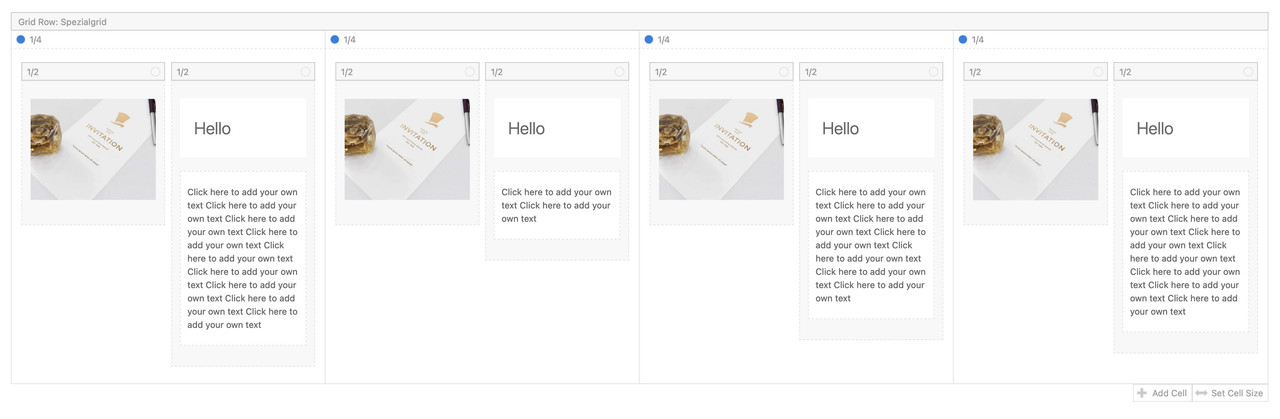
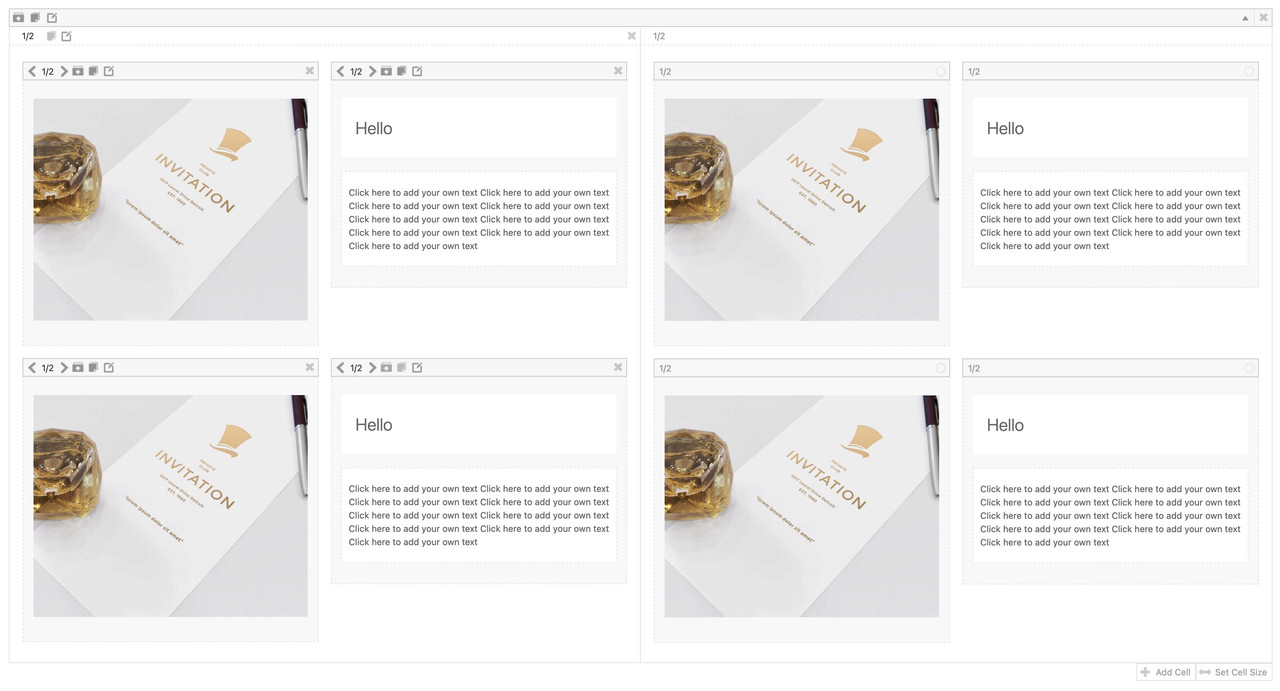
    but you know that you can nest columns in a grid-row cell?
    To have the grid-row not as full-width – you can add a snippet to your child-theme functions.php.

    See result and all code you need: https://enfold.webers-webdesign.de/grid-row-special/
    PS: with no gap – there will be no gap !
    I prefer to have here 1/4 cells besides each other and style them by grid layout.

    but you can also style it as 1/2 Cells this way:

    #1369830

    Hi,
    We will leave this open to hear back from you, please note that some cPanel PHP v8 installs do not have the zip extension enabled by default
    2022-10-22_017.png
    and some have the max_input_time set to a negative number, try changing to 120
    2022-10-22_018.png
    Perhaps this will help.

    Best regards,
    Mike

    #1369801
    Steve Webgecko
    Participant

    Hi there

    I think this is a well known issue: I have to update a whole WP Site, so I cloned the client site to a Staging Subdomain for Testings, and started to update all older AddOns and Themes there. As I don’t want to update on the Live site because of Failes and Errors.

    After Updating ENFOLD from 4.7 to 5.2 the 4 Widgets in Footer section now are missing. Showing now 4 placeholder widgets instead, like «Categores» and «Archives»
    Testing Clone: https://cleanhouse.webagentur-aarau.ch
    Original: https://www.cleanhouse.ch
    (Scroll all way down to FOOTER Section).

    How can I get back the 4 original widgets (which are still there under WIDGETS)?
    I run a Child theme Copy from ENFOLD theme.
    Somehow, the theme can’t find the Orignal widgets… something wrong with the footer.php in Enfold Child?

    #1369798
    coldstreamer
    Participant

    Hi guys,
    I’m wondering if anyone else has this effect: switching from Visual Mode to the Code-Editor doesn’t work. The view stays in Visual Mode. I’ve tried this with Safari 16.0 and Chrome 106.0.5249.119 but the switch fails. I’m running WP 6.0.3 de and an Enfold Child theme (Parent: 5.1.1) using PHP 7.4.30. I’m bit stumped!
    It seems to be the Enfold theme because using the same browsers to work on a site with theme version 4.9.2.1 (and PHP 8.0.24) works fine. Is this a known bug (hopefully) to be fixed soon?
    Thx for any tips/advice
    Andrew

    #1369790

    Hi,

    Thanks for reporting this. Happend when adding the .min feature.


    @Guenni007
    Your line above is correct.

    For other users I uploaded a fixed file to

    https://github.com/KriesiMedia/enfold-library/blob/master/temp_fixes/Enfold_5_2/config-templatebuilder/avia-shortcodes/slideshow_fullsize/slideshow_fullsize.php

    Please replace the following file:

    enfold\config-templatebuilder\avia-shortcodes\slideshow_fullsize\slideshow_fullsize.php

    If you need help please let us know so we can help you.

    Best regards,
    Günter

    #1369787

    Hi,

    If you want to use a custom js/css file instead of theme files you have to deregister/dequeue theme files as you show above.

    avia_minify_extension() returns ‘.min’ or ” depending on theme setting.

    If you need it in your child theme depends if you upload both versions (non minified and minified) or only one version.

    To see an example how to enqueue files have a look at e.g.

    config-templatebuilder\avia-shortcodes\icongrid\icongrid.php function extra_assets():

    
    			$ver = Avia_Builder()->get_theme_version();
    			$min_js = avia_minify_extension( 'js' );
    			$min_css = avia_minify_extension( 'css' );
    
    			wp_enqueue_style( 'avia-module-icon', AviaBuilder::$path['pluginUrlRoot'] . "avia-shortcodes/icon/icon{$min_css}.css", array( 'avia-layout' ), $ver );
    			wp_enqueue_style( 'avia-module-icongrid', AviaBuilder::$path['pluginUrlRoot'] . "avia-shortcodes/icongrid/icongrid{$min_css}.css", array( 'avia-layout' ), $ver );
    
    			wp_enqueue_script( 'avia-module-icongrid', AviaBuilder::$path['pluginUrlRoot'] . "avia-shortcodes/icongrid/icongrid{$min_js}.js", array( 'avia-shortcodes' ), $ver, true );
    

    Best regards,
    Günter

    #1369660

    Hi Guenni007,

    I’m not confident that I understand how to rename/edit the header/footer.php files, hence why I am asking for help from the admin team.

    If you want to provide detailed step-by-step instructions on how to do it might be able to try it.

    Thanks,

    #1369658

    and now this one… whats going on with enfold?

    Fatal error: Uncaught Error: Call to undefined function av_icon_css_string() in /mnt/web418/b1/70/5603570/htdocs/wp-content/themes/enfold/css/dynamic-css.php:1094 Stack trace: #0 /mnt/web418/b1/70/5603570/htdocs/wp-content/themes/enfold/includes/admin/register-dynamic-styles.php(234): require() #1 /mnt/web418/b1/70/5603570/htdocs/wp-content/themes/enfold/functions.php(783): avia_prepare_dynamic_styles() #2 /mnt/web418/b1/70/5603570/htdocs/wp-includes/class-wp-hook.php(307): avia_custom_styles() #3 /mnt/web418/b1/70/5603570/htdocs/wp-includes/class-wp-hook.php(331): WP_Hook->apply_filters() #4 /mnt/web418/b1/70/5603570/htdocs/wp-includes/plugin.php(476): WP_Hook->do_action() #5 /mnt/web418/b1/70/5603570/htdocs/wp-settings.php(598): do_action() #6 /mnt/web418/b1/70/5603570/htdocs/wp-config.php(171): require_once(‘…’) #7 /mnt/web418/b1/70/5603570/htdocs/wp-load.php(50): require_once(‘…’) #8 /mnt/web418/b1/70/5603570/htdocs/wp-admin/admin.php(34): require_once(‘…’) #9 /mnt/web418/b1/70/5603570/htdocs/wp-admin/themes.php(10): require_once(‘…’) #10 {main} thrown in /mnt/web418/b1/70/5603570/htdocs/wp-content/themes/enfold/css/dynamic-css.php on line 1094

    #1369646

    No I have the problem that our site is broken -.-

    I activated debug mode: Fatal error: Uncaught Error: Call to undefined function wp_check_php_mysql_versions() in /mnt/web418/b1/70/5603570/htdocs/wp-settings.php:37 Stack trace: #0 /mnt/web418/b1/70/5603570/htdocs/wp-config.php(171): require_once() #1 /mnt/web418/b1/70/5603570/htdocs/wp-load.php(50): require_once(‘…’) #2 /mnt/web418/b1/70/5603570/htdocs/wp-blog-header.php(13): require_once(‘…’) #3 /mnt/web418/b1/70/5603570/htdocs/index.php(17): require(‘…’) #4 {main} thrown in /mnt/web418/b1/70/5603570/htdocs/wp-settings.php on line 37

    ..

    #1369640

    have a look to new header.php – look for lines 66 till 132 and 172-173

    so if there is an older child-theme header.php with no support for those new features ( like curtain effect etc. ) …

    #1369557

    Good morning,

    I have been to the LayerSlider developer’s site.
    I read on the help page an error similar to mine and figured out how to access the LayerSlider settings. By reading the suggestions they gave I was able to set them up on the site, I must say it worked.
    I will still have to contact my hosting to increase the PHP Post Max Size and the PHP Max Upload Size.
    This is the link where I saw the suggestions:

    https://kreatura.ticksy.com/ticket/3145967/

    Therefore you can safely close this Ticket

    I didn’t mean to be so dramatic, but sometimes I don’t know where the problem lies and write like this.
    I apologise to the Enfold developers (who are not to blame for this) for writing this ugly sentence: “Continuous problems even after upgrade to 5.2 (LayerSlider)”.

    Thank you

    #1369553
    uniquefu
    Participant

    Hi I have following critical error after all Theme- Updates and switch from PHP 7.4 to PHP 8.0 (hosted on one.com):

    Fatal error: Unparenthesized a ? b : c ? d : e is not supported. Use either (a ? b : c) ? d : e or a ? b : (c ? d : e) in /customers/6/3/6/haarmeisterei21.at/httpd.www/wp-content/themes/enfold/functions-enfold.php on line 332

    Can you help me to fix this error?
    Thanks

    krenni
    Participant

    Recently bought 5.1.2 from Themforest, but when I activate it instead of the 3.1 Version I get error messages and loose control on lots of functions the WP-Admin.

    Errors:
    o locations
    Warning: Illegal string offset ‘default’ in /www/htdocs/w012479e/ipw2015/wp-content/themes/enfoldNEU20221/config-templatebuilder/avia-template-builder/php/base-classes/class-popup-templates-responsive.php on line 220

    Warning: Illegal string offset ‘desktop’ in /www/htdocs/w012479e/ipw2015/wp-content/themes/enfoldNEU20221/config-templatebuilder/avia-template-builder/php/base-classes/class-popup-templates-responsive.php on line 220

    Warning: Illegal string offset ‘medium’ in /www/htdocs/w012479e/ipw2015/wp-content/themes/enfoldNEU20221/config-templatebuilder/avia-template-builder/php/base-classes/class-popup-templates-responsive.php on line 220

    Warning: Illegal string offset ‘small’ in /www/htdocs/w012479e/ipw2015/wp-content/themes/enfoldNEU20221/config-templatebuilder/avia-template-builder/php/base-classes/class-popup-templates-responsive.php on line 220

    Warning: Illegal string offset ‘mini’ in /www/htdocs/w012479e/ipw2015/wp-content/themes/enfoldNEU20221/config-templatebuilder/avia-template-builder/php/base-classes/class-popup-templates-responsive.php on line 220

    Warning: Illegal string offset ‘default’ in /www/htdocs/w012479e/ipw2015/wp-content/themes/enfoldNEU20221/config-templatebuilder/avia-template-builder/php/base-classes/class-popup-templates-responsive.php on line 220

    Warning: Illegal string offset ‘desktop’ in /www/htdocs/w012479e/ipw2015/wp-content/themes/enfoldNEU20221/config-templatebuilder/avia-template-builder/php/base-classes/class-popup-templates-responsive.php on line 220

    Warning: Illegal string offset ‘medium’ in /www/htdocs/w012479e/ipw2015/wp-content/themes/enfoldNEU20221/config-templatebuilder/avia-template-builder/php/base-classes/class-popup-templates-responsive.php on line 220

    Warning: Illegal string offset ‘small’ in /www/htdocs/w012479e/ipw2015/wp-content/themes/enfoldNEU20221/config-templatebuilder/avia-template-builder/php/base-classes/class-popup-templates-responsive.php on line 220

    Warning: Illegal string offset ‘mini’ in /www/htdocs/w012479e/ipw2015/wp-content/themes/enfoldNEU20221/config-templatebuilder/avia-template-builder/php/base-classes/class-popup-templates-responsive.php on line 220

    Warning: Illegal string offset ‘default’ in /www/htdocs/w012479e/ipw2015/wp-content/themes/enfoldNEU20221/config-templatebuilder/avia-template-builder/php/base-classes/class-popup-templates-responsive.php on line 220

    Warning: Illegal string offset ‘desktop’ in /www/htdocs/w012479e/ipw2015/wp-content/themes/enfoldNEU20221/config-templatebuilder/avia-template-builder/php/base-classes/class-popup-templates-responsive.php on line 220
    etc

    #1369467

    just to be clear, i work under linux, and these file are inside the zipfile enfold itself downloads when updating, as this did’t work, i’ve installed the envato plugin that failed also. After temporary disable the .DS filter in our vsftpd i could run the update inside wordpress (envato market plugin)

    you can look with commandline inside the zip (i.e. list all files, in OSX terminal this should work too)

    zipinfo -1 themeforest-YeOFO7oQ-enfold-responsive-multipurpose-theme-wordpress-theme.zip | grep DS
    enfold/.DS_Store
    enfold/framework/images/icons/new/.DS_Store
    enfold/images/.DS_Store
    enfold/js/.DS_Store
    enfold/config-templatebuilder/avia-template-builder/php/.DS_Store

    Here are some hints how to deal with that in OSX
    https://perishablepress.com/remove-macosx-ds-store-zip-files-mac/

    • This reply was modified 3 years, 6 months ago by wespe.
    RSA Security
    Guest

    Dear Sir/Madam,

    RSA Anti-Fraud Command Center has been appointed to assist Standard Bank in detecting, analyzing and mitigating online fraudulent activity targeting their customers in an attempt to steal personal information.
    We would like to bring to your attention that our team has detected that the following site, which appears to be under your authority, is involved in a *phishing scam targeting Standard Bank’s customers:
    hxxp://computersdoctor[.]ca/sdm[.]rnics/signin[.]php (if you encounter an error while attempting to access this site, please try accessing using a proxy originating from the following country: South Africa)
    IP: 167 . 99 . 181 . 1
    We ask you to take all necessary measures to disable access to this content as soon as possible in order to prevent additional end-users from falling victim to this scam.
    If possible, please provide us with the source files of this phishing site so that we may analyze them and prevent further attacks. Please provide this evidence in a password protected zip file to avoid delivery filtering.
    We understand that you were not previously aware of the mentioned above and we appreciate your cooperation. If we have contacted you in error, or if there is a better way for us to report this incident, please let us know.
    Please do not hesitate to contact us with any questions or additional information you may require by replying to this email or calling the numbers below at any time.

    Regards,
    Anti-Fraud Command Center
    Outseer, an RSA Company
    UK Phone: +44-800-260-6644
    US/CA Phone: +1-800-635-8482
    AU Phone: +61-1800-950-824
    E-mail: (Email address hidden if logged out)
    http://www.outseer.com 68

    * A Phishing site refers to a website that attempts to trick consumers into revealing personal information under false pretenses.

    #1369319

    Hi,

    Thank you for the info.

    We are not really sure if this is a server issue but it looks the site cannot load the video because the server is not accepting ranges of bytes, which is required for streaming. Please check your nginx configuration and update it based on the following discussion.

    // https://stackoverflow.com/questions/22728016/nginx-is-not-accepting-range-of-bytes

    We also got this error just today.

    // https://developer.chrome.com/blog/play-request-was-interrupted/

    Did you add anything like that in the theme, maybe in the functions.php file?

    Best regards,
    Ismael

    #1369297

    Hi bynet2013,

    Thanks for informing us of the solution that worked for you. :)
    Although I think it may be a server/configuration issue as I have been using PHP 7.4 with Enfold in different platforms (as well as other users have used it) without issues.
    Thanks again for using Enfold and have a great day!

    Best regards,
    Nikko

    #1369290

    Hi again,

    I finally managed to solve the problem. After asking the server manager to increase the memory_limit, the site crashed and presented an error:PHP Fatal error: Call to undefined function json_decode()

    I had to revert the PHP version to 7.3.

    I leave this message just to inform you that with the latest version of PHP 7.4, your theme can create errors with json script.

    Thanks for your help.

    #1369281

    Hi,
    Thanks for your patience, I assume that you are referring to the Latest News & Latest Portfolio widgets:
    2022-10-18_006.png
    Try adding this code to the end of your functions.php file in Appearance ▸ Editor:

    add_filter('avia_widget_time', 'change_avia_date_format', 10, 2);
    function change_avia_date_format($date, $function) {
      $output = get_option('date_format');
      return $output;
    }

    the expected results:
    2022-10-18_007.png

    Best regards,
    Mike

    Cloud Construct
    Participant

    Hi,

    We host sites using an ISP in the UK.

    A website owner has reported to us a “slow admin” since last Thursday, we see the same issue on other Enfold built sites.

    We performed the usual diagnostics, checked various plugins /updates / PHP version and used a code profiler to track the issue down to a GET request to a couple of urls:

    https://repository.kreaturamedia.com/googlefonts/fonts.json
    https://repository.kreaturamedia.com/v4/data/ls-wp/

    If we request these files directly in the office they respond extremely quickly, which led us to consider network issues from the hosting provider.
    This was correct! It looks like if we try and connect to that URL direct from our webservers:

    curl -v -o /dev/null -s -w ‘Total: %{time_total}s\n’ https://repository.kreaturamedia.com/googlefonts/fonts.json
    * Trying 80.77.123.165:443…
    * connect to 80.77.123.165 port 443 failed: Connection timed out
    * Failed to connect to repository.kreaturamedia.com port 443 after 127282 ms: Connection timed out
    * Closing connection 0
    Total: 127.282686s

    It times out after 2 minutes or so – if I run this same command from my local setup or from the SSH servers it loads near immediately, so I supect the host of the fonts.json file is blocking our external IPs or at least preventing access over port 443

    So for some reason they’re blocking requests.

    We’re trying to reach out to the authors of LayerSlider – but as it’s bundled with Enfold felt you ought to be aware of this practice occurring too and maybe can suggest a workaround?

    Thank you.
    Pete

    #1369210

    In reply to: Child Theme

    Hey woogie07,

    You can use a function like this in functions.php:

    function woogie07_add_custom_code_head(){
    ?>
      YOUR SCRIPT GOES HERE
    <?php
    }
    add_action('wp_head', 'woogie07_add_custom_code_head');

    A child theme can be downloaded here: https://kriesi.at/documentation/enfold/child-theme/

    Best regards,
    Rikard

    #1368853
    nine2ten
    Participant

    Hi, after switching to the newest version, activating Pro 6 causes fatal error on Blog Posts and Tribe Events. I have been in touch with their support for a month and they say an update will resolve this issue. First they adviced to downgrade PHP 8 to 7.x. Doing so didn’t solve the problem. I read that PHP 8.0x might do the trick. I am reluctant to switch back and force. What’s your reccomendation?

    Regards,
    nine2ten

    David Singh
    Guest

    Fatal error: Uncaught TypeError: call_user_func_array(): Argument #1 ($callback) must be a valid callback, function “example_callback” not found or invalid function name in /chroot/home/a6dab50d/mokshayoga.com.au/html/wp-includes/class-wp-hook.php:307 Stack trace: #0 /chroot/home/a6dab50d/mokshayoga.com.au/html/wp-includes/plugin.php(191): WP_Hook->apply_filters(”, Array) #1 /chroot/home/a6dab50d/mokshayoga.com.au/html/wp-content/themes/enfold/config-templatebuilder/avia-shortcodes/events_upcoming/events_upcoming.php(424): apply_filters(‘avf_upcoming_ev…’, ”, Object(WP_Post)) #2 /chroot/home/a6dab50d/mokshayoga.com.au/html/wp-content/themes/enfold/config-templatebuilder/avia-template-builder/php/class-shortcode-template.php(1311): avia_sc_upcoming_events->shortcode_handler(Array, ”, ‘av_upcoming_eve…’, Array) #3 /chroot/home/a6dab50d/mokshayoga.com.au/html/wp-includes/shortcodes.php(356): aviaShortcodeTemplate->shortcode_handler_prepare(Array, ”, ‘av_upcoming_eve…’) #4 [internal function]: do_shortcode_tag(Array) #5 /chroot/home/a6dab50d/mokshayoga.com.au/html/wp-includes/shortcodes.php(228): preg_replace_callback(‘/\[(\[?)(av_upc…’, ‘do_shortcode_ta…’, ‘
    n[av_head…’) #6

    #1368696

    In reply to: Debug file

    Good morning Nikko,

    yes, thank you! It worked.

    I am sorry to bother you again, but the more I look into the file, the more errors I find.
    Next ones:

    
    PHP Notice:
    Trying to get property 'ID' of non-object in /home/wp/disk/wordpress/wp-content/themes/enfold/config-templatebuilder/avia-shortcodes/events_upcoming/events_upcoming.php on line 376
    
    
    PHP Warning:  Creating default object from empty value in /home/wp/disk/wordpress/wp-content/themes/enfold/config-templatebuilder/avia-shortcodes/events_upcoming/events_upcoming.php on line 393
    

    In case you want to look at the file, it is in Google drive.

    Really sorry for keeping this thread open so long.
    Asterios

    #1368596

    Welche WordPress Version hast du laufen? denn das wp-includes gehört zu WordPress!

    ich habe über Google einige Einträge bezüglich NextGen Gallery gefunden.

    if you got ftp access – go to your root directory and find in wp-includes that script-loader.php
    something similar to this is no longer supported:

    echo($str{0});
    now there might be : echo($str[0]);

    have a look what is on line 757

    #1368580

    Hi Guenni, hi Rikard,

    I upgraded from PHP 7.4 to 8.0 and also updated the theme. Sadly, I still can’t log in, but the Error Message has changed.

    Look at this.

    Thanks for your support.
    Julian

    #1368568

    Hi Ismael,
    no – it is not running on a Shared Server – indeed on the well-established hosting-provider “STRATO”.
    Do I have any disadvantages with your tweak of disabling Layerslider-data-updates?
    And by the way: I still see a PHP-error from LayerSlider – see error message below.
    But the backend-page has now a good / acceptable loading-speed of 1-3 seconds per click. So thanks for that. :)
    Anyway, the fact that you disabled something and the PHP-error in the query-monitor causes a little worried feeling… Do you think this can cause trouble in any future updates?
    Best regards,
    Oliver

    ———————————-
    PHP-Error in Query Monitor:

    Trying to access array offset on value of type null 2

    wp-content/themes/enfold/config-layerslider/LayerSlider/assets/classes/class.ls.remotedata.php:43
    LS_RemoteData::get()
    wp-content/themes/enfold/config-layerslider/LayerSlider/assets/wp/notices.php:36
    layerslider_important_notice()
    wp-includes/class-wp-hook.php:307
    do_action(‘admin_notices’)
    wp-admin/admin-header.php:303

    monicacibien
    Participant

    Good morning,
    We have a problem on our client’s site. Last week we installed the “Polylang for woocommerce” plugin, but activating it an error appeared in the display of the products tab. In particular, the message is the following:
    Fatal error: Uncaught Error: Object of class WP_Error could not be converted to string in /home/customer/www/cbn.digitalsfera.it/public_html/wp-content/themes/enfold/config-woocommerce/config.php:807 Stack trace: #0 /home/customer/www/cbn.digitalsfera.it/public_html/wp-includes/class-wp-hook.php(307): avia_woocommerce_breadcrumb(Array, Array) #1 /home/customer/www/cbn.digitalsfera.it/public_html/wp-includes/plugin.php(189): WP_Hook->apply_filters(Array, Array) #2 /home/customer/www/cbn.digitalsfera.it/public_html/wp-content/themes/enfold/framework/php/class-breadcrumb-trail.php(419): apply_filters(‘avia_breadcrumb…’, Array, Array) #3 /home/customer/www/cbn.digitalsfera.it/public_html/wp-content/themes/enfold/functions-enfold.php(664): avia_breadcrumb_trail->get_trail(Array) #4 /home/customer/www/cbn.digitalsfera.it/public_html/wp-content/themes/enfold/config-woocommerce/config.php(920): avia_title(Array) #5 /home/customer/www/cbn.digitalsfera.it/public_html/wp-includes/class-wp-hook.php(307): avia_woocommerce_before_mai in /home/customer/www/cbn.digitalsfera.it/public_html/wp-content/themes/enfold/config-woocommerce/config.php on line 807

    We immediately contacted the plugin support but talking to them we understood that it’s a problem related to the site’s breadcrumbs. On the page “Page/Post > Layout > Title Bar Settings” we had set the option “Header title and breadcrumbs” to “View title and breadcrumbs”.

    Changing the option to “Show title only” the error no longer appears. We would need to fix this though, as we would like to put the “Display title and breadcrumbs” option. Can you please advise us what to do?

    If you need an email to contact us, I ask you to write to the following address: (Email address hidden if logged out)

    Thank you

    #1368548

    sieht für mich nach einem alten php conflict aus. Hast du diese Seite schon auf neueren php Versionen laufen ? min 7.4 besser das neue Enfold auf php8.x

Viewing 30 results - 1,861 through 1,890 (of 16,893 total)