Hi,
Thanks for the feedback, I first copied your page to my test site and the error didn’t occur so this rules out a bug in the theme, then I saw that you have two parent themes installed Enfold v5.4.1 & Enfold v4.9.2.2 so I tried activating both of these, but the error only occurs with your child theme, so I removed your custom code your your child theme functions.php, but this didn’t solve. I tried disabling your plugins and removing your child theme Quick CSS, but this didn’t solve.
so I don’t know why this is occurring but this css solves the issue:
@media only screen and (max-width: 767px) {
	#top #wrap_all #main #sub_menu1 {
		 position: absolute !important;
		 top: auto !important;
	}
}
I have added this to your Quick CSS, please clear your browser cache and check.
Best regards,
Mike
This reply has been marked as private.
Hey Anna_Tewes,
Thank you for the inquiry.
To make the logo disappear when the website loads and to make the header transparent only on the landing page, you’ll need to add some custom CSS code. Here’s an example of how you can achieve this effect:
Hide the logo on page load:
.logo {
  display: none;
}
Make the header transparent only on the landing page:
.header {
  background-color: transparent;
}
Show the logo and change the header background color when the user starts scrolling:
function ava_custom_script() {
?>
 <script type="text/javascript">
	$(window).scroll(function() {
  if ($(this).scrollTop() > 0) {
    $('.logo').fadeIn();
    $('.header').css('background-color', 'rgba(255, 255, 255, 0.9)');
  } else {
    $('.logo').fadeOut();
    $('.header').css('background-color', 'transparent');
  }
});
 </script>
<?php
}
add_action('wp_footer', 'ava_custom_script', 20);
Best regards,
Ismael
Hi,
Guenni007 in the child theme since about v5 the Dev Team has referred to it in the PHPDoc headers of the functions.php file:
 * @param array $paths
 * @return array
I’m referring to the child theme in the full enfold with docs zip, I linked to it above, you don’t need to add it to your child theme and it’s not necessary, I refer to it above to keep the answer consistent with the files that I linked to.
Best regards,
Mike
Hi, I can’t upgrade from 7.4 to 8.x, I receive an error.
how can i fix it?
Looking forward hearing from you.
Best regards.
MS
Hey jaydub777,
Thank you for the inquiry.
Where do you see this error? Please provide a screenshot using imgur, savvyify or dropbox.
Have you tried upgrading PHP to 8.1 or higher versions?
Best regards,
Ismael
nevermind! I thought we did and then I went to upload coupons codes via .csv and keep getting this error below and then after trying 3 times it locks me out and crashes the server or something. I don’t get it. We are trying to figure out how and what to copy from staging site. So we may need a little more help.
Error: the uploaded file could not be moved to wp/content/uploads/woocommerce_uploads .
and then this other error on the WP staging:
WP STAGING – Folder Permission error.
The folder /opt/wordpress/ is not write and/or readable.
Check if this folder is writeable by php user php-fpm or www-data . File permissions should be chmod 755 or 777.
Thank you Riklard
So, when I look at the Demo pages of enfold, there are many layout/templates for the various pages. as can be seen in these demos from this page
I have tried to upload/install one of the themes and I continue to get an error that says,
Download of files for demo Construction Demo didn’t work!
You might want to try reloading the page and then try again.
I did this and still it is not working.
I have updated PHP to 7.4 and I reset using WordPress Reset, but it still will not upload
I am trying to import the Enfold Construction Demo for http://www.mooretreese.ca
thank you for your help and guidance.
Sandra
Hey woogie07,
You can try it there first of all, if it doesn’t work then you can use a function in functions.php:
function woogie07_add_gtag(){
?>
  Your script goes here
<?php
}
add_action('wp_head', 'woogie07_add_gtag');
Best regards,
Rikard
-
This reply was modified 3 years, 1 month ago by
 Rikard.
Hi,
when I update my website from 4.7.6.4 to enfold 5.4 my whole website is broken. Backend and Frontend: HTTP ERROR 500
Whithin the Child Theme Options there was no update available, so I uploaded the enfold 5.4 data via FTP and renamed the theme folder “enfold-neu” to “enfold”. I use a Enfold Child Theme.
To find out about the details instead of Enfold I activated a wordpress standard theme. Then there was no error. Also I deactivated all the plugins and activated then one by one. With the wordpess standard theme all went fine. But when I chance to enfold version 5.4 theme the error ist back. It seems that an error occurs with woocommerce plugin.
PHP-Version is: 8.0.28
Wordpress-Version: 6.1.1
Hi,
We have been using Enfold Theme since 2018 and we bought it from Envato Market.
We are having:
– WordPress: 6.1.1
– PHP version: 7.4.29
Our site is a bit slow and Elementor is not working well. We started to look at the issues and noticed that our Enfold version is really old (4.7.6.4), so we would like to update it.
So I tried to update it directly from WP -> Enfold (EN) -> Theme update.
In order to do that, I got the Envato API code to update it automatically. However, Enfold page tells that:
“Theme Updates
No Updates available. You are running the latest version! (4.7.6.4)
Check Manually
Your PHP version: 7.4.29”
On the other hand I can see that the latest version of Enfold is 5.4. So my question is that why I cannot update the Theme from WP -> Enfold and how can I do it?
Thanks!
Toni
[07-Mar-2023 08:01:53 UTC] PHP Fatal error:  Uncaught TypeError: Cannot access offset of type string on string in /www/htdocs/w01d4781/deniseclauss.de/wp-content/themes/enfold/framework/php/class-form-generator.php:1292
Stack trace:
#0 /www/htdocs/w01d4781/deniseclauss.de/wp-content/themes/enfold/framework/php/class-form-generator.php(448): avia_form->send(Object(avia_form))
#1 /www/htdocs/w01d4781/deniseclauss.de/wp-content/themes/enfold-child/shortcodes/contact.php(972): avia_form->display_form(true)
#2 /www/htdocs/w01d4781/deniseclauss.de/wp-content/themes/enfold/config-templatebuilder/avia-template-builder/php/class-shortcode-template.php(1306): avia_sc_contact->shortcode_handler(Array, Array, 'av_contact', Array)
#3 /www/htdocs/w01d4781/deniseclauss.de/wp-includes/shortcodes.php(355): aviaShortcodeTemplate->shortcode_handler_prepare(Array, '\n[av_contact_fi...', 'av_contact')
#4 [internal function]: do_shortcode_tag(Array)
#5 /www/htdocs/w01d4781/deniseclauss.de/wp-includes/shortcodes.php(227): preg_replace_callback('/\\[(\\[?)(av_con...', 'do_shortcode_ta...', '\n[av_hr class='...')
#6 /www/htdocs/w01d4781/deniseclauss.de/wp-content/themes/enfold/config-templatebuilder/avia-template-builder/php/class-shortcode-helper.php(559): do_shortcode('\n[av_hr class='...')
#7 /www/htdocs/w01d4781/deniseclauss.de/wp-content/themes/enfold-child/shortcodes/columns.php(1296): ShortcodeHelper::avia_remove_autop('\n[av_hr class='...', true)
#8 /www/htdocs/w01d4781/deniseclauss.de/wp-content/themes/enfold/config-templatebuilder/avia-template-builder/php/class-shortcode-template.php(1306): avia_sc_columns->shortcode_handler(Array, '\n[av_hr class='...', 'av_three_fifth', Array)
#9 /www/htdocs/w01d4781/deniseclauss.de/wp-includes/shortcodes.php(355): aviaShortcodeTemplate->shortcode_handler_prepare(Array, '\n[av_hr class='...', 'av_three_fifth')
#10 [internal function]: do_shortcode_tag(Array)
#11 /www/htdocs/w01d4781/deniseclauss.de/wp-includes/shortcodes.php(227): preg_replace_callback('/\\[(\\[?)(av_one...', 'do_shortcode_ta...', '\n[av_one_fifth ...')
#12 /www/htdocs/w01d4781/deniseclauss.de/wp-content/themes/enfold/config-templatebuilder/avia-template-builder/php/class-shortcode-helper.php(559): do_shortcode('\n[av_one_fifth ...')
#13 /www/htdocs/w01d4781/deniseclauss.de/wp-content/themes/enfold/config-templatebuilder/avia-shortcodes/grid_row/cell.php(778): ShortcodeHelper::avia_remove_autop('\n[av_one_fifth ...', true)
#14 /www/htdocs/w01d4781/deniseclauss.de/wp-content/themes/enfold/config-templatebuilder/avia-template-builder/php/class-shortcode-template.php(1306): avia_sc_cell->shortcode_handler(Array, '\n[av_one_fifth ...', 'av_cell_one_hal...', Array)
#15 /www/htdocs/w01d4781/deniseclauss.de/wp-includes/shortcodes.php(355): aviaShortcodeTemplate->shortcode_handler_prepare(Array, '\n[av_one_fifth ...', 'av_cell_one_hal...')
#16 [internal function]: do_shortcode_tag(Array)
#17 /www/htdocs/w01d4781/deniseclauss.de/wp-includes/shortcodes.php(227): preg_replace_callback('/\\[(\\[?)(av_one...', 'do_shortcode_ta...', '<br />\n[av_cell...')
#18 /www/htdocs/w01d4781/deniseclauss.de/wp-content/themes/enfold/config-templatebuilder/avia-template-builder/php/class-shortcode-helper.php(559): do_shortcode('<br />\n[av_cell...')
#19 /www/htdocs/w01d4781/deniseclauss.de/wp-content/themes/enfold/config-templatebuilder/avia-shortcodes/grid_row/grid_row.php(623): ShortcodeHelper::avia_remove_autop('<br />\n[av_cell...', true)
#20 /www/htdocs/w01d4781/deniseclauss.de/wp-content/themes/enfold/config-templatebuilder/avia-template-builder/php/class-shortcode-template.php(1306): avia_sc_grid_row->shortcode_handler(Array, '<br />\n[av_cell...', 'av_layout_row', Array)
#21 /www/htdocs/w01d4781/deniseclauss.de/wp-includes/shortcodes.php(355): aviaShortcodeTemplate->shortcode_handler_prepare(Array, '<br />\n[av_cell...', 'av_layout_row')
#22 [internal function]: do_shortcode_tag(Array)
#23 /www/htdocs/w01d4781/deniseclauss.de/wp-includes/shortcodes.php(227): preg_replace_callback('/\\[(\\[?)(av_one...', 'do_shortcode_ta...', '[av_layout_row ...')
#24 /www/htdocs/w01d4781/deniseclauss.de/wp-includes/class-wp-hook.php(308): do_shortcode('[av_layout_row ...')
#25 /www/htdocs/w01d4781/deniseclauss.de/wp-includes/plugin.php(205): WP_Hook->apply_filters('[av_layout_row ...', Array)
#26 /www/htdocs/w01d4781/deniseclauss.de/wp-content/themes/enfold/template-builder.php(102): apply_filters('the_content', '[av_layout_row ...')
#27 /www/htdocs/w01d4781/deniseclauss.de/wp-includes/template-loader.php(106): include('/www/htdocs/w01...')
#28 /www/htdocs/w01d4781/deniseclauss.de/wp-blog-header.php(19): require_once('/www/htdocs/w01...')
#29 /www/htdocs/w01d4781/deniseclauss.de/index.php(17): require('/www/htdocs/w01...')
#30 {main}
  thrown in /www/htdocs/w01d4781/deniseclauss.de/wp-content/themes/enfold/framework/php/class-form-generator.php on line 1292
-
This reply was modified 3 years, 1 month ago by
 BlutVampir.
The contact form can be send, but no response message is showing up. When checking, also no message is send in the back.
That issue only occures with PHP 8.1.
PHP 7.4 and PHP 8.0 are working as normal, but PHP 8.1 doesnt show an “response text on the webpage and doesnt send mails in the backend.
I did test the same issue on 3 sites wich have other hosting providers.
Please fix.
Unfortunately, the page-content shortcode does not work here.
echo do_shortcode("[av_postcontent link='page,40273']"); // your page-id
______________________
just to play a bit with that trial to insert on an archive page a top content
PS: the hook Mike uses is the one that is the only possible – but it is not so good i think – for this needs. If there would be a better hook f.e.
after <main class='content …
so if you like to think of a child-theme archive.php you can insert on that place your own hook:
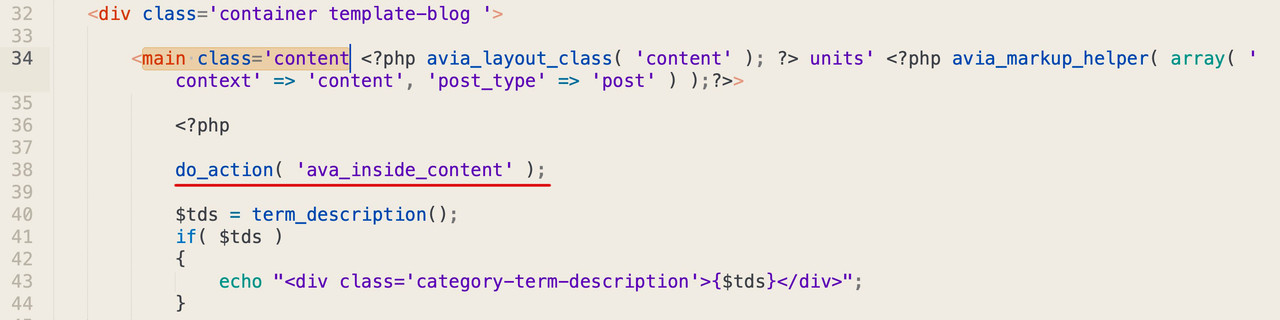
we can make our own page content shortcode – f.e:
function get_post_page_content( $atts ) {
    extract( shortcode_atts( array(
        'id' => null,
        'title' => false,
    ), $atts ) );

    $the_query = new WP_Query( 'page_id='.$id );
    while ( $the_query->have_posts() ) {
        $the_query->the_post();
            if($title == true){
            the_title();
            }
            the_content();
    }
    wp_reset_postdata();
}
add_shortcode( 'my_content', 'get_post_page_content' );
and insert our page content via page ID to that new hook:
function ava_insert_page_content_before_loop_mod() {
	if(is_category('grafik')) {
		echo do_shortcode("[my_content id='43262']");  // here you had to insert the ID
	}
}
add_action('ava_inside_content', 'ava_insert_page_content_before_loop_mod', 100);
You can then style a page ( as Mike said – better without any full-width alb element (color-section, tab-section, grid-row) ) – and insert it to your category via ID.
This reply has been marked as private.
Hi Mike,
Thanks a lot!
I rolled back to PHP 7.4x. and will check if the problem still exists. Otherwise I will contact Events Calendar people.
Best regards,
Tom
Hi,
Thanks, I see your site is using PHP v8.1.16, Event Tickets says that their PHP v8 is in beta and if you have any problems to roll back to PHP 7.4 as a first step.
I have looked at line 93 in the plugin file: /wp-content/plugins/event-tickets/common/vendor/monolog/monolog/src/Monolog/Handler/FilterHandler.php
public function isHandling(array $record)
    {
        return isset($this->acceptedLevels[$record['level']]);
    }
but I don’t see how to assist with this, I recommend first rolling back to PHP 7.4, if that doesn’t help then contact event-tickets support with the error as they should understand it more than us.
Best regards,
Mike
Hi,
Thanks for your patience, your current site using the parent theme has the error: Uncaught ReferenceError: jQuery is not defined because Yigit script above is using jQuery().ready(function(){ before jQuery is loaded, but I can not find it in your parent theme functions.php to correct by wrapping with:
window.addEventListener("DOMContentLoaded", function () { ... });
Your child theme functions.php has Guenni007’s script and it works correctly.
Did you add the script in the parent theme elsewhere? If not try clearing your server cache.
Best regards,
Mike
Hey Jochen,
Thanks for the link to your pages, you cannot use the Advanced Layout Builder to create your category pages unless you create specific pages and redirect to them.
But you can change the layout of the category pages, for example, if you want to use the grid layout add this filter to your child theme functions.php:
add_filter('avf_blog_style','avia_change_category_blog_layout', 10, 2);
function avia_change_category_blog_layout($layout, $context){
if($context == 'archive') $layout = 'blog-grid';
return $layout;
}

To create a custom header to the top of your category pages you could add the element shortcode via a function like this:
add_action('ava_after_main_title', 'ava_after_main_title_mod');
function ava_after_main_title_mod() {
	if(is_category('news')) {
		echo do_shortcode("[av_one_full first min_height='' vertical_alignment='av-align-top' space='' row_boxshadow_width='10' row_boxshadow_color='' margin='0px' margin_sync='true' av-desktop-margin='' av-desktop-margin_sync='true' av-medium-margin='' av-medium-margin_sync='true' av-small-margin='' av-small-margin_sync='true' av-mini-margin='' av-mini-margin_sync='true' mobile_breaking='' mobile_column_order='' border='' border_style='solid' border_color='' radius='' radius_sync='true' min_col_height='300px' padding='' padding_sync='true' av-desktop-padding='' av-desktop-padding_sync='true' av-medium-padding='' av-medium-padding_sync='true' av-small-padding='' av-small-padding_sync='true' av-mini-padding='' av-mini-padding_sync='true' svg_div_top='' svg_div_top_color='#333333' svg_div_top_width='100' svg_div_top_height='50' svg_div_top_max_height='none' svg_div_top_opacity='' svg_div_bottom='' svg_div_bottom_color='#333333' svg_div_bottom_width='100' svg_div_bottom_height='50' svg_div_bottom_max_height='none' svg_div_bottom_opacity='' column_boxshadow_width='10' column_boxshadow_color='' background='bg_color' background_color='#7bb0e7' background_gradient_direction='vertical' background_gradient_color1='#000000' background_gradient_color2='#ffffff' background_gradient_color3='' src='' attachment='' attachment_size='' background_position='top left' background_repeat='no-repeat' highlight_size='1.1' animation='' animation_duration='' animation_custom_bg_color='' animation_z_index_curtain='100' parallax_parallax='' parallax_parallax_speed='' av-desktop-parallax_parallax='' av-desktop-parallax_parallax_speed='' av-medium-parallax_parallax='' av-medium-parallax_parallax_speed='' av-small-parallax_parallax='' av-small-parallax_parallax_speed='' av-mini-parallax_parallax='' av-mini-parallax_parallax_speed='' css_position='' css_position_location=',,,' css_position_z_index='' av-desktop-css_position='' av-desktop-css_position_location=',,,' av-desktop-css_position_z_index='' av-medium-css_position='' av-medium-css_position_location=',,,' av-medium-css_position_z_index='' av-small-css_position='' av-small-css_position_location=',,,' av-small-css_position_z_index='' av-mini-css_position='' av-mini-css_position_location=',,,' av-mini-css_position_z_index='' link='' linktarget='' link_hover='' title_attr='' alt_attr='' mobile_display='' mobile_col_pos='0' id='' custom_class='' template_class='' aria_label='' av_uid='av-leu1xz8x' sc_version='1.0'][av_heading heading='Custom Header' tag='h3' style='blockquote modern-quote modern-centered' subheading_active='' show_icon='' icon='ue800' font='entypo-fontello' size='' av-desktop-font-size-title='' av-medium-font-size-title='' av-small-font-size-title='' av-mini-font-size-title='' subheading_size='' av-desktop-font-size='' av-medium-font-size='' av-small-font-size='' av-mini-font-size='' icon_size='' av-desktop-font-size-1='' av-medium-font-size-1='' av-small-font-size-1='' av-mini-font-size-1='' color='custom-color-heading' custom_font='#ffffff' subheading_color='' seperator_color='' icon_color='' margin='' margin_sync='true' av-desktop-margin='' av-desktop-margin_sync='true' av-medium-margin='' av-medium-margin_sync='true' av-small-margin='' av-small-margin_sync='true' av-mini-margin='' av-mini-margin_sync='true' headline_padding='' headline_padding_sync='true' av-desktop-headline_padding='' av-desktop-headline_padding_sync='true' av-medium-headline_padding='' av-medium-headline_padding_sync='true' av-small-headline_padding='' av-small-headline_padding_sync='true' av-mini-headline_padding='' av-mini-headline_padding_sync='true' padding='10' av-desktop-padding='' av-medium-padding='' av-small-padding='' av-mini-padding='' icon_padding='10' av-desktop-icon_padding='' av-medium-icon_padding='' av-small-icon_padding='' av-mini-icon_padding='' link='' link_target='' id='' custom_class='' template_class='' av_uid='' sc_version='1.0' admin_preview_bg=''][/av_heading][/av_one_full]");
	}
}

In the code above you will note that I added the header only to the category News in if(is_category(‘news’)) this demonstrate that you can have different headers for different categories, you will also note that this element is not a color section, color sections will cause issues on pages with sidebars, you are better off using single full width columns.
You can use the shortcode wand to get the element shortcode or Enable the Avia Layout Builder Debugger.
Give this a try and if you have trouble include an admin login so we can assist.
Best regards,
Mike
Well you had to use these characters: ™ ® © then the code will do the rest. A TM will not work.
It works on my end here.
Even in breadcrumb – they will be replaced. But if you like to have it
But if you even want to have it on:
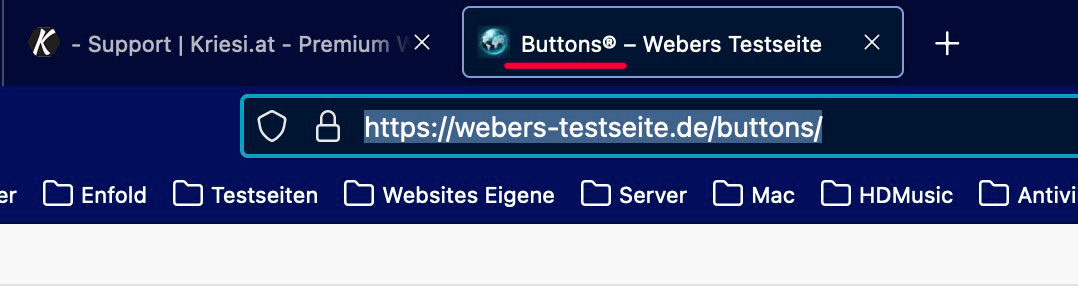
then you had to copy&paste the character on f.e.: http://unicode.e-workers.de/entities.php
or use the unicode decimal for it e.g: ® in the page title
sorry boardsoft will immedeitately transfer the entity : 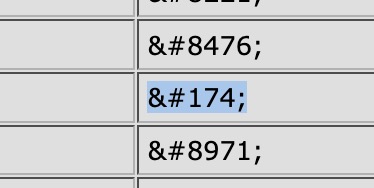
Hi I have a critical error which let me have a white screen of death. Obviously it is caused by Events Tickets or The Events Calendar.
This has happened when the system was running without any work on the site by admins.

Ein Fehler vom Typ E_COMPILE_ERROR wurde in der Zeile 93 der Datei /www/htdocs/w0171053/berliner-podencos.de/app/wp-content/plugins/event-tickets/common/vendor/monolog/monolog/src/Monolog/Handler/FilterHandler.php verursacht. Fehlermeldung: Declaration of Monolog\Handler\FilterHandler::isHandling(array $record) must be compatible with Monolog\Handler\AbstractHandler::isHandling(array $record): bool

Ein Fehler vom Typ E_COMPILE_ERROR wurde in der Zeile 93 der Datei /www/htdocs/w0171053/berliner-podencos.de/app/wp-content/plugins/the-events-calendar/common/vendor/monolog/monolog/src/Monolog/Handler/FilterHandler.php verursacht. Fehlermeldung: Declaration of Monolog\Handler\FilterHandler::isHandling(array $record) must be compatible with Monolog\Handler\AbstractHandler::isHandling(array $record): bool
I have deactivated to get the website to life again.
What could I do now?
Best regards,
Tom
Hi,
I recently added my Envato private token to the Theme Update section of my website. The following message is displayed “We checked the token on 2023/03/01 05:37 and we were able to connect to Envato…”. It also stated that it could access my purchase information”.
The issue is that the following message is also displayed:
“Theme Updates: No Updates available. You are running the latest version! (4.7.6.4). Your PHP version: 7.4.33”.
According to the Enfold Changelog, the current version is 5.4.1 (Feb. 2023). So, why isn’t my website updating to the most recent version of Enfold?
Thank you,
Angela
This reply has been marked as private.
Hi Sandra Dalziel,
Thanks for contacting us!
Child themes don’t need to be updated in general except if it has its own header.php and footer.php files which will probably need to get updated.
You only need to update the parent theme (Enfold) and the child theme will just inherit those updates automatically.
Please don’t forget to register to our forum and once you are registered and have logged in to your account, you can create a new topic here: https://kriesi.at/support/forum/enfold/#new-post
With regards to Enfold Requirements, you can use the latest version of WordPress (6.1.1) and PHP version you can use version 7.4 or higher.
Best regards,
Nikko
Hi So Evolve,
I have checked for the rumble icon on fontello’s website unfortunately, I did not find any icon.
You will need to find it somewhere or you can try downloading it here: https://companieslogo.com/rumble/logo/ (I just found one here)
Then do the following Steps:
1. Please add this code in functions.php of your child theme or you can add it via a plugin called WPCode:
// Register new icon as a theme icon
function avia_add_custom_icon($icons) {
    $icons['rumble'] = array( 'font' =>'entypo-fontello', 'icon' => 'ue897');
    return $icons;
}
add_filter('avf_default_icons','avia_add_custom_icon', 10, 1);

// Add new icon as an option for social icons
function avia_add_custom_social_icon($icons) {
    $icons['Rumble'] = 'rumble';
    return $icons;
}

add_filter('avf_social_icons_options','avia_add_custom_social_icon', 10, 1);
2. Go to Enfold > Social Profiles, then add Rumble and the link to your Rumble Channel.
3. Go to Header > Extra Elements > Header Social Icons and make sure to set to any value except No social Icons (at this point check the frontend of your site and see if it works properly)
4. Go to Media > Add New, then upload the rumble icon, (once uploaded) click the Copy URL to clipboard button.
5. Go to Enfold > General Styling > Quick CSS and add this CSS code:
#top #header .social_bookmarks .av-social-link-rumble a {
    background: url(rumble_image_url) center center no-repeat;
    background-size: contain;
}

#top #header .social_bookmarks .av-social-link-rumble a:before {
    display: none;
}
Just replace rumble_image_url with the URL you copied from the clipboard.
Hope this helps.
Best regards,
Nikko
Thanks Ismael. I don’t often edit php but I think i got this right. Still no changes. Can you evaluate for me?
https://www.dropbox.com/s/hpul7b0u4ahu4gh/class-framework-widgets.php?dl=0
Hallo Rikard
Die Seite https://crippa.fdb.ch/wordpress/ (debug af true gesetzt)
Folgender Fehler kommt jetzt wenn ich sie aufrufe:
(Siehe Private Content)
Kann es sein das ich gehackt wurde. Habe auch Daten auf dem Server wie 97f7jxn1.php die ich vorher nicht hatte.
Komme nicht mehr klar.
Gruss Fred Braune
Hi Sean,
The function I shared in that link won’t help.
However, I have found a workaround to imitate the layout in https://kriesi.at/themes/enfold-minimal-photography/
1. Edit the Masonry Gallery, go to Advanced > Developer Settings > Custom CSS Class and add this value big-first-item then save.
2. Add this code in functions.php using a child theme or if you don’t have a child theme, you can use WPCode plugin to insert this php snippet:
function masonry_gallery_first_item(){
?>
	<script>
		(function() {
			const images = document.querySelectorAll('#top .big-first-item .av-masonry-container > a:nth-child(2)');

			images.forEach(image => {
				image.classList.add("av-landscape-img", "av-portrait-img");
			});
		})();

	</script>
<?php
}

add_action('wp_footer', 'masonry_gallery_first_item');
The purpose of the code is just to set the first item to occupy two spaces in both column and row.
If you need to do this on another page, then just repeat Step #1 (only).
I have tested this on my end and it worked.
These are the order and sizes of the images (in px):
1. 1600 x 1600
2. 800 x 800
3. 900 x 1600
4. 800 x 800
5. 1600 x 600
6. 900 x 1600
7. 800 x 800
8. 800 x 800
9. 800 x 800
10. 800 x 800
I hope this helps.
Best regards,
Nikko
This reply has been marked as private.
Problem occurs using Google Chrome on laptop and on Android phone.
ENVIRONMENT:
WordPress 6.1.1
PHP version: 7.4.29
Plug-ins installed (using last version of all of them)
– WooCommerce
– Jetpack
– bbPress
– Akismet Anti-Spam
TRIED:
I tried to disable all plug-ins (except WooCommerce because disabling WooCommerce is not an option). That didn’t solve the problem.
Thank you in advance for you support
Alain
-
This topic was modified 3 years, 1 month ago by
 adepreter.



