I am getting an error message now that I have never seen before and I am not sure what to do to fix it. Can you please help? The full error is:
Warning: Undefined array key 8363 in /home/customer/www/staging7.investforbetter.org/public_html/wp-includes/nav-menu-template.php on line 211
And you can view it by viewing our website staging here:
I was working on the site yesterday and did not see this issue and I am seeing this now.
Hi,
Thank you for breaking down the problem. WP introduced class WP_Textdomain_Registry with 6.1 and this class caused the problem.
If you need a hotfix please modify enfold/functions.php:
Around line 173 you find:
if( ! function_exists( 'avia_lang_setup' ) )
{
	add_action( 'after_setup_theme', 'avia_lang_setup' );

	function avia_lang_setup()
	{
		$lang = apply_filters( 'ava_theme_textdomain_path', get_template_directory()  . '/lang' );
		load_theme_textdomain( 'avia_framework', $lang );
	}

	avia_lang_setup();
}
Replace
avia_lang_setup();
with
	if( did_filter( 'after_setup_theme' ) )
	{
		avia_lang_setup();
	}
If you need help let us know and we can do it for you.
Do not forget to make a backup of the original file for a fallback.
Best regards,
Günter
 Ravinder Kumar
Guest
Hi,
Recently i have update php 8.0 or 8.1 to my site but its not working. It working with 7.4. I received warning message with 7.4 version and need to upgrade your site.
From last few days, website not working properly and sometime it show a message (Database could not connect) but when i refresh the site it working again.
Please help and sole this matter.
Thank you
Hi,
We had a website that was working fine but has started to display a blank screen.
The site is running Enfold 5.4 and v8.1 php
Is this a php issue or a theme issue?
i have been told that lowering to php 7.2 will fix the issue but I need to know why the site has suddenly stopped displaying, when it was working ok previously. i can access the WP dashboard ok.
If a theme update is required, what is the best way to update?
Thanks
Marcus
 Philipp
Guest
Hi,
we have a very simple site, onepage, no plugins, just WordPress and Enfold and auto updates enabled.
For a few days we get now a 500 error:
AH01071: Got error ‘PHP message: PHP Fatal error: Uncaught Error: Attempt to modify property “extra” on null in /var/www/vhosts/herzo.it/httpdocs/wp-content/themes/enfold/config-templatebuilder/avia-template-builder/php/class-asset-manager.php:980nStack trace:n#0 /var/www/vhosts/herzo.it/httpdocs/wp-content/themes/enfold/config-templatebuilder/avia-template-builder/php/class-asset-manager.php(288): aviaAssetManager->try_deregister_scripts()n#1 /var/www/vhosts/herzo.it/httpdocs/wp-content/themes/enfold/config-templatebuilder/avia-template-builder/php/class-asset-manager.php(105): aviaAssetManager->merge()n#2 /var/www/vhosts/herzo.it/httpdocs/wp-includes/class-wp-hook.php(308): aviaAssetManager->try_minifying_scripts()n#3 /var/www/vhosts/herzo.it/httpdocs/wp-includes/class-wp-hook.php(332): WP_Hook->apply_filters()n#4 /var/www/vhosts/herzo.it/httpdocs/wp-includes/plugin.php(517): WP_Hook->do_action()n#5 /var/www/vhosts/herzo.it/httpdocs/wp-includes/script-loader.php(2194): do_action()n#6 /var/www/vhosts/herzo.it/httpdocs/wp-i…’
what do you need to further debug this error?
regards
Hi,
we have a very simple site, onepage, no plugins, just WordPress and Enfold and auto updates enabled.
For a few days we get now a 500 error:
AH01071: Got error ‘PHP message: PHP Fatal error: Uncaught Error: Attempt to modify property “extra” on null in /var/www/vhosts/herzo.it/httpdocs/wp-content/themes/enfold/config-templatebuilder/avia-template-builder/php/class-asset-manager.php:980\nStack trace:\n#0 /var/www/vhosts/herzo.it/httpdocs/wp-content/themes/enfold/config-templatebuilder/avia-template-builder/php/class-asset-manager.php(288): aviaAssetManager->try_deregister_scripts()\n#1 /var/www/vhosts/herzo.it/httpdocs/wp-content/themes/enfold/config-templatebuilder/avia-template-builder/php/class-asset-manager.php(105): aviaAssetManager->merge()\n#2 /var/www/vhosts/herzo.it/httpdocs/wp-includes/class-wp-hook.php(308): aviaAssetManager->try_minifying_scripts()\n#3 /var/www/vhosts/herzo.it/httpdocs/wp-includes/class-wp-hook.php(332): WP_Hook->apply_filters()\n#4 /var/www/vhosts/herzo.it/httpdocs/wp-includes/plugin.php(517): WP_Hook->do_action()\n#5 /var/www/vhosts/herzo.it/httpdocs/wp-includes/script-loader.php(2194): do_action()\n#6 /var/www/vhosts/herzo.it/httpdocs/wp-i…’
what do you need to further debug this error?
regards
Hi,
To change the thumbnail for a specific category, visit the link below. Additionally, you can customize the font color and banner overlay style.
// http://site.com/wp-admin/term.php?taxonomy=product_cat&tag_ID=27&post_type=product
Make sure to adjust the URL, using your own domain and adjust the value of the tag_ID parameter using the the actual ID of the category. Or just go to the Products > Categories panel and click the category manually, then look for the Thumbnail and Enfold Category Styling options.
Best regards,
Ismael
Hello,
My problem with the ‘featured’ images is as follows:
1. I have created 2 posts pages, one entitled “Blog” and the second entitled “News”, the latter of which displays only the ‘News’ category posts.
2. Each page is identical, using the “Blog Posts” element.
3. The “Featured” images for all posts (including ‘News’) measure the same at 845 x 321 pixels.
4. However, in responsive mode (on my mobile phone), the featured images displayed on the main Blog listing page will not extend to the full width of the container. The text box beneath this does, but the image above does not.
5. Conversely, on my identical “News” page, the “Featured” images are correctly displayed at full width.
6. I have tried all of the solutions found on the pages below but nothing seems to work.
7. As both the Blog and News pages are identical, the issue would seem to lie in having assigned my Blog page as my “Blog Posts page” in “Settings > Reading”. This Blog page assignment was then repeated in “Enfold Child Theme Options” – at the top of the page – in answer to the question: “Where Do You Want To Display The Blog”. Answer: “Blog”.
8. My question, then, is why are the ‘featured’ images on the Blog page not displaying at full width in responsive mode (mobile phone)?
9. And do you have a solution for this?
https://wordpress.org/support/topic/full-width-featured-images/
https://wordpress.org/support/topic/force-featured-image-to-full-width/
https://wordpress.org/support/topic/full-width-of-the-featured-image/
NOT WORKING
style.css
.attachment-featured-blog-large.size-featured-blog-large.wp-post-image {
width: 100%;
}
style.css
.attachment-featured-blog-large.size-featured-blog-large.wp-post-image {
width: 100%!important;
}
functions.php
add_filter( ‘avf_modify_thumb_size’, ‘enfold_customization_modify_thumb_size’, 10, 1 );
function enfold_customization_modify_thumb_size( $size ) {
$size[‘entry_with_sidebar’] = array(‘width’=>845, ‘height’=>321);
$size[‘portfolio’] = array(‘width’=>495, ‘height’=>400);
return $size;
}
Many thanks for your help.
Hallo,
leider kann Enfold (WP Version 6,2; PHP-Version 8.0.28 (Unterstützt 64bit-Werte)) nicht mehr aktualisiert werden
– Die letzte erfolgreiche Prüfung war am 2023/04/09 09:03
– Keine Aktualisierung verfügbar. Du verwendest die letzte Version! (4.8.7.1)
Neuinstallation bringt mir sofort Version 5.5, wie kann die Aktualisierung der bestehenden Website wieder aktiviert werden, bzw. wie kann ich ein manuelles Theme-Update durchführen?
Hey Julien,
Thanks for the link to your site, have you tried placing your shortcode differently in your temple file, it sounds like the shortcode is outside the main container, or perhaps there is an unclosed div. Unfortunately your theme editor is disabled so we can’t see your child theme files.
Please note that I would not recommend using a footer.php or a header.php in your child theme, because every so often we change these files and it becomes the top issue after updates.
For you adding fixed content like an accordion FAQ at the bottom of a single post, I recommend injecting the shortcode, for example to add an accordion before the footer of every single post, try adding this code to the end of your child theme functions.php file in Appearance ▸ Editor:
function insert_before_footer(){
	if(is_single()) {
    echo do_shortcode("[av_toggle_container faq_markup='' initial='0' mode='accordion' sort='' styling='' colors='' font_color='' background_color='' border_color='' toggle_icon_color='' colors_current='' font_color_current='' toggle_icon_color_current='' background_current='' background_color_current='' background_gradient_current_direction='vertical' background_gradient_current_color1='#000000' background_gradient_current_color2='#ffffff' background_gradient_current_color3='' hover_colors='' hover_font_color='' hover_background_color='' hover_toggle_icon_color='' size-toggle='' av-desktop-font-size-toggle='' av-medium-font-size-toggle='' av-small-font-size-toggle='' av-mini-font-size-toggle='' size-content='' av-desktop-font-size-content='' av-medium-font-size-content='' av-small-font-size-content='' av-mini-font-size-content='' heading_tag='' heading_class='' alb_description='' id='' custom_class='' template_class='' element_template='' one_element_template='' av_uid='av-lg8glvl5' sc_version='1.0' admin_preview_bg=''][av_toggle title='Toggle 1' tags='' custom_id='' element_template='' one_element_template='' av_uid='av-lg8glhnz' sc_version='1.0']Toggle 1 content[/av_toggle][av_toggle title='Toggle 2' tags='' custom_id='' element_template='' one_element_template='' av_uid='av-lg8glpqw' sc_version='1.0']Toggle 2 content[/av_toggle][/av_toggle_container]");
  }
}
add_filter( "ava_before_footer", "insert_before_footer" );
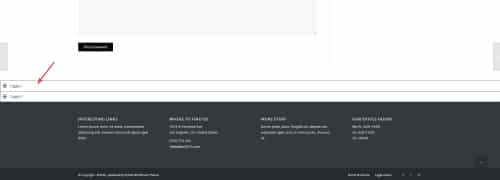
Try adjusting this to suit your needs.
Here is a link to our Hooks & Filters
Best regards,
Mike
Hi,
Thanks for the screenshot and the link to your site, but unfortunately the login you provided doesn’t work with the htaccess login, please also provide a login for this.
I checked my install and the up & down arrows work for me, you can also drag the menu items if you are having trouble clicking them:

If you would like to make them larger for easier use try adding this code to the end of your child theme functions.php file in Appearance ▸ Editor:
function make_admin_menu_items_larger(){
  ?> <style> .nav-menus-php .menu-item-bar .menu-item-handle,
.nav-menus-php .menu-item-settings {
    min-height: 40px;
    max-width: 482px;
}
.nav-menus-php .menu-item-bar .item-edit {
    width: 60px;
    right: -60px;
}
.nav-menus-php .menu-item-bar .menu-item-handle .item-controls {
	right: 60px;
}
.nav-menus-php .item-edit:before {
    margin-left: 14px;
} </style>
    <?php
  }
add_action('admin_head', 'make_admin_menu_items_larger', 1);
Please ensure to copy the code from the forum and not an email notification so the symbols are not converted.
this is the expected results:

Best regards,
Mike
 Angela West
Guest
Item Purchase Code: Enfold
560bf2b1-ca5a-4716-ae64-4aac72d55f8e
I can’t get it to run above PHP 5.6
reliableassetmgmt.com
Reply to my IT guy
David Lucht
(Email address hidden if logged out)
do not use these filters for that – just load your svg logo by enfold options dialog.
All newer Enfold will suport the inline svg logo now. And on transparency the same
See comment on bottom right “Since 4.8.6.4 … )
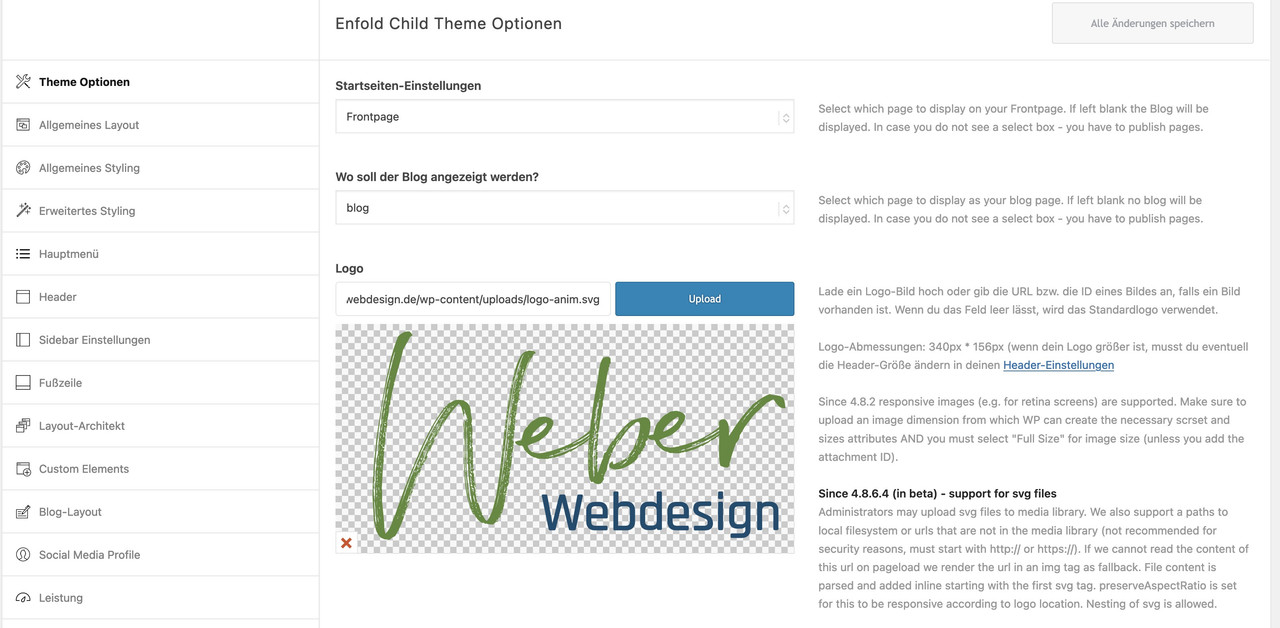
These filters can be used to show on specific pages a different logo. But for svg there might be better ways then.
f.e.: to replace a standard jpg/png logo with inline svg on specific pages:
function replace_logo_with_svg() {
if(is_page(array( 39718, 39906))){
?>
  <script type="text/javascript">
  (function($) {
    function a() {
      $( ".logo a img" ).remove();
      $.get('/wp-content/uploads/logo-rood-2023.svg', function(svg){
        $( ".logo a" ).html( svg );
      }, 'text');
    }
    a();
  })(jQuery);
  </script>
<?php
}
}
add_action('wp_footer', 'replace_logo_with_svg');
see here a different logo – than on the other pages: https://webers-testseite.de/portfolio/
@Guenni007 Everything is up to date, installation is 4 days old. only 4 plugins installed.
If i use the filter “avf_logo” below the correct logo will be used. Also it will show up in the browser if i directly acces it.
This is before it is going to set as a logo.
Array
(
    [$logo] => https://www.*.nl/2023/wp-content/uploads/logo-rood-2023.svg
    [option_set] => option_set
)
Here is the “avf_logo_final_output” data, as you can see here the SVG is nowhere to be found.
Array
(
    [$logo] => <span class='logo avia-svg-logo'><a href='https://www.**.nl/2023/' class='av-contains-svg'></a></span>
    [$use_image] => https://www.**.nl/2023/wp-content/themes/enfold/images/layout/logo.png
    [$headline_type] => span
    [$sub] =>
    [$alt] => **
    [$link] => https://www.**.nl/2023/
    [$title] => logo-rood-2023
)
So somewhere in following code it goes wrong Github / function (Not my github repo)
-
This reply was modified 3 years ago by
 Tieme.
Hi,
Thanks for the link to your child theme functions.php file, I see that it is missing the <?php at the top of the file before any functions, it should look like this:

Best regards,
Mike
This reply has been marked as private.
Hello together
I have received from a supporter for the plugin:
Page scroll to id Version 1.7.7
received the following message:
For the color of the target term, since you don’t have the links in your top menu, you’ll need to use javascript.
Can you add some js code in your page?
For example, you can add the following in your theme/child-theme footer.php template
in a new line right before the closing body tag (</body>):
<script>
(function($){
$(window).on(“load”,function(){
setTimeout(function(){
var _hash=window.location.hash;
if(_hash){
var targetElem=$(_hash);
if(targetElem.length){
targetElem.addClass(“highlighted-term”);
}
}
},100);
});
})(jQuery);
</script>
Now I can not figure out where to insert this?
Can you help me with this
and write me where this code was inserted?
thanks in advance
kind regards
Franz
Kindly see the error message appearing live on the site – https://euflegt.gov.gy/. Some elements have also disappeared. The code was added to the functions.php file within the enfold-child themes folder. We’re not even getting to create and save a maintenance page to prevent users from seeing the error.
We also tried the following code on the functions.php file in enfold theme folder from https://kriesi.at/documentation/enfold/intro-to-layout-builder/#debug-mode:
if(isset($avia_config[‘use_child_theme_functions_only’])) return;
A copy of the functions.php file is here – https://drive.google.com/file/d/187HWJRzMnbmsJxQKls4AXK0gmS37r01C/view?usp=sharing. We’re copying and pasting the code as you’ve recommended.
I am running Enfold version 4.5.6 and when I am in the editor mode, I see this line of code at the top of the interface. I’m having some issues where I’m editing content on a page and it won’t save so I’m not sure if that error message is related or not.
Deprecated: Hook contextual_help is deprecated since version 3.3.0! Use get_current_screen()->add_help_tab(), get_current_screen()->remove_help_tab() instead. in /home/wob94qt1tm09/public_html/wp-includes/functions.php on line 5788
I am also getting this error when I’m editing a specific page:
Deprecated: Function get_page_by_title is deprecated since version 6.2.0! Use WP_Query instead. in /home/wob94qt1tm09/public_html/wp-includes/functions.php on line 5413
Thank you
-
This topic was modified 3 years ago by
 gossammer9.
 Dewald
Guest
Hi Team,
I recently had to take over a website from another developer that passed away. He had a client on wordpress 4.8, php 7.4 with the Enfold theme version 4.3.1.
I’ve upgraded wordpress to version 6.2 now, but get an error in the Enfold theme when updating php to v8.
What is the latest version of Enfold – and how can I update it to be compatible with php v8? I unfortunatly do not have any info on the license the previous developer had. If this can be linked up, please let me know – else if I should purchase a new license to get the theme working I will, but I don’t want to charge the client for new development in setting up the content again, so I’m hoping there is an easy way to get the theme up to date and the site on to php8.
Thanks!
Hi!
I bought a new license and trying to update a different site now: https://infrapowerpanels.com to the newest version of WP & Theme – I am using Enfold 1.7.
I tried to replace the theme folder but get an error:
Fatal error: Call to undefined function aviaFramework\widgets\apply_filters_deprecated() in /www/htdocs/w010761e/wp-content/themes/enfold/framework/php/widgets/widget-classes/class-avia-instagram.php on line 111
Thx
Hi,
Thanks for your patience and the link to your site, I added this code to the end of your child theme functions.php file in Appearance ▸ Editor:
function custom_script() { ?>
  <script>
window.addEventListener('DOMContentLoaded', function() {
(function($){
	setTimeout(function(){
$('#footer-template .av-recaptcha-submit').insertAfter($('#element_avia_1_1'));
},400);
})(jQuery);
});
</script>
  <?php
}
add_action('wp_footer', 'custom_script');
and this css to your child theme stylesheet:
#footer-template .avia_ajax_form #element_avia_1_1.form_element_three_fourth {
    width: 68%;
    float: left;
    margin-right: 1%;
}
#footer-template .avia_ajax_form .button.av-recaptcha-submit {
    margin-top: 8px;
    padding: 14px 20px;
}
#footer-template .avia_ajax_form p:nth-child(8) {
    top: -35px;
}
@media only screen and (max-width: 761px) {
	#footer-template .avia_ajax_form #element_avia_1_1.form_element_three_fourth {
    width: 58%;
}
}
@media only screen and (min-width: 762px) and (max-width: 1024px) {
	#footer-template .avia_ajax_form #element_avia_1_1.form_element_three_fourth {
    width: 63%;
}
}
and cleared your Autoptimize cache and this is the result:

Please clear your browser cache and check.
Best regards,
Mike
Hi,
After changing a WooCommerce product, for example a variation and saving the product a fatal error occurs.
[Tue Apr 04 08:00:11.806652 2023] [proxy_fcgi:error] [pid 12716:tid 140643242297088] AH01071: Got error ‘PHP message: PHP Fatal error: Uncaught TypeError: preg_match(): Argument #2 ($subject) must be of type string, array given in /home/cloudwaysapps.com/mhanxjhzgy/public_html/wp-includes/formatting.php:1596\nStack trace:\n#0 /home/cloudwaysapps.com/mhanxjhzgy/public_html/wp-includes/formatting.php(1596): preg_match()\n#1 /home/cloudwaysapps.com/mhanxjhzgy/public_html/wp-includes/formatting.php(2207): remove_accents()\n#2 /home/cloudwaysapps.com/mhanxjhzgy/public_html/wp-content/plugins/woocommerce/includes/wc-template-functions.php(3158): sanitize_title()\n#3 /home/cloudwaysapps.com/mhanxjhzgy/public_html/wp-content/plugins/woocommerce/templates/single-product/add-to-cart/variable.php(45): wc_dropdown_variation_attribute_options()\n#4 /home/cloudwaysapps.com/mhanxjhzgy/public_html/wp-content/plugins/woocommerce/includes/wc-core-functions.php(345): include(‘/home/clo…’)\n#5 /home/cloudwaysapps.com/mhanxjhzgy/public_html/wp-content/plugins/woocommerce/includ…’, referer: https://childbirthclassgale.com/wp-admin/post.php?post=57&action=edit&classic-editor=1
I did a plugin conflict test and it happens with Yoast SEO activated. After disabling Yoast there’s no issue. However with Yoast enabled and default WP theme there are no issues. So this is something with Enfold.
Can this be fixed?
Cheers,
Jaap
Hi Rikard!
When replacing the theme file via FTP I get a fatal error opening the Site:
Fatal error: Call to undefined function aviaFramework\widgets\apply_filters_deprecated() in /www/htdocs/w010761e/wp-content/themes/enfold/framework/php/widgets/widget-classes/class-avia-instagram.php on line 111
Thx
Alex
Hey Ann Karina Robson,
Thanks for the link to your site, I see it is using v4.1 which is not compatible with WP 6.2 and PHP 8.0, you will need to update the theme to v5.5
To update your version of Enfold you will need to download the latest installable WP version from your Theme Forest account and upload it to your WordPress ▸ Appearance ▸ Themes ▸ Add Themes ▸ Add New

after you choose the zip file and click install, you will see a This theme is already installed message because you are updating, you can continue

then you will see the Theme updated successfully message.

If you don’t have access to the Theme Forest account because it was installed for you by a developer and you can’t contact the developer, then you will need to create your own Theme Forest account when you purchase a new license, Theme Forest will not transfer licenses and due to our contract with Theme Forest we can not directly sell or give licenses.
Best regards,
Mike
Hi,
It was working fine. But now that I have udgraded PHP version to 8.2 it gives me an error:
Warning: Undefined variable $vn in /home/clients/464ab434df4e26a0e5610929e267f33d/sites/wp-content/themes/enfold-child-copie/functions.php
I have done all updates (WordPress 6.2, Enfold 5.5).
Do you know what’s wrong?
 Ann Karina Robson
Guest
Hi,
We have a small website oplandskonsulenterne.dk that uses the Enfold theme. The employee who made the site and bought the licens is no longer with us. We are facing issues when changing to PHP 8.0 – and there are also errors when I enable debugging with PHP 7.4 which the site is using now.
I want to make sure that the latest version is compatible with WP 6.2 and PHP 8.0, so that we can update the theme. I will also need to know the progress of updating the theme, as I assume it is not just about installing the new theme on the site?
Best regards,
Ann Karina Robson
Hi,
I’m afraid this is not so easy.
Lets say your product has the ID 6499.
Then in the post meta for this post_id you find meta_key:
_stock_status
This is I think the “old” field (has meta_value e.g. outofstock, instock).
For the new tax query have a look into enfold\config-woocommerce\config.php around line 2981 function avia_wc_set_out_of_stock_query_params(…)
Database tables involved are wp_terms, wp_term_taxonomy, wp_term_relationships.
To be honest, I did not dig deeper how it is set by WC. But I think you need to set the “outofstock” term to wp_term_relationships
object_id = post_id, term_taxonomy_id = term_id of “outofstock” found in wp_terms
Hope this helps you a little.
the only real solution is to change the import
Yes, this would be the future safest way
Best regards,
Günter
Hi,
Since you are using v4.1.2 you will not be able to update via the API, you will need to manually update first and then create a new Envato Token.
The error you are getting The link you followed has expired sounds like the PHP ZipArchive Extension is disabled on your server, please ask your webhost to check.
To update your version of Enfold you will need to download the latest installable WP version from your Theme Forest account and upload it to your WordPress ▸ Appearance ▸ Themes ▸ Add Themes ▸ Add New
after you choose the zip file and click install, you will see a This theme is already installed message because you are updating, you can continue
then you will see the Theme updated successfully message.
Best regards,
Mike
Hi,
Try comparing your webhost PHP extensions for PHP 7.4 & 8.0, I found on my webhost the zip extension was not enabled by default in PHP v8.0
This didn’t cause any real issues and I don’t think it is your issue, but there could be a different extension causing a issue in your case.
Here is what my test site is using for v8

Best regards,
Mike



