Our ISP are getting this error message for our Enfold Theme and we are not sure why – can you please advise. They recently updated the database, prior to that the PHP version was fine. They don’t get the error message if they revert to and unsupported PHP version 7.4. There message is as follows:
“As discussed on the phone, this the the error we are seeing in Plesk logs when using PHP 8 or 8.1
AH01071: Got error ‘PHP message: PHP Fatal error: Uncaught Error: Attempt to assign property “extra” on null in /var/www/vhosts ”
for rest see private content
It seems Couldinary support found the issue. please see below. Not sure why the image recommendation is Logo Dimension: 340px * 156px if it’s reduced to 300 x 100.
“The theme is controlling the logo size, so I found this page: https://kriesi.at/documentation/enfold/logo/ which gives some details about customization. Based on this, it seems we can use a hook to handle the logo but the $logo itself is a full string so using the following hook in the functions.php of the theme here, we can add the right width and height to the element, as in this example:
add_filter(‘avf_logo_final_output’,’resize_logo’);
function resize_logo($logo)
{
$logo = str_replace(“height=\”100\” width=\”300\””,”height=\”157\” width=\”341\””,$logo);
return $logo;
}
Now the logo doesn’t look stretched anymore.”
This reply has been marked as private.
Hello, i recenlty updated to PHP versin 8 and the grid layout of posts on my home page is no longer working.
I made a copy of the home page and played around with it and found that it works in list mode, just not grid mode which is what i need. It just loads continuously without end.
The settings are set to display ntries from a custom taxonomy and show only title, excerpt and read more link.
also, if i revert back to php 7.4 it works, but that is causing problems with other plugins hence the update.
Hey Daniel,
I’m not sure if matters, but please try updating the theme first of all. It should probably run fine on PHP 7.2 and WordPress 4.9.
Best regards,
Rikard
Dear Support Team,
i have to update an old website running the above versions. In which order or process should i update?
Kind regards
Daniel
Hi,
Did you install a child theme? You can edit the functions.php file by going to the Appearance > Theme File Editor panel, or access the theme files via FTP.
// https://kriesi.at/documentation/enfold/theme-update/#update-via-ftp
// https://www.webhostinghub.com/help/learn/website/managing-files/editing-filezilla
If you haven’t installed a child theme, please check the documentation below.
// https://kriesi.at/documentation/enfold/child-theme/#how-to-install-the-child-theme
Best regards,
Ismael
Wow Guenni007, I am impressed!!! I really like the demo site you set up and the menu is just what I was thinking. Since you design websites all the time, do you think we have moved to a time where sites can just have a hamburger menu? Do people recognize it or do they get confused if they don’t see a menu?
I am not a coder, so I’m not sure how you are adding this to Enfold… the second two parts I see they go into functions.php, but where does this go:
<video autoplay=”” loop=”” class=”video_style” style=”width: 1636px; height: 920px; top: 0px; left: -72.5px;”><source src=”https://milano.beantown.website/wp-content/uploads/menu.m4v” type=”video/mp4″><source src=”https://milano.beantown.website/wp-content/uploads/menu.webm” type=”video/webm”><source src=”https://milano.beantown.website/wp-content/uploads/menu.ogv” type=”video/ogv”> </video>
Thanks so much!!!
Rob
PS Gunter may want to add this to Enfold’s features going forward… super cool menu!!!!
I’m currently running PHP v 8.1.17, but can update to 8.2. Is this recommended? Is there a place within Enfold where I can see what the latest recommendation might be for PHP versioning?
Thanks
This reply has been marked as private.
Hey epkdesign,
Try creating a new image size such as square_accordion by adding this code to the end of your child theme functions.php file in Appearance ▸ Editor:
add_image_size('square_accordion', 510, 510, true);
add_filter( 'image_size_names_choose', 'my_custom_sizes' );
function my_custom_sizes( $sizes ) {
    return array_merge( $sizes, array(
        'square_accordion' => __( 'Square Accordion' ),
    ) );
}
Note that the image size is 510px square, this is because the Accordion Slider has a 500px minimum.
Then install the plugin Regenerate Thumbnails and go to WordPress ▸ Tools ▸ Regenerate Thumbnails
Then in your accordion slider element you can choose the new size:

and on the frontend the new image thumbnails will show:

Best regards,
Mike
you see on your example page they are working with self hosted html5 videos. You could insert them on enfold burger overlay via script.
you had to be sure that the html insertion is on one line :
( a line-break inside that append – will break the script )
<video autoplay="" loop="" class="video_style" style="width: 1636px; height: 920px; top: 0px; left: -72.5px;"><source src="https://milano.beantown.website/wp-content/uploads/menu.m4v" type="video/mp4"><source src="https://milano.beantown.website/wp-content/uploads/menu.webm" type="video/webm"><source src="https://milano.beantown.website/wp-content/uploads/menu.ogv" type="video/ogv"><img src="https://milano.beantown.website/wp-content/uploads/menu.jpg" alt="background"></video>
i just did it here: https://enfold.webers-webdesign.de/
only with mp4 video :
function add_video_to_hamburger_background() {
?>
<script type="text/javascript">
(function($){
	$('#header').one('click', '.av-main-nav-wrap' , function() {
		setTimeout( function() {
			$('.av-burger-overlay').append('<div class="video_burger_bg"><video autoplay="" loop="" class="video_bg" style="width: 1920px; height: 1080px;"><source src="/wp-content/uploads/Blurred-Crowd-of-People-Walking_SD_DOWNLOAD.mp4"><img src="/wp-content/uploads/video-preview.jpg" alt="background"></video></div>');
		},300);
	});
})(jQuery);
</script>
<?php
}
add_action('wp_footer', 'add_video_to_hamburger_background');
But one thing to mention Does it all the time loop. so maybe it is best to enter a play/pause routine f.e. on clicking to a link inside the hamburger or the av-main-nav-wrap burger icon.
#top .video_bg {
	position: fixed;
	left: 0;
	top: 0;
	right: 0;
	bottom: 0;
	min-width: 100%;
	min-height: 100%;
	background-color: #000;
}

#top .av-burger-overlay-bg {
	opacity: 0.8;
}
Hi,
I would ask your web host to update to v7.4 and then update the rest of your site, then update to PHP v8
Does your web host make automatic backups or can you request a backup before PHP v8?
It would be good to do, but I don’t expect any issues.
Best regards,
Mike
Thanks Mike! The site is on 7.3.33. Should I update the PHP version the very first thing – before updating everything else? I assume the hosting company has to do this.
Hi,
Endold doesn’t require PHP v8, but WordPress requires at least PHP v7.4
Best regards,
Mike
Hey whdsolutions,
Thanks for your patience and the link to your site, when “hide on mobile” is used the element is given the css “display” of “none”, this only “hides” an element from view but it is still loaded.
The problem is that PHP is a server-side language and it can not know the device or screen size of a user, this requires a client-side language like css or javascript.
You may be able to use a solution like this to remove the element instead of hiding it.
Best regards,
Mike
How to Register a Theme on Enfold 3.3.2? (Do I first need to download the latest installable WP version?)
Following on from https://kriesi.at/support/topic/can-i-load-a-new-enfold-theme-onto-wordpress-5-5-on-a-server-using-php-5-6-30/#post-1402497
Having created a token for RayBall.co.uk, I can’t register the theme using the method suggested on: https://kriesi.at/documentation/enfold/theme-registration/#toggle-id-1
Because the current theme is so old, (Enfold Version: 3.3.2) it does not have the ‘Enter a valid Envarto private token. Option.
Instead, it has:
Update your Theme from the WordPress Dashboard
With options:
1. Your Themeforest User Name
2. Your Themeforest API Key
What should I do?
I was advised: To update your old versions of Enfold you will need to download the latest installable WP version from your Theme Forest account and upload it to your WordPress ▸ Appearance ▸ Themes ▸ Add Themes ▸ Add New
Do I do this before or after I have registered the Theme?
If I first need to register, how do I register the Theme?
Best Regards
Nick Ray Ball
I’m about to update a site that hasn’t been updated in a few years. What is the best order to do this?
Currently installed:
WP 5.3.14
Enfold 4.7.3
PHP 7.3.33 (hosted at GoDaddy)
WP Plugins (all the plugins are showing as *not activated* (and they all need updating too). How can this be that they are not activated? The site is running fine.
I want to do a backup first but the UpdraftPlus plugin needs to be updated. I’m afraid if I try to first update that plugin so I can make a backup, it will break the site. Any suggestions?
Thanks!
Hey Hans,
Thanks for your patience, I found this article: Add A Link To Latest Post To WordPress Nav Menu and it works for Posts.
I was able to adjust it to show the latest portfolio, but not for a specific category in the portfolio:
Try adding this code to the end of your child theme functions.php file in Appearance ▸ Editor:
// Front end only, don't hack on the settings page
if ( ! is_admin() ) {
    // Hook in early to modify the menu
    // This is before the CSS "selected" classes are calculated
    add_filter( 'wp_get_nav_menu_items', 'replace_placeholder_nav_menu_item_with_latest_post', 10, 3 );
}

// Replaces a custom URL placeholder with the URL to the latest post
function replace_placeholder_nav_menu_item_with_latest_post( $items, $menu, $args ) {

    // Loop through the menu items looking for placeholder(s)
    foreach ( $items as $item ) {

        // Is this the placeholder we're looking for?
        if ( '#latestpost' != $item->url )
            continue;

        // Get the latest post
        $latestpost = get_posts( array(
            'numberposts' => 1,
			'post_type' => 'portfolio',
			//'category' => 1, //only works for posts if you comment out the post_type line above, portfolio_entries & taxonomy doesn't work either
        ) );

        if ( empty( $latestpost ) )
            continue;

        // Replace the placeholder with the real URL
        $item->url = get_permalink( $latestpost[0]->ID );
    }

    // Return the modified (or maybe unmodified) menu items array
    return $items;
}
and create a custom menu item with the URL #latestpost

Best regards,
Mike
Hi,
Glad to hear that you have this sorted out with the needed file .user.ini, thanks for sharing. Also thanks to Guenni007 for sharing the wp-config.php tip, we will close this thread now as requested. If you have any further questions please create a new thread and we will gladly try to help you. Thank you for using Enfold.
Best regards,
Mike
have a look to the docu:
https://kriesi.at/documentation/enfold/social-share-buttons/#how-to-add-custom-social-icons-to-enfold-options
i do often prefer the option a little bit under the snippet: “Using images or non-Fontello icons” – so you can have multicolored icons
this to child-theme functions.php:
function avia_add_houzz_social_icon($icons) {
$icons['Houzz'] = 'houzz';
return $icons;
}
add_filter('avf_social_icons_options','avia_add_houzz_social_icon', 10, 1);
and f.e. something like this to your quick css:
#top #wrap_all .av-social-link-houzz a:before{
    content: "";
    width: 20px;
    height: 20px;
    display: inline-block;
    vertical-align: middle;
    background: url(url-to-your-houzz.png) no-repeat center center;
    background-size: contain;
}
you find the new entry on the end of the drop-down list.
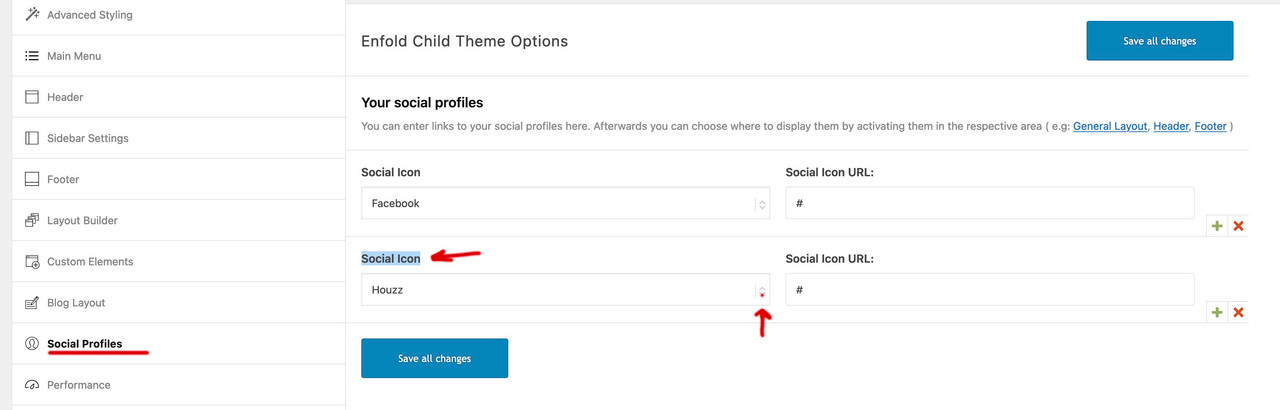
and on blog-layout options you will see too that new social option
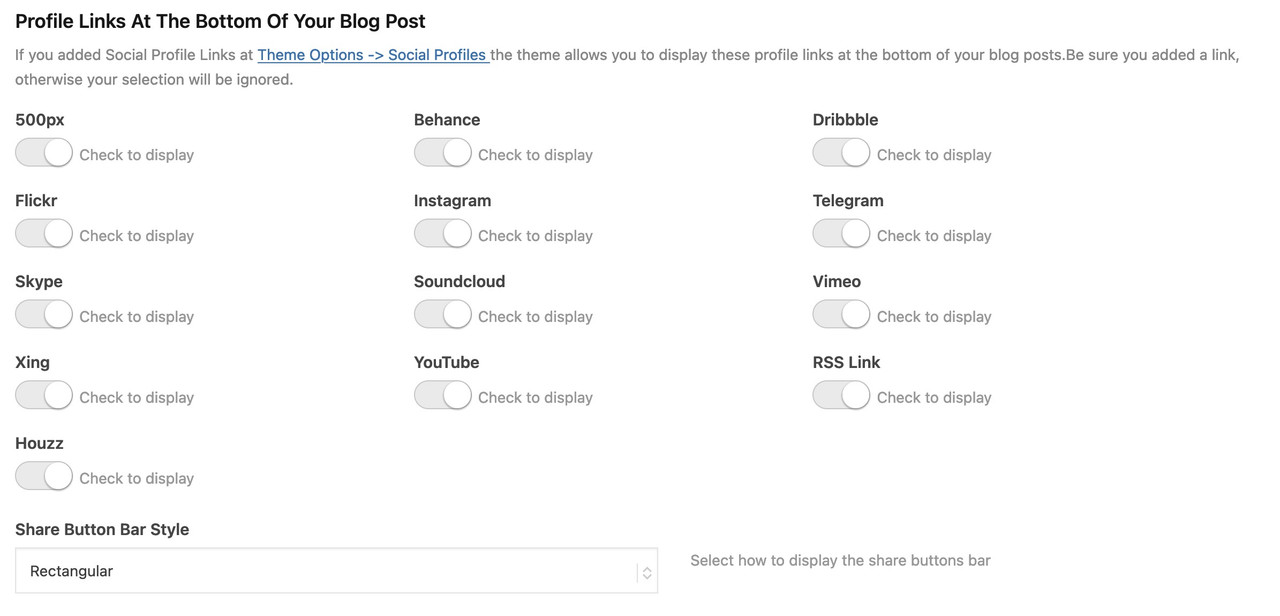
This reply has been marked as private.
Hi there,
I have several Enfold licences an before publishing a website, I work with a test site. That has worked for years now. Today I’ve tried to do that again, but just at the beginning, there appears an error on the testsite:
Warning: Creating default object from empty value in /var/www/web144/html/efi/wp-content/themes/enfold/config-templatebuilder/avia-template-builder/php/class-asset-manager.php on line 1175
The testsite is running on a new worpress 6.2, PHP 8 … someone who can help me?
Thanx, Uwe
Hi Ismael,
Thank you for your response.
I did some tests and unfortunately, it didn’t help. The problem still occurs.
I have renewed my support license, please try to prioritise this a bit, without creating new content I have a problem with managing my business.
Additional thing (maybe it will be helpful somehow), the server uses PHP version 8.0.28.
And second thing, we can show you one error we saw yesterday (but I think it resonates with your snippet of code above and as I wrote it didn’t help):
An error of type E_ERROR was caused in line 819 of the file /nas/content/live/inlinksprod/wp-content/themes/enfold/config-templatebuilder/avia-template-builder/php/class-font-manager.php. Error message: Uncaught TypeError: asort(): Argument #1 ($array) must be of type array, null given in /nas/content/live/inlinksprod/wp-content/themes/enfold/config-templatebuilder/avia-template-builder/php/class-font-manager.php:819
Stack trace:
#0 /nas/content/live/inlinksprod/wp-content/themes/enfold/config-templatebuilder/avia-template-builder/php/class-font-manager.php(819): asort(NULL)
#1 /nas/content/live/inlinksprod/wp-content/themes/enfold/config-templatebuilder/avia-template-builder/php/class-font-manager.php(792): avia_font_manager::set_new_backend('new', Array)
#2 /nas/content/live/inlinksprod/wp-content/themes/enfold/config-templatebuilder/avia-template-builder/php/class-font-manager.php(774): avia_font_manager::get_display_char('new', NULL)
#3 /nas/content/live/inlinksprod/wp-content/themes/enfold/config-templatebuilder/avia-template-builder/php/class-font-manager.php(925): avia_font_manager::backend_icon(Array)
#4 /nas/content/live/inlinksprod/wp-content/themes/enfold/config-templatebuilder/avia-shortcodes/buttons/buttons.php(536): av_backend_icon(Array)
#5 /nas/content/live/inlinksprod/wp-content/themes/enfold/config-templatebuilder/avia-template-builder/php/class-shortcode-template.php(1629): avia_sc_button->editor_element(Array)
#6 /nas/content/live/inlinksprod/wp-content/themes/enfold/config-templatebuilder/avia-template-builder/php/class-template-builder.php(2193): aviaShortcodeTemplate->prepare_editor_element(false, Array, true)
#7 /nas/content/live/inlinksprod/wp-includes/class-wp-hook.php(308): AviaBuilder->js_template_editor_elements('')
#8 /nas/content/live/inlinksprod/wp-includes/class-wp-hook.php(332): WP_Hook->apply_filters('', Array)
#9 /nas/content/live/inlinksprod/wp-includes/plugin.php(517): WP_Hook->do_action(Array)
#10 /nas/content/live/inlinksprod/wp-includes/media-template.php(1555): do_action('print_media_tem...')
#11 /nas/content/live/inlinksprod/wp-includes/class-wp-hook.php(308): wp_print_media_templates('')
#12 /nas/content/live/inlinksprod/wp-includes/class-wp-hook.php(332): WP_Hook->apply_filters('', Array)
#13 /nas/content/live/inlinksprod/wp-includes/plugin.php(517): WP_Hook->do_action(Array)
#14 /nas/content/live/inlinksprod/wp-admin/admin-footer.php(78): do_action('admin_footer', '')
#15 /nas/content/live/inlinksprod/wp-admin/post.php(369): require_once('/nas/content/li...')
#16 {main}
Thank you so much in advance!
Best regards,
Maciej
-
This reply was modified 2 years, 12 months ago by
 inlinks.
-
This reply was modified 2 years, 12 months ago by inlinks.
Hi,
Thanks for your patience, the Dev Team writes since there isn’t a CSS selector we can use to check if Gravity Forms is active, we suggest the following workaround, add this code to the end of your child theme functions.php file in Appearance ▸ Editor:
function ava_gravity_forms_mod() {
if ( is_plugin_active( 'gravityforms/gravityforms.php' ) ) {
    echo '<style>
			#postdivrich_wrap.avia-hidden-editor #postdivrich {
				visibility: visible;
			}
			#postdivrich_wrap.avia-hidden-editor #postdivrich .wp-editor-tabs,
			#postdivrich_wrap.avia-hidden-editor #postdivrich #insert-media-button,
			#postdivrich_wrap.avia-hidden-editor #postdivrich #wp-content-editor-container {
				display: none;
			}
	    </style>';
  }
}
add_action('admin_head', 'ava_gravity_forms_mod');
This is how it looks after adding this code to the functions.php file:

Best regards,
Mike
I’ve also just received this information from the server error log
AH01071: Got error ‘PHP message: PHP Fatal error: Uncaught DivisionByZeroError: Division by zero in /var/www/vhosts/groenerisoleren.nl/httpdocs/wp-content/themes/enfold/config-templatebuilder/avia-shortcode-helpers/class-avia-slideshow.php:1073\nStack trace:\n#0 /var/www/vhosts/groenerisoleren.nl/httpdocs/wp-content/themes/enfold/config-templatebuilder/avia-shortcode-helpers/class-avia-slideshow.php(634): avia_slideshow->html_advanced_slide()\n#1 /var/www/vhosts/groenerisoleren.nl/httpdocs/wp-content/themes/enfold/config-templatebuilder/avia-shortcodes/slideshow_fullsize/slideshow_fullsize.php(1238): avia_slideshow->html()\n#2 /var/www/vhosts/groenerisoleren.nl/httpdocs/wp-content/themes/enfold/config-templatebuilder/avia-template-builder/php/class-shortcode-template.php(1332): avia_sc_slider_full->shortcode_handler()\n#3 /var/www/vhosts/groenerisoleren.nl/httpdocs/wp-includes/shortcodes.php(355): aviaShortcodeTemplate->shortcode_handler_prepare()\n#4 [internal function]: do_shortcode_tag()\n#5 /var/www/vhosts/groenerisoleren.nl/h…’, referer: https://groenerisoleren.nl/.
hi
i have a fatal error on this site
https://www.foto-kaleidoskop.at/hausimleben/
please look also to the screenshot
thanks
______________________
a excerpt:
Fatal error: Uncaught Error: Attempt to assign property “extra” on null in /home/.sites/855/site2587/web/hausimleben/wp-content/themes/enfold/config-templatebuilder/avia-template-builder/php/class-asset-manager.php:1175 Stack trace: #0 /home/.sites/855/site2587/web/hausimleben/wp-content/themes/enfold/config-templatebuilder/avia-template-builder/php/class-asset-manager.php(433): aviaAssetManager->try_deregister_scripts(‘avia-head-scrip…’) #1 /home/.sites/855/site2587/web/hausimleben/wp-content/themes/enfold/config-templatebuilder …
Hi,
@Blatze: You may need to modify themes/enfold/lang/de_DE.po file and adjust this translation around line 21147.
#: includes/admin/register-portfolio.php:60
#, fuzzy
msgid "Portfolio Categories"
msgstr "Portfolio Einträge"
@ishish: You can add this in the functions.php file.
// https://kriesi.at/support/topic/recaptcha-v2-wpml/#post-1374230
add_filter('avf_google_recaptcha_apiurl_lang', function($lang, $context) {
	if($context == 'frontend')
	{
		$lang = substr(get_locale(), 0, 2);
	}

	return $lang;
}, 10, 2);
Best regards,
Ismael
This reply has been marked as private.



