Viewing 30 results - 1,261 through 1,290 (of 16,891 total)
  • Author
    Search Results
  • #1411150

    Topic: Images/Lightbox Issues

    in forum Enfold
    EinsElfManufaktur
    Participant

    Hello Support-team,
    I have Images/Lightbox Issues, thank you so much for help. Here are the details:

    – Error exists since the Enfold update from 4.5.7 to the current 5.6.2.
    – PHP version is 8.0
    – Regarding desktop & mobile version (Windows, Android)
    – All PlugIns were deactivated once, brought no success
    – Issue with all linked images as well as with lightbox effect (linked, arrow)
    – Issue e.g. visible on homepage https://111manufaktur.de/ and on https://111manufaktur.de/blog/
    Home page https://111manufaktur.de/: Previously the backed image was directly visible (transparent effect) and no black element was visible previously

    In the blog https://111manufaktur.de/blog/
    On mouseover there is an error and the background image turns white – Normally the background image should continue to show through. Also, the arrows/lightbox elements (image link) sometimes sit at wrong positions.

    // —————– German

    Bilder/Lightbox-Probleme
    – Fehler besteht seit dem Enfold Update von 4.5.7 auf das aktuelle 5.6.2.
    – PHP Version ist 8.0
    – In Desktop & mobiler Version (Windows, Android)
    – Alle PlugIns wurden einmal deaktiviert, brachte keinen Erfolg
    – Fehler bei allen verlinkten Bildern sowie mit Lightbox-Effekt (verlinkt, Pfeil)
    – Fehler z. B. sichtbar auf Startseite https://111manufaktur.de/ und auf https://111manufaktur.de/blog/

    Startseite https://111manufaktur.de/: Vorher war das hinterlegte Bild direkt sichtbar (transparent Effekt) und kein schwarzes Element vorher sichtbar

    Im Blog https://111manufaktur.de/blog/
    Beim Mouseover gibt es einen Fehler und das Hintergrund-Bild wird weiß – Normalerweise sollte das Hintergrund-Bild weiter durchscheinen. Auch sitzen die Pfeile/Lightbox-Elemente (Bild-Link) teilweise an falschen Positionen.

    #1411031
    philjpjohnson
    Participant

    I am running WP 6.2.2, Enfold 5.6.1, and PHP 7.3 (anything higher crashes my site).

    When I activate WooCommerce it displays an error “There has been a critical error on this website. Please check your site admin email inbox for instructions”. No email is ever received. I also get an HTTP Error 500 when trying to open the Products page. This only happens when Enfold is active. The only other plugin active is SSL Insecure Content Fixer 2.7.2.

    I created a fresh install to test it, with no other plugins installed. Worked fine on the base theme, but when I installed Enfold the same happened.

    I have followed directions from other threads, none of which have worked, Specifically:
    Added the below to htaccess –
    ########
    php_value upload_max_filesize 50M
    php_value post_max_size 50M
    php_value max_execution_time 500
    php_value max_input_time 500
    #########

    And added the below to config –
    define(‘WP_MEMORY_LIMIT’, ‘128M’);

    Urgently trying to get this working but going round in circles now. Any help appreciated.

    Hey doug123,
    The gray box in the left column is the correct layout for the Event Calendar in Enfold, see our Church Demo
    Enfold_Support_2362.jpeg
    If you want to disable the compatibility with the Events Calendar plugin you can edit the functions.php file via FTP, look around line 856 for:

    if( ! current_theme_supports( 'deactivate_tribe_events_calendar' ) )
    {
    	require_once( 'config-events-calendar/config.php' );			//compatibility with the Events Calendar plugin
    }

    and add two backslashes before the require_once like this:

    if( ! current_theme_supports( 'deactivate_tribe_events_calendar' ) )
    {
    	//require_once( 'config-events-calendar/config.php' );			//compatibility with the Events Calendar plugin
    }

    Best regards,
    Mike

    #1410696

    Hi Klaus,

    Updating the theme should work in order to solve the menu problem. I’m not sure what type of problem you are getting after you are updating though? I see that you are running PHP 7.4 which might be causing the problem after updating. Could you try updating that to 8.0 for example?

    Best regards,
    Rikard

    #1410528

    In reply to: Enfold version 4.2.3

    Hey Todd Adams,
    You posted a duplicate, so here is the answer again:
    Yes your version is not compatible with PHP v8.1 so you will need to update, unfortunately since you last updated Theme Forest also changed the way auto updates work so you will need to manually update once and the create a new Theme Forest Token for future updates.
    To update your version of Enfold you will need to download the latest installable WP version from your Theme Forest account and upload it to your WordPress ▸ Appearance ▸ Themes ▸ Add Themes ▸ Add New
    WordPress_Appearance_Themes_Add-Themes_Add-New.jpg
    after you choose the zip file and click install, you will see a This theme is already installed message because you are updating, you can continue
    Installing_theme_from_uploaded_file_This_theme_is_already_installed.jpg
    then you will see the Theme updated successfully message.
    Theme_updated_successfully.jpg

    Best regards,
    Mike

    #1410527

    In reply to: Enfold version 4.2.3

    Hey Todd Adams,
    Yes your version is not compatible with PHP v8.1 so you will need to update, unfortunately since you last updated Theme Forest also changed the way auto updates work so you will need to manually update once and the create a new Theme Forest Token for future updates.
    To update your version of Enfold you will need to download the latest installable WP version from your Theme Forest account and upload it to your WordPress ▸ Appearance ▸ Themes ▸ Add Themes ▸ Add New
    WordPress_Appearance_Themes_Add-Themes_Add-New.jpg
    after you choose the zip file and click install, you will see a This theme is already installed message because you are updating, you can continue
    Installing_theme_from_uploaded_file_This_theme_is_already_installed.jpg
    then you will see the Theme updated successfully message.
    Theme_updated_successfully.jpg

    Best regards,
    Mike

    #1410426

    Topic: Error woocommerce

    in forum Enfold
    vbonora
    Participant

    Hi Kriesi,
    I’m using the advanced editor for woocommerce products but it no longer shows me the prices of the variations when they are selected.
    The WP version is Version 6.2.2, child theme 5.5, PHP 8.0.28.

    I leave you the woocommerce log, can you help me?

    2023-06-12T14:44:08+00:00 CRITICAL Uncaught TypeError: preg_match(): Argument #2 ($subject) must be of type string, array given in /home/dsomluxl/public_html/wp-includes/formatting.php:1596
    Stack trace:
    #0 /home/dsomluxl/public_html/wp-includes/formatting.php(1596): preg_match('/[\\x80-\\xff]/', Array)
    #1 /home/dsomluxl/public_html/wp-includes/formatting.php(2208): remove_accents(Array)
    #2 /home/dsomluxl/public_html/wp-content/plugins/woocommerce/includes/wc-template-functions.php(3158): sanitize_title(Array)
    #3 /home/dsomluxl/public_html/wp-content/plugins/woocommerce/templates/single-product/add-to-cart/variable.php(45): wc_dropdown_variation_attribute_options(Array)
    #4 /home/dsomluxl/public_html/wp-content/plugins/woocommerce/includes/wc-core-functions.php(345): include('/home/dsomluxl/...')
    #5 /home/dsomluxl/public_html/wp-content/plugins/woocommerce/includes/wc-template-functions.php(1748): wc_get_template('single-product/...', Array)
    #6 /home/dsomluxl/public_html/wp-content/themes/psicologanicolettacarta/config-templatebuilder/avia-shortcodes/product_snippets/product_snippet_button.php(177): woocommerce_variable_add_to_cart()
    #7 /home/dsomluxl/public_html/wp-content/themes/psicologanicolettacarta/config-templatebuilder/avia-template-builder/php/class-shortcode-template.php(1181): avia_sc_produc_button->shortcode_handler(Array, '', 'av_product_butt...', Array)
    #8 /home/dsomluxl/public_html/wp-includes/shortcodes.php(355): aviaShortcodeTemplate->shortcode_handler_prepare(Array, '', 'av_product_butt...')
    #9 [internal function]: do_shortcode_tag(Array)
    #10 /home/dsomluxl/public_html/wp-includes/shortcodes.php(227): preg_replace_callback('/\\[(\\[?)(av_pro...', 'do_shortcode_ta...', '[av_textblock t...')
    #11 /home/dsomluxl/public_html/wp-content/themes/psicologanicolettacarta/config-templatebuilder/avia-template-builder/php/class-shortcode-helper.php(580): do_shortcode('[av_textblock t...')
    #12 /home/dsomluxl/public_html/wp-content/themes/psicologanicolettacarta/config-templatebuilder/avia-shortcodes/columns/columns.php(1937): ShortcodeHelper::avia_apply_autop('<p>[av_textbloc...')
    #13 /home/dsomluxl/public_html/wp-content/themes/psicologanicolettacarta/config-templatebuilder/avia-template-builder/php/class-shortcode-template.php(1181): avia_sc_columns->shortcode_handler(Array, '\n[av_textblock ...', 'av_one_half', Array)
    #14 /home/dsomluxl/public_html/wp-includes/shortcodes.php(355): aviaShortcodeTemplate->shortcode_handler_prepare(Array, '\n[av_textblock ...', 'av_one_half')
    #15 [internal function]: do_shortcode_tag(Array)
    #16 /home/dsomluxl/public_html/wp-includes/shortcodes.php(227): preg_replace_callback('/\\[(\\[?)(av_one...', 'do_shortcode_ta...', '\n[av_one_half f...')
    #17 /home/dsomluxl/public_html/wp-content/themes/psicologanicolettacarta/config-templatebuilder/avia-template-builder/php/class-shortcode-helper.php(559): do_shortcode('\n[av_one_half f...')
    #18 /home/dsomluxl/public_html/wp-content/themes/psicologanicolettacarta/config-templatebuilder/avia-shortcodes/section/section.php(1349): ShortcodeHelper::avia_remove_autop('\n[av_one_half f...', true)
    #19 /home/dsomluxl/public_html/wp-content/themes/psicologanicolettacarta/config-templatebuilder/avia-template-builder/php/class-shortcode-template.php(1181): avia_sc_section->shortcode_handler(Array, '\n[av_one_half f...', 'av_section', Array)
    #20 /home/dsomluxl/public_html/wp-includes/shortcodes.php(355): aviaShortcodeTemplate->shortcode_handler_prepare(Array, '\n[av_one_half f...', 'av_section')
    #21 [internal function]: do_shortcode_tag(Array)
    #22 /home/dsomluxl/public_html/wp-includes/shortcodes.php(227): preg_replace_callback('/\\[(\\[?)(av_but...', 'do_shortcode_ta...', '[av_section min...')
    #23 /home/dsomluxl/public_html/wp-includes/class-wp-hook.php(308): do_shortcode('[av_section min...')
    #24 /home/dsomluxl/public_html/wp-includes/plugin.php(205): WP_Hook->apply_filters('[av_section min...', Array)
    #25 /home/dsomluxl/public_html/wp-content/plugins/wordpress-seo/src/builders/indexable-link-builder.php(115): apply_filters('the_content', '[av_section min...')
    #26 /home/dsomluxl/public_html/wp-content/plugins/wordpress-seo/src/integrations/watchers/indexable-post-watcher.php(207): Yoast\WP\SEO\Builders\Indexable_Link_Builder->build(Object(Yoast\WP\SEO\Models\Indexable), '[av_section min...')
    #27 /home/dsomluxl/public_html/wp-includes/class-wp-hook.php(310): Yoast\WP\SEO\Integrations\Watchers\Indexable_Post_Watcher->build_indexable(363)
    #28 /home/dsomluxl/public_html/wp-includes/class-wp-hook.php(332): WP_Hook->apply_filters(NULL, Array)
    #29 /home/dsomluxl/public_html/wp-includes/plugin.php(517): WP_Hook->do_action(Array)
    #30 /home/dsomluxl/public_html/wp-includes/post.php(4726): do_action('wp_insert_post', 363, Object(WP_Post), true)
    #31 /home/dsomluxl/public_html/wp-includes/post.php(4817): wp_insert_post(Array, false, true)
    #32 /home/dsomluxl/public_html/wp-admin/includes/post.php(439): wp_update_post(Array)
    #33 /home/dsomluxl/public_html/wp-admin/post.php(227): edit_post()
    #34 {main}
      thrown in /home/dsomluxl/public_html/wp-includes/formatting.php alla riga 1596
    
    2023-06-12T14:51:10+00:00 CRITICAL Uncaught TypeError: preg_match(): Argument #2 ($subject) must be of type string, array given in /home/dsomluxl/public_html/wp-includes/formatting.php:1596
    Stack trace:
    #0 /home/dsomluxl/public_html/wp-includes/formatting.php(1596): preg_match('/[\\x80-\\xff]/', Array)
    #1 /home/dsomluxl/public_html/wp-includes/formatting.php(2208): remove_accents(Array)
    #2 /home/dsomluxl/public_html/wp-content/plugins/woocommerce/includes/wc-template-functions.php(3158): sanitize_title(Array)
    #3 /home/dsomluxl/public_html/wp-content/plugins/woocommerce/templates/single-product/add-to-cart/variable.php(45): wc_dropdown_variation_attribute_options(Array)
    #4 /home/dsomluxl/public_html/wp-content/plugins/woocommerce/includes/wc-core-functions.php(345): include('/home/dsomluxl/...')
    #5 /home/dsomluxl/public_html/wp-content/plugins/woocommerce/includes/wc-template-functions.php(1748): wc_get_template('single-product/...', Array)
    #6 /home/dsomluxl/public_html/wp-content/themes/psicologanicolettacarta/config-templatebuilder/avia-shortcodes/product_snippets/product_snippet_button.php(177): woocommerce_variable_add_to_cart()
    #7 /home/dsomluxl/public_html/wp-content/themes/psicologanicolettacarta/config-templatebuilder/avia-template-builder/php/class-shortcode-template.php(1181): avia_sc_produc_button->shortcode_handler(Array, '', 'av_product_butt...', Array)
    #8 /home/dsomluxl/public_html/wp-includes/shortcodes.php(355): aviaShortcodeTemplate->shortcode_handler_prepare(Array, '', 'av_product_butt...')
    #9 [internal function]: do_shortcode_tag(Array)
    #10 /home/dsomluxl/public_html/wp-includes/shortcodes.php(227): preg_replace_callback('/\\[(\\[?)(av_pro...', 'do_shortcode_ta...', '[av_textblock t...')
    #11 /home/dsomluxl/public_html/wp-content/themes/psicologanicolettacarta/config-templatebuilder/avia-template-builder/php/class-shortcode-helper.php(580): do_shortcode('[av_textblock t...')
    #12 /home/dsomluxl/public_html/wp-content/themes/psicologanicolettacarta/config-templatebuilder/avia-shortcodes/columns/columns.php(1937): ShortcodeHelper::avia_apply_autop('<p>[av_textbloc...')
    #13 /home/dsomluxl/public_html/wp-content/themes/psicologanicolettacarta/config-templatebuilder/avia-template-builder/php/class-shortcode-template.php(1181): avia_sc_columns->shortcode_handler(Array, '\n[av_textblock ...', 'av_one_half', Array)
    #14 /home/dsomluxl/public_html/wp-includes/shortcodes.php(355): aviaShortcodeTemplate->shortcode_handler_prepare(Array, '\n[av_textblock ...', 'av_one_half')
    #15 [internal function]: do_shortcode_tag(Array)
    #16 /home/dsomluxl/public_html/wp-includes/shortcodes.php(227): preg_replace_callback('/\\[(\\[?)(av_one...', 'do_shortcode_ta...', '\n[av_one_half f...')
    #17 /home/dsomluxl/public_html/wp-content/themes/psicologanicolettacarta/config-templatebuilder/avia-template-builder/php/class-shortcode-helper.php(559): do_shortcode('\n[av_one_half f...')
    #18 /home/dsomluxl/public_html/wp-content/themes/psicologanicolettacarta/config-templatebuilder/avia-shortcodes/section/section.php(1349): ShortcodeHelper::avia_remove_autop('\n[av_one_half f...', true)
    #19 /home/dsomluxl/public_html/wp-content/themes/psicologanicolettacarta/config-templatebuilder/avia-template-builder/php/class-shortcode-template.php(1181): avia_sc_section->shortcode_handler(Array, '\n[av_one_half f...', 'av_section', Array)
    #20 /home/dsomluxl/public_html/wp-includes/shortcodes.php(355): aviaShortcodeTemplate->shortcode_handler_prepare(Array, '\n[av_one_half f...', 'av_section')
    #21 [internal function]: do_shortcode_tag(Array)
    #22 /home/dsomluxl/public_html/wp-includes/shortcodes.php(227): preg_replace_callback('/\\[(\\[?)(av_but...', 'do_shortcode_ta...', '[av_section min...')
    #23 /home/dsomluxl/public_html/wp-includes/class-wp-hook.php(308): do_shortcode('[av_section min...')
    #24 /home/dsomluxl/public_html/wp-includes/plugin.php(205): WP_Hook->apply_filters('[av_section min...', Array)
    #25 /home/dsomluxl/public_html/wp-content/plugins/wordpress-seo/src/builders/indexable-link-builder.php(115): apply_filters('the_content', '[av_section min...')
    #26 /home/dsomluxl/public_html/wp-content/plugins/wordpress-seo/src/integrations/watchers/indexable-post-watcher.php(207): Yoast\WP\SEO\Builders\Indexable_Link_Builder->build(Object(Yoast\WP\SEO\Models\Indexable), '[av_section min...')
    #27 /home/dsomluxl/public_html/wp-includes/class-wp-hook.php(310): Yoast\WP\SEO\Integrations\Watchers\Indexable_Post_Watcher->build_indexable(363)
    #28 /home/dsomluxl/public_html/wp-includes/class-wp-hook.php(332): WP_Hook->apply_filters(NULL, Array)
    #29 /home/dsomluxl/public_html/wp-includes/plugin.php(517): WP_Hook->do_action(Array)
    #30 /home/dsomluxl/public_html/wp-includes/post.php(4726): do_action('wp_insert_post', 363, Object(WP_Post), true)
    #31 /home/dsomluxl/public_html/wp-includes/post.php(4817): wp_insert_post(Array, false, true)
    #32 /home/dsomluxl/public_html/wp-admin/includes/post.php(439): wp_update_post(Array)
    #33 /home/dsomluxl/public_html/wp-admin/post.php(227): edit_post()
    #34 {main}
      thrown in /home/dsomluxl/public_html/wp-includes/formatting.php alla riga 1596
    
    #1410422
    webagent007
    Participant

    Hey guys,

    i love enfold. using it since 2015 and i am still impressed by every new version.

    My problem:
    i have a button with the class “.trigger1” and a section (that is hidden by default) named “#hide1”.
    So whenever i´m hovering an element with that class, the hidden section fades in.
    therefore i searched the forums and used this code in my child-theme´s function.php.
    it works well on the test server but not on the new server even if the WordPress Versions and the enfold versions are exactly the same.

    here it´s working fine: http://www.silkeetex.de

    
    /* hide/show sections */
    function add_custom_cs(){
    ?>
    <style>
    .trigger1,
    .trigger2,
    .trigger3,
    .trigger4,
    .trigger5,
    .trigger6,
    .trigger7 {
        cursor: pointer; /* Change cursor to hand */
    }
    </style>
    <script>
    jQuery(window).load(function(){
        jQuery("#hide1, #hide2, #hide3, #hide4, #hide5, #hide6, #hide7").hide();
        
        jQuery(".trigger1").hover(function() {
            if (jQuery("#hide1").is(":visible")) {
                jQuery("#hide1").hide().removeClass("active");
            } else {
                jQuery(".active").hide().removeClass("active");
                jQuery("#hide1").show().addClass("active");
            }
        });
        
        jQuery(".trigger2").hover(function() {
            if (jQuery("#hide2").is(":visible")) {
                jQuery("#hide2").hide().removeClass("active");
            } else {
                jQuery(".active").hide().removeClass("active");
                jQuery("#hide2").show().addClass("active");
            }
        });
        
        jQuery(".trigger3").hover(function() {
            if (jQuery("#hide3").is(":visible")) {
                jQuery("#hide3").hide().removeClass("active");
            } else {
                jQuery(".active").hide().removeClass("active");
                jQuery("#hide3").show().addClass("active");
            }
        });
        
        jQuery(".trigger4").hover(function() {
            if (jQuery("#hide4").is(":visible")) {
                jQuery("#hide4").hide().removeClass("active");
            } else {
                jQuery(".active").hide().removeClass("active");
                jQuery("#hide4").show().addClass("active");
            }
        });
    	
    	jQuery(".trigger5").hover(function() {
            if (jQuery("#hide5").is(":visible")) {
                jQuery("#hide5").hide().removeClass("active");
            } else {
                jQuery(".active").hide().removeClass("active");
                jQuery("#hide5").show().addClass("active");
            }
        });
        
        jQuery(".trigger6").hover(function() {
            if (jQuery("#hide6").is(":visible")) {
                jQuery("#hide6").hide().removeClass("active");
            } else {
                jQuery(".active").hide().removeClass("active");
                jQuery("#hide6").show().addClass("active");
            }
        });
        
        jQuery(".trigger7").hover(function() {
            if (jQuery("#hide7").is(":visible")) {
                jQuery("#hide7").hide().removeClass("active");
            } else {
                jQuery(".active").hide().removeClass("active");
                jQuery("#hide7").show().addClass("active");
            }
        });
    });
    </script>
    <?php
    }
    add_action('wp_footer', 'add_custom_cs');
    
    /* avoid jumping up to header */
    function add_custom_href_remove(){
    ?>
    <script>
    jQuery(window).load(function(){
    jQuery('.trigger1,.trigger2,.trigger3,.trigger4,.trigger5,.trigger6,.trigger7').removeAttr('href');
    });
    </script>
    <?php
    }
    add_action('wp_footer', 'add_custom_href_remove');

    Why is that? Can anyone please help?

    • This topic was modified 2 years, 10 months ago by webagent007. Reason: typos

    if you like to replace it everywhere you can try this in your child-theme functions.php:

    function wrap_copyright_text_with_sup(){
    ?>
    <script>
    window.addEventListener("DOMContentLoaded", function () { 
    (function($) {     
         $('body :not(script)').contents().filter(function() {
            return this.nodeType === 3;
            }).replaceWith(function() {
                return this.nodeValue.replace(/[™®©]/g, '<sup>$&</sup>');
         });
    })(jQuery);
    });
    </script>
    <?php
    }
    add_action('wp_footer', 'wrap_copyright_text_with_sup');

    after that you can style the sup (superscript) tag:
    this is default:

    sup {
      top:-0.5em;
      font-size: 0.75em;
      line-height: 0;
      position: relative;
      vertical-align: baseline;
    }

    Hi,
    Thanks for the link to your site, as you said the Layerslider ▸ Server status says the PHP ZipArchive Extension is not enabled, I see that you are using PHP v8.0.28, I my cPanel this was also not enabled by default, to enable it please go to cPanel ▸ Select PHP Version
    Enfold_Support_2312.jpeg
    then under PHP Extensions look for zip and check it
    Enfold_Support_2314.jpeg

    Best regards,
    Mike

    #1410180

    Hey HotCoffee_IT,
    Your version would need to be updated manually to the latest version 5.6.2 before the update token could be used.
    Typically the theme updates well without issues as the Dev Team is quite mindful to keep it backward compatible, but if it has a child theme with element modifications this could be an issue. Most often a header.php & footer.php in a child theme is the biggest issue, if you see these please copy to your computer for review and remove them from the child theme.
    If you manually updated via FTP, please don’t “overwrite” the files of the parent theme, first delete the parent theme directory via FTP and then upload the new one, otherwise old files that are not used anymore will be left behind and cause errors.
    Check your webhost to see if you have the one click staging site option, this is a option in most cPanels to create a staging clone of your site so you can test the update on it and you site will stay up and running. You can always ask your webhost to help you with setting this up if you want.
    Here are some screenshots of what it would look like:
    staging-1.jpg
    staging-2.jpg
    I recommend updating your version of Enfold by downloading the latest installable WP version from your Theme Forest account and upload it to your WordPress ▸ Appearance ▸ Themes ▸ Add Themes ▸ Add New
    WordPress_Appearance_Themes_Add-Themes_Add-New.jpg
    after you choose the zip file and click install, you will see a This theme is already installed message because you are updating, you can continue
    Installing_theme_from_uploaded_file_This_theme_is_already_installed.jpg
    then you will see the Theme updated successfully message.
    Theme_updated_successfully.jpg

    Best regards,
    Mike

    #1410154

    Hey Stilecatalini,
    Thanks for your patience and the link to your site, I see your sticky close button at the bottom of your page, but it links to the homepage “Barche” section, so this is more like a “back” button than a “close” button.
    Nonetheless to add this button to your three pages venticinque, venticinque-panoramica, ventuno-sport-fisherman and have it hide on scroll down and show on scroll up, add this code to the end of your child theme functions.php file in Appearance ▸ Editor:

    function custom_back_button() { ?>
      <script>
    (function($){
      var button = $('<div class="avia-button-wrap avia-button-right back-button"><a href="https://www.stilecatalini.it/#barche" class="avia-button avia-icon_select-yes-left-icon avia-size-large avia-position-center av-button-notext avia-color-light avia-font-color-white"><span class="avia_button_icon avia_button_icon_left" aria-hidden="true" data-av_icon="" data-av_iconfont="entypo-fontello"></span><span class="avia_iconbox_title"></span><span class="avia_button_background avia-button avia-color-theme-color"></span></a></div>');
      if ($("body").hasClass("page-id-738") || $("body").hasClass("page-id-5837") || $("body").hasClass("page-id-5667") == true) {
      $(button).prependTo('#wrap_all');
      } else {}
    })(jQuery);
      
    (function() {
        var doc = document.documentElement;
        var w = window;
        var prevScroll = w.scrollY || doc.scrollTop;
        var curScroll;
        var direction = 0;
        var prevDirection = 0;
        var backButton = document.querySelector('.back-button');
        var checkScroll = function() {
            curScroll = w.scrollY || doc.scrollTop;
            if (curScroll > prevScroll) {
                direction = 2;
            } else if (curScroll < prevScroll) {
                direction = 1;
            }
            if (direction !== prevDirection) {
                toggleButton(direction, curScroll);
            }
            prevScroll = curScroll;
        };
        var toggleButton = function(direction, curScroll) {
            if (direction === 2) {
                backButton.style.opacity=0;
                prevDirection = direction;
            } else if (direction === 1) {
                backButton.style.opacity=1;
                prevDirection = direction;
            }
        };
        window.addEventListener('scroll', checkScroll);
    }
    )();
    </script>
      <?php
    }
    add_action('wp_footer', 'custom_back_button');

    and this CSS in your Enfold Theme Options ▸ General Styling ▸ Quick CSS field:

    .back-button {
        position: fixed;
        top: 1%;
        right: 1%;
        z-index: 999;
        background-color: transparent;
    }

    Best regards,
    Mike

    #1410151

    Topic: Popup

    in forum Enfold
    Luisgasser
    Participant

    Hi, i use this solution for a popup window from another post:

    Hey axelfx07!

    Thank you for using Enfold.

    The Enfold uses MagnificPopup as default lightbox plugin. You can add this on functions.php:

    function popup_inline() { ?>
    <script type=”text/javascript”>
    jQuery(window).load(function(){
    jQuery(‘.open-popup-link’).magnificPopup({
    type:’inline’,
    midClick: true // Allow opening popup on middle mouse click. Always set it to true if you don’t provide alternative source in href.
    });
    });
    </script>
    <?php }

    add_action(‘wp_head’, ‘popup_inline’);
    Then use this on a text block:

    <div id=”test-popup” class=”white-popup mfp-hide”>
    <p>PLACE CONTENT HERE</p>
    </div>

    Show inline popup
    Add this on Quick CSS or custom.css:

    .white-popup {
    position: relative;
    background: #FFF;
    padding: 20px;
    width: auto;
    max-width: 500px;
    margin: 20px auto;
    }
    Remove browser cache then reload the page a few times.

    Cheers!
    Ismael

    It works great, but on my mobile it scrolls automatically to the top on the page and the content of the popup doesn’t shown.

    Script is on “360° Tour” button on the bottom of the sidebar. Link ist in private content.

    May anybody have a solution to position it on the top of the mobile.

    Thank you for helping!

    the php extensions from c-panel:

    c-panel

    #1410096

    Mike,

    I am still a bit foggy about what I am supposed to do here. Can you please confirm:

    1. add the following code to the custom PHP file within my child theme:
    function handle_lightbox_groups_in_gallery(){
    ?>
    <script>
    (function($){
    $(window).on(‘load’,function() {
    $(‘.group-1 .lightbox-added’).attr(‘data-group’, ‘1’);
    $(‘.group-2 .lightbox-added’).attr(‘data-group’, ‘2’);
    $(‘.group-3 .lightbox-added’).attr(‘data-group’, ‘3’);
    $(‘.group-4 .lightbox-added’).attr(‘data-group’, ‘4’);
    $(‘.group-5 .lightbox-added’).attr(‘data-group’, ‘5’);
    $(‘.group-6 .lightbox-added’).attr(‘data-group’, ‘6’);
    $(‘.group-7 .lightbox-added’).attr(‘data-group’, ‘7’);
    $(‘.group-8 .lightbox-added’).attr(‘data-group’, ‘8’);
    // …

    var groups = {};
    $(‘.lightbox-added’).each(function() {
    var id = parseInt($(this).attr(‘data-group’), 10);
    if(!groups[id]) {
    groups[id] = [];
    }
    groups[id].push( this );
    });

    $.each(groups, function() {
    $(this).magnificPopup({
    type: ‘image’,
    mainClass: ‘avia-popup mfp-zoom-in mfp-image-loaded’,
    closeOnContentClick: false,
    closeBtnInside: false,
    gallery: { enabled:true }
    })
    });
    });
    })(jQuery);
    </script>
    <?php
    }
    add_action(‘wp_footer’, ‘handle_lightbox_groups_in_gallery’);

    2. add ____ to the custom CSS field on each image on a given page
    ????

    Thanks

    #1410089
    xeovision
    Participant

    Hi,
    Hoster moved the page from old server to a newer one (php8.2.6).
    All there but some errors after activate Debug …
    I have reimported the theme but no changes. ANy idea?
    P.S: I know, no SSL :)
    I am not sure whats wrong with the Layerslider AND Media Folder is shown empty

    Deprecated: mb_convert_encoding(): Handling HTML entities via mbstring is deprecated; use htmlspecialchars, htmlentities, or mb_encode_numericentity/mb_decode_numericentity instead in /www/sites/t170509/cafe-libretto.de/wp-content/themes/enfold/config-layerslider/LayerSlider/assets/classes/class.ls.dom.php on line 209

    Deprecated: mb_convert_encoding(): Handling HTML entities via mbstring is deprecated; use htmlspecialchars, htmlentities, or mb_encode_numericentity/mb_decode_numericentity instead in /www/sites/t170509/cafe-libretto.de/wp-content/themes/enfold/config-layerslider/LayerSlider/assets/classes/class.ls.dom.php on line 209

    Deprecated: mb_convert_encoding(): Handling HTML entities via mbstring is deprecated; use htmlspecialchars, htmlentities, or mb_encode_numericentity/mb_decode_numericentity instead in /www/sites/t170509/cafe-libretto.de/wp-content/themes/enfold/config-layerslider/LayerSlider/assets/classes/class.ls.dom.php on line 209

    Deprecated: mb_convert_encoding(): Handling HTML entities via mbstring is deprecated; use htmlspecialchars, htmlentities, or mb_encode_numericentity/mb_decode_numericentity instead in /www/sites/t170509/cafe-libretto.de/wp-content/themes/enfold/config-layerslider/LayerSlider/assets/classes/class.ls.dom.php on line 209

    • This topic was modified 2 years, 10 months ago by xeovision.
    • This topic was modified 2 years, 10 months ago by xeovision.
    • This topic was modified 2 years, 10 months ago by xeovision.
    #1409926

    Hi,
    When I check your site the Enfold theme options do not display in the admin tool bar or in the admin panel, when I switch to the Enfold parent theme the theme options show and the frontend shows. I don’t see any specific customization in your index.php but it is missing many lines when compared to the current theme index.php
    I recommend removing this file.
    Your child theme stylesheet is also missing the Template: enfold so WordPress doesn’t know it is a child theme, try adding this.

    Best regards,
    Mike

    Hey markpay10,
    Thanks for the link to your site when I go to /wp-content/themes/enfold/style.css on your site I see your Enfold stylesheet and see that you are using v4.5.6 so your theme is still in place.
    Have your checked to see if your webhost has a working backup from before this error occurred?
    Your version doesn’t support PHP v8 or the latest WordPress, if you changed your PHP version just before this occurred try going back to PHP v7.4 on your server, perhaps your server automatically changed your PHP version so please check.
    Otherwise I would recommend downloading the latest installable WP version from your Theme Forest account and upload it to your site via FTP.
    See our documentation for Update via FTP
    Please note that you don’t need to change anything with your child theme, and don’t try to overwrite the /wp-content/themes/enfold/ directory with the FTP files, this may leave old unused files behind and cause errors, instead delete the /enfold/ directory and upload the new files in a new directory.
    Perhaps a full backup in your server tools would be a good idea.

    Best regards,
    Mike

    #1409793

    Hi,
    I don’t think that you understood what I wrote above, yoy are uning Enfold v4.7.5 in order to update your theme to v5.6.2 you will need to login to your Theme Forest account and download the latest installable WP version and then upload to your WordPress ▸ Appearance ▸ Themes ▸ Add Themes ▸ Add New and follow the instructions above.
    If you have customized any of the core theme files you will loose these customizations, but this would be true no matter how you update your site, so assuming that you have not customize any of the core files you will not lose anything. I took a quick look at your header.php & functions.php and didn’t see any customizations so unless you modified another file you should be ok.
    This message is in our “contact form” thread which is not appropriate for support, Please start a new thread in the support forum.

    Best regards,
    Mike

    Yes – there is a definition for those quotes in enfold-functions.php with avia_ampersand function.
    but even if i overwrite that function ( as a pluggable function – it is easy to do ) i can not set for quillemets ( » and. « )

    i think that the lang setting for that page is disturbing the way it might work.

    if you are using the de_X setting for your page try this in your child-theme functions.php:

    for copy and paste the function ( do not copy the leading <?php see pastbin : https://pastebin.com/JQfUCDqZ

    PPS: all credits goes to : https://www.buchundberger.net/blog/stefan-buchberger/

    #1409620

    Hi,
    If you add customizations to the parent theme function it will be lost on updates, but with a child theme they will not be lost.
    To add the Microsoft Team logo, I assume that this is not available as a icon so you can add it like we do for TikTok, try following these steps and adjust for your logo.
    If you are not using a child theme I recommend the WPcode plugin this plugin supports PHP code snippets, JavaScript code snippets, & CSS code snippets and allows you to export and import your custom code snippets to other sites that you may have or as a backup.

    Best regards,
    Mike

    #1409598
    carlo2007
    Participant

    Hi everyone,

    I bought the enfold theme years ago and it worked very well for all these years. Now I got a message from my hoster that I had to update to php version 8.0 (I’m on 7.4) and so I’ve done that. Now I got another mail that said that I’m still using 7.4 despite having it turned to 8.0 in the settings of the hoster. Now I found that in the .htaccess file there is this entry:
    AddType application/x-httpd-php74 .php

    I’ve then set it to AddType application/x-httpd-php8 .php which gave me errors. I’ve removed the entry but still get a critical error. I’ve debugged with wordpress and debug.log gave me following errors:

    PHP Fatal error: Unparenthesized a ? b : c ? d : e is not supported. Use either (a ? b : c) ? d : e or a ? b : (c ? d : e) in /mnt/web005/b0/99/58640899/htdocs/WordPress_SecureMode_01/wp-content/themes/enfold/functions-enfold.php on line 313

    I’m on enfold version 4.4

    Can somebody help me please? :(

    #1409594

    hm – tested it on newest Enfold – seems not to work as expected – and even the known snippet of generating groups – does not work anymore in that manner that even if there are images in text-block element with that group-class are together in one Group.
    Between Image Alb even in different color-sections the snippet works!

    (on using group-1, group-2 etc. )

    function handle_lightbox_groups_in_gallery(){
    ?>
    <script>
    (function($){
        $(window).on('load',function() {
            $('.group-1 .lightbox-added').attr('data-group', '1');
            $('.group-2 .lightbox-added').attr('data-group', '2');
            $('.group-3 .lightbox-added').attr('data-group', '3');
            $('.group-4 .lightbox-added').attr('data-group', '4');
            $('.group-5 .lightbox-added').attr('data-group', '5');
            $('.group-6 .lightbox-added').attr('data-group', '6');
            $('.group-7 .lightbox-added').attr('data-group', '7');
            $('.group-8 .lightbox-added').attr('data-group', '8');
            // …
    
            var groups = {};
            $('.lightbox-added').each(function() {
              var id = parseInt($(this).attr('data-group'), 10);
              if(!groups[id]) {
                groups[id] = [];
              }
              groups[id].push( this );
            });
    
            $.each(groups, function() {
              $(this).magnificPopup({
                  type: 'image',
                  mainClass: 'avia-popup mfp-zoom-in mfp-image-loaded',
                  closeOnContentClick: false,
                  closeBtnInside: false,
                  gallery: { enabled:true }
              })
            });
        });
    })(jQuery);
    </script>
    <?php
    }
    add_action('wp_footer', 'handle_lightbox_groups_in_gallery');
    #1409559

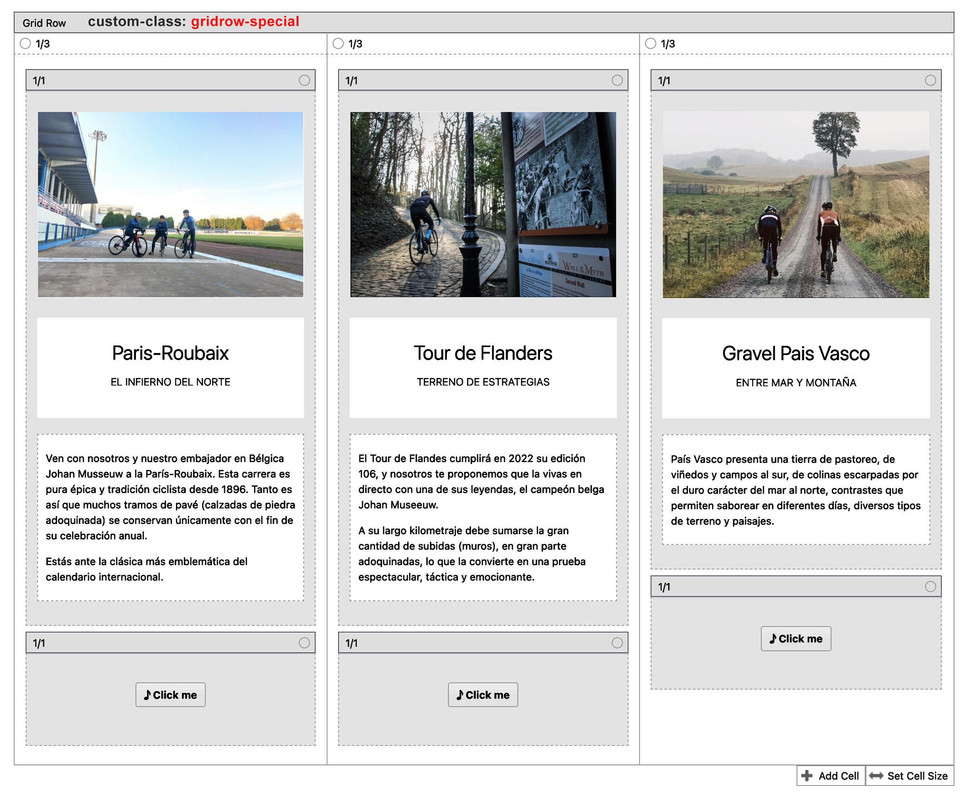
    Whereas I actually like the use of columns within grid cells. Then I would put the element which should be placed at the bottom in the same height in an extra 1/1 column – the rest doesn’t matter.
    In that case the snippet for functions.php would stay the same, but the css would now refer to the last column instead of the button-wrapper.

    (click to enlarge the image)

    @media only screen and (min-width: 768px) {
      .responsive #top #wrap_all  #main .gridrow-special .flex_cell {
        padding-bottom: 100px !important
      }
      #top #wrap_all .gridrow-special .flex_cell .flex_column:last-of-type {
        position: absolute;
        margin-top: 0px;
        top: calc(100% - 80px);
        width: 33%;
      }
    }

    in the case that on the last 1/1 container is more content – you had to adjust those shift values of padding-bottom and top: calc … !
    The height of that last 1/1 container had to be at least the padding-bottom on the cells

    But: if you got troubles on that – just get back to me ;)

    #1409555

    So you don’t have to set this class for all home pages, just leave the lines included.
    For the other grid-row elements you then have to set the custom-class gridrow-special

    function get_rid_of_flex_cell_inner(){ 
    ?>
    <script type="text/javascript">
    window.addEventListener("DOMContentLoaded", function () { 
      (function($) {
        $('#top.home #av-layout-grid-1 .flex_cell_inner > *').unwrap();
        $('#top .gridrow-special .flex_cell_inner > *').unwrap();
      })(jQuery);
    });
    </script>
    <?php
    }
    add_action('wp_footer', 'get_rid_of_flex_cell_inner');
    @media only screen and (min-width: 768px) {
      .responsive #top.home #wrap_all #av-layout-grid-1 .flex_cell,
      .responsive #top #wrap_all #main .gridrow-special .flex_cell {
        padding-bottom: 100px !important
      }
      #top.home #av-layout-grid-1 .avia-button-wrap,
      #top #wrap_all #main .gridrow-special .avia-button-wrap {
        position: absolute;
        top: calc(100% - 80px);
        width: 33%;
      }
    }

    It goes without saying that if you take 4 grid cells you have to adjust the width of the button-wrapper to 25%.
    If you switch at 989px – you need to change the media query to that as well.

    #1409508

    Hi,
    Your PHP file size limit is 8mb, please change to 20mb
    Enfold_Support_2237.jpeg

    Best regards,
    Mike

    #1409505
    This reply has been marked as private.
    #1409501

    Hi,
    To change the big icon list into a small icon list for mobile we need to swap the class av-iconlist-big with av-iconlist-small and change the iconlist title by swaping the class av_iconlist_title with av-iconlist-small and by default the small icon list title doesn’t use a H tag it uses a plain div.
    So note that in the following snippet it looks for the ID Ablaufschritte and it removes your h4 tag, so if you change the H tag in the future or your section ID you will need to update the snippet.
    Try adding this code to the end of your child theme functions.php file in Appearance ▸ Editor:

    function change_iconlist_big_to_small_below_tablet() { ?>
      <script>
    window.addEventListener('DOMContentLoaded', function() {
      (function($){
      	function replaceElementTag(targetSelector, newTagString) {
          $(targetSelector).each(function(){
            var newElem = $(newTagString, {html: $(this).html()});
            $.each(this.attributes, function() {
              newElem.attr(this.name, this.value);
            });
            $(this).replaceWith(newElem);
          });
        }
        $('#Ablaufschritte').each(function() {
          var width = $(window).width();
        if ((width <= 767)) {
          $('.avia-icon-list').removeClass('av-iconlist-big').addClass('av-iconlist-small');
          $('li').each(function() {
          	$('.av_iconlist_title').removeClass('iconlist_title').addClass('iconlist_title_small');
          });
          replaceElementTag('h3.av_iconlist_title', '<div></div>');
        } else {}
      });
      })(jQuery);
    });
    </script>
      <?php
    }
    add_action('wp_footer', 'change_iconlist_big_to_small_below_tablet');

    When you test with the Dev Tools on your desktop you will need to refresh the page after emulating a mobile device, this will work correctly on a real mobile device, and if you switch back to a desktop screen you will need to refresh again.
    Since a real mobile device won’t switch the screen size in the real world there is no reason to make the code more complicated.
    Please ensure to copy the code from the forum and not an email notification so the symbols are not converted.

    Best regards,
    Mike

    #1409496

    Hi,
    Typically this error occurs when the full theme zip file is used instead of the installable WP version from your Theme Forest account is used.
    Please ensure that you use the installable WP version. Another possible reason this occurs is if your webhost doesn’t have the PHP ZipArchive Extension enabled so WordPress can extract the zip file, please check with your webhost that this is enabled.
    I also see that your PHP version is v7.3.33, WordPress require a minimum of v7.4, please ask your webhost to update your PHP.

    Best regards,
    Mike

    #1409489

    the problem with it is the flex_cell_inner container – it hampers the absolute positioning of the button-wrapper.

    if you need this more than once – give a custom-class to those grid-rows – i now adjusted the code to that page only by ID.
    so to get rid of that container under preserving the child elements put this to your child-theme functions.php

    function get_rid_of_flex_cell_inner(){ 
    ?>
    <script type="text/javascript">
    window.addEventListener("DOMContentLoaded", function () { 
      (function($) {
        $('#top.home #av-layout-grid-1 .flex_cell_inner > *').unwrap();
      })(jQuery);
    });
    </script>
    <?php
    }
    add_action('wp_footer', 'get_rid_of_flex_cell_inner');

    put this to your quick css:

    @media only screen and (min-width: 768px) {
      .responsive #top.home #wrap_all #av-layout-grid-1 .flex_cell {
        padding-bottom: 100px !important
      }
      #top.home #av-layout-grid-1 .avia-button-wrap {
        position: absolute;
        top: calc(100% - 80px);
        width: 33%;
      }
    }

    EDIT: – sorry i see that you got a lot of translations – so best ist to give a custom-class to that grid-row ( on all translated pages )
    e.g. : gridrow-special and use that

    If it is only that page – it is on all translations the home page – so #top.home will be a good selector for it – see above

Viewing 30 results - 1,261 through 1,290 (of 16,891 total)