Hi,
in the last few days my site (armonia2.it) looks like extremely slow. Maybe Avia editor is the cause, or some other componet of Enfold (as I can see in debug.log). Some issues: many widgets in Avia editor don’t open, so I can’t either modify pages or add new content blocks. They are stuck on loading in blank popup. Other: frequent gateway timeout error Here is my error log:
[21-Sep-2023 14:25:32 UTC] PHP Fatal error: Uncaught TypeError: strip_tags(): Argument #1 ($string) must be of type string, array given in /home/mhd-01/www.armonia2.it/htdocs/wp-content/themes/enfold/framework/php/widgets/widget-classes/class-avia-partner.php:138
Stack trace:
#0 /home/mhd-01/www.armonia2.it/htdocs/wp-content/themes/enfold/framework/php/widgets/widget-classes/class-avia-partner.php(138): strip_tags(Array)
#1 /home/mhd-01/www.armonia2.it/htdocs/wp-includes/class-wp-widget.php(457): aviaFramework\widgets\avia_partner_widget->update(Array, Array)
#2 /home/mhd-01/www.armonia2.it/htdocs/wp-includes/class-wp-customize-widgets.php(1615): WP_Widget->update_callback(Array)
#3 /home/mhd-01/www.armonia2.it/htdocs/wp-includes/class-wp-customize-widgets.php(1722): WP_Customize_Widgets->call_widget_update(‘avia_partner_wi…’)
#4 /home/mhd-01/www.armonia2.it/htdocs/wp-admin/includes/ajax-actions.php(2450): WP_Customize_Widgets->wp_ajax_update_widget()
#5 /home/mhd-01/www.armonia2.it/htdocs/wp-includes/class-wp-hook.php(310): wp_ajax_update_widget(”)
#6 /home/mhd-01/www.armonia2.it/htdocs/wp-includes/class-wp-hook.php(334): WP_Hook->apply_filters(”, Array)
#7 /home/mhd-01/www.armonia2.it/htdocs/wp-includes/plugin.php(517): WP_Hook->do_action(Array)
#8 /home/mhd-01/www.armonia2.it/htdocs/wp-admin/admin-ajax.php(188): do_action(‘wp_ajax_update-…’)
#9 {main}
thrown in /home/mhd-01/www.armonia2.it/htdocs/wp-content/themes/enfold/framework/php/widgets/widget-classes/class-avia-partner.php on line 138
[21-Sep-2023 14:26:04 UTC] PHP Fatal error: Uncaught TypeError: strip_tags(): Argument #1 ($string) must be of type string, array given in /home/mhd-01/www.armonia2.it/htdocs/wp-content/themes/enfold/framework/php/widgets/widget-classes/class-avia-partner.php:138
Stack trace:
#0 /home/mhd-01/www.armonia2.it/htdocs/wp-content/themes/enfold/framework/php/widgets/widget-classes/class-avia-partner.php(138): strip_tags(Array)
#1 /home/mhd-01/www.armonia2.it/htdocs/wp-includes/class-wp-widget.php(457): aviaFramework\widgets\avia_partner_widget->update(Array, Array)
#2 /home/mhd-01/www.armonia2.it/htdocs/wp-includes/class-wp-customize-widgets.php(1615): WP_Widget->update_callback(Array)
#3 /home/mhd-01/www.armonia2.it/htdocs/wp-includes/class-wp-customize-widgets.php(1722): WP_Customize_Widgets->call_widget_update(‘avia_partner_wi…’)
#4 /home/mhd-01/www.armonia2.it/htdocs/wp-admin/includes/ajax-actions.php(2450): WP_Customize_Widgets->wp_ajax_update_widget()
#5 /home/mhd-01/www.armonia2.it/htdocs/wp-includes/class-wp-hook.php(310): wp_ajax_update_widget(”)
#6 /home/mhd-01/www.armonia2.it/htdocs/wp-includes/class-wp-hook.php(334): WP_Hook->apply_filters(”, Array)
#7 /home/mhd-01/www.armonia2.it/htdocs/wp-includes/plugin.php(517): WP_Hook->do_action(Array)
#8 /home/mhd-01/www.armonia2.it/htdocs/wp-admin/admin-ajax.php(188): do_action(‘wp_ajax_update-…’)
#9 {main}
thrown in /home/mhd-01/www.armonia2.it/htdocs/wp-content/themes/enfold/framework/php/widgets/widget-classes/class-avia-partner.php on line 138
[21-Sep-2023 14:26:39 UTC] PHP Fatal error: Uncaught TypeError: strip_tags(): Argument #1 ($string) must be of type string, array given in /home/mhd-01/www.armonia2.it/htdocs/wp-content/themes/enfold/framework/php/widgets/widget-classes/class-avia-partner.php:138
Stack trace:
#0 /home/mhd-01/www.armonia2.it/htdocs/wp-content/themes/enfold/framework/php/widgets/widget-classes/class-avia-partner.php(138): strip_tags(Array)
#1 /home/mhd-01/www.armonia2.it/htdocs/wp-includes/class-wp-widget.php(457): aviaFramework\widgets\avia_partner_widget->update(Array, Array)
#2 /home/mhd-01/www.armonia2.it/htdocs/wp-includes/class-wp-customize-widgets.php(1615): WP_Widget->update_callback(Array)
#3 /home/mhd-01/www.armonia2.it/htdocs/wp-includes/class-wp-customize-widgets.php(1722): WP_Customize_Widgets->call_widget_update(‘avia_partner_wi…’)
#4 /home/mhd-01/www.armonia2.it/htdocs/wp-admin/includes/ajax-actions.php(2450): WP_Customize_Widgets->wp_ajax_update_widget()
#5 /home/mhd-01/www.armonia2.it/htdocs/wp-includes/class-wp-hook.php(310): wp_ajax_update_widget(”)
#6 /home/mhd-01/www.armonia2.it/htdocs/wp-includes/class-wp-hook.php(334): WP_Hook->apply_filters(”, Array)
#7 /home/mhd-01/www.armonia2.it/htdocs/wp-includes/plugin.php(517): WP_Hook->do_action(Array)
#8 /home/mhd-01/www.armonia2.it/htdocs/wp-admin/admin-ajax.php(188): do_action(‘wp_ajax_update-…’)
#9 {main}
thrown in /home/mhd-01/www.armonia2.it/htdocs/wp-content/themes/enfold/framework/php/widgets/widget-classes/class-avia-partner.php on line 138
[21-Sep-2023 14:27:07 UTC] PHP Fatal error: Uncaught TypeError: strip_tags(): Argument #1 ($string) must be of type string, array given in /home/mhd-01/www.armonia2.it/htdocs/wp-content/themes/enfold/framework/php/widgets/widget-classes/class-avia-partner.php:138
Stack trace:
#0 /home/mhd-01/www.armonia2.it/htdocs/wp-content/themes/enfold/framework/php/widgets/widget-classes/class-avia-partner.php(138): strip_tags(Array)
#1 /home/mhd-01/www.armonia2.it/htdocs/wp-includes/class-wp-widget.php(457): aviaFramework\widgets\avia_partner_widget->update(Array, Array)
#2 /home/mhd-01/www.armonia2.it/htdocs/wp-includes/class-wp-customize-widgets.php(1615): WP_Widget->update_callback(Array)
#3 /home/mhd-01/www.armonia2.it/htdocs/wp-includes/class-wp-customize-widgets.php(1722): WP_Customize_Widgets->call_widget_update(‘avia_partner_wi…’)
#4 /home/mhd-01/www.armonia2.it/htdocs/wp-admin/includes/ajax-actions.php(2450): WP_Customize_Widgets->wp_ajax_update_widget()
#5 /home/mhd-01/www.armonia2.it/htdocs/wp-includes/class-wp-hook.php(310): wp_ajax_update_widget(”)
#6 /home/mhd-01/www.armonia2.it/htdocs/wp-includes/class-wp-hook.php(334): WP_Hook->apply_filters(”, Array)
#7 /home/mhd-01/www.armonia2.it/htdocs/wp-includes/plugin.php(517): WP_Hook->do_action(Array)
#8 /home/mhd-01/www.armonia2.it/htdocs/wp-admin/admin-ajax.php(188): do_action(‘wp_ajax_update-…’)
#9 {main}
thrown in /home/mhd-01/www.armonia2.it/htdocs/wp-content/themes/enfold/framework/php/widgets/widget-classes/class-avia-partner.php on line 138
[21-Sep-2023 14:27:38 UTC] PHP Fatal error: Uncaught TypeError: strip_tags(): Argument #1 ($string) must be of type string, array given in /home/mhd-01/www.armonia2.it/htdocs/wp-content/themes/enfold/framework/php/widgets/widget-classes/class-avia-partner.php:138
Stack trace:
#0 /home/mhd-01/www.armonia2.it/htdocs/wp-content/themes/enfold/framework/php/widgets/widget-classes/class-avia-partner.php(138): strip_tags(Array)
#1 /home/mhd-01/www.armonia2.it/htdocs/wp-includes/class-wp-widget.php(457): aviaFramework\widgets\avia_partner_widget->update(Array, Array)
#2 /home/mhd-01/www.armonia2.it/htdocs/wp-includes/class-wp-customize-widgets.php(1615): WP_Widget->update_callback(Array)
#3 /home/mhd-01/www.armonia2.it/htdocs/wp-includes/class-wp-customize-widgets.php(1722): WP_Customize_Widgets->call_widget_update(‘avia_partner_wi…’)
#4 /home/mhd-01/www.armonia2.it/htdocs/wp-admin/includes/ajax-actions.php(2450): WP_Customize_Widgets->wp_ajax_update_widget()
#5 /home/mhd-01/www.armonia2.it/htdocs/wp-includes/class-wp-hook.php(310): wp_ajax_update_widget(”)
#6 /home/mhd-01/www.armonia2.it/htdocs/wp-includes/class-wp-hook.php(334): WP_Hook->apply_filters(”, Array)
#7 /home/mhd-01/www.armonia2.it/htdocs/wp-includes/plugin.php(517): WP_Hook->do_action(Array)
#8 /home/mhd-01/www.armonia2.it/htdocs/wp-admin/admin-ajax.php(188): do_action(‘wp_ajax_update-…’)
#9 {main}
thrown in /home/mhd-01/www.armonia2.it/htdocs/wp-content/themes/enfold/framework/php/widgets/widget-classes/class-avia-partner.php on line 138
[21-Sep-2023 14:28:06 UTC] PHP Fatal error: Uncaught TypeError: strip_tags(): Argument #1 ($string) must be of type string, array given in /home/mhd-01/www.armonia2.it/htdocs/wp-content/themes/enfold/framework/php/widgets/widget-classes/class-avia-partner.php:138
Stack trace:
#0 /home/mhd-01/www.armonia2.it/htdocs/wp-content/themes/enfold/framework/php/widgets/widget-classes/class-avia-partner.php(138): strip_tags(Array)
#1 /home/mhd-01/www.armonia2.it/htdocs/wp-includes/class-wp-widget.php(457): aviaFramework\widgets\avia_partner_widget->update(Array, Array)
#2 /home/mhd-01/www.armonia2.it/htdocs/wp-includes/class-wp-customize-widgets.php(1615): WP_Widget->update_callback(Array)
#3 /home/mhd-01/www.armonia2.it/htdocs/wp-includes/class-wp-customize-widgets.php(1722): WP_Customize_Widgets->call_widget_update(‘avia_partner_wi…’)
#4 /home/mhd-01/www.armonia2.it/htdocs/wp-admin/includes/ajax-actions.php(2450): WP_Customize_Widgets->wp_ajax_update_widget()
#5 /home/mhd-01/www.armonia2.it/htdocs/wp-includes/class-wp-hook.php(310): wp_ajax_update_widget(”)
#6 /home/mhd-01/www.armonia2.it/htdocs/wp-includes/class-wp-hook.php(334): WP_Hook->apply_filters(”, Array)
#7 /home/mhd-01/www.armonia2.it/htdocs/wp-includes/plugin.php(517): WP_Hook->do_action(Array)
#8 /home/mhd-01/www.armonia2.it/htdocs/wp-admin/admin-ajax.php(188): do_action(‘wp_ajax_update-…’)
#9 {main}
thrown in /home/mhd-01/www.armonia2.it/htdocs/wp-content/themes/enfold/framework/php/widgets/widget-classes/class-avia-partner.php on line 138
[21-Sep-2023 14:28:36 UTC] PHP Fatal error: Uncaught TypeError: strip_tags(): Argument #1 ($string) must be of type string, array given in /home/mhd-01/www.armonia2.it/htdocs/wp-content/themes/enfold/framework/php/widgets/widget-classes/class-avia-partner.php:138
Stack trace:
#0 /home/mhd-01/www.armonia2.it/htdocs/wp-content/themes/enfold/framework/php/widgets/widget-classes/class-avia-partner.php(138): strip_tags(Array)
#1 /home/mhd-01/www.armonia2.it/htdocs/wp-includes/class-wp-widget.php(457): aviaFramework\widgets\avia_partner_widget->update(Array, Array)
#2 /home/mhd-01/www.armonia2.it/htdocs/wp-includes/class-wp-customize-widgets.php(1615): WP_Widget->update_callback(Array)
#3 /home/mhd-01/www.armonia2.it/htdocs/wp-includes/class-wp-customize-widgets.php(1722): WP_Customize_Widgets->call_widget_update(‘avia_partner_wi…’)
#4 /home/mhd-01/www.armonia2.it/htdocs/wp-admin/includes/ajax-actions.php(2450): WP_Customize_Widgets->wp_ajax_update_widget()
#5 /home/mhd-01/www.armonia2.it/htdocs/wp-includes/class-wp-hook.php(310): wp_ajax_update_widget(”)
#6 /home/mhd-01/www.armonia2.it/htdocs/wp-includes/class-wp-hook.php(334): WP_Hook->apply_filters(”, Array)
#7 /home/mhd-01/www.armonia2.it/htdocs/wp-includes/plugin.php(517): WP_Hook->do_action(Array)
#8 /home/mhd-01/www.armonia2.it/htdocs/wp-admin/admin-ajax.php(188): do_action(‘wp_ajax_update-…’)
#9 {main}
thrown in /home/mhd-01/www.armonia2.it/htdocs/wp-content/themes/enfold/framework/php/widgets/widget-classes/class-avia-partner.php on line 138
[21-Sep-2023 14:34:19 UTC] PHP Warning: Undefined array key 0 in /home/mhd-01/www.armonia2.it/htdocs/wp-content/themes/enfold/config-templatebuilder/avia-shortcodes/google_maps/google_maps.php on line 749
[21-Sep-2023 14:34:19 UTC] PHP Warning: Trying to access array offset on value of type null in /home/mhd-01/www.armonia2.it/htdocs/wp-content/themes/enfold/config-templatebuilder/avia-shortcodes/google_maps/google_maps.php on line 749
Can you help me? Thanks.
By the way : not your Question – i know but
this is something i miss on default too:
the image sizes generated by enfold are all ( some are squared) in landscape format.
At least one image format should be created in portrait mode, e.g. for team members. Of course, the aspect ratios required for landscape shots are not suitable for such portrait shots. Here, 3:4 or 4:5 would probably be common formats.
you can do that by a snippet inside child-theme functions.php:
add_image_size( 'news_size', 175, 260, false );
add_image_size( 'portrait', 900, 1200, false );
add_image_size( 'portrait_small', 450, 600, array( 'center', 'top' ) );  // this is with crop : true and crop properties

function my_custom_sizes( $sizes ) {
    return array_merge( $sizes, array(
        'news_size' => __( 'News Size' ),
		'portrait' => __( 'Portrait' ),
		'portrait_small' => __( 'Portrait small' ),
    ));
}
add_filter( 'image_size_names_choose', 'my_custom_sizes' );
but: this only works on uploadiing images. If you like to recalculate the existing images – use a recalculation plugin ( force regenerate Thumbnails etc.)
Thanks, Ismael. Looks/sounds a little over my head — unfortunately I still don’t actually *know* php. But I think I found a workaround: I can save my Elementor footer section as an Elementor “template”. The problem is, updates to those “templates” don’t apply to every page containing the template — Elementor wants you to use the Theme Builder to do something like that — and if I use the Theme Builder to create the footer, it cancels out the Enfold header (the reason for this ticket). BUT Elementor does provide shortcode for those “Saved Templates” (see https://capture.dropbox.com/N8yakpTKi7pSjcLE ), so if I just save my Elementor footer section as a template and drop the shortcode in at the bottom of every page, then, when I make a change to my footer via the Saved Templates, it applies to every page containing the shortcode. So then I have my goal: Enfold headers with Elementor footers (updatable from one file)!
Thanks so much for sticking with me on this — I think exhausting the possibility of using Elementor’s Theme Builder to handle the footers helped/forced me to look at the problem from a new angle and discover this workaround.
-
This reply was modified 2 years, 6 months ago by
 sky19er.
Hi,
This was an error because you added the snippet as a “HTML Snippet”:

I changed it to a “PHP Snippet” for you

please clear your browser cache and check.
Best regards,
Mike
Am getting a critical error message when trying to edit the home page of the website http://www.oxsec.co.uk
can log into admin fine and am also able to view the site.
Error message appears when trying to edit the home page.
error details email says..
Error Details
=============
An error of type E_ERROR was caused in line 3768 of the file /home/sites/26a/8/8b9cdb854b/public_html/wp-content/themes/enfold/config-templatebuilder/avia-template-builder/php/class-element-templates.php. Error message: Uncaught TypeError: Argument 1 passed to aviaElementTemplates::set_locked_attributes() must be of the type array, string given, called in /home/sites/26a/8/8b9cdb854b/public_html/wp-content/themes/enfold/config-templatebuilder/avia-shortcodes/slideshow_fullsize/slideshow_fullsize.php on line 1128 and defined in /home/sites/26a/8/8b9cdb854b/public_html/wp-content/themes/enfold/config-templatebuilder/avia-template-builder/php/class-element-templates.php:3768
Stack trace:
#0 /home/sites/26a/8/8b9cdb854b/public_html/wp-content/themes/enfold/config-templatebuilder/avia-shortcodes/slideshow_fullsize/slideshow_fullsize.php(1128): aviaElementTemplates->set_locked_attributes(”, Object(avia_sc_slider_full), ‘av_slide_full’, Array, Array, ”)
#1 /home/sites/26a/8/8b9cdb854b/public_html/wp-content/themes/enfold/config-templatebuilder/avia-shortcodes/slideshow_fullsize/slideshow_fullsize.php(1172): avia_sc_slider_full->get_element_styles(Array)
#2 /home/sites/26a/8/8b9cdb854b/public_html/wp-content/themes/enfold/config-t
have set enfold login and etails below in private content
Hey Stilecatalini,
I carefully examined your site and came up with a way to center your logo for all device sizes and for it to show in the same place when the menu is open.
This is the logo before the menu is open:

and this is with the menu open the logo shows in the same place:

Add this code to the end of your child theme functions.php file in Appearance ▸ Editor:
function show_logo_in_burger_menu() { ?>
  <script>
(function($){
$('#avia-menu').one('click', function(){
jQuery('.logo.avia-standard-logo').clone().wrapInner('<div class="burger-logo"/>').children(0).unwrap().prependTo('#av-burger-menu-ul');
});
})(jQuery);
</script>
  <?php
}
add_action('wp_footer', 'show_logo_in_burger_menu', 99);
and this CSS in your Enfold Theme Options ▸ General Styling ▸ Quick CSS field:
@media only screen and (min-width: 990px) {
	.logo.avia-standard-logo,
	.logo.avia-standard-logo a {
		display: flex;
	    justify-content: center;
	    width: 100%;
	    align-items: center;
	}
	.av-burger-overlay-active .burger-logo {
		top: 30px;
	    position: absolute;
	    justify-content: center;
	    display: flex;
	    width: 100%;
	}
}
@media only screen and (max-width: 989px) {
	.responsive #top .logo {
		width: 100%;
		display: flex;
		justify-content: center;
        align-items: center;
	}
	.responsive #top #wrap_all .main_menu,
	.responsive #top #wrap_all .av_mobile_menu_tablet .main_menu {
    	top: 11px;
    	height: 55px;
	}
	.av-burger-overlay-active .burger-logo img {
		height: 30px;
    	max-height: 30px;
    	width: 155.17px;
	}
	.av-burger-overlay-active .burger-logo {
		top: 25px;
	    position: absolute;
	    justify-content: center;
	    display: flex;
	    width: 100%;
	}
}
@media only screen and (min-width: 768px) and (max-width: 989px) {
	.responsive.html_header_transparency.html_header_top #top #main {
    	margin-top: -70px;
	}
	.responsive #top .logo {
    	height: 80px !important;
	}
}
Best regards,
Mike
Hi,
Thank you for your patience, I see that you are using the Code Snippets plugin so I will add the customizations in it,
I also see that you are using the heading setting Logo left, menu below, I disabled the Shrinking Header because it didn’t give enough room for the search box. The following code will only show the search bar on screens larger that 990px when there is enough room.
So first I added the function to add the widget to the header as a code snippet:
add_action( 'ava_main_header', 'enfold_customization_header_widget_area' );
function enfold_customization_header_widget_area() {
dynamic_sidebar( 'header' );
}
Then the custom header widget with a search widget:
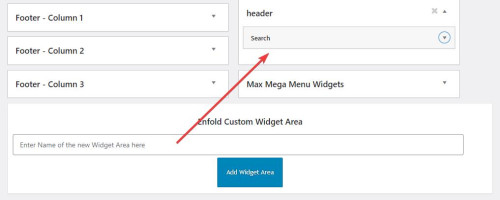
then I added this code to place the widget after the logo in the header:
function header_widget_placement() { ?>
  <script>
window.addEventListener('DOMContentLoaded', function() {
  (function($){
    var width = $(window).width();
    if ((width >= 990)) {
   $('#header_main .widget').detach().insertBefore('.av-logo-container .inner-container #menu-item-shop');
    } else {}
  })(jQuery);
});
 </script>
  <?php
}
add_action('wp_footer', 'header_widget_placement', 99);
then this css to style and order the header elements:
@media only screen and (max-width: 989px) {
	#header_main > .widget {
	display: none;
}
}
@media only screen and (min-width: 990px) {
.av-logo-container .inner-container {
	display: flex;
    flex-direction: row-reverse;
}
.av-logo-container .inner-container .widget {
	display: flex;
    order: 3;
    flex-basis: 65%;
}
#header_main > .widget {
	display: none;
}
.av-logo-container .inner-container .widget #searchform {
	 width: 100%;
}
.av-logo-container .inner-container .widget #searchform .ajax_search_response {
	background-color: #fff;
    z-index: 3;
}
.av-logo-container .inner-container #menu-item-shop {
	display: flex;
    order: 2;
}
}
This is the final result:

Best regards,
Mike
Hi,
To move your account & search menu items next to the cart icon:
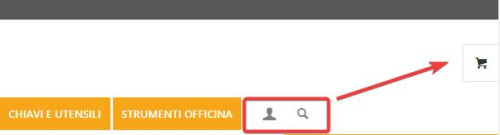
this is only needed for screens larger than 990px, because on mobile it’s already next to the burger menu:

Add this CSS in your Enfold Theme Options ▸ General Styling ▸ Quick CSS field:
@media only screen and (min-width: 990px) {
.account-menu {
    position: absolute;
    z-index: 3;
    height: 46px;
    right: 0;
    width: 150px;
    line-height: 46px;
    text-decoration: none;
    text-align: center;
    top: 38%;
    margin: -23px 0 0 0;
}
.account-menu .cart_dropdown {
	top: 85%;
}
.account-menu #menu-item-wc-account-icon {
	display: inline-block;
    height: 46px;
    width: 46px;
    float: left;
}
.account-menu #menu-item-search {
	display: inline-block;
    height: 46px;
    width: 46px;
    float: left;
}
.account-menu .menu-item-account-icon a {
	line-height: 46px !important;
	width: 46px;
    height: 46px !important;
    display: inline-block;
}
.account-menu #menu-item-search a {
	line-height: 46px !important;
	width: 46px;
    height: 46px !important;
    display: inline-block;
}
}
Then add this code to the end of your child theme functions.php file in Appearance ▸ Editor:
function move_account_search_nexto_cart() { ?>
  <script>
window.addEventListener('DOMContentLoaded', function() {
(function($){
	var width = $(window).width();
	if ((width >= 990)) {
 $(".menu-item.cart_dropdown ").wrapAll("<span class=account-menu></span>");
 $('#avia-menu #menu-item-wc-account-icon').detach().insertBefore('.account-menu .cart_dropdown');
 $('#avia-menu #menu-item-search').detach().insertBefore('.account-menu .cart_dropdown');
	} else {}
})(jQuery);
});
</script>
  <?php
}
add_action('wp_footer', 'move_account_search_nexto_cart', 99);
this is the expected results:

Best regards,
Mike
Hi,
Thank you for your patience and the password to your site but I don’t see a user name, please include.
I see the [avia_search] shortcode in your topbar, it looks like you have not added the code to the end of your child theme functions.php file in Appearance ▸ Editor: add_shortcode('avia_search', 'get_search_form'); or if you did the symbols may be converted, please ensure to copy the code from the forum and not an email notification so the symbols are not converted. You said that you are using SearchWP, did you add the code for it to be the search for your site? And doesn’t it have it’s own shortcode, this page explains how to adjust the SearchWP shortcode for the options you want, you should end up with something like this: [searchwp_search_form engine="default" var="searchvar" button_text="Find Results"] (this code may not work on your site, follow the instructions)
Your asking for a Amazon search bar, have you thought about adding a larger one like in our Knowledge Base Demo below your menu? We have a search bar element:
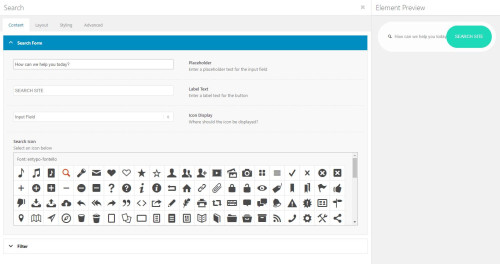
that will allow you to adjust the style better it you want a big search bar like on Amazon.
Best regards,
Mike
Hey CJGVD,
Thank you for your patience, in your grid row element example it look like to have added an image element inside of the grid element, instead try adding the image as a background image to the grid and set the Background Image Position as center center

on my test page I set each grid row element as 50% of the height and the image fills the cell size:

the only issue is the when the grid becomes a single column at mobile the cells with the background image have no content so the height doesn’t match as the equal height is not applied:

To correct I added the custom class equal-height-mobile-grid to the grid row elements, my test page has three:

and added this code to the end of my child theme functions.php file in Appearance ▸ Editor:
function grid_row_elements_equal_height_for_mobile() { ?>
  <script>
window.addEventListener('DOMContentLoaded', function() {
  (function($){
  	var width = $(window).width();
  	if (width < 767) {
    $('.equal-height-mobile-grid').each(function(){
     var $columns = $('.flex_cell .flex_cell_inner',this);
     var maxHeight = Math.max.apply(Math, $columns.map(function(){
         return $(this).height();
     }).get());
     $columns.attr('style', 'height: '+ maxHeight +'px !important');
  });
  	} else {}
  })(jQuery);
});
</script>
  <?php
}
add_action('wp_footer', 'grid_row_elements_equal_height_for_mobile', 99);
and now on mobile the image cell is equal height:

Please give this a try.
Best regards,
Mike
Hi,
Thank you for reporting this. Something we have completly missed.
For next release I will add a fix for this in av_video_assets_required.
I will let you know here when the fix is ready so you can update the file.
Meanwhile you can use filter avf_enqueue_wp_mediaelement to avoid loading (in functions.php line 679).
Return false when not needed.
Best regards,
Günter
Hi sarthakchoudhary,
The image sizes used is 705 x 705px, so unless it’s a square image, some parts of the image would be lost, otherwise, the layout will break.
You can change the size by adding this PHP snippet in your child theme’s functions.php file (or use plugin like WPCode to add PHP snippet):
function enfold_customization_modify_thumb_size( $size ) {
  $size['masonry'] = array( 'width' => 705, 'height' => 705 , 'crop' => false );
  return $size;
}

add_filter( 'avf_modify_thumb_size', 'enfold_customization_modify_thumb_size', 10, 1 );
Just adjust the values as you see fit.
Hope it helps.
Best regards,
Nikko
Hey sarawh,
Thank you for the inquiry.
You can use the avf_modify_thumb_size filter to adjust the dimension of the existing thumbnails instead of directly editing the functions.php file. Usage examples can be found in the following threads.
// https://kriesi.at/support/topic/alter-featured-image-on-blog-does-not-work/#post-1342432
// https://kriesi.at/support/topic/title-and-image/#post-1304670
// https://kriesi.at/support/topic/source-for-masonry-image-size/
Best regards,
Ismael
Hi,
I see that you have placed the code that is causing problems in your WordPress ▸ Customize ▸ Additional CSS

This should not be there, please remove.
I also see that you have the same code in your WordPress ▸ Appearance ▸ Theme File Editor ▸ Enfold ▸ functions.php
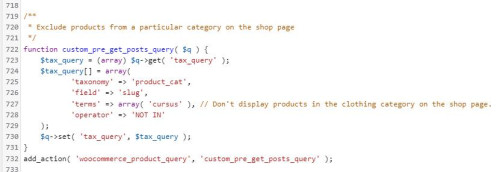
please also remove this and then check again.
If you are not using a child theme I recommend the WPcode plugin this plugin supports PHP code snippets, JavaScript code snippets, & CSS code snippets, because you will lose the custom code that you add to the enfold ▸ functions.php when you update next time.
Best regards,
Mike
Hi,
a while ago I asked how we can change the size of the thumbnails on our blog archive pages. We need to do this because we have text on our images which is cut off with the predefined images size. You gave me a reply which I have understood (see below) – but can I implement this change in the child theme? I´ve tried adding this code but it isn´t making any difference, which suggests that I am doing something wrong ;) I have to add that I don´t know much about php. I re-uploaded one of the thumbnails after adding the code but that also made no difference.
/* Resize portfolio thumbnails on archive/category pages in the blog */
$avia_config[‘imgSize’][‘portfolio’] = array( ‘width’ => 710, ‘height’ => 375 ); // images for portfolio entries (2,3 column)
You replied:
Hi,
Thank you for your patience and the links to your site, the portfolio size images on the archive pages is set by line 190 in the enfold/functions.php file
I didn’t find an easy way to adjust the image size on the archive page so I would recommend changing the portfolio size from array(‘width’=>495, ‘height’=>400 ); to mmatch the magazine size array(‘width’=>710, ‘height’=>375 ); and then you will need to regenerate your thumbnails and then check.
This would also change any other use of the portfolio thumbnails on your site, but it doesn’t look like this would be an issue for you.
Best regards,
Mike
Post Link: https://kriesi.at/support/topic/change-layout-number-of-columns-on-blog-category-pages/#post-1310490
Hi,
If you are using a child theme then yes leave the code in the functions.php, otherwise I recommend the WPcode plugin this plugin supports PHP code snippets, JavaScript code snippets, & CSS code snippets and you will not lose your code when you update as you would if the code is in your parent theme functions.php.
To change it into a button using the magic wand in the Post editors we will need to change the function a little to use do_shortcode
Here is an example that I tested on my yest site and works, you can change the button code to suit your needs:
add_action("ava_after_content", function() {
    if (is_singular('post')) {
        echo do_shortcode("[av_button label='Back to Bolg' icon_select='yes' icon='ue830' font='entypo-fontello' icon_hover='aviaTBicon_hover' link='manually,#' link_target='' size='medium' position='center' label_display='' title_attr='' size-text='' av-desktop-font-size-text='' av-medium-font-size-text='' av-small-font-size-text='' av-mini-font-size-text='' margin='' margin_sync='true' padding='' padding_sync='true' av-desktop-margin='' av-desktop-margin_sync='true' av-desktop-padding='' av-desktop-padding_sync='true' av-medium-margin='' av-medium-margin_sync='true' av-medium-padding='' av-medium-padding_sync='true' av-small-margin='' av-small-margin_sync='true' av-small-padding='' av-small-padding_sync='true' av-mini-margin='' av-mini-margin_sync='true' av-mini-padding='' av-mini-padding_sync='true' color_options='' color='theme-color' custom_bg='#444444' custom_font='#ffffff' btn_color_bg='theme-color' btn_custom_grad_direction='vertical' btn_custom_grad_1='#000000' btn_custom_grad_2='#ffffff' btn_custom_grad_3='' btn_custom_grad_opacity='0.7' btn_custom_bg='#444444' btn_color_bg_hover='theme-color-highlight' btn_custom_bg_hover='#444444' btn_color_font='theme-color' btn_custom_font='#ffffff' btn_color_font_hover='white' btn_custom_font_hover='#ffffff' border='' border_width='' border_width_sync='true' border_color='' border_radius='' border_radius_sync='true' box_shadow='' box_shadow_style='0px,0px,0px,0px' box_shadow_color='' animation='' animation_duration='' animation_custom_bg_color='' animation_z_index_curtain='100' hover_opacity='' sonar_effect_effect='' sonar_effect_color='' sonar_effect_duration='1' sonar_effect_scale='' sonar_effect_opac='0.5' css_position='' css_position_location=',,,' css_position_z_index='' av-desktop-css_position='' av-desktop-css_position_location=',,,' av-desktop-css_position_z_index='' av-medium-css_position='' av-medium-css_position_location=',,,' av-medium-css_position_z_index='' av-small-css_position='' av-small-css_position_location=',,,' av-small-css_position_z_index='' av-mini-css_position='' av-mini-css_position_location=',,,' av-mini-css_position_z_index='' id='' custom_class='' template_class='' element_template='' one_element_template='' av_uid='' sc_version='1.0' admin_preview_bg='']");
    }
}, 10);
Best regards,
Mike
Hi Mike,
Thank you for your response!
I have created a test page and copied the original embed code from the new form builder as instructed.
Here’s the backend preview: https://www.ritahyland.com/wp-admin/post.php?post=11567&action=edit&classic-editor
And here’s the privately published URL: https://www.ritahyland.com/test-page-only/
As you’ll see, when the ‘LET’S GET STARTED’ button is clicked, it navigates to a new page instead of floating on the current page or triggering as a modal.
The “SIGN UP FOR THE PODCAST POPUP” overlay appears on the page, but the content/button remains visible.
Regarding the codes, please see below:
HOMEPAGE (Form Embed Code) –
<iframe
src=”https://link.mightyrealmedia.com/widget/form/gV1yYcpxZ4HF072oSS8b”
style=”display:none;width:100%;height:100%;border:none;border-radius:0px”
id=”popup-gV1yYcpxZ4HF072oSS8b”
data-layout=”{‘id’:’POPUP’}”
data-trigger-type=”showOnScrolling”
data-trigger-value=”20″
data-activation-type=”alwaysActivated”
data-activation-value=””
data-deactivation-type=”neverDeactivate”
data-deactivation-value=””
data-form-name=”OPT-IN: RH WEBSITE HOMEPAGE [CURRENT]”
data-height=”242″
data-layout-iframe-id=”popup-gV1yYcpxZ4HF072oSS8b”
data-form-id=”gV1yYcpxZ4HF072oSS8b”
title=”OPT-IN: RH WEBSITE HOMEPAGE [CURRENT]”
>
</iframe>
<script src=”https://link.mightyrealmedia.com/js/form_embed.js”></script>
PODCAST (Form Embed Code) –
<iframe
src=”https://link.mightyrealmedia.com/widget/form/SKLq9d3FYMp3PKRXYTbs”
style=”display:none;width:100%;height:100%;border:none;border-radius:0px”
id=”popup-SKLq9d3FYMp3PKRXYTbs”
data-layout=”{‘id’:’POPUP’}”
data-trigger-type=”showAfter”
data-trigger-value=”5″
data-activation-type=”alwaysActivated”
data-activation-value=””
data-deactivation-type=”neverDeactivate”
data-deactivation-value=””
data-form-name=”OPT-IN: RH WEBSITE PODCAST PAGE [CURRENT]”
data-height=”521″
data-layout-iframe-id=”popup-SKLq9d3FYMp3PKRXYTbs”
data-form-id=”SKLq9d3FYMp3PKRXYTbs”
title=”OPT-IN: RH WEBSITE PODCAST PAGE [CURRENT]”
>
</iframe>
<script src=”https://link.mightyrealmedia.com/js/form_embed.js”></script>
We’re looking forward to your assistance since this project holds significant importance for us. We have an extensive list of forms to migrate from the New CRM, and we are at a point where we must either find a solution or make a decision regarding the migration.
Thank you very much!
Gee
Hey Timothy,
Thank you for your patience, for the image on your homepage in the lightbox, I can see the difference better when I compare the original image with the lightbox image, I have linked to all three images below.
I believe that the issue is related to the color profile of your original image, please see this thread in the thread a professional photographer had accidentally changed his Lightroom color profile to ProPhoto RGB and the supporting thread that I referred to had:
The problem is inside your Photoshop setting. Try Preferences -> Color Setting -> Color Policies and enable the cklickbox at Profile Mismatches and Missing Profiles
the issue points to the PHP GD Library used by WordPress not being able to create the new image sizes with certain color profiles.
I’m not a professional photographer and I could be explaining it not quite correctly, but if you used Photoshop or Lightroom or another professional image tool please review the threads and your software settings.
I hope this helps you identify the issue.
Best regards,
Mike
Hello,
After updating the Enfold theme on my website, I encountered the following error:
Warning: require_once(zip://#template): failed to open stream: operation failed in /nas/content/live/arcnmstg/wp-includes/template.php on line 785
Fatal error: require_once(): Failed opening required ‘zip://#template’ (include_path=’.:/usr/share/pear/php:/usr/share/php’) in /nas/content/live/arcnmstg/wp-includes/template.php on line 785
Temporary Resolution:
To ensure my website remains operational, I resorted to making a temporary modification in the wp-includes/template.php file. Here’s the check I added in the load_template function:
php
if ($_template_file != “zip://#template”) {
if ($load_once) {
require_once $_template_file;
} else {
require $_template_file;
}}
This modification allowed me to make my website functional. However, I believe there might be an underlying issue that needs proper investigation and resolution.
I’m uncertain why WordPress attempted to load a template with the name “zip://#template,” as this behavior is unexpected. I’m creating this Topic here for the permanent solution from the support team.
I understand the importance of not modifying core files directly, and I am eager to restore my website to its standard configuration as soon as possible.
Thank you for your help!
-
This topic was modified 2 years, 7 months ago by
 Qasim1991.
Hey @Ismael, we’re still having the issue I noted in my last post in this thread (https://kriesi.at/support/topic/using-blog-element-for-events-calendar-listings-need-to-order-by-event-date/#post-1405617) where recurring events are not showing. For example the Upcoming Events box at the bottom of https://gobhdev.wpengine.com/property/casa-dominguez/ should be showing the After-School Program recurring event (https://gobhdev.wpengine.com/event/after-school-program-2/2023-09-07/).
Looks like it has something to do with the function below, at the top of my functions.php file — if I comment this code out, the events show. But without that code, the events show in reverse chronological (we want chronological), recurring events are out of order, and all past events show, too (this is how I have it on the live site, for now, so at least the events show: https://gobeyondhomes.org/property/casa-dominguez/). But if I leave this code in, no events show. So maybe something about this function doesn’t jive with the the recurring events?
Any chance you could help me troubleshoot that? I’m including a temp login and sftp info in the private content. Thanks so much and lmk if you have any questions!
// QUERY EVENTS BY STARTING DATE
function avia_blog_post_query_mod( $query, $params ) {
    if(! is_singular( 'portfolio' ) )
    {
        return $query;
    }

    $include = array();
    $posts = array();

    $events = tribe_get_events( [
        'posts_per_page' => 5,
        'start_date' => 'now',
        'orderby' => 'meta_value',
        'meta_key' => '_EventStartDate',
        'order' => 'DESC',
        'tax_query' => $query['tax_query']
    ] );

    foreach($events as $event) {
        $date = tribe_get_start_date( $event, false, 'j F Y' );
        $include[$event->ID] = $date;
    }

    asort($include);

    foreach($include as $key => $value) {
        $posts[] = $key;
    }

    unset($query['tax_query']);
    $query['orderby'] = 'meta_value';
    $query['order'] = 'ASC';
    $query['meta_key'] = '_EventStartDate';
    $query['post__in'] = $posts;

    return $query;
}
add_filter('avia_blog_post_query', 'avia_blog_post_query_mod', 10, 2); */
Hi Mike,
Yes, it’s for MySQL 8.0, not PHP 8.0. It’s for WP Engine and here is an article discussing their upgrade: https://wpengine.com/support/mysql-8/?_hsmi=271282644.
You listed using Maria. Is Maria using a different version than normal MySQL, hence the difference in version numbers? From my understanding MySQL is only at 8.0 at the moment. This version was released a while ago so I assume the theme will work, but I wanted to be sure since WP Engine is updating all its servers and I have a lot of customers using Enfold.
Hey CodeSamurai,
Thank you for your question, are you sure that you mean MySQL 8 and not PHP 8?
on my server I’m using MySQL Version 10.5.17-MariaDB-cll-lve
so MySQL 8 seems behind, most questions are about their servers are going to PHP 8 which works fine with Enfold v5.6.5+
I assume MySQL 8 would also work fine.
Best regards,
Mike
Hi,
Please add the following to the bottom of Functions.php file of your child theme ( https://kriesi.at/documentation/enfold/child-theme/ ) or as a new snippet using the Code Snippets ( https://wordpress.org/plugins/code-snippets/ ) plugin:
add_action('ava_after_main_container', 'new_ava_after_main_container');
function new_ava_after_main_container(){
if(is_page(8779)){
echo '<div class="custom-back-button"><span class="av_font_icon av-lm7ig98k-65ba33b015b6384fd3901ea03a4bd5d6 avia_animate_when_visible av-icon-style- avia-icon-pos-left av-no-color avia-icon-animate avia_start_animation avia_start_delayed_animation"><a href="LINK_TO_YOUR_HOMEPAGE" class="av-icon-char" aria-hidden="true" data-av_icon="" data-av_iconfont="entypo-fontello"></a></span></div>';
}
}
You can use the “is_page” condition to target your Boats page. The “8779” is ID of the page you shared in your initial post. If you want to display the button on another page, you’ll need to update the “8779” in the code.
Then, you’ll need to update the “LINK_TO_YOUR_HOMEPAGE” in the snippet to the link of your homepage.
After that, add the following code to the bottom of the Quick CSS field in Enfold theme options > General Styling
.custom-back-button {
  position: fixed;
  top: 50px;
  left: 20px;
  z-index: 99;
  background-color: #1a1a1a;
  opacity: 0.7;
  padding: 90px 30px 40px 30px;
}

.custom-back-button .av_font_icon {
font-size: 80px;
margin: 0;
}
You’ll need to use jQuery to hide/display the button when scroll down/up.
We cannot help you fine-tune this. If you need further assistance, please consider to hire a freelance developer for the task.
Best regards,
Yigit
Hi Rikard
Thank you – I can see the Footer Widgets, but there is no content in the backend. https://app.screencast.com/VktE9mV3wDPEL
I tried with Firefox and Google Chrome – it’s the same.
Now I updated wordpress. I also downloaded a new version (Version 5.6.6) of enfold and installed it via FTP, but when I activate the new theme version on the FTP the site appears blank. Also when I try to choose a PHP-Version more than 7.4.
In the backend of WordPress there are 2 themes of enfold. Version 4.7.6.3 and 4.5.2 .When I try to delete the older version 4.5.2, also an error appears: https://app.screencast.com/iAO7TQpUQiNBP
But I can’t see the uploaded version of Enfold via FTP (https://app.screencast.com/gCjXrerslVMuu).
Do you have an idea to resolve. Would be great. Thank you very much.
Hi Ismael & Guenni007,
All the details given in private content, please go through and let me know how to solve my issue
https://www.maritimetravel.nicomitcms.com/wp-login.php
site password without admin login – maritimetravel2023
there are nice plugins to influence datepicker f.e.: Datepicker by input
but you can insert that snippet to your child-theme functions.php
( if you get rid of those outcommented signs “//” – the weekends will be unavailable too ):
( there is a prebuild option for no Weekend)
function my_datepicker_defaults() {
?>
<script type="text/javascript">
window.addEventListener("DOMContentLoaded", function () {
(function($) {
    $.datepicker.setDefaults({
        // beforeShowDay: $.datepicker.noWeekends,
        minDate: "+7d",
        maxDate: "+12m",
    });
}(jQuery));
});
</script>
<?php
}
add_action('wp_footer', 'my_datepicker_defaults', 20);
if you do not need maxDate remove that line
Hi elenapoliti,
I see :has does not have support for firefox, you can check it here: https://caniuse.com/?search=%3Ahas
I have added a javascript code to your functions.php to add a class on paragraphs that has images:
function has_image(){
  ?>
  <script>
    (function() {
      var container = document.querySelector('#top .search-filter-results');

      if (container) {
        var paragraphs = container.querySelectorAll('p');

        for (var i = 0; i < paragraphs.length; i++) {
          var paragraph = paragraphs[i];

          if (paragraph.querySelector('img')) {
            paragraph.classList.add('has-image');
          }
        }
      }
    })();
  </script>
  <?php
}

add_action('wp_footer', 'has_image');
and added this CSS code:
#top #search-filter-results-4746 > div:not(.pagination) p.has-image {
    display: block;
}
Please review the page.
Best regards,
Nikko
Okay, so I think I might have figured it out, and hopefully this can be of benefit to others as well.
I ran across this article from WordPress:
To sum it up, the template files need to be in the Child Theme directory, using the WordPress/Enfold default templates as basis starting points.
But, you need to add the following lines at the top (right below the first if switch that follows the open php tag.
/*
Template Name: Full-width layout (Rename to appropriate template name)
Template Post Type: post, page, (insert your new cpts here)
*/
Remainder of template follows, but that will finally add the Post Attributes meta box to the right side of the screen.
Can something similar/related-to to this be added to the Enfold Docs?
Hi,
The theme does not turn of file editing in WordPress, it’s likely done by your hosting provider. Please try reaching out to them.
The footer is working as expected in the version you are updating to, are you sure that you are not overriding footer.php and/or header.php in your child? Please note that there are two files you need to check for.
What kind of login do you need to inspect the problem?
Admin-rights for the backend or login to FTP?
Both please.
Best regards,
Rikard
-
This reply was modified 2 years, 7 months ago by
 Rikard.
What I have done before the error occureed:
1. switched the PHP version from 7.4 to 8.1
2. upgrade the Nginx server from 1.20 to 1.22
What I have tried to solve the problem but failed:
1: deleted the whole enfold file and reupload the newest package, FAILED(can’t solve)!
2: some setting in the Enfold Theme Options -> Performance, FAILED(can’t solve)!
3: Set PHP back to 7.4 and Nginx to 1.20, FAILED(can’t solve)!



