Viewing 30 results - 631 through 660 (of 16,890 total)
  • Author
    Search Results
  • #1463070

    In reply to: Woocommerce sorting

    Ismael, there seems to be an error on line 7 of your PHP snippet…

    Snippet automatically deactivated due to an error on line 7:
    Cannot redeclare function avia_woocommerce_frontend_search_params.

    #1462973

    In reply to: Enfold Theme Update.

    On the Enfold Theme Update page I can see:

    Your current Enfold Theme Version Number is 6.0.2
    Your PHP version: 7.4.33

    I tried to update but this failed – shows following at the top of the page:

    Last time we checked the token we were not able to connected to Envato:

    Purchases could not be accessed
    Username could not be accessed (needed for your information only)
    E-Mail could not be accessed (needed for your information only)

    Following errors occurred:

    Purchases: Errorcode 403 returned by Envato: Forbidden:
    – reason: invalid-token
    username Errorcode 403 returned by Envato: Forbidden:
    – reason: invalid-token
    email Errorcode 403 returned by Envato: Forbidden:
    – reason: invalid-token
    Purchases: A problem occurred accessing your purchases. Unable to check for updates.

    #1462927

    Hey jaimemerz,

    Thank you for the inquiry.

    We recommend upgrading to PHP 8.0 or later versions to eliminate potential errors related to older PHP versions. The site will also benefit from the performance improvements included in PHP 8.0 and later versions.

    // https://www.php.net/releases/8.0/en.php#:~:text=PHP%208%20introduces%20two%20JIT,on%20par%20with%20PHP%207.4.

    Best regards,
    Ismael

    #1462909
    jaimemerz
    Participant

    With the new WordPress 6.6.1 update, my server is telling me I need to upgrade my PHP to a minimum of 7.4. Is there an ideal recommend PHP level that works best with Enfold 6.0.2?

    #1462680
    jolynndeal
    Participant

    I have a client website that is receiving 502 and 504 error codes. We have made several of the changes the hosting company recommended including updating to the newest Enfold theme. The hosting company is saying it is because of an error in the PHP and to contact theme support. Below is a copy of the transcript from the hosting support call and our client. Does this error seem like it is something with the Enfold theme? Or could this be one of the plugins we are using? We tried deactivating all plugins and it did not help with the errors. Or can you advise us what to tell hosting? Thank you!

    (06:36:31) Taoufik E.
    The site has some PHP errors, I believe they’re stemming from the enfold theme. These errors are causing the 502 and time out errors
    (06:36:34) Taoufik E.
    [18-Jul-2024 01:22:46 America/Denver] PHP Fatal error: Uncaught Error: Class ‘WP_Dependencies’ not found in /home/wynneb5/public_html/wp-includes/class-wp-styles.php:18
    Stack trace:
    #0 {main}
    thrown in /home/wynneb5/public_html/wp-includes/class-wp-styles.php on line 18
    [18-Jul-2024 01:23:50 America/Denver] PHP Fatal error: Uncaught Error: Call to undefined function get_the_block_template_html() in /home/wynneb5/public_html/wp-includes/template-canvas.php:12
    Stack trace:
    #0 {main}
    thrown in /home/wynneb5/public_html/wp-includes/template-canvas.php on line 12
    [18-Jul-2024 01:25:00 America/Denver] PHP Warning: Use of undefined constant ABSPATH – assumed ‘ABSPATH’ (this will throw an Error in a future version of PHP) in /home/wynneb5/public_html/wp-includes/blocks/index.php on line 8
    [18-Jul-2024 01:25:00 America/Denver] PHP Warning: Use of undefined constant WPINC – assumed ‘WPINC’ (this will throw an Error in a future version of PHP) in /home/wynneb5/public_html/wp-includes/blocks/index.php on line 8
    [18-Jul-2024 01:25:00 America/Denver] PHP Warning: require(ABSPATHWPINC/blocks/legacy-widget.php): failed to open stream: No such file or directory in /home/wynneb5/public_html/wp-includes/blocks/index.php on line 11
    [18-Jul-2024 01:25:00 America/Denver] PHP Fatal error: require(): Failed opening required ‘ABSPATHWPINC/blocks/legacy-widget.php’ (include_path=’.:/usr/php/54/usr/lib64:/usr/php/54/usr/share/pear’) in /home/wynneb5/public_html/wp-includes/blocks/index.php on line 11
    [18-Jul-2024 01:26:30 America/Denver] PHP Fatal error: Uncaught Error: Class ‘WP_Widget’ not found in /home/wynneb5/public_html/wp-includes/widgets/class-wp-widget-block.php:17
    Stack trace:
    #0 {main}
    thrown in /home/wynneb5/public_html/wp-includes/widgets/class-wp-widget-block.php on line 17
    [18-Jul-2024 14:12:35 UTC] Cron reschedule event error for hook: action_scheduler_run_queue, Error code: could_not_set, Error message: The cron event list could not be saved., Data: {“schedule”:”every_minute”,”args”:[“WP Cron”],”interval”:60}
    [18-Jul-2024 16:45:40 UTC] PHP Warning: include_once(): Failed opening ‘/home/wynneb5/public_html/wp-content/plugins/uncanny-learndash-toolkit/uncanny-learndash-toolkit.php’ for inclusion (include_path=’.:/usr/php/54/usr/lib64:/usr/php/54/usr/share/pear’) in /home/wynneb5/public_html/wp-settings.php on line 522
    (06:37:28) Taoufik E.
    You should really contact the devs of this theme or consult with your developer. The issue is not the infrastructure here, the theme and they it works with the plugins should be reviewed by a devloper

    #1462675

    Hi Tim,

    Thank you for the credentials.

    Having a look into it – you are having a lot of customizations, a lot of plugins and also modifications to the image sizes defined.

    E.g. 1500*0 – Featured Thin (added by theme), 1700*0 – Fullscreen Sections/Sliders (added by theme), …

    In core it is: 1500*430 – Featured Thin (added by theme), 1500*1500 – Fullscreen Sections/Sliders (added by theme)

    We are using core WP functions for creating the responsive scrset and size – no idea what *0 causes behind the scene in WP core.

    Also it is a bit strange that when no image is selected for a category we get the last image added returned by a core WP function:

    
    $attachment_id = avia_get_woocommerce_term_meta( $term->term_id, 'thumbnail_id' );
    

    calls

    
    get_term_meta( $term_id, $key, $single )
    

    The following functions are involved in handling the banner for shop page and category pages in file ..\config-woocommerce\config.php:

    avia_woocommerce_overview_banner_image()
    avia_woocommerce_big_cat_banner()
    avia_woocommerce_shop_banner()
    avia_woocommerce_parallax_banner()

    The code in the functions is pretty straight and easy to understand.

    What I would suggest you can do:

    – To make 100% sure we do not have a bug in our core (we tested it carefully, but we might have missed something) create a clean install with Enfold and WooCommerce, add a few images and categories and check, if you get it to run as you want it – using filters if necessary (we can add additional filters if needed to core)

    – Then you need to dig into your customizationed site and try to figure out, what breaks our code

    I know this answer does not satisfy but digging into your code cannot be done in a few minutes.

    If you need anything added to code or anything I can assist you let me know.

    Best regards,
    Günter

    #1462661

    Hi, thanks for your answer!

    This is the code i put in header.php juste before </head>

    <script type="application/ld+json">
        {
          "@context": "https://schema.org",
          "@type": "LocalBusiness",
     "image": [
            "https://vernissageduvar.com/wp-content/uploads/2024/06/image-du-site-vernissage-du-var.jpg"
             ],
    
          "address": {
           "@type" : "PostalAddress",
        "streetAddress" : "13 Notre Dame des Anges",
        "addressLocality" : "Gonfaron",
        "addressRegion" : "Var",
        "addressCountry" : "FR",
        "postalCode" : "83590  "
          },
    
      "description": "Nous réalisons pour vous les travaux de ponçage, sablage, rénovations , petite ébénisterie, peintures et vernissage sur tous supports. ",
      "logo": "https://vernissageduvar.com/wp-content/uploads/2024/07/Logo-du-site-vernissage-du-var.png",
      "name": "Vernissage du Var",
    
    "openingHoursSpecification": [
      {
        "@type": "OpeningHoursSpecification",
        "dayOfWeek": [
          "Monday",
          "Tuesday",
          "Wednesday",
          "Thursday",
          "Friday"
        ],
        "opens": "08:00",
        "closes": "18:00"
      },
      {
        "@type": "OpeningHoursSpecification",
        "dayOfWeek": [
          "Saturday",
          "Sunday"
        ],
        "opens": "08:00",
        "closes": "12:00"
      }
    ],
          "priceRange": "$$",
         
    
          "telephone": "0686721473",
    
          "url": "https://vernissageduvar.com",
    
     "geo": {
            "@type": "GeoCoordinates",
            "latitude": 43.31818189354868,
            "longitude":  6.2900818092288 
            },
    
    "AggregateRating": {
            "@type": "AggregateRating",
            "itemReviewed": "Vernissage du Var",
            "ratingCount": 8,
            "ratingValue": 5
        },
        "review": [
            {
                "@type": "Review",
                "author": {
                    "@type": "Person",
                    "name": "Elisabeth Hecketsweiler"
                },
                "datePublished": "2024-06-21",
                "description": "Entreprise au top pour sa disponibilit\u00e9, son professionnalisme et  ses tr\u00e8s bons conseils! Vraiment tr\u00e8s satisfaite du travail effectu\u00e9! Je ne reconnais plus mes meubles de cuisine! Nous referons appel \u00e0 Vernissage du Var les yeux ferm\u00e9s si besoin et nous les recommanderons autour de nous.",
                "name": "Vernissage du Var",
                "reviewRating": {
                    "@type": "Rating",
                    "bestRating": 5,
                    "ratingValue": 5,
                    "worstRating": 1
                }
            },
            {
                "@type": "Review",
                "author": {
                    "@type": "Person",
                    "name": "Pierre MARTIN"
                },
                "datePublished": "2024-07-15",
                "description": "On voit tout de suite qu'on a affaire a un passionn\u00e9! un travail m\u00e9ticuleux  pour un tarif tr\u00e8s raisonnable, les d\u00e9lais ont \u00e9t\u00e9 respect\u00e9s, je recommande sans aucune h\u00e9sitation!",
                "name": "Vernissage du Var",
                "reviewRating": {
                    "@type": "Rating",
                    "bestRating": 5,
                    "ratingValue": 5,
                    "worstRating": 1
                }
            },
            {
                "@type": "Review",
                "author": {
                    "@type": "Person",
                    "name": "S\u00e9bastien Hazebroucq"
                },
                "datePublished": "2024-06-21",
                "description": "Au top.\nJe vous conseille vivement de jeter un oeil.\nTr\u00e8s beau boulot.",
                "name": "Vernissage du Var",
                "reviewRating": {
                    "@type": "Rating",
                    "bestRating": 5,
                    "ratingValue": 5,
                    "worstRating": 1
                }
            },
            {
                "@type": "Review",
                "author": {
                    "@type": "Person",
                    "name": "Djamila Sahki"
                },
                "datePublished": "2024-06-21",
                "description": "Travail tr\u00e8s s\u00e9rieux je suis contente de son professionnalisme et pontuel je le conseille",
                "name": "Vernissage du Var",
                "reviewRating": {
                    "@type": "Rating",
                    "bestRating": 5,
                    "ratingValue": 5,
                    "worstRating": 1
                }
            },
            {
                "@type": "Review",
                "author": {
                    "@type": "Person",
                    "name": "Sebastien Ramuscello"
                },
                "datePublished": "2024-06-21",
                "description": "Tres bon acceuil bon professionnel et tres reactif ! Je recommande sans hesitation.sebastien",
                "name": "Vernissage du Var",
                "reviewRating": {
                    "@type": "Rating",
                    "bestRating": 5,
                    "ratingValue": 5,
                    "worstRating": 1
                }
            }
        ]
    }    
     
    </script>

    I don’t have error when i test it with google tools but the problem is that i don’t find it in the search console

    Thanks for your help!

    #1462645

    Hey James,

    Thank you for the inquiry.

    You can try this script in the functions.php file:

    function ava_custom_script_here()
    {
        ?>
        <script>
            (function ($)
            {
                function hideEmptyDescCols()
                {
                    if ($(window).width() <= 768) {
                        $('.avia-desc-col').each(function() {
                            if ($(this).is(':empty')) {
                                $(this).hide();
                            }
                        });
                    } 
                }
    
                $(document).ready(function ()
                {
                    hideEmptyDescCols();
                    $(window).resize(hideEmptyDescCols);
                });
            })(jQuery);
        </script>
        <?php
    }
    add_action('wp_footer', 'ava_custom_script_here');
    

    Best regards,
    Ismael

    #1462636
    pierremartin311
    Participant

    Hello,
    1 – I add my script json in header.php just before </head> on my site : vernissageduvar.com
    Everything is OK with the google testing tool of structured data but i can’t see my strucutured data in the Google search console..Why?

    2- Whats is the difference by making this : https://kriesi.at/support/topic/structured-data-html/#post-758419 or ading the script in header.php?

    Thanks!

    an other question: Whats is the difference by making this : https://kriesi.at/support/topic/structured-data-html/#post-758419 or ading the script in header.php?

    #1462515
    clemenskuenzel
    Participant

    Hi at all,

    I’m using your theme in one of my clients website. I use the version: 4.4.
    I now needed to update PHP to Version 8.3.
    I made a copy on another server to test the upgrade
    the I want to go to the login I receive the following message:

    “Fatal error: Unparenthesized a ? b : c ? d : e is not supported. Use either (a ? b : c) ? d : e or a ? b : (c ? d : e) in /home/.sites/97/site938/web/ksk/wp-content/themes/enfold/functions-enfold.php on line 313″

    I read on an old tread, (https://kriesi.at/support/topic/fatal-error-unparenthesized-a-b-c-d-e/) that a upgrade to v4.8.8 could solve the issue….
    Is there a possibility to get a download link for this version?
    Best regards,
    Clemens

    #1462331

    If it helps figure out why no footer is displaying, I did see this in the debug log.

    [17-Jul-2024 22:59:43 UTC] PHP Notice: Undefined index: footer_option in /home/xxxxxxx/public_html/staging/wp-content/themes/enfold/footer.php on line 35
    [17-Jul-2024 22:59:43 UTC] PHP Notice: Undefined index: footer_behavior in /home/xxxxxxx/public_html/staging/wp-content/themes/enfold/footer.php on line 37
    [17-Jul-2024 22:59:43 UTC] PHP Notice: Undefined index: footer_behavior in /home/xxxxxxx/public_html/staging/wp-content/themes/enfold/footer.php on line 288

    #1462275

    Sounds easy enough!
    I added a portfolio category ‘Gast’ and added the following function to ad a custom class to the categorized portfolios, but I cant seem to get the banner to show up.

    I added this to functions.php of the child theme:

    function add_custom_category_class($classes) {
        if (is_category('378')) {
            $classes[] = 'category-378';
        }
        return $classes;
    }
    add_filter('body_class', 'add_custom_category_class');

    and this to my css:

    .category-378 .grid-entry .inner-entry {
      position: relative;
    }
    
    .category-378 .grid-entry .inner-entry::before {
      content: 'Gast';
      position: absolute;
      top: 0;
      left: 0;
      width: 100%;

    height: 50px;
    background-color: rgba(255, 0, 0, 0.8);
    color: white;
    display: flex;
    align-items: center;
    justify-content: center;
    font-size: 18px;
    font-weight: bold;
    transform: rotate(-45deg);
    transform-origin: top left;
    z-index: 1;
    }

    liuxuewu
    Participant

    My website is showing a warning: “Warning: Undefined array key ‘host’ in /home/site/wwwroot/wp-includes/media.php on line 1372”. After upgrading my website’s WordPress, I started seeing numerous instances of this warning.
    Warning: Undefined array key “host” in /home/site/wwwroot/wp-includes/media.php on line 1372

    Warning: Undefined array key “host” in /home/site/wwwroot/wp-includes/media.php on line 1372

    Warning: Undefined array key “host” in /home/site/wwwroot/wp-includes/media.php on line 1372

    Warning: Undefined array key “host” in /home/site/wwwroot/wp-includes/media.php on line 1372

    • This topic was modified 1 year, 8 months ago by liuxuewu.

    Hi,
    CSS would not be the way to display the LayerSlider, we would use PHP, the css would be used to style the LayerSlider after the PHP, such as to hide the logo in the header. We can do this but since you are not using a Child Theme you could use the WP Code plugin to add the PHP code.
    Since we will need to switch your theme to the one that the LayerSlider is not working in a few times to ensure the PHP code that we add works correctly, do you want to create a staging site so your visitors will not be confused while we work on the site? Did you find any other errors when switching to the new theme?
    I also see that you don’t have the latest theme installed v6.0.1 I only see v5.6.9?

    Most cPanel webhosts have a staging site option, some in the dashboard:
    staging-1.jpeg
    Others add the option in the Softaculous WordPress Management
    2022-12-11_001.jpeg
    There may be other staging site options in different cPanel servers, these are the two that I have seen.

    Best regards,
    Mike

    Hi,
    Thank you for your patience and the link to your site, I first tested one of your videos on my test sites with the same settings that you have and the video plays with sound, on your site the volume is clearly disabled:
    Enfold Support 6325
    but your child theme has a lot of custom files, including a header.php – typically including a old header.php can cause issues, please consider removing.
    Enfold Support 6327
    So I tested switching to the parent theme and the video plays correctly with sound:
    Enfold Support 6323
    So this points to a custom file in your child theme causing the error, try removing the header.php first, then the “includes” files, and if that doesn’t help start removing your other custom files until you find the conflict.

    Best regards,
    Mike

    Hey Peter,
    I will try, in my example I wanted to use a menu created in WordPress, so first create a menu and save the menu name for the function code later:
    Enfold Support 6307
    For the logo we will add the image via css so you will need to add the custom classes button logo
    Enfold Support 6313
    For the CTA we add the classes button cta:
    Enfold Support 6311
    Then on the page you want to use this use the option Hide Header on this page:
    Enfold Support 6315
    and add the shortcode [custom_menu menu=”test menu with logo”] to your page, adjust the menu name to suit.
    Then add this code to the end of your child theme functions.php file in Appearance ▸ Editor:

    function display_custom_menu($atts) {
        $atts = shortcode_atts(
            array(
                'menu' => '',
            ), 
            $atts, 
            'custom_menu'
        );
        $menu = $atts['menu'];
        if (!empty($menu)) {
            $args = array(
                'menu' => $menu,
                'container' => false, 
                'menu_class' => 'av-main-nav scmenu',
                'echo' => false
            );
            $menu_html = wp_nav_menu($args);
            $output = '<header id="header" style="position: absolute; top: 0;">';
            $output .= '<nav class="main_menu" style="display: flex; align-items: center; justify-content: center; width: 100%;">';
            $output .= $menu_html;
            $output .= '</nav>';
            $output .= '</header>';
            return $output;
        } else {
            return '<p>No menu specified or menu not found.</p>';
        }
    }
    add_shortcode('custom_menu', 'display_custom_menu');
    

    and this CSS in your Enfold Theme Options ▸ General Styling ▸ Quick CSS field:

    #top #wrap_all .main_menu ul.scmenu {
    list-style: none;	
    }
    #top #wrap_all .main_menu .scmenu .menu-item a {
    	color: var(--enfold-header_replacement_menu_color);
    }
    #top #wrap_all .main_menu .scmenu {
    background-color: rgba(0, 0, 0, 0.2);
    }
    body:not(.wp-admin) li.button.logo {
    background-image: url(/wp-content/uploads/2024/07/logo_fysiotherapie_groningen.webp);
    background-size: contain;
    background-repeat: no-repeat;
    background-position: 50% 50%;
    width: 200px;
    margin-left: 0;
    }
    body:not(.wp-admin) li.button.logo a {
    opacity: 0;
    }
    #top #wrap_all .main_menu .scmenu .button.menu-item.cta {
    	background-color: orange;
    }

    and adjust the image URL to suit
    The expected results should be like this when a color section with a image is used:
    Enfold Support 6317

    Best regards,
    Mike

    #1461995

    Hi,
    Please change #av-sc-portfolio-1 to .av-portfolio-grid-sorting-container in the code:
    Enfold Support 6305
    like this:

    function custom_script() { ?>
      <script>
    window.addEventListener('DOMContentLoaded', function() {
      (function($){
        $('.av-portfolio-grid-sorting-container .grid-sort-container').each(function(){
         var $gridContent = $('.grid-content',this);
         var gridContentmaxHeight = Math.max.apply(Math, $gridContent.map(function(){
             return $(this).height();
         }).get());
         $gridContent.height(gridContentmaxHeight);
      });
      })(jQuery);
      });
      </script>
      <?php
    }
    add_action( 'wp_footer', 'custom_script', 99 );

    Best regards,
    Mike

    Hi,
    On the demo page that you linked to, The sidebar menu is automatically created by the Page Sidebar Navigation option.
    Enfold Support 6295
    I believe the issue with the sidebar showing lower on the page when you add a tab section element is that it is a full width element and this moves the sidebar, there are a few elements like the color section and full width slider that is known to do this.
    Nonetheless you can add the Page Sidebar Navigation with a shortcode, first add this code to the end of your child theme functions.php file in Appearance ▸ Editor:

    //shortcode [avia_sidebar_menu]
    function display_avia_sidebar_menu() {
        ob_start();
        global $avia_config;
        if (function_exists('avia_sidebar_menu')) {
            $av_sidebar_menu = avia_sidebar_menu(false);
            if ($av_sidebar_menu) {
                echo $av_sidebar_menu;
            }
        }
        return ob_get_clean();
    }
    add_shortcode('avia_sidebar_menu', 'display_avia_sidebar_menu');

    then add this shortcode [avia_sidebar_menu]
    Enfold Support 6297
    and note that the theme option Page Sidebar Navigation must be enabled:
    Enfold Support 6295
    then it will show, note that the style is the same because it is in the sidebar:
    Enfold Support 6299
    but if you add the shortcode to your page it will have a different style, so add this css:

    #top #main .widget_nav_menu .nested_nav>li:first-child,
    #top #main .widget_nav_menu li {
    border: none;
    }
    #top #main .main_color .widget_nav_menu .current_page_item>a {
    color: var(--enfold-main-color-heading); 	
    }
    #top #main .main_color .widget_nav_menu a {
    color: var(--enfold-main-color-meta);	
    }
    #top #main .main_color .widget_nav_menu ul:first-child>.current_page_item {
    background: var(--enfold-main-color-bg2);	
    }
    #top #main .widget_nav_menu li a{
    border: none;
    padding: 6px 7px 7px 0;
    }
    #top #main .widget_nav_menu ul:first-child > .current_page_item {
        left: 0;
    }

    Enfold Support 6301
    so with the sidebar disabled it will look the same:
    Enfold Support 6303

    Best regards,
    Mike

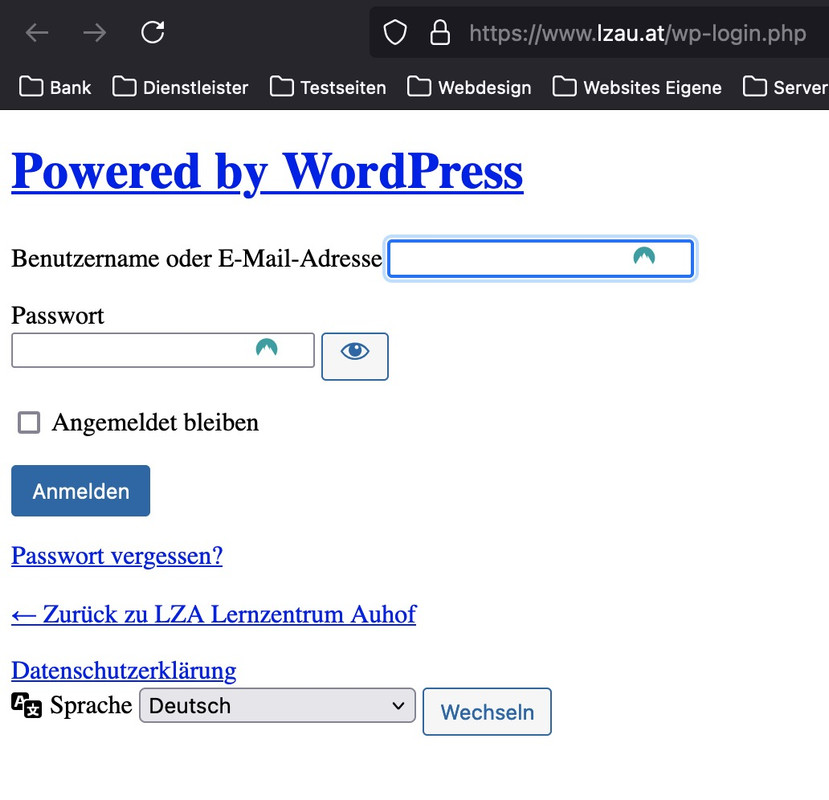
    a few minutes ago i could open the url http://www.lzau.at/wp-login.php and it opens some kind of login page – try to login to that page.
    (it seems that they forget to install a working certificate). I guess you now are working on that

    #1461901

    put these two snippets inside your child-theme functions.php:

    
    add_action('ava_after_footer_output', function() {
      echo '<div id="subsocket" class="container_wrap subsocket_color"><div class="container">';
      echo !dynamic_sidebar('subsocket');
      echo '</div></div>';
    });
    
    function subsocket_color_set($color_sets){
      $color_sets['subsocket_color'] = 'Subsocket';
      return $color_sets;
    }
    add_filter( 'avf_color_sets', 'subsocket_color_set', 999 );

    after that go to your widgets and create a new widget area named: subsocket

    the first snippet is to have a new widget area – the second snippet is for having your own color styles for that area by enfold options.

    Inside the new widget area you can have all widget you like to have.

    to have less height and paddings etc. just a little css:

    #subsocket > .container,
    #subsocket .widget {
      padding: 0;
    }
    #subsocket p {
      margin: 0;
    }
    #subsocket .av-special-heading {
      margin: 10px auto;
    }

    for changing the position of copyright info and footer menue – the idea of Mike is perfect:

    #socket .container {
      display: flex;
      flex-flow: row-reverse wrap;
      justify-content: space-between;
    }
    
    #socket .container::after {
      display: none;
    }
    
    #socket .sub_menu_socket {
      display: flex;
      align-items: center;
    }
    
    @media only screen and (max-width:767px) {
      #socket .container {
        flex-direction: column;
        align-items: center;
      }
      #socket .container > * {
        display: inline-block;
        width: unset !important;
      }
    }

    Meine Empfehlung wäre schon eher den Code für die functions.php zu nehmen.
    siehe den Endkommentar meinerseits.

    Da post ids und page ids wohl offenbar bei Enfold mit als Klasse bei html geführt werden sollte es reichen nur diese aufzuführen.
    Damit der Selector stärker wird solltest Du noch das html vor die Klasse setzen.
    Pass auf, das alle selectoren durch Kommata getrennt sind, nur der letzte in der Reihe erhält kein Komma vor der eröffnenden Klammer.

    die variablen kannst du natürlich anpassen. Je nachdem, was du ersetzen willst. Die Liste was Enfold da anlegt bezieht sich auf die Einstellungen – siehe unten – die Farben bzw. anderen Werte entsprechen den Styling-Einstellungen

    html.html_entry_id_777,
    html.html_entry_id_778,
    html.html_entry_id_779 {
    	--enfold-header-color-bg: #eee;
    	--enfold-main-color-bg: #eee; 
    	--enfold-footer-color-bg: #eee;
    	--enfold-alternate-color-bg2: #eee;
    	--enfold-header-color-bg2: #eee;
    	--enfold-socket-color-bg: #eee;
    	--enfold-socket-color-border: #eee;
    }

    Beispiel-Liste was alles von Enfold als variablen geführt werden.

    :root {
      --enfold-socket-color-bg:#333333;
      --enfold-socket-color-bg2:#555555;
      --enfold-socket-color-primary:#ffffff;
      --enfold-socket-color-secondary:#aaaaaa;
      --enfold-socket-color-color:#eeeeee;
      --enfold-socket-color-meta:#999999;
      --enfold-socket-color-heading:#ffffff;
      --enfold-socket-color-border:#444444;
      --enfold-socket-color-constant-font:#333333;
      --enfold-socket-color-button-border:#dddddd;
      --enfold-socket-color-button-border2:#888888;
      --enfold-socket-color-iconlist:#333333;
      --enfold-socket-color-timeline:#333333;
      --enfold-socket-color-timeline-date:#000000;
      --enfold-socket-color-masonry:#444444;
      --enfold-socket-color-stripe:#ffffff;
      --enfold-socket-color-stripe2:#ffffff;
      --enfold-socket-color-stripe2nd:#bbbbbb;
      --enfold-socket-color-button-font:#333333;
      --enfold-footer-color-bg:#222222;
      --enfold-footer-color-bg2:#333333;
      --enfold-footer-color-primary:#ffffff;
      --enfold-footer-color-secondary:#aaaaaa;
      --enfold-footer-color-color:#dddddd;
      --enfold-footer-color-meta:#919191;
      --enfold-footer-color-heading:#919191;
      --enfold-footer-color-border:#444444;
      --enfold-footer-color-constant-font:#222222;
      --enfold-footer-color-button-border:#dddddd;
      --enfold-footer-color-button-border2:#888888;
      --enfold-footer-color-iconlist:#333333;
      --enfold-footer-color-timeline:#333333;
      --enfold-footer-color-timeline-date:#000000;
      --enfold-footer-color-masonry:#222222;
      --enfold-footer-color-stripe:#ffffff;
      --enfold-footer-color-stripe2:#ffffff;
      --enfold-footer-color-stripe2nd:#bbbbbb;
      --enfold-footer-color-button-font:#222222;
      --enfold-alternate-color-bg:#fcfcfc;
      --enfold-alternate-color-bg2:#ffffff;
      --enfold-alternate-color-primary:#719430;
      --enfold-alternate-color-secondary:#83a83d;
      --enfold-alternate-color-color:#666666;
      --enfold-alternate-color-meta:#8f8f8f;
      --enfold-alternate-color-heading:#222222;
      --enfold-alternate-color-border:#e1e1e1;
      --enfold-alternate-color-constant-font:#ffffff;
      --enfold-alternate-color-button-border:#507210;
      --enfold-alternate-color-button-border2:#61861b;
      --enfold-alternate-color-iconlist:#d0d0d0;
      --enfold-alternate-color-timeline:#d0d0d0;
      --enfold-alternate-color-timeline-date:#a0a0a0;
      --enfold-alternate-color-masonry:#eeeeee;
      --enfold-alternate-color-stripe:#93b652;
      --enfold-alternate-color-stripe2:#82a541;
      --enfold-alternate-color-stripe2nd:#94b94e;
      --enfold-alternate-color-button-font:#ffffff;
      --enfold-main-color-bg:#ffffff;
      --enfold-main-color-bg2:#fcfcfc;
      --enfold-main-color-primary:#719430;
      --enfold-main-color-secondary:#83a83d;
      --enfold-main-color-color:#666666;
      --enfold-main-color-meta:#919191;
      --enfold-main-color-heading:#222222;
      --enfold-main-color-border:#e1e1e1;
      --enfold-main-color-constant-font:#ffffff;
      --enfold-main-color-button-border:#507210;
      --enfold-main-color-button-border2:#61861b;
      --enfold-main-color-iconlist:#d0d0d0;
      --enfold-main-color-timeline:#d0d0d0;
      --enfold-main-color-timeline-date:#a0a0a0;
      --enfold-main-color-masonry:#ebebeb;
      --enfold-main-color-stripe:#93b652;
      --enfold-main-color-stripe2:#82a541;
      --enfold-main-color-stripe2nd:#94b94e;
      --enfold-main-color-button-font:#ffffff;
      --enfold-header-color-bg:#ffffff;
      --enfold-header-color-bg2:#f8f8f8;
      --enfold-header-color-primary:#719430;
      --enfold-header-color-secondary:#444444;
      --enfold-header-color-color:#333333;
      --enfold-header-color-meta:#808080;
      --enfold-header-color-heading:#000000;
      --enfold-header-color-border:#e1e1e1;
      --enfold-header-color-constant-font:#ffffff;
      --enfold-header-color-button-border:#507210;
      --enfold-header-color-button-border2:#222222;
      --enfold-header-color-iconlist:#d0d0d0;
      --enfold-header-color-timeline:#d0d0d0;
      --enfold-header-color-timeline-date:#a0a0a0;
      --enfold-header-color-masonry:#e7e7e7;
      --enfold-header-color-stripe:#93b652;
      --enfold-header-color-stripe2:#82a541;
      --enfold-header-color-stripe2nd:#555555;
      --enfold-header-color-button-font:#ffffff;
      --enfold-header_burger_color:inherit;
      --enfold-header_replacement_menu_color:inherit;
      --enfold-header_replacement_menu_hover_color:inherit;
      --enfold-font-family-theme-body:"HelveticaNeue","Helvetica Neue",Helvetica,Arial,sans-serif;
      --enfold-font-size-theme-content:13px;
      --enfold-font-size-theme-h1:34px;
      --enfold-font-size-theme-h2:28px;
      --enfold-font-size-theme-h3:20px;
      --enfold-font-size-theme-h4:18px;
      --enfold-font-size-theme-h5:16px;
      --enfold-font-size-theme-h6:14px;
      --enfold-font-size-content-font:18px
    }

    We had to revert back to Enfold 5.7. Or you can add this to your child theme’s functions.php as a temporary fix until the authors of Enfold fix this issue:

    // Enfold 6.0 slow query fix
    add_filter('avf_before_query_wp_default_custom_fields', function($custom_fields) { return []; });

    The dynamic custom fields don’t work anymore with this line, but at least your website is working again.

    #1461646

    Hi,
    I believe that I have found a solution to change the sidebar header menu to have multiple dropdowns like the burger menu,
    Enfold Support 6271
    for example this is the first dropdown after a click:
    Enfold Support 6267
    this is the second level after click:
    Enfold Support 6269
    please note that both the “first level” and “second level” menu items are not links to pages, so a click will open the sub-menu:
    Enfold Support 6273
    Try adding this code to the end of your child theme functions.php file in Appearance ▸ Editor:

    function change_sidebar_menu_to_burger_menu_dropdown() { ?>
      <script>
    document.addEventListener("DOMContentLoaded", function() {
        var screenWidth = window.innerWidth;
        if (screenWidth >= 768) {
            if (document.documentElement.classList.contains("html_header_sidebar")) {
                const aviaMenu = document.getElementById("avia-menu");
                if (aviaMenu) {
                    aviaMenu.id = "av-burger-menu-ul";
                    aviaMenu.classList.remove("av-main-nav");
                    aviaMenu.classList.remove("menu");
                }
                const menuItems = document.querySelectorAll("#av-burger-menu-ul .menu-item");
    
                menuItems.forEach(function(item) {
                    item.classList.add("av-active-burger-items");
                    item.classList.remove("menu-item");
                });
                const menuItemsWithChildren = document.querySelectorAll("#av-burger-menu-ul .menu-item-has-children");
    
                menuItemsWithChildren.forEach(function(item) {
                    item.classList.add("av-width-submenu");
                    //item.classList.remove("menu-item-has-children");
    
                    const dropdownAva = item.querySelector(".menu-item-has-children.av-width-submenu .avia-menu-text");
                    if (dropdownAva) {
                        const dropdownAvailable = document.createElement("span");
                        dropdownAvailable.classList.add("dropdown_available");
                        dropdownAva.insertAdjacentElement('afterend', dropdownAvailable);
                    }
                    const dropdownSpan = item.querySelector(".menu-item-has-children.av-width-submenu .dropdown_available");
                    if (dropdownSpan) {
                        const submenuIndicator = document.createElement("span");
                        submenuIndicator.classList.add("av-submenu-indicator");
                        dropdownSpan.insertAdjacentElement('afterend', submenuIndicator);
                    }
                });
    
                const style = document.createElement('style');
                style.innerHTML = `
                    #top #av-burger-menu-ul {
                        width: 300px;
                        padding: 0px 30px;
                    }
                    .main_menu ul:first-child>li a {
                        height: 50px;
                        line-height: 50px;
                    }
                `;
                document.head.appendChild(style);
            }
        }
    });
    </script>
      <?php
    }
    add_action( 'wp_footer', 'change_sidebar_menu_to_burger_menu_dropdown', 99 );

    Please disable any previous snippets from this thread.

    Best regards,
    Mike

    #1461577

    Hey beverlystone,

    Thank you for the inquiry.

    You should be able to use custom fields to create links between pages in different languages. Here’s how:

    1.) Edit the page in English (EN) language. Create a custom field named “language_switch_url” and enter the URL of the corresponding page in French (FR).

    2.) Repeat this process for the page in French (FR) language, making sure you use the URL of the English (EN) page in the “language_switch_url” custom field.

    3.) Finally, add the following code to your theme’s functions.php file to create a language switcher after the main menu:

    add_action('ava_after_main_menu', function () {
        $switch_url = get_field('language_switch_url');
    
        if ($switch_url) {
            ?>
            <div class="av-custom-language-switcher">
                <a href="<?php echo esc_url($switch_url); ?>">
                    <?php _e('Switch to Other Language', 'avia_framework'); ?>
                </a>
            </div>
            <?php
        }
    }, 10, 1);

    Best regards,
    Ismael

    #1461539

    Hey Ad-Min747,
    I assume that your user is not admin, so see the theme option at Enfold Theme Options ▸ Layout Builder ▸ Lock Advanced Layout Builder
    This removes the ability to move or delete existing template builder elements, or add new ones, for everyone who is not an administrator.
    Another option might be this function in your child theme functions.php file in Appearance ▸ Editor to hide the ALB button from anyone that is not admin.

    add_action('admin_head', function() {
    	if( !current_user_can('activate_plugins') ){
                ?>
                 <style>#avia-builder-button{ display: none; } </style>
                <?php
            }
    });

    Best regards,
    Mike

    #1461508

    In reply to: change H2 to H1

    or if you like to change that globally ( those which are set as Rikard said are not influenced by the snippet – only those headings are changed where the setting is default.)
    put this to your child-theme function.php:

    function my_avf_customize_heading_settings( array $args, $context, array $extra_args = array()){
      if( 'avia_slideshow' == $context ){
        //  get class of slideshow
        $slider_class = get_class( $extra_args[2] );
    
        if( in_array( $slider_class, [ 'avia_sc_slider_full' ])){
          $index = $extra_args [1];
          if( '' == $attr['heading_tag'] && 0 == $index ){
            $args['heading'] = 'h1';
          }
        }
      }
      return $args;
    }
    add_filter( 'avf_customize_heading_settings', 'my_avf_customize_heading_settings', 10, 3 );

    see: https://webers-testseite.de/slider-caption/

    PS:
    avia_sc_slider_full is the fullwidth-slider
    avia_sc_slider_fullscreen is the fullscreen slider
    avia_sc_slider is easy slider

    PPS: this is the better method than mine from https://kriesi.at/support/topic/changing-the-caption-title-on-fullwidth-easy-slider-to-h1/#post-998732
    This controls the generation of these headings – the jQuery script only replaces them after the creation process.

    #1461492

    Hi,
    Thank you for your patience, yry adding this code to the end of your child theme functions.php file in Appearance ▸ Editor:

    function center_the_contact_form_ajax_response_after_the_submit_button_is_clicked() { ?>
      <script>
    document.addEventListener('DOMContentLoaded', function () {
        var buttons = document.querySelectorAll(".button.av-verify-recaptcha-0.av-recaptcha-submit");
    
        buttons.forEach(function(button) {
            button.addEventListener("click", function(event) {
                setTimeout(function() {
                    var resultElement = document.getElementById("result_ajax_response_1");
                    if (resultElement) {
                        resultElement.style.display = 'block'; 
                        var elementRect = resultElement.getBoundingClientRect();
                        var absoluteElementTop = elementRect.top + window.pageYOffset;
                        var middle = absoluteElementTop - (window.innerHeight / 2);
    
                        window.scrollTo({
                            top: middle,
                            behavior: 'smooth'
                        });
                    }
                }, 7000);
            });
        });
    });
    </script>
      <?php
    }
    add_action( 'wp_footer', 'center_the_contact_form_ajax_response_after_the_submit_button_is_clicked', 99 );

    This will center the contact form ajax response after the submit button is clicked, in my tests the time can be between 5 – 7 seconds while the recaptcha checks before the ajax response is shown. Some of this could be because I’m in a different country, so give this a try and adjust the 7000 at the end of the script to 5000 or 6000 to see what works best for you.
    Please ensure to copy the code from the forum and not an email notification so the symbols are not converted.

    Best regards,
    Mike

    #1461478

    Hey Roel,
    Thanks for your question, but I’m not able to reproduce this on my demo site, please try disabling all of your plugins and any custom files such as a custom header.php or footer.php in your child theme, or any customized elements that you have created. If you still find the error please explain how we can reproduce this in a new support thread, because using the contact form is not appropriate for support questions, please log in to the support forum and open a new thread.
    If you are unable to login to the support forum because you don’t have a activate support contract, please try going to your Theme Forest account and renew your support and then log in to the support forum and open a new thread.

    Best regards,
    Mike

    #1461453
    asy1mpo
    Participant

    I have a client with web site which uses Enfold theme. Actually it uses a child theme, the parent theme is Enfold.

    Its currently running v5.1.2.

    I have created an Envato token and entered this into the Theme update settings, so can update via that but it does not say there are any new updates. But I know the latest is v6.0.

    This is the reason I purchased the license because it needed update and the previously developer who worked on the site did not enter a token or anything like that.

    Now I know I can just upload the theme files manually by FTP but was hoping, for ease, could do it via the wp-admin/Enfold theme options. Also, when there are updates in the future, we would more easier see that there was update to theme available.

    It says on the checked the token on 4th July at about 7pm. But then on the page it says –

    Theme Updates
    No Updates available. You are running the latest version! (5.1.2)

    Check Manually
    Your PHP version: 8.1.27
    There has been no check within the last month.

    When I click Check Manually, it just goes to the WordPress update page (https://domain.co.uk/wp-admin/update-core.php?force-check=1) but does not show any theme updates. Just some updates we happen to have to plugins.

Viewing 30 results - 631 through 660 (of 16,890 total)