Hi Tim,
If the img tag disappears in database content (db field post_content and also in metadata ‘_aviaLayoutBuilderCleanData’) means that these fields are updated. I do not know a situation where Enfold itself updates this when a page is loaded in frontend. This happens when a post gets updated from backend.
object cache in my opinion could only be a problem when this happens on saving/updateing a page – but not when it is loaded in frontend. In this case the content is only read.
Is the page after the image disappeared an older version of the page before you added the image ? Then it could be that your hoster restored some older db entries from a backup ?
Best regards,
Günter
why my new portolio images are different size?
nothing change after:
View post on imgur.com
Hi Ismael,
I left the code in there, added a fall back image and checked the box to hide the video on mobile for now.
Thanks anyways.
Hi,
This seemed to be working correctly yesterday, but it’s not functioning as expected when we checked it again today. We also forgot to inform you that the background video will not display on mobile view. You will need to apply a fallback image. Did you apply a fallback image?
Best regards,
Ismael
Hey TheConduitLondon,
Thank you for the inquiry.
The size of the images is 710x375px, so they are displaying the correct magazine thumbnail. Would you mind providing a screenshot of the issue? You can use platforms like Savvyify, Imgur or Dropbox to upload and share the screenshot. Here are the steps to follow:
1.) Visit the website of your chosen platform, such as Savvyify, Imgur or Dropbox.
2.) Locate the option to upload a file or an image.
3.) Select the screenshot file from your computer or device and upload it to the platform.
4.) After the upload is complete, you will be provided with a shareable link or an embed code.
5.) Copy the link or code and include it in your message or response to provide us with the screenshot.
Thank you for taking the time to share the screenshot. It will help us better understand the issue you’re facing and provide appropriate assistance.
Best regards,
Ismael
Hey Vorden69,
Please note that your theme is quite old, a few years ago Envato (Theme Forest) changed from a API to a Token, and the first few updates with the Token did not work correctly on the Envato (Theme Forest) side, we were able to correct the issue, but only via a new update.
Since your site is using a non-updated version, to update your version of Enfold you will need to download the latest installable WP version from your Theme Forest account and upload it to your WordPress ▸ Appearance ▸ Themes ▸ Add Themes ▸ Add New

after you choose the zip file and click install, you will see a This theme is already installed message because you are updating, you can continue

then you will see the Theme updated successfully message.

Best regards,
Mike
Hi,
Your best solution will be to create two slideshows with portrait sized images for mobile, using your desktop landscape images for mobile will typically not look good on mobile.
Best regards,
Mike
Hey,
I’m have trouble with the size of my feature images. Then seem to all be set to original size event though I’ve set them to magazine in the module. I’ve added the below to as a make shift fix for now. the happened when I updated to wordpress 6.7.1. You can see the issue on our mobile site: https://www.theconduit.com/
#magazine .slide-image{
max-width: 710px;
width: 100%; /* Ensures responsiveness */
max-height: 190px !important;
min-height: 105px !important;
object-fit: cover;
display: block; /* Removes bottom space for inline elements */
margin: 0 auto !important; /* Centers the image horizontally */
image-rendering: auto; /* Ensures proper image rendering */
object-position: center !important; /* Centers the image in crop */
}
This is the screenshot of the output:
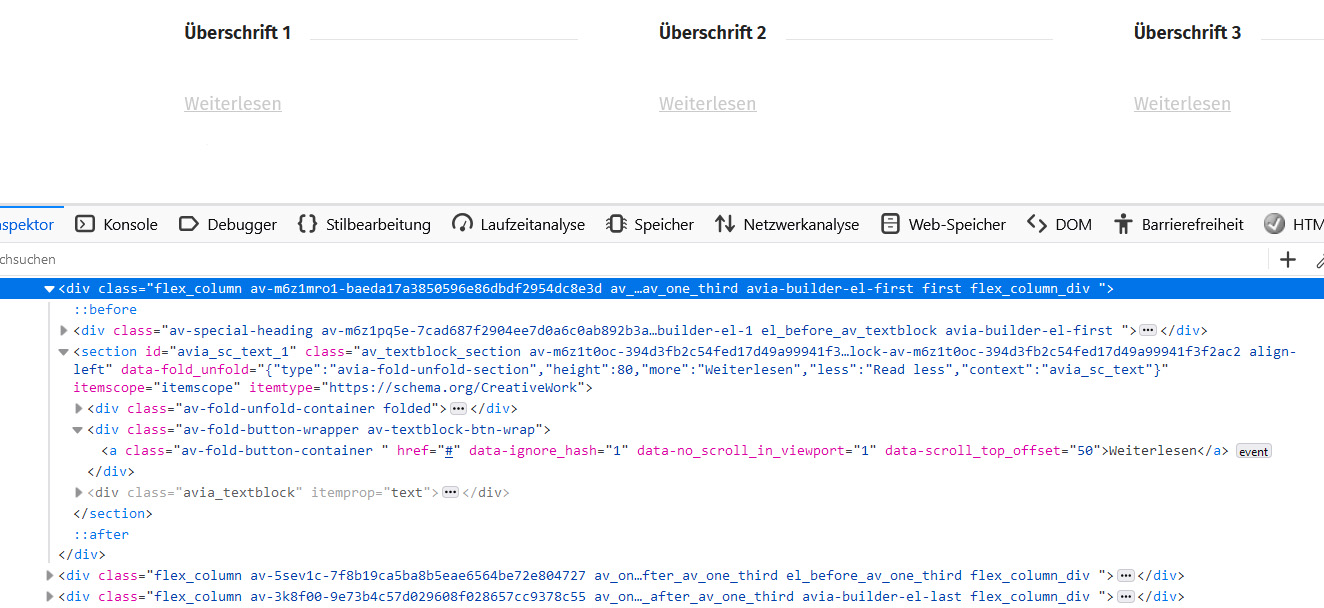
Please look at the first column: The container with the classes “av-fold-unfold-container folded” is empty. The texblock is positioned beneath the “Weiterlesen”-Button (not in the folded container) and is not visible. Any ideas why it’s not working?
Thanks Ruth
Hi,
Thank you for the info.
Lazy loading is working as expected. You can see it in action here:https://drive.google.com/file/d/1OMT7W6kwgbutLuWBIKEe61r_I4KPoeLT/view?usp=sharing
As you may have noticed, some of the images loaded immediately because they are above the fold or close to it, while the bottom images start loading only upon scrolling.
Best regards,
Ismael
Hi Ismael,
I’ve tested it out and was able to fix the issue.
Is there a way to move the menu up so it aligns with the top of the image? I’ve added an image to Dropbox showing how I’d like it to look—file name: “Burger menu w coloured background_edited aligned image.”
Thanks a lot :)
Hey michael,
The Envato (Theme Forest) license is not locked to a domain, or a domain to a license.
I recommend purchasing a new license for $59 and Extend support to 12 months, for a little more.

Then you will have your own Envato account and lifetime updates.
Then see our documentation to create a “Token” to add to the theme for updates, and replace the current license Token.

But first after you purchase your new license, before you create a new Token you will need to manually update your theme because v4.4.1 can not be automatically updated because of how Envato has since changed the license.
Follow these steps:
To update your version of Enfold you will need to download the latest installable WP version from your Theme Forest account and upload it to your WordPress ▸ Appearance ▸ Themes ▸ Add Themes ▸ Add New
after you choose the zip file and click install, you will see a This theme is already installed message because you are updating, you can continue
then you will see the Theme updated successfully message.
I recommend first making a full server backup, I don’t expect any errors, but it is good practice.
Best regards,
Mike
Hi,
Try this instead:
.bdp-post-categories a,.bdp-post-title a,.av_textblock_section a.wp-dark-mode-bg-image {
	text-decoration: underline !important;
}
.bdp-post-categories a:hover,.av_textblock_section a.wp-dark-mode-bg-image:hover strong {
	color: #fff
}
Please ensure to copy the code from the forum and not an email notification so the symbols are not converted.
After applying the css, please clear your browser cache and check.
Best regards,
Mike
Hey Rikard,
Appreciate the quick response.
If you follow what you quoted above, hopefully you will see it. Only thing is, it doesn’t happen right away. The images get stripped some time after building the page. Sometimes it’s been days, other times weeks. But please try and see if you can reproduce it.
Only other thing we can think of is object cache causing a problem with how it’s being written to the database. Is enfold fully compatible with object caches?
Thanks
Tim
Hey Tim,
We haven’t any other reports of this problem no. Is there a sure way of reproducing this, or should we follow this?
Eg: Insert a text block via ALB. Use the Add Media button to add an image.
Eg: Insert a timeline via ALB. Use the Add Media button to add an image.
Best regards,
Rikard
Hey Gunter,
We might have a bug with how the enfold parser is handling ![]() tags that are inserted into an ALB element. Across multiple sites now we have randomly had images disappear entirely from the page, and from the source code. This only seems to ONLY affect images that are inserted via an img tag, and not via the ALB Image element or any sliders etc.
tags that are inserted into an ALB element. Across multiple sites now we have randomly had images disappear entirely from the page, and from the source code. This only seems to ONLY affect images that are inserted via an img tag, and not via the ALB Image element or any sliders etc.
Eg: Insert a text block via ALB. Use the Add Media button to add an image.
Eg: Insert a timeline via ALB. Use the Add Media button to add an image.
The page will work just fine, but then after some days randomly some of these images will not only be gone from the front end, but entirely missing from the backend as well, even in the shortcode debugging section. Then entire img tag just gets completely stripped out, like it was never there.
Have you had any reported instances of something like this before, or can you take a look at how Enfold parses these and see if you can spot any issues?
This has been occurring now for a couple of months across multiple sites.
Thanks a lot
Tim
-
This topic was modified 1 year, 2 months ago by
 THP Studio.
Hi,
Thank you for the inquiry.
The only known host so far having issues with the demo import is OVH, but it’s possible that restrictions on your server are causing the import to fail. If that is the case, you can try manually importing the demo by following these steps:
— Download the demo that you’d like to install from this link: https://github.com/KriesiMedia/enfold-library/tree/master/demos
— Extract the zip file and retrieve the XML file.
— After that, go to Dashboard > Tools > Import and install the WordPress importer, then run it.
— Upload the XML demo file.
The demo images may not be included in the import due to server security restrictions. You can edit the pages and upload your own images.
Let us know if this works.
Best regards,
Ismael
Hi,
Your page masonry is set for 4 columns, that is why it is not centered for 3 columns, please change the column count:

Best regards,
Mike
Hi,
I deleted it for you before the last post:

So you are all done.
Glad we were able to help, if you have any further questions please create a new thread and we will gladly try to help you. Thank you for using Enfold.
Best regards,
Mike
Hey Augeundso,
A child theme allows you to add customizations to core element files that you don’t want to lose on your next update.
For example, if you wanted to customize a element like the contact form, and you found a solution that says add some PHP code to your functions.php file, the next time you update you will lose this code. If you don’t need this kind of customization, you will be fine.
If you are not using a child theme you could use the WP Code plugin then add a new snippet, in the top right corner use the PHP snippet as the code type:

and ensure that it is activated, then add your code and save.
You can add a child theme at any time, follow these steps: child theme
Best regards,
Mike
Hi,
I made an adjustment so now the image is on the right side, but your titles are too large and long, so I added this css to brake your text so the element lines up good:
.avia-timeline h2.av-milestone-date>strong {
	width: 200px;
	font-size: 20px !important;
	overflow-wrap: break-word;
  word-wrap: break-word;
  -ms-word-break: break-all;
  word-break: break-all;
  word-break: break-word;
  -ms-hyphens: auto;
  -moz-hyphens: auto;
  -webkit-hyphens: auto;
  hyphens: auto;
}
you can adjust the font size and width to suit, but there is not a lot of options.
You may try making the page width 100% with this css:
.responsive #top.page-id-19 #after_tab_section_1 .container {
	max-width: 100%;
}
and then make the font size and width larger to suit.
Best regards,
Mike
Hi,
Here (https://www.traumwandel.de/traumartikel/) it looks like you are using a plugin “blog-designer_pack” the above css works in the footer.
Try adding this css:
.bdp-post-categories a,.bdp-post-title a,a.wp-dark-mode-bg-image {
	text-decoration: underline !important;
}
.bdp-post-categories a:hover,a.wp-dark-mode-bg-image:hover strong {
	color: #fff
}
Best regards,
Mike
Hi,
The ID for “av-m1yjw3j3-8de8ef07635f179e0beedc245c4c38a7” is “sub_menu1”

so replace the class in your css “av-m1yjw3j3-8de8ef07635f179e0beedc245c4c38a7” with the ID “sub_menu1”
You also have an extra “bracket” in your css, probably braking it.
/*A B C ……..*/
@media only screen and (max-width: 767px) {
  /* Add your Mobile Styles here */
  #top #menu-dialektwoerter > li {
  padding: 2px 0;
  display: inline-block;
  }

  #top #menu-dialektwoerter {
  padding: 10px 0;
  }

  #top #sub_menu1 {
  width: 40px;
  }
  #top #sub_menu1 {
  position: fixed !important;
  right: 0;
  top: 10px;
  width: 50px;
  }
  #top #sub_menu1 + .sticky_placeholder {
  height: 0 !important;
  }
  }
Please ensure to copy the code from the forum and not an email notification so the symbols are not converted.
After applying the css, please clear your browser cache and check.
Is the problem that the first page submenu is:
A B C D E
and the second page submenu is:
A B C D
Best regards,
Mike
You are the best!!!
And last thing please, because you are the only one who will be able to figure this out:
The formatting is wrong, only on Desktop view. On mobile it is right and when I am signed in, it looks correct.
I even tried cache and all that. Nothing works. The headline sizes are small, button colors are white, and even missing a background photo at the bottom of home page. see screenshots. Can you please Take a quick look?
live, not right formatting: https://img.savvyify.com/image/Screen-Shot-2025-02-07-at-5.39.03-PM.9p7cM
my view when signed in: https://img.savvyify.com/image/Screen-Shot-2025-02-07-at-5.40.42-PM.9pGUA
https://img.savvyify.com/image/Screen-Shot-2025-02-08-at-12.52.28-PM.92ll8
https://img.savvyify.com/image/Screen-Shot-2025-02-08-at-12.52.05-PM.92yWN
Hi,
@media only screen and (max-width: 768px) {
    .avia-caption-content p {
        font-size: 40px !important;
        line-height: 32px !important;
    }
}
@media only screen and (max-width: 479px) {
    #top #wrap_all .avia-slideshow .av-slideshow-caption .avia-caption-title {
        font-size: 50px;
        line-height: 43px;
    }
}

Best regards,
Mike
And I have to ask you, because you are one of the best techs that I talk to, could you take quick look at my website? The formatting is different that when I am signed in, compared to live site. I even tried cache and all that. NOthign works. The headline sizes are small, button colors are white, and even missing a background photo at the bottom of home page. Can you please Take a quick look?
live, not right formatting: https://img.savvyify.com/image/Screen-Shot-2025-02-07-at-5.39.03-PM.9p7cM
my view when signed in: https://img.savvyify.com/image/Screen-Shot-2025-02-07-at-5.40.42-PM.9pGUA
https://img.savvyify.com/image/Screen-Shot-2025-02-08-at-12.52.28-PM.92ll8
https://img.savvyify.com/image/Screen-Shot-2025-02-08-at-12.52.05-PM.92yWN
I’m even missing background images on the home page. See screenshot. Please help. I am running ads and my site look weird. Thank you for your help on this.
https://img.savvyify.com/image/Screen-Shot-2025-02-08-at-12.52.28-PM.92ll8
https://img.savvyify.com/image/Screen-Shot-2025-02-08-at-12.52.05-PM.92yWN
Hi Mike,
thanks for your reply. My timeline looks exactly like in image 1. And the final result should look exactly like in image 2. However, I added both codes and it still looks like in image 1. Maybe you have some other advies?
Thank in advance!
Hi,
As I understand, you see this:

and would like this:

Try this CSS in your Enfold Theme Options ▸ General Styling ▸ Quick CSS field:
@media only screen and (max-width: 767px) {
	.page-id-4540 .av_one_fifth.avia-builder-el-59,.av_one_fifth.avia-builder-el-66 {
		display: none;
	}
    .responsive #top.page-id-4540 #wrap_all .content .entry-content-wrapper .flex_column.av_one_fifth {
        width: 33%;
    }
}
After applying the css, please clear your browser cache and check.
Best regards,
Mike
Hi,
Unfortunately background videos will not display on mobile views by default and are replaced with their fallback images, please try the layerslider
Best regards,
Mike



