Hi,
I tested your fontello-d73127ed.zip and added this php code to my functions.php
function avia_add_custom_icon($icons) {
$icons['mastodon'] = array( 'font' =>'mastodon-bluesky', 'icon' => 'ue800');
$icons['bluesky'] = array( 'font' =>'mastodon-bluesky', 'icon' => 'ue801');
return $icons;
}
add_filter('avf_default_icons','avia_add_custom_icon', 10, 1);

function avia_add_custom_social_icon($icons) {
$icons['mastodon'] = 'mastodon';
$icons['bluesky'] = 'bluesky';
return $icons;
}
add_filter('avf_social_icons_options','avia_add_custom_social_icon', 10, 1);
add_filter('avia_social_share_link_arguments', 'avia_add_social_share_link_arguments', 10, 1);
function avia_add_social_share_link_arguments($args){
    $mastodon = array('mastodon' => array("encode"=>true, "encode_urls"=>false, "pattern" => "https://www.mastodon.com/", 'label' => __("Share on mastodon",'avia_framework')));
	$bluesky = array('bluesky' => array("encode"=>true, "encode_urls"=>false, "pattern" => "https://www.bluesky.com/", 'label' => __("Share on bluesky",'avia_framework')));
    $args = array_merge($mastodon,$bluesky, $args);
    return $args;
}
and this css to my quick css:
#top #wrap_all .av-social-link-mastodon:hover a{
    color:#fff;
    background-color:blue;
}
#top #wrap_all .av-social-link-bluesky:hover a{
    color:#fff;
    background-color:blue;
}
and they both show in my social profiles:

and in my “Profile Links At The Bottom Of Your Blog Post”

and in the header:

and in the “Share this entry” on blog posts:

please give this a try.
Best regards,
Mike
Hello, The Slider image on my homepage is skewed. It looks fine on desktop and tablet but not mobile. I’m not sure if this is being caused by some css code. I have included all the css from my current site in private.
Hi there,
a client of ours has to pay a fee because the copyright didn’t show anymore. In the changelogs, we didn’t find anything about you changing the output of a copyright of an image.
We had to manually display the copyright now (see link 1). Can you maybe tell us when this change happened?
(link 2 is a webarchive link where the copyright was shown, without our code)
thanks in advance!
Hey Gunter,
Now that WooCommerce has FINALLY added Brands support into core (https://woocommerce.com/document/managing-product-taxonomies/product-brands/) could you please add the same styling support that currently is in place for categories (eg: the 6 different options of display of breadcrumbs and banner image) and any other support that may be needed in ALB elements?
Brands are now enabled by default for new installs so this will be needed pretty soon by new users, and us existing users may choose to switch over at some point.
Thanks a lot,
Tim.
Hi,
You may need to remove the text from the background images and add it to the flipback element as actual text. Make sure to set the background image to stretch to fit so that it covers the entire container.
Best regards,
Ismael
Hi,
Would you mind providing a screenshot of the issue along with the login details for the site? You can use platforms like Savvyify, Imgur or Dropbox to upload and share the screenshot. Here are the steps to follow:
1.) Visit the website of your chosen platform, such as Savvyify, Imgur or Dropbox.
2.) Locate the option to upload a file or an image.
3.) Select the screenshot file from your computer or device and upload it to the platform.
4.) After the upload is complete, you will be provided with a shareable link or an embed code.
5.) Copy the link or code and include it in your message or response to provide us with the screenshot.
Thank you for taking the time to share the screenshot. It will help us better understand the issue you’re facing and provide appropriate assistance.
Best regards,
Ismael
Hi,
The screenshot is still not available. Please make sure the image has finished uploading before retrieving the share links from Imgur. You can also try Savvyify or Dropbox.
Best regards,
Ismael
This reply has been marked as private.
Hi We have have found a bug with the full width easy slider.
If you enable transparent header and have a full width easy slider at the top of the page then the caption doesnt load in consistently.
Sometimes it does sometimes it doesnt.
You can see this on the site in the private comments.
INSTURCTIONS TO RECREATE:
Visit the pages in the private content, browse between them a few times, after the initial pageload the header and button elements stop appearing over the header image.
This is an ALB full width easy slider with caption and 2 buttons.
The buttons and caption do not display consistently.
Hi,
The search preview does only work in the navigation bar but not on the search page itself.
https://www.daseq.de/?s=jobs
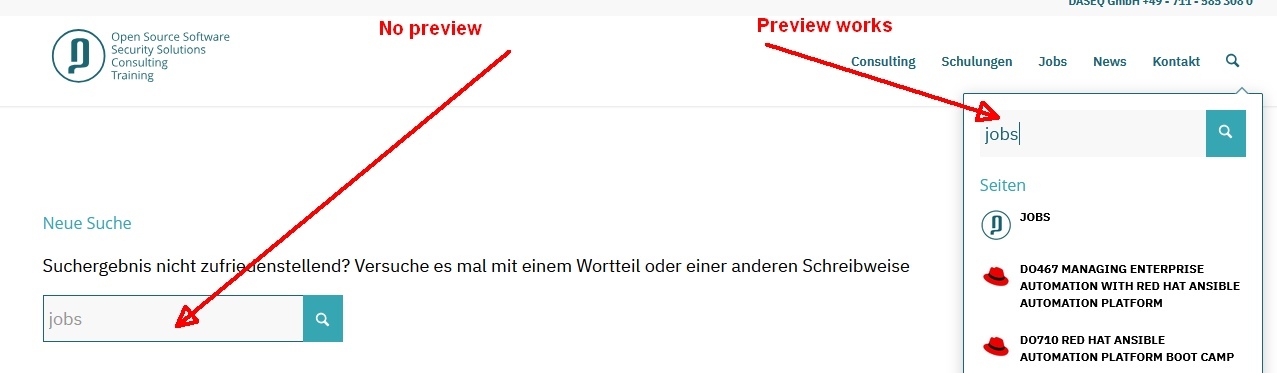
Thanks for any hint
Kind regards
Uli
-
This topic was modified 1 year, 1 month ago by
 Johnny.
Hey rixi,
Would you mind providing a screenshot of the issue? You can use platforms like Savvyify, Imgur or Dropbox to upload and share the screenshot. Here are the steps to follow:
1.) Visit the website of your chosen platform, such as Savvyify, Imgur or Dropbox.
2.) Locate the option to upload a file or an image.
3.) Select the screenshot file from your computer or device and upload it to the platform.
4.) After the upload is complete, you will be provided with a shareable link or an embed code.
5.) Copy the link or code and include it in your message or response to provide us with the screenshot.
Thank you for taking the time to share the screenshot. It will help us better understand the issue you’re facing and provide appropriate assistance.
Best regards,
Ismael
concerning to svg ( that topic is closed ) you asked make svg – so i thought you do not have one.
You can use Illustrator to do so from an image – but this image redrawer is not 100% accurate, it depends mainly on the image and its resolution.
Hi,
i have allmost no text on my website, because it’s an artist page with almost images.
I’m trying to make the text-logo to a H1, but i could not find a way to do that?
I added this to my function.php to have a text-logo:
add_filter('avf_logo_subtext', 'kriesi_logo_addition');
function kriesi_logo_addition($sub) {
    $sub .= "My Website Textlogo";
    return $sub;
}
How can i make the “My Website Textlogo” to <H1>My Website Textlogo<H1> for seo reasons?
kind regards
Jak
Hey distortedimage,
Try this css instead:
#top .package-slider .avia-slideshow-arrows.avia-slideshow-controls a.prev-slide:before {
    content: "<" !important;
}
#top .package-slider .avia-slideshow-arrows.avia-slideshow-controls a.next-slide:before {
    content: '>' !important;
}
Please ensure to copy the code from the forum and not an email notification so the symbols are not converted.

Best regards,
Mike
Hey finchkelsey,
Try this CSS in your Enfold Theme Options ▸ General Styling ▸ Quick CSS field:
.avia-data-table-wrap td {
	vertical-align: top;
}

Best regards,
Mike
Hey Diana,
Since your menu is too large for screens lower than 1500px you should display the mobile menu instead, I changed this for you


clear your browser cache and check.
Best regards,
Mike
Hi,
It looks like someone changed the directory name from “enfold” to “enfold-” with a dash:

This maybe the issue, you will need to change this via ftp or your webhost file manager
Best regards,
Mike
Hi,
When I check your parent theme enfold looks correct:

and in the child theme the Template name looks correct:

but I have not seen this code in your child theme functions.php:

I tried commenting it out, but it didn’t help.
Currently you have the Twenty Twenty-Five active, I’m not sure what your critical error was, perhaps the best solution is to restore from a older backup.
Best regards,
Mike
Hey Sandra,
First, click the edit button for the half column:

then change under design:

Best regards,
Mike
Hey srsutherland,
When I check your site the only broken image I see is the Canada Flag under the “About” title, but only when the ad-blocker is active.
Try disabling your ad-blocker.
Best regards,
Mike
Hi,
Try replacing the file at enfold/framework/php/class-responsive-images.php with the linked file.
Keep the old file as a fallback.
Best regards,
Mike
Hi, im having some issues with the gallery media elemets. I already have images setup already; everything is showing fine. Only when I go to add another image to the set, sort it save and update the page, the image is not being applied. Does anyone know what is causing this? I deactivated all my plugins to see if that was affecting the update page but nope. it’s still giving some issues.
Hello,
Having new display issues on the first load of homepage. In response to this errors I decided to set up a brand new WordPress and Enfold installation for testing, and imported the same Demo Content I was using on my paster site; Image links and formatting is broken (on first page load or cleared cache load) unless browser refresh button is clicked (in Chrome and Edge only – Firefox works fine). Does anyone know what could cause this?
-
This topic was modified 1 year, 1 month ago by
 srsutherland.
Hey northorie,
Try this CSS in your Enfold Theme Options ▸ General Styling ▸ Quick CSS field:
@media only screen and (max-width: 767px) {
#av-layout-grid-1 .flex_column {
    background-image: url(//schlafundseele.mindful-designs.de/wp-content/uploads/2025/03/Design-ohne-Titel-22-1.png) !important;
    background-repeat: repeat;
    background-position: center;
    background-size: contain;
    background-position: top center;
}
}
Best regards,
Mike
Hi,
The login is not admin so we can not see any of the settings.
Try going to the theme settings and ensure that the “frontpage” is set and that the “blog” is not set, sometimes the same page is in both fields causing the error.
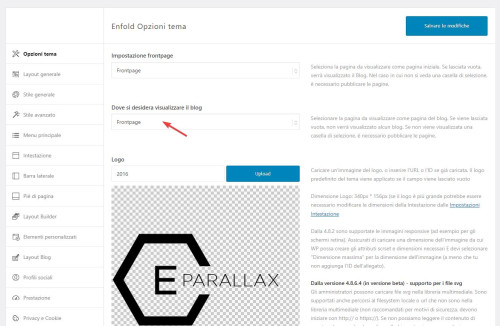
Best regards,
Mike
Hi,
The “charter code” (ue800) is probably not correct, we would need to see the file. If you are using plain SVG files and not iconfont from Fontello.com then first convert it on Fontello

Best regards,
Mike
Hi,
I believe there may have been a issue with your font, I uploaded a new one from Google Fonts and added this css:
#top #wrap_all .sacramento h2 {
font-family: "sacramento", cursive;
font-weight: 700;
}
and it seems to work now:

Best regards,
Mike
Hello Guenni007
thanks for your help! i appreciate it very much.
the layout is stretched now.
looks good, but a few small things are not oke yet:
1. https://jmcwebdesign.nl/fotos/wp-content/uploads/2025/03/halfbeeld-scaled.jpg
turning the screen of small devices the image/video leaves a gap at the right side (see also : screenfly )
the Keeping the fireplace in view bit may be not totally correct? im not sure…
2. there is some kind of haze over the text below the pic….has something to do with the z-index i belief but i cant figure out what exactly…
Best regards, jelle
-
This reply was modified 1 year, 1 month ago by
 jeel147.
Dear all do you know how we can correct troubles with avia footer scripts. Are such troubles from plugins or from some stuff i i did in my pages ? this is slowing down both mobile and desktop
regarding layerslide : do you guys recommend to fill it with 1280 / 720 format as indicated in the layerslide set up dashboard ? or does it resize automatically the images ? i am trying to understand if such thing can slow down the page
-
This topic was modified 1 year, 1 month ago by
 hankboomer.



