-
Search Results
-
When I try to make a gallery with one big picture and thumbnails – big picture being natively a very LONG one but being set to portfolio – everything works except there is a white box under the main photo that looks like it may be ~300px long.
Also, the overlay images on images are wrong. Instead of getting an icon or something when I hover an image, I get E869.
Thanks!
Topic: Random images
Is it possible to have random images from the categories selected in either the Masonry full width or portfolio grid?
I wanted the front page of my website to have random member images displayed from several hundred and don’t want the same ones at the front every time.
Hey,
Disclaimer: I am developing this site locally, so all I can provide you with is information and screenshots.
I have two questions:
1 ) I am trying to add a background hover color for the main menu items, but want to create a ‘box effect’ (using css3 with transitions etc.) around the menu word/item. Considering the area for each menu item stretches all the way to the top and bottom of the header, under what class/id should the css be placed?2) On my blog homepage I’ve set the sidebar to a custom widget area I’ve created (where I’ve included ‘Recent Posts’ only), but the sidebar still displays the search bar, another recent posts section, comments, archives, categories and meta beneath the sidebar area I’ve set. Please see screenshot below:
http://postimg.org/image/bk6ecbkzr/
http://postimg.org/image/bk6ecbkzr/
Thanks!
I have added videos, single images and sliders using the Avia framework and none open a lightbox when clicked. I upreved to the latest Enfold rev today.
Topic: Connection Error…
Building a page in the Avia Layout Builder > Text Block. I have text and image in this area now when I click on this area and when the pop up editor appears the page is blank with the spinning circle icon. If I click save or the x button it takes me back to the that page layout builder but at the top of the page is “Connection Lost….”.
I have turned off each plugin one by one and still get this error. I contacted the server company and they tested. They say it is a theme issue saying that the execution time on PHP is timing out at 30s.
Can you please help fix this issue? Need to launch site today. Thanks
Hello,
while everything has been working perfectly fine until today a sudden problem with my logo appeared.
On Firefox the logo is completely pixelated while on Safari and Chrome it still looks OK.
The same problem occurs on a single page of my website with an image in the fullwith-slideshow.
To me, it seems that firefox somehow gets stuck within the scaling process!
I have deactivated all plugins, cleared the browser cache, but the problem still persists.
Any help highly appreciated. I can send u guys my website and login data vial e-mail or webform but I would not want to make it public.
Thx in advance
MaxDear Kriesi Team,
I’ve got a question concerning the enfold theme in combination with the WooCommerce shop plug in. We are a company, that would like to sell video clips via the woocommerce shop. The whole layout incl. programming was done by a programmer and is oriented on big video agencies like shutterstock.com or corbismotion. We created a catalog of small thumbnails (jpeg) that are loaded first. While mouse over, a low res video starts to play. By clicking on the video, you get into the article details and can buy the article. Here is a screenshot of the catalog view incl. mouse over effect: WooCommerce Thumbnails" />
We have noticed, that all small thumbnail images are a little bit unsharp, although the woocommerce thumbnails size (Woocommerce settings -> Image options) matches exactely the pixel size of our source jpegs, that I’ve uploaded to each article and which are clearly sharp.
Woocommerce or WordPress must either do an unnecessary resizing, that we don’t want or must apply a compression to the jpegs.
Due to the responsive design, the images getting more and more unsharp when reducing the windows size of the browser. I found out, that woocommerce scales the thumbnails to five different pixel sizes, depending on the size of the browser window.Thumbnail size full screen window 187×105
reduce window size Thumbnail jumps to 159×89
reduce window size more Thumbnail jumps to162x91
reduce window size more Thumbnail jumps to 208×117
reduce window size more Thumbnail jumps to 266×150 (its a view like on an i-phone display)Is there a way that we can make our thumbnail images sharper throughout the whole responsive layout and avoid unnecessary image processing by woocommerce/wordpress?
Thanks for your answer!
Hi
Since the last update the WP native gallery will not show in the Gallery Post Type. It will show by selecting standard or link or Quote (well, a tiny version) but nothing will make it display when I select ‘Gallery as a post type.Was 100% fine before the update…
Here: http://www.swarez.co.uk/sold_art/fluid-dynamics/ should have nine images above the text – one of which was a big one – like it used to be when the Gallery post type was selected.
I have 147posts that now show NO images.. Please help…
Thanks
EdHi hi,
Untill now I have been working locally, and today I have just moved the website for testing. You can check it.
http://14.192.65.20/~mymakna/test/home-3/There are few sections that I will need help for. I would be very grateful if you find time to consider them.
1. Transfer problems with the images links: After I have transferred the website from localhost to the live page, I have used SQL update to change the links from localhost/wordpress to http://14.192.65.20/~mymakna/. Anyhow some of the pictures are displayed some are still keeping the old link. Can u pls tell me what might be the problem?
2.IE Issues:
-The font is different
– All the objects(buttons, pictures)who are suppose to have round squares are displayed as boxes.
– The width of the whole website is smaller
– The background picture of the buttons Volunteer and Donate is not displayed in full size. Mozila doesnt show them properly as well.3. Chrome: Social bookmarks icons which are part of the header are not displayed on Chrome, even though I can see them in the code.
Thank you a lot for your help. Highly appreciated.
Is there a way to crop the easy slider image in mobile view? Right now, it’s reducing the full width image so that it fits in the mobile view but then the height is super small. I’d like it to be taller and just to crop out 25% on either side. Not sure if that’s possible??
Hi, I am having a problem with the content slider. I have one column, no auto
All displays and works fine on regular monitor. But on mobile devices the last slide image appears on top covering up the first image.
I actually have iframe to youtube video in each content slide. In mobile the text and video plays from first slide but you see image from last slide. See: http://elwoodtemp.com/gemco-valve-product-video/
How can i fix so that the mobile version works the same as full monitor version?Is there a quick css code that can be used to force a certain image size for the ‘Single Post With Big Preview Image’? For instance, I have an image that is 700w x 300h, but another one is 600w x 250h, but I wanted all the images in the blog to be 800w x 350h .
Thank you for your help. Much appreciated. Great theme too!
Gary
Topic: menu background image IE8
https://kriesi.at/support/topic/menu-background-image/
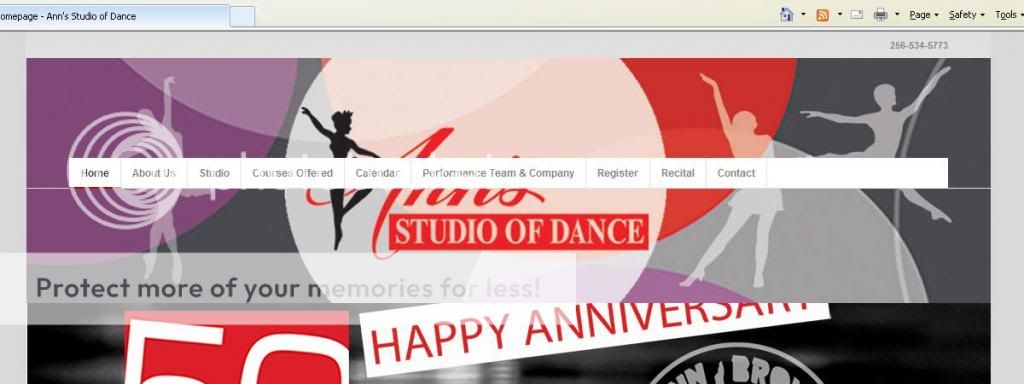
Hi, I started the topic above… I have checked using IE8 and the background and menu are not displaying correctly. The menu is sitting over my slider instead of over the background image. Is there some code I need to add to get it working on IE8.
Thanks in advance for your help
Viewing 30 results - 100,501 through 100,530 (of 106,426 total)