Hey!
You can’t control the slider size. It will always use the entire container width of the surrounding container. If you put it in a column the slider width will adjust to the column width, if you use it without a column wrapper the slider will stretch over the entire page width. The thumbnail size option helps you to select the right image size for your slider but it won’t set a fixed size. If you’reusing a slider within a column you can choose a smaller thumbnail size, for a fullwidth slider you need to use a bigger thumbnail size, etc.
Regards,
Peter
Hi!
Yes – you could use the “Partner/Logo Element” which enables you to add an unlimited number of images to a grid and you can link these images to different websites or pages.
Cheers!
Peter
Thanks Josue, that works. Only problem is that there is a few pixels wrong until you roll over the image, then it aligns perfectly. On the ipad for instance I can’t roll over the image so there the gap remains. Is this rollover function something that I can turn off?
Once again, thanks.
Hi!
We really are not able to debug customizations like that for you. If it isn’t available as part of the theme functions we will do our best to try and assist with some custom css but cross browser testing and bug testing is beyond what we can do via support.
Your best route would be to look into a freelance developer who can help you finish off customization like that. It could just be a syntax issue or something like that but also remember that IE8 doesn’t even have support for border-radius so it wouldn’t render that kind of css anyway.
Cheers!
Devin
Hi covaun!
The first option will display them at their original ratio:
Flexible Masonry: All images get the same width but are displayed with their original height and width ratio
But no, there isn’t an option to keep them at the original size since its responsive to the screen width.
Regards,
Devin
Hi,
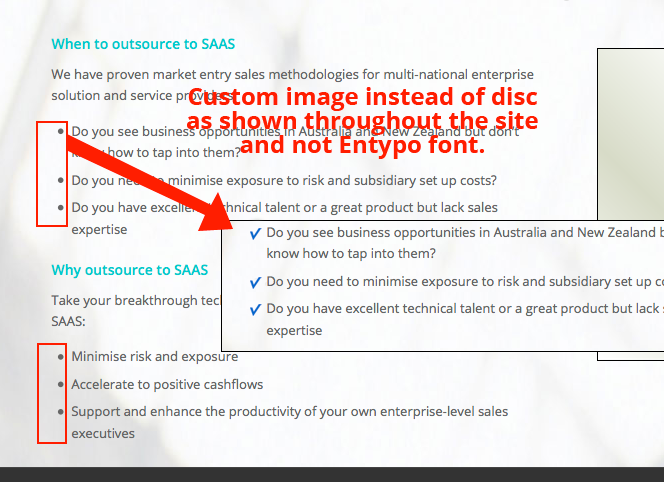
I want to use a custom image for bullets instead of the default in the list items on the site http://web8f.spring.studiocoast.com.au/ (Enfold Theme)
I have been through the forum and cannot get an easy solution.
The screen shot is here http://firoz.namroz.com/support/custom-bullet.png
Please let me know where can I change the css and where do I upload the custom image. Thank You.
Cheers
Now I’ve tried setting the text widget images to 100% and now they are the same size, however there is a bigger gap between the title and the image on the Instagram box and I can’t find the CSS to make them equal. Can you point me in the right direction?
Thankfully
/Michael
Thanks Josue – but how about pages, categories and images? Will they be overwritten?
Regards,
Derek
Hi Yigit,
thx for the reply and SORRY, WPML has redirected you to the english version of my site where the logo was set to 100×97, so it was not scaling down.
I have deinstalled WPML on my testserver. Please check again, you will now see then see what I am talking about.
http://www.mhstudios.de
Best Regards
Maxim
Hey kaMai!
Please see this video tutorial http://vimeo.com/channels/aviathemes/67651241
Best regards,
Yigit
Hi Maxim_HH!
I just checked your website on Firefox and your logo looks the same as it looks on Chrome http://i.imgur.com/y1XVe5w.jpg
Please go to wp-content\plugins folder in your WordPress theme directory and remove files of the plugin
Cheers!
Yigit
Thanks.
We did that and problem was resolved.
(along with installing Respond.js)
Is it possible for the fullwidth masonry gallery images to be set to there original sizes?
Thanks
I’ve got a ‘Referal URL’ associated with an image in an Advertising Area widget. How do I make the ‘Referal URL’ launch in a blank page, instead of within the existing page? ie: target=blank
Hey idespiran!
Where are you going to use the images? Slider? Blog posts? You can find the image sizes on functions.php, find this code:
$avia_config['imgSize']['widget'] 			 	= array('width'=>36,  'height'=>36);						// small preview pics eg sidebar news
$avia_config['imgSize']['square'] 		 	    = array('width'=>180, 'height'=>180);		                 // small image for blogs
$avia_config['imgSize']['featured'] 		 	= array('width'=>1500, 'height'=>430 );						// images for fullsize pages and fullsize slider
$avia_config['imgSize']['extra_large'] 		 	= array('width'=>1500, 'height'=>1500 , 'crop' => false);	// images for fullscrren slider
$avia_config['imgSize']['portfolio'] 		 	= array('width'=>495, 'height'=>400 );						// images for portfolio entries (2,3 column)
$avia_config['imgSize']['portfolio_small'] 		= array('width'=>260, 'height'=>185 );						// images for portfolio 4 columns
$avia_config['imgSize']['gallery'] 		 		= array('width'=>710, 'height'=>575 );						// images for portfolio entries (2,3 column)
$avia_config['imgSize']['masonry'] 		 		= array('width'=>705, 'height'=>705 , 'crop' => false);		// images for fullscreen masonry
$avia_config['imgSize']['entry_with_sidebar'] 	= array('width'=>710, 'height'=>270);		                 // big images for blog and page entries
$avia_config['imgSize']['entry_without_sidebar']= array('width'=>1030, 'height'=>360 );						// images for fullsize pages and fullsize slider

//overwrite blog and fullwidth image on extra large layouts
if(avia_get_option('responsive_layout') == "responsive responsive_large")
{
	$avia_config['imgSize']['gallery'] 		 		= array('width'=>845, 'height'=>684 );					// images for portfolio entries (2,3 column)
	$avia_config['imgSize']['entry_with_sidebar'] 	= array('width'=>845, 'height'=>321);		            // big images for blog and page entries
	$avia_config['imgSize']['entry_without_sidebar']= array('width'=>1210, 'height'=>423 );					// images for fullsize pages and fullsize slider
}
You can edit wp-config.php, find this code:
define('WPLANG', '');
Replace it with:
define('WPLANG', 'sv_SE');
You can use this plugin to translate the strings manually. http://wordpress.org/plugins/codestyling-localization/
Cheers!
Ismael
I just tried that plugin and the images in my portfolio grid disappeared, the thumbnails on my galleries stopped animating in, and the lightboxes stopped working at all.
The lightbox pretty much sucks on the iPhone — the formatting is funky, and having to click on those little arrows is really cumbersome. I would LOVE it if there were some improvement on this. Please let me know if you have any ideas.
I thought I read somewhere the best dimensions for the images for this theme… Enfold.
I would like to set the hight and width in Photoshop… But know I can´t find it ;-)
And antoher thing – read this in the changelog :-)
2013 September 18 – Version 2.2
What changed: The template builder now works fne with wordpress 3.6 Revisions!
We also added a bunch of language files submitted by our users to make it easier to switch to another language. New languages:
Danish
Spanish
French
Japanese
Russian
Swedish
Dutch
German
But can´t find how to change to for example Swedish :-)
Hello,
I’ve introduccido in the box you see in the picture, but as you can observe, in the second image is where I have the menu, it does nothing.
What have I done wrong?
Thank you very much.
JUANJO


Unfortunately, my first request on this support forum has not really been responded to.
I still have strong logo/image issues with enfold. This happened at sudden – while it worked fine for months before.
When I upload large image sizes to enfold (so that firefox scales them down when viewing in the browser) I get heavy rendering issues. (images completely pixelated.) Something blocks Firefox from rendering properly. (safari and chrome work fine)
I have now installed my website on this testserver: http://www.mhstudios.de
I have uploaded the logo in a large size and it looks like a mess on firefox. 471px × 500px (scaled to 85px × 90px)
I wonder whether a certain script may be hindering firefox from rendering properly. What do you think?
Pagespeed Insights tells me that https://connect.soundcloud.com/sdk.js?ver=3.7.1 blocks rendering. However, I have already removed this plugin.
Can you tell me which file to edit in order to remove this javascript code?
THANK YOU!
-
This topic was modified 12 years, 4 months ago by
 Maxim_HH.
Hey, thanks for the response.
You mean instead creating my slider image size of 1030 x 360, I should extend the width to 1920 x 360? But in the Global Settings, I leave the “Slider Width” at 100% correct? As for image quality, even when I added the code in the function.php for jpg compression to 100%, that doesn’t do anything huh?
I was hoping to adjust where when stretching out the browser window size, that the image would expand, but retain the top and bottom position and expand outward proportionally.
Also, is there a way to add a short mail form in the Widget area? Would like to add an E-mail Subscribe Form, as in just an E-mail Field with a Submit button. I rather not go with a 3rd Party Plugin for this. Let me know. Thanks.
-
This reply was modified 12 years, 4 months ago by
 khoavo.
Hey warrentkachuk!
This feature would require some custom code and is not supported by Enfold out of the box. You can try this plugin: Magic Zoom – as far as I know it comes with such a feature and the plugin author helps you if it doesn’t work (properly) with our themes.
Regards,
Peter
Hi!
1) To fix the logo issue insert following code into the quick css field:
.logo img {
height: 55px\9;
width: 300px\9;
}
2) Yes, unfortunately IE8 does not support stretched background images because it doesn’t support css3 code. Only newer IE versions (IE9,10,11) support them.
Regards,
Peter
The AJAX portfolio images. They still open a lightbox, or try to, on mobile. Take a look at http:..mcalpin.net on the iPhone for instance… and choose one of the portfolio pieces. If you choose the Mesaging/Branding post, you’ll see that tapping on any of these photos brings up a lightbox. It shouldn’t. Also… although the arrows for the slideshow are gone… the little dots are still there. Can er get rid of those also?
Thanks Yigit!
Hey mAqq!
Did you solve the problem? I just visited your website and the images display fine for me: http://www.clipular.com/c?4691520619806720=-rJj5SOHSVWDmfNjdHwBkkxEd5I&f=.png
Regards,
Peter
Hi!
If you want to remove the featured image from single pages open up /wp-content/themes/enfold/includes/loop-portfolio-single.php and delete
if($thumb) echo "<div class='page-thumb'>{$thumb}</div>";
Regards,
Peter
Hey!
I think my fix works. I used the code someone posted here: http://en.forums.wordpress.com/topic/vertically-stretched-images-in-ie and adjusted it a bit
.avia-content-slider .slide-image img {
max-width: 100%;
width: auto;
 }
At least IETester seems to display the images properly now. I’ll tag this thread for Kriesi and ask him to include the code with the next update.
Cheers!
Peter
Hey apweb!
You can select the logo size after uploading the logo image and before you click the “Use this image as logo”. Add this on your custom.css or Quick CSS to move the logo horizontally:
.logo.bg-logo {
left: 30%;
}
Can you please post a screenshot of what you’re trying to do?
Cheers!
Ismael
Hey fjrichart!
You can edit header.php, find this code:
echo avia_logo(AVIA_BASE_URL.'images/layout/logo.png', false, 'strong');
Below, you can place a banner, image or anything you want:
echo "<div class='header-right'>CONTENT HERE</div>";
Regards,
Ismael