Viewing 30 results - 841 through 870 (of 106,442 total)
  • Author
    Search Results
  • #1488882

    Hey rixi,

    Thank you for the inquiry.

    The effect is actually disabled on mobile view because the css property that enables it is not supported, specially on iOS. You can try enabling it back using the following css code but you may find issues with the transition.

    #top .alternate_color.avia-bg-style-fixed, #top .footer_color.avia-bg-style-fixed, #top .header_color .header_bg.avia-bg-style-fixed, #top .main_color.avia-bg-style-fixed, #top .socket_color.avia-bg-style-fixed {
        background-attachment: fixed;
    }

    https://caniuse.com/background-attachment

    Known Issues:
    Firefox does not appear to support the local value when applied on a textarea element.
    Chrome has an issue that occurs when using the will-change property on a selector which also has background-attachment: fixed defined. It causes the image to get cut off and gain whitespace around it.
    iOS has an issue preventing background-attachment: fixed from being used with background-size: cover

    Best regards,
    Ismael

    #1488876
    Steve Webgecko
    Guest

    Hi Team.
    I need to migrate my 11-years old static HTML Website (Bootstrap CSS)
    https://www.klangbild.ch
    to WordPress using ENFOLD Theme if possible. I need functions as shown:

    https://www.klangbild.ch/#services
    Boxes Hover: Changing Color, change black Icon to Negative White –> clicking = Lightbox Text window opens. Possible?

    Blog: Pictures in Black&White, hovering IMG changes to Color and With Icon Lens opening bigger Image in Lightbox

    Possible with ENFOLD theme?

    #1488859

    Is there a similar code for webp files as well, as it also seems to increase the sizes of the additional images?

    Regards
    Colin

    #1488852

    Hi,

    Thank you for opening another thread.

    Unfortunately, we don’t provide support for third-party plugins, and we’re not familiar with Redsys. We’ll do our best and take a look. When we checked the Redsys Diagnostics panel, it indicated an issue with the API connection or integration, which might be the reason why the payment gateway is not working.

    Screenshot-2025-09-02-at-1-39-05-PM
    url image upload
    Please check this documentation for more info: https://sis-d.redsys.es/sis/CAs/comunicadoCertificado.html

    Is this the redsys checkout page?

    Screenshot-2025-09-02-at-1-44-36-PM
    url image upload
    We recommend keeping in touch with the plugin developers for additional assistance.

    Best regards,
    Ismael

    #1488848

    In reply to: akkordeon doesn`t work

    Hey rixi,

    Thank you for the inquiry.

    Would you mind providing a screenshot of the issue, or provide the login details in the private field? You can use platforms like Savvyify, ImgBB, PostImages or Dropbox to upload and share the screenshot. Here are the steps to follow:

    1.) Visit the website of your chosen platform, such as Savvyify, ImgBB, PostImages or Dropbox.
    2.) Locate the option to upload a file or an image.
    3.) Select the screenshot file from your computer or device and upload it to the platform.
    4.) After the upload is complete, you will be provided with a shareable link or an embed code.
    5.) Copy the link or code and include it in your message or response to provide us with the screenshot.

    Thank you for taking the time to share the screenshot. It will help us better understand the issue you’re facing and provide appropriate assistance.

    Best regards,
    Ismael

    #1488845

    Hey dondela,

    Thank you for the inquiry.

    You can try this css code to display images above the category sort buttons:

    .sort_by_cat a:before {
        content: '';
        width: 100px;
        height: 100px;
        display: block;
        background-size: contain;
    }
    
    .sort_by_cat .css_sort_button:before {
        background-image: url(https://site.com/images/placeholder.svg);
    }
    
    .sort_by_cat .javascript_sort_button:before {
        background-image: url(https://site.com/images/placeholder.svg);
    }

    The parts .css and .javascript represent the names of the category sort buttons.

    Best regards,
    Ismael

    fiorettipau
    Participant

    Hello,

    1. Header : I would like to add on the top right of my main menu header a call to action, I followed all the instructions you give here > https://kriesi.at/documentation/enfold/header/#toggle-id-5-closed but it does not work, there is no text on the top of my menu.

    2. Footer : I would like to have all of my text content (the column 2, 3, 4) vertically aligned with the text ” Les Fioretti, une ferme en permaculture à Pau”, currently they are aligned with the logo image. I don’t know how to do that without disturbing responsive design.
    Can you help me ?

    Thank you

    #1488814
    dondela
    Participant

    Dear support,
    would it be possible to show images above the portfolio-grid menu.
    Like in my attached layout?

    #1488805
    This reply has been marked as private.
    #1488796

    Hello everyone,

    I have built a new website for the company, and I have two problems.
    1) I would like to create an SVG divider for a grid line. I have tried overlaying it with a colour section, but I can’t control it very well with the -px values. (Or maybe I’m just being stupid.) Especially not on mobile.
    2) When I view this page on a mobile device, there is a huge gap between the text and the image. Can I adjust the height depending on the content, as with a colour section?

    Many thanks.
    PS, I hope it’s OK that I’m reactivating this old post after such a long time. It is based on the above scripts.
    The new side:

    #1488786

    Hey waveseven,
    This is due to the default image compression settings, Enfold unpacks the original file and generates new thumbnail sizes without applying compression, resulting in larger file sizes, especially for larger dimensions like “featured”, “featured_large”, and “extra_large”. This occurs because the theme sets the default JPEG quality to 100, which is higher than the typical WordPress default of 80, and the generated files are not compressed during the resizing process.
    To change the compression of new thumbnail sizes, add this code to the end of your child theme functions.php file in Appearance ▸ Editor and adjust to suit.

    add_filter("avf_jpeg_quality", "avf_set_quality_mod", 9999, 1); 
    add_filter("avf_wp_editor_set_quality", "avf_set_quality_mod", 9999, 1); 
    function avf_set_quality_mod($quality) { $quality = 60; return $quality;}

    For thumbnails already created you will need to regenerate the thumbnails

    Best regards,
    Mike

    #1488784
    waveseven
    Participant

    Hi

    I’m just trying to convince our customer to upload smaller files sizes and use image compression and nexgen image formats etc rather than what they uplaod. However I’ve noticed that files that they have already uploaded which are for example 2500px wide x 1660px with a file size of 231KB. Enfold/Wordpress then creates files for banners etc which are 3 times the files size. e.g. 1500px x 630px becomes 721kb and 1500px x 430px becomes 670kb and so on.

    Do you know why this would be and how we can prevent the image files becoming larger than the orgiinal that is uploaded?

    Many Thanks
    Regards
    Colin

    #1488783

    In reply to: Custom SVG Divider

    if you use the attachment ID of that image you do not need to set a path ; and as far as I know, neither the key nor the name needs to be specified then in the snippet.

    Upload your image – switch to list view – note the ID – use it in the snippet.

    #1488782

    Hey oburlin,
    In the footer the text is in Widgets:
    Screen Shot 2025 08 31 at 6.54.07 AM
    you can edit these from the Widget panel:
    Screen Shot 2025 08 31 at 6.57.00 AM
    Note that the theme has some default demo text that shows if no Widgets are added to the footer columns, so if you don’t see any widgets just add some from the left side of the panel, typically the text widget works well:
    Screen Shot 2025 08 31 at 7.04.23 AM
    These drag and drop into place.
    In the Socket the text “Enfold WordPress Theme by Kriesi” can be removed by adding this shortcode into the Enfold Theme Options ▸ Footer ▸ Copyright field: [nolink] and add whatever text you want to see there.
    Screen Shot 2025 08 31 at 7.10.03 AM
    Here is a link to our footer documentation.

    Best regards,
    Mike

    #1488776

    In reply to: Custom SVG Divider

    Hi,
    In my tests, the name of the array must be in lower case, and the path must be added if you are not using the attachment ID
    for example:

    function custom_avf_custom_svg_shapes( array $custom_shapes )
    {
    	$custom_shapes = array(
    				
    		'mountain-test'	=> array(
    						'key'			=> 'Mountain-Test',
    						'title'			=> __( 'Mountain Test', 'avia_framework' ),
    						'has_flip'		=> true,
    						'has_width'		=> true,
    						'filename'		=> 'Mountain-Test',
    						'path'			=> './wp-content/uploads/avia_custom_shapes/'
    					//	'attachment'	=> '4650'
    									)
    						);
    	
    	return $custom_shapes;
    }
    
    add_filter( 'avf_custom_svg_shapes', 'custom_avf_custom_svg_shapes', 10, 1 );

    Screen Shot 2025 08 30 at 10.23.30 AM

    I would use the media library as Guenni007 suggests, as it would be easier to manage. The documentation also points to this.

    Best regards,
    Mike

    #1488770

    Hey Tobias,
    Please link to your page so we can examine and include a mockup image of what you would like as a result. To add a read more button we will need admin access to test the needed php function.
    To add a screenshot please try using an Screenshot service and pasting the image URL in your post.

    Best regards,
    Mike

    #1488760
    Munford
    Participant

    HI
    – I figured it out thanks –
    from this thread: https://kriesi.at/support/topic/turn-photos-to-black-white-and-bring-colours-back-on-mouse-hover/
    Can you help me make it so my images go from grayscale to color on hover instead of the other way around?
    My client might not want a link on the image, just the hover effect.

    Thanks,
    Nancy

    #1488745

    Hi Guenni007,
    I am trying to fix the Problem with “mobile”. On Webers Testseite looks perfect.
    I don´t understand the following points:
    – i create the pseudo-containers for those bg-fixed sections : before
    – These bg-fixed:before container inherited the background-image from its parent.
    – These bg-fixed:before container are set to position: fixed ! ( this is well supported on mobile devices )
    – to have no overflow – i set a clip-path to each of those color-sections that will cause the slanted boarder
    Perhaps in german?
    Nevertheless, I love the Demo for my actual project.
    Greets Gabi

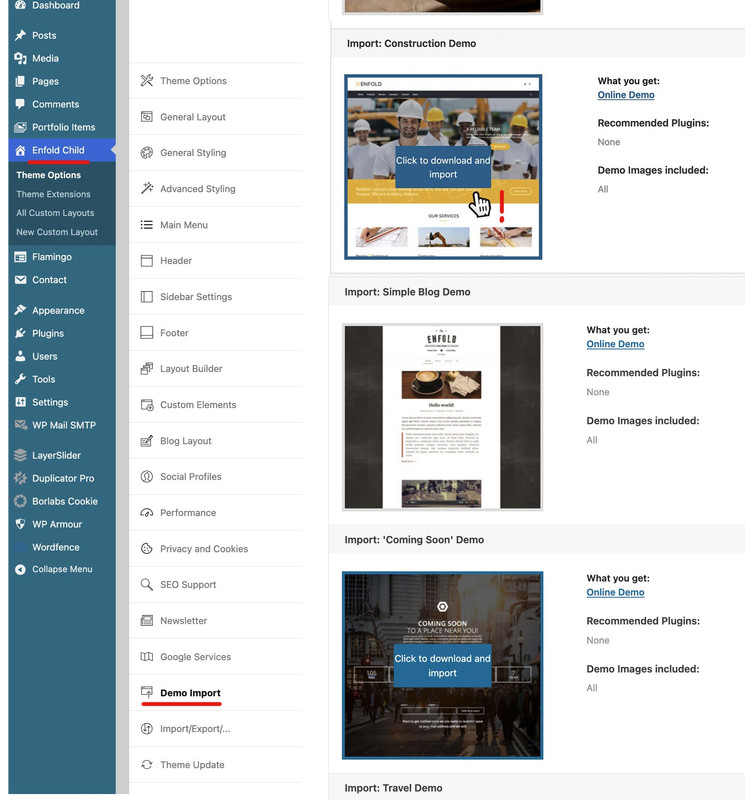
    First, I would like to ask whether you can see these demos in the Enfold options and whether you see a download option when hovering over the images (or, if plugins are required for the demo, a note in red); and why you don’t want to go down this way.

    As Rikard said – hover the image of the demo – then an info will show if you can import or not. Some of the demos need Plugins befor import – but Construction Demo is not that way.

    Have you already created pages/posts?

    Although Rikard has the jump mark in the link, you sometimes still have to scroll to the relevant places.

    Only necessary if you have already made settings; in this case, you must first save your design settings, for example.
    As described in the docu.
    Export/ Import theme settings.

    • First, export the theme settings from Enfold > Import/Export tab.
    • Import the demo theme of your choice.
    • Overwrite the new settings with your old setting by importing back the settings file we saved in step 1.
    #1488701

    Hi,

    Since we adjusted the size of the thumbnail, the aspect ratio changed. To address that, please add this css code:

    .big-preview img, .small-preview img {
        object-fit: cover;
        height: 82px;
    }

    Please review the css code above to eliminate the dotted line and make the featured image full width on mobile view. You can also post the login details in the private field so we can check the modification.

    Best regards,
    Ismael

    CharlieTh
    Participant

    On a gridrow I have two columns…one with a single-image easyslider with single image, a title, content. The second column is blank, only as placeholder.

    I have two columns because if do all the way across the screen the image/title/content seems VERY tall…not sure why, so this is work around.

    Have noticed when looking at large screens or landscape screens image looks okay…on narrow, phone-like screens, image is chopped vertically and can’t see title or content.

    Figure needs to be full width….and taller.

    What I’d like is the easy slider in a gridrow to match rest of page, but without having i mage a monster high.

    Can you help me with this?

    Have removed my own (poor) css to make first cell full width and taller, but was something like this:
    works…
    // @media only screen and (max-width: 800px) {
    // #top ul.avia-slideshow-inner {
    // height: 265px!important;border: 2px red solid!important;
    // width:100%!important;background:orange!important;
    // }
    // }
    // // #top .first-grid-gallery-cell{
    // // //grid-template-columns: 1fr!important;}
    // // width:100vw!important;background:orange!important;}

    // // }

    **** The section I’m working with is midway down the page…

    The image of a camera lens with text saying:
    Sermon Gallery
    View previous sermons.

    Thanks for any assistance, I am boggled!

    #1488684

    Hi Ismael.
    With this change, the problem seems to be solved on smartphones, but on desktop, the image display in the list goes from this correct one
    30

    to this incorrect one
    31

    What do I need to change in the code to make it apply only to mobile devices?

    The problem with the vertical dashed line also remains unchanged and is still visible.
    10c
    Thanks for your time.

    enderku
    Participant

    Hi, I’m trying to change description under the menu links at Consulting Demo (Enfold). Unfortunately I can’t find any place with description to change.

    to see what I want to change: https://freeimage.host/i/K3Kjq4R

    #1488645

    Hey schweg33,

    Thank you for the inquiry.

    Would you mind providing a screenshot of the issue? You can use platforms like Savvyify, Imgur or Dropbox to share the image.

    The log points to a modification or feature in the enfold-child/at-audio-libraries/lib/audio/AtAudioLibraryManager.php file. Have you tried temporarily disabling this file or feature? You may need to ask the developer to review the modification.

    Best regards,
    Ismael

    #1488643

    Hi,

    Thank you for the update.

    We actually removed the is_single conditional function from the avf_post_featured_image_link filter. Please update the code.

    https://kriesi.at/support/topic/post-preview-image-display-issue/#post-1488334

    View post on imgur.com

    Best regards,
    Ismael

    #1488631

    In reply to: Text Overlay Size

    Hi, Rikard,
    Here is what I am seeing: https://www.mygpc.org/wp-content/uploads/Image1-6-scaled.jpg
    Thanks!
    Justine

    #1488628
    jkorsower
    Participant

    Hi,

    I’ve enabled the Woo lightbox for image galleries in the shop in the theme’s settings. The issue is there is no popup when clicking on an image. I’ve disabled all plugins except Woocommerce and I’m still seeing the issue. An example can be seen here: https://staging2.threepedals.com/products/three-pedals-merch/shirt/shaken-stirred-t-shirt/. Any help getting the popup modal working?

    #1488624
    Munford
    Participant

    Hi
    On the site below I have a background video in a color section at the bottom of the page.
    I added an unmute button to the video, and it seems to be working.
    I added the codes I found here: https://kriesi.at/support/topic/html-for-turning-on-audio/#post-1432783
    and on this page: https://webers-testseite.de/mute-unmute/

    I didn’t understand where to place the first code where it says :
    Activate Child-theme shortcodes replacement by:

    add_filter('avia_load_shortcodes', 'avia_include_shortcode_template', 15, 1);
    function avia_include_shortcode_template($paths){
      $template_url = get_stylesheet_directory();
          array_unshift($paths, $template_url.'/shortcodes/');
      return $paths;
    }

    Do I add that to my functions.php or is it OK as it is?

    I am also still seeing the mute icon on mobile, even though my css is:

    @media only screen and (min-width: 768px) {
    .custom-mute {
        display: block;
        background-image: url('/wp-content/uploads/2025/08/icon-mute.png');
        background-size: cover;
        width: 50px;
        height: 50px;
        position: absolute;
        bottom: 8%;
        right: 4%;
        z-index: 50;
    }
    .custom-mute:hover {
    	opacity: 0.7;
    }
    .icon-sound-on {
    	background-image: url('/wp-content/uploads/2025/08/icon-sound.png');
    }}

    can you help me with this?

    thanks
    Nancy

    • This topic was modified 7 months, 1 week ago by Munford.
    • This topic was modified 7 months, 1 week ago by Munford.
    • This topic was modified 7 months, 1 week ago by Munford.
    • This topic was modified 7 months, 1 week ago by Munford.
    #1488622

    Hi Ismael, thanks for your support.

    Where did you add the code?

    In the child’s functions.php file, as you indicated.

    The Appearance > Theme File Editor is not accessible.

    This hosting provider doesn’t enable it automatically, but I made a change and it is now active, as shown in the image where the inserted code is also highlighted.
    20

    Regards.

Viewing 30 results - 841 through 870 (of 106,442 total)