Viewing 30 results - 511 through 540 (of 106,437 total)
  • Author
    Search Results
  • #1492041

    Dear Ismael,

    Than you!

    Yes, I did use the plugin but the new upload of the image almost did it:
    Now the image is squared but croped at the right.
    How can I show the whole image?

    Thank you!
    Jasna

    #1492030

    In reply to: Before/After part

    try:

    .responsive #top #section-container-width .container {
      width: 100% !important;
      max-width: 100% !important;
      padding: 0;
    }
    
    .responsive #top #section-container-width .avia-image-diff-container {
      margin: 0 !important;
    }
    
    .responsive #top #section-container-width .av-image-diff-wrapper,
    .responsive #top #section-container-width .av-image-diff-wrapper img {
      width: 100%;
      max-width: 100% !important;
      margin: 0
    }

    your images are 1024px width – so you had to stretch them to the container width.

    #1492010

    Hi,

    I want to display the title and cation of an Easy Slider below the images on this page, with title on the right at 25% width and caption on the left at 75% width. I tried code from other threads with the same topic to no avail.

    I did set “liste-recette” as a custom CSS class for my Easy Slider element. I did successfully hide the slideshow controls with the following CSS:

    div.liste-recette div.avia-slideshow-controls {
    	display: none;
    }

    I tried code from other threads with the same topic but, after several hours hammering on that, I can’t figure out the correct CSS to make it work.

    Best regards,
    Serge

    #1491985

    In reply to: Fade by scroll

    have a look at: https://webers-testseite.de/woodnest/
    i placed the styles and script as inline codes in a codesnippet.

    there might be solutions if we have to put in one image column two content columns (f.e. 2/3 – 1/3)

    #1491982

    Thank you for your quick response. Will this deal with the logo image change from a transparent header (with all-white logo) to an opaque header (two-tone logo)?

    #1491967

    Hey Sebastian,

    Thank you for the inquiry.

    That is not possible without significant modifications to the theme, unfortunately. We recommend using the Content Slider instead so you can control the content for each slider. Try manually adding an image and text for each slide.

    Best regards,
    Ismael

    #1491966

    Hey coredesignsupport,

    Thank you for the inquiry.

    Would you mind providing a screenshot of the issue? The logo image cannot be translated by default, but you can use the avf_logo filter to assign a different logo image based on different conditions, like different language.

    Example:

    function avf_logo_mod($logo){
        $currentlang = get_bloginfo('language');
        if($currentlang == "fr_FR"){
            $logo = 123;  // <-- replace with the FR logo image
        }
        return $logo; 
    }
    add_filter('avf_logo','avf_logo_mod');

    Best regards,
    Ismael

    #1491964
    coredesignsupport
    Participant

    I’m very happy with the way Enfold and Translatepress work together for the most part. However, there seems to be an issue with translating the logo image between English and French in the transparent header.

    English: lambdafoundation.org
    French: lambdafoundation.org/fr/

    The translation procedure appears to work but is not reflected in the translated site. Translatepress seems to be confused by the swap between the white transparent logo and the RGB version of the logo that appears when the site visitor scrolls down the page.

    Can anyone suggest a fix (or if I’m doing something wrong)?

    #1491961

    Hi,
    Kriesi uses a image and not the FB script because the FB script is bloacked by may browsers by default, such a Safari. Users need to turn it off in the settings to see the FB box manually but most don’t know to do this. I’m not sure why the widget is not working for you, but once we figure it out your visitors may still not see it due to ad-blockes or the default actions of the browsers. This maybe something to consider.

    Best regards,
    Mike

    #1491955

    Mike,

    Have tried everything you mention without success. I have also found that the default facebook of Kriesi does not work when added to my website. See https://respectaclecompany.co.uk/Facebook.jpg. Whereas on the right hand section of this page shows the Kriesi facebook header image showing?

    #1491953
    xeovision
    Participant

    Hi,
    maybe this was already requested but i did not find it.
    I am using the Logo slider. On mouse over the caption appears but i would like to have it below the image as text and always visible.
    Is there a quick solution for that?

    or maybe another Plugin that i can use?

    #1491949

    Hi,
    I see, thanks. Your widget is not showing any errors in the console and there is only one image, your logo, in the FB iFrame code. Try checking that your Facebook page is set to “Visible to Everyone”.
    You can also try creating the Facebook Like Box manually to see if it then shows. Try Method 2: Adding a Facebook Like Box With Code
    Unfortunately I’m not able to test this on my end as I don’t have a FB account.

    Best regards,
    Mike

    #1491947

    Dear Mike,

    If you goto the actual facebook page you will see the images in the header see link. The images in the header (dogs) do not come through. They use to in the past.

    https://www.facebook.com/Respectacle.Company/?ref=embed_page#

    #1491945

    Hey condonp,
    Thanks for your patience, the FB widget looks correct to me:
    fnemtR4.png
    please explain further.

    Best regards,
    Mike

    #1491930

    Hi,

    In this recipe page, I want hovering the ingredients list automatically shows the corresponding ingredient image in the Easy Slider.

    I noticed those links for slider dots, but they have no effect when used outside Easy Slider:

    <a href='#1' class='goto-slide active'>1</a>
    <a href='#2' class='goto-slide '>2</a>
    <a href='#3' class='goto-slide '>3</a>
    <a href='#4' class='goto-slide '>4</a>
    <a href='#5' class='goto-slide '>5</a>
    <a href='#6' class='goto-slide '>6</a>
    <a href='#7' class='goto-slide '>7</a>
    <a href='#8' class='goto-slide '>8</a>

    Thanks,
    Serge

    #1491890

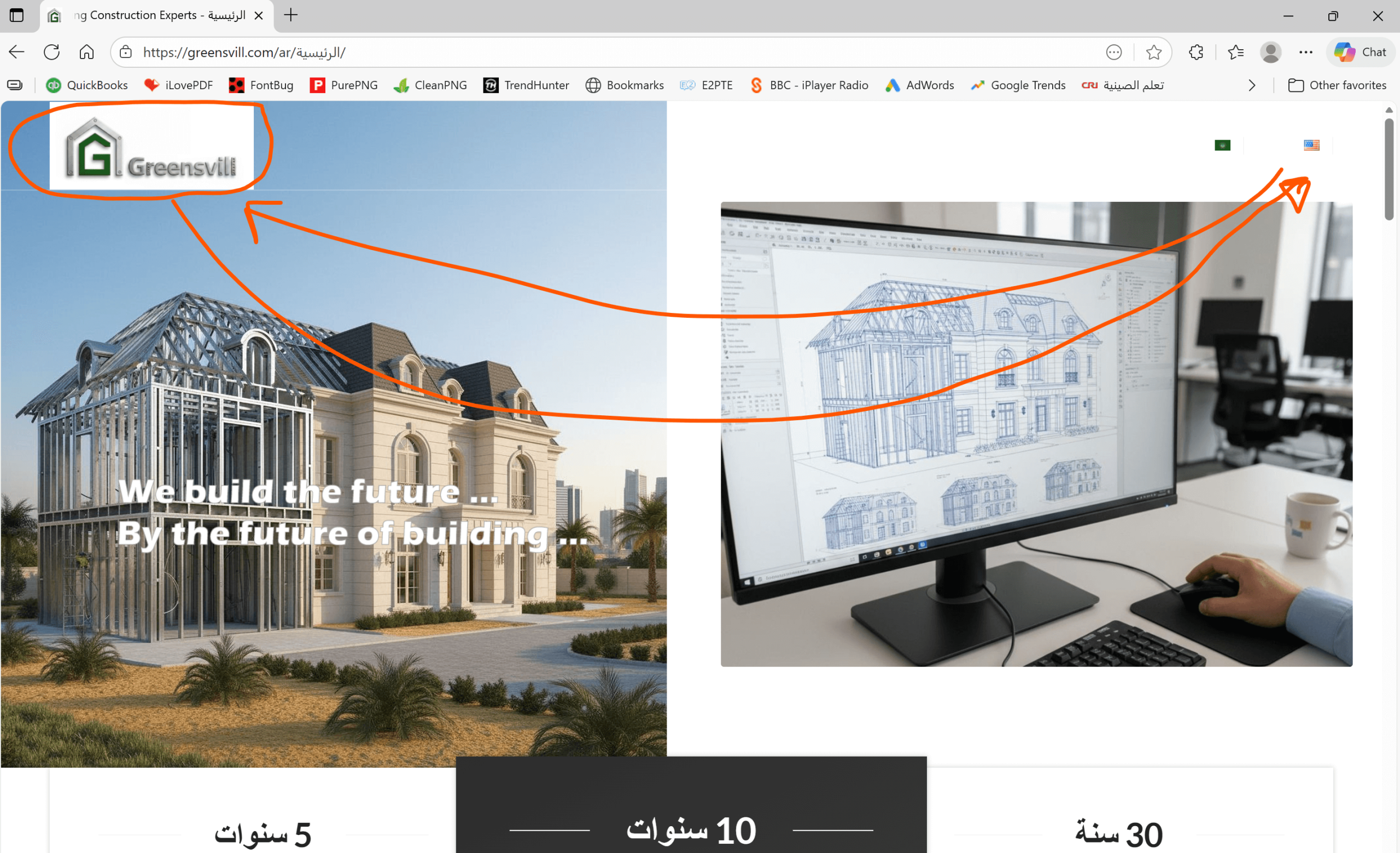
    Topic: RTL Header

    in forum Enfold
    tariqyacoub82
    Participant

    Guys,

    I installed Arabic language which is RTL.

    All home page elements are now right to left except the header. Please check the below image.

    https://greensvill.com/wp-content/uploads/2025/11/RTL-header-scaled.png

    #1491861

    Topic: Feature request

    in forum Enfold
    caw67
    Participant

    image border and border radius for every corner for the image field like the column element

    #1491832

    In reply to: Top Menu hiding

    Dear Rikard,

    I did all possible edits but I am still have Home link on the top bar. I need only the logo on the left. I don’t need any menu on desktop or mobile.

    Please see this image https://greensvill.com/wp-content/uploads/2025/11/Top-Menu-scaled.png

    #1491808

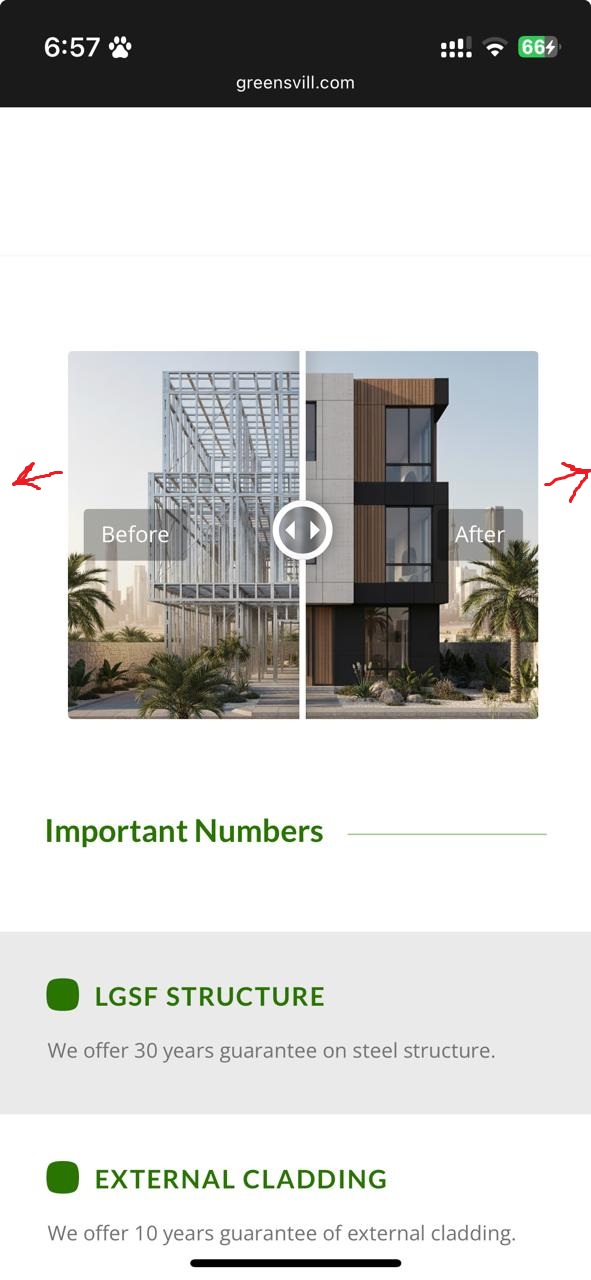
    In reply to: Before/After part

    Hi Rikard,

    I want to make the Before/After section with full width.

    Please see the image below

    https://greensvill.com/wp-content/uploads/2025/11/Before-After.jpeg

    #1491758
    Johann Brand
    Participant

    For several months now, images from YouTube have not been appearing in embedded videos for Show. Apparently, the error lies with YouTube. Is there any information on how to fix this problem? The following error message appears:
    Watch video on YouTube
    Error 153
    Error configuring video player

    #1491757
    This reply has been marked as private.
    #1491746
    Munford
    Participant

    UPDATE
    I found this code and that fixed it:

    add_filter( 'avf_wc_before_shop_loop_item_title_img_size', 'avf_wc_before_shop_loop_item_title_img_size_mod', 10, 1 );
    function avf_wc_before_shop_loop_item_title_img_size_mod( $thumbnail_size ) {
        return 'woocommerce_thumbnail';
    }

    I am building a shop with woocommerce and I have selected in the customizer to have the product thumbnails be uncropped, but they are defaulting to 1:1. Have tried all combinations. I have setup another page to be the shop page, using the Shop Single 450×999 image size, which works OK, but all the related products are still 1:1 ratio. Can you see what’s blocking the upcropped setting?
    thanks
    Nancy

    • This topic was modified 4 months, 1 week ago by Munford.
    #1491686

    i implemented the possibility to add a custom class set on the grid container (div.av-author-loop-container)
    and implemented a css for that custom-class on loop-author.css to rule the column-count for all screen width :

    /* ======================================================================
    	OPTIONAL: AUTO-FIT GRID  in filter for automatic responsive columns
    	Use    $atts['class']   = 'auto-fit-grid';   
       ====================================================================== */
    #top.author .av-author-grid-container.auto-fit-grid {
        grid-template-columns: repeat(auto-fit, minmax(250px, 1fr)) !important;
    }

    this means: Each column must have a minimum width of 250px — the entire width is then filled with columns based on this basis.

    _______________

    in list view – if you do not like to show the featured image in cover mode – then add to your quick css:

    #top.author .av-author-list-image img {
      height: 100%; /* === unset - will bring the image to top === */
      object-fit: contain;  /* === contain - will show the whole image without crop === */
    }
    #1491676

    Hey ivanglaser,

    Do you have any plugins installed that might be altering images? For example image compression plugins?

    Best regards,
    Rikard

    #1491671

    just for understanding – these are the default values from loop-author.php:

    // Default arguments for Author Loop
    $default_args = array(
        'type'              => 'grid',
        'columns'           => 4,
        'items'             => get_option('posts_per_page', 12), // WordPress setting, fallback: 12
        'contents'          => 'excerpt_read_more',
        'preview_mode'      => 'auto',
        'image_size'        => 'portfolio',
        'paginate'          => 'no',
        'class'             => '',
        'show_modified_date' => 'no',  // 'yes' or 'no' - shows "Updated: XX" if post was modified
        'orderby'           => 'date',  // 'date', 'modified', 'title', 'rand', 'comment_count', 'menu_order'
        'order'             => 'DESC',  // 'DESC' (newest first) or 'ASC' (oldest first)
        'fallback_image'    => 'placeholder',      //  'placeholder'  or URL to fallback image 
        'post_types'        => array('post'), // Array: array('post'), array('portfolio'), or array('post', 'portfolio')
    );
    
    // Content Options for 'contents' parameter:
        // 'title'                  - Title only
        // 'title_read_more'        - Title and Read More button
        // 'only_excerpt'           - Excerpt only (no title)
        // 'only_excerpt_read_more' - Excerpt and Read More button (no title)
        // 'excerpt'                - Title and Excerpt
        // 'excerpt_read_more'      - Title, Excerpt and Read More button (default)


    if you like to have it this way (grid, 4columns, exerpt with readmore, only posts ordered by date – newest first) you do not need to set the filter.
    Then only the second part is needed inside functions.php.

    The filter could do more – you can even differ between authors – f.e by author name. :

    // 1. Layout for different authors by ID
    add_filter( 'avf_author_loop_args', function( $atts, $context ) {
        if( $context == 'author' ) {
            // Common settings for all author pages
            $atts['items']             = -1;
            $atts['image_size']        = 'gallery';
            $atts['contents']          = 'excerpt_read_more';
            $atts['post_types']         = array('post', 'portfolio'); 
    		
    	// Fallback-Image from Media Library (Attachment-ID)
            $fallback_id = 2052;  // Your image ID from Media Library
            $fallback_img = wp_get_attachment_image_src($fallback_id, $atts['image_size']);
            $atts['fallback_image'] = $fallback_img ? $fallback_img[0] : 'placeholder';
            
            $author_slug = get_query_var( 'author_name' );
    
            // Individual configuration for a specific author
            if( $author_slug == 'guenni007' ) {
                $atts['type']              = 'grid';
                $atts['columns']           = 3;
            } 
            else {
                // default setting for the rest
                $atts['type']              = 'list';
            }
        }
        return $atts;
    }, 10, 2);

    the fallback image i get from media-library with the attachment ID
    Advantage of this solution – the fallback image is based on the selected image size setting.

    see:
    grid for guenni007: https://basis.webers-testseite.de/author/guenni007/
    list for johndoe: https://basis.webers-testseite.de/author/johndoe/

    #1491667

    now my final solution is – to upload 3 files to the child-theme includes folder:

    /wp-content/themes/enfold-child/
    └── includes/
      └── loop-author.php ← PHP Loop (loads the css once)
      └── loop-about-author.php
      └── loop-author.css ← all Styles (Grid + List)

    loop-author.php: https://pastebin.com/yaXj5Zfw
    loop-about.php: https://pastebin.com/QQ84LGaw
    loop-author.css: https://pastebin.com/zTJMtth9

    to style the author page now are two entries for child-theme functions.php

    // 1. Configure layout and settings
    add_filter( 'avf_author_loop_args', function( $atts, $context ) {
        if( $context == 'author' ) {
            $atts['type']              = 'list';               // 'grid' or 'list' Layout
            $atts['columns']           = 4;                    // columns count
            $atts['image_size']        = 'gallery';            //  image-size
            $atts['contents']          = 'excerpt_read_more';  // Content-Type
            $atts['items']             = -1;                   // Posts per page
            $atts['paginate']          = 'no';                // Pagination  on/off  (yes or no)
            $atts['show_modified_date'] = 'yes';               // 'yes' = shows  "Updated: XX"
            $atts['orderby']           = 'date';               // orderby : 'date', 'modified', 'title', 'rand', 'comment_count'
            $atts['order']             = 'DESC';               // order: 'DESC' (newest or Z-A) or 'ASC' (oldest or A-Z)
    	$atts['fallback_image']     = get_stylesheet_directory_uri() . '/includes/fallback.jpg';  // an url or  'placeholder'
    	$atts['post_types'] 		= array('post', 'portfolio');    	// 	count posts or portfolios or both
        }
        return $atts;
    }, 10, 2);
    
    // 2.  IMPORTANT: Customise query for pagination, sorting and post types
    add_action( 'pre_get_posts', function( $query ) {
        if( ! is_admin() && $query->is_main_query() && is_author() ) {
            // Get the filtered arguments from above
            $default_args = array(
                'items'      => get_option('posts_per_page', 12),
                'orderby'    => 'date',
                'order'      => 'DESC',
                'post_types' => array('post')
            );
            $atts = apply_filters( 'avf_author_loop_args', $default_args, 'author' );
            
            // Set Query-Parameters
            $query->set( 'posts_per_page', $atts['items'] );
            $query->set( 'orderby', $atts['orderby'] );
            $query->set( 'order', $atts['order'] );
            
            // Set post types - IMPORTANT: even if there is only one type
            if( ! empty( $atts['post_types'] ) && is_array( $atts['post_types'] ) ) {
                // WordPress requires 'any' or an array with multiple types
                if( count( $atts['post_types'] ) == 1 ) {
                    $query->set( 'post_type', $atts['post_types'][0] );
                } else {
                    $query->set( 'post_type', $atts['post_types'] );
                }
            }
        }
    }, 999 );

    see result page : https://basis.webers-testseite.de/author/guenni007/
    Unfortunately, no translation for But we are proud to say that %s contributed %s entries already. has been added to the (at least German) lang files yet. That is why it is in English on my example page.

    i tested all 3 blog styles – it works on all of them.

    #1491652

    Thanks Ismael,

    Is it possible to fix it with custom CSS to always show the whole image and get it smaller vertically on wide screens? I don’t want the image take too much space vertically. This is why it has wide panoramic proportions.

    Best regards,
    Serge

    #1491648

    Hi Agian, can you try to add something rather to the function file code on the top of this post? Gri-notfull is working perfect except that the image bacground still is boxed, so if we only can get the full width background on the function code, its all good.
    Thanks, Mathilde

    #1491623

    Hey photographie-tous-azimuts,

    Thank you for the inquiry.

    This is possible by setting the background image size to 100%, but the image may become distorted. We recommend resizing the image to have a 16:10 aspect ratio, or as close as possible to the aspect ratio of the container you plan to use. Then set the Styling > Background Image > Background Repeat to “Stretch to fit”. Unfortunately, the image may still be partially cropped on some screen sizes.

    Screenshot-2025-11-21-at-4-26-13-PM

    Best regards,
    Ismael

    #1491621

    In reply to: Before/After part

    Hey tariqyacoub82,

    Thank you for the inquiry.

    You may need to place the before/after image in a Color Section element and set its container to full width. Please check this documentation for more info.

    https://kriesi.at/documentation/enfold/color-section/#color-section-with-100-content-width

    Best regards,
    Ismael

Viewing 30 results - 511 through 540 (of 106,437 total)