I had tested replacing footer.php last night, but didn’t realize I needed to do header.php, as well. Now that I’ve done that, the footer widgets are showing up correctly. THANK YOU!
Lesson learned: Latest version contains changes to both header.php and footer.php. Any child themes in use will need to have BOTH of these files swapped out (and customizations added back in).
Side note: The Enfold license was originally handled by the hosting company (I’m a former employee, and RCC was one of the sites I worked with/on regularly). I’ve recommended that RCC secure their own Enfold product key, so they can maintain their own license going forward.
I truly appreciate your help, thank you!
Hi,
Thanks for letting us know, I’ll close this thread for now then. Please open a new thread if you should have any further questions or problems.
Best regards,
Rikard
Hey,
Thanks for contacting us!
Please add following code to Quick CSS field in Enfold theme options > General Styling tab
.main_color .avia-content-slider .slide-image {
  background-color: transparent;
}
Regards,
Yigit
I also need to note that I had to use my day job’s purchase key to register for the forums. The issue is for a different Enfold client (who has brought me on board to assist them. As soon as they provide it to me, I will add that in via the “Private Content” section.
-
This reply was modified 4 years, 1 month ago by
 BearlyDoug.
There appears to be a bug within the Enfold theme and displaying footer widgets. It seems that the widgets are not being hooked into the footer area properly. I’ll embed some screen grabs of the current configuration, however, I will preemptively answer a few questions:
* WordPress core and Enfold (parent theme) are current latest versions.
* I downloaded a fresh installation of Enfold and swapped the old one out and put the new one in.
* I eat, breathe and sleep WordPress (AKA a true WordPress developer in every sense). Get super technical with me, please!
CURRENT Footer View

Current Footer Options inside Enfold theme panel

Widget Footer 1

Yet, I cannot seem to get that widget put in. Instead, it shows “Here are some links. Enjoy your stay” or words to that effect.
I’d appreciate any help y’all can provide.
Thanks!
First :
this here :

is the content you like to have on all pages ?
– i can see it on your front-page too – so your code does not take over the if clause ?
next Enfold has an option to choose a whole page as footer !
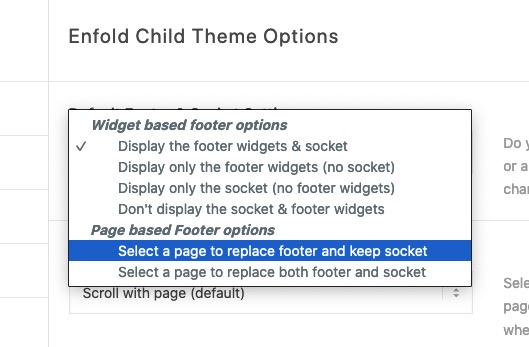
So style a new page ( sponsors ) and set this page to be the footer-page
If you have some changes on that sponsors – just edit that page ( page as footer ) – and all pages are up to date at once.
Hey Lothringer64,
Thank you for the inquiry.
Could you provide a screenshot or a mockup of how you want the header to look like? If you want to put a larger image in the header, you can upload it as a background in the Enfold > Logo Area > Background Image settings.
Best regards,
Ismael
Hey Ian,
Thank you for the inquiry.
There are other optimization options in the Enfold > Performance panel such as disabling the emojis and enabling only loaded elements. You can also check the following articles for more info about site optimization.
// https://kriesi.at/archives/scoring-100-100-in-google-pagespeed-insights-gtmetrix-pagespeed-and-yslow
// https://gtmetrix.com/wordpress-optimization-guide.html
Best regards,
Ismael
Hallo, bin ein absoluter Newbie, daher meine wahrscheinlich banale Frage:
Ich benutze das Enfold 2017 Theme auf meiner lokalen xampp Installation. Wenn die Seite fertig ist, möchte ich sie dann ins Netz stellen. Wie kann ich denn ein Header Bild unseres Vereins oben einfügen, welches dann auf dem Startbildschirm (evtl. auch auf den übrigen Seiten) sichtbar sein sollte? In Header finde ich nur Logo einfügen bis max. 300 px, aber keine Möglichkeit ein Bild der Größe ca. 1100 x 500 px einzufügen. Bitte um kurze Info, wie/wo man das macht?
Vorab vielen Dank!
dear all,
after a battle after using sg transfer to siteground I’ve finally got the site working, i needed to activate default profiles and then the enfold one and then the child to get it to work.
think its working now.
ok im using the sg security and the sg optimizer plug ins connected to cloudflair via the optimzer and gt metrix score went from F to B, yeh.
ok i have looked through the forums and so far done the following
turned off css and javascript merging in the child and get sg optimizer do that.
also tuned off lazy loaded in the child and let the optimzer do it, which seems to be working, it was not before.
im using plug ins wise
all in one seo, ive let that handle the seo rather than enfold turned that off in the seo section
akismet
google analytics for monster sites
wp content copy protection for images
are there any other optimizations i can make to enfold using siteground that would help my seo and web site speed please.
so far so good just need to make an ftp back up and database as no other errors so far.
regards ian
Hi,
Great, I’m glad that you found a solution, and thanks for the update. I’ll close this thread for now then, please open a new thread if you should have any further questions or problems.
Best regards,
Rikard
Hi,
I changed your password and logged in using your account, and I’m able to open a new thread. Please use open a new thread link, or click this button in the Enfold sub forum: https://imgur.com/a/AnoSPNb
Best regards,
Rikard
Hey rgupta2019,
Could you try updating the theme to the latest version (4.9) to see if that helps please? https://kriesi.at/documentation/enfold/how-to-install-enfold-theme/#theme-update. If not, then please try to use an earlier version of PHP.
Best regards,
Rikard
hi, yes, we updated the enfold/config-woocommerce/config.php according your instructions
Hey antelozancic,
Please try the following in Quick CSS under Enfold->General Styling:
#av-burger-menu-ul .avia-menu-text {
    width: 100%;
    display: inherit;
}
Best regards,
Rikard
Hey smsutton,
Please try the following in Quick CSS under Enfold->General Styling:
.page-id-2206 #header_meta {
    background: #00f !important;
}
Best regards,
Rikard
Hi,
Thanks for letting us know, I’ll close this thread for now then. Please open a new thread if you should have any further questions or problems.
Best regards,
Rikard
Hey lkhst,
Thank you for the inquiry.
You have to modify the enfold/config-templatebuilder/avia-shortcodes/logoslider/logoslider.php file and look for this code around line 314.
<strong>
			$c = array(

						array(
								'type'			=> 'template',
								'template_id'	=> 'columns_count_icon_switcher',
								'std'			=> array(
														'default'	=> '3'
													),
								'lockable'		=> true,
								'heading'		=> array(),
								'id_sizes'		=>	array(
														'default'	=> 'columns'
													),
								'subtype'		=> array(
														'default'	=> array(
																	__( '1 Columns', 'avia_framework' )	=> '1',
																	__( '2 Columns', 'avia_framework' )	=> '2',
																	__( '3 Columns', 'avia_framework' )	=> '3',
																	__( '4 Columns', 'avia_framework' )	=> '4',
																	__( '5 Columns', 'avia_framework' )	=> '5',
																	__( '6 Columns', 'avia_framework' )	=> '6',
																	__( '7 Columns', 'avia_framework' )	=> '7',
																	__( '8 Columns', 'avia_framework' )	=> '8',
																)
													)
							),
						);
You can increase the number of columns in the dropdown by editing the subtype array and adding more column options.
You can then modify this block of code around line 1120 and add new grid_class for the additional column options.
switch( $this->config['columns'] )
				{
					case '1':
						$this->grid_class = 'av_fullwidth';
						break;
					case '2':
						$this->grid_class = 'av_one_half';
						break;
					case '3':
						$this->grid_class = 'av_one_third';
						break;
					case '4':
						$this->grid_class = 'av_one_fourth';
						break;
					case '5':
						$this->grid_class = 'av_one_fifth';
						break;
					case '6':
						$this->grid_class = 'av_one_sixth';
						break;
					case '7':
						$this->grid_class = 'av_one_seventh';
						break;
					case '8':
						$this->grid_class = 'av_one_eighth';
						break;
					default:
						$this->grid_class = 'av_one_third';
						break;
				}
You may also need to add css for the new columns.
Best regards,
Ismael
Hi!
Did you modify the avia_woocommerce_add_body_classes function in enfold/config-woocommerce/config.php file? The class name “product” should be added to products using the ALB but we are not seeing it in the product page above. The add-to-cart-variation.js file is now loading correctly but it requires the product class name which will be added once you modify the avia_woocommerce_add_body_classes function in the config.php file as suggested above.
Thank you for your patience.
Regards,
Ismael
Hi christiemade,
We’re glad that we could help you :)
Thanks for using Enfold and have a great day!
Best regards,
Nikko
Every time I log into the wp- admin i get an automated email from wordpress saying i have a fatal error on my site.
In this case, WordPress caught an error with your theme, Enfold.
When seeking help with this issue, you may be asked for some of the following information:
WordPress version 5.9.2
Current theme: Enfold (version 4.9)
Current plugin: (version )
PHP version 8.0.16
Error Details
=============
An error of type E_ERROR was caused in line 385 of the file /nas/content/live/clearcututah/wp-content/themes/enfold/config-templatebuilder/avia-template-builder/php/class-post-css-management.php. Error message: Uncaught TypeError: aviaPostCssManagement::handler_wp_save_post(): Argument #2 ($post) must be of type WP_Post, null given, called in /nas/content/live/clearcututah/wp-includes/class-wp-hook.php on line 307 and defined in /nas/content/live/clearcututah/wp-content/themes/enfold/config-templatebuilder/avia-template-builder/php/class-post-css-management.php:385
Stack trace:
#0 /nas/content/live/clearcututah/wp-includes/class-wp-hook.php(307): aviaPostCssManagement->handler_wp_save_post(0, NULL, false)
#1 /nas/content/live/clearcututah/wp-includes/class-wp-hook.php(331): WP_Hook->apply_filters(true, Array)
#2 /nas/content/live/clearcututah/wp-includes/plugin.php(474): WP_Hook->do_action(Array)
#3 /nas/content/live/clearcututah/wp-includes/post.php(4687): do_action(‘save_post’, 0, NULL, false)
#4 /nas/content/live/clearcututah/wp-admin/includes/post.php(700): wp_insert_post(Array, false, false)
#5 /nas/content/live/clearcututah/wp-admin/includes/dashboard.php(547): get_default_post_to_edit(‘post’, true)
#6 /nas/content/live/clearcututah/wp-admin/includes/template.php(1395): wp_dashboard_quick_press(”, Array)
#7 /nas/content/live/clearcututah/wp-admin/includes/dashboard.php(268): do_meta_boxes(Object(WP_Screen), ‘side’, ”)
#8 /nas/content/live/clearcututah/wp-admin/index.php(203): wp_dashboard()
#9 {main}
thrown
Hello,
We have experience some issues with Easy slider/full width easy slider on a few websites. A huge white space appears below the image on first page load. After the first rotation it disappear. We have at least a couple of Enfold websites that have the same issue. One of the websites is OOTB and does not have any custom styling that may interfere with the sliders.
Please advise. We can send a screenshot for reference.
Thank you in advance.
I already have an Envato private token validated in Enfold. I’m a developer with licenses of Enfold installed on many sites. Am I going to have to do this for all of them? Can I recycle the tokens that I’ve already generated, or is there some difference between an “Envato private token” and an “Envato API Personal Token”? And do I have to put tokens in both Enfold and the Envato Market plugin?
-
This reply was modified 4 years, 1 month ago by
 efgumnick.
Hi,
Thanks for letting us know, I’ll go ahead and close this thread for now then. Please open a new thread if you should have any further questions or problems.
Best regards,
Rikard
Hey bonsaimedia,
Thanks for the login details. Please enable debug mode, so that we can check the page shortcodes: https://kriesi.at/documentation/enfold/intro-to-advanced-layout-builder/#debug-mode. We can do it for you if you give us permission to do so, and if you activate the Appearance->Theme Editor functionality in WordPress. You could also provide us with FTP login details in private, if you don’t know how to activate that option.
Best regards,
Rikard
Hi,
Thanks for that. Please try the following in Quick CSS under Enfold->General Styling:
.page-id-57658 #av_section_1 .container {
    max-width: 100%;
    padding-right: 0;
}
Best regards,
Rikard
Hey!
Please check enfold\config-templatebuilder\avia-template-builder\php\class-template-builder.php
around line 686 you have the function autoloadLibraries()
and inside filter avf_load_single_shortcode_file.
There you can hook to load your customized file instead the original one.
A few lines above you have filter avf_load_single_builder_core_file where you can load modified customized core files.
Regards,
Günter
That’s exactly my problem. I get good scores on Page Speed test or GT Metrix. Almost 100%. HOWEVER, Google Search Console keeps saying it takes more than 4s to load my pages. All of them, not only image-heavy pages etc. It’s abysmal (see the links below). GSC community experts say page speed tests etc. are lab tests, and cannot predict real user experience. GSC is saying real user experience for my web is bad. (your experience seems to be good, but apparently GSC doesn’t think so)
Vikinguard is a real user experience plugin. I copy pasted Viginguard results and GCS community replies etc. in the above message. Did you see them and do you have any suggestions? If “it loads fast on my computer” is only thing you can suggest, unfortunately I will have to try other themes. Especially as Vikinguard says it takes the longest time to load html for the website and the other article says Enfold is the second slowest WP theme…Of course your theme may not be the problem, but as I cannot find anything else right now, all I can do is to change theme unless you have any suggestions to improve the situation.
Hey guys
maybe someone knows a Workaround or when this bugs are going to be patched:
1. When adding a manual link to a button element and having a link with multiple parameters like:
/request/?subject=beratung¶m=this-wont-work
Enfold first saves it correctly, but after reloading the Editor in backend, the &p… got converted into some weird special-char.
2. If someone uses the Social icons – element in a page and uses that page as a footer, the share-link uses the footer-url.
3. When adding a Video with the Videoplayer element, the video starts muted (even if not selected) –
and if someone clicks on unmute, you additionally have to increase the volume.
-
This topic was modified 4 years, 1 month ago by
 boehm.media.
Hi Antonio,
Thanks for using Enfold and have a great day :)
Best regards,
Nikko



