
-
AuthorSearch Results
-
March 22, 2022 at 10:33 pm #1345593
Topic: Tags in Enfold
in forum Pre Sale QuestionsAngela Sealana
GuestOur nonprofit organization has been successfully using Enfold for several years. It was installed and configured for us by a webmaster who had purchased it for us as a client of his. Now, he is no longer a webmaster.
Have things changed recently with Tags and Enfold, given the latest WP updates regarding taxonomies? Our taxonomies are still visible on the back-end, but attempting to retrieve them in certain ways on the front-end results in an error. Ex: https://pilgrimcenterofhope.org/category/pilgrimages/journeys-of-hope/
March 22, 2022 at 9:18 pm #1345587In reply to: Redis Object Cache best practices
Günter,
Thanks for replying, to answer your questions:
– “…if you use file compression” – We do not have that feature enabled on sites we use Enfold on. It is currently set to “Disable – no CSS file merging and compression” for both CSS and JS.
– “Enable option “Delete old CSS and JS files?”” – Done
– “Load frontpages several times to check…” – Did not see any extra files being generated in this after reloading the homepage a few times.
– “Try again these steps several times to verify.” – I’ll give it a shot, it’s not easily reproducible as it’s a de-sync between the cache (when it expires) and the database. So it may be a little bit to verify if this helps.
– “… you have to disable creation of these files…” – I didn’t get an answer on the type of performance impact this would cause on the site. What kind of impact should I expect in disabling this feature?I also have another question regarding “Delete old CSS and JS files” option. This is the description:
“Check if you want to delete expired CSS and JS files generated by the theme. Only recommended if you are NOT using a caching plugin (since a cached page might still use those files)”
It says this is only recommended if we’re not using a caching plugin, but we are using an object cache. Will that cause issues?March 22, 2022 at 8:07 pm #1345580In reply to: Hyphenation
es ist halt bei der DSGVO so, dass sobald du auch nur eine Kontaktmöglichkeit anbietest ( Telefon; E-Mail etc. ) – muss das eben vorhanden sein.
Das machen sehr viele falsch, die glauben eine sogenannte Visitenkarten-Seite im Netz platzieren zu können._______
und bei den Sprachen, die hyphenate bedient, hast du das manuell eingestellt? Ist aus performance gründen schon besser.
Ausserdem siehst du ja anhand meiner Beispielseite, dass bei breiten Screens ja auch kein Unterschied zu sehen ist. Hast du mal deine Seitenbreite ( durch verkleinern des Browserfensters ) verkleinert?Hast du nachdem du Hyphenate installiert hast – alle Cache geleert ( Browser Cache ) in Enfold – falls du das aktiviert hast das Merging aktualisiert ( unter Performance ) – hast du Performance Plugins laufen? dort auch die Cache erneuern.
Vielleicht schickst du mir mal das Seitenpasswort (also nicht die WP Zugänge) via E-Mail ( alles unter meinem Nick – bzw siehst ja die Testseite )
________
wei man ein plugin installiert weißt du! Mein Vorschlag für Günters Plugin war halt nur, dass man da nicht drei Rauten vor und nach den Einsetzungen macht sondern nur eine. Und eben die Liste erweitert – da es so viele schöne html entities gibt die man nutzen könnte.
zB ist das nonbreaking hyphen (geschützter Bindestrich) auch in der deutschen Sprache wichtig um zu verhindern, dass diese Worte bei Zeilenumbruch getrennt werden. ( z.B. bei 100 % – gehört einfach ein Leerzeichen hin – oder besser vielleicht ein dreiviertel Geviert Leerzeichen; soll aber wohl nicht im Zeilenumbruch getrennt werden – daher meine #nbhyp# Ergänzung in dem Plugin.
Hier kannst du meine Veränderungen sehen – pastebin: Link
und hier das installierbare zip file downloaden: https://webers-testseite.de/avia-special-characters.zipAb da kannst Du dann überall für diese Zeichen das Pendent einsetzen. In allen ALB Elementen wo der Kontent gesetzt wird – aber auch in der Textblock eingabe. #shy# setzt dann ein softhyphen.
-
This reply was modified 4 years, 1 month ago by
Guenni007.
March 22, 2022 at 7:58 pm #1345579In reply to: Hide image title, etc. on hover
it is a wordpress – no it is a browser related question – if there are titles – browsers will show tooltip after some time.
to simply remove all titles from images :function custom_remove_title_script() { ?> <script> (function($){ $("img").hover(function(){ $(this).removeAttr("title"); }); })(jQuery); </script> <?php } add_action('wp_footer', 'custom_remove_title_script');but even this you had to know how to insert it.
if content is missing after activating a child-theme – then there is something wrong with the installation from you.
i tried to explain it even for noobs how to. And linked the description to the docu with even a film to explain.
Maybe you let a mod do this for you.Otherwise you can insert it to parent-theme functions.php ( it is in enfold folder ) and on that file there is a comment at the bottom of that file:
/*
 *  register custom functions that are not related to the framework but necessary for the theme to run
 */
after that – and before the last command (
require_once( 'functions-enfold.php' );) i would place that code.March 22, 2022 at 7:21 pm #1345572In reply to: Gallery not working after update to 4.9
Hey cpetroff1321,
Please send us a temporary WordPress admin login and login URL so that we can have a closer look. You can post the details in the Private Content section of your reply. Also please enable debug mode, so that we can look at the shortcodes: https://kriesi.at/documentation/enfold/intro-to-advanced-layout-builder/#debug-mode. We can do it for you if you give us permission to do so, and Appearance->Theme Editor is active on your installation.
Best regards,
RikardMarch 22, 2022 at 7:14 pm #1345569In reply to: Hide image title, etc. on hover
Thank you Yigit.Yes, I’m desperate for help.
At this point I just need to get that title off asap. I don’t care about SEO at the moment. The client wants it off and so do I.
When I tried making a child theme, when I enabled it, all of my content was gone, so that is not an option for an existing website.
I don’t know where the file is that I’m supposed to use what Guenni007 said to add. Don’t know where to add it within the file.
I don’t care if I have to re-add it upon updates. I need that title off. No other website I’ve ever seen has that on there. Just Enfold theme websites and not all of those.
The Quick Css used to work, but it doesn’t now, I don’t know why.
Just please, someone from Kriesi tell me how to get this off. SEO or not.
Yes, I’d like the SEO, but no one is telling me where this php file is or where to put the code within the php
I don’t know what “root” means.
Public_html > what then? Wp-content? then themes? Then Enfold?
I don’t know and need to know asap.
Please, please, please help me get this title off the images on hover in a way I can understand!! PLEASE!!! I’m begging here.
Why hasn’t this been sorted out before? Like I said, I went years with it on there, but over the years it’s bothered me more and more.I know it bothers others as well, and they are probably just staying silent as I did for so many years.
If it’s so vital for SEO then why in the heck are 100s of millions of websites that don’t have that title displaying ranking #1 or at the very least on page 1?
Just help me get it off if a way I can understand. I’m a novice or I wouldn’t have paid extra for support.
March 22, 2022 at 6:17 pm #1345564Topic: Polylang Pro issue
in forum Enfoldwebmonnik
ParticipantHI Support,
I am using Polylang Pro and a Enfold child theme. I am using English and Dutch. I am able to switch the languages execpt for the homepage. That is always switching to dutch (/nl/) witdh a 301 redirect. When i change the frontpage setting (select page) then it is not able to store it for NL and EN. When i change one, it is gone in the other language. I also tried all kinds of combinations under Sttings / reading. Do you have any suggestions?
Thank you.
Best regards, Rogier
March 22, 2022 at 6:08 pm #1345562In reply to: Audioplayer – delete inverted commas in the titles
can you try this in your child-theme functions.php:
ok i had to show you the image of that snippet, because boardsoft will allways transform the included entities to the signs:
you had to type it your own:
( click to enlarge )

or copy&paste from pastebin: https://pastebin.com/k0f385TJ
by the way – that does not come from enfold – it is a wordpress based style. from media.php and function is : wp_underscore_playlist_templates
March 22, 2022 at 5:21 pm #1345554In reply to: Disappearing Page Title (latest version)
Hi,
Yes, it was :) I believe the theme files were not overwritten correctly and re-updating fix that issue.
You are welcome! :)
For your information, you can take a look at Enfold documentation here – https://kriesi.at/documentation/enfold/
If you have any other questions or issues, feel free to start a new thread under Enfold sub forum and we will gladly try to help you :)
Enjoy the rest of your day!
Regards,
YigitMarch 22, 2022 at 4:11 pm #1345542In reply to: Disappearing Page Title (latest version)
Hey,
I enabled ALB debugging mode – https://kriesi.at/documentation/enfold/intro-to-layout-builder/#debug-mode and copied your page to my local installation however it does work fine on my end. I do not see any JS errors in console. I tried re-installing the theme via WP dashboard but that did not work. Could you please post temporary FTP logins here privately as well so I could try updating the theme via FTP? :)
Best regards,
YigitMarch 22, 2022 at 3:38 pm #1345538In reply to: Hyphenation
Hallo! Ach so, Du meintest meine Seite, ja das ist nur eine Baustelle, mit meinem Logo drauf. Die ist in der Tat minimalistisch. ;D
Das Statistiktool sollte ich dann vielleicht erstmal deaktivieren…Und ich hatte nicht bemerkt, dass Du ein Teilnehmer, bist. ;-)
Und ja, wie gesagt, ich habe auch im chrome developer tool gesehen, dass es da so: Donau#shy#dampf#shy#schiffahrts#shy#gesellschafts#shy#kapitän umgesetzt wird.
Aber leider verstehe ich die Anweisung, wie man es machen soll nicht. Also wie man das:
https://github.com/KriesiMedia/enfold-library/blob/1ec96192922cad4536567590394faa34f6d87b93/integration%20plugins/Enfold/Special%20Character%20Translation/avia-special-characters/avia-special-characters-plugin.php
in die wordpress seite einfügt.?Und ja, ich habe im Textblock unter > advanced > Custom CSS Class > hyphenate eingegeben, nix weiter, aber es werden keine Silben getrennt.
Es kann doch kein Hexenwerk sein, dass eine einfache Silbentrennung funktioniert. Dachte ich.
Wäre großartig, wenn Du mir weiterhelfen könntest. :)
March 22, 2022 at 2:31 pm #1345524Hi,
The custom.css file is registered or loaded by default. You can also use the Quick CSS field in the Enfold > General Styling panel or the style.css file in the child theme directory.
Best regards,
IsmaelMarch 22, 2022 at 2:22 pm #1345515In reply to: MaiChimp API problem
Hey,
Thanks for contacting us!
Could you please try removing MailChimp API key from Enfold theme options and using only the plugin and check if that helps? If it does not, please try contacting plugin authors as the issue does not seem to be Enfold related :)
Best regards,
YigitMarch 22, 2022 at 1:38 pm #1345512In reply to: Menu & Header
Hey,
Thanks for contacting us!
Please go to Enfold theme options > Header and choose to display “Logo left, menu below” option and then enable “Sticky” and “Shrinking header” options in Enfold theme options > Header > Header Behaviour tab. Then add following code to bottom of Enfold theme options > General Styling > Quick CSS tab
.header-scrolled-full .av-logo-container {
  max-height: 0;
}
Best regards,
YigitMarch 22, 2022 at 1:11 pm #1345505In reply to: Hide image title, etc. on hover
Sometimes reading is first step to learning. Everything is well documented even on enfold docu: Link
March 22, 2022 at 1:02 pm #1345504In reply to: Hide image title, etc. on hover
if you like to change parent-theme functions.php ( not functions-enfold.php – never said something else ) – you had to be very carefull –
first with the place you insert that snippet – then you always had to do that – each time enfold updates – because that file will be overwritten by the update. So my recommendation is : child-theme
Next : as mentiond above it is the themes root directory – and you see it on the image above: child-theme is selected on ftp and the files in it are: style.css, functions.php and screenshot.pngMarch 22, 2022 at 12:58 pm #1345502Topic: Disappearing Page Title (latest version)
in forum EnfoldTopper006
ParticipantHi Kriesi,
After updating the theme to the latest version the Page Titles seem to have disappeared. I used the built-in editor (from Enfold), created a content section (with background image) and within that section a Special Header.
The special header disappeared.
Could you help me?
March 22, 2022 at 12:48 pm #1345499In reply to: Hide image title, etc. on hover
Thank you so much for your time, but could you please just tell me where this file is??
So it’s under the theme?
So folder is Enfold
Then which file?
functions.php or functions-enfold.php
Please just tell me which of these files or where to find where ever the file the code needs to go in is located.
Thanks
March 22, 2022 at 12:40 pm #1345497In reply to: Navigation centered, logo left
Hi,
Glad we were able to help, if you have any further questions please create a new thread and we will gladly try to help you. Thank you for using Enfold.Best regards,
MikeMarch 22, 2022 at 12:38 pm #1345496In reply to: Hide image title, etc. on hover
first to know : as one of the central files – the functions.php is in the root directory of your theme !
And : child-theme can have its own functions.php ( same as above directly in root direcctory of the child-theme
if you got a child-theme : parent-theme and child-theme are siblings:
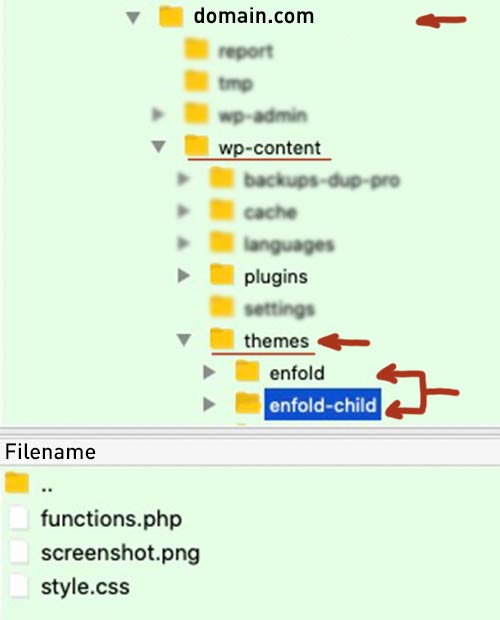
Actually, you cannot destroy an existing installation by setting up a child theme. Because you can always go back and activate the parent theme.
When you have installed ( uploaded the child-theme folder to your themes directory – on Dashboard – Themes there will be two enfold themes. One is marked as Child-Theme.
After Activation of the child-theme – go to (now) Enfold-Child Options :
on Import/Export Tab there is on top the button: “Import Parent Theme Settings” – click
This will take your settings from the parent-theme to your child-theme – including quick css entries and all the other settings.
It is not always the case that this does not work right away. If this is the case for you, please contact us again.March 22, 2022 at 11:00 am #1345491Topic: MaiChimp API problem
in forum Pre Sale QuestionsSHR Design
ParticipantHi.
I have a problem to integrate MaiChimp to the Enfold account in WordPress.
I have integrated the API in Enfold from my customer’s mailChimp account. Added Mailchimp for WooCommerce plugin.
But we can not intefrate Mail Chimp inside WooCoommerce on the site. When I connect to the account, this error message appears.
Mailchimp says: API Request Error – 503 :: on 1866 in /home/V/verdenno/www/wp-content/plugins/mailchimp-for-woocommerce/includes/api/class-mailchimp-api.phpWhat am I doing wrong?
March 22, 2022 at 10:42 am #1345490Thanks, I am done with the update for the Enfold theme. How to enable the custom.css for the updated version?
March 22, 2022 at 10:03 am #1345487In reply to: Changement couleur et police ne fonctionne pas
Super merci cela fonctionne.
Je m’attaque maintenant à un autre problème. Lorsque je télécharge une image, il y a énormément de miniature qui sont créés en parallèle. Cela occupe donc de la place et ralenti mon site.

Pourriez-vous me dire ou aller pour supprimer les miniatures qui sont créées automatiquement?
Y en a-t-il a garder en priorité pour le thème enfold?Merci pour votre retour
March 22, 2022 at 10:02 am #1345486In reply to: Hide image title, etc. on hover
Hi. That’s very sweet of you to go to the trouble to help, but I’ve tried doing Child themes in the past and regardless of the documentation provided, I fail.
The last time I tried it, my site I worked days on all disappeared. I don’t have time to redo all the work. I understand what the Child theme is supposed to do, I just don’t know how it works or if I did it right, etc. I’m thoroughly, completely, totally baffled by Child themes.
I do want to keep SEO, but nonetheless, I still have no clue where to find the php file that needs the code added to it, what folder(s) it’s in, etc.
Do I just add it to the bottom of the file?
Is the php file that needs the code added to it under the main WP content folder, then what folder after that and after that? Then which functions php file within whichever folder?
I have no clue. Bottom line, there should be a built in solution to this since the Enfold demo is misleading in that the titles do not show up on the images or slider images on the 2017 demo or the shop demo that I’ve looked at.
No other website platform or theme that I’ve seen in years of being on the web, that rank well on SEO has this pop up with the image title in it. It looks awful. It’s confusing and ugly to the visitor too.
Thanks.
March 22, 2022 at 9:37 am #1345485In reply to: Enfold – scroll-down-link not centered
Hello Nikko,
thanks for your super fast response ;)
I’ve seen, that – per default – the Enfold default value was set to: left: 49.85%;We added your code snippet, now it’s a bit too far to the right. See more details in the private content section.
Any idea?Thanks a lot,
JochenMarch 22, 2022 at 9:31 am #1345483In reply to: Hide image title, etc. on hover
To your fundamental question – where to insert that snippets ( code provided above )
First of all, I recommend using a child theme; this has many more advantages than disadvantages from my point of view. The child theme initially takes over all the properties of the parent theme until it develops its own properties.
Hence the naming. A child theme actually only comes in the form of a style.css in which it is declared to which parent it belongs.
If you download the prefabricated child theme from Enfold, you will see three files in the zip file – the mentioned style.css – a screenshot, so that you can directly recognize the affiliation to the parent theme in the dashboard / themes, and a quasi empty functions.php.
This central file is also a great exception, as it is one of the few files that is not intended as a replacement for the parent theme elements, but as an addendum. This is where such code snippets belong ( without deleting the introductory<?php)
There are snippets that will overwrite parent-theme instructions – but then they have to be coded that way. The most snippets only do change or add new abilities.Accordingly, this child theme does not require an update in the proper sense. Occasionally, however, it needs to be reworked, in case of major changes within the parent theme or WordPress.
Therefore, it is advisable to add comments to the added code snippets, which make it easier to understand the origin and meaning of the change even after years.In a php file you can implement this in two ways:
Either you surround the comment :/*** a comment here * without any influence to the code snipptet itself ***/or for a one-liner by prefixing it with :
// a comment here without any influence to the code snipptet itselfon that snippet above you see the the new function got a name – This name can be chosen arbitrarily; it is better to recognize directly what it is about. This function is then added to the theme via a so-called “hook” by add_action.
-
This reply was modified 4 years, 1 month ago by
March 22, 2022 at 8:09 am #1345479In reply to: pageload and speed
Hi caw67,
Thanks for using Enfold and have a great day!
Best regards,
NikkoMarch 22, 2022 at 7:46 am #1345478In reply to: Hide image title, etc. on hover
Personally, I was only bothered by the galleries with previews.
https://kriesi.at/themes/enfold-2017/elements/gallery/
If you hover a little bit over the thumbnails, an Enfold Tooltip and the WordPress Tooltip will be shown at the same time. Therefore my solution to hover the Titles in a Substitute Title ( org_title ) to cache.

there is a simpler method to remove all titles – but then as mentioned above – the seo aspect will be ignored – and if you decide to show on an image a lightbox – the title is missing in the bottom-bar of the lightbox.
March 22, 2022 at 7:26 am #1345476Topic: Menu & Header
in forum Enfoldayeh
ParticipantHello Enfold Theme,
I have a one question.
How I can create menu and header like https://www.ketengah.gov.my/.
When user scroll down, only menu appear and header is display none.Thank You.
March 22, 2022 at 6:48 am #1345472In reply to: pageload and speed
Hi caw67,
I noticed that it’s a bit slow in chrome, though it’s good in firefox on my end.
Since the js file are loaded last, the above-the-fold part of the site would show an incomplete style for a moment then fixes itself after the js file is downloaded.
Can you try adding this CSS code in Enfold > General Styling > Quick CSS:.av-minimum-height-50 .container { min-height: 50vh; }And see if it helps with the initial load.
Best regards,
Nikko -
This reply was modified 4 years, 1 month ago by
-
AuthorSearch Results
-
Search Results
-
Topic: Tags in Enfold
Our nonprofit organization has been successfully using Enfold for several years. It was installed and configured for us by a webmaster who had purchased it for us as a client of his. Now, he is no longer a webmaster.
Have things changed recently with Tags and Enfold, given the latest WP updates regarding taxonomies? Our taxonomies are still visible on the back-end, but attempting to retrieve them in certain ways on the front-end results in an error. Ex: https://pilgrimcenterofhope.org/category/pilgrimages/journeys-of-hope/
Topic: Polylang Pro issue
HI Support,
I am using Polylang Pro and a Enfold child theme. I am using English and Dutch. I am able to switch the languages execpt for the homepage. That is always switching to dutch (/nl/) witdh a 301 redirect. When i change the frontpage setting (select page) then it is not able to store it for NL and EN. When i change one, it is gone in the other language. I also tried all kinds of combinations under Sttings / reading. Do you have any suggestions?
Thank you.
Best regards, Rogier
Hi Kriesi,
After updating the theme to the latest version the Page Titles seem to have disappeared. I used the built-in editor (from Enfold), created a content section (with background image) and within that section a Special Header.
The special header disappeared.
Could you help me?
Topic: MaiChimp API problem
Hi.
I have a problem to integrate MaiChimp to the Enfold account in WordPress.
I have integrated the API in Enfold from my customer’s mailChimp account. Added Mailchimp for WooCommerce plugin.
But we can not intefrate Mail Chimp inside WooCoommerce on the site. When I connect to the account, this error message appears.
Mailchimp says: API Request Error – 503 :: on 1866 in /home/V/verdenno/www/wp-content/plugins/mailchimp-for-woocommerce/includes/api/class-mailchimp-api.phpWhat am I doing wrong?
Topic: Menu & Header
Hello Enfold Theme,
I have a one question.
How I can create menu and header like https://www.ketengah.gov.my/.
When user scroll down, only menu appear and header is display none.Thank You.


