Hi Elena,
Thanks for using Enfold as well and have a great day!
Best regards,
Nikko
Hi adapt,
We’re happy that we could help :)
Thanks for using Enfold and have great day!
Best regards,
Nikko
 Mark Zuccolo
Guest
My name is Mark Zuccolo, and I am the CEO of a new company, My Clinical Site. We are about to launch on the NorthAmerican market. Since we will be using only Enfold theme in designing sites for our target audience, healthcare professionals, we are making quite a use of Enfold’s name and images to make our point. The reason for my mail is to let you know in advance of our plans and to ask if there is anything that you would like us to add or change in our presentation. Please review our draft site at https://myclinicalsite.com/home/
Thank you and best regards.
Hi Camineet,
The child theme mentioned is optional, if you have some customizations that you’d like to do to your site/theme which might require changing some code in the files then a child theme is recommended.
But you can skip it for now so it does not make things complicated, you can just add it later in your website development stage when you think you’ll need it.
As for the enfold folder in the screenshot, please don’t remove it, it is required for the theme to function correctly.
You can read further about Child Themes and Parent Themes in WordPress Codex so you’ll have better understanding of what it is, what it does and if you’ll need one: https://developer.wordpress.org/themes/advanced-topics/child-themes/
Hope this helps.
Best regards,
Nikko
Hello,
awesome, im already looking forward to it!
Can you give me a rough time frame for Enfold 5.0 release date?
Thank you for getting back to me. :)
All the best
Luca
Thanks Nikko.
I now appear to be ready to do the FTP upload.
Before I proceed, can I ask what is meant by child theme here?

I am the original creator of this site. I don’t remember anything about a child theme.
I only know that LayerSlider was included in my purchase of Enfold, and I have LayerSlider implemented on the site.
How can I check to see if there’s a necessary child theme or not?
Hi Folks,
I’m back with an old technical problem from the backend which ist still not fixed,
or otherwise – it’s an “basic performance problem“ of Enfold?! ;/;)
I have had a “tour calendar” in operation on a client site for quite some time. Due to
the many entries there, page editing in the backend is getting slower and slower!
The more new entries I add, the slower the page becomes and normal, speedy work
is virtually no longer possible. Conclusion: The more individual elements there are
on a page, the slower it becomes! IIt also happens more often that the page doesn’t
respond at all, because the database seems to have a tilt. I can then only fix this error
with “WP-Sweep”.
To make up your own mind, please have a look at the event-page. I will post
the URL in the private area.
Is there really no solution or alternative here in sight? Of course there are “event
calendar plug-ins” and I am currently considering whether to use one. But my
client is convinced of the current design and doesn’t really want to change the layout.
Therefore, it would be nice if you could offer me an option! :) Is there maybe a media-
or content element that I haven’t considered yet that I could use to create the tour entries?
I’m really looking forward to your new thoughts about it!
Best regards
Carsten
Hi,
Glad we were able to help, if you have any further questions please create a new thread and we will gladly try to help you. Thank you for using Enfold.
Best regards,
Mike
Hi Guys,
See example sites in Private content
When you have a mega menu towards the right side of the page the offset is incorrect in the current version of Enfold.
Please can you take a look at the examples in private content and advise?
I think this is a bug with Enfold vs my modifications – I didnt want to make css changes to fix without checking with support first.
-
This topic was modified 3 years, 11 months ago by
 thinkjarvis.
Hi, I’m using the Blog Post widget within Enfold to show all our blog posts using the Grid Layout. We are currently showing the “Title and Excerpt + Read More Link” layout option. We would like to add a listing of all tags that are associated with each post underneath the blog post title. Here’s an example of what I would like to see
blog post title 1 blog post title 2 blog post title 3
tag 1, tag 2, tag 3 tag 2, tag 5 tag 6
Excerpt Excerpt Excerpt
Read More Read More Read More
Is it possible to display each related tag for each post within this widget? I only want to show the tags that are related and sometimes there might be many associated tags for a post. Some posts may just have one though.
Thoughts? Thanks!
Hi,
I added the function to your functions.php file, and it’s working as it should. Please note that the function will be overwritten on updates, unless you put it in a child theme.
Best regards,
Rikard
Hi,
We will implement this as a new feature in Enfold 5.0 :-)
Best regards,
Rikard
INTERESTING BEHAVIOUR:
If I add exact 4 or more products to the upsell box, than my shortcode works as expected.
So, somehow, the upsell (counter) and enfold productslider/wc must be linked.
Hi,
Glad to hear, you should be able to use wp-rocket, we just wanted to clear the cache. Try enabling it again and checking, also use the wp-rocket options to clear it’s cache, if all is good then try enabling the theme Enfold Theme Options ▸ Performance ▸ JS & CSS file merging and compression, if all is fine then good you are all set, if you see an error again then check if wp-rocket has a minifying option enabled, if so disable this option, because if the theme and wp-rocket are both minifying this could cause issues.
Try different settings until all is working well again.
Best regards,
Mike
Hi Mike,
thanks for the check-up.
As I’ve mentioned before, this only occures on WC product page (single product).
Now I’ve found where it is beeing set: wp-content/plugins/woocommerce/includes/wc-template-functions.php
from line: 456 -> function wc_get_loop_class()
There seems to be something wrong with the modulo calculation:
$columns    = absint( max( 1, wc_get_loop_prop( 'columns', wc_get_default_products_per_row() ) ) );

	$loop_index ++;
	wc_set_loop_prop( 'loop', $loop_index );

	if ( 0 === ( $loop_index - 1 ) % $columns || 1 === $columns ) {
		return 'first';
	}

	if ( 0 === $loop_index % $columns ) {
		return 'last';
	}
Maybe I did not mention, that in the enfold shop settings under “product gallery” I’m using: WC 3.0 product gallery (not enfold default).
Could you please check again? Thanks!
Liebes Enfold-Team,
ich hoffe, ich bin hier richtig für mein Anliegen.
ich habe eine einfache avia-Tabelle und möchte sie via css formatieren:
.avia-data-table .column-1 {
text-align: left !important;
background-color: white;
border: 0;
font-weight: bold;
color: #008dca;
width: 200px !important;
}
.avia-data-table .column-2 {
text-align: left !important;
background-color: white;
border: 0;
color: black;
}
Ich habe diesen Code in Quick-css, in der style.css und via code-block <style> direkt auf der Seite probiert. Leider kein Effekt.
Zum Test habe ich mit Tablepress eine Tabelle darunter erstellt. Damit funktioniert es. Ich würde es jedoch lieber mit der avia-Tabelle umsetzen.
Zur Info: ich habe ein Manged WordPress bei ionos und zur Sicherheit das enfold-child-Theme installiert.
Herzlichen Dank für Ihre Hilfe.
viele Grüße von Markus
Hi,
Glad we were able to help, if you have any further questions please create a new thread and we will gladly try to help you. Thank you for using Enfold.
Best regards,
Mike
Hey Antonio,
Thank you for the inquiry.
How did you add the search form? You should be able to adjust the default search query by using the pre_get_posts filter. If you are using the AJAX search from the theme, using the get_search_query filter from the functions-enfold.php file > avia_ajax_search function should work.
This documentation should help.
// https://developer.wordpress.org/reference/classes/wp_query/#category-parameters
Best regards,
Ismael
Hey decode,
Thank you for the inquiry.
To fix the issue temporarily, we modified the themes/enfold/config-templatebuilder/avia-template-builder/php/class-generic-helper.php file a bit around line 440.
			if( post_type_exists( $link[0] ) )
			{
				return apply_filters( 'wpml_permalink',  get_permalink( $link[1] ), ICL_LANGUAGE_CODE );
			}
The modification should return the translated page.
Best regards,
Ismael
Hi Mike,
I do not fully understand what you meant by resizing the logo so the logo text is the same height as the image,
I uploaded a new logo, cropped it and I played with this code:
.av_header_transparency .logo img.alternate {
opacity: 1;
padding-top: 62px;
}
#top #header #header_main .logo {
left: 44%;
}
change it to this:
.av_header_transparency .logo img.alternate {
opacity: 1;
padding-top: 62px;
}
#top #header #header_main .logo {
left: 21%;
}
}
This edit the logo is the correct size although it is not centered.
The hamburger menu is now stuck on the left hand side when its set to Logo Left, Menu Right in the enfold settings.
View post on imgur.com
Hi adapt,
Please try to add this CSS code in Enfold > General Styling > Quick CSS:
#top .av-masonry-outerimage-container .av-masonry-image-container {
    height: 54%;
}
Best regards,
Nikko
Hi wildturkeyway,
Can you try adding this CSS code in Enfold > General Styling > Quick CSS:
@media only screen and (max-width:767px) {
  .home #av_section_1 {
    background-size: contain !important;
  }

  .home #av_section_1 .av-special-heading-tag {
    font-size: 48px !important;
  }
}
Hope it helps.
Best regards,
Nikko
Hi Natacha,
Have you set the correct permissions as pointed in the documentation: https://kriesi.at/documentation/enfold/theme-registration/#toggle-id-5
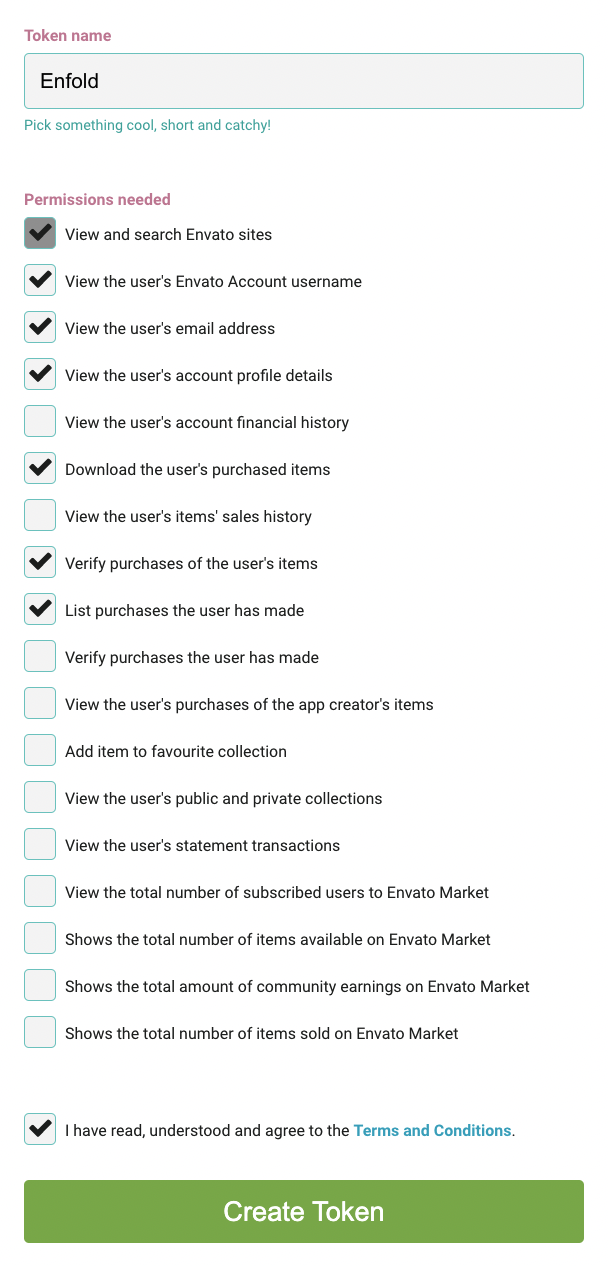
If you’re still having issues even with correct permission, then try to update the theme using this plugin: https://www.envato.com/lp/market-plugin/
Best regards,
Nikko
 Margaret
Guest
Help I need assistance on the forum but my password does not go through to my email. It’s been 3 days now and not once has it come through can you please assist me with getting registered? please I bought the enfold theme and need help with it.
Actually don’t worry about it for now.
I just checked the site, and the update broke a few other pages as well, so for now I’ve had to revert back to the old version of the site (pre-Enfold template update) and will have to check the code manually to copy over the updates the developer made directly on the template files (yeah, not making these changes on the child theme was extremely silly)…..
Thanks for your help!
This reply has been marked as private.
Hi,
Glad we were able to help, if you have any further questions please create a new thread and we will gladly try to help you. Thank you for using Enfold.
Best regards,
Mike
Hi,
Glad Rikard could help, if you have any further questions please create a new thread and we will gladly try to help you. Thank you for using Enfold.
Best regards,
Mike
Hi,
Glad we were able to help, if you have any further questions please create a new thread and we will gladly try to help you. Thank you for using Enfold.
Best regards,
Mike
Hi,
Glad we were able to help, if you have any further questions please create a new thread and we will gladly try to help you. Thank you for using Enfold.
Best regards,
Mike



