
-
AuthorSearch Results
-
May 27, 2022 at 8:49 pm #1353222
In reply to: custom logo size 300xp is too small
Hi,
Glad we were able to help, if you have any further questions please create a new thread and we will gladly try to help you. Thank you for using Enfold.Best regards,
MikeMay 27, 2022 at 7:54 pm #1353215In reply to: Gravity form doesn't load for some users
Hi,
Thanks for the update. Does the same thing happen if you activate one of the default WordPress themes? There’s nothing in Enfold which would not show element based on browser language or location, or affecting third party plugin elements either.
Best regards,
RikardMay 27, 2022 at 7:53 pm #1353214In reply to: Can't get a widget area above the header…
for header meta you can use:
add_filter( 'avf_execute_avia_meta_header', '__return_true', 10, 1);

add_filter('avf_header_setting_filter', 'avf_header_setting_filter_mod', 9999, 1);
function avf_header_setting_filter_mod($header) {
  $header['header_topbar'] = 'header_topbar_active';
  return $header;
}

add_action( 'avia_meta_header', 'enfold_customization_header2_widget_area' );
function enfold_customization_header2_widget_area() {
  dynamic_sidebar( 'header2' );
}
Then you had to create the custom widget area on widgets named : header2
the setting that the header meta is scrolling you can find on enfold child – header – header behavior: Unstick topbarMay 27, 2022 at 7:38 pm #1353211In reply to: Can't get a widget area above the header…
Link removed – see advice later on.
it is just a quick and dirty setting – because all responsive settings aren’t done.if you go and have a look into enfold folder content – there are a lot of do_action rules –
wp_body_open, ava_after_body_opening_tag, avia_meta_header, ava_main_header etc.
some of them are used – if f.e. wpml is installed.-
This reply was modified 3 years, 10 months ago by
Guenni007.
May 27, 2022 at 7:01 pm #1353206In reply to: Demo import not working
Hi alejandroc109,
Please open a new thread and include WordPress admin login details in private, so that we can have a closer look at your site.
Best regards,
RikardMay 27, 2022 at 6:45 pm #1353201Hi,
Great, I’m glad that Mike could help you out. I’ll close this thread for now then, please open a new thread if you should have any further questions or problems.
Best regards,
RikardMay 27, 2022 at 6:29 pm #1353198In reply to: Adding TikTok for social profiles the correct way
you upload fontello font icon packs as zip files. Not as font-files but on enfold child Import/Export – Iconfont Manager
 May 27, 2022 at 6:27 pm #1353197
Topic: Can't get a widget area above the header…
in forum Enfoldinterage
ParticipantHey folks.
A client asked us to add a widget area above their header area… and we’ve followed the directions here, to the letter:
As soon as we add the CSS provided, the logo shrinks, and the header stops following the “Let logo and menu position adapt to browser window” setting.

Then, when we add a widget to the header widget area, it gets inserted between the logo and the menu, which are now centered and on top of each other – and is not in the right place:

This is what the header looks like without the CSS code… they just want this, with a widget area above it.

We’re following the instructions to the letter, have searched the forum for a solution, and can’t figure this out.
Any ideas?
Thanks!
MarkMay 27, 2022 at 6:23 pm #1353196In reply to: Adding TikTok for social profiles the correct way
first the existing embedded icon-font on Enfold is named: entypo-fontello
Then – if you place f.e. an icon alb element to your layout and open to edit it you can see :
(click to enlarge:)
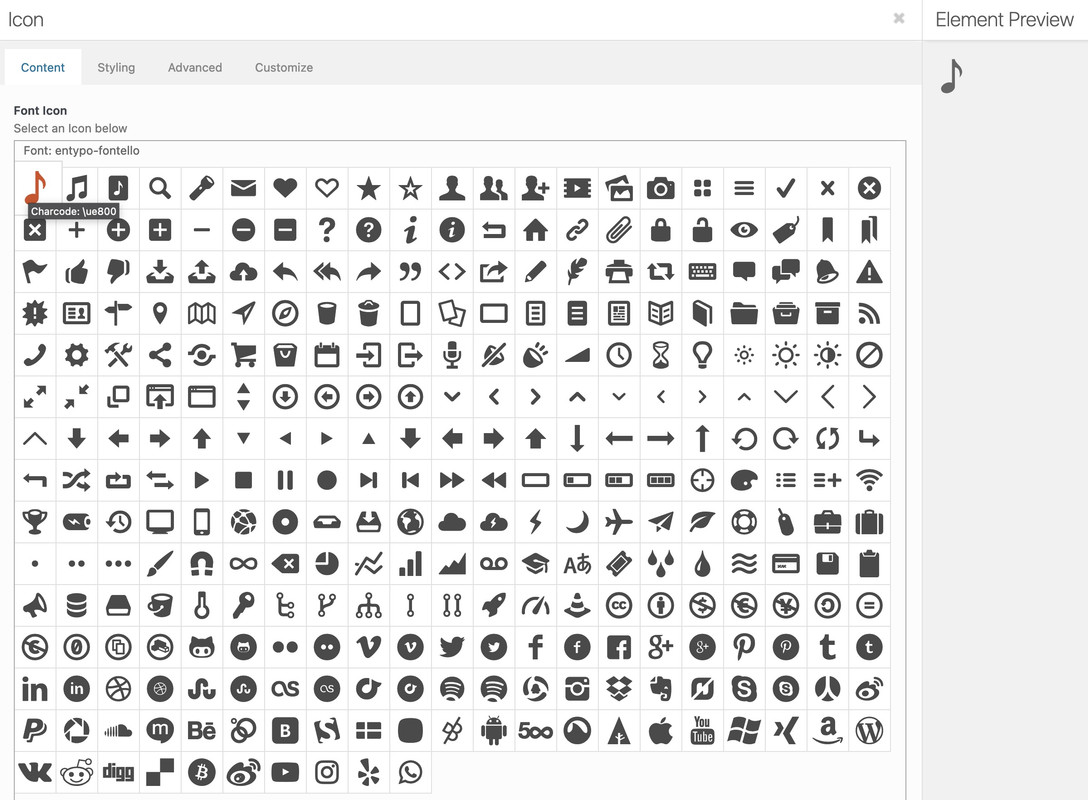
If you hover the icons and stay on that icon a while – you can see as tooltip the hexcode.the t from trumblr is on ue8fa and ue8fb
maybe the ue904 is an older icon of tiktokMay 27, 2022 at 6:08 pm #1353191Hi Julian,
Thanks for the login details. First off, could you try updating the theme to the latest version (4.9.2.3) to see if that helps please? https://kriesi.at/documentation/enfold/how-to-install-enfold-theme/#theme-update. I see that the automatic updates are not coming through on your installation, it might be due to your security plugin. Please try to install and configure this plugin to see if it works better: https://envato.com/market-plugin/
Best regards,
RikardMay 27, 2022 at 6:07 pm #1353189In reply to: Adding TikTok for social profiles the correct way
None of that @Guenni007.
Isn’t the example code supposed to work with the already Fontello icons Enfold uses?
So I replace “ue800” to whatever is needed for Tumblr and an icon should show up?
Thanks.
May 27, 2022 at 6:01 pm #1353186In reply to: Comment submitted but comment form not visible
Hi,
Thanks for letting us know, I’ll close this thread for now then. Please open a new thread if you should have any further questions or problems.
Best regards,
RikardMay 27, 2022 at 5:02 pm #1353180Hi Rikard,
No, there is no problem with the other WP theme. This is the first time this has happened to me with Enfold (this is my fourth Enfold theme installed and i am very happy with it).
I haven’t started building the site so I don’t know if this will impact any element or functionality… I hope not.
Are you logged in with my login or is it not necessary?Best regards
Nat
May 27, 2022 at 4:23 pm #1353178In reply to: Multiple Footers
Hi Nikko,
I see the option for using a page as a footer in the Enfold settings. Do you have some example CSS code you can share with me for the unique ID portion?
Thanks for your help.
Jeff
May 27, 2022 at 4:12 pm #1353174In reply to: Adding TikTok for social profiles the correct way
Hey peterolle,
Thank you for the inquiry.
You can actually use custom images as icons if the font icon is not available. Please check the documentation below.
// https://kriesi.at/documentation/enfold/social-share-buttons/#how-to-add-custom-social-icons-to-enfold-options > Using images or non-Fontello icons
Best regards,
IsmaelMay 27, 2022 at 3:32 pm #1353169In reply to: Formatieren einer Tabelle avia-data-table via css
Hi,
Glad we were able to help, if you have any further questions please create a new thread and we will gladly try to help you. Thank you for using Enfold.Best regards,
MikeMay 27, 2022 at 3:08 pm #1353165In reply to: Woocommerce categories not working
Hi,
Glad to hear that you have this sorted out, and thanks for sharing the issue with the plugin as it will alert other users with this plugin.
If you have any further questions please create a new thread and we will gladly try to help you. Thank you for using Enfold.Best regards,
MikeMay 27, 2022 at 3:01 pm #1353164In reply to: Randomize Testimonials
Hey Scout-Bri,
Thanks for the link to the old thread, the testimonials script is now in it’s own file at:
\wp-content\themes\enfold\config-templatebuilder\avia-shortcodes\testimonials\testimonials.js
try saving your current file to your desktop for fallback and create a new file with this code:(function($) { "use strict"; // ------------------------------------------------------------------------------------------- // testimonial shortcode javascript // ------------------------------------------------------------------------------------------- $.fn.shuffle = function() { var allElems = this.get(), getRandom = function(max) { return Math.floor(Math.random() * max); }, shuffled = $.map(allElems, function(){ var random = getRandom(allElems.length), randEl = $(allElems[random]).clone(true)[0]; allElems.splice(random, 1); return randEl; }); this.each(function(i){ $(this).replaceWith($(shuffled[i])); }); return $(shuffled); }; $.fn.avia_sc_testimonial = function(options) { return this.each(function() { var container = $(this), elements = container.find('.avia-testimonial'); $('.avia-testimonial').shuffle(); //trigger displaying of thumbnails container.on('avia_start_animation', function() { elements.each( function(i) { var element = $(this); setTimeout( function(){ element.addClass('avia_start_animation'); }, (i * 150) ); }); }); }); }; }(jQuery));Then clear your browser cache and any cache plugin, and check.
Note that clearing javascript cache may require a few tries.Best regards,
MikeMay 27, 2022 at 2:34 pm #1353160In reply to: social menu text link
Hi,
Glad we were able to help, if you have any further questions please create a new thread and we will gladly try to help you. Thank you for using Enfold.Best regards,
MikeMay 27, 2022 at 1:50 pm #1353153In reply to: Height of toggle-content
Hi,
Thanks for the clarification. First off, could you try updating the theme to the latest version (4.9.2.3) to see if that helps please? https://kriesi.at/documentation/enfold/how-to-install-enfold-theme/#theme-update. If not, then please post admin WordPress login details in private.
Best regards,
RikardMay 27, 2022 at 1:07 pm #1353143In reply to: Demo import not working
Godaddy have disabled the control files on their end and we have tried to install the demo again but the same error
I have checked the error log files and this error is appearing
[25-May-2022 10:21:31 UTC] PHP Warning: Use of undefined constant ‘avia_demo_store_downloaded_files’ – assumed ‘‘avia_demo_store_downloaded_files’’ (this will throw an Error in a future version of PHP) in /home/d7cczkcpi1gz/public_html/giocavalliconcierge.co/wp-content/themes/enfold/functions-enfold.php on line 568
Have you seen this before?
May 27, 2022 at 1:06 pm #1353140In reply to: Sticky header covers content of destination anchor
Hi,
Glad we were able to help, if you have any further questions please create a new thread and we will gladly try to help you. Thank you for using Enfold.Best regards,
MikeMay 27, 2022 at 11:24 am #1353130In reply to: WordPress 6.0
Hi,
Thanks for letting us know, I’ll close this thread for now then. Please open a new thread if you should have any further questions or problems.
Best regards,
RikardMay 27, 2022 at 11:20 am #1353127In reply to: Fontproblem with custom font mostly under Windows
Hi,
Great, I’m glad that Mike could help you out, and thanks for the update. I’ll close this thread for now then, please open a new thread if you should have any further questions or problems.
Best regards,
RikardMay 27, 2022 at 11:04 am #1353119In reply to: Contact form not working
Hi,
Please refer to these suggestions if your contact form is not working as it should: https://kriesi.at/documentation/enfold/contact-form/#my-contact-form-is-not-sending-emails-
Best regards,
RikardMay 27, 2022 at 9:24 am #1353102In reply to: Masonry element – pagination setting is disappeared
Hey StuWeTueHo,
Thanks for providing us a screenshot.
Can you tell us what version of Enfold you’re currently using?Best regards,
NikkoMay 27, 2022 at 9:16 am #1353101Hi dcshortwave,
Thanks for giving us admin access.
It seems you are still using a bit outdated version of Enfold and the latest version of WordPress, please backup your site first and then update Enfold and all the plugins you have on your site.
Let us know if it helps, if not then just let us know and we’ll check further on your site.Best regards,
NikkoMay 27, 2022 at 5:22 am #1353091Topic: deleted Pages are hidden or gone
in forum Enfoldlaptophobo
ParticipantI just noticed that in the Enfold dashboard that the Pages trash no longer exists. It does in Posts.
I trashed a page today and now I have no ability to re-activate the Page should I need to.
Please see private for access.
May 26, 2022 at 8:52 pm #1353074In reply to: Grid row 100% widht on mobile
Hi,
Glad Nikko was able to help, if you have any further questions please login and create a new thread in the Enfold support fourm and we will gladly try to help you. Please do not use the Pre Sale Questions section for support questions. Thank you for your understanding and for using Enfold.Best regards,
MikeMay 26, 2022 at 7:52 pm #1353071In reply to: Demo import not working
This reply has been marked as private. -
This reply was modified 3 years, 10 months ago by
-
AuthorSearch Results
Viewing 30 results - 25,711 through 25,740 (of 244,580 total)
-
Search Results
-
Hey folks.
A client asked us to add a widget area above their header area… and we’ve followed the directions here, to the letter:
As soon as we add the CSS provided, the logo shrinks, and the header stops following the “Let logo and menu position adapt to browser window” setting.
Then, when we add a widget to the header widget area, it gets inserted between the logo and the menu, which are now centered and on top of each other – and is not in the right place:
This is what the header looks like without the CSS code… they just want this, with a widget area above it.
We’re following the instructions to the letter, have searched the forum for a solution, and can’t figure this out.
Any ideas?
Thanks!
Mark


