Hey, do I need to be aware of anything when I want to Import my Enfold website to another domain? Or do I need to deregister the license first?
Hi,
Ihm trying to build a “related posts” section. Currently I am using the YARPP plugin, but I noticed there is an integrated version in enfold. I tried to find some advice in this forum but unfortunately it does not make any sense. I’m using the ALB for my Blogpost and I enabled the “related Entries” in my blog layout. Can someone please help?
Tank you very much,
Sincerely,
Veronika
Hi Tarek,
We are actually done with this integration, it will be included in Enfold 5.0 which should be available within the next few weeks.
Best regards,
Rikard
 Tarek
TarekGuest
Hello,
i tried to add a feature request, but seems like the option is not available since few years now.
i am working on RankMath and introduced a TOC in my blogposts, however rankmath is unable to read it since it is not fully integrated. they provided a solution on how to add a filter to the theme, but they said that it should be included within the theme so they can add the theme Enfold to the supported themes.
thank you.
Hey TrevorMF,
Thanks for the login details. First off, could you try updating the theme to the latest version (4.9.2.3) to see if that helps please? https://kriesi.at/documentation/enfold/how-to-install-enfold-theme/#theme-update.
If you haven’t registered your theme license, then please refer to this: https://kriesi.at/documentation/enfold/theme-registration/
Best regards,
Rikard
Hi,
Please try the following in Quick CSS under Enfold->General Styling:
#text-2 .av-5gitv0-b47efd8ec5e652095d30c361f6068132 {
    margin-right: 20px;
    background: white;
    color: #0d206a;
    border: 2px solid #0d206a;
}
Best regards,
Rikard
Hey Jacopotj,
Please try the following in Quick CSS under Enfold->General Styling:
.avia-cookie-consent .avia-cookie-consent-button {
    padding: 0.9em;
    font-size: 14px;
}
Best regards,
Rikard
Hi,
Since you have selected to use a page to display your footer, you will have to edit the content in that specific page. If you want a regular footer instead, then you can make the necessary adjustments under Enfold->Footer.
Best regards,
Rikard
Hi,
Thanks for that. The body font seems to be working as it should, but the header font is not. First of all, could you try updating the theme to the latest version (4.9.2.3) to see if that helps please? https://kriesi.at/documentation/enfold/how-to-install-enfold-theme/#theme-update.
Best regards,
Rikard
Hi our site https://veritalifemexico.com/ worked fine on desktop and mobile for several months. Elements that should have cascaded down to a single column like the Masonry did so as did other elements that behaved that way. What I am getting now is a desktop version of the site on my mobile and it’s a real mess.
I have no idea what’s happened, we are on the latest version of WP and Enfold, any ideas?
-
This topic was modified 3 years, 10 months ago by
 TrevorMF.
Hey Shari,
Thanks for your question, it seems that the default your-domain.com/favicon.ico that browsers look for is pointing to /wp-content/uploads/TSS_112x112-36×36.jpg
which is the one on the right.
What image do you have in your Enfold Theme Options ▸ Favicon?
Do you have an actual favicon.ico in your root directory?
Try removing the Enfold Theme Options ▸ Favicon image and add the correct favicon.ico in your root directory.
Then clear your browser cache and any cache plugin, and check.
Best regards,
Mike
Hi,
Glad to hear that Guenni007 has helped you this sort this out, thanks Guenni007!
If you have any further questions please create a new thread and we will gladly try to help you. Thank you for using Enfold.
Best regards,
Mike
Hi,
Glad to hear that you have this sorted out, if you have any further questions please create a new thread and we will gladly try to help you. Thank you for using Enfold.
Best regards,
Mike
Hi,
Glad we were able to help, if you have any further questions please create a new thread and we will gladly try to help you. Thank you for using Enfold.
Best regards,
Mike
Thanks Mike, I don’t mind the linked image overlay but, I do find it strange that my Enfold theme options > Advanced Styling doesn’t look like your image. Mine does not have the Linked Image Overlay. Strange….
The code for removing titles on mouse-over worked. Thank you!
The four links at the bottom of page two don’t change color with mouse-over. I feel like I have that set to turn blue but, something is a miss. lol
Also still need help with the three images on page two. The desktop looks great but, the mobile version has micro thumbnails. lol
Would be great if we could get that to look like the desktop, please.
Thank you!
Jason
I loaded Widget Options and in Enfold, my two ‘alternating’ widgets are named Footer – column2 (the original footer column2) and the ‘new’ one with the video is named VideoFooter – column2. I edited the Footer – column2 widget to not display on the Home, Projects and About pages and set the VideoFooter – column2 widget to display on those pages, but all that’s displaying in it’s place on those 3 pages is the default page menu list. I’m not sure what setting I’m missing to tell that widget to display on those 3 pages. I have it set to ‘show on checked pages and those three are checked.
Hi,
You can disable the linked image overlay at: Enfold theme options > Advanced Styling > Linked Image Overlay

You can remove the Titles on mouse-over by adding this code to the end of your child theme functions.php file in Appearance ▸ Editor:
function custom_remove_title_script() {
?>
    <script>
(function($){
    $("*").hover(function(){
      $(this).removeAttr("title");
    });
  })(jQuery);
  </script>
    <?php
}
add_action('wp_footer', 'custom_remove_title_script');
Best regards,
Mike
Yes Mike is right – i do have for that a different Plugin : restrict-widgets
i still works on newest WordPress and Enfold.
you will have under each widget a choice to show or hide on selected :
if you click on the fiels to add other options you can choose page names or post or categories, tags, single-posts etc. pp.
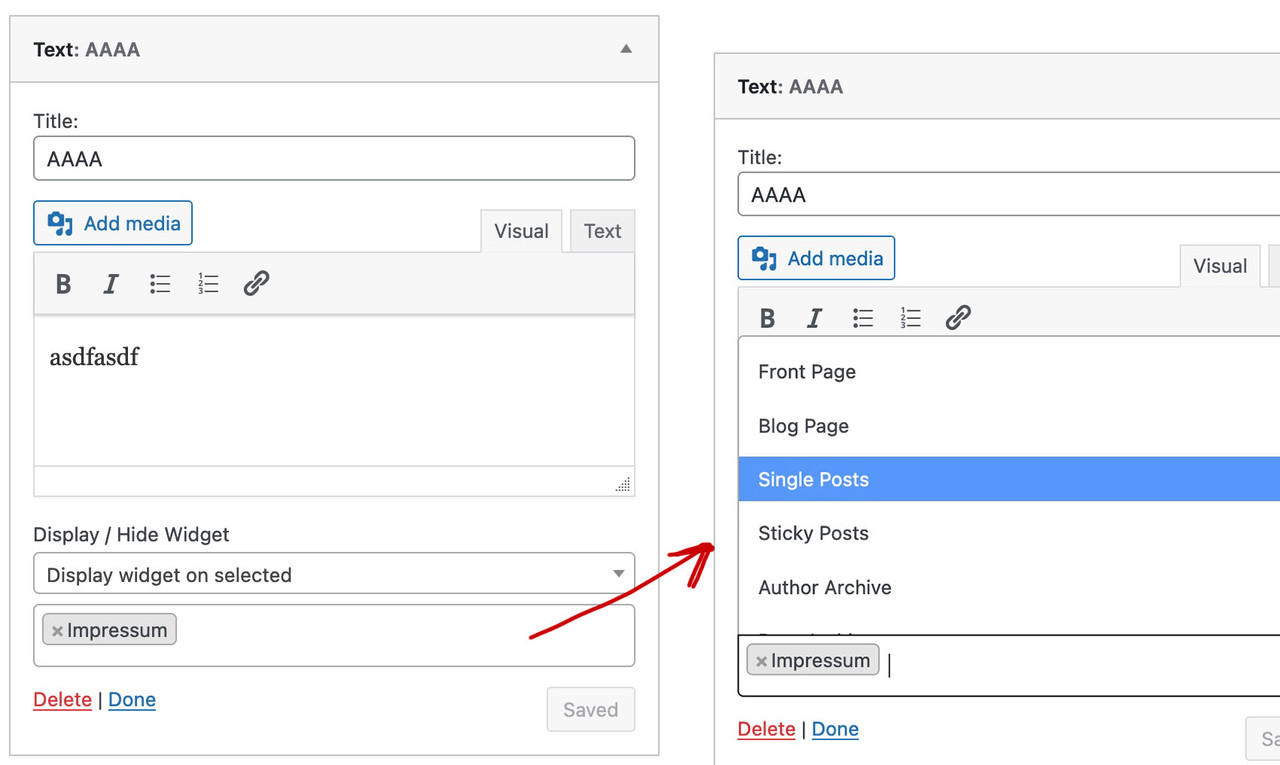
Mike’s recommendation seems to be more powerful, but possibly also a bit more complex to handle.
I will now also test it.
Edit: i lost the common view of all widget areas. Only archives widget is seen – and no widget-areas. ?
Maybe only a bug inside my installation.
Rikard, thank you for your response. We’ve upgraded the site to the latest version of Enfold without issue.
Guenni007, thank you for your suggestion. I’ve noted it and will test it out.
For now, all is well. Please consider this topic closed.
Hey peterolle,
Try adding this code to the end of your child theme functions.php file in Appearance ▸ Editor:
function cAdmin() {
	$current_user = wp_get_current_user();
	$user = $current_user->user_login;
	return ($user === 'enfold');
}
add_action('admin_bar_menu', 'update_adminbar', 999);
function update_adminbar($wp_adminbar) {
	if(cAdmin()) return;
	$wp_adminbar->remove_node('avia_ext');
}
Best regards,
Mike
you are right – now you have to work with the new class-avia-masonry.php.
if you look inside the older file – you see at the beginning:
if ( ! class_exists( 'avia_masonry_old' ) )
the method stayes the same as before – your snippet is placed and the edited file could be uploaded to the enfold-child/shortcodes folder as before.
if i read the script well – and if i test it via developer Konsole on https://kriesi.at/themes/enfold-shop/
this will not remove the Sale badge but move it from bottom right to top right place.

Hi,
I am returning to work on my website after some time. I am currently adding blog entries and I have noticed something that did not seem to happen before. The general blog page does not seem to work regularly, as you can see here blog page
The page contains just a masonry block. In the block, in the backend, there is a notice in Italian that says that this block uses the whole screen by default and if you put it in a column (where it actually is), it will take up the available space. Plus a red warning: Regulate the content width.
Also, the single articles are ok except one where I have added and accordion slider: article with Accordion slider
It shows this message either in the main part of the page or sometimes above the menu: Warning: Division by zero in /home/customer/www/elenagrassi.it/public_html/wp-content/themes/enfold/config-templatebuilder/avia-shortcodes/slideshow_accordion/slideshow_accordion.php on line 1199
and the side bar is moved downwards.
Can you help please?
Thank you. Best regards,
Elena
Hi Ash,
Could you try updating the theme to the latest version (4.9.2.3) to see if that helps please? https://kriesi.at/documentation/enfold/how-to-install-enfold-theme/#theme-update.
Best regards,
Rikard
Hi Nat,
Could you try updating the theme to the latest version (4.9.2.3) to see if that helps please? https://kriesi.at/documentation/enfold/how-to-install-enfold-theme/#theme-update. If you need further help, then please post admin WordPress login details in private.
Best regards,
Rikard
Thank you for that @guenni007.
I will do some performance tests using the font and the image to see if it is ok, in the meantime I used the entypo-fontello that comes with Enfold and with the Tumblr icon to avoid extra loads.
If anyone is looking for the same, just use the following in your functions and add your TikTok URL in Social Profiles.
	// Register new icon as a theme icon
		function avia_add_tiktok_icon($icons) {
			$icons['tiktok'] = array( 'font' =>'entypo-fontello', 'icon' => 'ue8fa');
			return $icons;
		}
		add_filter('avf_default_icons','avia_add_tiktok_icon', 10, 1);

	// Add new icon as an option for social icons
		function avia_add_tiktok_social_icon($icons) {
			$icons['TikTok'] = 'tiktok';
			return $icons;
		}
		add_filter('avf_social_icons_options','avia_add_tiktok_social_icon', 10, 1);
Any idea why when hovering over the icon it displays Tiktok instead of TikTok with 2 capital T’s?
Thanks.
Dear Enfold Support
Until now I add a customized version of the shortcode av-helper-masonry.php to my child theme with the following function in my child theme’s functions.php:
add_filter('avia_load_shortcodes', 'avia_include_shortcode_template', 15, 1);
function avia_include_shortcode_template($paths)
{
  $template_url = get_stylesheet_directory();
      array_unshift($paths, $template_url.'/shortcodes/');

  return $paths;
}
Since Enfold version 4.8.9 av-helper-masonry.php is supposed to be deprecated and is moved from the directory avia_shortcodes to the directory legacy_avia_shortcodes. Instead there is a new class-avia-masonry.php in the new directory avia-shortcode-helpers. Do I have to make my customizations in the class-avia-masonry.php now and how can I add this customized version to the child theme? The above function does not the job. Or is there a way to still use the deprecated av-helper-masonry.php?
What do you recommend?
Kind regards
Ueli
Hi,
I’ve just taken over maintenance of a website that has Enfold 4.7.4 installed and is in desperate need of updates. They have the following script in functions.php to remove the ecommerce sales badge, I presume. When I upgrade to 4.9.2.3 will this script need to be replaced? If so, what would it need to be? Thank you.
// Removing sales badge
// custom script
add_action(‘wp_footer’, ‘ava_custom_script’);
function ava_custom_script(){
?>
<script>
(function($){
function h() {
$(‘#top .product’).each(function() {
var onsale = $(this).find(‘.onsale’),
thumb = $(this).find(‘.woocommerce-LoopProduct-link’);
onsale.appendTo(thumb);
});
}
h();
})(jQuery);
</script>
<?php
}
Hi,
Impossible to access anything in the theme (page or post), a page is displayed with an error message “fatal error” (I put the message in the private content).
I don’t know if it’s due to the WordPress 6.0 update? My Enfold theme version is 4.8.3./ PHP version 8.0.19
Website is working but impossible to modify content in page or post.
Thanks for your help
Natalia
Hi,
Glad Nikko was able to help, if you have any further questions please create a new thread and we will gladly try to help you. Thank you for using Enfold.
Best regards,
Mike



