Viewing 30 results - 25,441 through 25,470 (of 244,560 total)
  • Author
    Search Results
  • #1354423
    easy-marketing
    Participant

    Hallo Enfold Team,
    1) Ist es möglich jeder Seite eine eigene Navigation zur Verfügung zu stellen?
    2) Ist es möglich unter “Demodaten importieren” nur gewünschte Unterseiten hinzuzufügen. Ich hätte gerne die Kontaktseite von Demo xy und die Portfolio Seite von Demo xy? Möchte nicht immer die ganze Demoseite importieren.
    3) Kann ich auch verschiedene Logos auf verschiedenen Seite anzeigen lassen?

    Sind bei dem Enfold Theme nur globale Einstellungen möglich, das wäre sehr schade. Und wann kommen denn mal neue Demodaten?

    LG Alex

    Hey Marko,

    Thanks for reaching out to us!

    You can refer to this post – https://kriesi.at/documentation/enfold/intro-to-layout-builder/#debug-mode and enable debugging mode for ALB which would display shortcodes of the elements in the field right below Advanced Layout Builder. Then, you can add Search element to your page and then copy its shortcode from debug field and paste it into a Custom HTML widget in Appearance > Widgets :)

    Best regards,
    Yigit

    #1354402

    Hi Paul,

    1- I have moved the screenshot in Ismael’s post into private content field :)

    2- Please add following code to Quick CSS field in Enfold theme options > General Styling tab

    
    .current-page-ancestor .avia-menu-fx {
      opacity: 1;
      visibility: visible;
    }
    

    Best regards,
    Yigit

    #1354396

    Hey Annemarie,

    We haven’t tested that plugin with Enfold unfortunately.

    Best regards,
    Rikard

    #1354395

    Hey Woutski,

    Could you try updating the theme to the latest version (4.9.2.3) to see if that helps please? https://kriesi.at/documentation/enfold/how-to-install-enfold-theme/#theme-update.

    Best regards,
    Rikard

    thinkjarvis
    Participant

    Hi team,

    In the latest update of Enfold – When you specify font sizes for ALB Special Headings or Slider Headings the default sizes are not applied correctly.

    If you overide the settings locally for Desktops and leave the others as default – The system seems to apply the last specified size to smaller screen sizes.

    So if I create an ALB Special Heading and set the Desktop font size to 48px and the tablet size to 40px – Leaving the two smallest size as default – It automatically applies the larger size to the mobile sizes.
    Essentially – Giant fonts on mobile phones causing overflow issues for sliders and headings where the container has a fixed height.

    Really hard to explain but this has affected every site on my server where I had left some of the font settings for smaller screen sizes as default size.

    I had to go in to every header element (h1 – h6) on every page and change the mobile size defaults to specific pixel sizes to resolve the issue.

    Is it possible for you to investigate? I’ll see if I can re-create the issues for you on my test server when I am next in there.

    Can you try creating a special heading in a clean Enfold install and within the element change the desktop and tablet sizes to 48px leaving the smallest two sizes as default. This should cause the fonts to become massive on mobile devices instead of using the defaults.

    • This topic was modified 3 years, 10 months ago by thinkjarvis.
    #1354387

    Ok. Is there somwhere I can download the previous version of Enfold?

    #1354386
    AnnemarieDoolin
    Participant

    Hi Guys,
    are you aware whether the Copyscape plugin is compatible with Enfold… and more specifically the Avia layout builder?

    Regards,
    Annemarie

    #1354377

    Hi,
    Glad we were able to help, thanks Guenni007, if you have any further questions please create a new thread and we will gladly try to help you. Thank you for using Enfold.

    Best regards,
    Mike

    Hey Mike,

    thank you very much for your reply.

    Actually ì´m not sure how to do disable my costumizations and worrried about unwanted changes.
    So I´ll try to activate my parent theme and check again!?

    Would that be the right way to do it in the wordpress backend:
    Design (Apperance) > Themes > Aktivieren (“activate” Enfold parent theme instead of child theme) ?
    Please also see screenshot.

    Thanks a lot in advance for another reply.

    Best regards,
    fkm

    #1354365

    Hi,

    The same error messages are still there, so it’s still not configured properly. You can check the Help tab in the plugin, you will see this message:

    Envato API AuthenticationNot currently authenticated with the Envato API. Please add your API token. Forbidden

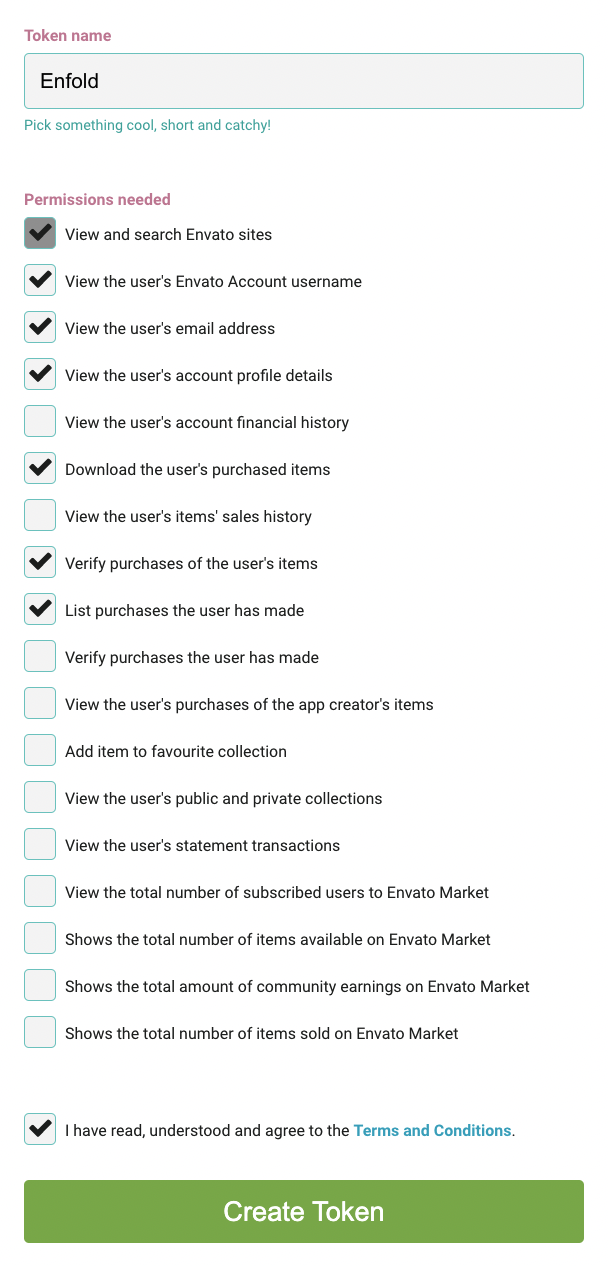
    Please check the permissions here: https://kriesi.at/documentation/enfold/theme-registration/#toggle-id-5, or try reaching out to Envato support further help.

    Best regards,
    Rikard

    #1354361

    Hi Ismael,

    I wrote at my first post “… I have tried the Customizer and set it to “Subcategory & Products”,
    both for Enfold and for WooCommerce, both have no effect?! …” Why do I have the feeling that my question was not really read?
    Because this is exactly my question! Why do these settings of the Customizer not take effect when using the Enfold theme?

    Best regards
    Mikew

    Hi,

    Thanks for that. I’m still seeing the same error messages that I referred to earlier, which is not an Enfold file. Maybe it’s added by a plugin?

    Best regards,
    Rikard

    #1354357

    In reply to: Move menu to center

    Hi,

    Thanks for the update. You can change the default body font size under Enfold->General Styling->Typography.

    Facebook; did you try to activate social icons under Enfold->Header->Extra Elements?

    Best regards,
    Rikard

    #1354356

    In reply to: Body text in uppercase

    how do you place the text to your layout. Are you working with the advanced layout builder of enfold ?
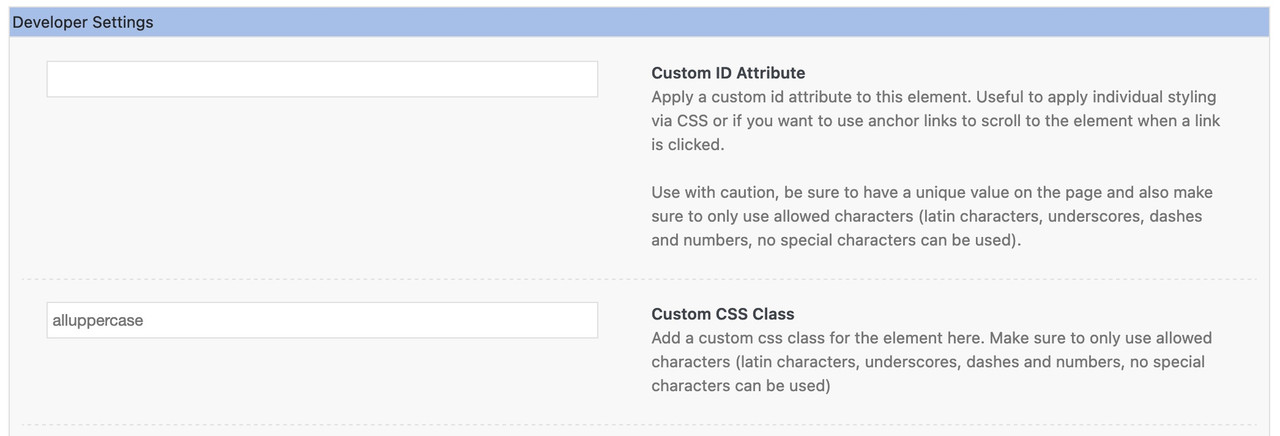
    in this case you open f.e. the column in which your text element is placed – and open the tab on top: Advanced – on that tab you have those input fields in the developer section for IDs or custom-classes – insert alluppercase to that custom-class field ( without dot )
    Or directly to the text-block alb element itself.
    If you want to change all texts in a color-section – go to that advance tab to insert the class.

    If you completely want to change the whole Text in your installation then use it without that class:

    .responsive #top #wrap_all  {
      text-transform: uppercase !important
    }

    because of the two ID’s within this rule and the Important setting, it will mostly prevail against existing css rules that state differently.

    #1354347

    Hi tiffanytnttobol,

    I’m glad that Ismael helped you :)
    Thanks for using Enfold and have a great day!

    Best regards,
    Nikko

    #1354345

    In reply to: Footer is not showing

    Hi Cory,

    Did you override footer.php and/or header.php via a child theme? if yes, then please update using the latest version of Enfold (make sure to have a backup first).
    If you need further assistance on it then please provide us with FTP access and post the credentials in private content.

    Best regards,
    Nikko

    #1354344

    In reply to: support

    Hi Ellie Parker,

    Thanks for contacting us!
    Can you tell us what version of Enfold you’re currently using?

    Best regards,
    Nikko

    Hi dcshortwave,

    The latest version is 4.9.2.3, you’ll need to enter the Envato private token in order to update the theme.
    You can find the instructions in https://kriesi.at/documentation/enfold/theme-registration/ and make sure it has correct permissions.

    Best regards,
    Nikko

    #1354340
    jaliisah
    Participant

    I have been trying to get pictures on my Enfold to link to their product pages. I tried a Woo gallery that put my images on the front page where I want four products displayed, but I don’t want the prices and order information displayed, just linked pictures. I have subsequently set up a horizontal gallery but cannot get image links to work. Since the gallery itself can’t link to the page, I put the links in the Image gallery and linked them to the product pages vial the custom link but it still doesn’t work. Suggestions? Ideas? Help would be much appreciated. The gallery in question is at https://humbleweed.net/home2/

    #1354336

    Topic: support

    Ellie Parker
    Guest

    Hi there, I am needing help with our theme because we are seeing a critical error. It say it is all up to date, wordpress is up to date, but we are still have issues and unable to use enfold. Can you please help?

    This reply has been marked as private.
    amyreiley
    Participant

    After updating Enfold with your most recent update, my CSS/JS merging function won’t work. (It was working prior to the update.)

    My webmaster couldn’t get it to work and said he found a thread with a similar issue but nothing works. Here’s what he reports, “They mentioned these in the database: “aviaAsset_avia-merged-styles” and “aviaAsset_avia-head-scripts”. I found them but there’s an error apparently so the files are not being generated: a:1:{s:50:”avia-head-scripts-d05dd44812d82010cbd6db0b370eb89c”;s:21:”error-generating-file”;}

    I tried deleting these records from the DB + the “dynamic_avia” folder as the developer suggested there but it didn’t help. I see the merged JS/CSS file in that folder now but there’s still an error in the DB and there are still individual files in the source code instead of a single JS/CSS file.

    Since this generic error is not telling me much I think only the Enfold theme developers could figure this out. Most likely it’s a theme bug or a plugin conflict but I don’t want to randomly turn off plugins to test what will happen.

    If you could submit a ticket I’m sure they will know how to debug this quickly and effectively.”

    I had to buy a new license to the theme in order to be able to post this thread to fix an issue that’s probably a theme bug, so I’d really appreciate your help on this matter.

    Thanks!

    #1354316
    zimbo
    Participant

    I modify the code in enfold/framework/php/widgets/widget-classes/class-avia-combo.php and enfold/framework/php/widgets/widget-classes/class-avia-combo.php to change the appearance of the Combo Widget.

    At present I alter the files in the enfold directory, which means I have to re-do the changes on every Enfold update, even if those files don’t alter, then re-upload the files with my mods in.

    Is there a way to have my modified files stored and loaded via my child theme, in a similar way that I do this for iconbox: enfold-child/shortcodes/iconbox.php?

    (I know that if there are changes to the widget-classes files that I’d have to re-do my mods but at least if there’s a way via the child theme I wouldn’t have to re-do the alterations on every Enfold update.)

    Or is there another way to do this?

    Hey marcyt3,

    The update to 4.9.x has to be done manually from the version you are running, please refer to my replies in this thread: https://kriesi.at/support/topic/enfold-4-5-theme-update-update-failed-download-failed-a-valid-url-was-not-pro/#post-1021541
    You can either update manually via FTP: https://kriesi.at/documentation/enfold/how-to-install-enfold-theme/#theme-update, or use a plugin to upload the theme zip file: https://wordpress.org/plugins/update-theme-and-plugins-from-zip-file/
    If that doesn’t work then please try to delete the whole theme folder, then replace it with the new version. Make sure that you have backups of the site before starting updating.
    Also please read this after you have updated: https://kriesi.at/documentation/enfold/theme-registration/

    Best regards,
    Rikard

    marcyt3
    Participant

    I have the following issues with my website.
    1. The background image (a field of wheat) is not appearing. However, you can vaguely see part of the wheat field on the top menu bar.
    2. Some photos on two pages show broken image symbols.
    3. Enfold tab: “No Updates available. You are running the latest version! (4.3.2)” This of course is not the case. Check Manually does not work.
    4. Links to PDFs on one page go to 404 page
    Support at the company who hosts my website tells me that the images are still on the host server. After looking at many items from his end, regarding items 1 and 2, and hearing that the theme is not updating, he believes this is a theme issue.
    After being on the phone with him for more than an hour, I looked through the site and found #4.
    I don’t know if it is relevant but the pages with photos not showing and broken PDF links are among the earliest pages I published.
    I am a farmer, not a website designer. After the website designer (who had been urging me to update to WordPress for several years) went AWOL after I actually hired him, I took an online course on WordPress and a second course on using the Enfold theme from Udemy. I have been very happy with Enfold until this happened.

    #1354305

    Hi,
    Glad we were able to help, although you actually found the solution :) if you have any further questions please create a new thread and we will gladly try to help you. Thank you for using Enfold.

    Best regards,
    Mike

    #1354299

    Hi,
    Glad we were able to help, if you have any further questions please create a new thread and we will gladly try to help you. Thank you for using Enfold.

    Best regards,
    Mike

    #1354297
    scitation
    Participant

    Hi all,

    I hope you can help me with this problem.

    I want to display the metadata (category and tags) of each blog post, with the grid layout, so the user can click on the tags of each post and see related posts. The option to sort by category/tag on top doesn’t fit the needs because there are about 100 tags.
    Although in the Enfold Blog layout I have selected the blog meta elements (category and tags), only the date appears (even if not selected here).

    Is there any CSS code I could add to fix this?

    Thank you very much for your help.

    #1354295

    In reply to: Blogpost

    Hi,
    Glad we were able to help, if you have any further questions please create a new thread and we will gladly try to help you. Thank you for using Enfold.

    Best regards,
    Mike

Viewing 30 results - 25,441 through 25,470 (of 244,560 total)