
-
AuthorSearch Results
-
June 17, 2022 at 4:00 pm #1355617
In reply to: Image with hotspots that open image in lightbox
Hi Mike and Guenni007
Thanks a lot for your help and contributions.
Reply on Mike’s https://kriesi.at/support/topic/image-with-hotspots-that-open-image-in-lightbox/#post-1355277
This solution also works well.Your new approach in using the tooltip text is a very nice idea. It’s more convenient to write and edit this text within the hotspot element than editing it in the child’s functions.php. WP authors without access to the functions.php would not able to edit this text if I used the initial approach.
I implemented Mike’s version (https://kriesi.at/support/topic/image-with-hotspots-that-open-image-in-lightbox/#post-1355413) on my website:
function popup_tooltips_with_links_erdgeschoss() {
if(is_page(559)) {
?>
<script type="text/javascript">
window.addEventListener('DOMContentLoaded', function() {
(function($){
   $('#top.page-id-559 .av-image-hotspot_inner').each(function () {
   	var toolTip = $(this).closest('.av-image-hotspot').attr('data-avia-tooltip');
    var cleanTitle =  $(toolTip).text();
	$(this).attr('title', cleanTitle );
	$(this).magnificPopup({
    type: 'image',
    image: {
        titleSrc: 'title'
    }
});
});
})(jQuery);
});
</script>
<?php }
									 }
add_action('wp_footer', 'popup_tooltips_with_links_erdgeschoss');

function popup_tooltips_with_links_obergeschoss() {
if(is_page(561)) {
?>
<script type="text/javascript">
window.addEventListener('DOMContentLoaded', function() {
(function($){
   $('#top.page-id-561 .av-image-hotspot_inner').each(function () {
   	var toolTip = $(this).closest('.av-image-hotspot').attr('data-avia-tooltip');
    var cleanTitle =  $(toolTip).text();
	$(this).attr('title', cleanTitle );
	$(this).magnificPopup({
    type: 'image',
    image: {
        titleSrc: 'title'
    }
});
});
})(jQuery);
});
</script>
<?php }
									 }
add_action('wp_footer', 'popup_tooltips_with_links_obergeschoss');

function popup_tooltips_with_links_dachgeschoss() {
if(is_page(563)) {
?>
<script type="text/javascript">
window.addEventListener('DOMContentLoaded', function() {
(function($){
   $('#top.page-id-563 .av-image-hotspot_inner').each(function () {
   	var toolTip = $(this).closest('.av-image-hotspot').attr('data-avia-tooltip');
    var cleanTitle =  $(toolTip).text();
	$(this).attr('title', cleanTitle );
	$(this).magnificPopup({
    type: 'image',
    image: {
        titleSrc: 'title'
    }
});
});
})(jQuery);
});
</script>
<?php }
									 }
add_action('wp_footer', 'popup_tooltips_with_links_dachgeschoss');
Actually, there are three floor plans. That’s why I use the script three times (with slightly different function names) and address it to the corresponding page id.
For all of those who want to see how a house tour with floor plans might be realized with Enfold’s image with hotspots media element, here is the link:
http://www.ferienhaus-alpina.ch/hausbesichtigung
@Guenni007: I’ve also tried your version (https://kriesi.at/support/topic/image-with-hotspots-that-open-image-in-lightbox/#post-1355426) but it didn’t work. Like Mike’s report, the lightbox opens but no image is shown. Any idea how your version could run on my site?Kind regards
UeliJune 17, 2022 at 2:59 pm #1355611In reply to: Change logo when page scroll
Yes, I would like it exactly like this site but in the middle
How do I achieve this? Is this a default enfold feature? If you can tell me the steps, that would be great.
Also, I know this is a new enfold 5.0 template but can I apply those animations to my existing site https://alexandere77.sg-host.com/ if i update to enfold 5.0? I love the animations
June 17, 2022 at 1:52 pm #1355608In reply to: Product pages not showing and can't access wp-admin
Hi Rikard,
I have tried restoring but I get critical errors. The host 123-reg say the problem is with the child theme I created for Enfold. Please can you look at my child theme functions,php code and see if it has errors. Apparently it is line 23. My child theme is called Orion I.T. Theme:
<?php/*
* Add your own functions here. You can also copy some of the theme functions into this file.
* WordPress will use those functions instead of the original functions then.
*/
//set builder mode to debug
add_action(‘avia_builder_mode’, “builder_set_debug”);
function builder_set_debug()
{
return “debug”;
}/* Add Custom class to all ALB elements */
add_theme_support(‘avia_template_builder_custom_css’);/*
Woocommerce 3.0.0 Compatibility Fix
Remove Enfold’s custom functions that conflict with the new image display in WooCommerce 3.0.0
*/
global $woocommerce;
if( version_compare( $woocommerce->version, ‘3.0.0’, “>=” ) ) {
function avia_woocommerce_gallery_thumbnail_description($img, $attachment_id, $post_id, $image_class ) {
return $img;
}
function avia_woocommerce_post_thumbnail_description($img, $post_id){
return $img;
}
}add_action( ‘woocommerce_single_product_summary’, function() {
echo ” – FREE SHIPPING IN THE UK!”;
}, 10);June 17, 2022 at 1:51 pm #1355607In reply to: Equal products height in Woocommerce Shop Page
Hey thijmens,
Please try the following in Quick CSS under Enfold->General Styling:
@media only screen and (min-width: 768px) {
div.inner_product.av-product-class- {
    min-height: 780px;
}
}
Best regards,
RikardJune 17, 2022 at 1:43 pm #1355605In reply to: Odd Mega Menu Hover
Hi,
Glad Nikko was able to help, if you have any further questions please create a new thread and we will gladly try to help you. Thank you for using Enfold.Best regards,
MikeJune 17, 2022 at 1:21 pm #1355602In reply to: Change logo when page scroll
i would realize it by creating the logo as svg.
Shouldn’t be too difficult with fonts and a figurative mark.
Depending on where you want your image mark to appear after scrolling, I would then place it on the left or in the center directly inside the svg, and set the fill-opacity of this group to zero.
Then you can even change the fill-opacity animated with the class header-scrolled.By the way – what font is it – i found similar fonts – but not exactly the same.
see here : https://enfold.webers-webdesign.de/June 17, 2022 at 12:29 pm #1355592are you familiar with inspecting the DOM? Look what is your portfoliobox-ID
use this to get influence on image source as a snippet in your child-theme functions.php:
function my_avf_newsbox_image_size( $image_size, array $args, array $instance ){
  if( $args['widget_id'] == ( 'portfoliobox-3' || 'newsbox-2' || 'newsbox-4' ) ){
    $image_size = 'full';
  }
  return $image_size;
}
add_filter( 'avf_newsbox_image_size', 'my_avf_newsbox_image_size', 10, 3 );
______________
just for INFO:
change full to what you like to have ( small, medium, large etc. pp.) you can find the names of the enfold image-sizes on functions.php lines 211ff:$avia_config['imgSize']['widget'] = array('width'=>36, 'height'=>36); // small preview pics eg sidebar news $avia_config['imgSize']['square'] = array('width'=>180, 'height'=>180); // small image for blogs $avia_config['imgSize']['featured'] = array('width'=>1500, 'height'=>430 ); // images for fullsize pages and fullsize slider $avia_config['imgSize']['featured_large'] = array('width'=>1500, 'height'=>630 ); // images for fullsize pages and fullsize slider $avia_config['imgSize']['extra_large'] = array('width'=>1500, 'height'=>1500 , 'crop' => false); // images for fullscrren slider $avia_config['imgSize']['portfolio'] = array('width'=>495, 'height'=>400 ); // images for portfolio entries (2,3 column) $avia_config['imgSize']['portfolio_small'] = array('width'=>260, 'height'=>185 ); // images for portfolio 4 columns $avia_config['imgSize']['gallery'] = array('width'=>845, 'height'=>684 ); // images for portfolio entries (2,3 column) $avia_config['imgSize']['magazine'] = array('width'=>710, 'height'=>375 ); // images for magazines $avia_config['imgSize']['masonry'] = array('width'=>705, 'height'=>705 , 'crop' => false); // images for fullscreen masonry $avia_config['imgSize']['entry_with_sidebar'] = array('width'=>845, 'height'=>321); // big images for blog and page entries $avia_config['imgSize']['entry_without_sidebar'] = array('width'=>1210, 'height'=>423 ); // images for fullsize pages and fullsize sliderJune 17, 2022 at 11:35 am #1355588In reply to: Masonry gallery magnific popup not working/enabled
Hi,
Glad we were able to help, if you have any further questions please create a new thread and we will gladly try to help you. Thank you for using Enfold.Best regards,
MikeJune 17, 2022 at 11:22 am #1355587In reply to: Video – no sound & other issues
Hi Elvira,
For #2, please replace the content of enfold\config-templatebuilder\avia-shortcodes\slideshow\slideshow.js with this slideshow.js file.
Make sure to clear your browser cache once you have replaced the content as it might still be fetching older js files.
It should be fixed on the next Enfold updates.Best regards,
NikkoJune 17, 2022 at 10:54 am #1355581In reply to: picture filter on masonry grid
Hi Nikko,
thx fory lour quick reply – I´ve tried e.g. Envira Gallery, Portfolio Filter gallery and other plugins. But they either they don´t have a good masonry display option or they do not to work with Enfold. Another WP plugin, “cube portfolio” did the job, but is not longer available. Also a workaround via portfolio like described here https://kriesi.at/support/topic/gallery-with-category-filter/ does not work for my purpose. I still need to filter just pics, not portfolio entries.A simple filter function for the masonry portfolio is what I still need. And I know a lot of other enfold users who would really appreciate this as well. Would be great if you / somebody else can provide a solution acc.
In this context a question/idea: I use the plugin “Real Media Gallery” from devowl.io. With this I can assign images to multiple folder collections. May be there is a way to define within enfold masonry: “Use onle pics allocated to RM Gallery xyz”?
Thx again for your efforts & best regards Tilman
-
This reply was modified 3 years, 10 months ago by
oestersund.
-
This reply was modified 3 years, 10 months ago by
June 17, 2022 at 10:23 am #1355574In reply to: Transparent header turning white
Hey rosalewis,
Please try the following in Quick CSS under Enfold->General Styling:
#top .av_header_glassy.av_header_transparency .header_bg {
    background-color: transparent;
}
Best regards,
RikardJune 17, 2022 at 10:04 am #1355567In reply to: Setting breakpoints
Hi,
Thanks for letting us know, I’ll close this thread for now then. Please open a new thread if you should have any further questions or problems.
Best regards,
RikardJune 17, 2022 at 10:00 am #1355566Topic: custom svg files as dividers
in forum EnfoldGuenni007
Participantcan you please clarify how to use that method with attachment ID.
https://kriesi.at/documentation/enfold/columns/#adding-custom-svg-dividers
Till now i use the method to set the upload folder as source for those files – and this is ok – as long you do not organize the upload folder per year and month.
So tell me how to register the custom svgs if i use it with the attachment id method. ( what does the $custom_shapes = array look like)
ThanksEdit:
'waves-in-motion'	=> array(
	'key'		=> 'waves-in-motion',
	'title'		=> __( 'Waves in motion', 'avia_framework' ),
	'has_flip'    	=> true,
	'has_width'	=> false,
	'attachment'	=> 16,
	'filename'	=> 'waves-in-motion'
	),
i can see the custom shapes in the dropdownlist – yes – but it is not inserted then, if i do not define a path. Or do i have to put the attachment into quotes?
this third method is unclear to me:* – Upload svg file (and a possible negative file) with WP Media Uploader
* – use ‘attachment’ to add ID of svg file
* – use ‘attachment_negative’ to add ID of negative svg file
* – using ‘attachment’ filename and path are ignored
* – Register your svg files with filter ‘avf_custom_svg_shapes’ – make sure to use unique keys that do not conflict with native keysJune 17, 2022 at 9:51 am #1355563Thanks a lot! I thought it was may be an Enfold-setting, but you’re correct. Thanks for helping me out!
June 17, 2022 at 12:40 am #1355551In reply to: Layerslider 7 add h1 title
Thank you very much – got it. did not see that!
Great support as always from Enfold.
AnneJune 17, 2022 at 12:04 am #1355549if these are only images that are not meant to be opend in a lightbox – you can simply remove the titles of the images.
This is not an enfold setting – it is simple browser behavior to show after a while the title on hovering.
just put it in the child-theme functions.php:function remove_title_attr(){ ?> <script> (function($) { $(window).on('load', function(){ $('*[title]').removeAttr('title'); }); })(jQuery); </script> <?php } add_action('wp_footer', 'remove_title_attr');__________
If you need the title for lightbox bottom-bar description – use instead:
function temporary_removal_title_tags(){
?>
<script>
  window.onload = function() {
      var links = document.querySelectorAll('a,img,div[title]');
      for (var i = 0; i < links.length; i++) {
          var link = links[i];
          link.onmouseover = function() {
              this.setAttribute("data-tooltip", this.title);
              this.title = "";
          };
          link.onmouseout = function() {
              this.title = this.getAttribute("data-tooltip");
          };
          link.onmousedown = function() {
              this.title = this.getAttribute("data-tooltip");
          };
      }
  };
</script>
<?php
}
add_action('wp_footer', 'temporary_removal_title_tags');
June 16, 2022 at 6:04 pm #1355532Hi Rikard,
Sorry but it still doesn’t work, the width of the main content is still 100% even if I have settled it at 70% in Enfold->General Layout->Dimensions.
Any other idea to fix this?
Thank you so much,
Kind regards,
Olivier
June 16, 2022 at 5:58 pm #1355531The image solution – but what if you like to have an image as background for the whole color-section area – where do you insert it in the alb? this is possible by css – to have multiple background-files : https://webers-testseite.de/multiple-background-images/
but had to be done in quick css for each section.the alternative solution:
Enfold offers the option to have those dividers on color-sections and on columns.
One difficulty is to have this “border-styling” outside the container – and for columns this is the fact then.how to have custom svg files as dividers? https://kriesi.at/documentation/enfold/columns/#adding-custom-svg-dividers
i do prefer the custom path to those svg files because i do organize my media library not per year and month. So all media are inside uploads folder.
Maybe a mod or a dev can tell us how to use the path independet solution with the attachment id ?go to the example page again and see last color-section with the links of the two grass files. https://enfold.webers-webdesign.de/ryan2/#av_section_5
you can download them : open and then save pagethis snippet is for making the uploads folder the folder for custom svgs:
function my_svg_path(){
  $path = get_site_url().'/wp-content/uploads';
      return $path;
}
add_filter( 'avf_custom_svg_shapes_files_directory', 'my_svg_path', 10 );
and now to register the custom svg files with their options:
function custom_avf_custom_svg_shapes( array $custom_shapes ) {
$custom_shapes = array(
	'grass'		=> 	array(
				'key'			=> 'grass',
				'title'			=> __( 'Grass', 'avia_framework' ),  // this notation with avia_framework offers the possibility to translate to other languages
				'has_width'		=> true,
				'has_flip'    	=> true,
				'attachment'	=> 1,
				'filename'		=> 'grass'
				),

	'grass-semi' => array(
				'key'			=> 'grass-semi',
				'title'			=> __( 'Grass Semi', 'avia_framework' ),
				'has_width'		=> true,
				'has_flip'    	=> true,
				'attachment'	=> 2,
				'filename'		=> 'grass-semi'
				),

	);
return $custom_shapes;
}
add_filter( 'avf_custom_svg_shapes', 'custom_avf_custom_svg_shapes', 10, 1 );
now you got on your color-section ( and colums too ) on layout – svg-dividers the chance to insert your own custom svg:
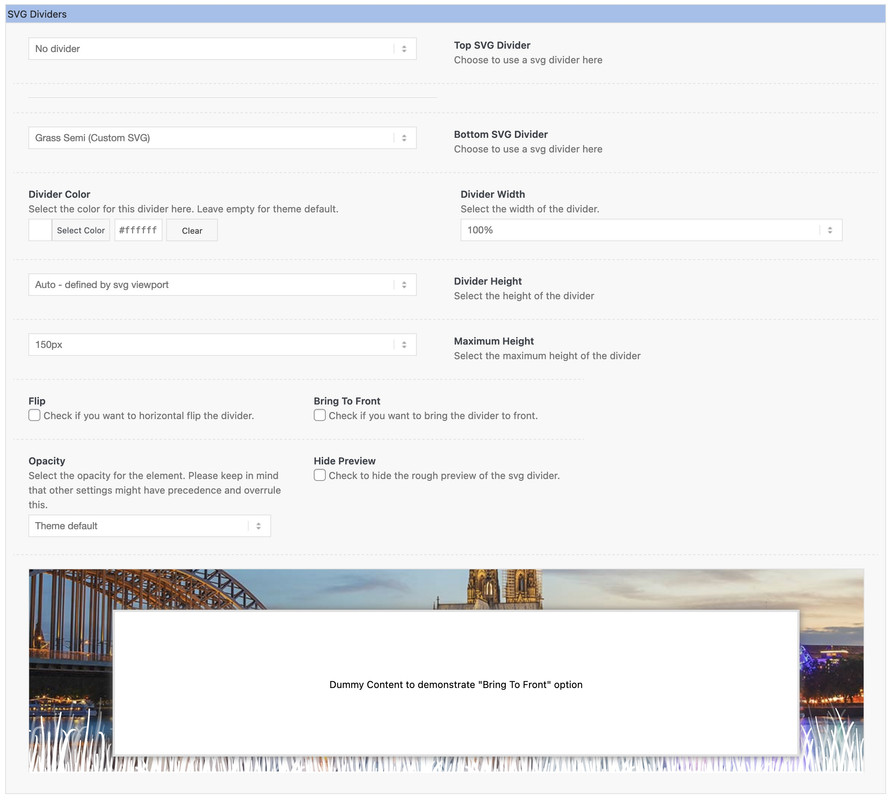 June 16, 2022 at 4:32 pm #1355517
In reply to: Slider Heading Changed Colour & Change Change Back
Hi,
Thanks for that. The account still doesn’t have administrator rights though, so we can’t change anything on your installation. If you want to have a go yourself, then please replace /enfold/config-templatebuilder/avia-shortcodes/slideshow/slideshow.js, with this file: https://github.com/KriesiMedia/enfold-library/blob/master/temp_fixes/Enfold_5_0/template-builder/slideshow/slideshow.js. If you need help with that, then please upgrade the account to have administrator rights, and include FTP login details as well.
Best regards,
RikardJune 16, 2022 at 4:25 pm #1355516Hi,
Please try the following in Quick CSS under Enfold->General Styling:
@media only screen and (max-width: 1024px) {
h2.avia-caption-title {
  font-size: 40px;
}
}
Best regards,
RikardJune 16, 2022 at 2:28 pm #1355499In reply to: Post Featured Image
Hi Esther,
It seems like Dust & Metal is actually the correct size for it (260px width and 185px height) however since you want it to look as a square instead of rectangle, first you’ll need to use a child theme,
You can download and find instructions on how to use it here: https://kriesi.at/documentation/enfold/child-theme/
Once you used a child theme, add this code at the bottom of the child theme’s functions.php file:function enfold_customization_modify_thumb_size( $size ) { $size['portfolio_small'] = array('width'=>260, 'height'=>260); return $size; } add_filter( 'avf_modify_thumb_size', 'enfold_customization_modify_thumb_size', 10, 1 );then re-upload the featured image for Dust & Metal.
Hope this helps.Best regards,
NikkoJune 16, 2022 at 2:19 pm #1355494Topic: Sliders not working on mobile
in forum Enfoldevas49
ParticipantHi,
i have a empty white space where one of your sliders should show an image
It works when i downsize my browserwindow but on a real mobile i see just white nothing.
Yes, cache is emptied.
Enfold setting “Merging” has been deactivated and activated and deactivated….After i removed the Layerslider and added it again it works now.
But when i turn my mobile into landscape format i dont see nothing – neither the Layerslider nor the Enfold-Slider.Please help.
http://www.simonehirsch.deEva Simone
-
This topic was modified 3 years, 10 months ago by
evas49.
June 16, 2022 at 1:54 pm #1355492In reply to: Blog page not displaying after new post published
Hi,
Thanks for letting us know, I’ll close this thread for now then. Please open a new thread if you should have any further questions or problems.
Best regards,
RikardJune 16, 2022 at 1:52 pm #1355490Topic: Product pages not showing and can't access wp-admin
in forum Enfoldfanlokbun
ParticipantHi I have a problem with this site where the product pages are not showing and I can’t access the backend.
I have:
Disabled all plugins one at a time via FTP
Uploaded the most recent version of Enfold
Please can you take a look and see if you can see the problemJune 16, 2022 at 1:50 pm #1355489In reply to: Fatal Error after Url Change
So that we don’t have any changes in the core of Enfold, everything has been restored back to original. We click through each page to restore the deleted entries in the post_meta. For this to work, we had to disable Custom Elements in the Settings (because otherwise some pages wouldn’t open even in the backend). We don’t really need the custom elements.
Still asking for control/feedback, gladly also in a test environment. We want to make sure that our solution strategy does not lead to further discrepancies in the database.
June 16, 2022 at 1:50 pm #1355488Hey Dave,
Please try the following in Quick CSS under Enfold->General Styling:
@media only screen and (max-width: 767px) {
.responsive #top #wrap_all .slide-entry {
    width: 100%;
    margin-left: 0;
}
}
Best regards,
RikardJune 16, 2022 at 1:24 pm #1355487In reply to: Masonry gallery magnific popup not working/enabled
Hey BFred,
Thanks for your question, please check that lightbox is enabled at Enfold Theme Options ▸ Lightbox Modal Window
If this doesn’t correct please include admin login in the Private Content area so we can investigate.Best regards,
MikeJune 16, 2022 at 12:32 pm #1355482Hi,
Glad we were able to help, if you have any further questions please create a new thread and we will gladly try to help you. Thank you for using Enfold.Best regards,
MikeJune 16, 2022 at 11:33 am #1355473In reply to: We have had problems with envato item purchase
Hey Aure1,
Thank you for the inquiry.
You may need to adjust the token permission. Please review the following documentation for more info about the token and the required permissions to properly access your account.
// https://kriesi.at/documentation/enfold/theme-registration/
The token should have the following permissions.
View and search Envato sites (checked by default)
View the user’s Envato Account username
View the user’s email address
View the user’s account profile details
Download the user’s purchased items
Verify purchases of the user’s items
List purchases the user has madeBest regards,
IsmaelJune 16, 2022 at 11:23 am #1355470Topic: Enfold 5.0 – Layerslider Background Video Safari Browser
in forum Enfoldmediaformers
ParticipantHi
Since Enfold 5.0 there is a problem with Layerslider Background Videos (only in Safari browser). When starting the page, a section of the video is visible for a short time (1 sec.) in the lower right corner (it is not the poster image). Only then the video starts in fullscreen mode. In Chrome and Firefox this effect does not occur. What can be the cause?
Thanks for your review.
Regards, Mike
-
This reply was modified 3 years, 10 months ago by
-
AuthorSearch Results
-
Search Results
-
Topic: custom svg files as dividers
can you please clarify how to use that method with attachment ID.
https://kriesi.at/documentation/enfold/columns/#adding-custom-svg-dividers
Till now i use the method to set the upload folder as source for those files – and this is ok – as long you do not organize the upload folder per year and month.
So tell me how to register the custom svgs if i use it with the attachment id method. ( what does the $custom_shapes = array look like)
ThanksEdit:
'waves-in-motion' => array( 'key' => 'waves-in-motion', 'title' => __( 'Waves in motion', 'avia_framework' ), 'has_flip' => true, 'has_width' => false, 'attachment' => 16, 'filename' => 'waves-in-motion' ),i can see the custom shapes in the dropdownlist – yes – but it is not inserted then, if i do not define a path. Or do i have to put the attachment into quotes?
this third method is unclear to me:* – Upload svg file (and a possible negative file) with WP Media Uploader
* – use ‘attachment’ to add ID of svg file
* – use ‘attachment_negative’ to add ID of negative svg file
* – using ‘attachment’ filename and path are ignored
* – Register your svg files with filter ‘avf_custom_svg_shapes’ – make sure to use unique keys that do not conflict with native keysHi,
i have a empty white space where one of your sliders should show an image
It works when i downsize my browserwindow but on a real mobile i see just white nothing.
Yes, cache is emptied.
Enfold setting “Merging” has been deactivated and activated and deactivated….After i removed the Layerslider and added it again it works now.
But when i turn my mobile into landscape format i dont see nothing – neither the Layerslider nor the Enfold-Slider.Please help.
http://www.simonehirsch.deEva Simone
Hi I have a problem with this site where the product pages are not showing and I can’t access the backend.
I have:
Disabled all plugins one at a time via FTP
Uploaded the most recent version of Enfold
Please can you take a look and see if you can see the problemHi
Since Enfold 5.0 there is a problem with Layerslider Background Videos (only in Safari browser). When starting the page, a section of the video is visible for a short time (1 sec.) in the lower right corner (it is not the poster image). Only then the video starts in fullscreen mode. In Chrome and Firefox this effect does not occur. What can be the cause?
Thanks for your review.
Regards, Mike


