Hi there,
i do the it- and security administration for a customer running WordPress 4.9.20 (!) with Enfold Version: 3.3.2. they left the whole page without any administration or any updates for at least 4 years, and now i have the task to close the detected vulnerabilites and do the upgrade of the whole environment.
now, due to the urgency of updateing the wordpress instance i have some questions:
1. i overtake the administration and i didn’t get any informations about the Enfold product (such as Themeforest User Name, Themeforest API Key which will be needed for the update of the theme and so on) and i have to know, wheter the version of my customer is a payed one or a free one and if i’ll do the update of WordPress to version 6, wheter i can upgrade the Enfold too or not.
2.will the version my customer owns be compatible with wordpress 6?
3. if i do the upgrade to WordPress 6, will it work also for the istalled theme Enfold 3.3.2 or do i have to update of the theme before?
4. do you know anything about my customer (registration, billing) ? i guess if there was a registration, the person who did it could be ” (Email address hidden if logged out) “, but unfortunately it was back in 2015 (guess) and the person don’t work for my customer anymore…
thanks for your help and your guidance in advance and kind regards,
beat tschanz
Hello, I get this error: Warning: Undefined array key “nav_visibility_desktop” in /customers/3/9/8/caspersmeets.nl/httpd.www/wp-content/themes/enfold/config-templatebuilder/avia-template-builder/php/traits/trait-sc-slideshow-ui-controls.php on line 59
after updating to the newest Enfold version. Can you please login and see what causes this problem? You can find the details in the private section.
Thanks!
Ref below –
6/ Pop up box on entry to accept cookies
Is there anything in the theme that sets an auto pop-up to accept cookies etc.
Your reply
Yes, go to Enfold > Privacy & Cookies, for further instructions please check: https://kriesi.at/documentation/enfold/privacy-cookies/
Which do I enable to create the pop up in entry of the site?
2/ Adding code in head tag
If I want to add code in the head tag that is script not for Google but another – is this applied in Appearance > Theme File Editor? If so which php file do I edit?
Ref Recaptcha
I am currently developing this site in an alternative dev domain.
The site will then be moved its domain for launch.
Recapcha required that the domain is hosted.
Would you suggest I register for the keys under the dev domain to create them and add Recaptcha in enfold google services so that I can test.
OR
Wait until the site is in it’s true domain, then register for the keys in the true domain and then enable Recaptcha.
dear enfold support team
I could not find a solution after searching the web and this support forum hours by hours. Please see my customers website where we have many youtube video embeded with the enfold video function. It used to work many years but stopped working, I don´t know when.
PLEASE can you help.
The first video you see I´ve embeded today with the iframe from youtube. This seems to work. But the enfold embeding isn´t working anymore.
I´ve tried disabling all plugins – no luck
I´ve updated WordPress, Enfold and the php version to 8 – no luck
Hi, Guenni007 thanks for your example page and input, while Enfold does support direct use of webP, Chris_85 is not tring to do this, he wants to use the Imagify plugin that replaces the <img> tags with <picture> tags and then shows webP images, instead of just directly using the webP in the current <img> tags.
Hi,
Glad Nikko was able to help, if you have any further questions please create a new thread and we will gladly try to help you. Thank you for using Enfold.
Just use webp – the “can i use page” shows that only the IE11 with less than 0,5% gloabal usage does not support webp.
In my opinion the usage of a fallback solution is now obsolete. Enfold supports webp usage in all alb elements – no need for a picture construct.
Hallo,
I just bought the Enfold theme and download also the Child theme. Unfortunately I do not get a zip file only the following files: function.php, screenshot.png and style.css. What can I do?
This issue has been reported many times and it is usually due to server configuration which may vary per hosts. Unfortunately, we do not know precisely which configuration is affecting the demo import, but there are workarounds if the issue persists.
One way is to manually import the demo using an xml file and the other is to import the demo locally, then transfer it to the live site. Please check the following documentation for more info.
Hi,
Glad Guenni007 could help, thank you Guenni007, if you have any further questions please create a new thread and we will gladly try to help you. Thank you for using Enfold.
Hi,
Glad Nikko was able to help, if you have any further questions please create a new thread and we will gladly try to help you. Thank you for using Enfold.
Hi, Guenni007 thank you for sharing :) peterolle glad that this helped, if you have any further questions please create a new thread and we will gladly try to help you. Thank you for using Enfold.
Hello,
When I tried to import ENFOLD wordpress theme’s default demo, I have an error message after few seconds : “cURL error 28: Connection timed out after 10000 milliseconds”.
I checked that my WordPress hosting server is using the latest versions of PHP etc. I re-installed SSL certificate for my website then I re-installed ENFOLD theme on wordpress but I still have this error message.
How can I fix it and import default demo on my website ?
Thank’s for your help,
Mélanie
I took over web deveklopment for a customer that uses the Enfold theme. Since the previous web developer is not available any more we have no access to the previously purchesed license. Is there any way to gain access again (maybe based on the web URL the theme is licensed to)?
Hi,
Glad we were able to help, if you have any further questions please create a new thread and we will gladly try to help you. Thank you for using Enfold.
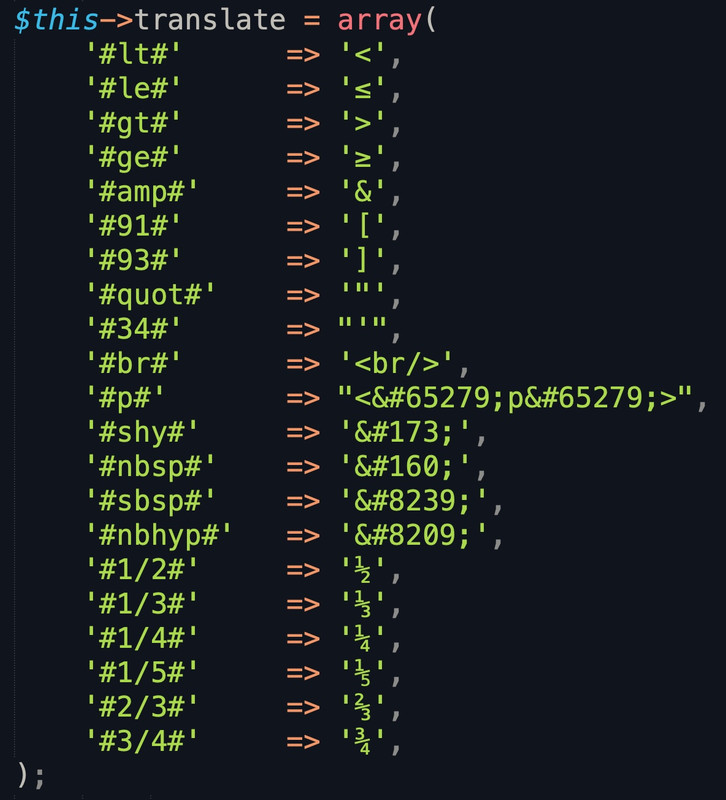
other entries can be inserted into the array, of course.
f.e.:
see and download mine from: https://pastebin.com/jttc230x And in contrast to Günter’s notation, I always put only one # before and after the character.
After activation of the plugin – you can use these substitutions – f.e. for a linebreak then #br#
Please enable the required APIs for the map, then test the API key again or regenerate another. You might want to review the following documentation and start from the beginning.
This is not my code and I did not add padding. These are the pre-coded Blocks from Gutenberg. All I did was change the text.
I had to rebuild them. Went back to the Block Editor, picked the two columns with Background and that’s exactly what it is. I did not touch the code or add any padding.
That fixed the problem on Desktop. That particular Block with Background has changed (by WordPress – not by me) they’ve created one large block split in two, they added another block into each half. Again, that’s what I noticed. I did not modify Gutenberg’s padding code. I noticed the exact same behavior on your sandbox. When you see the block on Mobile, the two columns lose all right/left padding.
I have not updated the theme to the latest version. That’s why I asked for an ETA. So, if you guys developed functionality to address this all you had to say is, we fixed it and it’s on the latest release.
When you say you added a config file, can you explain what that means? Is is accessible via the Enfold Settings? Do I have to adjust anything there? Or will it fix the issue by itself?
Do I have to go back to the original Gutenberg Block with Background (2 columns)?
I don’t have much time for this. My surgery has been scheduled and I am supposed to work towards staying alive and getting support for my post-op. Then get ready for the second surgery. Plus this is not all I do. So, please make things simple for me. I have given you every little detail already.
I applied the latest updated version of Enfold 5.0.1 to my site as such the “Featured Image Slider” is not working. I had to fall back to a previous version of the theme to get it working again. Please advise.
Author
Search Results
Viewing 30 results - 24,751 through 24,780 (of 244,545 total)