Viewing 30 results - 23,911 through 23,940 (of 244,520 total)
  • Author
    Search Results
  • #1361081

    Hi,

    Great, I’m glad that Mike could help you out. I’ll close this thread for now then, please open a new thread if you should have any further questions or problems.

    Best regards,
    Rikard

    #1361080

    Hi,

    Great, I’m glad that you managed to solve your problems. I’ll close this thread for now then, please open a new thread if you should have any further questions or problems.

    Best regards,
    Rikard

    #1361079

    Hey monmouth,

    Could you try updating the theme to the latest version (5.1.1) to see if that helps please? https://kriesi.at/documentation/enfold/how-to-install-enfold-theme/#theme-update. If not, then please post admin WordPress login details in private.

    Best regards,
    Rikard

    Hey Suze,

    Please try the following in Quick CSS under Enfold->General Styling:

    @media only screen and (max-width: 767px) {
    .responsive #top .cart_dropdown {
        z-index: 999;
        right: 5px;
    }
    }

    Best regards,
    Rikard

    #1361076
    DaWeb
    Participant

    Hi!

    Today I want to open a site on my webpage but I get an error messega and white screen. After that I get also an Email with the error description about: /avia-template-builder/php/class-template-builder.php. Sporočilo napake: Uncaught Error: Failed opening required

    Could you please help me what can I do?

    Kind regards,
    Daniel

    #1361073

    Hey Christian,

    I can see that you are running a very old version of the theme on the .net site. Could you try to update to the latest version (5.1.1) to see if that helps please? The update to 5.0 has to be done manually from the version you are running, please refer to my replies in this thread: https://kriesi.at/support/topic/enfold-4-5-theme-update-update-failed-download-failed-a-valid-url-was-not-pro/#post-1021541
    You can either update manually via FTP: https://kriesi.at/documentation/enfold/how-to-install-enfold-theme/#theme-update, or use a plugin to upload the theme zip file: https://wordpress.org/plugins/update-theme-and-plugins-from-zip-file/
    If that doesn’t work then please try to delete the whole theme folder, then replace it with the new version. Make sure that you have backups of the site before starting updating.
    Also please read this after you have updated: https://kriesi.at/documentation/enfold/theme-registration/

    About the 403 error on the .com site; are you running Enfold on that site as well? It looks like the error message is not coming from Enfold, and we have no functionality in the theme for setting error screens like that either.

    Best regards,
    Rikard

    #1361071

    In reply to: Mobile Font Issues

    Hi,

    Ok, I see how that could be confusing. The inline CSS of 72 pixels would take priority in that case.

    I’ll close this thread for now then, please open a new thread if you should have any further questions or problems.

    Best regards,
    Rikard

    #1361069

    Hi,

    Thanks for the update. Please try this CSS as well:

    .av-burger-overlay-scroll #av-burger-menu-ul a {
        color: #fff;
    }

    I tried logging into your site, but the details are not working again.

    If you want to set the colour for the strong tag, then you can do so under Enfold->Advanced Styling.

    Best regards,
    Rikard

    #1361068

    @slikslok

    If you use FTP you can directly replace the current theme. However it is good practice to keep a copy of the previous release.

    If you wish to not have more than one copy. You can take the new copy of the theme, unzip it first on your PC/Mac then upload the files via an FTP client. It will give you the option to overwrite the existing files.

    Otherwise it is best practice for FTP uploads to rename the current theme to something like Enfold-Backup-08082022 Then upload the new one and call it Enfold. You can then roll back to the previous version just by renaming the folders.

    If you have a license key you can connect it to pull the updates through with other WordPress updates by entering the API key in the panel. See Rikards earlier post.

    Have you tried the two methods that Rikard suggested to turn on the auto updates from theme forest?

    #1361065

    Very often it is caused by WordPress autop function.
    Can you try these filters if it will solve that issue:

    remove_filter( 'the_content', 'wpautop' );
    remove_filter( 'the_excerpt', 'wpautop' );
    remove_filter( 'widget_text_content', 'wpautop');

    refresh merging of enfold js and css rules – and refresh all cachings ( browser or optimization tools)

    ____

    Sometimes it is caused by manually make some errors in f.e. editor by adding tags yourself.
    W3C it is not allowed to have block-elements inside p-tag ( including p-tag itself)
    see here a list of allowed elements inside p-tag: https://html.spec.whatwg.org/#phrasing-content
    f.e. no ul nor ol tag etc.

    and btw: i do not see any errors on your starting page! : Link
    only warnings are present

    #1361049
    Jason
    Participant

    I am working on a new dev site. I duplicated another dev site and for some reason on the old dev site on the blog post I get the /blog/category/title on the breadcrumb.

    But on the duplicate site which is running the latest version of Enfold and WP I only get the /category/title?

    Here is an example of old and new site where has it and and one does not?

    devapp.galaxypress.com/book-recommendations-classic-titles-not-to-miss-mister-tidwell-gunner/

    dev.galaxypress.com/book-recommendations-classic-titles-not-to-miss-mister-tidwell-gunner/

    Thank you for any input on this. I compared all of the settings and can’t figure out what is wrong.

    Never mind, just found the reason. On the Enfold Child under Theme Options on the news site I didn’t specify the “And where do you want to display the Blog?” Once I did this I am all good now.

    • This topic was modified 3 years, 8 months ago by Jason.
    • This topic was modified 3 years, 8 months ago by Jason.
    #1361041

    Hi,

    Thank you for the info.

    In the child there is also the “shortcode” folder of https://www.spiderflystudios.com/shop/software/custom-enfold-elements-spiderfly/, the header.php file has not been modified.

    It is possible that the errors occurred because the custom shortcodes in that folder are not updated and are no longer compatible with the latest version of the theme. Is there an available update for the custom shortcodes that is compatible with Enfold 5.1.1?

    Please enable the error logs so that we can check the generated errors. You may need to contact the shortcode developer/s and ask them to inspect the issue.

    Best regards,
    Ismael

    Hi,

    Thank you for the info.

    We may need to edit one of the posts in order to check the issue further. Please provide the login details in the private field.

    In the enfold/includes/helper-post-format.php filter, you will find the avia_audio_content_filter function which handles the content and preview for audio formatted posts. The function requires an audio shortcode which it extracts from the post content based on a shortcode pattern. The extracted value is assigned as a parameter for the current post and passed as an argument for the avia_default_title_filter function, which is responsible for displaying the audio player in the preview container. Without the audio shortcode, the theme will not be able to display an audio player in the preview container.

    Best regards,
    Ismael

    #1361036

    Hey evas49,

    Thank you for the inquiry.

    That is actually the correct breadcrumb trail for the post if the page containing the masonry element is not assigned as the main blog page. If you want the breadcrumb to link back to the masonry page, try to set it as blog page in the Enfold > Theme Options panel.

    We can use the avia_breadcrumbs_trail filter to adjust the breadcrumb but we recommend setting the masonry page as blog page instead.

    Usage example of the avia_breadcrumbs_trail filter below.

    add_filter( 'avia_breadcrumbs_trail', 'avia_breadcrumbs_trail_mod', 50, 2 );
    function avia_breadcrumbs_trail_mod( $trail, $args ) {
    	// remove duplicate events trail
    	if ( is_singular('post') {
    		unset ($trail[1]);
    	}
    	return $trail;
    }
    

    Best regards,
    Ismael

    #1361035

    Hi,

    Thank you for the info.

    The css code below should adjust the position of the dots on smaller screens.

    @media only screen and (max-width: 768px) {
        .avia-image-container.av-67cea-136ddc8b145abc744c886b5819885f00, .avia-image-container.av-4hwii-ef140ae0612800d65a56956f82b14b3f, .avia-image-container.av-2ofye-558b2f838626b4d4afd94927f17a28e6{
            position: relative;
            top: -75px;
            left: -40px;
        }
    }

    We are using the unique class name of the image elements in the css rule above, but the class names can be replaced with custom ones if necessary. Please check this documentation.

    // https://kriesi.at/documentation/enfold/add-custom-css/

    Best regards,
    Ismael`

    #1361033

    Hi Mike,

    I’m getting no effect. I’ve tried 3 different browsers (desktop and mobile) and cleared the server cache as well. Please feel free to check for yourself with the credentials below.

    I placed the CSS in QuickCSS at the bottom and the former in functions.php file at the bottom.

    Yes, as you mentioned I want only the image to animate exactly as in this link at the bottom of the page under WHAT OTHERS SAY ABOUT US

    Thanks so much,

    Jas

    Hey Katja,

    Thank you for the inquiry.

    We could apply a background to the event pages manually using this css code.

    .single-tribe_events div#main {
        background: url(https://kschira.de/shanti/wp-content/uploads/shantidevi-hintergrundbild-1.jpg) !important;
    }
    

    And to apply the same transparent background to the header, please add this css.

    .single-tribe_events .header_bg {
        background-color: transparent;
        opacity: 0;
        filter: alpha(opacity=0);
    }
    

    You may need to toggle or temporarily disable the Enfold > Performance > File Compression settings after adding the css.

    Best regards,
    Ismael

    #1361028
    Christian Medis
    Guest

    ENFOLD,
    I am NOT making any headway in getting this website fix after almost FOUR WEEKS.
    Below is the response I receive from Hostgator after doing what you requested.
    There must be a way to fix this issue.

    CHRISTIAN MEDIA CONSULTANTS
    ************************************************************************************************************************
    Hello CHRISTIAN,

    Thank you for reaching out to us. I’m Naveena looking into case #42445163. I understand how important it is to have your website back up and running and I’m happy to assist you with this.

    From your last response, I understand that you have upgraded several plugins and theme and website is still not working. upon reviewing, I could see that christianmediaconsultants.net website is redirecting to https://christianmediaconsultants.com/ website and that website is loading with 403 Error. Forbidden.error. I have updated christianmediaconsultants.net website Home URL and that fixed the redirection issue.

    Checking further, I could see that website home page is spinning without any error message. I have reviewed the error log and I could see that you website theme ‘enfold’ is causing the issue. For testing purpose I have changed your website theme to HostGator default theme and website was loading without any issues (reverted the changes after test is done).

    Such issues might not get fixed on our end because the theme was not developed by us. The best option is to contact a web developer to get this checked.

    HostGator agents are highly trained specifically for our server environments, including troubleshooting common server issues, email problems, and other basic server related issues. While our agents may have outside knowledge of common web design issues and coding, we are unable to provide assistance with custom coding (PHP, HTML, CSS, JS etc), web design, third-party script design and troubleshooting, third party CMS installations, and website optimization outside of basic internet research.

    We promise to make a good faith effort to help you resolve any issue you may have, but sometimes there are issues that are beyond what we can do. These are not services we offer at this time. For issues like this, I would suggest contacting a web developer, or someone who is familiar with your site’s structure and functionality.

    I’m sorry this wasn’t something we could resolve for you on our end. Please get back to us if the developer /theme vendor requires any additional info. We are happy to help.

    Thank you for contacting HostGator

    #1361021

    Hi,
    Glad we were able to help, if you have any further questions please create a new thread and we will gladly try to help you. Thank you for using Enfold.

    Best regards,
    Mike

    #1361017

    In reply to: Breadcrumbs

    Hey letsrocc15,
    Thanks for your question, I only found one page with the title container and breadcrumbs /privacy-policy/
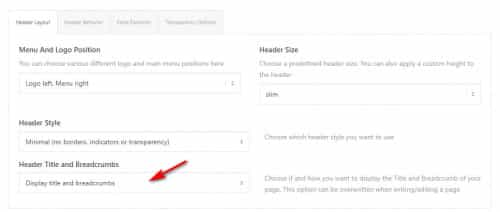
    assuming that all of your other pages have the setting Title Bar Settings ▸ Default Setting then please check Enfold Theme Options ▸ Header ▸ Header Layout ▸ Header Title and Breadcrumbs to ensure it is enabled:
    2022-08-07_007.jpg
    If this doesn’t help please include an admin login in the Private Content area so we can be of more assistance.

    Best regards,
    Mike

    Hi,

    You have set the body font to 19 pixels under Enfold->Advanced Styling, and that is what is currently applying. If you remove that, then the Typography settings should apply after that.

    Best regards,
    Rikard

    #1361014

    Hi Tim,

    Thanks for that. I see that the latest version of the theme is being used on your site, you can verify that under Enfold->Theme Update. I see that you have two Enfold installations on your site, you can simply delete the old version under Appearance->Themes. The child theme version number is something you set yourself, it’s not an indication of the parent theme version. If you want to change that, then you can edit style.css in the child theme.

    Best regards,
    Rikard

    #1361013

    In reply to: Mobile Font Issues

    Hi,

    Thanks for the apology, it’s appreciated. If I suggest a to use a different element or a different way of doing something, it’s not to be rude. I’m only trying to help you out to have a better interaction with the theme.

    Please help me understand why the special headings element works and the text element I was using does not. I do understand that only putting the 72px value in and nothing else means everything is set to 72px I’m confused about this part though….Each of those elements has the same text size component, where you can leave it blank or insert your desired text size for each screen size. I did that on the text element I initially used but it didn’t work. I had only placed text sizes in the last two screen sizes previously, but in the special headings element, I went ahead and filled in the size for each screen. Could that be part of the problem? Must you fill in all the text sizes for it to work properly?

    This is what I tried explaining with the first test page I linked to. If you add inline CSS to any html markup, then in most cases it will override any other CSS which is trying to set the same value. I’ll try a different example:

    //This text will override theme settings, and will always show at 70px
    <h1 style="font-size: 70px;">My heading</h1>
    //This text should get its size from the theme settings
    <h1>My heading</h1>

    Special Heading element – will get its styling from the theme settings. You can set the responsive font sizes under Enfold->General Styling->Typography. You can also set styling under Enfold->Advanced Styling.

    Text Block element with responsive font settings – If you use a Text Block element and you set font sizes for each screen size in the element options, then that should override the general theme settings. Please note that you need to set values for all screen sizes, otherwise the last value set will apply to smaller screens.

    I hope that explains it a bit clearer.

    Best regards,
    Rikard

    #1361003

    Here it goes. As you see, in “Design-> Themes” you will find separate Enfolds, the Child, 4.9 and 5.1.1….

    #1361000

    In reply to: Mobile Font Issues

    This reply has been marked as private.

    Hi,

    Thanks for the update. Please try to remove the CSS I referred to above, then make the settings you would like to have under Enfold->General Styling->Typography. Look for the Default content font size option.

    Best regards,
    Rikard

    #1360998

    Hi,

    Thanks for that. Please try the following in Quick CSS under Enfold->General Styling:

    .page-id-11020 #after_grid_row_1 .container {
        max-width: 100%;
        padding: 0;
    }
    
    .page-id-11020 #after_grid_row_1 .av-minimal-toggle .toggle_content {
        padding: 12px 0 11px 0;
    }

    If you need to add this to more than one element and page, then please add a class to the element options instead, and adjust the CSS accordingly. If you need help with new CSS, then let us know.

    Best regards,
    Rikard

    #1360983

    In reply to: Mobile Font Issues

    This reply has been marked as private.

    Hi,

    Thanks for letting us know, I’ll close this thread for now then. Please open a new thread if you should have any further questions or problems.

    Best regards,
    Rikard

    #1360975

    In reply to: Mobile Font Issues

    Hi,

    I tried your suggestion, and as I indicated before, it did not work. Adding the font size in css or inline makes to difference, the mobile settings are not responsive The font, remains at 72px on every screen.

    But that is exactly what my example page showed you. If you add inline CSS, that will apply instead of any theme setting, since that CSS has a higher priority. If you don’t understand how CSS priority works, then please try to do a bit of research online.

    This page will answer your question in the screenshot: https://wpexpert.se/enfold/text-block-font-sizes-example/

    Not at all, I’m simply suggesting that when you design a website, it’s designed for the largest screen first, then the responsive settings adjust all the page elements to fit the appropriate size. That 72px value would still be there for the larger screens and naturally, adjust to smaller screens. That is how responsive websites are supposed to work.

    You have explicitly told an element to be 72 pixels, with no further specification. How exactly should the theme then know when you want it to change, and on which screen sizes?

    Best regards,
    Rikard

Viewing 30 results - 23,911 through 23,940 (of 244,520 total)