Hi FokeOne,
Here’s how you can turn off parallax effects on a mobile screen (add this CSS code in Enfold > General Styling > Quick CSS):
@media only screen and (max-width:767px) {
  #top .av-parallax {
    transform: matrix3d(1, 0, 0, 0, 0, 1, 0, 0, 0, 0, 1, 0, 0, 0, 0, 1) !important;
  }
}
As for hiding elements in different screen sizes, it is still there, go to Advanced (tab) > Responsive and you should see four checkboxes.
Best regards,
Nikko
 Christian Media
Guest
WHY WOULD YOU SEND ME THIS LINK? IT DOES NOT WORK TO HELP ME GET MY WEBSITE UP. I need someone to walk me through this or refund ALL of what I have purchased in the past 21 days. Frances — Frances Middleton On Aug 8, 2022, at 4:27 AM, Support | Kriesi.at – Premium WordPress Themes < (Email address hidden if logged out) > wrote: You are receiving this email because you sent a question/request with a contact form. Our staff has answered it now. Use the following link to view the answer(s) and add follow up questions: https://kriesi.at/support/topic/enfold-blocks-website-launch/?avia_support_contact=avs_62f0320341db76.13642491_1361028
Your private data has been saved and is only visible to you and our moderators.
Please do not answer to this mail, it is an automatic generated E-Mail.
Christian MedisGuest
WHY WOULD YOU SEND ME THIS LINK?
IT DOES NOT WORK TO HELP ME GET MY WEBSITE UP.
I need someone to walk me through this or refund ALL of what I have purchased in the pass 21 days.
Frances
—
Frances Middleton
On Aug 8, 2022, at 4:27 AM, Support | Kriesi.at – Premium WordPress Themes < (Email address hidden if logged out) > wrote:
You are receiving this email because you sent a question/request with a contact form. Our staff has answered it now.
Use the following link to view the answer(s) and add follow up questions:
Hello Enfold Team,
I am experiencing a random refresh issue on one of my sites, but only on mobile devices. It is a wedding site with a lot of images, but I have not had this problem in the past. Everything works great on a desktop, but after scrolling through the images on a phone, it will randomly refresh after 30 seconds or so and then jump to a different spot on the page. After a minute or so, everything goes away, and I get the message “a problem repeatedly occurred on https:mysitesurl
Also, the first image on the page constantly gets more prominent as you scroll back and forth on your phone. I don’t know if they are related, but I thought I would mention it just in case.
I appreciate your help.
Site URL and admin credentials for you are in the private content section.
Hi,
Great, I’m glad that Mike could help you out. I’ll close this thread for now then, please open a new thread if you should have any further questions or problems.
Best regards,
Rikard
Hey advteksol,
Please try the following in Quick CSS under Enfold->General Styling:
.postid-1567 main input[type='text'] {
  border-color: #fff;
}

.postid-1567 main input::-webkit-input-placeholder, .postid-1567 main input:-ms-input-placeholder, .postid-1567 main input::placeholder {
  color: #fff;
}
Best regards,
Rikard
Hi Erin,
Please try the following in Quick CSS under Enfold->General Styling:
.avia-testimonial-markup-entry-content p {
    font-family: 'verdana';
}
Best regards,
Rikard
Hi,
Did you check your settings under Enfold->SEO Support? Look for the Meta Tag “robots” option.
Best regards,
Rikard
Hello
I am entering the following in the autoresponder text on the contact form:
Guten Tag

Vielen Dank für Ihre Nachricht.
Gerne werden wir Sie in den nächsten Tagen persönlich kontaktieren.

Freundliche Grüsse

xyz
The email that the visitor receives, has the following markup:
Guten Tag</p><br />
<p>Vielen Dank für Ihre Nachricht.<br /><br />
Gerne werden wir Sie in den nächsten Tagen persönlich kontaktieren.</p><br />
<p>Freundliche Grüsse</p><br />
<p>xyz
Somehow the markup seems to get mixed up when saving. This causes different spacing between paragraphs in the email to the visitor.
In the shortcode_handler in the contact.php file, $atts[‘autorespond’] has the following value:
Guten Tag</p>\n<p>Vielen Dank für Ihre Nachricht.<br />\nGerne werden wir Sie in den nächsten Tagen persönlich kontaktieren.</p>\n<p>Freundliche Grüsse</p>\n<p>xyz
I have already reentered the text and also tried to define all breaks directly with HTML code – unfortunately unsuccessful so far. Also deactivating all plugins did not bring any change.
We could find the problem with Enfold 5.1.1 under WP 6.0.1 as well as with Enfold 4.7.6.3 under WP 6.0.1.
Do you have a tip for me? Many thanks!
Hello it will be good to explain how to proceed. Switch between the update footer.php to the child theme? that right? because on my side if i do that the footer on my website just not display… For now I just dont proceed of any update of enfold… its pity… For sure i forget enfold for next projects…
Hey cbroome12,
Could you try updating the theme to the latest version (5.1.1) to see if that helps please? https://kriesi.at/documentation/enfold/how-to-install-enfold-theme/#theme-update. If not, then please check the login details you posted, as they are not working.
Best regards,
Rikard
Hi
Is there a Google Reviews widget within the enfold themes that pulls in clients Google Reviews? If not, is there a plugin or alternative way to pull in the the reviews.
Thanks
Marcus
have you played a bit on that settings here :
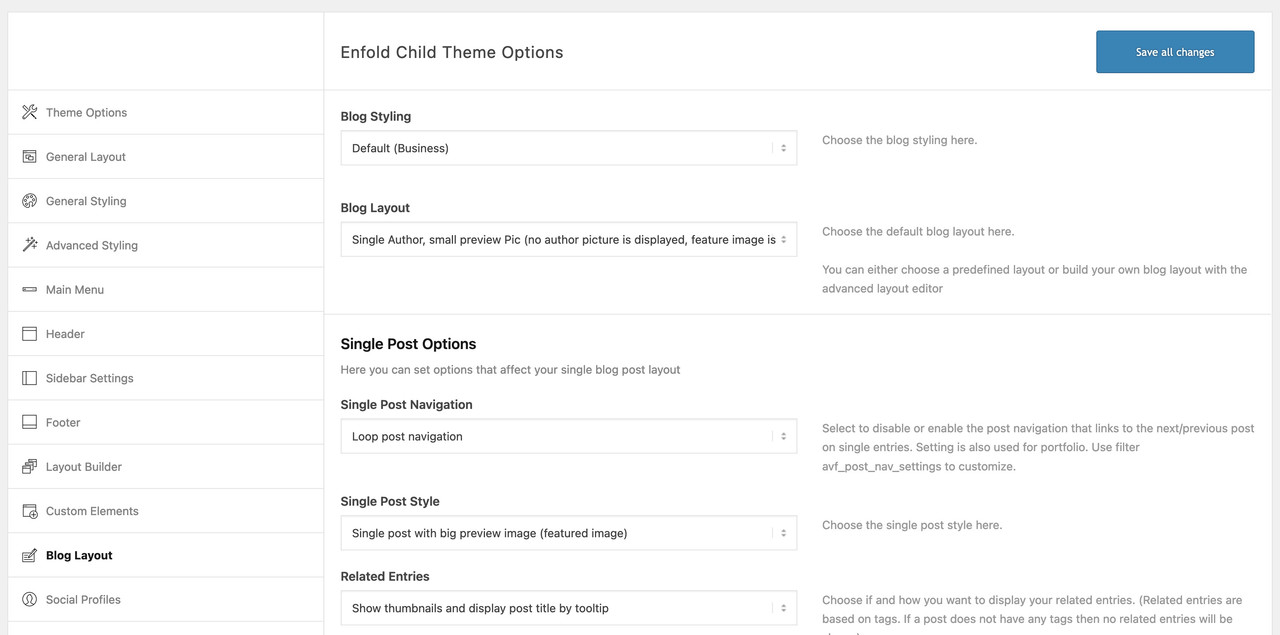
Or if you have done your blog page with enfold alb element blog-posts – on those similar settings ( single author – small preview )
if you decided to have no sidebar on those pages – there are css ways to get this look alike allthough.
Hi,
Sorry for the delay. You can edit the enfold/config-templatebuilder/avia-shortcodes/slideshow/slideshow-video.js file, look for the _playerReady function around line 279 and replace it with the following code.
		//wait for player to be ready, then bind events
		_playerReady: function()
		{
			var _self = this;

			this.$option_container.on('av-video-loaded', function(){ _self._bindEvents(); });

			switch(this.type)
			{
				case "html5":
					this.$video.on( 'av-mediajs-loaded', function(){
                        _self.$option_container.trigger('av-video-loaded');
                        _self._html5_mute();
                        _self._html5_play();
                    } );
					this.$video.on( 'av-mediajs-ended' , function(){ _self.$option_container.trigger('av-video-ended');  } );
					break;
				case "vimeo":
					//finish event must be applied after ready event for firefox
					_self.player.addEvent('ready',  function()
					{
                        _self._vimeo_mute();
                        _self._vimeo_play();
                        _self.$option_container.addClass('av-video-playing').removeClass('av-video-paused');
						_self.$option_container.trigger('av-video-loaded');
						_self.player.addEvent('finish', function(){ _self.$option_container.trigger('av-video-ended');  });
					});

					break;

				case "youtube":

					var params = _self.$video.data();

					if( _self._supports_video() )
					{
						params.html5 = 1;
					}

					_self.player = new YT.Player(_self.$video.attr('id'),
					{
						videoId: params.videoid,
						height: _self.$video.attr('height'),
						width: _self.$video.attr('width'),
						playerVars: params,
						events: {
						'onReady': function(){
                            _self.$option_container.trigger('av-video-loaded');
                            _self._youtube_mute();
                            _self._youtube_play();
                        },
						'onError': function(player){ $.avia_utilities.log('YOUTUBE ERROR:', 'error', player); },
						'onStateChange': function(event){
							if (event.data === YT.PlayerState.ENDED)
							{
								var command = _self.options.loop != false ? 'loop' : 'av-video-ended';
								_self.$option_container.trigger(command);
							}
						  }
						}
					});
					break;
			}

			//fallback always trigger after 2 seconds
			setTimeout(function()
			{
				if(_self.eventsBound == true || typeof _self.eventsBound == 'undefined' || _self.type == 'youtube' )
				{
					return;
				}

				$.avia_utilities.log('Fallback Video Trigger "' + _self.type + '":', 'log', _self );

				_self.$option_container.trigger('av-video-loaded');

			}, 2000 );
		},
This will mute the video and play it automatically. You may also have to modify the enfold/config-templatebuilder/avia-shortcodes/slideshow/slideshow.js, look for the _prepareSlides function and at the very first line, just add this code to disable the function and prevent the theme from rendering the fallback images.
return;
Best regards,
Ismael
Hey Diana,
Thank you for the inquiry.
1-2.) You can use this css code to adjust the overlap issue on mobile view and hide footer logo.
@media only screen and (max-width: 768px) {

  /* Add your Mobile/Tablet Styles here */
  .avia-image-container.av-l4tjzlhk-ec21aaea3608b0ab6b2a6cfbbd3dbdde {
    top: 100px;
    left: -20px;
  }

  div#logofooter {
    display: none;
  }
}
Please toggle or temporarily disable the Enfold > Performance > File Compression settings after adding the css code.
Best regards,
Ismael
 Alexander Baum
Hello Ricard,
I have now deactivated the slider plug-in and switched the hosting back to 8x.x.
An error of the Theme Plug-In is now caused again.
Here is the error message.
Greetings Alexander
>>>>>>>>>>>>>>>>>>>>>>>
Wenn du Hilfe bei diesem Problem suchst, wirst du möglicherweise nach einigen der folgenden Informationen gefragt:
WordPress-Version 6.0.1
Aktives Theme: Enfold (Version 5.1.1.1-image) Aktuelles Plugin: (Version ) PHP-Version 8.0.20
Fehler-Details
==============
Ein Fehler vom Typ E_ERROR wurde in der Zeile 38 der Datei /var/www/vhosts/26164.s1.creoline.cloud/httpdocs/wp-content/themes/enfold/css/dynamic-css.php verursacht. Fehlermeldung: Uncaught Error: Call to undefined function extract() in /var/www/vhosts/26164.s1.creoline.cloud/httpdocs/wp-content/themes/enfold/css/dynamic-css.php:38
Stack trace:
#0 /var/www/vhosts/26164.s1.creoline.cloud/httpdocs/wp-content/themes/enfold/includes/admin/register-dynamic-styles.php(234): require()
#1 /var/www/vhosts/26164.s1.creoline.cloud/httpdocs/wp-content/themes/enfold/functions.php(781): avia_prepare_dynamic_styles()
#2 /var/www/vhosts/26164.s1.creoline.cloud/httpdocs/wp-includes/class-wp-hook.php(307): avia_custom_styles()
#3 /var/www/vhosts/26164.s1.creoline.cloud/httpdocs/wp-includes/class-wp-hook.php(331): WP_Hook->apply_filters()
#4 /var/www/vhosts/26164.s1.creoline.cloud/httpdocs/wp-includes/plugin.php(476): WP_Hook->do_action()
#5 /var/www/vhosts/26164.s1.creoline.cloud/httpdocs/wp-settings.php(598): do_action()
#6 /var/www/vhosts/26164.s1.creoline.cloud/httpdocs/wp-config.php(79): require_once(‘…’)
#7 /var/www/vhosts/26164.s1.creoline.cloud/httpdocs/wp-load.php(50): require_once(‘…’)
#8 /var/www/vhosts/26164.s1.creoline.cloud/httpdocs/wp-login.php(12): require(‘…’)
#9 {main}
thrown
Hi,
Thanks for the update. Are you referring to the LayerSlider plugin? If so, then that is bundled with the theme, and it’s working on all installations I’ve seen running PHP 8.x.x, so it’s not a general problem with the theme or LayerSlider. We can’t say why this problem is happening on your site unfortunately, but you could try to deactivate the bundled LayerSlider under Enfold->Layout Builder, to see if that makes any difference. Look for the Integrated (Bundled) LayerSlider Plugin option.
Best regards,
Rikard
Hi Sozo,
I apologize, the code I gave is incorrect (I only changed the upper part of the code, the lower part of the code was wrong which I did not notice), use this code instead:
// Register new icon as a theme icon
function avia_add_custom_icon($icons) {
    $icons['visa'] = array( 'font' =>'fontello', 'icon' => 'uf1f0');
    $icons['master_card'] = array( 'font' =>'fontello', 'icon' => 'uf1f1');
    $icons['discover'] = array( 'font' =>'fontello', 'icon' => 'uf1f2');
    $icons['amex'] = array( 'font' =>'fontello', 'icon' => 'uf1f3');
    $icons['payPal'] = array( 'font' =>'fontello', 'icon' => 'uf1f4');
    $icons['stripe'] = array( 'font' =>'fontello', 'icon' => 'uf1f5');
    $icons['apple'] = array( 'font' =>'fontello', 'icon' => 'uf179');
    $icons['android'] = array( 'font' =>'entypo-fontello', 'icon' => 'ue91c');
    $icons['venmo'] = array( 'font' =>'fontello', 'icon' => 'uf30f');
    return $icons;
}
add_filter('avf_default_icons','avia_add_custom_icon', 10, 1);

// Add new icon as an option for social icons
function avia_add_custom_social_icon($icons) {
    $icons['Visa'] = 'visa';
    $icons['Master Card'] = 'master_card';
    $icons['Discover'] = 'discover';
    $icons['Amex'] = 'amex';
    $icons['PayPal'] = 'payPal';
    $icons['Stripe'] = 'stripe';
    $icons['Apple'] = 'apple';
    $icons['Android'] = 'android';
    $icons['Venmo'] = 'venmo';
    return $icons;
}
add_filter('avf_social_icons_options','avia_add_custom_social_icon', 10, 1);
Let me make sure I’m understanding everything correctly. After I’ve added the code, these icons should appear in the “Social Profiles” tab, of the enfold menu correct? Enable the icons we’ve just added etc, Go to the footer tab, make your selection and the icons should appear on site.
Yes, it should appear in the Social Profiles tab and you can add those icons there and then in the Footer tab just enable Social Icons.
Best regards,
Nikko
 Michael Blumenthal
Guest
Im getting a message on the support forum that my license key is from 2016 but my site is current with Enfold at version 4.2 – how do I find the key that the site seems to be looking for so i can access support?
Hey Audrey,
Thanks for contacting us!
Please add following code to Quick CSS field in Enfold theme options > General Styling tab
@media only screen and (max-width: 1200px) {
.single-product-main-image {
  width: 100%;
  margin-right: 0;
  float: none;
}}
Cheers!
Yigit
Hi,
Thanks for contacting us!
Please refer to this post – https://kriesi.at/documentation/enfold/social-share-buttons/#how-to-add-custom-social-icons-to-enfold-options
Apparently Mastodon icon is not available on Fontello so please check under “Using images or non-Fontello icons” section :)
Regards,
Yigit
Dear Kriesies,
ENFOLD is a well thought out cms inside the wordpress cms
also u spend a lot of care on the designs, so bought this theme 2x TWICE! :)
question: currently customer has 1) Facebook 2) LinkedIn and 3) Twitter but also want’s a 4) Mastodon social network button
https://mastodon.social/@mastodon
not sure how to add it as there are only 3 columns/buttons possible to config see screenshot
https://pasteboard.co/5WN8nC149uaz.jpg
where to tweak the theme? :D
why don’t you use a different way to show your blog?
f.e.: like this https://kriesi.at/themes/enfold/blog/blog-single-small/
Hi,
Thanks for the screenshots. So it’s on pages like these you don’t like the featured image? https://kriesi.at/themes/enfold/category/science/, or do you only want to display it smaller?
Bonus; if that is a regular page, then you can add content to the sidebar under Appearance->Widgets. I’m not sure exactly what you had in mind for that, but if you are looking for a dynamic alternative, then there’s nothing like that in the theme by default unfortunately.
Best regards,
Rikard
Thank you for the quick help. :-)
I want the transparent header like the ones on the rest of the website: transparent without the grey border, but after scrolling down, it hast to get white with the grey border.
Could you fix that? After that, the font in the single event page is a little problem (I tried to fix it, but it didn’t work…):
in the weekend seminar, there is text separated from the double point (break in the next line) – of course that looks terrible. How to fix it?
Veranstaltungskategorie
:
And the word “Details” and “Veranstaltungsort” should be bold. The Google map should be in a single row. I don’t have any idea how to do it…
Now I just saw, the Enfold version is 4.9 – but it doesn’t show that there is an update. Why?
Best regards and a big thanks to you,
Kati
-
This reply was modified 3 years, 8 months ago by
 KittenAdmin. Reason: Just saw sth. to tell
Hey RG1968,
Thank you for the inquiry.
We can use the following css code to adjust the breakpoint of the gallery columns on tablet/phone view.
/*
Mobile Styles
================================================== */
/* Note: Add new css to the media query below that you want to only effect the Mobile and Tablet Portrait view */

@media only screen and (max-width: 768px) {

  /* Add your Mobile/Tablet Styles here */
  .responsive #top .avia-gallery .avia-gallery-thumb a {
    width: 50%;
  }
}

@media only screen and (max-width: 480px) {

  /* Add your Mobile Styles here */
  .responsive #top .avia-gallery .avia-gallery-thumb a {
    width: 100%;
  }
}
You may need to toggle or temporarily disable the Enfold > Performance > File Compression settings after adding the css.
Best regards,
Ismael
Hey Tim,
Please try the following in Quick CSS under Enfold->General Styling:
#top .av-main-nav ul ul {
    left: 207px;
}
Best regards,
Rikard
Hi Tobias,
Please open a new thread and include WordPress admin login details in private, so that we can have a closer look at your site.
Best regards,
Rikard
Hi,
Great, I’m glad to hear that you found the problem. I’ll close this thread for now then, please open a new thread if you should have any further questions or problems.
Best regards,
Rikard



