Hi Rikard,
I installed the Envato Market plugin and added my private token. The Enfold theme update failed the first time with “Updating failed The theme is at the latest version… View version 5.1.1 details.” but it worked the second time.
My issue now is that it does not appear to have migrated the pages to the new version. If I try to edit the “Contact” page for example, it is not displayed in WYSIWYG format but in a text format with embedded codes and when the page is viewed it does not display the [ av_google_map ] embedded code correctly.
Best regards,
Pieter
Hey slikslok,
Thank you for the inquiry.
The breadcrumb will not display if the page is set to have a transparent header. You have to disable the header transparency to enable the breadcrumbs back. You can also create a custom shortcode for the breadcrumb and add it manually in the page.
function av_breadcrumbs_shortcode( $atts ) {
	return Avia_Breadcrumb_Trail()->get_trail( array( 'separator' => '/', 'richsnippet' => true ) );
}
add_shortcode( 'av_breadcrumbs', 'av_breadcrumbs_shortcode' );
Please check the documentation below for more info.
// https://kriesi.at/documentation/enfold/breadcrumbs/#insert-breadcrumbs-as-shortcodes
Best regards,
Ismael
Hi,
I have the GeoCoding function working and billing established through the G Suite console and have the media element working just fine in Enfold. But when I click on the map it does absolutely nothing and I cannot find where to place a link to driving directions or the like so it has more functionality than just a placeholder.
Can someone please tell me how to make the Google Maps media element more interactive with driving directions or point me to some more documentation?
Many thanks.
Hi,
Thanks for your question, if you are using Enfold v3.8 then you must manually update because that version will not accept the Envato Token and will only use the Envato API which Envato has disabled. Second, if your PHP is v7.3 then you must update to v7.4, then update Enfold to v5.1.1, then update WordPress to v6+, then you can update to PHP v8+
To update your version of Enfold you will need to download the latest version from your Theme Forest account and upload it to your WordPress ▸ Appearance ▸ Themes ▸ Add Themes ▸ Add New

after you choose the zip file and click install, you will see a This theme is already installed message because you are updating, you can continue

then you will see the Theme updated successfully message.

Before you do anything else !!
Please backup your site with your webhost full site backup tool.
Please do not rely on a backup plugin unless you have personal experience restoring from such a backup!
Many backup plugins only backup and do not restore!
Best regards,
Mike
Hey patde22,
Thanks for your question, as I recall there was an update issue with that old version, when I check your site the Debugging Info for Theme support says that Updates are disabled.
To update your version of Enfold you will need to download the latest version from your Theme Forest account and upload it to your WordPress ▸ Appearance ▸ Themes ▸ Add Themes ▸ Add New
after you choose the zip file and click install, you will see a This theme is already installed message because you are updating, you can continue
then you will see the Theme updated successfully message.
Best regards,
Mike
Hi,
Glad Guenni007 could help, thank you Guenni007, if you have any further questions please create a new thread and we will gladly try to help you. Thank you for using Enfold.
Best regards,
Mike
Hi Guys,
unfortunately I can´t update the enfold theme during the Update Menu in enfold settings.
It say the latest version 4.5.5 is installed. The envato token is working properly.
When i click on “check updates” wordpress closes the setting page of enfold.
2nd problem: I can´t open theme customizer anymore…wordpress will not open it.
Could you check it on my website?
regards patde22
Hi,
In a similar position to a lot of people at the moment with required PHP updates I need to update the PHP on my server to ideally 8.1. I have let the version of Enfold get quite behind and it has quite a few customisations so I just wanted to check what the best method would be and with the version being so low any issues I need to be aware of when performing the upgrade.
This is my current setup
Wordpress = Current version: 5.8.4
Enfold is 3.8
PHP is 7.3
I have linked my Envato token which it has accepted but it is currently saying no updates available but I don’t think it has checked yet so hopefully shortly it will say the new version. Would the best method be
1, Update Enfold from within the theme update section to 5.0
2, Update WordPress to 5.8.4
3, Update any other plugins
4, Update server PHP to 8.1
Any help really appreciated.
Thanks,
Danny
Hey Mike1050,
I’m not sure why you would need a plugin for that? You could upload them directly in the theme options instead if you like: https://kriesi.at/documentation/enfold/typography/#how-to-upload-custom-fonts
Best regards,
Rikard
Hey Vera,
You can select for the header to be transparent in the Layout menu on each page, did you try that out? The transparent menu colour can be set under Enfold->Header->Transparency options.
Best regards,
Rikard
Hi,
I activate breadcrumbs in the enfold-settings (header), but they are only shown on sites with no image in the header. How can I see them also on sites with header-pictures?
And how can I disable breadcrumbs on the starting page?
I’ll send you examples in the private area.
Thanks for suporting
Tim
Hi,
We are happy that Mike could help!
If you have any other questions or issues, feel free to start a new thread under Enfold sub forum and we will gladly try to help you :)
Enjoy the rest of your day!
Best regards,
Yigit
Hi Enfold-Team,
i would like to use the plugin “OMGF | Optimize My Google Fonts” to host Google Fonts on my hosters servers and not on Google Servers. On Enfold Website A (see private content) it works flawlessly. On Enfold Website B (see private content) no Google fonts are detected, although loaded. So no optimization can take place. Do you have any ideas how to fix this?
Thanks & best regards,
Michael
I have few problems:
1. I am using Enfold 4.6.3.1 version. I have integrated the token but it’s not finding the latest update which is 5.* please see here
2. Currently I am getting an error :
public_html/wp-content/themes/enfold/config-templatebuilder/avia-shortcodes/slideshow_layerslider/slideshow_layerslider.php on line 28
3. I am using WordPress 5.9.3 version. When I updated to the latest version then the number of errors increases a lot and I cant even access the admin page. That’s why I restored my website to the 5.9.3 version.
4. I have tried updating the theme via FTP and WordPress admin upload method but nothing solves the error.
What is the solution for this? I want to upgrade the WordPress version to the latest one and also want to upgrade the theme to the latest version.
Thank you Mike!
Now I see, that was my fault. By mistake I uploaded the wrong files for the enfold-child. I’m sorry for that.
I still haven’t grasped the benefit of it all. Should the displayed page be displayed without header and navigation, without footer – that would make relatively little sense
_______
if you only like to insert a page content to another page:
Why not creating that target page – and embed that page with ALB Element “Page Content” – opening that target.
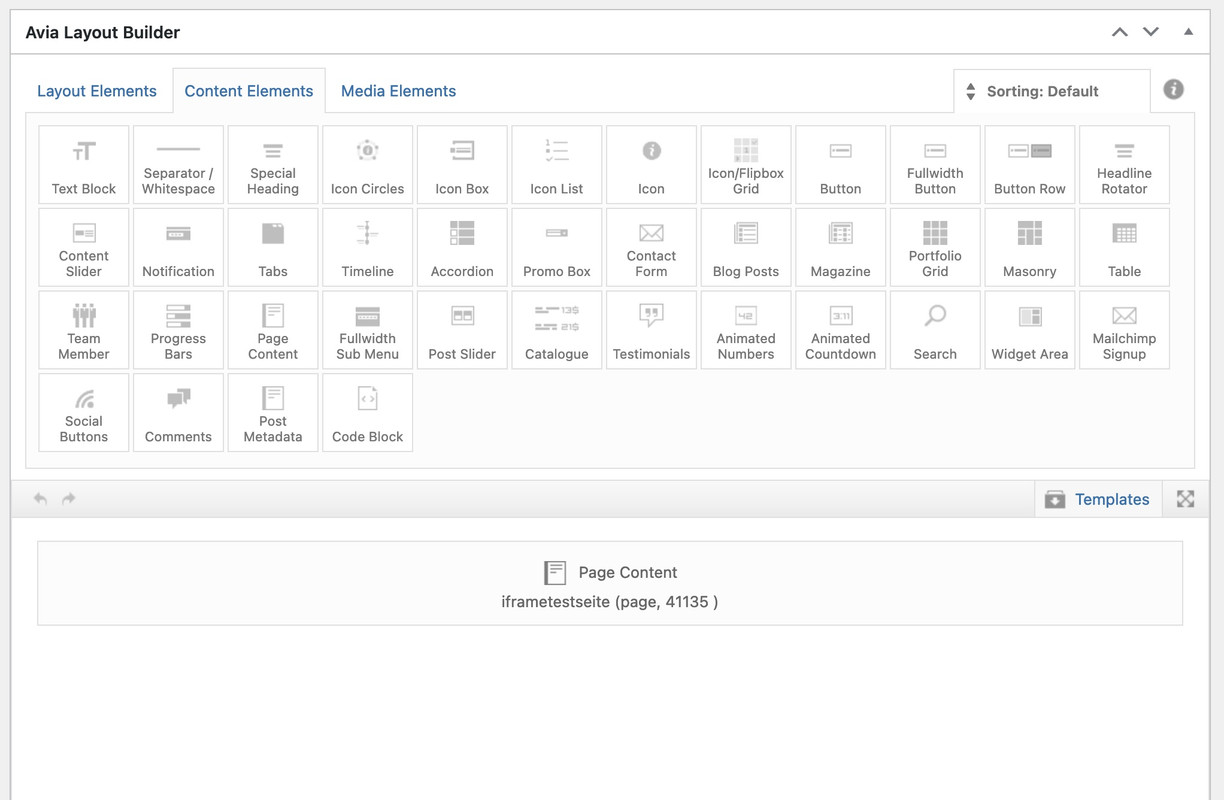
see here: https://enfold.webers-webdesign.de/schweg33/
PS: the content (code snippets ) of that iframe page has nothing to do with your topic. It is just an example page placed on another enfold page.
-
This reply was modified 3 years, 7 months ago by
 Guenni007.
Bonjour,
J’ai suivi vos indications mais en procédant à la mise à jour j’ai l’erreur suivante qui s’affiche :Warning: Creating default object from empty value in /homepages/13/d621856167/htdocs/jetsaveurs/wp-content/themes/enfold/config-templatebuilder/avia-shortcodes/slideshow_layerslider/slideshow_layerslider.php on line 28
Et toutes les images de mon slider sont surdimmensionnées…
J’ai donc été obligé de restaurer l’ancienne version pour le moment,
Merci pour votre aide,
ENFOLD > MAIN MENU > BURGER/MOBILE MENU STYLING > Flyout Width settings – still does not work.
so there must be something else – maybe a caching issue?
zunächst übernimmt Enfold die Sprache von der eingestellten WordPress Sprache.
Wenn Du also die informelle Deutsche Version unter Dashboard – Einstellungen – Allgemein gewählt hast nimmt auch Enfold die informellen Sprachfiles.
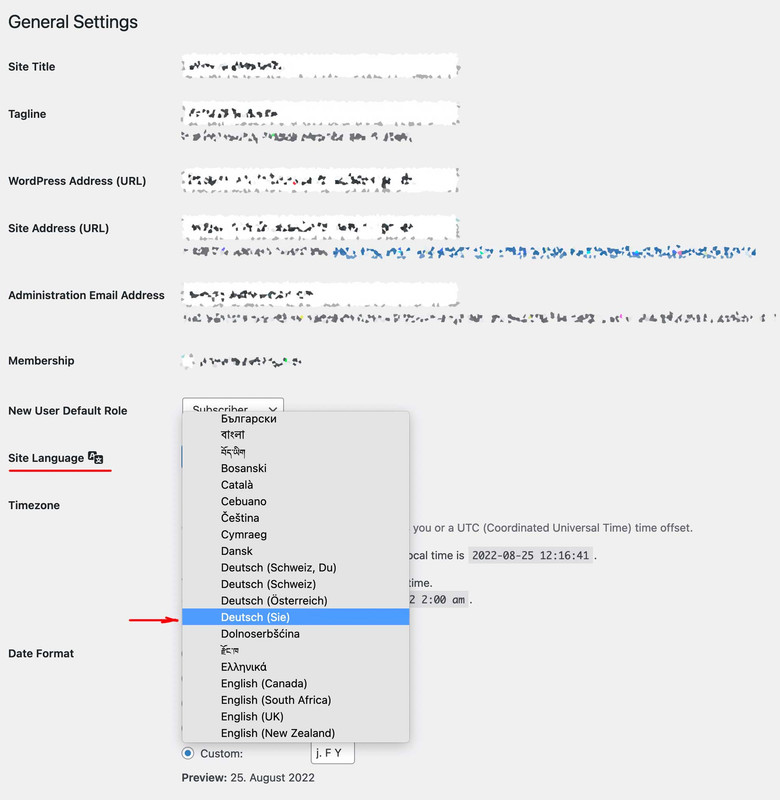
Um Übersetzungen zu verändern, kannst du die Lang Files im enfold/lang/ ordner bearbeiten, und diese als child-theme files hochladen.
Ich würde in dem Fall die Ordnerstruktur beibehalten und einen child-theme/lang/ folder dafür erstellen. Bedenke du musst zwei Files hochladen.
Editiert wird der po file der beiden, hochgeladen werden muss allerdings noch der mo file ( po-edit generiert beide)
Die Child-Theme Lang Files werden dann geladen via child-theme functions.php:
function overwrite_language_file_child_theme() {
    $lang = get_stylesheet_directory().'/lang';
    return $lang;
}
add_filter('ava_theme_textdomain_path', 'overwrite_language_file_child_theme');
_________________________________
Soviel zu dem theoretischen Weg.
Es gibt aber die Quick and Dirty Version dazu – bitte stelle aber mal zunächst auf Deutsch (Sie) um – und poste hier dann die exakten Texte die dann erscheinen.
Hi, I use Montserrat as default font fot tifle and body font (Enfold Theme Option > General Style > Font
I created some Advanced Style to change H2 Weight and color to Red and 900.
I change with advanced styles the weight of the H2, H3 and p tags
When i see the the site from my google chrome all function perfect but whene i see the site from my computer with Mozilla Firefox the Weight are completly lost (the color is ok) for all the tags H2 – H3 – p
All peaple that see the site from another computer with any browser can’t see the right weight.
Help!
-
This topic was modified 3 years, 7 months ago by
 galliulisse.
-
This topic was modified 3 years, 7 months ago by galliulisse.
Hi,
Please add following code to Quick CSS field in Enfold theme options > General Styling tab
#top #wrap_all .av-social-link-facebook:hover a,
#top #wrap_all .av-social-link-facebook a:focus {
  color: #fff;
  background-color: orange;
}
Best regards,
Yigit
Hi,
We are glad Nikko and Rikard could help! :)
For your information, you can take a look at Enfold documentation here – https://kriesi.at/documentation/enfold/
If you have any other questions or issues, feel free to start a new thread under Enfold sub forum and we will gladly try to help you :)
Enjoy the rest of your day!
Best regards,
Yigit
Hi,
In Social Buttons element “use defaults” option was chosen so it displays the share buttons enabled in Enfold theme options > Blog Layout. They were not showing up because they were all disabled. I enabled some and that worked.
Please review your website :)
Best regards,
Yigit
Hallo,
wo kann ich bei Enfold im BLOG “hinterlasse einen Kommentar” in hinterlassen Sie einen Kommentar ändern? Habe nicht gefunden wo man das einstellen kann. und auch noch folgendes
An der Diskussion beteiligen?
Hinterlasse uns deinen Kommentar! In Hinterlassen Sie uns Ihren Kommentar!
Vielen Dank schon mal für die Hilfe
Hi Team,
I have create a page and using full screen slider for big screen and grid row for small screen.
I tried using the enfold feature for hiding the content on different screens but unfortunately it didn’t work.
I will appreciate if you could help me out with this.
I am sharing page link and login credentials in private section.
Maybe offtopic – but i think it will be a nice idea to offer – f.e. on the documentation a download link for the icon-sets used on the demos.
Sometimes i do not want to use the medical demo – but like to use the iconset of it. ( or enfold-law etc. )
But maybe it is better to do it yourself. You will find the link to the svg file on those demos by inspecting the css.
Download that svg – and upload it to fontello custom font area – activate all fonts then – name it as the original set – and download that zip file.
Now – even the woff2 is included ! Better to rename that zip file too – as the original filename is ;)
As far as i can see there are:
enfold-knowledgebase, flaticon-sports, justice, light_ , medical
-
This reply was modified 3 years, 7 months ago by Guenni007.
Hey Michael,
Thank you for your interest in the theme.
The theme is very user-friendly, all you need is a basic understanding of the WordPress platform such as creating posts or pages, activating plugins and themes and a bit of persistence. The theme is well documented and we have some articles which should help you get started in no time.
Please check the links below.
// https://kriesi.at/documentation/enfold/
// https://kriesi.at/documentation/enfold/quick-setup/
// https://kriesi.at/archives/wordpress-beginners-how-to-start-with-enfold-from-scratch
And if you prefer watching, these videos should help.
// https://www.youtube.com/watch?v=Gr4GV8NKMek
// https://vimeo.com/devinvinson
If you didn’t find what you are looking for or if you have questions about theme, you can always reach us in the forums.
// https://kriesi.at/support/
Best regards,
Ismael
Hi,
Thank you for the update.
The blog page looks different compare to the demo because the sidebar for the blog page has been disabled and the posts have no excerpt or summary. We enabled the sidebar back for the blog page (Enfold > Sidebar Settings > Sidebar On Blog Page). You may need to add more content to the posts or define the excerpt manually to make your blog look more like the demo.
Best regards,
Ismael
Hi,
Added below code to functions.php file to add custom social icons,
// Register new icon as a theme icon
function avia_add_custom_icon($icons) {
	$icons['Groupware'] = array( 'font' =>'fontello', 'icon' => 'UF1A0');
	$icons['TeamViewer'] = array( 'font' =>'fontello', 'icon' => 'UE801');
	$icons['Messenger'] = array( 'font' =>'fontello', 'icon' => 'UF136');
	$icons['Wiki'] = array( 'font' =>'fontello', 'icon' => 'UF266');
	return $icons;
}
add_filter('avf_default_icons','avia_add_custom_icon', 10, 1);

// Add new icon as an option for social icons
function avia_add_custom_social_icon($icons) {
	$icons['Groupware'] = 'Groupware';
	$icons['TeamViewer'] = 'TeamViewer';
	$icons['Messenger'] = 'Messenger';
	$icons['Wiki'] = 'Wiki';
	return $icons;
}
add_filter('avf_social_icons_options','avia_add_custom_social_icon', 10, 1);
But doesn’t show at Enfold Theme Options > Social Profiles dropdown menu.
Could you please advise?
Thank you,
-Leanne
Hi Rikard,
My ISP host is forcing an upgrade from PHP 7.4 to 8.0 (by 3 October) and this triggered me going down this pit of despair. Thank you for offering to have a closer look. Details in private content.
I tried deleting the wp-content\themes\enfold folder and replacing it with the latest version (5.1.1) and it works but it does not appear to migrate widgets successfully, for example the av_google_map widget on the contact page.
Also when trying to edit a page, it is not displayed in WYSIWYG format but embedded text (if you know what I mean).
Thanks in advance,
Pieter



