Hi All,
I am not able to click on my Avia elements on any existing post or page. I can click on them for new pages though.
Please see screenshot here: https://www.seniaconference.org/wp-content/uploads/2022/09/Cannot-click-elements.png
Any ideas on how to fix this? I have Enfold 4.5. On my other site, with the same version, it is not a problem.
Thanks,
Michael
I have two websites that I have and use Enfold on.
This one: http://www.usasoftballaz.com is not receiving any emails from the form after 8/30 it stopped, but my other site: http://www.43sixtyaz.com has the same set up and works fine.
Can you please help we aren’t able to see the registrations
-
This topic was modified 3 years, 6 months ago by
 azsocialwiz.
Hi,
I just installed a Demo theme on my site – I previously built my site using the standard Enfold theme but liked how Enfold Creative Studio looked so have installed it and cannot figure out how to update the logo etc. I also notice that the layout isn’t exactly like the demo on my site – I liked the diagonal pages but that isn’t showing up on my website… Is there a tutorial I can watch or can someone walk me through the steps? Thanks!
@aussiedropbear
Hey I put this together a year or so ago. It uses enfolds menu building tools. It also has woocommerce for bakery sales.
https://www.thehoneypotcompany.co.uk/
https://www.thehoneypotcompany.co.uk/menu/
If you have not already seen it there is a demo of a restaurant.
https://kriesi.at/themes/enfold-restaurant/
-
This reply was modified 3 years, 6 months ago by
 thinkjarvis.
Hello,
thanks first of all for developing such a great solution as Enfold – it makes life easy. :)
BUT…l have one issue with the LayerSlider on the Startpage:
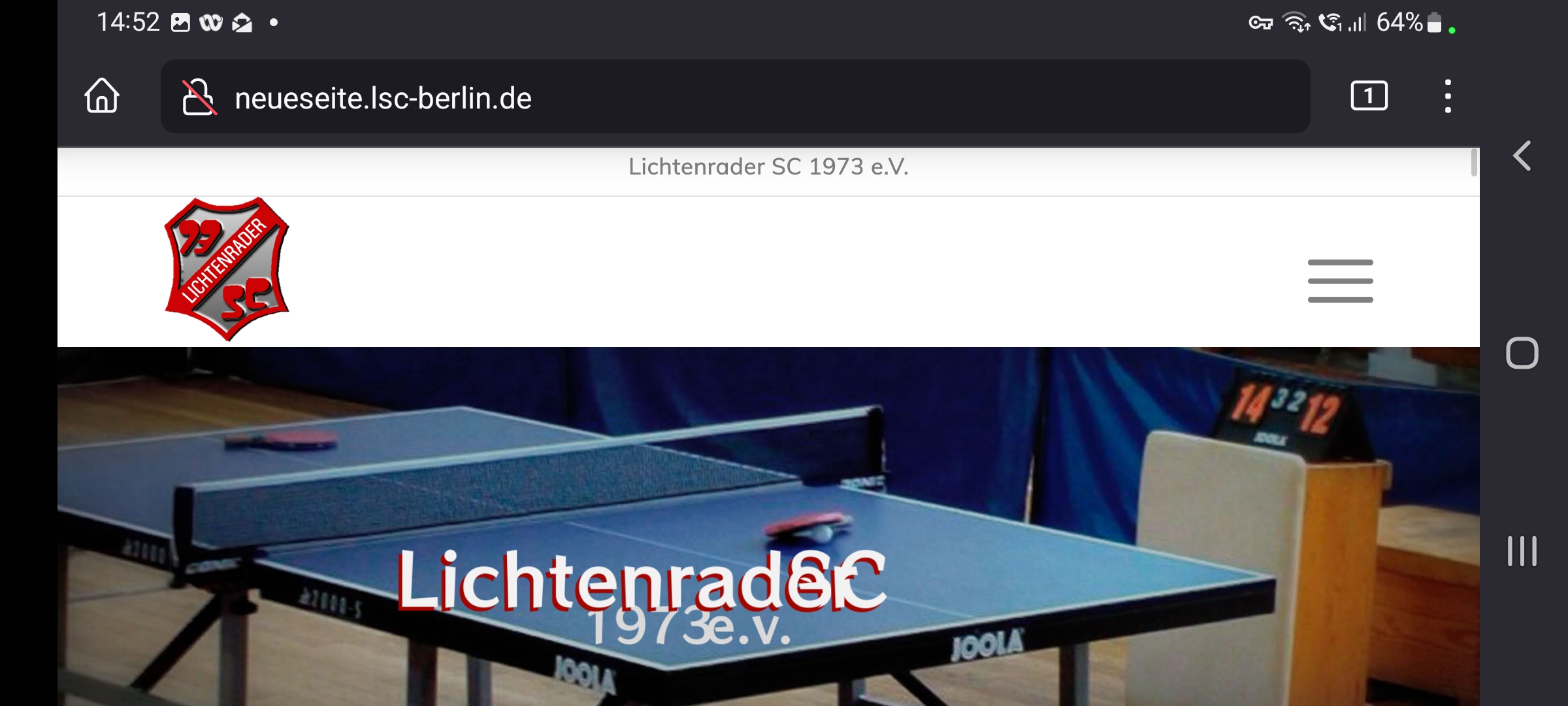
It works good on nearly all tested devices – like several browsers on Windows-PCs, iPhones, iPads…. but on Android (-> Firefox) I am facing the issue that some text-layers are overlapping.
You can see the issue in that picture:
http://neueseite.lsc-berlin.de/wp-content/uploads/2022/09/IMG_2974.jpg
“Lichtenrader” is one layer and “SC” is one layer – but they are overlapping… and also the layer below “1973 e.V.” is crashing into it.
Usually it looks good on all other tested devices – you can also check it here: http://neueseite.lsc-berlin.de
Do you have any idea what could be the reason?
I played already with the witdh of the layers, setting from px to % and some other settings – but found no solution for that.
Thanks a lot in advance.
Best regards,
Oliver
PS: Same issue can be faced on your Enfold Demo-page “Enfold 2017” with my Samsung A53 with latest Android and Firefox.
See result here:
http://neueseite.lsc-berlin.de/wp-content/uploads/2022/09/IMG_2975.jpg
-
This topic was modified 3 years, 6 months ago by
 don_olli.
-
This topic was modified 3 years, 6 months ago by don_olli.
Hi Enfold team,
I assume that this is not covered by your support, but maybe you could still give me some advice:
we have received a written warning from a lawyer because we would use dynamic google fonts on our website (where the IP address of the visitor would be sent to Google in the US which should be a violation of personal rights if it´s without permission).
In fact – as we now found out – a dynamic google font was used in the google maps tooltip (so we’ve removed google maps for now).
Apart from that we are using font files that we have licensed/purchased from myfonts.com and which may be stored locally in the child theme (please see screenshot 1).
On a website where you can have your own website checked for data protection violations, it was shown that page view tracking from MyFonts (myfonts counter) was integrated into our website (please see screenshot 2 + 3).
This could equate to the problem with the google fonts mentioned at the beginning.
So I tried to delete the myfonts counter but I could not locate this function.
Do you perhaps have an idea where to find this function or where to deactivate it?
Thank you very much in advance for a short reply.
Best regards,
fkm
Hi,
We are glad that Ismael could help! :)
For your information, you can take a look at Enfold documentation here – https://kriesi.at/documentation/enfold/
If you have any other questions or issues, feel free to start a new thread under Enfold sub forum and we will gladly try to help you :)
Enjoy the rest of your day!
Best regards,
Yigit
Hi,
We are glad that Mike could help! :)
For your information, you can take a look at Enfold documentation here – https://kriesi.at/documentation/enfold/
If you have any other questions or issues, feel free to start a new thread under Enfold sub forum and we will gladly try to help you :)
Enjoy the rest of your day!
Best regards,
Yigit
I was wondering if anyone has come across enfold used for a cafe theme with and without an ordering process included?
Just after a little inspiration.
Cheers
John
Hi Mike,
I used an old enfold version…. after updating the theme files, I now get the updated E-Mail output with line breaks.
Thanks for your help – should have thought of that myself, sorry. Please close this topic.
Hi,
To hide the contact widget on mobile and show it on tablet and desktop, please add this css to Enfold Theme Options ▸ General Styling ▸ Quick CSS field
@media only screen and (max-width: 767px) {
	#text-5 {
		display: none;
	}
}
After applying the css, please clear your browser cache and check.
Best regards,
Mike
Hey garagestudios,
Thanks for your question, the option Enfold Theme Options ▸ Header ▸ Header Layout ▸ Header Title and Breadcrumbs

is a global setting for both pages and posts, to remove the breadcrumbs only from all posts please add this css to your Enfold Theme Options ▸ General Styling ▸ Quick CSS field
#top.single-post .title_container .breadcrumb {
	display:none;
}
After applying the css, please clear your browser cache and check.
Best regards,
Mike
Hi,
Glad Ismael could help, if you have any further questions please create a new thread and we will gladly try to help you. Thank you for using Enfold.
Best regards,
Mike
Thank you Ismael,
but that means that any change made in the code will be lost in the next update. Will you please add this code in a future release?
I think that all ecommerce Enfold clients will appreciate, because it is obvious that a shop owner will prefer that product will be displayed before anything else
Best regards,
Mauro
Hi, Rikard
Thanks for your anwser.
I added the debug mode lines of code to our functions-enfold.php file but it doesn’t show anything.
I tried with the functions.php file like this:
function avia_disable_seo_analysis_delay_cb($classes) {
$classes .= ‘ avia-seo-analysis-no-delay’;
return $classes;
}
}
//set builder mode to debug
add_action(‘avia_builder_mode’, “builder_set_debug”);
function builder_set_debug()
{
return “debug”;
}
/*
* register custom functions that are not related to the framework but necessary for the theme to run
*/
require_once( ‘functions-enfold.php’ );
It does not display any bug.
On your site, in case we do not use a child theme (which is the case), it says we should add this line of code:
if(isset($avia_config[‘use_child_theme_functions_only’])) return;
but I don’t know exactly where I should insert it in the functions.php file as I am not familiar with php… and I don’t want to make any mistake.
Can you tell me how to do that?
Thanks
Hey lindaw_selco,
Thank you for the inquiry.
This is possible but you have to modify the enfold/includes/helper-social-media.php file and edit this code around line 210.
$html .= "<a {$blank} {$aria_label} href='" . esc_url( $icon['social_icon_link'] ) . "' " . av_icon_string( $icon['social_icon'], false ) . " title='{$display_name}'>";
Just remove the {$blank} attrribute.
$html .= "<a {$aria_label} href='" . esc_url( $icon['social_icon_link'] ) . "' " . av_icon_string( $icon['social_icon'], false ) . " title='{$display_name}'>";
Best regards,
Ismael
Hi,
You are welcome!
Please add following code to Quick CSS field in Enfold theme options > General Styling tab
#top #socket .social_bookmarks li a {
  color: white;
}
Best regards,
Yigit
Hi,
Thank you for the update.
You can remove the default copyright link by adding the [nolink] flag in the Enfold > Footer > Copyright field.
Best regards,
Ismael
Hi,
Thanks for the clarification. Please try to enable debug mode, so that we can move all the shortcodes to a test page: https://kriesi.at/documentation/enfold/intro-to-advanced-layout-builder/#debug-mode
There can be problems with plugins on local sites, but there are no general incompatibility with the plugins you are using. You could try to temporarily deactivate all plugins though, to see if that changes anything.
Best regards,
Rikard
Hi,
Thank you for the update.
For the AJAX search, you have to directly modify the enfold/functions-enfold.php file, look for the avia_ajax_search function and this comment around line 410.
//now we got everything we need to preapre the output
Above this line, add this block.
$sorted = array('portfolio' => $sorted['portfolio']) + $sorted;
$sorted = array('post' => $sorted['post']) + $sorted;
$sorted = array('product' => $sorted['product']) + $sorted;
Best regards,
Ismael
Hi,
Thank you for the info.
But if I reinstate the ‘shop_catalog image size, it starts picking it up again and not the woocommerce_thumbnail one.
Did you implement the changes in the enfold/config-woocommerce/config.php after reinstating the shop_catalog image size?
$woocommerce_thumbnail_image_width = get_option( 'woocommerce_thumbnail_image_width' );
		$default_size = $woocommerce_thumbnail_image_width == 300 ? 'shop_catalog' : 'woocommerce_thumbnail';
		$size = apply_filters( 'avf_wc_before_shop_loop_item_title_img_size', $default_size );
The theme by default will prioritize the custom shop_catalog (450x450px) thumbnail if the changes above are not implemented. You can also use the filter.
add_filter( 'avf_wc_before_shop_loop_item_title_img_size', 'temp_thumbnail_size_fix', 10, 1 );
function temp_thumbnail_size_fix( $thumbnail_size ) {
    return 'woocommerce_thumbnail';
}
Best regards,
Ismael
Hey jeel147,
Thank you for the inquiry.
We checked the site but we couldn’t see any layout issues with the header. Would you mind providing a screenshot of the issue? You can use imgur, savvyify or dropbox for the screenshot.
To apply a consistent height to the header on tablet view, you can use this css code.
@media only screen and (min-width: 768px) and (max-width: 989px) {
  .responsive.html_mobile_menu_tablet #top #header_main>.container .main_menu .av-main-nav>li>a, .responsive.html_mobile_menu_tablet #top #wrap_all .av-logo-container {
    height: 90px;
    line-height: 90px;
  }
}
You may need to toggle or temporarily disable the Enfold > Performance > File Compression settings after adding the css.
Best regards,
Ismael
Hi,
Thank you for the update.
You can use the following css code to apply a minimum height to the slides and resize the slide images including the fallback images.
@media only screen and (max-width: 767px) {

  /* Add your Mobile Styles here */
  .avia-slideshow-inner .avia-slideshow li, .avia-slideshow-inner .avia-slideshow li .avia-slide-wrap {
    min-height: 200px;
  }

  .avia-slideshow li img {
    object-fit: cover;
    width: 100%;
    height: 200px;
  }
}
Please toggle or temporarily disable the Enfold > Performance > File Compression settings after adding the css.
Best regards,
Ismael
Hallo,
I added a new Social Profil with this description: https://kriesi.at/documentation/enfold/social-share-buttons/#toggle-id-1
This worked well and i could add a new profile in enfold settings. But know i want to use this new profile within the avia layout element “social buttons”. There i cant see the new profile? can you plz help me with this?
Best regards
Chris
Hello,
I would like to use the Garden Gnome Package to insert 360° fotos:
There is no support in the enfold theme at the moment. Am I right? And how can I use the plugin? With shortcodes it works, but it is not really comfortable.
Many thanks for your help.
-
This topic was modified 3 years, 6 months ago by
 donillo.
-
This topic was modified 3 years, 6 months ago by donillo.
Hello
I have had this problem on my own website for a few months now, but it has also become an issue today on one of my client’s websites.
After creating a new page and publishing it I viewed the page, then when I go back in to edit it the Avia Layout Builder does not load making it impossible to edit the content.
The new page was created in the same format / style as other pages on the site. I deleted the page and created a new page with the same content – but still the same problem. Then I created another page this time with different information and the problem did not occur – I am able to edit this page. I am wondering if the problem is with the content on the page? It is a page with information about being an executor of an estate – the website is for a funeral home.
When the issue happened the site was running Enfold 4.8.6 – so I thought I would update to Enfold 5.1.2 but then things got weirder. I received the error message shown below along with a few other lines of error messages. Unfortunately I didn’t copy all the other error lines and now the message is no longer showing.
Notice: Undefined index: advanced_styling in /home/brisba65/public_html/wp-content/themes/enfold/includes/admin/helper-compat-update.php on line 830
I clicked onto the All Pages section to find that the page on ‘being an executor’ was no longer there! Somehow it has been deleted. The other new page I created is still there though.
In the private content I have included a link to my clients website, the other new page that is working and also the content that was put onto the page that has been deleted. I am wondering if the content has a trigger in it that is causing the issue?
Hopefully you can help as this page will need to be added again. If you need login details just let me know.
Thank you
Peta
Ok I’ll try it. Can you tell me how to get rid of the text in the footer that says “Enfold Theme by Kriesi”?
Another question: as I often write a title and a subtitle, is it possible to have a field modifying the subtitles as well ? In Enfold/advanced styles there are only parameters settings for titles, not for subtitles. Is it possible to modify the menus in Enfold/advanced styles so one can modify things from there ?
Hi,
Thank you for the advice concerning Enfold/advanced style.
Where do I have to put the css code ?
I need those brocken letters to disappear, it makes a bad impression to users of the website. Can you please maybe transfer the issue to someone else ? Since we all see things differently, maybe another person will have an idea.
Thanks
Best
Natacha
Hey Protohill,
Thanks for the link to your site, I see that you are using Enfold v4.7.4 with WordPress v6.0.2
I recommend updating to Enfold v5.1.2 and ensure your PHP version is at least v7.4
To update your version of Enfold you will need to download the latest version from your Theme Forest account and upload it to your WordPress ▸ Appearance ▸ Themes ▸ Add Themes ▸ Add New

after you choose the zip file and click install, you will see a This theme is already installed message because you are updating, you can continue

then you will see the Theme updated successfully message.

Best regards,
Mike