
-
AuthorSearch Results
-
September 20, 2022 at 4:32 pm #1365733
In reply to: Content elements/tabs
Hey Morcy,
Thanks for contacting us!
You can go to Enfold theme options > Advanced Styling and edit heading elements. If you would like to make styling changes on ALB elements, you can go to Styling > Colors tab and color individually on supported elements – https://imgur.com/a/lMUSaRP
Best regards,
YigitSeptember 20, 2022 at 4:27 pm #1365731In reply to: Bug in Form
OK.
Mehr Probleme.Dieser Satz steht in Formularen die ich vor wenigen Wochen implementiert hatte.
Dies konnte man in den Formularsettings hinzufügen:
“Bitte löse die Gleichung. Diese Maßnahme dient der Abwehr von Spam”Jetzt kann ich diesen String weder aus den alten Formularen entfernen, noch edtieren, da er einfach nicht mehr da ist.
Er ist allerdings im Frontend noch da – aber nicht im Backend.
???In neuen Formularen taucht dieser Zusatz nicht auf, auch wenn ich exakt dieselben Formularsettings übernehme.
Es kann logischerweise also eigentlich nur daher kommen das in irgendeinem Theme-Update etwas wesentliches vergessen wurdeEA
PS: Soviel Aufwand nur um in einem Formular über oder in einem Multiselect-Feld eine Überschrift zu haben???
Da steht irgendwie die Frage im Raum warum Enfold eine so simple und ständig benötigte Option nicht einbaut bzws warum dieses Formular derart buggy ist.PPS: Bitte lass mich wissen wie die Lösung aussieht wenn ich das möchte – aber ohne wählbaren, häßlichen, leeren grauen Balken:
[av_contact title='' button='Senden' on_send='' sent='Ihre Nachricht wurde versendet!' link='manually,http://' captcha='active' captcha_theme='light' captcha_size='normal' captcha_score='0.5' email='info@.......de' from_email='' subject='' autoresponder_email='info@......de' autoresponder_reply_to='' autoresponder_subject='' autorespond='' autorespond_after='' hide_labels='aviaTBhide_labels' form_align='' color='' heading_tag='' heading_class='' alb_description='' id='' custom_class='kursformular' template_class='' aria_label='' av_uid='av-l59y6d3l-6' sc_version='1.0' admin_preview_bg=''] [av_contact_field label='Name' type='text' check='is_empty' options='' multi_select='' av_contact_preselect='' element_display='' width='' headline_tag='h3' av_uid='av-19lvsfd-5' sc_version='1.0'][/av_contact_field] [av_contact_field label='E-Mail' type='text' check='is_email' options='' multi_select='' av_contact_preselect='' element_display='' width='' headline_tag='h3' av_uid='av-35sn6x-4' sc_version='1.0'][/av_contact_field] [av_contact_field type='html' label='Welcher Kurs?' options='' check='' element_display='' width='' headline_tag='h3' av_uid='av-l8ab7kvw' sc_version='1.0'] Für welchen Kurs möchten Sie anfragen? [/av_contact_field] [av_contact_field type='select' label='' options='Ohne Geige geht es nicht,Streichen lernen / 22.10.2022' multi_select='aviaTBaviaTBmulti_select' check='' element_display='' width='' headline_tag='h3' av_uid='av-l5e3okhn-3' sc_version='1.0'][/av_contact_field] [av_contact_field type='text' label='Anzahl der Personen?' options='' check='is_number' element_display='' width='' headline_tag='h3' av_uid='av-l59y48df-2' sc_version='1.0' multi_select='' av_contact_preselect=''][/av_contact_field] [av_contact_field type='textarea' label='Anmerkung' options='' check='' element_display='' width='' headline_tag='h3' av_uid='av-l59y4xcu-1' sc_version='1.0' multi_select='' av_contact_preselect=''][/av_contact_field] [/av_contact]-
This reply was modified 3 years, 6 months ago by
evas49.
September 20, 2022 at 4:12 pm #1365728Hey,
Thanks for contacting us!
You are currently using a old version of the theme. Updating the theme should help. Enfold is compatible with PHP version up to 8.0.x.
Please refer to this post – https://kriesi.at/documentation/enfold/theme-update/ and update Enfold to the latest version 5.1.2.
Then, please generate a Personal Token by referring to this post – https://kriesi.at/documentation/enfold/theme-registration/#how-to-generate-a-envato-personal-token and insert it in Enfold theme options to receive auto updates :)
Best regards,
YigitSeptember 20, 2022 at 4:00 pm #1365725Tumelo
GuestHi
The Enfold Version: 4.6.3.1 is not compatible with PHP 8.1 and I need to upgrade the server. I cannot seem to upgrade it anyhow and I would like to inqure on how I can do so. We want to keep the same website theme.Your response will be highly appriciated.
September 20, 2022 at 3:40 pm #1365721In reply to: Previous next portfolio settings
Hi mallorcamedia,
Try adding this CSS code in Enfold > General Styling > Quick CSS:
#top .avia-post-nav {
    background-color: #c3aca1;
}
or this one: (or you can change it to the color of your preference)
#top .avia-post-nav {
    background-color: rgba(0,0,0,0.8);
}
You can check this for color reference: https://www.w3schools.com/cssref/css_colors.asp
Hope it helps.Best regards,
NikkoSeptember 20, 2022 at 3:31 pm #1365719Hi fkm,
You’re welcome :)
We’re just happy that we could help you.
Thanks for using Enfold and have a great day!Best regards,
NikkoSeptember 20, 2022 at 3:18 pm #1365715In reply to: Word Wrap in Menu – or Have the menu on two lines
i would do it like in the documentation of enfold: with flex box layout: Link
and add some additional css settings to better style the whole thing:.main_menu { max-width: 70%; /*** maybe use a calculation (100% minus logo width ) for it: calc(100% - 350px) ***/ } .av-main-nav-wrap { height: 100%; } ul.menu.av-main-nav { display: flex !important; flex-flow: row wrap; /**** try: row wrap-reverse to see influence ****/ justify-content: flex-end; /**** try: flex-start or center to see influence ****/ top: 50% !important; transform: translateY(-50%); } .av-main-nav > li > a { line-height: 35px !important; height: 35px !important; }BUT: if your shrinking header end height will be to low ( 44px – f.e. on choosing the small header height ) the items will be too near each other and overlap header area.
if you got shopping cart and social bookmarks besides your menu – there had to be more css to adjust the right setting.
September 20, 2022 at 2:02 pm #1365702In reply to: searchfield in menu
and by the way – if you like to have search input field on hamburger too – we can use that ID set above ( on hamburger the IDs will change to classes)
you need this additional snippet just under the above inserted:
function add_search_to_burger_menu(){ ?> <script type="text/javascript"> (function($) { $('.av-burger-menu-main').one('click', function() { var page = window.location.href; var mobile = $('.menu-item-search'); var search = '<form action="'+page+'" method="get" class=""><div><input type="submit" value="" id="searchsubmit" class="button avia-font-entypo-fontello"><input type="text" id="s" name="s" value="" placeholder="Search"></div></form>'; setTimeout(function() { if(mobile.find('form').length == 1) return; mobile.html(search); }, 500); }); })(jQuery); </script> <?php } add_action('wp_footer', 'add_search_to_burger_menu');and a bit of additional css in quick css:
#top #wrap_all #header #av-burger-menu-ul>li.av-active-burger-items.menu-item-search {
  padding: 15px 50px;
  position: relative !important;
}

#top #av-burger-menu-ul #searchsubmit {
  height: 45px;
}

#top #wrap_all #header #av-burger-menu-ul>li.av-active-burger-items.menu-item-search form {
  position: relative !important;
}

#av-burger-menu-ul .ajax_search_response {
  background-color: #efefef;
  border: 1px solid #ddd;
  padding-top: 20px;
}

#av-burger-menu-ul .ajax_search_response > a {
  padding: 10px 12px 20px !important
}
See Results on : https://enfold.webers-webdesign.de/
September 20, 2022 at 1:07 pm #1365697In reply to: LayerSlider – issue on Android with Layer-width
Hi Oliver,
We have contacted LayerSlider team and informed them about the issue and shared a link of your website, screenshot and exported slider from Enfold 2017 demo. We will update you here once we hear back from them.
Please reply to this thread so it is added back to our queue :)
Best regards,
YigitSeptember 20, 2022 at 12:53 pm #1365694Topic: Theme issue in PHP 8.0
in forum Enfoldfanlokbun
ParticipantHi I have a site that has been customised to use advanced custom fields to create an online database of the stories of people on local war memorials. I have to update the site from PHP 7.4 to 8.0 but when I do the final page doesn’t show (link below). It currently works as still running 7.4. The server company (one.com) says it is a problem with the theme. I don’t think it is the Enfold theme as it isn’t a problem where I have used it elsewhere. I suspect it is a problem with the child theme where there are additional files (includes and page-templates) to give the needed functionality. I did not write these files and I have very basic PHP knowledge. Can you suggest how I go about resolving the problem please? You have always managed to help me get to the bottom of things in the past.
Thanks
RobSeptember 20, 2022 at 12:32 pm #1365688In reply to: Herstellung DSGVO Konformität
Hey Chris,
Thanks for contacting us!
Choosing the “User must accept and must opt in, only essential cookies selected” cookie option should do what you are looking for. For more information, please see – https://kriesi.at/documentation/enfold/privacy-cookies/#toggle-id-6 :)
Best regards,
YigitSeptember 20, 2022 at 12:22 pm #1365686Hi Nicola,
Please add following code to Quick CSS field in Enfold theme options > General Styling tab to remove the border
.avia-menu.av_menu_icon_beside {
  border: none;
}
Then, you can go to Enfold theme options > General Styling > Logo Area and change “Logo Area Background Color” for background color and “Logo Area Secondary Font Color” for the color of menu items :)
Best regards,
YigitSeptember 20, 2022 at 12:20 pm #1365685In reply to: Hide Date on Posts
Hi Dave,
Please try to add this CSS code in Enfold > General Styling > Quick CSS:
#top .avia-content-slider .entry-content-header {
    padding-bottom: 10px;
}

#top .avia-content-slider .slide-meta {
    display: none;
}
Best regards,
NikkoSeptember 20, 2022 at 12:09 pm #1365682Hi fkm,
Please try to add this CSS code in Enfold > General Styling > Quick CSS: (just adjust the top margin value, the original value is 12px)
#top .av-milestone-content p {
    margin-top: 20px;
}
Best regards,
NikkoSeptember 20, 2022 at 12:05 pm #1365681In reply to: Previous next portfolio settings
Hi mallorcamedia,
Thanks for giving us admin access.
I have checked one of the portfolio pages and it seems to show the Previous/Next Navigation.
I have added a screenshot link in private content.
You can move it’s position from middle to bottom (though still fixed) by adding this CSS code in Enfold > General Styling > Quick CSS:#top .avia-post-nav { top: 90%; }Best regards,
NikkoSeptember 20, 2022 at 11:56 am #1365679In reply to: Bug on Easy Slider
Hi,
The issue you were having was due to the Smush lazy loading, I have disabled it for you and now the sliders are working correctly.
Smush is aware of this issue from other Smush Pro users in our forum, and said they are looking into it, unfortunately, we can not fix this from within the theme.
Smush is also aware that their page, class, and ID exclusion doesn’t work, otherwise we could have just excluded the slider.
Please note that the theme has lazy loading built-in at Enfold Theme Options ▸ Performance ▸ Responsive Images And Lazy Loading so you still have lazy loading without the plugin.Please clear your browser cache and check.
Best regards,
MikeSeptember 20, 2022 at 11:35 am #1365674In reply to: New Template for new Website
Hi Eve,
You can only have one demo active at a time, but you can import the content from more than one demo if you like. Please note that your theme settings will be update when you import a new demo. If you want to keep theme settings, then you can export/import them in the theme settings.
If you want to add/change content between pages, then you would have to enable debug mode: https://kriesi.at/documentation/enfold/intro-to-advanced-layout-builder/#debug-mode
All demos are available for you to import in the theme options once you have installed the theme. You don’t buy demos separately.
Best regards,
RikardSeptember 20, 2022 at 9:55 am #1365657In reply to: Eintrag teilen Telegram
hey yigit, thanks for the information. the telegram icon should be set to disabled by default when the theme got updated.
i can understand togetherconcept´s worries about telegram. this messenger is not necessarily known as a reputable platform :-D.
i was shocked and thought the same as i updated my sites.
all new share-platforms should be disabled by default. you know, some people have more then one enfold-licenses ;-)September 20, 2022 at 8:50 am #1365647In reply to: New Template for new Website
Evelyn Steizinger
GuestHi,
thanks for answering so quickly. Ok, that sounds good – can you please explain me, how I can copy the content between different demos? First I buy one of the themes? Or should I therefore buy the Enfold Classic Theme? And how does it work to get some parts of the different demos? Because that would be perfect for me…
Thanks a lot.
Best Regards,
EveSeptember 20, 2022 at 8:42 am #1365644Hey fkm,
Thank you for the inquiry.
Try to this css code to adjust the height of the timeline images on smaller screens.
@media only screen and (max-width: 767px) {
    .av-no-preview .avia-timeline .milestone_icon.milestone-icon-hasborder .milestone_inner {
        line-height: 300px;
    }
}
You may need to toggle or temporarily disable the Enfold > Performance > File Compression settings after adding the css.
Best regards,
IsmaelSeptember 20, 2022 at 8:42 am #1365643In reply to: Previous next portfolio settings
Hi mallorcamedia,
Please go to Enfold > Blog Layout > Single Post Navigation set it to Enable post navigation.
Hope this helps.Best regards,
NikkoSeptember 20, 2022 at 8:32 am #1365641In reply to: Enfold 5 update broke the theme
Hi AHolm1957,
Thanks for giving us admin access.
I have switched staging21 to Enfold version 5 and it seems to work as it should, please check.Best regards,
NikkoSeptember 20, 2022 at 8:13 am #1365639In reply to: searchfield in menu
Hi Korinna,
Please follow Guenni007’s recommendation on this thread: https://kriesi.at/support/topic/search-icon-on-left-menu/#post-1185825
Then go to Enfold > General Styling > Quick CSS, and add this CSS code:#top .avia-menu-text #searchform div { display: block !important; opacity: 1 !important; right: auto !important; transform: translateY(100%); }Hope it helps.
Best regards,
NikkoSeptember 20, 2022 at 7:54 am #1365636Hi Sergio,
Thanks for contacting us!
I would suggest you to rollback to the previous version and create a staging site where you update Enfold first before applying to your live site.
We would love to assist you in resolving the issue but we would also need to have access to the staging site to inspect your site further.
Also, we would appreciate it if you renew support for the Enfold theme.Best regards,
NikkoSeptember 20, 2022 at 7:47 am #1365633In reply to: Preview for social media / messenger apps
Hi,
Thanks for letting us know, I’ll close this thread for now then. Please open a new thread if you should have any further questions or problems.
Best regards,
RikardSeptember 20, 2022 at 7:41 am #1365627In reply to: logo center split menu
Hi garyt13,
There are two options to resolve this, either move the main menu or the logo.
1. Move the Main Menu: (logo still centered)
Find this CSS code in Enfold > Theme Options > Quick CSS:#header .main_menu { width: 100%; left: 50%; transform: translateX(-50%); }replace it with:
#header .main_menu {
    width: 100%;
    left: 50%;
    transform: translateX(-47.4%);
}
2. Move the Logo: (main menu is still centered)
Replace:#top #header .av-main-nav li:nth-child(3) { margin-right: 150px; }with:
#top #header .av-main-nav li:nth-child(3) {
    margin-right: 250px;
}
Also, replace:
#header .logo {
    left: 50%;
    transform: translateX(-50%);
    z-index:999;
}
with:
#header .logo {
    left: 50%;
    transform: translateX(-80%);
    z-index: 999;
}
Hope this helps.
Best regards,
NikkoSeptember 20, 2022 at 7:25 am #1365626In reply to: Automatical theme update doesn´t work
Hi Claudia,
I would suggest using the plugin mentioned by Rikard (which is made by Envato) https://www.envato.com/lp/market-plugin/ and using the token you have generated in ThemeForest and that should update your Enfold theme.
Make sure it has sufficient permissions:
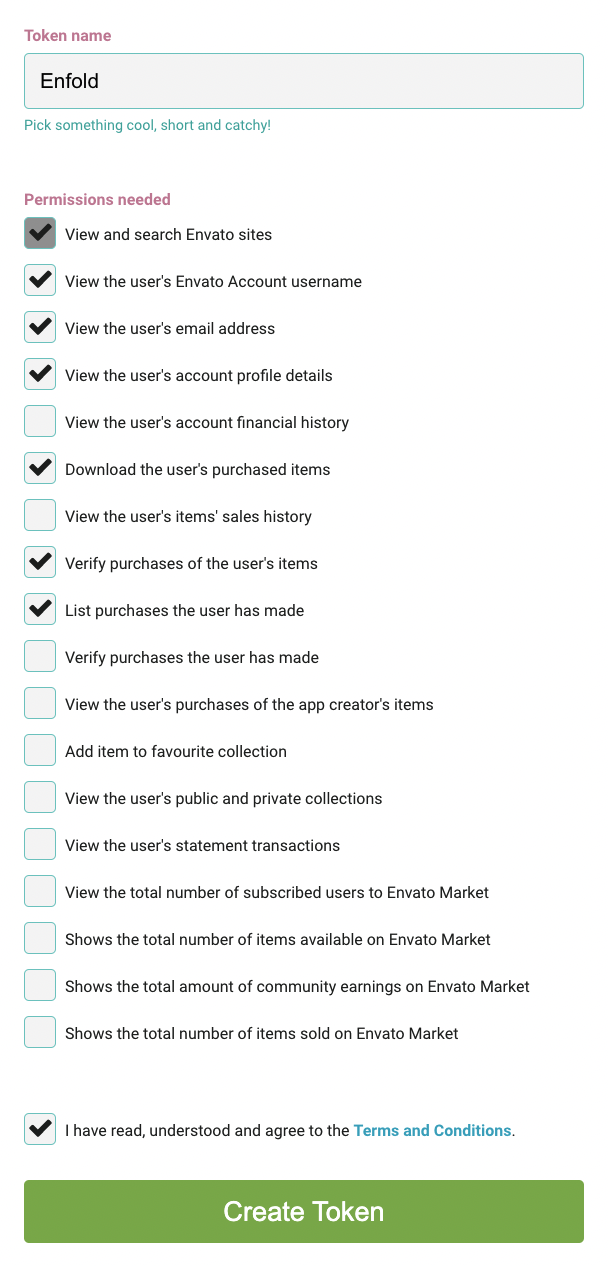
Once you have updated the theme to the latest version, use the same token and add it to Enfold > Theme Updates and that should allow you to update the theme in the future via Theme Options and you should be able to remove the plugin.
Hope this helps.Best regards,
NikkoSeptember 20, 2022 at 7:19 am #1365625In reply to: Gravity Form Styling
Hi,
Please add the following CSS codes in Enfold > General Styling > Quick CSS:
1. (Required) I woiuld like to be #AEFB47 – there are lots of these.#top .gfield_required { color: #AEFB47; }2. Section titles (APPLICANT INFORMATION, SPOUSE/PARTNER INFORMATION, BUSINESS/MANAGEMENT GOALS & OBJECTIVES, ETC) I woiuld like to be #AEFB4 – is there also a way to make this text larger?
#top .gsection_title {
    color: #AEFB47;
    font-size: 32px;
}
Just adjust the font size as you see fit (default size is 20px).
3. The submit button text i need black
#top .gform_wrapper .gform_button {
    color: black;
}
4. How do I remove the form title? The Title is RFC at the top
#top .gform_heading .gform_title {
    display: none;
}
Hope this helps :)
Best regards,
NikkoSeptember 20, 2022 at 7:05 am #1365623In reply to: Contact form submissions sporadic
Hi Erin,
Does the client’s email have the same domain name as the site? for example if the site is abc.com then the client’s email is (Email address hidden if logged out) ? or does it use a different domain?
If yes then, the issue might be that the email goes to spam, here’s an article that maybe helpful: https://www.sendx.io/blog/emails-going-to-spam
Also, please try to check our documentation specifically #5 in My contact form is not sending emails: https://kriesi.at/documentation/enfold/contact-form/#my-contact-form-is-not-sending-emails-
By default WordPress uses phpmail however it’s more reliable to use SMTP.
If all of the above does not help, then try using third party plugins like Contact Form 7 and partner it with a plugin that saves it’s form submission in database like Contact Form 7 Database Addon – CFDB7.
Hope this helps.Best regards,
NikkoSeptember 20, 2022 at 6:24 am #1365620In reply to: Update an Imported Demo Theme
Hi ussma,
To change the heading font, you can change it in Enfold > General Styling > Fonts > Heading Font.
As for the logo and favicon, it seems to be correct, I tried to switch it to Enfold icon (which is already uploaded on your site) and then switch it back, and I didn’t have any issues.Best regards,
Nikko -
This reply was modified 3 years, 6 months ago by
-
AuthorSearch Results
-
Search Results
-
Hi
The Enfold Version: 4.6.3.1 is not compatible with PHP 8.1 and I need to upgrade the server. I cannot seem to upgrade it anyhow and I would like to inqure on how I can do so. We want to keep the same website theme.Your response will be highly appriciated.
Topic: Theme issue in PHP 8.0
Hi I have a site that has been customised to use advanced custom fields to create an online database of the stories of people on local war memorials. I have to update the site from PHP 7.4 to 8.0 but when I do the final page doesn’t show (link below). It currently works as still running 7.4. The server company (one.com) says it is a problem with the theme. I don’t think it is the Enfold theme as it isn’t a problem where I have used it elsewhere. I suspect it is a problem with the child theme where there are additional files (includes and page-templates) to give the needed functionality. I did not write these files and I have very basic PHP knowledge. Can you suggest how I go about resolving the problem please? You have always managed to help me get to the bottom of things in the past.
Thanks
Rob


