
-
Search Results
-
I have a fresh WordPress install (3.8) and I have uploaded the theme to the /wp-content/themes folder. I have tried both the FTP and Admin upload methods. Both methods successfully install the theme without error and it shows up properly within the Appearance/Themes admin selection screen. However, when trying to Preview or Activate the theme I receive a White Screen with the following error
“The server closed the connection without sending any data.”
I have validated that my WordPress memory is set properly:
define(‘WP_MEMORY_LIMIT’, ‘128M’);
define(‘WP_MAX_MEMORY_LIMIT’, ‘256M’);I have turned on debug:
define( ‘WP_DEBUG’, true );
define( ‘WP_DEBUG’, false );I have tried to download the files again both (full and WordPress only) and different browsers. I have installed other themes successfully before and I am not having any issues with the default WordPress themes.
Am I missing something?
Topic: Text image overlay
Hi,
I’m trying to figure out how to do text image overlays, similar to the 3 boxes shown near the bottom of this page: http://www.sapient.com/en-us/sapientmphasize.html (Our Experience, What We Do, …). I’m trying to replicate a similar look for a site by 3 images on the home page that have text overlayed on top but haven’t been able to figure it out in the Enfold theme. Could someone provide some guidance?
Thanks,
NickSo my problem is that the website I’m creating doesn’t look great in a responsive setting. I also am not a fan of how Enfold handles the responsive look on smart phones (white space gaps are far too large, etc).
So I want to keep the website fixed, but unfortunately the fixed setting causes the full-width masonry gallery to glitch up (odd flickers, gaps become uneven, etc). So basically, I want to make the page with the fullwidth masonry responsive, but keep the rest of the website as fixed.
Here is a link to the website: http://goo.gl/TyXQI8
It is the portfolio page that I want to keep responsive.Any help would be greatly appreciated. :)
Hey guys – I am freakin out because of the facebook share function! I allready tried 4 different social share plugins, but always the same problem.
If you click on the share button the pop up opens perfectly, but in the “share window” is only the URL of the blog post visible, and nothing else. No Post Image, no excerpt of the article! Here’s a screenshot…
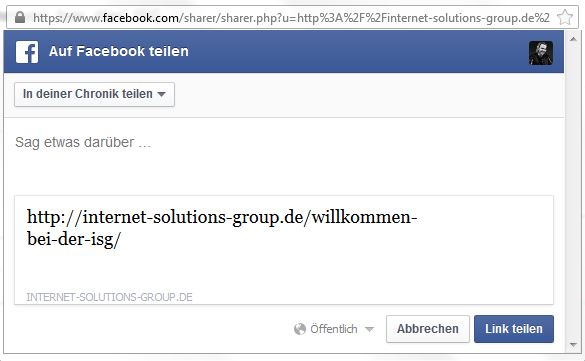
How can we solve this problem?
This theme is absolutely great, and I can’t believe that such basics will not work and cause issues. We’ve also tried the actual social plugin on another website of us, and it works perfect. So as allready many other users had the same problem, the problem must be caused by the theme or what else could it be?Really looking forward to your help! If you want to test it out on our site – please visit: http://internet-solutions-group.de/willkommen-bei-der-isg/
Hello,
I have observed two problems on the homepage of my website: http://www.hawthorntravel.com.au.
1/ When loading first, the all length of the homepage is not shown. The testimonials at the bottom are hidden by the footer. It then goes back to normal after a minute or so. Any idea of how to fix that problem? (I have already been deactivating all plugins but is still doesn’t work)
2/ There is a compatibility problem with MailChimp for WordPress Lite plugin. Indeed, I am not able to edit the homepage if I don’t deactivate the plugin. Even with the last updates of the plugin. Can you consider that in the next Enfold update?
Thank you very much in advance.
CharlotteTopic: basic domain question
just a basic question, is it possible to build a new site using enfold and then add a domain name to it later. i’ve only ever made a wordpress site before using a theme by uploading the relevant theme into the correct place using ftp, which was already linked to a domain.
it would be useful if i could just build a site on some new hosting with no domain assigned, and then when finished transfer a domain over from another hosting provider, to link up with the newly built site on the new hosting.
another advantage of this would be no down time.
thanks,
paulTopic: Switching to the Child Theme
Hey guys,
After installing Enfold, I made some structural changes to functions.php and style.css. I want to update to the new version of Enfold, and don’t want to find out where my edits are and what they were, and manually apply my changes again. I was wondering if I could get around this by doing the following:
– Install the child theme I downloaded from the Envato page.
– Copy/paste the content of Enfold functions.php and style.css to the Child theme files
– Then update Enfold to the latest versionWill this circumvent losing any changes I’ve made?
Topic: Open Graph for Linkedin
Hello there,
I am trying to get Open Graph meta tags working with Enfold on http://www.next2know.org.
I am using the WordPress SEO plugin by Yoast but somehow something either in theme or something else is messing it up in linkedIn.
I’ve googled and found that facebook picks the tags up well.. Just LinkedIn isn’t working well…
Would really appreciate any help I can get!
Regards,
Matthijs
Topic: Color picker not working
Hi,
I’m having the same problem as user Ipfa experienced – the colour picker in the Enfold theme options was working, but now doesn’t appear to. I haven’t installed or activated any plug-ins since the problem began.
I’m unable to see the full thread that Ipfa created, as his responses are marked as private, so I can’t see what he did to resolve the problem, though my symptoms are identical.
Please help!
Viewing 30 results - 227,671 through 227,700 (of 244,545 total)


