This reply has been marked as private.
I’m having this issue too, when upgrading from Enfold 2.6.2 to 2.7. I loaded the entire site by ftp, then reloaded only the layerslider as you suggest above. It is not fixing it.
Any ideas?
Hi!
Please add following code to Quick CSS
#comments span, .minitext, .form-allowed-tags, #reply-title small, #commentform label { display: inline!important; }
Cheers!
Yigit
-
This reply was modified 11 years, 11 months ago by
 Yigit.
If you are using a child theme then you need to first tell the child theme to recognize and use your own shortcode versions. See: http://kriesi.at/documentation/enfold/add-new-or-replace-advanced-layout-builder-elements-from-child-theme/
Otherwise the directory replacement does nothing and is ignored.
Somebody know a good directory plugin for wordpress, that works good with enfold together?
thanks
actually I upgraded Enfold to 2.7 from 2.45 and it fixed the issue
Sorted :-)
Enfold version 2.7.
For iphone 5, when i switch from portrait to landscape mode, about half of the footer is covered with white stripe, i.e. that part of the screen does not seem to be refreshed properly with the color of the footer.
Please kindly help
http://kriesi.at/themes/enfold/features/
iPhone 5 version 7.1
I also tested this in Chrome and IE9. If you resize your browser window and activate the mobile menu, the height is not calculated correctly. Also if you use web developer tools in Chrome (F12) then emulate any device, the mobile menu doesn’t extend entirely.
I believe the height calculated in avia.js for the mega menu is the culprit. For now I have to use an absolute value.
Hey grpetz!
Please add following code to Quick CSS in Enfold theme options under General Styling tab and adjust as needed
.cart_dropdown { top: 300%; }
and please see – http://kriesi.at/documentation/enfold/change-icon-used-for-standard-theme-elements/
Best regards,
Yigit
Hey!
Please add following code to Quick CSS in Enfold theme options under General Styling tab
#top .avia-content-slider, #top .avia-content-slider-inner, #top .avia-content-slider-inner .slide-entry-wrap {
-webkit-transform-style: flat;
}
Best regards,
Yigit
Enfold version 2.7.
For iphone 5, when i switch from portrait to landscape mode, about half of the footer is covered with white stripe, i.e. that part of the screen does not seem to be refreshed properly with the color of the footer.
To see this effect, go to http://www.ipinform.ca/ on iphone 5 using portrait mode, scroll down so that the line “Feel Free to Drop Us a Line” is at the top of the screen, now turn to landscape orientation, you will see the above effect wherein the copyright line in the footer is covered with white stripe.
Hey!
Please add following code to Quick CSS in Enfold theme options under General Styling tab
@media only screen and (max-width: 480px) {
.responsive .logo a, .responsive .logo img {
max-width: 85%;
height: auto !important; }}
Regards,
Yigit
How do I make a mega menu column header/title like the Page mega menu “Example Page” at http://kriesi.at/themes/enfold/pages/?
Thanks
Bosco
Hey Superbobrik!
As you have read here – https://kriesi.at/support/register/#av_section_2 we do not provide support for 3rd party plugin related issues. But please post the link to your website so we can take a quick look.
Regards,
Yigit
Hello!
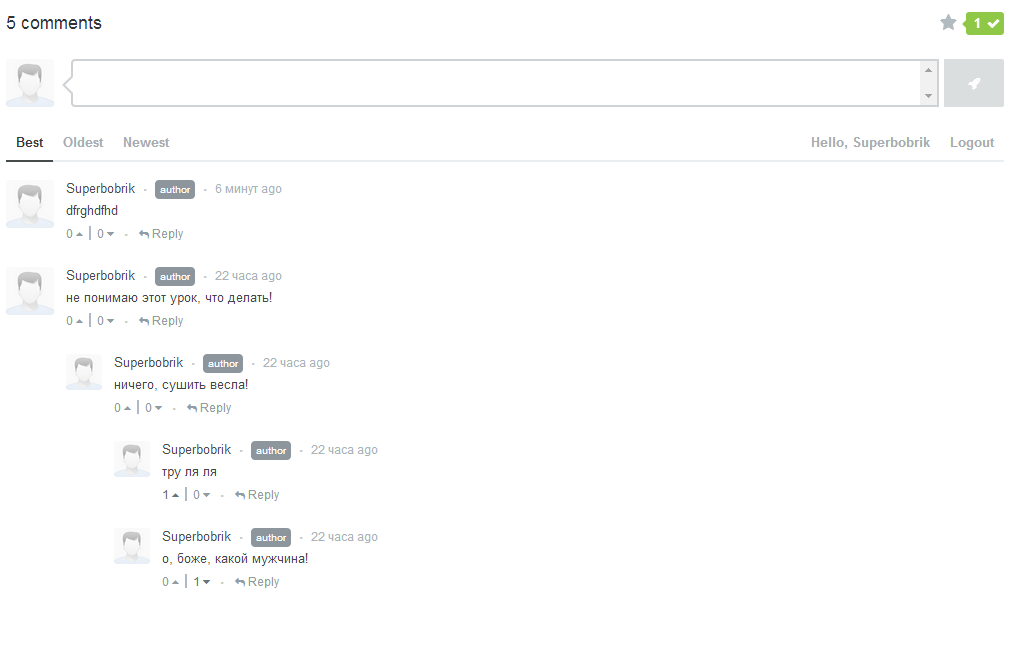
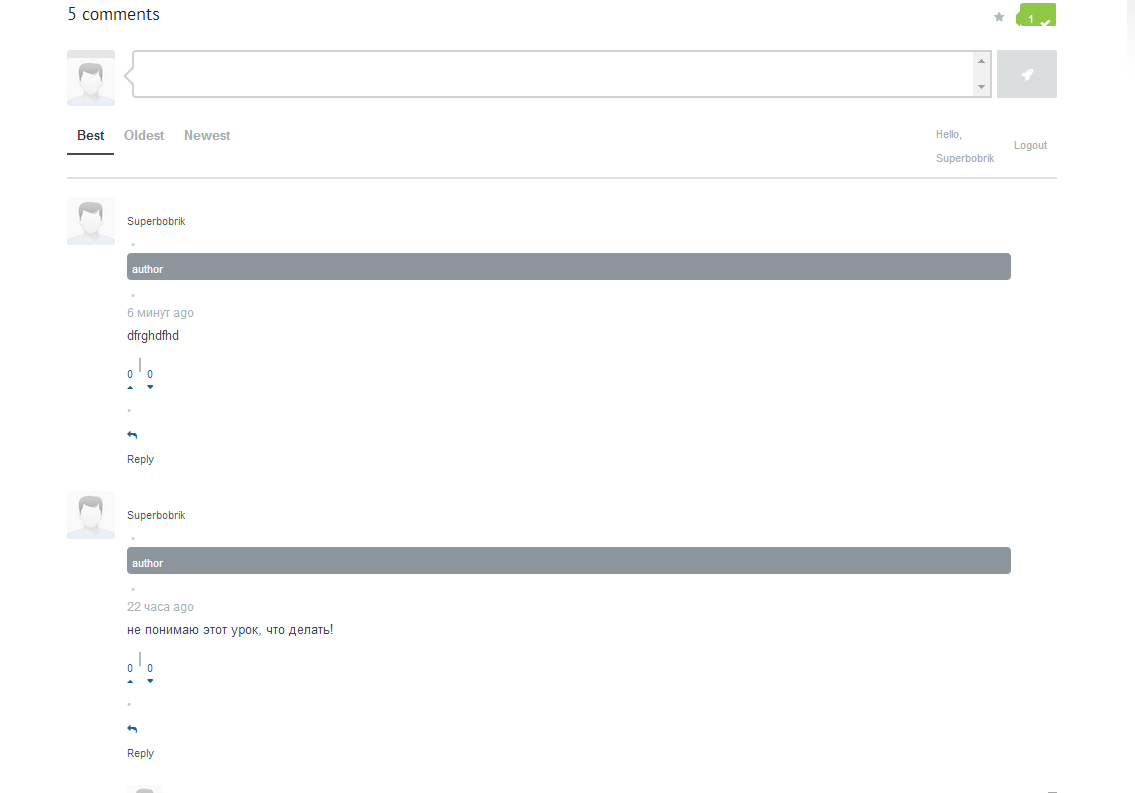
I just purchased and set up commentator plugin http://codecanyon.net/item/commentator-wordpress-plugin/6425752
and got a problem with Enfold.
See how that should look like (with one of wordpress default theme): http://i.gyazo.com/20221e67dc8b9704d26be22a46c7b57c.png
And how it looks like with Enfold: http://i.gyazo.com/2dfd6a978688747529c3c0a0a649463a.png
Any possible solutions?
Hi!
Diese Struktur wäre in der Tat schwierig umzusetzen, da Portfolio Einträge und Posts einen Slug benötigen. Ihr könnt daher ohne Anpassung des Theme Codes http://meine-website.com/(jeweilige Versicherung)-vergleich/ nur mit Seiten (bzw. Subseiten) umsetzen. Wenn ihr dafür Posts oder Portfolio Einträge verwendet würde ich den Slug “versicherungsvergleich” verwenden und dann als Titel des Portfolio-Eintrags den Versicherungsnamen wählen. Der Slug wäre dann http://meine-website.com/versicherungsvergleich/(Name der Versicherung). Wenn sich (jeweilige Versicherung) auf eine Gattung von Versicherungen bezieht (Brandschutz, Haftpflicht, etc.), dann würde ich diese auf jeden Fall als Seiten anlegen und dann entweder wieder die einzelnen Versicherungen als Subseiten anlegen, oder zB ein Ajax Portfolio nützen (siehe zB: http://kriesi.at/themes/enfold/portfolio/portfolio-ajax/ ) um auf die einzelnen Versicherungen zu verlinken. Nachteil der letzten Lösung ist jedoch, dass die Permalink Struktur nicht konsistent ist.
heers!
Peter
Hi, i use the enfold portfolio with modified css to display transparant png entries with the theme’s striped background. Most of all show fine (ajax portfolio, portfolio with one picture)
http://www.dmhaarlem.nl/DM/portfolio/
Only the gallery portfolio won’t display transparent. Which class do i need to edit for this?
http://www.dmhaarlem.nl/DM/portfolio-item/degero-huisstijl/
Thanks!
Hallo,
ich kann im Wysiwyg Texteditor keine benutzerdefinierte Farbe für eine Schrift mehr auswählen. Hat das etwas mit Enfold oder mit WordPress zu tun?
Auch bei den Bildunterschriften war es vorher so, das diese immer zentriert dargestellt wurden jetzt sind sie linksbündig und ich kan dies nirgendwo ändern.
Habt ihr dafür eine Lösung?
Danke! Simon
Hi!
Please edit your slider and go to Global options > Layout and set responsive under to 1140 – http://i.imgur.com/bYatMmz.png
Also note that you are not using responsive layout. You can enable it in Enfold theme options > Responsive Layout active?
Regards,
Yigit
Hey!
Please add following code to Quick CSS as well
.single_variation_wrap { height: auto !important; }
Cheers!
Yigit
Hey agernaat!
Please add following code to Quick CSS in Enfold theme options under General Styling tab
.pricing-table>li { min-height: 85px; }
Regards,
Yigit
Hi!
Please add following code to Quick CSS as well
.avia-data-table .avia-center-col { vertical-align: middle; }
Regards,
Yigit
Hi squaic!
Thank you for using the theme!
You can utilize the anchor page navigation as described on this link: http://kriesi.at/documentation/enfold/add-anchors-to-your-page-for-single-page-navigation/
Instead of using it on the theme menu, use it on the buttons.
Regards,
Ismael
Hey adrianwackernah!
Thank you for using the theme.
The shortcode should be fixed on Enfold 2.7. Please download the latest version from your themeforest account then update the theme via FTP. Please refer to this link for more info: http://kriesi.at/documentation/enfold/updating-your-theme-files/
UPDATE: My bad! The shortcode generator is broken: https://github.com/woothemes/woocommerce/issues/5130
Regards,
Ismael
Hi wieslander!
Thank you for using the theme!
We suggest that you create a video tutorial for your client in order to do the excerpt variation that you want. Aside from using the Excerpt metabox, you can utilize the wp more tag in which I’m sure you’re familiar with. Please refer to this link :http://en.support.wordpress.com/splitting-content/more-tag/
Regretfully, creating a complex function for this is outside the scope of support and is not a theme related issue. You might need to find a plugin or hire a freelance developer to add the feature for you. Please visit Werkpress for further customization. You can also vote or post the feature on our Feature Requests page.
Thank you for your understanding.
Best regards,
Ismael
Hey!
Please add following code to Quick CSS in Enfold theme options under General Styling tab and adjust as needed
.main_color a:hover, .main_color h1 a:hover, .main_color h2 a:hover, .main_color h3 a:hover, .main_color h4 a:hover, .main_color h5 a:hover, .main_color h6 a:hover, .main_color .template-search a.news-content:hover {
color: black;
}
Cheers!
Yigit
Hi Sean!
Thank you for using the theme.
This is not possible without modifying the theme files. Please edit js > avia.js, find this code on line:
scroll_top = $('#scroll-top-link'),
Below, add this code:
title_container = $('.title_container'),
Find this one on line 1218:
if(st < el_height/2)
	                {
	                    newH = el_height - st;
	                    header.removeClass('header-scrolled');
	                }
	                else
	                {
	                    newH = el_height/2;
	                    header.addClass('header-scrolled');
	                }
Replace it with:
if(st < el_height/2)
	                {
	                    newH = el_height - st;
	                    header.removeClass('header-scrolled');
						title_container.removeClass('title_container_fixed');
	                }
	                else
	                {
	                    newH = el_height/2;
	                    header.addClass('header-scrolled');
						title_container.addClass('title_container_fixed');
	                }
On Enfold > Styling > Quick CSS, add this css snippet:
.title_container_fixed {
position: fixed;
top: 28px;
z-index: 1000;
width: 100%;
}
I hope that helps.
Best regards,
Ismael
Hi Sean!
Please add following code to Quick CSS in Enfold theme options under General Styling tab
.title_container {
position: fixed;
top: 35%;
z-index: 99;
width: 100%;
}
Please note that it may or may not cause issue, such as responsiveness.
Regards,
Yigit