Hey Highlander-2013,
If you want to reverse the order, then please try this filter out:
add_filter( 'avia_post_nav_entries', 'enfold_customization_postnav', 10, 2);
function enfold_customization_postnav($entries, $settings) {
	$entries['prev'] = get_next_post($settings['same_category']);
	$entries['next'] = get_previous_post($settings['same_category']);
	return $entries;
}
Best regards,
Rikard
Hey Markus,
Thanks for the login details. It’s possible that the bundled LayerSlider is responsible for that, could you try to deactivate it temporarily under Enfold->Layout Builder to see if that makes any difference?
Best regards,
Rikard
Hi,
Great, I’m glad that we could help. I’ll close this thread for now then, please open a new thread if you should have any further questions or problems.
Best regards,
Rikard
the new functions of Enfold for setting parallax effects on images – or columns are also active on mobile devices. Settings of e.g. an absolute positioning of an image are therefore also applied on the small screens. Therefore it might be advisable not to set the settings in the first screen but to set them for wide and medium screens only.
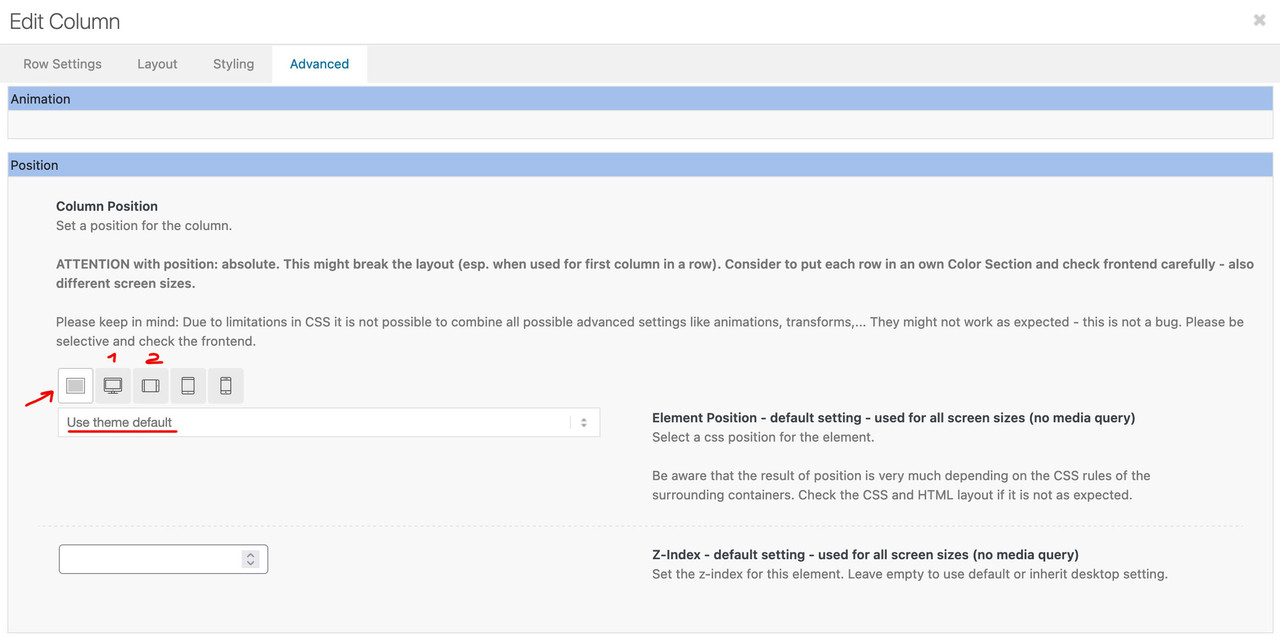
if you have set a relative or absolute position for the first screen width – this will be the default setting for all other screens (until you change it there).
My recommendation is to leave the first setting as it is – and only set position 1 and 2.
the Parallax effect increases this gap by making this column scroll faster than the rest as you scroll up.
Hi,
Great, I’m glad that you found it, and thanks for the update. I’ll close this thread for now then, please open a new thread if you should have any further questions or problems.
Best regards,
Rikard
Hey stefpasi,
thanks for informing us.
We are planning to release Enfold 5.2 today or in one of the next days.
I updated layerslider to version 7.5.3 already in core.
Have a great day and enjoy the theme.
Best regards,
Günter
Hi,
Glad we were able to help, if you have any further questions please create a new thread and we will gladly try to help you. Thank you for using Enfold.
Best regards,
Mike
Hi,
If this occurs try clicking on the Advanced Layout Builder button at the top of the page, when I checked the pages open in the Advanced Layout Builder correctly, but sometimes it took an extra minute for the builder to show and the debugger window showed first, perhaps this is what you mean:

but in the end the builder loaded correctly.
I don’t recall if you had Enabled the Avia Layout Builder Debugger of if I did, I can disable it if you wish.
If you mean the first text block with the button shortcode, this was always like this and it is fine to use shortcode like this:

instead of using the shortcode in the text element you could use the notification and button elements, I created a test page for you linked below:

Best regards,
Mike
Hey woogie07,
You can use a function like this in functions.php:
function woogie07_add_custom_code_head(){
?>
  YOUR SCRIPT GOES HERE
<?php
}
add_action('wp_head', 'woogie07_add_custom_code_head');
A child theme can be downloaded here: https://kriesi.at/documentation/enfold/child-theme/
Best regards,
Rikard
Hey luismc83,
Thanks for the update, I’ll close this thread for now then. Please open a new thread if you should have any further questions or problems.
Best regards,
Rikard
Hey colorlike,
Please try to enable debug mode in order to see layout builder shortcodes: https://kriesi.at/documentation/enfold/intro-to-advanced-layout-builder/#debug-mode. Then you can try copy the icon shortcode into the heading element.
Best regards,
Rikard
 Kerstin Bulligan
Guest
Hello,
a web agency bought the Enfold Theme for me in 2018. I only recently found out that there is a support forum where you need registration to be able to ask questions.
I cannot get access to the licence key as this webmaster is sort of confused and won’t answer or else, he hasn’t got the key any longer.
Would you PLEASE register me manually? This would be very helpful, thank you.
Hey ABTRSthemes,
Elementor is not a supported plugin unfortunately, so I would recommend that you keep using the Layout Builder if you intend to keep using Enfold.
If you need further help with your problem, then please try to explain it a bit further, or post screenshots highlighting it. Please note that our support for unsupported plugins is limited.
Best regards,
Rikard
Hi,
Thanks for letting us know, I’ll close this thread for now then. Please open a new thread if you should have any further questions or problems.
Best regards,
Rikard
Hey hasbeat,
The update to 5.1.2 has to be done manually from the version you are running, please refer to my replies in this thread: https://kriesi.at/support/topic/enfold-4-5-theme-update-update-failed-download-failed-a-valid-url-was-not-pro/#post-1021541
You can either update manually via FTP: https://kriesi.at/documentation/enfold/how-to-install-enfold-theme/#theme-update, or use a plugin to upload the theme zip file: https://wordpress.org/plugins/update-theme-and-plugins-from-zip-file/
If that doesn’t work then please try to delete the whole theme folder, then replace it with the new version. Make sure that you have backups of the site before starting updating.
Also please read this after you have updated: https://kriesi.at/documentation/enfold/theme-registration/
Best regards,
Rikard
Hi!
We use Enfold theme version 5.1.1, Polylang version 3.2.8 and The events Calendar 6.0.1.1.
We are not able to translate posts, portfolio-elements or events. Multilingual functionality (language selection) is not available in these post types. Is Enfold 5 not compatible with Polylang?
Which multilingual plugin do you recommend to Enfold 5? We got bad experience with WPML, and will prefer another plugin. Polylang worked fine before, but not anymore?
This reply has been marked as private.
Hi
I am using Enfold 5 with a child theme. I copied archive.php from the parent theme but any changes I make are not visible on the blogs page. I need to change the layout of the blog page. How can I do it?
Hi,
Glad we were able to help, if you have any further questions please create a new thread and we will gladly try to help you. Thank you for using Enfold.
Best regards,
Mike
Hi,
Glad we were able to help, if you have any further questions please create a new thread and we will gladly try to help you. Thank you for using Enfold.
Best regards,
Mike
Hi,
Glad we were able to help, if you have any further questions please create a new thread and we will gladly try to help you. Thank you for using Enfold.
Best regards,
Mike
Hi,
Glad we were able to help, if you have any further questions please create a new thread and we will gladly try to help you. Thank you for using Enfold.
Best regards,
Mike
Hello,
I would like to move my pages away from Avia advanced builder. I am having this thing happen where if I try to make a page in elementor for my home page, everything is breaking. I am thinking of keeping enfold but disabling avia advanced builder. How can I do this? I have most of my posts in elementor, but my pages are the ones giving me the issues. I currently have about 90% of my pages in avia.
 Kerstin Bannöhr
Guest
Hi Christian und Team,
Das ist ein sehr schöne Vorlage/ Template, die ich gerne für mich gestalten also umgestalten möchte als Life Work Health Coach. Ich bin mir aber sehr unsicher, ob das eine Seite ist, die ich selbst umgestalten kann und immer auf dem Laufenden also aktuell halten kann. Und ist sie responsive?
Wenn das zutrifft, würde ich sie gerne kaufen und meine Inhalte einfügen;-)
Ich würde mich sehr freuen, wenn ich von Dir und Deinem Team bald Feedback bekommen könnte ;-)☺️🖖🏻 Herzliche Grüße Kerstin
Dear Enfold Team,
A new client of mine got two WP website both made with your Enfold theme.
Unfortunately, both website are running theme version 4.2.6 which I cannot
update at all.
I badly need your assistance. Thank you!
Best
Hi Oliver,
Great, I’m glad to hear that it’s working as it should again. We can’t say exactly when Enfold 5.2 will be released unfortunately, but you are welcome to use the development version on your sites until it’s available for download.
I’ll close this thread for now then, please open a new thread if you should have any further questions or problems.
Best regards,
Rikard
We have a problem in our new website because it does not show properly some images and generates very big spaces. We have used the latest Enfold template which has a nice design and is very dynamic. The first image we have added inside a color section is not displayed on iPhone iOS device. I do not know if it has something to do with a very large space that is also generated by itself at the top of the page. This huge space is after the first text of the web https://oneairracing.es , however from the editor we have not added any space. basically we have 2 problems.
Thanks
Ok like this, with both codes, it is working, but …
you have used the existing WooCommerce textarea, meant to add a long description before the products. Now it is not possible anymore to add a single line of text before the products to explain whatever is necessary to explain
Over the banner you can add just one or maximum two short sentences
Long descriptions are very important to bring archive pages to a high ranking
Also, you have used the WooCommerce “Thumbnail” upload to choose or upload the banner
Again, the problem is that a banner is a panoramic picture that might look ugly in a square thumbnail, when that subcategory is presented in the father category page
The correct way should be
- Leave, as they should be, the default WooCommerce fields as they are, they are necessary like this
- Add back-office facilities to add banners and their titles and descriptions in the edit category page
Adding a banner is an easy and straightforward thing to do in many themes, and I was expecting this missing functionality since long ago to be added in Enfold too, but as it is now it is not useful for me
Please see screenshot to understand what I mean
Thank you anyway
Mauro
we got this mail, the webside looks good, should we do something?
Many greetings rixi
Hallo!
Seit WordPress 5.2 gibt es eine eingebaute Funktion, die erkennt, wenn ein Plugin oder ein Theme einen fatalen Fehler auf deiner Website verursacht, und dich deswegen mit dieser automatisierten E-Mail benachrichtigt.
In diesem Fall hat WordPress einen Fehler in deinem Theme „Enfold“ abgefangen.
Thank you for the answers.
Thanks to this plugin I found out that the layerslider is trying to load googlefonts by every click I do in the backend. I installed a Plugin that switched off all googlefonts in Enfold, and every click I do in the backend, the layerslider tries to load this fonts and gets a timeout.
Because of german restrictions I have switched off every googlefonts in my wordPress Installation and have installed them local on my server.
After I wrote the following in my functions.php of my child theme
add_theme_support( ‘deactivate_layerslider’ );
WordPress is fast again!
This is in my eyes a very big bug that should be solved in every case!
The Layerslider that comes with Enfold shouldn’t load Googlefonts by himself!
In Germany we have very big problems because of this googlefonts topic and it is very important for us, that we have the possibility to switch off the usage of this fonts completely.
I use Enfold now on more than 20 Websites of my customers, and just one of them uses the layerslider.
So it would be absolutely comfortable if there could be a switch in the backend of Enfold to
1. Switch off Google Fonts
2. Switch off the layerslider
Thanks for your great support here in this forum!
Best regards
Dave
-
This reply was modified 3 years, 5 months ago by
 divedave.



