Viewing 30 results - 209,881 through 209,910 (of 244,614 total)
  • Author
    Search Results
  • #336741

    Topic: Defaults CSS

    in forum Enfold
    neilwalker
    Participant

    Where can I find what the default values are for the styles in Enfold. I want to change some of mine , like H1 H2 etc and I’d like to know what I’m starting from in terms of font, font size etc.

    Thanks

    #336740
    elbnetz
    Participant

    Hi There,

    we are using Enfold with WooCommerce and have the following problem:

    On frontage we are using your short code Product grid to show latest products. If we click on “add to cart the product ends up in the little popup window at the right but if you click on the cart itself it is empty?!

    If you add something from the shop itself, every things runs well.

    Any idea?

    Thanks, T.

    BTW: We are running WP 4.0, WooCommerce 2.2.2 and Enfold 2.9.2

    #336734

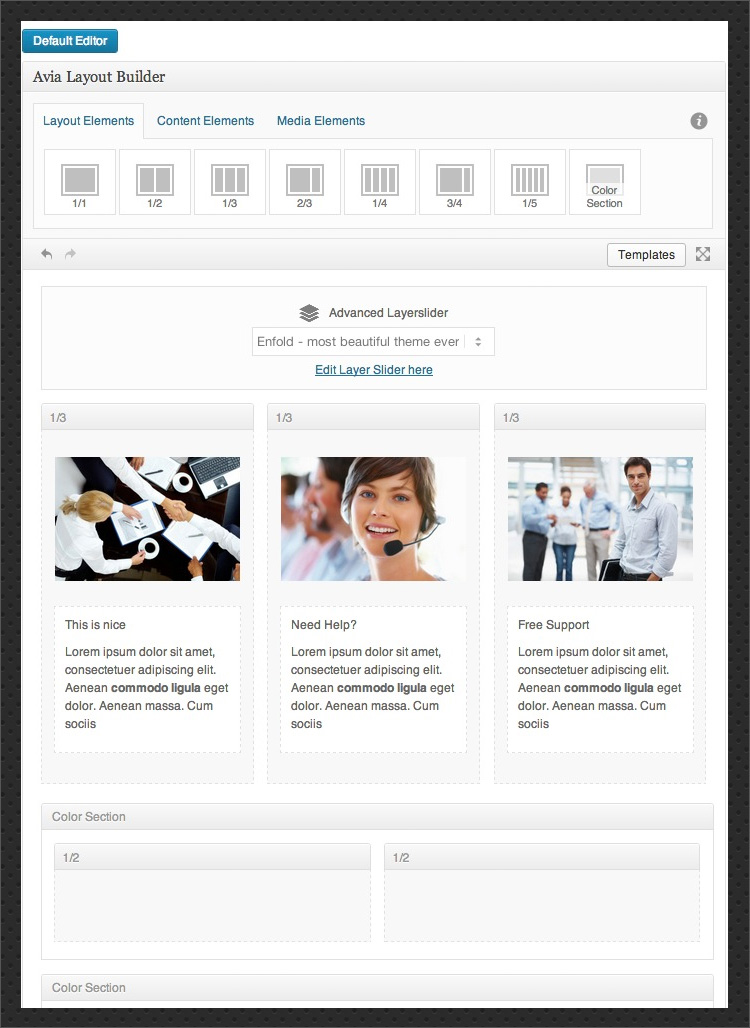
    @ zmata: I’m not sure how this relates to the problem. The image you have uploaded is clearly from Enfold, and I actually see the avia layout builder. It’s actually in plain sight. So please be more specific. I am a user too, stuck with other similar issues which I try to understand, to solve and contectualizeso as to be more specific with the support team. Maybe you are miing two subjects here and create some confusion?

    Should I iunderstand from the screenshot that AVIA BUILDER is still here (that’s not what you write) but the right-hand side bar wherein the “update” button should appear is not present? I just tried to make things clearer.

    #336733
    This reply has been marked as private.
    #336724

    In reply to: Überschrift blog

    Hallo Neo,

    Bei den Themeoptions Enfold -> Blog Layout -> Related Entries gibt es ein DropDown mit mehreren Einstellungen. Falls ein Post kein Thumbnail hat, kann auch keines angezeigt werden. Ansonsten einfach einmal die Möglichkeiten durchprobieren.

    Regards,
    Günter

    basecrest
    Participant

    Hi Guys,

    Thanks again for making, maintaining, improving and supporting a really fantastic WordPress framework/theme.

    The more i use Enfold the more i love it.
    ———
    There is an issue with the slideshow capabilities of all the image slideshow widgets. They stay on the 1st image and do not automatically move.

    It would be really good if they would.

    I have added 2 images to the bottom socket, programs to switch every 5 seconds.

    http://handyandywatt.co.uk/

    This happened to another site i made since new update. The slideshow did not work.

    Can anyone shine some light on this issue?

    Many thanks
    Nathan

    #336722
    AnnemarieDoolin
    Participant

    Hi Lads

    I noticed a small spelling error and I did not find it in the .po file (Danish) da_DK
    So I did a text search in all “Enfold” — Options with no p :)
    Here is the result:
    config-templatebuilder\avia-shortcodes\masonry_entries.php(69): __(‘No, do not display sort otions‘, ‘avia_framework’ ) => ‘no’)),
    config-templatebuilder\avia-shortcodes\portfolio.php(143): __(‘No, do not display sort otions‘, ‘avia_framework’ ) => ‘no’)),
    framework\php\avia_shortcodes\tinymce\js\table-control.js(41): id: ‘scn-row-otions‘,
    framework\php\avia_shortcodes\tinymce\js\table-control.js(47): id: ‘scn-column-otions‘,
    Found 4 occurrence(s) in 3 file(s)

    I leave you to fix it…. It’s not critical

    gerardjp
    Participant

    Dear Support,

    1) I run Enfold v 2.6.2 but the available update (to 3.0) is not showing in the WordPress dashboard. Is that an error or by choice? And if so, why?

    2) Also, when adding Portfolio items, the button “Advanced Layout Editor” doesn’t respond. WordPress version is 4.0.

    PS: You support forum confirmation emails are getting through very slow. I might seem as they are not arriving.

    Thanx a lot!

    Kind regards,

    Gerard.

    #336716

    Hello Kriesi,

    I have same trouble over here.
    Im not friendly user of worldpress and was working on new site with enfold, so dont know if bug come frome template or my wordpress too.

    I just upgrade :
    – WP 4.0
    – Installed on French version
    – Enfold 3.0.1 upgrade with API key licence
    (i have delete from FTP, after deseapere in theme setting, i reinstall the “theme” by adding pluggin)

    I just uninstall all plugin

    When i create article i lost the AVIA LAYOUT BUILDER you can find here
    http://kriesi.at/themes/wp-content/manually/enfold/templatebuilder.jpgAVIA LAYOUT BUILDER

    I have only for working the Shorcode Them Insert (on right menu) near Visual & Text bouton

    ——————
    Actually im reinstall a new version of WP and enfold to see if its appear

    #336714
    LarryLayouter
    Participant

    Hi support,

    while getting to work with your theme I would like to thank you for this absolutely great piece of work!!!

    I use:
    – enfold child theme
    – a masonry element to display a catogery of posts.
    – every single masonry element displays the content of the post with a limitation of something about 60 characters

    So here are my questions:
    1. I would like to display the whole content of the post (including the images placed within the post’s text).
    What changes do I have to apply to which code? I don’t want to use the excerpt part because it doesn’t support html tags.

    2. If displaying the whole post’s content is possible: Is there a way to _not_ include the link to the post itself? Which code has to be changed therefor?

    You can describe this as an attempt to display something similar to iconboxes in masonry style ;)

    Thanks in advance for your answer!
    Claus

    #336708
    This reply has been marked as private.
    #336707

    Sorry – this doesn`t seem to be a real solution – just a workaround. First this is just a fix for mega menus with 5 columns (class = avia_mega5). Ok – I can easily change that to my desired number of columns e.g. 4, but this still doesn´t work. I have 4 mega menu items with 4 columns. With the provided code I can adjust the left-pixel value to align the mega menu correctly for one of these menu items, but it is still misaligned for the other three. With this solution I need to manually add css-code for each mega menu item, which is no real solution.

    By the way: The same problem happend after another theme update (https://kriesi.at/support/topic/two-problems-with-bottom-menu-social-icons-and-mega-menu/). I don´t know what kriesi changed back then, but it worked (at least till the update to enfold 3).

    Thanks

    #336700
    MDPC
    Participant

    Hey!
    I got a strange problem with Enfold (not happens with other themes);
    I run a multilanguage website (WPML, 3 languages, EN as default) and all is working fine (a little Yoast incompatibility problem, soon to be fixed) except that the general layout has not the same size with every languages.
    In English, I got the right size (stretched layout, 1130px max cont. width) but in FR or DE the layout is reduced and I really dunno why as the Enfold settings are the very same in all languages…
    As this happens only with Enfold, the support team at WPML told me to come to you for your team to have a look at it and figure it out.
    Could you please have a look at it and tell me how to get the same layout for every languages?
    Thanks in advance, hope to hear soon from you.
    Best Regards.

    #336696
    This reply has been marked as private.
    onegirlrtw
    Participant

    Hello!

    How to remove time and date from the Recent and Popular tabs in the Enfold Categories widget?

    (I only want to see the thumbnail image and title text link.)

    Thank you!

    #336693
    onegirlrtw
    Participant

    Hello!

    How to remove time and date from Enfold Recent Posts widget?

    (I only want to see the thumbnail image and title text link.)

    Thank you!

    onegirlrtw
    Participant

    Hello! I’d like to change the welcome text for leaving comments in the comment form of blog posts.

    I see that I can edit this information in the comments.php file, but how do I make this file work in the enfold child theme please?

    Thank you!

    #336686

    In reply to: Shortcode and excerpt

    This reply has been marked as private.
    #336684

    Hey Giles!

    Thank you for using our theme.

    In custom.css or Enfold->Styles->QuickCSS put the following and adjust the value:

    
    #main .template-page .entry-content-wrapper > div {
        margin-top: 20px !important;
    }
    

    If you want to limit it to the given page:

    
    .page-id-15 #main .template-page .entry-content-wrapper > div {
        margin-top: 20px !important;
    }
    

    Cheers!
    Günter

    #336680

    Topic: Full width logo

    in forum Enfold
    steve159159
    Participant

    Hi

    We are developing a site for a client using Enfold (love this theme!!) and the client wants to change the current logo to a full width one.

    Can this be done and, if so, please could you advise how we do that?

    The development site link is in the Private Content box along with a link to the requested full width text logo (ignore the photo underneath). The existing horizontal menu will be retained.

    Hope you can help.

    Thanks

    Steve

    #336677
    dalboslampen
    Participant

    Hi
    I almost got crazy when I realized that you guys had implemented a hotspot function into Enfold!! Wow – that is so impressive.
    ….but – I can not use it. I need the hotspots, or the text to link to another page when clicked. Is there a tiny chance of accomplishing that?

    • This topic was modified 11 years, 6 months ago by dalboslampen.
    #336673
    This reply has been marked as private.
    #336668

    Hi there:

    As The Kriesi himself noted in this post:
    https://kriesi.at/support/topic/avia-layout-editor-is-buggy-in-ff-32-and-ie-10-11/
    Avia Layout editor is buggy in FF32 and IE 10, 11.

    I do experience a similar situation to yours, and I’ve also been using enfold for years, never experiencing any of these issues.
    This is a bug which I am sure Team Kriesi will fix.

    We took the exact same actions (reuploading Enfold through FTP, rebuilding things again from scratch, etc.).
    For those experiencing similar issues, here is the thread:
    https://kriesi.at/support/topic/big-issue-with-enfold-3-0-1-wp4-avia-breaks-up/
    https://kriesi.at/support/topic/mayday-mayday-page-contents-erased-when-edit-a-page-and-pressupdate-help/

    Alexoidea

    #336667
    Boris
    Participant

    Hi,

    the problem is not fixed yet, as mentioned in your posting here: https://kriesi.at/support/topic/yoast-slug-bug-filter-question/#post-330438

    #336666

    Hi Rupert!

    Thank you for using our theme.

    In custom.css or Enfold->Styles->QuickCSS put the following:

    
    #main .main-title a {
        color: #f2f3f5 !important;
    }
    #main .breadcrumb, 
    #main .breadcrumb a {
        color: #f2f3f5 !important;
    }


    Regards,
    Günter

    #336661
    pako69
    Participant

    Hello,

    This has already been discuted here : https://kriesi.at/support/topic/fullscreen-slideshow-bottom-anhor-enfold-v3/

    But I’m sorry to insist about that, your new animated anchor for the fullscreen show is not user friendly at all and not visible on images with whiter backgrounds.

    Please give us this back :

    Or let us have the choice to chose what we want.

    >> I need to upgrade to the new enfold version but I can’t because of that anchor …


    @Yigit
    tell me to go to https://kriesi.at/support/enfold-feature-requests/ to ask for it, well… maybe I can do it, but I realy apreciate that this feature to be back in an update whitout ask for something that was working well before…

    Thanks a lot

    #336643

    In reply to: Some problems

    Hi Ismael,

    Thank you so much, the 2 and 3 questions works perfect, but about the 1st question, I put the code in functions.php (enfold child) but now the switcher desapears.

    Hey!

    Thank you for using Enfold.

    @neepie: You’re not using the latest version of the theme. Please download the latest version 3.0.1 from your themeforest account then update the theme via FTP. Please refer to this link for more info: http://kriesi.at/documentation/enfold/updating-your-theme-files/

    Cheers!
    Ismael

    #336620

    Hey tom77113!

    Thank you for using Enfold.

    Are you referring to the white background? Please add this on Quick CSS or custom.css:

    h3.slide-entry-title.entry-title {
    background: transparent !important;
    }

    Cheers!
    Ismael

    Hi Khanh Hong!

    Thank you for using Enfold.

    Please give us a link to the actual website. We would like to check it. Make sure that you’re running Enfold 3.0.1 on WordPress 4.0.

    Regards,
    Ismael

Viewing 30 results - 209,881 through 209,910 (of 244,614 total)